What is Form MV-38O?
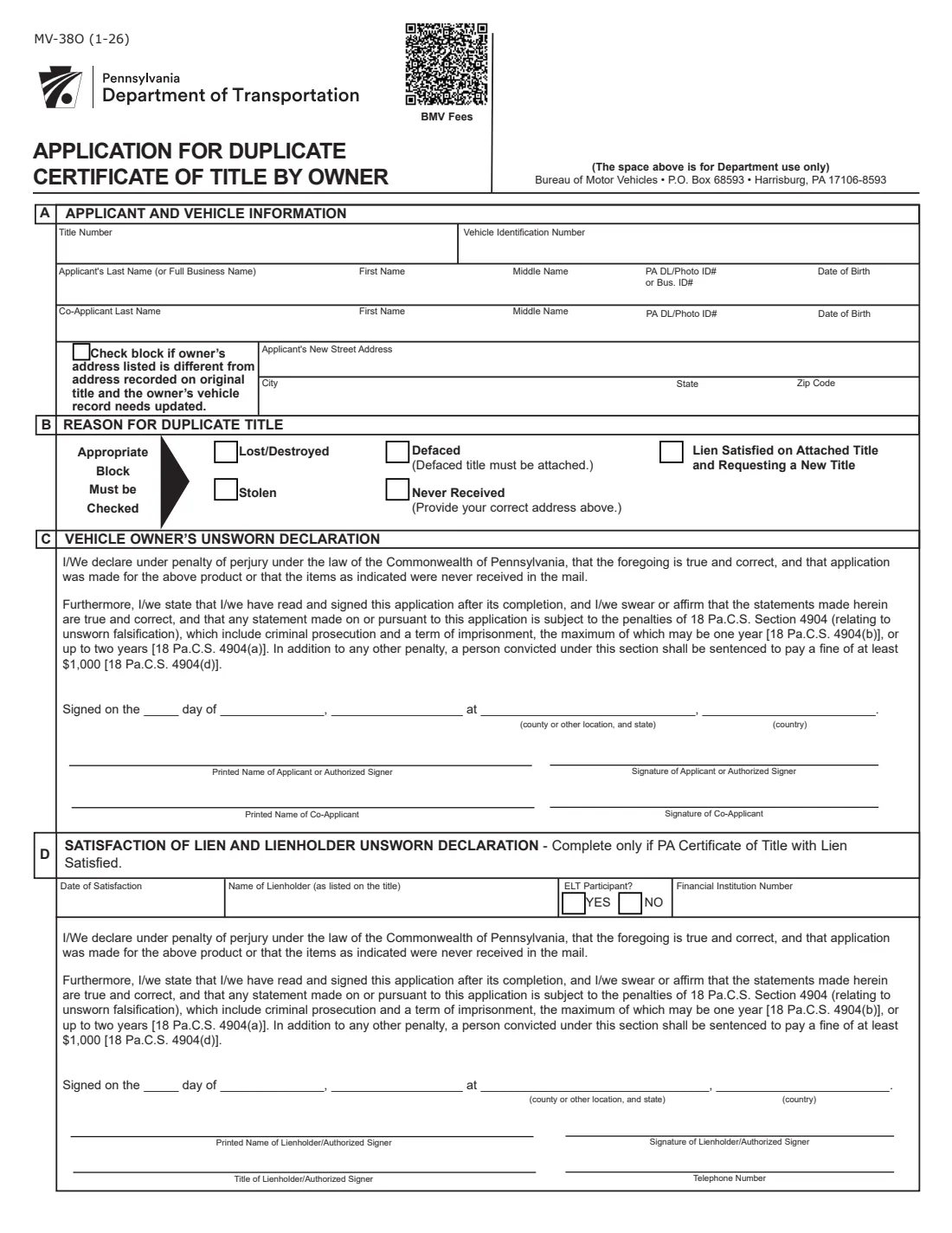
Form MV-38O is PennDOT's Application for Duplicate Certificate of Title by Owner. A vehicle owner uses it when the Pennsylvania title was lost or destroyed, stolen, defaced or never received, or when a lien has been satisfied and the owner wants a new title. When the application is processed, the previous title becomes void. The current edition is MV-38O (1-26).
The form has four parts: A, the vehicle, the applicant and any co-applicant, and the address; B, the reason for the duplicate; C, the vehicle owner's unsworn declaration; and D, a satisfaction of lien and lienholder unsworn declaration, completed by the lienholder only when it's needed. The declarations replace the notarization the form used to require. They are made under penalty of perjury and 18 Pa.C.S. Section 4904 (unsworn falsification).
FileIt lets you fill out the MV-38O online. It pre-fills your name and date of birth from the People records in your vault, prints the 'Signed on' lines from the date you sign, and puts every answer onto PennDOT's own PDF. The finished form is saved in your vault. You then print it, sign it by hand and mail it to PennDOT yourself. FileIt never submits anything.
- Who fills it
- The vehicle owner (and any co-applicant). Section D is completed by the lienholder only when needed.
- Where it goes
- By mail to PennDOT, Bureau of Motor Vehicles, P.O. Box 68593, Harrisburg, PA 17106-8593, as printed on the form.
- Fee
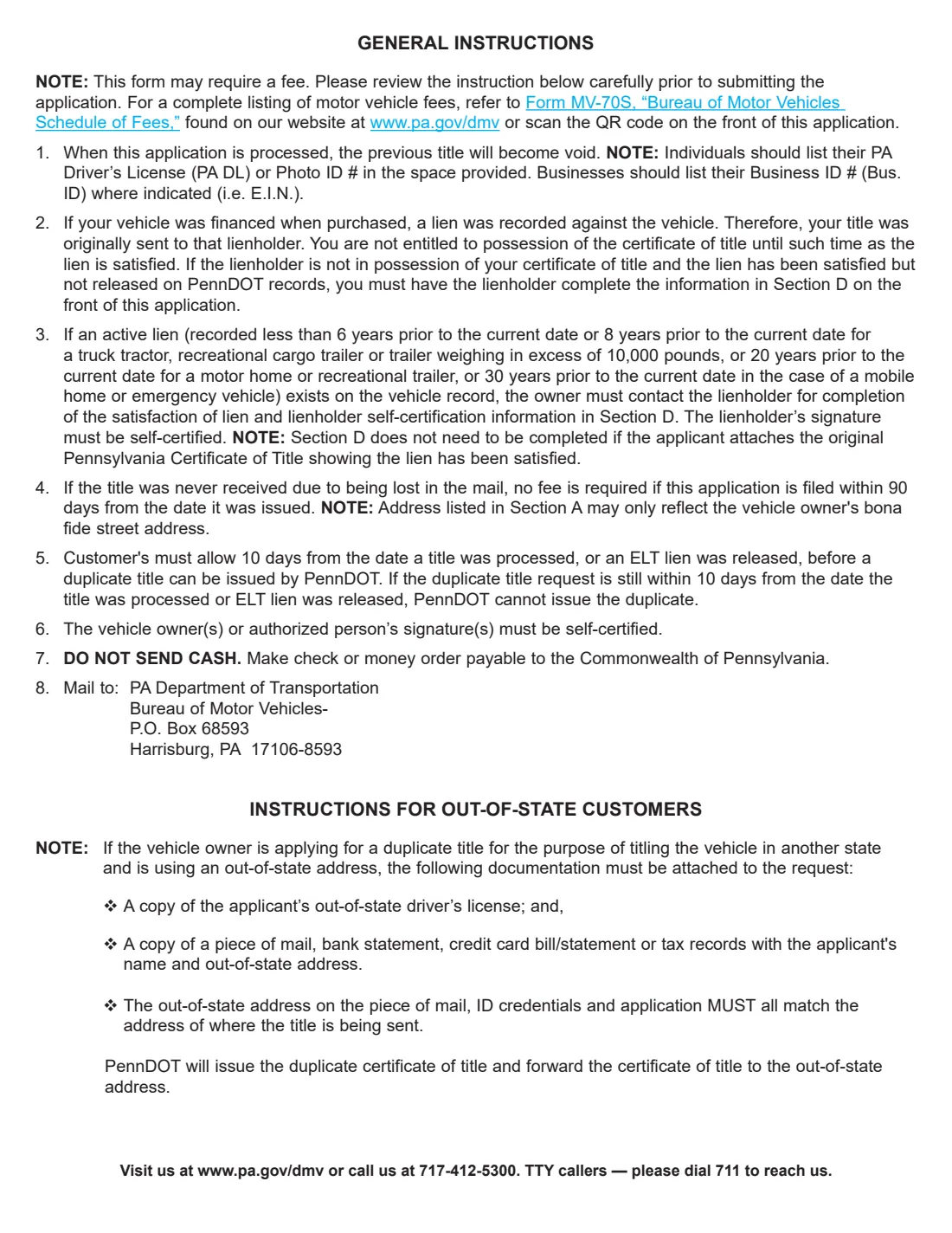
- Not printed on the form. It refers you to Form MV-70S, the Bureau of Motor Vehicles Schedule of Fees. No fee is due for a title lost in the mail if you apply within 90 days of the date it was issued.
- Payment
- Check or money order payable to the Commonwealth of Pennsylvania. Do not send cash.
- Signatures
- Print and sign by hand. The owner (and co-applicant) sign the unsworn declaration in Section C; a lienholder signs Section D.
- Edition
- MV-38O (1-26): the application on page 1, instructions on page 2.
Who needs to fill out Form MV-38O?
- Owners of a Pennsylvania-titled vehicle whose title was lost, destroyed or stolen.
- Owners whose title was defaced, who attach the defaced title.
- Owners whose title never arrived in the mail.
- Owners who paid off a loan and want a new title without the lien, attaching the title showing the lien satisfied, or with Section D completed by the lienholder.
- Businesses that own a vehicle, using the full business name and their business ID number (for example the EIN).
- Out-of-state owners getting a duplicate to title the vehicle in another state.
When to use Form MV-38O
- When you can't find your Pennsylvania title and need it to sell, transfer or retitle the vehicle.
- When the title was stolen or damaged.
- When a new or transferred title never arrived. Apply within 90 days of the issue date to avoid the fee.
- After a lien is satisfied, to get a title without it.
- Not within 10 days of the title being processed or an ELT lien being released. PennDOT can't issue a duplicate that soon.
What you need before you start
- The title number and the vehicle identification number (VIN).
- Your name (or full business name), PA driver's license or photo ID number (or business ID number) and date of birth.
- The same details for any co-applicant.
- Your new or correct street address, if it differs from the address on the original title or the title was never received.
- The defaced title, if that is the reason, or the original title showing the lien satisfied.
- If a lien was satisfied but not released on PennDOT's records: the lienholder's name, date of satisfaction, financial institution number and the lienholder's signed declaration in Section D.
- A check or money order for the fee in Form MV-70S, payable to the Commonwealth of Pennsylvania.
- Out of state: a copy of your out-of-state driver's license and of a piece of mail, bank or credit card statement or tax record with the same name and address.
What’s on Form MV-38O
The 2026 edition has 2 pages. FileIt asks for it in 7 parts:
- Section A: VehicleOwner (applicant)
- Section A: ApplicantOwner (applicant)
- Section A: Co-applicantCo-applicant
- Section A: AddressOwner (applicant)
- Section B: Reason for duplicate titleOwner (applicant)
- Section C: Vehicle owner's unsworn declarationOwner (applicant)
- Section D: Satisfaction of lien and lienholder unsworn declarationLienholder
How to fill out Form MV-38O, step by step
1 Section A: Vehicle and applicant
Enter the title number and the VIN. Then the applicant's last name (or the full business name), first and middle name, PA driver's license or photo ID number (businesses give their business ID, such as the EIN) and date of birth. A co-applicant who is also on the title fills in the second row.
2 Section A: Address
Tick the block if your address is different from the one recorded on the original title and your vehicle record needs updating, then give the new street address, city, state and ZIP. If the title was never received, give your correct address here too. Only your bona fide street address may be listed. FileIt reminds you if the address is missing when it's needed.
3 Section B: Reason for duplicate title
Check the one block that applies: lost/destroyed, stolen, defaced (attach the defaced title), never received, or lien satisfied on the attached title and requesting a new title.
4 Section C: Vehicle owner's unsworn declaration
Fill in where and when you sign: the day, month and year, the county or other location and state, and the country. FileIt prints the day, month and year from the date you give. Then print the names of the applicant (or authorized signer) and any co-applicant. Each of you signs by hand on the printed form.
5 Section D: Satisfaction of lien (only if needed)
If the vehicle was financed and the lien was satisfied but is still on PennDOT's records, and you can't attach the title showing the lien satisfied, the lienholder completes this part. It gives the date of satisfaction, the lienholder's name as listed on the title, whether it takes part in electronic lien and title (ELT), its financial institution number, where and when it signed, and the signer's printed name, title and telephone number. The lienholder signs the declaration.
Common mistakes to avoid
- Checking more than one reason, or none. One block must be checked.
- Leaving out the correct address when the title was never received.
- Leaving out a co-owner who is on the title.
- Sending cash. Pay by check or money order payable to the Commonwealth of Pennsylvania.
- Applying within 10 days of the title being processed or an ELT lien being released.
- Asking the lienholder for Section D when you can simply attach the original title showing the lien satisfied.
- Out-of-state owners whose license, proof of address and application don't all show the same address.
After you fill it out
Print the form, and have the owner, any co-applicant and, if needed, the lienholder sign by hand.
Mail it with the fee from Form MV-70S (if any) and any attachments to PA Department of Transportation, Bureau of Motor Vehicles, P.O. Box 68593, Harrisburg, PA 17106-8593.
Once the duplicate is issued, the previous title is void. FileIt keeps the filled application in your vault folder; store the new title there too when it arrives.
Fill out Form MV-38O online with FileIt
- Pick the person. Choose someone from People and FileIt fills in their name, date of birth, address and other details it already knows.
- Answer plain-language questions. One part of the form at a time, with the official help text beside each question — 39 fields in all. Your answers save as you go.
- Check the live preview. Watch your answers land on the real Pennsylvania Department of Transportation (PennDOT), Bureau of Motor Vehicles form, and let FileIt do any worksheet arithmetic.
- Generate the official PDF. FileIt prints your answers into the agency’s own PDF and files it in that person’s folder in your vault.
FileIt fills the form — it never files or submits anything for you. Deliver the finished form to whoever asked for it, the way the form’s instructions say.
Start Form MV-38O now — it’s freeForm MV-38O: frequently asked questions
How much does a duplicate Pennsylvania title cost?
The MV-38O doesn't print the fee. It refers you to Form MV-70S, PennDOT's Bureau of Motor Vehicles Schedule of Fees. If the title was lost in the mail and never received, no fee is required when you apply within 90 days of the date it was issued.
Does the MV-38O still need to be notarized?
This edition uses unsworn declarations instead. The owner and, where needed, the lienholder sign declarations under penalty of perjury and 18 Pa.C.S. Section 4904, and the instructions say the signatures must be self-certified.
Where do I mail Form MV-38O?
To PA Department of Transportation, Bureau of Motor Vehicles, P.O. Box 68593, Harrisburg, PA 17106-8593, as printed on the form.
My loan is paid off. Does the lender need to sign?
Only if you can't attach the original Pennsylvania title showing the lien satisfied. Then the lienholder completes and signs Section D.
Can a business use the MV-38O?
Yes. Put the full business name in the last-name box and give the business ID number (for example the EIN) instead of a driver's license number.
Can I sign the MV-38O electronically through FileIt?
FileIt doesn't offer e-signature for this form. Print it and sign by hand, then mail it to PennDOT.
Does FileIt send the application to PennDOT?
No. FileIt fills the official PDF and saves it in your vault. You print, sign and mail it yourself.
Official sources
- Blank form (PDF), published by Pennsylvania Department of Transportation (PennDOT), Bureau of Motor Vehicles: https://www.pa.gov/content/dam/copapwp-pagov/en/penndot/documents/public/dvspubsforms/bmv/bmv-forms/mv-38o.pdf
- Official instructions and guidance: https://www.pa.gov/services/dmv/get-a-duplicate-title
- Edition shown on this page: MV-38O (1-26) (checked 2026-10-01).
FileIt is not affiliated with or endorsed by Pennsylvania Department of Transportation (PennDOT), Bureau of Motor Vehicles or any government. This page explains the form in general terms and is not legal, tax or immigration advice. Always read the official instructions, and check that you are using the edition the recipient accepts. Page last reviewed 2026-10-01.