What is Form VTR-34?
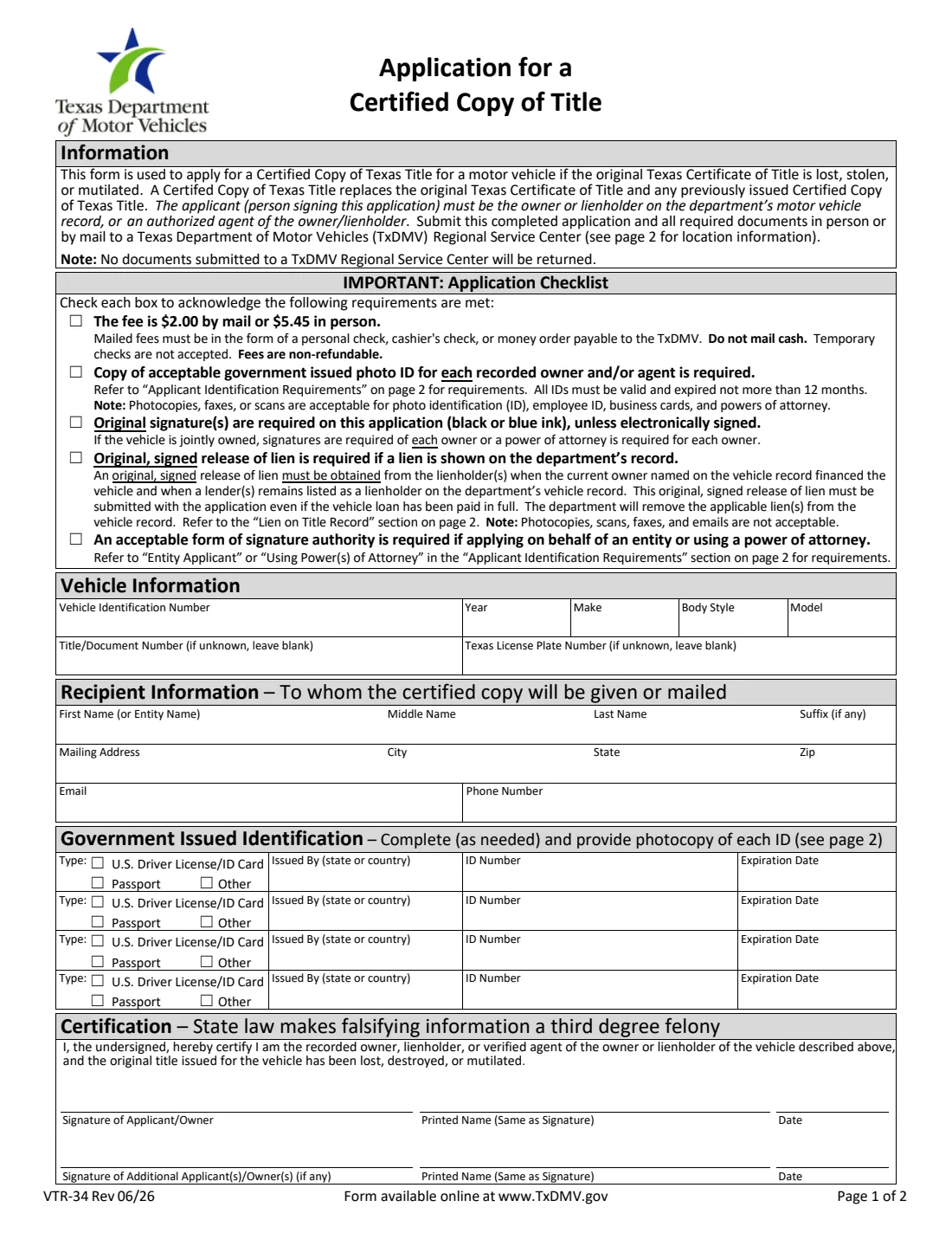
Form VTR-34 is the Texas Department of Motor Vehicles (TxDMV) application for a Certified Copy of Texas Title. You use it when the original Texas Certificate of Title for a motor vehicle has been lost, stolen or mutilated. The certified copy replaces the original title and any certified copy issued before it. The current edition is VTR-34 Rev 06/26.
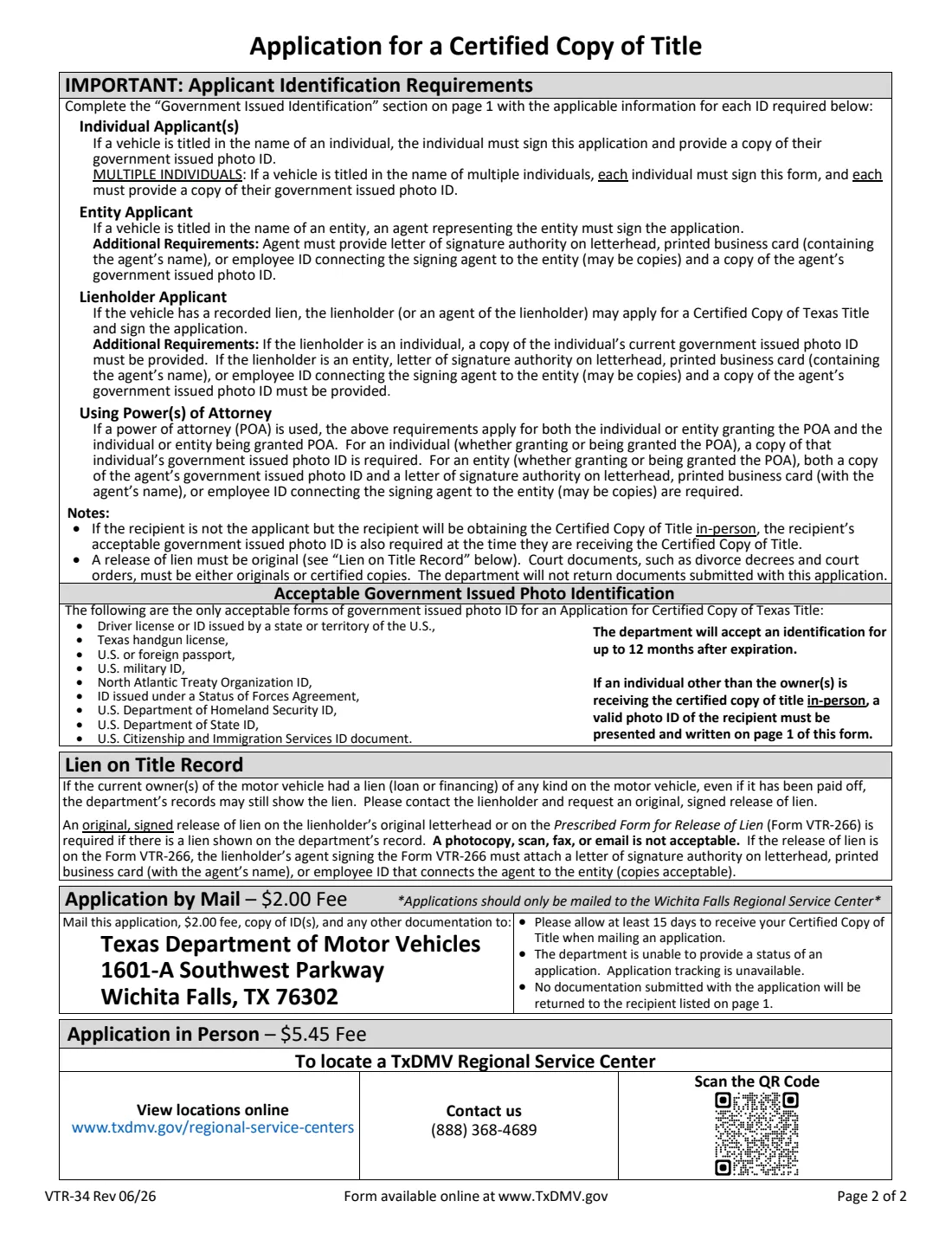
The applicant, meaning the person signing, must be the owner or lienholder on the department's motor vehicle record, or an authorized agent of the owner or lienholder. The one-page form has an application checklist, the vehicle details, who the certified copy goes to, a government-issued photo ID row for each person who needs one, and a certification signed under a warning that falsifying information is a third-degree felony. Page 2 explains which IDs are needed and how a lien on the record is handled.
FileIt lets you fill out the VTR-34 online. It pre-fills the recipient's name from the People records in your vault and prints every answer onto TxDMV's own PDF. The finished form is saved in your vault, and because the form accepts electronic signatures, you can send it for e-signature. FileIt never submits anything: you mail the application or take it to a TxDMV Regional Service Center yourself.
- Who fills it
- The recorded owner or owners, the lienholder, or an authorized agent of either.
- Fee (Rev 06/26)
- $2.00 by mail or $5.45 in person, as printed on the form. Fees are non-refundable.
- Where it goes
- By mail only to the TxDMV Wichita Falls Regional Service Center (address on page 2), or in person at any TxDMV Regional Service Center.
- ID
- A copy of an acceptable government-issued photo ID for each recorded owner and/or agent, valid or expired not more than 12 months.
- Signatures
- Every recorded owner signs, or a power of attorney is used for each. Original signatures in black or blue ink, unless electronically signed.
- Edition
- VTR-34 Rev 06/26: the application on page 1, requirements and addresses on page 2.
Who needs to fill out Form VTR-34?
- Vehicle owners whose Texas title has been lost, stolen or damaged and who need a replacement to sell, trade in or transfer the vehicle.
- Joint owners, who each sign the application and each provide a copy of their photo ID.
- Businesses and other entities that own a vehicle, through an agent with proof of signature authority.
- Lienholders, or their agents, when a lien is recorded on the vehicle.
- Agents acting under a power of attorney for the owner or lienholder.
When to use Form VTR-34
- When you can't find the Texas Certificate of Title for a vehicle you own.
- When the title was stolen, destroyed or mutilated.
- Before selling or transferring a vehicle whose title you no longer have.
- After a loan is paid off but you no longer have the title. If the lien still shows on the record, get an original release of lien from the lender first.
What you need before you start
- The vehicle identification number (VIN), year, make, body style and model.
- The title or document number and the Texas license plate number, if you know them. They can be left blank.
- The name, mailing address, email and phone number of the person or business who will receive the certified copy.
- A photocopy of each required government-issued photo ID, plus its issuing state or country, number and expiration date.
- An original, signed release of lien if a lien is shown on the department's record, on the lienholder's letterhead or on Form VTR-266.
- Proof of signature authority if you sign for an entity or under a power of attorney.
- The fee printed on the form: $2.00 by mail (personal check, cashier's check or money order payable to the TxDMV) or $5.45 in person.
What’s on Form VTR-34
The 2026 edition has 2 pages. FileIt asks for it in 9 parts, and it is signed by Applicant/owner and Additional applicant/owner:
- Application checklistApplicant/owner
- Vehicle informationApplicant/owner
- Recipient informationApplicant/owner
- Government-issued identification: ID 1Applicant/owner
- Government-issued identification: ID 2Applicant/owner
- Government-issued identification: ID 3Applicant/owner
- Government-issued identification: ID 4Applicant/owner
- CertificationApplicant/owner
- Additional applicant/ownerAdditional applicant/owner
How to fill out Form VTR-34, step by step
1 Application checklist
Tick each of the five boxes to acknowledge the requirements: the fee, a copy of photo ID for each owner or agent, original or electronic signatures, an original release of lien if a lien is on record, and proof of signature authority for an entity or a power of attorney. The checklist reminds you that mailed fees can't be cash and that temporary checks aren't accepted.
2 Vehicle information
Enter the VIN, year, make, body style and model. Add the title or document number and the Texas license plate number if you know them, or leave them blank. FileIt prints the VIN and the other vehicle details in capitals.
3 Recipient information
This is who the certified copy will be given or mailed to: first name (or entity name), middle name, last name and suffix, then the mailing address, city, state and ZIP, an email and a phone number. If someone other than the applicant will pick up the certified copy in person, their photo ID is also needed when they collect it, and it is written in one of the ID rows.
4 Government-issued identification
Fill in one row per required ID: the type (U.S. driver license or ID card, passport, or other), who issued it, the ID number and the expiration date. The only accepted IDs are listed on page 2: a U.S. state or territory driver license or ID, a Texas handgun license, a U.S. or foreign passport, a U.S. military ID, a NATO ID, an ID issued under a Status of Forces Agreement, and U.S. Department of Homeland Security, Department of State or USCIS ID documents. The department accepts an ID for up to 12 months after it expires, and FileIt flags one that expired earlier.
5 Certification and signatures
The applicant certifies that they are the recorded owner, lienholder, or verified agent of the owner or lienholder, and that the original title was lost, destroyed or mutilated. Print each signer's name exactly as they sign. A second line is there for an additional owner. FileIt fills in the printed names. You can sign in ink or through FileIt's e-signature, since the form accepts electronic signatures.
Common mistakes to avoid
- Forgetting the release of lien. If a lien still shows on the department's record, even for a paid-off loan, an original, signed release is required. Photocopies, scans, faxes and emails are not accepted.
- Leaving out a joint owner. If the vehicle is titled to several people, each one signs and each provides a copy of their photo ID.
- Sending an ID that expired more than 12 months ago.
- Mailing the application to a Regional Service Center other than Wichita Falls. The form says applications should only be mailed there.
- Mailing cash or a temporary check.
- Signing for a business or under a power of attorney without proof of signature authority.
- Sending original documents you need back. The department does not return anything submitted with the application.
After you fill it out
Sign the application, in ink or through FileIt's e-signature, and make sure every other owner signs too.
Mail it with the $2.00 fee, copies of the IDs and any other documents to the TxDMV Wichita Falls Regional Service Center at the address on page 2, or take it to a TxDMV Regional Service Center and pay $5.45. The form says to allow at least 15 days for a mailed application, and that application status and tracking aren't available.
FileIt saves the filled PDF in your vault folder. When the certified copy arrives, store it in the vehicle's folder in your vault too.
Fill out Form VTR-34 online with FileIt
- Pick the person. Choose someone from People and FileIt fills in their name, date of birth, address and other details it already knows.
- Answer plain-language questions. One part of the form at a time, with the official help text beside each question — 40 fields in all. Your answers save as you go.
- Check the live preview. Watch your answers land on the real Texas Department of Motor Vehicles (TxDMV) form, and let FileIt do any worksheet arithmetic.
- Generate the official PDF. FileIt prints your answers into the agency’s own PDF and files it in that person’s folder in your vault. Sign it, or send it for e-signature.
FileIt fills the form — it never files or submits anything for you. Deliver the finished form to whoever asked for it, the way the form’s instructions say.
Start Form VTR-34 now — it’s freeForm VTR-34: frequently asked questions
How much does a certified copy of a Texas title cost?
Form VTR-34 Rev 06/26 prints a fee of $2.00 by mail or $5.45 in person. Mailed fees must be a personal check, cashier's check or money order payable to the TxDMV, and fees are non-refundable.
Where do I mail Form VTR-34?
The form says to mail applications only to the Texas Department of Motor Vehicles Wichita Falls Regional Service Center; the full address is on page 2. In person, you can go to any TxDMV Regional Service Center.
Who can apply for a certified copy of title?
The owner or lienholder on the department's motor vehicle record, or an authorized agent of the owner or lienholder. Entities apply through an agent with proof of signature authority.
Can I sign Form VTR-34 electronically?
The form says original signatures in black or blue ink are required unless the application is electronically signed. FileIt lets you send it for e-signature, or you can print it and sign in ink.
What ID do I need?
A copy of an acceptable government-issued photo ID for each recorded owner and/or agent: a U.S. state or territory driver license or ID, a Texas handgun license, a U.S. or foreign passport, a U.S. military ID, a NATO ID, an ID issued under a Status of Forces Agreement, or a U.S. Department of Homeland Security, Department of State or USCIS ID document. IDs expired up to 12 months are accepted.
My car loan is paid off but the lien still shows. What do I do?
Ask the lienholder for an original, signed release of lien on its letterhead or on Form VTR-266, and send it with the application. Copies, scans, faxes and emails aren't accepted.
Does FileIt send the application to TxDMV?
No. FileIt fills the official PDF and saves it in your vault. You mail it or take it to a TxDMV Regional Service Center yourself.
Official sources
- Blank form (PDF), published by Texas Department of Motor Vehicles (TxDMV): https://www.txdmv.gov/sites/default/files/form_files/Form_VTR-34.pdf
- Official instructions and guidance: https://www.txdmv.gov/forms
- Edition shown on this page: VTR-34 Rev 06/26 (checked 2026-10-01).
FileIt is not affiliated with or endorsed by Texas Department of Motor Vehicles (TxDMV) or any government. This page explains the form in general terms and is not legal, tax or immigration advice. Always read the official instructions, and check that you are using the edition the recipient accepts. Page last reviewed 2026-10-01.