What is VS-140?
Form VS-140, Mail Application for Birth Record, is how you order a Texas birth record by mail from the Vital Statistics Section of the Texas Department of State Health Services (DSHS) in Austin. You give your own details as the applicant, identify the person named on the birth record, choose the record type — long form, short form, an heirloom certificate for framing, or a verification letter — and add any expedited processing or overnight return shipping.
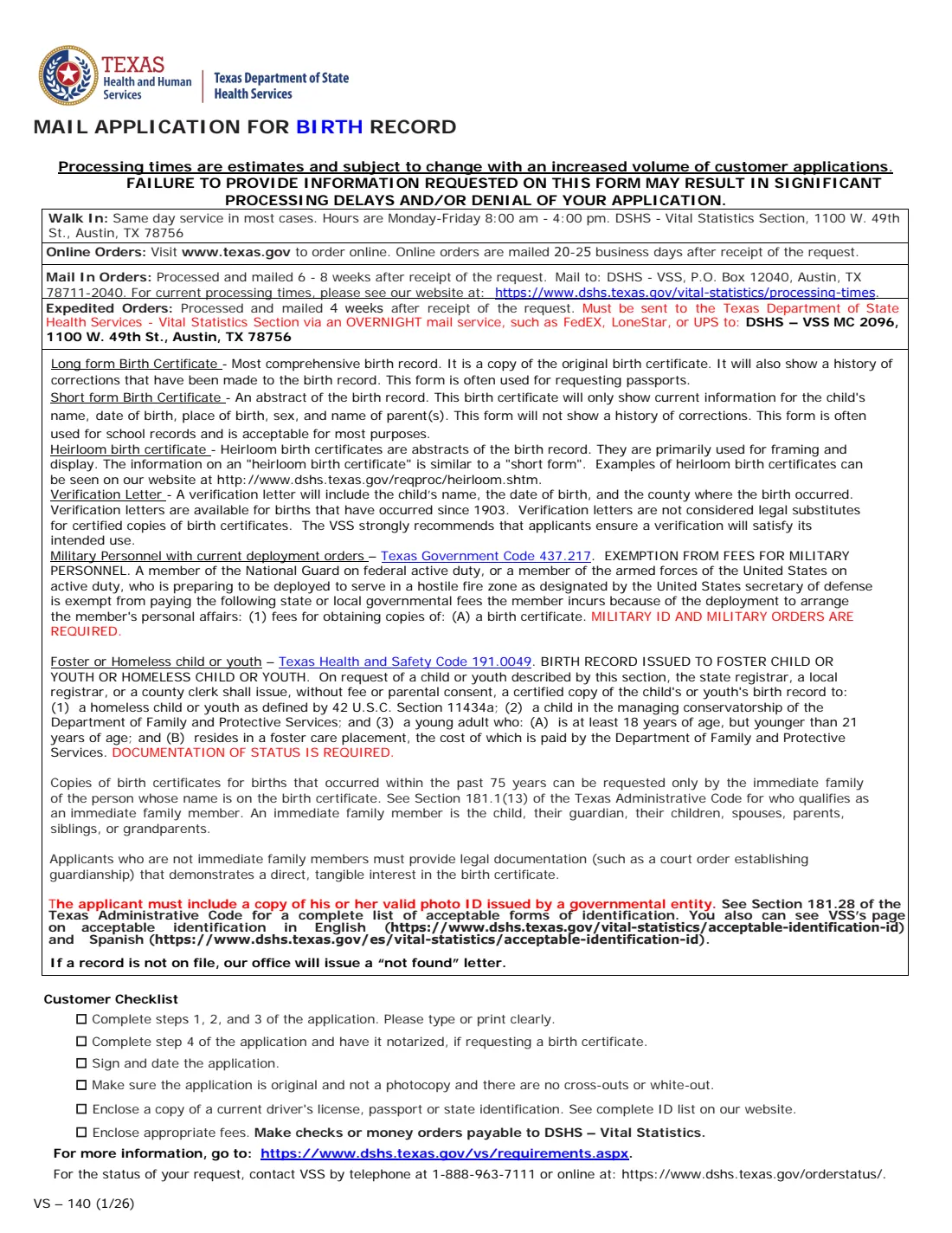
Copies of birth certificates for births within the past 75 years can be requested only by the immediate family: the person on the record, their guardian, children, spouse, parents, siblings or grandparents. Other applicants must provide legal documentation, such as a court order, showing a direct, tangible interest. Every mail application needs a copy of the applicant's valid government-issued photo ID, must be the original with no cross-outs or white-out, and — for birth certificates (not verification letters) — must be notarized in Step 4.
FileIt asks each question in plain English, totals the fees at the prices printed on the January 2026 edition, and prints your answers into the Department's own PDF. The finished application is saved in your vault. You sign it in front of a notary and mail it with your ID copy and payment yourself.
- Who fills it
- The applicant: the person on the record or an immediate family member, guardian or legal representative
- Sent to
- DSHS – VSS, P.O. Box 12040, Austin, TX 78711-2040 (expedited orders by overnight service to 1100 W. 49th St., Austin)
- Fees
- $22 long or short form, $60 heirloom, $22 verification letter; $25 expedited; $16 or $22.95 return shipping
- Signature
- The applicant signs and dates; birth certificate requests are notarized in Step 4
- Edition
- VS-140 (1/26)
- Agency
- Texas Department of State Health Services, Vital Statistics Section
Who needs to fill out VS-140?
- People born in Texas who need a certified birth certificate for a passport, driver license, school, insurance or records.
- Parents, spouses, children, siblings and grandparents ordering a family member's Texas birth certificate.
- Legal guardians and legal representatives, with proof of their authority.
- Military personnel with current deployment orders, who can get copies fee-exempt with military ID and orders.
- Foster or homeless children and youth, who can get a copy fee-exempt with documentation of their status.
- Anyone who needs only a birth verification letter (name, date of birth and county), which doesn't need notarizing.
When to use VS-140
- When you want to order a Texas birth record by mail and pay by check or money order.
- When you need the long form certificate — the copy of the original with its history of corrections, often used for passports.
- When you want an heirloom birth certificate for framing and display.
- When you can't use the walk-in service in Austin or prefer not to order online.
What you need before you start
- Your name, mailing address, email and daytime phone number.
- Your relationship to the person on the certificate, and proof if you are a legal guardian or legal representative.
- The person's full name on the record, date of birth, sex, and city and county of birth in Texas.
- Each parent's first and middle name and maiden last name (before first marriage).
- A copy of your valid photo ID issued by a governmental entity.
- A notary, for birth certificate requests.
- A check or money order payable to DSHS – Vital Statistics.
What’s on VS-140
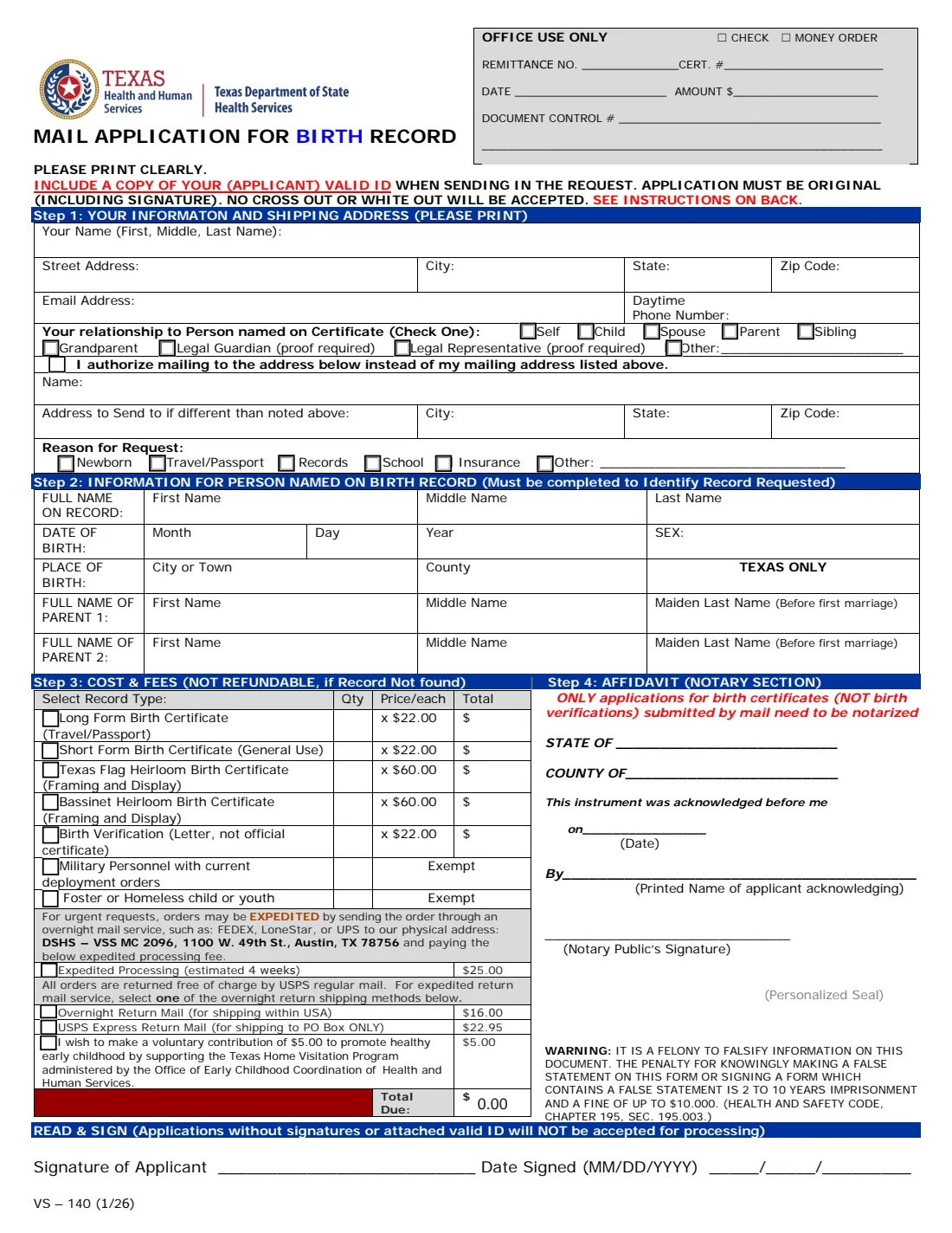
The 2026 edition has 2 pages. FileIt asks for it in 7 parts, and it is signed by Applicant:
- Step 1: Your information and shipping addressApplicant
- Mail the record to a different addressApplicant
- Reason for requestApplicant
- Step 2: The person named on the birth recordApplicant
- Step 3: Cost and feesApplicant
- Expedited processing and return mailApplicant
- Step 4: Affidavit (notary section)Applicant
How to fill out VS-140, step by step
1 Step 1: Your information and shipping address
Enter your name, address, email and daytime phone, and check your relationship to the person named on the certificate. If the record should be mailed to a different address, FileIt ticks the authorization box and prints the name and address to send it to. Then choose the reason for the request: newborn, travel/passport, records, school, insurance or other.
2 Step 2: Person named on the birth record
This must be completed to identify the record. Give the first, middle and last name on the record, the month, day and year of birth, sex, the city or town and county of birth (Texas only), and each parent's first and middle name and maiden last name before first marriage.
3 Step 3: Cost and fees
Tick each record type and enter the quantity: long form or short form birth certificate ($22.00 each), Texas Flag or Bassinet heirloom birth certificate ($60.00 each), or birth verification letter ($22.00 each). Military personnel with current deployment orders and foster or homeless children or youth are exempt. Add expedited processing ($25.00), one overnight return method ($16.00 overnight within the USA, or $22.95 USPS Express to a PO Box only) and the optional $5.00 contribution. FileIt fills in each line total and the total due. Fees are not refundable if the record is not found.
4 Step 4: Affidavit (notary section)
Only applications for birth certificates submitted by mail need to be notarized — not verification letters. FileIt can print the state and county and your printed name; you sign in front of the notary, who dates, signs and seals the affidavit.
5 Read and sign
Sign and date the application (MM/DD/YYYY). Applications without signatures or an attached valid ID will not be accepted for processing. Mail the original to DSHS – VSS, P.O. Box 12040, Austin, TX 78711-2040, or send an expedited order by overnight service to DSHS – VSS MC 2096, 1100 W. 49th St., Austin, TX 78756.
Common mistakes to avoid
- Sending a photocopy of the application, or one with cross-outs or white-out — the application must be original.
- Forgetting the copy of your valid photo ID.
- Not having a birth certificate request notarized in Step 4.
- Leaving the application unsigned or undated.
- Selecting both overnight return methods — select only one.
- Mailing an expedited order to the P.O. Box instead of by overnight service to the physical address.
- Ordering a verification letter when you need a certified copy — a verification letter is not a legal substitute.
After you fill it out
Print the PDF, sign it in front of a notary if you are ordering a certificate, and mail it with your ID copy and a check or money order payable to DSHS – Vital Statistics. FileIt keeps a copy of the completed application in your vault.
Page 2 of the form says mail-in orders are processed and mailed 6-8 weeks after receipt, and expedited orders about 4 weeks after receipt; processing times are estimates. You can check the status by phone at 1-888-963-7111 or at dshs.texas.gov/orderstatus. If no record is on file, the office issues a "not found" letter.
When the certificate arrives, scan it into your FileIt vault so it's on hand for passport and ID applications.
Fill out VS-140 online with FileIt
- Pick the person. Choose someone from People and FileIt fills in their name, date of birth, address and other details it already knows.
- Answer plain-language questions. One part of the form at a time, with the official help text beside each question — 56 fields in all. Your answers save as you go.
- Check the live preview. Watch your answers land on the real Texas Department of State Health Services, Vital Statistics form, and let FileIt do any worksheet arithmetic.
- Generate the official PDF. FileIt prints your answers into the agency’s own PDF and files it in that person’s folder in your vault. Sign it, or send it for e-signature.
FileIt fills the form — it never files or submits anything for you. Deliver the finished form to whoever asked for it, the way the form’s instructions say.
Start VS-140 now — it’s freeVS-140: frequently asked questions
How much is a Texas birth certificate by mail?
On the January 2026 edition of VS-140, a long form or short form birth certificate costs $22.00 each, a Texas Flag or Bassinet heirloom certificate $60.00 each, and a verification letter $22.00. Expedited processing is $25.00, and overnight return mail is $16.00 (or $22.95 for USPS Express to a PO Box).
Does the Texas birth certificate application need to be notarized?
Yes, for birth certificates requested by mail. The form says only applications for birth certificates, not birth verification letters, submitted by mail need to be notarized.
What's the difference between the long form and the short form?
The long form is a copy of the original birth certificate and shows a history of corrections; it is often used for passports. The short form is an abstract with current information only — name, date and place of birth, sex and parents' names — and is acceptable for most purposes.
Who can order a Texas birth certificate?
For births within the past 75 years, only the immediate family: the person on the record, their guardian, children, spouse, parents, siblings or grandparents. Others must provide legal documentation such as a court order showing a direct, tangible interest.
How long does it take?
The form says mail-in orders are processed and mailed 6-8 weeks after receipt and expedited orders about 4 weeks after receipt; these are estimates and can change with demand.
Does FileIt mail the application for me?
No. FileIt fills the official PDF and saves it in your vault. You sign it, get it notarized if needed, and mail it with your ID copy and payment.
Official sources
- Blank form (PDF), published by Texas Department of State Health Services, Vital Statistics: https://www.dshs.texas.gov/sites/default/files/vs/doc/mail-application-for-birth-record-vs-140_1.2026.pdf
- Official instructions and guidance: https://www.dshs.texas.gov/vs/requirements.aspx
- Edition shown on this page: VS-140 (1/26) (checked 2026-09-28).
FileIt is not affiliated with or endorsed by Texas Department of State Health Services, Vital Statistics or any government. This page explains the form in general terms and is not legal, tax or immigration advice. Always read the official instructions, and check that you are using the edition the recipient accepts. Page last reviewed 2026-09-28.