What is DH 726?
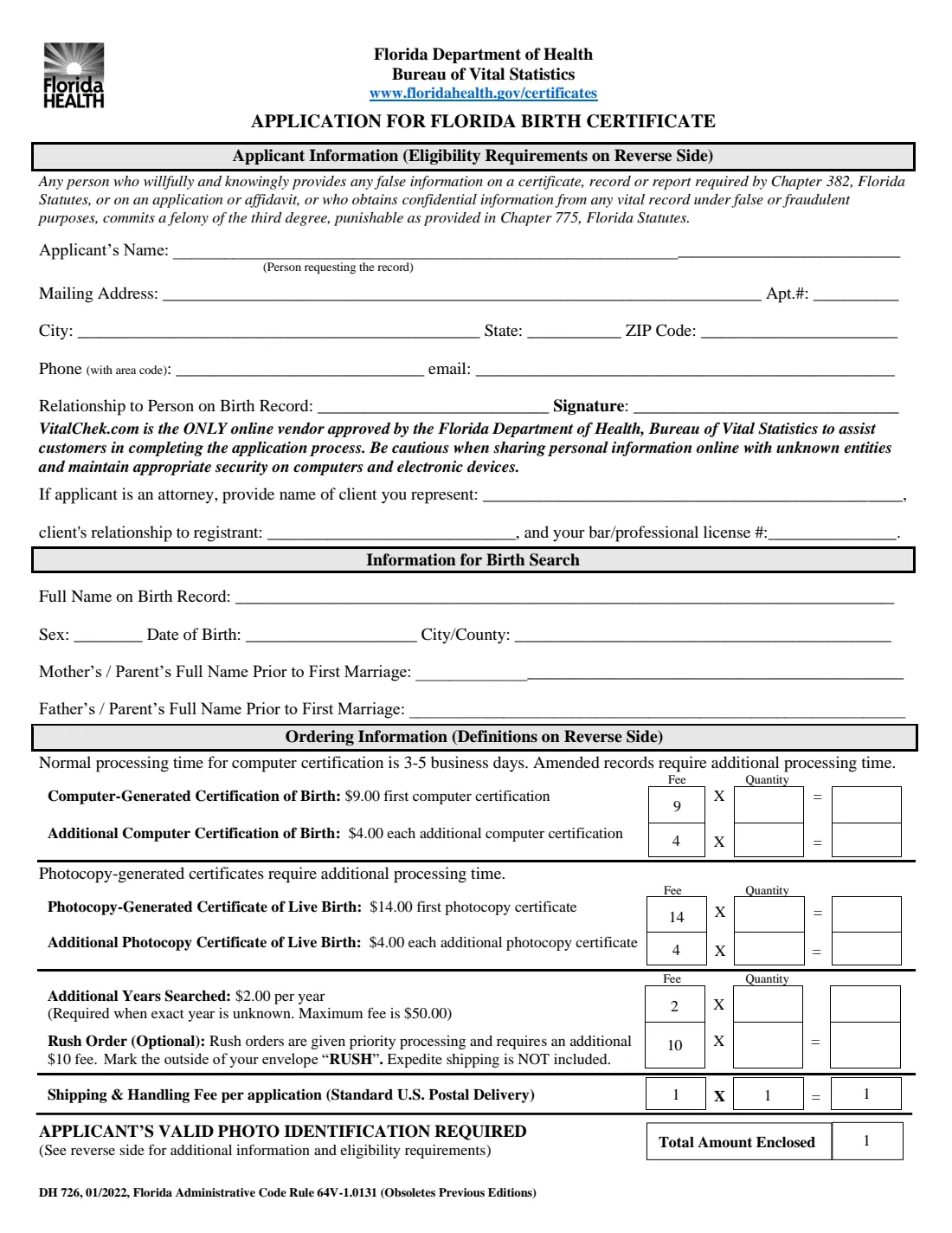
Form DH 726, Application for Florida Birth Certificate, is how you order a certified copy of a birth record from the Florida Department of Health's Bureau of Vital Statistics in Jacksonville by mail. You give your own details as the applicant, the details of the person on the record (the registrant), and choose what to order: a computer-generated certification of birth, a photocopy-generated certificate of live birth, or both.
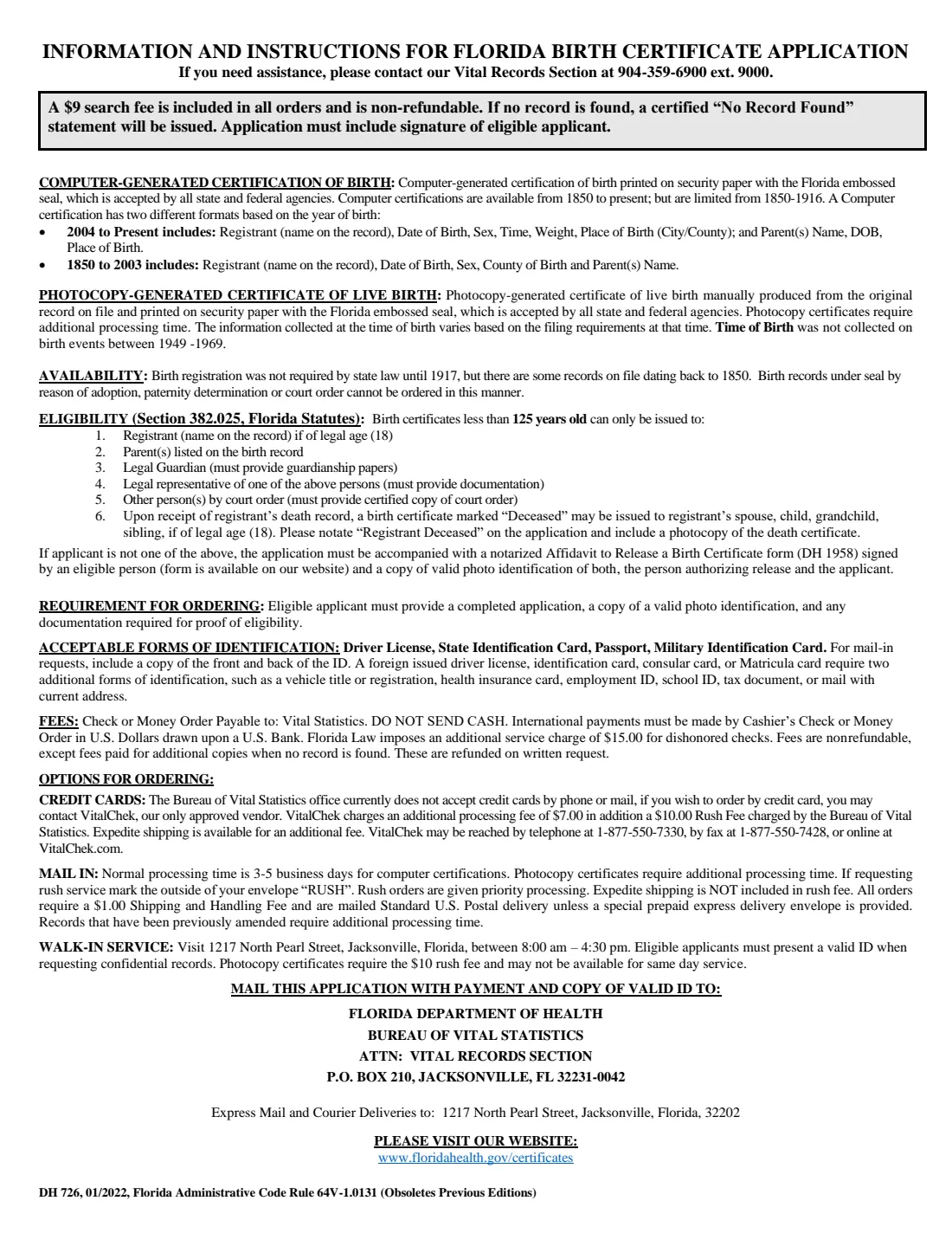
Florida birth certificates less than 125 years old are confidential and can only go to eligible people: the registrant if 18 or older, a parent listed on the record, a legal guardian, a legal representative, someone with a court order, or — once the registrant has died — their adult spouse, child, grandchild or sibling. Anyone else needs a notarized Affidavit to Release a Birth Certificate (DH 1958) from an eligible person. Every mail-in order includes a copy of the front and back of a valid photo ID.
FileIt asks each question in plain English, adds up the fee grid at the fees printed on the form, and prints your answers into the Department's own PDF. The finished application is saved in your vault. You sign it and mail it with your ID and payment yourself.
- Who fills it
- An eligible applicant: the registrant (18+), a parent on the record, a guardian, a legal representative, or an adult relative of a deceased registrant
- Sent to
- Florida Department of Health, Bureau of Vital Statistics, Attn: Vital Records Section, P.O. Box 210, Jacksonville, FL 32231-0042
- Fees
- $9 first computer certification, $14 first photocopy certificate, $4 each additional, $2 per extra year searched, $10 rush, $1 shipping
- Signature
- The applicant signs page 1
- Edition
- DH 726, 01/2022
- Agency
- Florida Department of Health, Bureau of Vital Statistics
Who needs to fill out DH 726?
- Adults born in Florida who need a certified birth certificate for a passport, driver license, REAL ID, school, benefits or a job.
- Parents listed on a Florida birth record ordering their child's certificate.
- Legal guardians and legal representatives, with documentation of their authority.
- The adult spouse, child, grandchild or sibling of a deceased registrant, who can receive a certificate marked "Deceased" with a copy of the death certificate.
- Attorneys ordering for a client, who give the client's name, the client's relationship and their bar or professional license number.
When to use DH 726
- When you want to order a Florida birth certificate by mail and pay by check or money order.
- When you need the photocopy-generated certificate of live birth, which shows the details collected at the time of birth.
- When you are unsure of the exact year of birth and need extra years searched.
- When you want the Department to rush the order ($10), marking the outside of the envelope "RUSH".
What you need before you start
- Your name, mailing address, phone number and email.
- Your relationship to the person on the record, and any proof of eligibility the form asks for (guardianship papers, court order, death certificate or DH 1958 affidavit).
- The registrant's full name at birth, sex, date of birth and city or county of birth.
- Each parent's full name before their first marriage.
- A copy of the front and back of a valid photo ID: driver license, state ID card, passport or military ID. A foreign ID, consular card or Matricula card needs two more forms of identification.
- A check or money order payable to Vital Statistics. Do not send cash.
What’s on DH 726
The 2022 edition has 2 pages. FileIt asks for it in 4 parts, and it is signed by Applicant:
- Applicant informationApplicant
- Attorney applying for a clientApplicant
- Information for birth searchApplicant
- Ordering informationApplicant
How to fill out DH 726, step by step
1 Applicant information
Enter your name as the person requesting the record, your mailing address, phone and email, and your relationship to the person on the birth record. The eligibility rules are printed on the back of the form. If you are an attorney, also give your client's name, the client's relationship to the registrant and your bar or professional license number.
2 Information for birth search
Give the full name on the birth record, sex, date of birth, city or county of birth, and each parent's full name prior to first marriage. The more closely these match the record, the easier the search. If the registrant has died, FileIt marks the application "Registrant Deceased" as the instructions ask; include a photocopy of the death certificate.
3 Choose what to order
A computer-generated certification of birth ($9 first copy, $4 each additional) is printed on security paper with the Florida embossed seal and is accepted by all state and federal agencies. For births from 2004 on it shows time, weight and place of birth and the parents' dates and places of birth; for 1850 to 2003 it shows the county of birth and parents' names.
A photocopy-generated certificate of live birth ($14 first copy, $4 each additional) is produced from the original record and takes longer.
4 Extra years, rush and shipping
If you don't know the exact year of birth, add additional years searched at $2 per year, up to a maximum fee of $50. Rush orders ($10) get priority processing, but expedited shipping is not included. Every order pays a $1 shipping and handling fee for standard U.S. Postal delivery. FileIt fills in the quantities and totals and the total amount enclosed.
5 Sign and mail
The application must include the signature of the eligible applicant. Mail it with your payment and a copy of the front and back of your ID to the Bureau of Vital Statistics, P.O. Box 210, Jacksonville, FL 32231-0042. Express mail and courier deliveries go to 1217 North Pearl Street, Jacksonville, Florida 32202.
Common mistakes to avoid
- Forgetting to sign the application — it must include the signature of an eligible applicant.
- Leaving out the copy of the front and back of your photo ID.
- Applying as someone who isn't eligible without a notarized DH 1958 affidavit and both people's IDs.
- Sending cash. Pay by check or money order payable to Vital Statistics.
- Leaving out the $1 shipping and handling fee every order pays. The $9 search fee is already part of the first-copy fee and is not refunded if no record is found.
- Choosing rush and forgetting to mark the outside of the envelope "RUSH".
- Using a parent's married name instead of their name before first marriage.
After you fill it out
Print the PDF, sign it, and mail it with your payment and ID copy to the address on page 2. FileIt keeps a copy of the completed application in your vault.
The form says normal processing for computer certifications is 3-5 business days; photocopy certificates and previously amended records take longer. If no record is found you receive a certified "No Record Found" statement, and the $9 search fee is not refunded. Fees for additional copies are refunded on written request when no record is found.
When the certificate arrives, scan it into your FileIt vault so it's on hand for passport, ID and benefit applications.
Fill out DH 726 online with FileIt
- Pick the person. Choose someone from People and FileIt fills in their name, date of birth, address and other details it already knows.
- Answer plain-language questions. One part of the form at a time, with the official help text beside each question — 35 fields in all. Your answers save as you go.
- Check the live preview. Watch your answers land on the real Florida Department of Health, Bureau of Vital Statistics form, and let FileIt do any worksheet arithmetic.
- Generate the official PDF. FileIt prints your answers into the agency’s own PDF and files it in that person’s folder in your vault. Sign it, or send it for e-signature.
FileIt fills the form — it never files or submits anything for you. Deliver the finished form to whoever asked for it, the way the form’s instructions say.
Start DH 726 now — it’s freeDH 726: frequently asked questions
How much does a Florida birth certificate cost by mail?
Using the fees printed on DH 726: $9 for the first computer-generated certification or $14 for the first photocopy-generated certificate, $4 for each additional copy, plus a $1 shipping and handling fee. Additional years searched are $2 per year (maximum $50) and rush is $10.
Who can order a Florida birth certificate?
For records less than 125 years old: the registrant if 18 or older, a parent listed on the record, a legal guardian, a legal representative, a person with a court order, or — after the registrant's death — their adult spouse, child, grandchild or sibling. Anyone else needs a notarized DH 1958 affidavit from an eligible person.
What is the difference between a computer certification and a photocopy certificate?
Both are printed on security paper with the Florida embossed seal and accepted by all state and federal agencies. The computer certification is generated from the record and processed faster. The photocopy certificate is a copy of the original record, showing the information collected at the time of birth, and takes additional processing time.
Can I pay by credit card?
Not by mail or phone with the Bureau. The form says to order by credit card through VitalChek, the Department's only approved online vendor, which charges its own processing fee.
Where do I mail the application?
Florida Department of Health, Bureau of Vital Statistics, Attn: Vital Records Section, P.O. Box 210, Jacksonville, FL 32231-0042. Express mail and courier deliveries go to 1217 North Pearl Street, Jacksonville, Florida 32202.
Does FileIt send the application for me?
No. FileIt fills the official PDF and saves it in your vault. You sign it and mail it with your ID copy and payment.
Official sources
- Blank form (PDF), published by Florida Department of Health, Bureau of Vital Statistics: https://www.floridahealth.gov/wp-content/uploads/2025/07/DH726-birth-app-6-30-2023.pdf
- Official instructions and guidance: https://www.floridahealth.gov/certificates
- Edition shown on this page: DH 726, 01/2022 (Florida Administrative Code Rule 64V-1.0131) (checked 2026-09-28).
FileIt is not affiliated with or endorsed by Florida Department of Health, Bureau of Vital Statistics or any government. This page explains the form in general terms and is not legal, tax or immigration advice. Always read the official instructions, and check that you are using the edition the recipient accepts. Page last reviewed 2026-09-28.