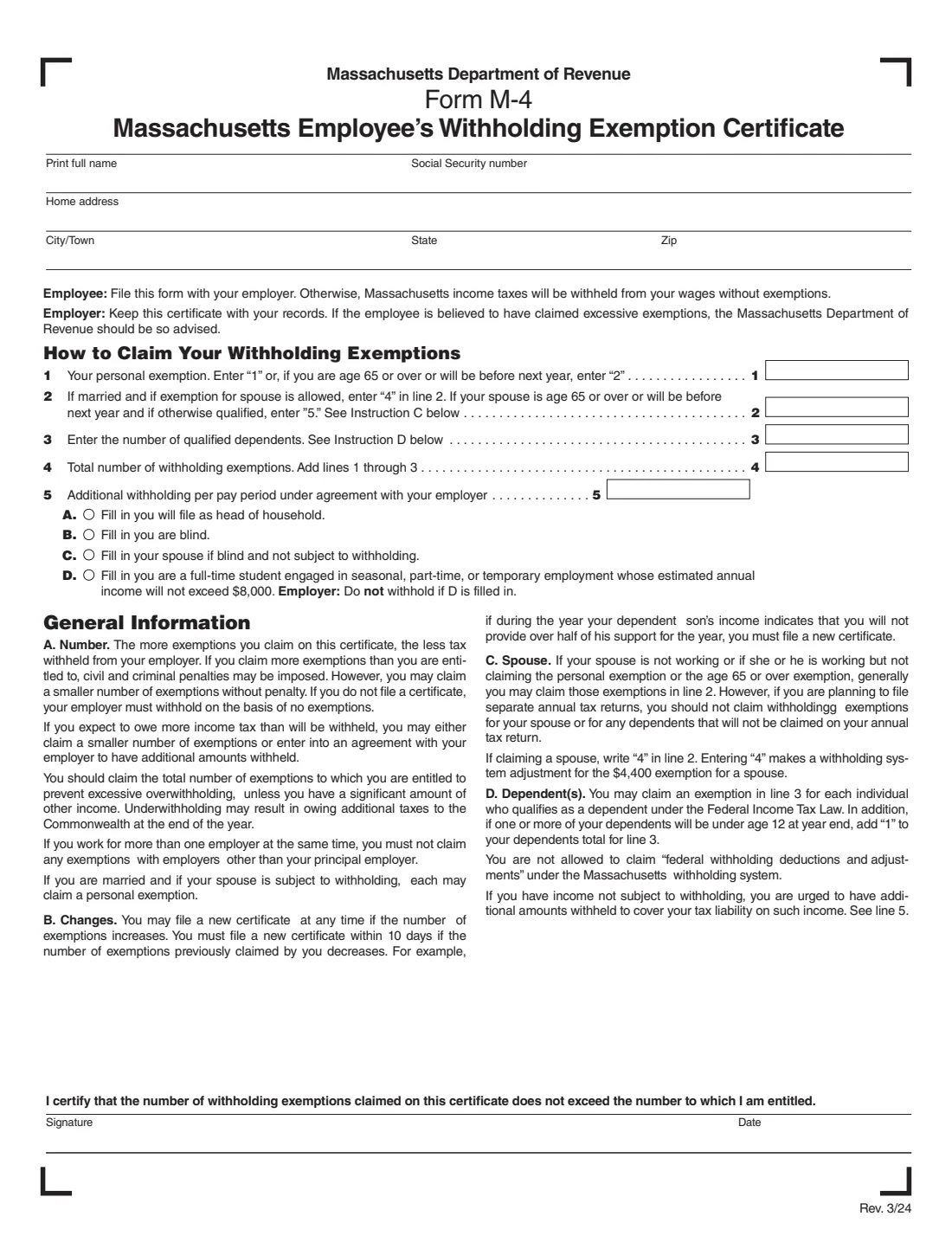
What is Form M-4?
Form M-4 is the Massachusetts Employee's Withholding Exemption Certificate, issued by the Massachusetts Department of Revenue (DOR). Your federal Form W-4 only controls federal withholding. Massachusetts has its own exemption-based system, so your employer needs an M-4 to know how much Massachusetts income tax to take out of your pay. The current edition is Rev. 3/24.
It is a one-page form. You claim a personal exemption, an exemption for your spouse where allowed, and exemptions for qualified dependents, and you can ask for an additional amount to be withheld each pay period. Four fill-in items cover head of household status, blindness, and full-time students with low seasonal or part-time income. If you don't file an M-4, the form says Massachusetts income taxes will be withheld from your wages without exemptions.
FileIt lets you fill out Form M-4 online in a guided form. It pre-fills your name from the People records in your vault, adds up your exemptions on line 4 (including the extra dependent exemption for a child under 12), and prints your answers onto the DOR's own official PDF. The finished form is saved in your vault folder, and you can send it for e-signature if you like. FileIt never submits anything to the DOR or your employer: you give the signed M-4 to your employer yourself.
- Who fills it
- The employee. There is no employer section to complete.
- Given to
- Your employer, who keeps it with its records. The DOR should be told if an employee is believed to have claimed excessive exemptions.
- When
- When you start a job with Massachusetts withholding, any time your exemptions increase, and within 10 days if they decrease.
- Signatures
- You sign and date it, certifying that you haven't claimed more exemptions than you are entitled to.
- Edition
- Form M-4, Rev. 3/24, one page.
Who needs to fill out Form M-4?
- Employees who have Massachusetts income tax withheld from their wages.
- New hires in Massachusetts, so their first paychecks are withheld at the right rate.
- Married employees who want to claim an exemption for a spouse who isn't working or isn't claiming their own exemption.
- Parents and other taxpayers with qualified dependents, especially dependents under age 12.
- Full-time students in seasonal, part-time or temporary work whose estimated annual income won't exceed $8,000 (as printed on the Rev. 3/24 form), who may ask for no withholding.
- Anyone who wants an additional amount withheld each pay period, for example to cover income not subject to withholding.
When to use Form M-4
- When you start a job where Massachusetts income tax is withheld.
- Any time the number of exemptions you can claim increases — for example after the birth of a child.
- Within 10 days if your exemptions decrease. The form's example is a dependent son whose income means you will no longer provide over half of his support.
- When you take a second job at the same time: you must not claim exemptions with any employer other than your principal employer.
- When you expect to owe more tax than will be withheld and want to claim fewer exemptions or agree an additional amount with your employer.
What you need before you start
- Your full name and Social Security number.
- Your home address, city or town, state and ZIP code.
- Whether you are 65 or over, or will be before next year.
- Whether you are married, whether your spouse is working or claiming their own exemptions, and whether your spouse is 65 or over.
- The number of individuals who qualify as your dependents under federal income tax law, and whether any of them will be under 12 at year end.
- Whether you or your spouse are blind, and whether you'll file as head of household.
- Any additional amount per pay period you have agreed with your employer to withhold.
What’s on Form M-4
The 2024 edition has 1 page. FileIt asks for it in 4 parts, and it is signed by Employee:
- Your detailsEmployee
- How to Claim Your Withholding Exemptions — lines 1 to 5Employee
- Items A to DEmployee
- Signature and dateEmployee
How to fill out Form M-4, step by step
1 Name, Social Security number and address
Print your full name, Social Security number, home address, city or town, state and ZIP code at the top of the form. FileIt pre-fills your name from your People record and prints each answer in the space under its label.
2 Line 1: Your personal exemption
Enter 1 for your personal exemption, or 2 if you are 65 or over or will be before next year. You may claim fewer exemptions without penalty. If this isn't your principal employer and you already claim your exemptions with another employer at the same time, the form says you must not claim any exemptions here, so you would claim none.
3 Line 2: Exemption for your spouse
If you are married and the exemption for your spouse is allowed, enter 4. If your spouse is 65 or over, or will be before next year, and otherwise qualifies, enter 5. Instruction C explains that you can generally claim these if your spouse is not working, or is working but not claiming the personal or age-65 exemption. Don't claim your spouse if you plan to file separate annual returns.
The number looks odd, but the Rev. 3/24 form explains it: entering 4 makes a withholding system adjustment for the $4,400 exemption for a spouse.
4 Line 3: Qualified dependents
Enter one exemption for each individual who qualifies as your dependent under federal income tax law. If one or more of your dependents will be under age 12 at year end, add 1 to your dependents total. Don't include dependents you won't claim on your annual return. FileIt adds the extra 1 for you when you tick the under-12 box.
5 Line 4: Total withholding exemptions
Add lines 1 through 3. FileIt does this for you. The more exemptions you claim, the less tax is withheld. If you claim more than you are entitled to, the form warns that civil and criminal penalties may be imposed.
6 Line 5: Additional withholding
Enter any additional amount per pay period that you have agreed with your employer to withhold. The form urges you to do this if you have income not subject to withholding, so you don't owe a large balance at the end of the year. Note that you are not allowed to claim federal withholding deductions and adjustments under the Massachusetts system.
7 Items A to D
Fill in each oval that applies: A if you will file as head of household; B if you are blind; C if your spouse is blind and not subject to withholding; D if you are a full-time student engaged in seasonal, part-time or temporary employment whose estimated annual income will not exceed $8,000. If D is filled in, the form tells the employer not to withhold. FileIt prints a filled dot in each oval you choose.
8 Signature and date
Sign and date at the bottom. You are certifying that the number of withholding exemptions claimed does not exceed the number to which you are entitled. FileIt prints the date, and you can sign on paper or through the optional e-signature.
Common mistakes to avoid
- Writing 1 on line 2 for a spouse. The form asks for 4 (or 5 if your spouse is 65 or over) because of how the withholding tables work.
- Claiming a spouse exemption when your spouse is working and claiming their own personal exemption, or when you plan to file separate returns.
- Forgetting the extra 1 on line 3 when a dependent will be under 12 at year end.
- Claiming exemptions with two employers at the same time instead of only with your principal employer.
- Not filing a new M-4 within 10 days after your exemptions decrease.
- Filling in item D when your estimated annual income will be more than $8,000, or when you aren't a full-time student in seasonal, part-time or temporary work.
- Trying to claim federal deductions and adjustments on the M-4, which the Massachusetts system doesn't allow.
- Forgetting to sign the form before giving it to your employer.
After you fill it out
Print the M-4, or send it for e-signature through FileIt, and make sure it is signed and dated. Give it to your employer; the form tells the employee to 'file this form with your employer' and tells the employer to keep it with its records. You don't send it to the Department of Revenue.
If your employer believes you've claimed excessive exemptions, the form says it should advise the Massachusetts Department of Revenue. Claiming only what you're entitled to, and updating the form when things change, avoids that.
FileIt keeps the completed PDF in your vault folder, so you always have a copy of exactly what you gave your employer. Revisit it when you marry, have a child, take a second job, or find you owe tax at the end of the year.
Fill out Form M-4 online with FileIt
- Pick the person. Choose someone from People and FileIt fills in their name, date of birth, address and other details it already knows.
- Answer plain-language questions. One part of the form at a time, with the official help text beside each question — 20 fields in all. Your answers save as you go.
- Check the live preview. Watch your answers land on the real Massachusetts Department of Revenue (DOR) form, and let FileIt do any worksheet arithmetic.
- Generate the official PDF. FileIt prints your answers into the agency’s own PDF and files it in that person’s folder in your vault. Sign it, or send it for e-signature.
FileIt fills the form — it never files or submits anything for you. Deliver the finished form to whoever asked for it, the way the form’s instructions say.
Start Form M-4 now — it’s freeForm M-4: frequently asked questions
Do I need a Massachusetts M-4 as well as a federal W-4?
Yes, if Massachusetts income tax is withheld from your wages. The W-4 only covers federal withholding. Massachusetts uses its own exemption system, so your employer needs Form M-4 as well.
What happens if I don't fill out Form M-4?
The form says that Massachusetts income taxes will then be withheld from your wages without exemptions, meaning the maximum amount for your pay.
Why do I enter 4 for my spouse on line 2?
The Rev. 3/24 form explains that entering 4 makes a withholding system adjustment for the $4,400 exemption for a spouse. If your spouse is 65 or over, or will be before next year, and otherwise qualifies, you enter 5.
How do I count dependents on the M-4?
Claim one exemption on line 3 for each individual who qualifies as a dependent under federal income tax law. If one or more of your dependents will be under 12 at the end of the year, add 1 to the total.
Can a student be exempt from Massachusetts withholding?
Item D covers full-time students in seasonal, part-time or temporary employment whose estimated annual income will not exceed $8,000, as printed on the Rev. 3/24 form. If D is filled in, the form tells the employer not to withhold.
Where do I send Form M-4?
To your employer, not to the Department of Revenue. Your employer keeps the certificate with its records.
Can I fill out Form M-4 online?
Yes. FileIt lets you fill it in online, adds up your exemptions, and prints your answers onto the DOR's official PDF. You print it or send it for e-signature, then give it to your employer yourself. FileIt does not submit it.
I have two jobs. Where do I claim my exemptions?
Only with your principal employer. The form says that if you work for more than one employer at the same time, you must not claim any exemptions with employers other than your principal employer.
How often do I need to update my M-4?
You may file a new certificate any time your exemptions increase. You must file a new one within 10 days if the number of exemptions you previously claimed decreases.
Official sources
- Blank form (PDF), published by Massachusetts Department of Revenue (DOR): https://www.mass.gov/doc/form-m-4-massachusetts-employees-withholding-exemption-certificate/download
- Official instructions and guidance: https://www.mass.gov/info-details/massachusetts-withholding-forms
- Edition shown on this page: Form M-4 Rev. 3/24 (checked 2026-09-26).
FileIt is not affiliated with or endorsed by Massachusetts Department of Revenue (DOR) or any government. This page explains the form in general terms and is not legal, tax or immigration advice. Always read the official instructions, and check that you are using the edition the recipient accepts. Page last reviewed 2026-09-26.