What is Form IL-W-4?
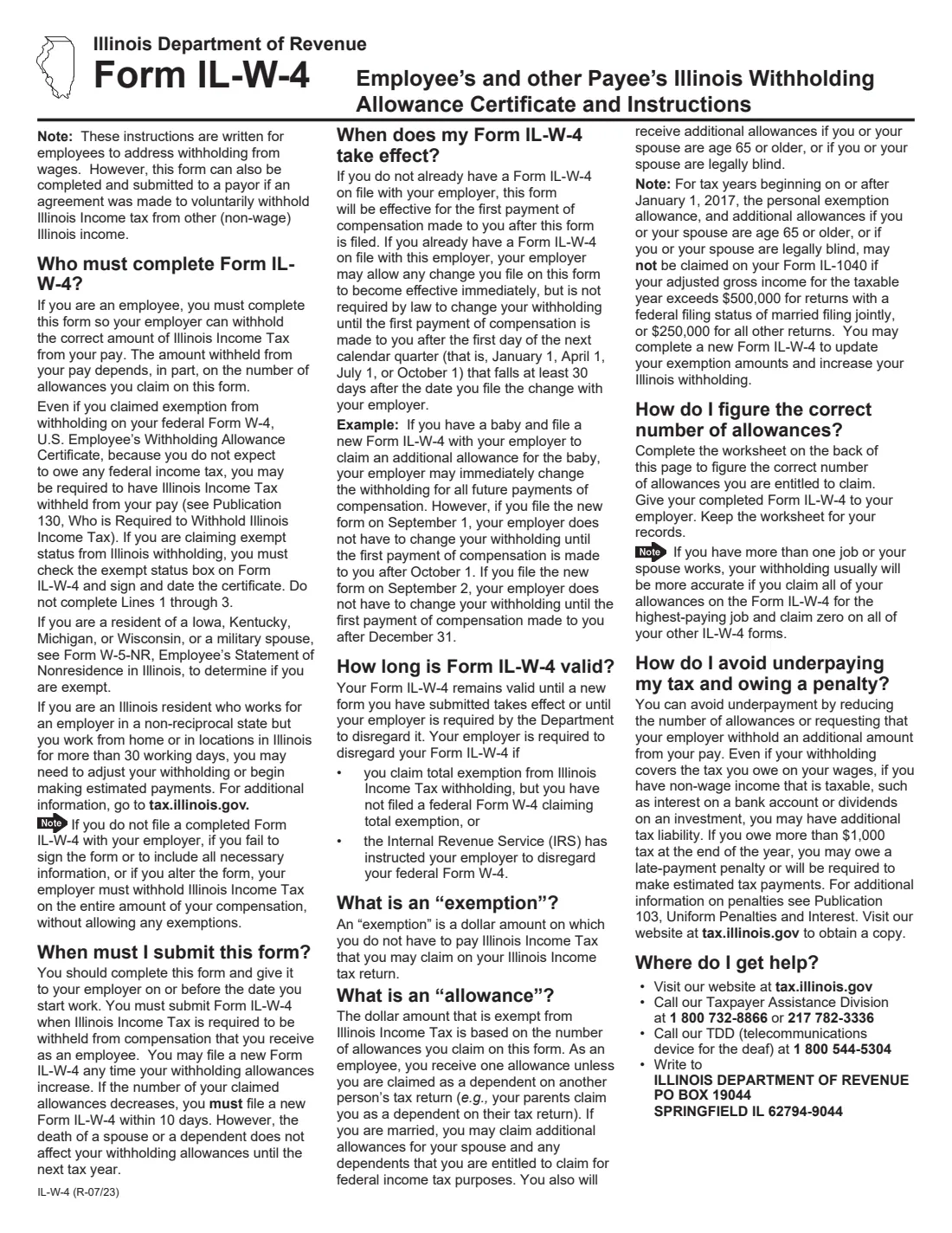
Form IL-W-4 is the Illinois Department of Revenue's withholding allowance certificate. Your federal Form W-4 only controls federal income tax withholding, so if you work in Illinois your employer also needs an IL-W-4 to work out how much Illinois income tax to take out of each paycheck. The current edition is IL-W-4 (R-07/23). It can also be given to a payer who has agreed to withhold Illinois tax voluntarily from other, non-wage Illinois income.
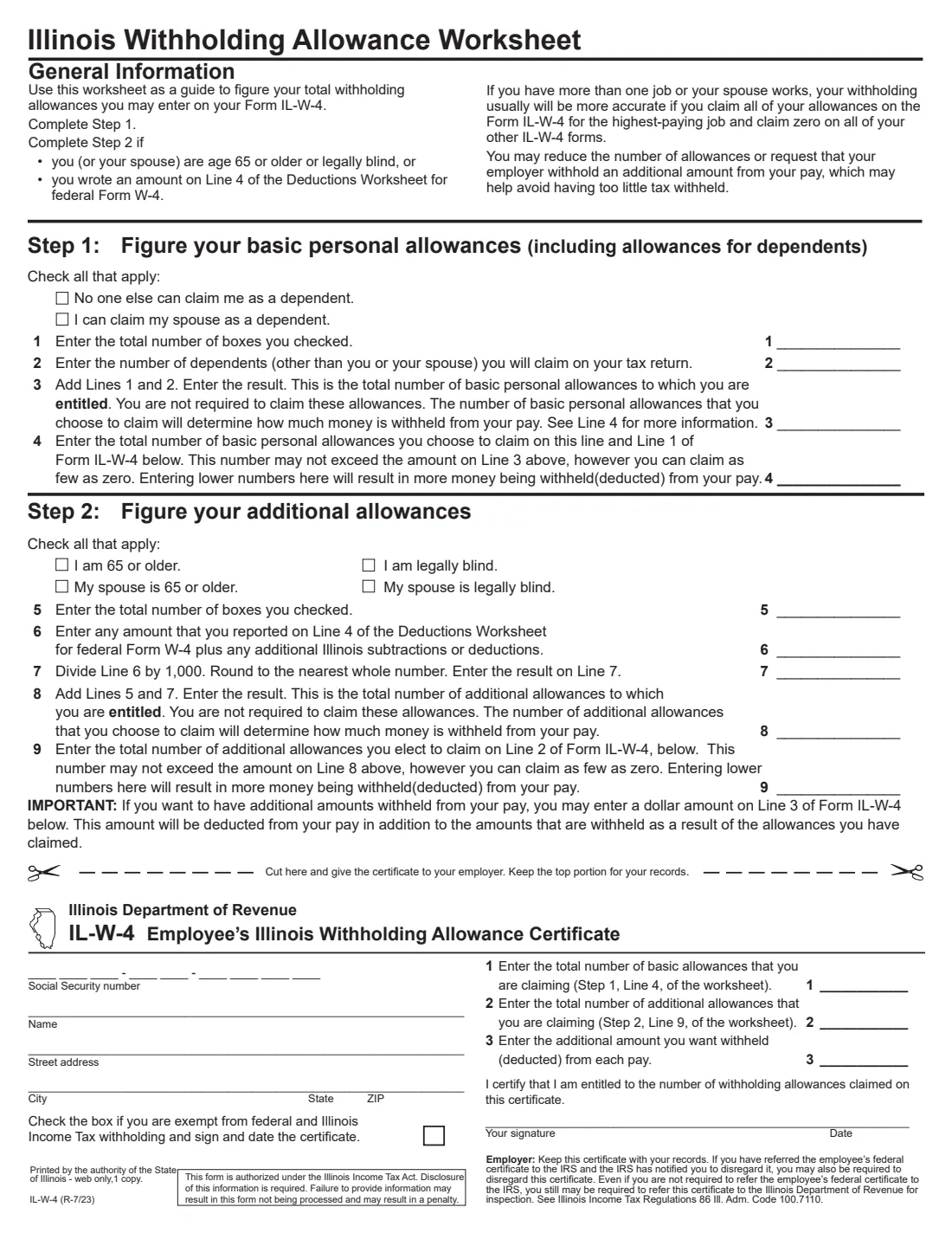
The form is short: a worksheet at the top of page 2 that you keep for your records, and a certificate below the 'Cut here' line that you give to your employer. The worksheet counts your basic personal allowances (including dependents) in Step 1 and additional allowances in Step 2 for being 65 or older, being legally blind, or having extra deductions. If you don't file a completed IL-W-4, don't sign it, or alter the form, the instructions say your employer must withhold Illinois tax on your entire pay without allowing any exemptions.
FileIt lets you fill out the IL-W-4 online in a guided form. It pre-fills your name from the People records in your vault, adds up the worksheet lines for you, and prints your answers onto the Illinois Department of Revenue's own official PDF, including the three groups of Social Security number blanks. The finished form is saved in your vault folder, and you can send it for e-signature if you like. FileIt never submits anything to the Department or to your employer: you hand the certificate to your employer yourself.
- Who fills it
- The employee (or other payee who asked for voluntary withholding). There is no employer section to complete.
- Given to
- Your employer or payer, who keeps it with its records. It is not sent to the Illinois Department of Revenue unless the Department asks to inspect it.
- When
- On or before the day you start work, whenever your allowances increase, and within 10 days if they decrease.
- Signatures
- You sign and date the certificate. An unsigned IL-W-4 means your employer withholds with no allowances.
- Edition
- IL-W-4 (R-07/23), two pages: instructions, then the worksheet and certificate.
Who needs to fill out Form IL-W-4?
- Employees who work in Illinois and have Illinois income tax withheld from their wages.
- New hires, who should complete it on or before their first day of work.
- Anyone whose Illinois allowances have gone down, for example because a dependent no longer qualifies — a new form is due within 10 days.
- People who want more Illinois tax taken out of each pay, by claiming fewer allowances or asking for an additional amount on line 3.
- Recipients of non-wage Illinois income who have agreed with the payer to have Illinois tax withheld voluntarily.
- People who are exempt from both federal and Illinois withholding and need to say so on the certificate.
When to use Form IL-W-4
- When you start a new job in Illinois, before or on your first day.
- Any time your number of withholding allowances increases — for example after marriage or the birth of a child — if you want less withheld.
- Within 10 days of your allowances decreasing. The form notes that the death of a spouse or a dependent does not affect your allowances until the next tax year.
- When you take a second job or your spouse starts working, so you can move all your allowances to the highest-paying job and claim zero on the others.
- When you expect to owe tax on non-wage income such as interest or dividends and want extra withheld instead of making estimated payments.
What you need before you start
- Your full name, street address, city, state and ZIP code.
- Your Social Security number.
- The number of dependents (other than you and your spouse) you will claim on your Illinois return.
- Whether someone else can claim you as a dependent, and whether you can claim your spouse.
- Whether you or your spouse are 65 or older or legally blind.
- The amount from Line 4 of the Deductions Worksheet on your federal Form W-4, plus any additional Illinois subtractions or deductions, if you have them.
- Any additional dollar amount you want withheld from each pay.
- Your federal Form W-4, if you claimed exemption there, to check whether you're also exempt from Illinois withholding.
What’s on Form IL-W-4
The 2023 edition has 2 pages. FileIt asks for it in 5 parts, and it is signed by Employee:
- Certificate — your detailsEmployee
- Lines 1–3: Allowances and additional withholdingEmployee
- Exemption, signature and dateEmployee
- Worksheet Step 1 — Basic personal allowances (including dependents)Employee
- Worksheet Step 2 — Additional allowancesEmployee
How to fill out Form IL-W-4, step by step
1 Page 1: instructions
The first page explains who must complete the form, when it takes effect and how to avoid underpaying. Two points are worth knowing before you start. Claiming exemption on your federal W-4 does not automatically make you exempt from Illinois withholding. And if you are a resident of Iowa, Kentucky, Michigan or Wisconsin, or a military spouse, the form points you to Form W-5-NR, the Employee's Statement of Nonresidence in Illinois, to see whether you are exempt instead.
The page also notes that personal exemption allowances, and the extra allowances for age 65 or blindness, may not be claimed on Form IL-1040 above certain income levels, and that you can file a new IL-W-4 to increase your withholding if that applies to you.
2 Worksheet Step 1: Figure your basic personal allowances
Tick 'No one else can claim me as a dependent' if that is true, and 'I can claim my spouse as a dependent' if it applies. Line 1 is the number of boxes you ticked. Line 2 is the number of dependents, other than you or your spouse, that you will claim on your tax return. Line 3 adds them up: that is the number of basic allowances you are entitled to.
Line 4 is the number you actually choose to claim. It can be anything from zero up to line 3. A lower number means more tax is withheld from each pay. Whatever you enter on line 4 goes on line 1 of the certificate. FileIt counts lines 1 and 3 for you and checks that line 4 isn't more than line 3.
3 Worksheet Step 2: Figure your additional allowances
Complete Step 2 only if you or your spouse are 65 or older or legally blind, or you wrote an amount on Line 4 of the Deductions Worksheet for your federal Form W-4. Tick each of the four age and blindness boxes that applies; line 5 is the count.
Line 6 is that federal Deductions Worksheet amount plus any additional Illinois subtractions or deductions. Line 7 divides line 6 by 1,000 and rounds to the nearest whole number. Line 8 adds lines 5 and 7. Line 9 is how many of those additional allowances you choose to claim, from zero up to line 8, and it goes on line 2 of the certificate. FileIt does the division and rounding for you.
4 Certificate: your details
Below the 'Cut here' line is the part your employer keeps. Enter your Social Security number in the three groups of blanks, then your name, street address, city, state and ZIP code. FileIt prints the SSN digit by digit into the printed blanks.
5 Certificate lines 1 to 3
Line 1 is the total basic allowances you are claiming (worksheet Step 1, line 4). Line 2 is the total additional allowances (Step 2, line 9). Line 3 is an optional additional dollar amount to be withheld from each pay, on top of the withholding worked out from your allowances.
If you have more than one job, or your spouse works, the form says your withholding will usually be more accurate if you claim all your allowances on the IL-W-4 for the highest-paying job and zero on the others.
6 Exempt status box
Tick this box only if you are exempt from both federal and Illinois income tax withholding. If you tick it, don't complete lines 1 through 3 — just sign and date the certificate. FileIt flags it if you tick the box and also fill in those lines.
7 Signature and date
By signing you certify that you are entitled to the number of withholding allowances claimed. Sign on the 'Your signature' line and date it. FileIt prints the date for you, and you can sign on paper or through FileIt's optional e-signature.
Common mistakes to avoid
- Handing in the whole page instead of the certificate. The worksheet above the 'Cut here' line is for your own records; the employer keeps the certificate.
- Forgetting to sign. An unsigned or incomplete IL-W-4 means your employer must withhold on your whole pay with no allowances.
- Claiming more allowances on line 4 or line 9 of the worksheet than you are entitled to on line 3 or line 8.
- Claiming your full allowances at two jobs at once, which usually leads to too little tax withheld. Claim them at the highest-paying job and zero elsewhere.
- Ticking the exempt box because you were exempt on your federal W-4, without checking that you're also exempt from Illinois withholding.
- Ticking the exempt box and still filling in lines 1 to 3.
- Not filing a new form within 10 days after your allowances decrease.
- Residents of Iowa, Kentucky, Michigan or Wisconsin using the IL-W-4 when Form W-5-NR may apply to them.
After you fill it out
Print the certificate, or send it for e-signature through FileIt, and make sure it is signed and dated. Cut along the dashed line and give the certificate to your employer or payer on or before your first day of work. Keep the worksheet for your records.
Your employer keeps the certificate with its records. The Department of Revenue can ask an employer to refer a certificate for inspection, and an employer that has been told by the IRS to disregard your federal certificate may also have to disregard this one. A first IL-W-4 applies from your first payment after you file it. If you already had one on file, your employer may apply a change at once but, according to the form, doesn't have to until the first payment after the start of the next calendar quarter that falls at least 30 days after you file it. The certificate stays valid until a new one takes effect or the Department requires your employer to disregard it.
FileIt saves the filled PDF in your vault folder, so you have a copy of exactly what you handed in. Review it when your family situation changes, when you take a second job, or if you end up owing tax at the end of the year, and file a new IL-W-4 when your allowances change.
Fill out Form IL-W-4 online with FileIt
- Pick the person. Choose someone from People and FileIt fills in their name, date of birth, address and other details it already knows.
- Answer plain-language questions. One part of the form at a time, with the official help text beside each question — 28 fields in all. Your answers save as you go.
- Check the live preview. Watch your answers land on the real Illinois Department of Revenue (IDOR) form, and let FileIt do any worksheet arithmetic.
- Generate the official PDF. FileIt prints your answers into the agency’s own PDF and files it in that person’s folder in your vault. Sign it, or send it for e-signature.
FileIt fills the form — it never files or submits anything for you. Deliver the finished form to whoever asked for it, the way the form’s instructions say.
Start Form IL-W-4 now — it’s freeForm IL-W-4: frequently asked questions
Do I need an IL-W-4 if I already filled out a federal W-4?
Yes, if Illinois income tax is withheld from your pay. The federal W-4 only covers federal withholding. Illinois uses its own allowance system, so your employer needs the IL-W-4 to work out your Illinois withholding.
What happens if I don't give my employer an IL-W-4?
According to the form's instructions, your employer must then withhold Illinois income tax on the entire amount of your pay, without allowing any exemptions. The same applies if you don't sign it, leave out necessary information, or alter the form.
How many allowances should I claim on the IL-W-4?
The worksheet on page 2 works out the number you are entitled to: basic allowances for yourself, your spouse and your dependents, plus additional allowances for age 65 or older, blindness and larger deductions. You can claim fewer than you are entitled to, down to zero, if you want more withheld.
Can I be exempt from Illinois withholding?
The certificate has a box for people who are exempt from both federal and Illinois income tax withholding. If you tick it, you don't complete lines 1 to 3. Being exempt on your federal W-4 alone doesn't make you exempt in Illinois. Residents of Iowa, Kentucky, Michigan or Wisconsin, and military spouses, should look at Form W-5-NR instead.
Where do I send Form IL-W-4?
To your employer or payer, not to the Illinois Department of Revenue. The employer keeps it with its records. The Department may ask the employer to refer a certificate for inspection.
Can I fill out the IL-W-4 online?
Yes. FileIt lets you fill it out online in a guided form, adds up the worksheet, and prints your answers onto the Department's official PDF. You then print it or send it for e-signature, and give it to your employer yourself. FileIt does not submit it anywhere.
How do I get more Illinois tax withheld?
Claim fewer allowances on lines 1 and 2, or enter an additional dollar amount to be withheld from each pay on line 3. The form suggests this if you have non-wage income such as interest or dividends.
I have two jobs. How should I split my allowances?
The IL-W-4 says withholding will usually be more accurate if you claim all your allowances on the IL-W-4 for your highest-paying job and claim zero on the IL-W-4 for each of your other jobs. The same applies if your spouse works.
Do I need to file a new IL-W-4 every year?
The form doesn't require a yearly renewal. You may file a new one any time your allowances increase, and you must file a new one within 10 days if your allowances decrease.
Official sources
- Blank form (PDF), published by Illinois Department of Revenue (IDOR): https://tax.illinois.gov/content/dam/soi/en/web/tax/forms/withholding/documents/currentyear/il-w-4.pdf
- Official instructions and guidance: https://tax.illinois.gov/forms/withholding.html
- Edition shown on this page: IL-W-4 (R-07/23) (checked 2026-09-26).
FileIt is not affiliated with or endorsed by Illinois Department of Revenue (IDOR) or any government. This page explains the form in general terms and is not legal, tax or immigration advice. Always read the official instructions, and check that you are using the edition the recipient accepts. Page last reviewed 2026-09-26.