What is Form AR-11?
Form AR-11, Alien's Change of Address Card, is how a noncitizen in the United States tells U.S. Citizenship and Immigration Services (USCIS), part of the Department of Homeland Security, that they have moved. Under section 265 of the Immigration and Nationality Act, all aliens in the U.S., except those exempted, must report a change of address, and the form says to do so within 10 days of the change. It applies to green card holders, visa holders and others, including children: each person who moves reports separately.
Reporting is not optional. The form's privacy notice warns that failure to report a change of address may result in a fine, imprisonment and/or removal, and could jeopardize your ability to get a future visa or other immigration benefits. USCIS lets most people report a move online as well; the paper AR-11 is for reporting by mail. Either way, filing with USCIS does not update your address with the Immigration Court: if you are in immigration proceedings, you must notify the court separately.
FileIt fills in the AR-11 for you in plain English and prints your answers in capitals onto USCIS's own official PDF (Edition 11/02/22). It pre-fills your name and date of birth from your People record, formats your A-Number for the 9-digit boxes, and saves the finished PDF in your vault. USCIS says this form can't be signed electronically, so you print it, sign it by hand and mail it yourself. FileIt never sends it to USCIS.
- Who fills it
- Each noncitizen who has moved, including children (a parent signs a child's form).
- Given to
- Mailed to USCIS at the address printed on page 2 of the form.
- When
- Within 10 days of moving to a new address.
- Signatures
- Hand-signed in the "Your Signature" box. The form can't be signed electronically or with a typed name.
- Edition
- Edition 11/02/22
- Agency
- U.S. Citizenship and Immigration Services (USCIS), Department of Homeland Security
Who needs to fill out Form AR-11?
- Lawful permanent residents (green card holders) who move to a new home.
- Nonimmigrants in the U.S., such as students, workers and visitors, who change their address, unless they fall under an exemption.
- Parents reporting a move for each child who is not a U.S. citizen: every person needs their own form.
- Noncitizens with pending USCIS applications, who also need USCIS to have their current address to receive notices and documents.
- People in immigration proceedings, who must report to USCIS and, separately, to the Immigration Court.
- U.S. citizens do not file Form AR-11.
When to use Form AR-11
- Within 10 days of moving to a new physical address in the United States.
- When you move within the same city or building, such as to a different apartment, since your address still changes.
- When you want to add or change a separate mailing address, for example a PO box, alongside your physical address.
- Each time you move: there is no single report that covers future moves.
What you need before you start
- Your family name, given name and middle name, as used with USCIS.
- Your date of birth.
- Your Alien Registration Number (A-Number), if you have one; it appears on a green card, work permit and USCIS notices.
- Your present physical address: street number and name, apartment, suite or floor number, city, state and 5-digit ZIP code. No PO boxes.
- Your previous physical address.
- A separate mailing address, only if you want USCIS mail sent somewhere else.
- A printer and a pen: the form must be signed by hand.
- An envelope and postage to mail it to the USCIS address on page 2.
What’s on Form AR-11
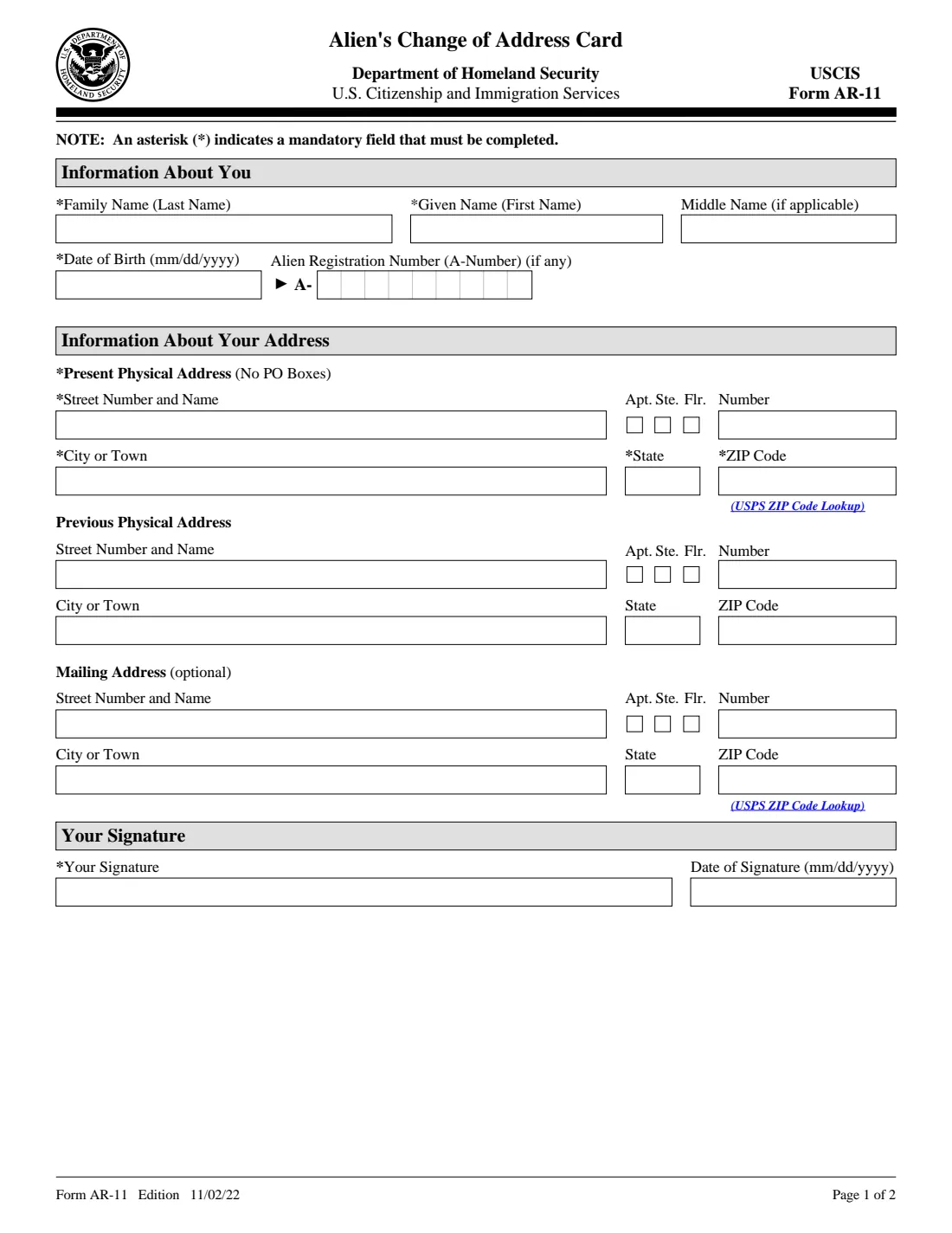
The 2022 edition has 2 pages. FileIt asks for it in 5 parts:
- Information about youYou (the person who moved)
- Present physical addressYou (the person who moved)
- Previous physical addressYou (the person who moved)
- Mailing address (optional)You (the person who moved)
- Your signatureYou (the person who moved)
How to fill out Form AR-11, step by step
1 Information About You
Enter your family name (last name), given name (first name) and middle name, if you have one, and your date of birth in month/day/year order. The family name, given name and date of birth are marked with an asterisk, which means they are mandatory.
The Alien Registration Number (A-Number) is optional ("if any") but helps USCIS find your records. It has 9 boxes; if your A-Number has 7 or 8 digits, add zeros in front so that it fills all 9. FileIt drops the letter A and any dashes for you.
2 Present Physical Address
This is where you actually live now, and it is mandatory. It can't be a PO box. Enter the street number and name, tick apartment, suite or floor if it applies and give the number, then the city or town, state and ZIP code.
The boxes on the paper form are short: 25 characters for the street and 20 for the city. Use standard abbreviations such as St, Ave or Blvd if you need to. FileIt prints everything in capitals, which is what USCIS forms expect.
3 Previous Physical Address
Enter the address you moved from, in the same layout. It isn't marked with an asterisk, but the instructions on page 2 say to complete all fields, and it helps USCIS match you to your old record. Give the whole address (street, city, state and ZIP) or leave it blank.
4 Mailing Address (optional)
Only complete this if you want USCIS to send mail somewhere other than your physical address, for example a PO box or a relative's address. If you receive mail where you live, leave it blank.
5 Your Signature
Sign in the "Your Signature" box and date it. The form's own guidance says it can't be signed electronically, the applicant's name can't be typed into the space, and the form will be rejected without a signature. For a minor child, the parent signs the child's name. You can have FileIt print the date, or leave it blank and write it by hand when you sign.
Common mistakes to avoid
- Missing the 10-day deadline. Report as soon as you move.
- Putting a PO box as your present physical address. Use your real residence and add the PO box as a mailing address.
- Typing your name in the signature box or signing electronically. Print the form and sign it by hand.
- Filing one AR-11 for the whole family. Each noncitizen who moved, including each child, needs their own form.
- Entering a 7- or 8-digit A-Number without leading zeros, so digits land in the wrong boxes.
- Assuming the AR-11 updates the Immigration Court. If you are in proceedings, notify the court separately.
- Mailing an old edition or to an old address. Use the current form and the address printed on its page 2.
After you fill it out
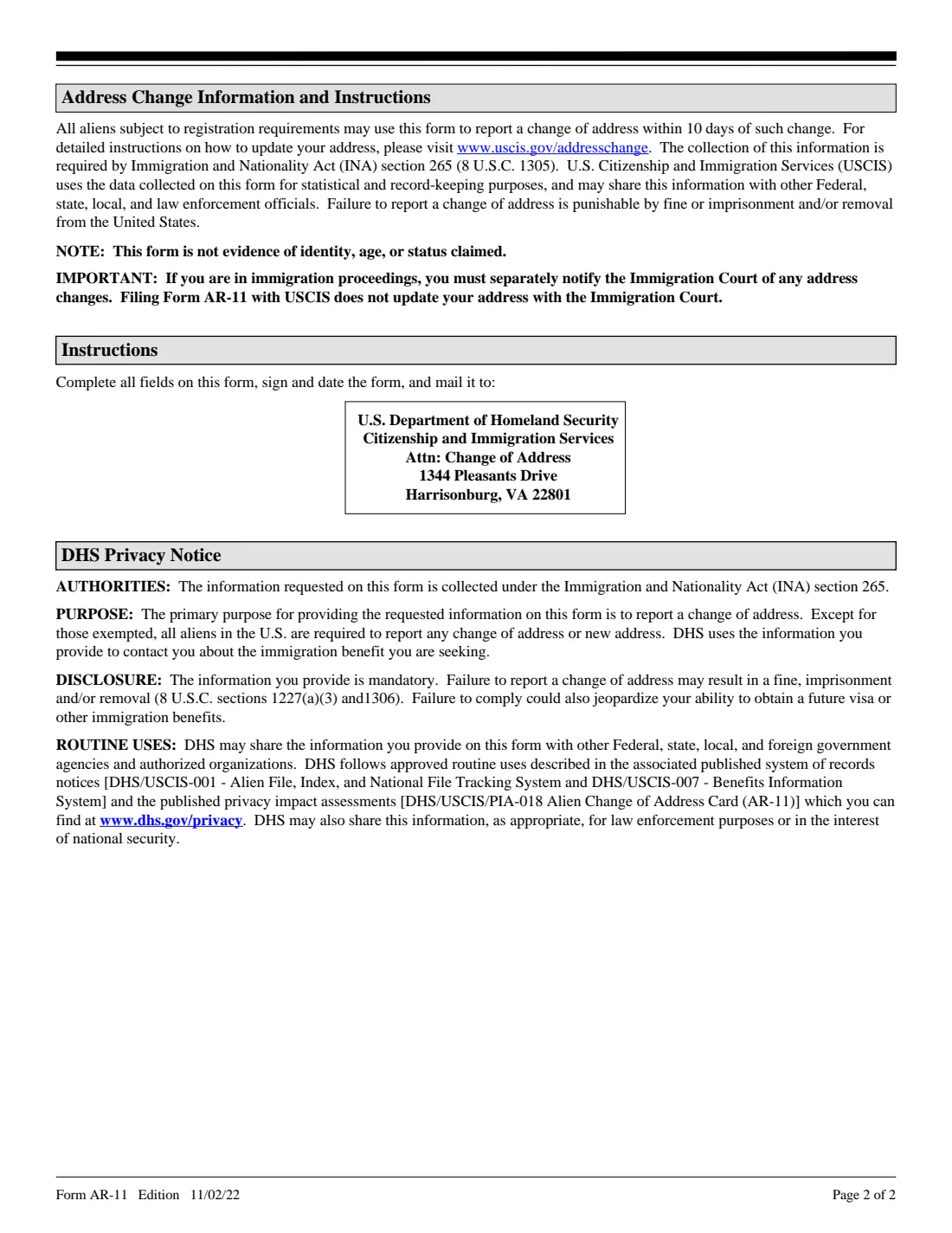
Print the form, sign it by hand in the "Your Signature" box and date it. For this edition, page 2 tells you to mail it to: U.S. Department of Homeland Security, Citizenship and Immigration Services, Attn: Change of Address, 1344 Pleasants Drive, Harrisonburg, VA 22801. Check the USCIS AR-11 page before you mail it in case the address has changed. The form notes it is not evidence of identity, age or status.
If you have pending USCIS applications or petitions, USCIS's online change-of-address service can also update them. If you are in immigration proceedings, filing the AR-11 does not update your address with the Immigration Court, so notify the court separately.
Keep a copy of what you mailed and when. FileIt saves the finished PDF in your vault, which is useful proof of when you reported your move. Fill out a new AR-11 every time you move.
Fill out Form AR-11 online with FileIt
- Pick the person. Choose someone from People and FileIt fills in their name, date of birth, address and other details it already knows.
- Answer plain-language questions. One part of the form at a time, with the official help text beside each question — 24 fields in all. Your answers save as you go.
- Check the live preview. Watch your answers land on the real U.S. Citizenship and Immigration Services (USCIS), Department of Homeland Security form, and let FileIt do any worksheet arithmetic.
- Generate the official PDF. FileIt prints your answers into the agency’s own PDF and files it in that person’s folder in your vault.
FileIt fills the form — it never files or submits anything for you. Deliver the finished form to whoever asked for it, the way the form’s instructions say.
Start Form AR-11 now — it’s freeForm AR-11: frequently asked questions
How long do I have to file Form AR-11 after moving?
Ten days. The form says aliens subject to registration requirements may use it to report a change of address within 10 days of the change.
Where do I mail Form AR-11?
To the address printed on page 2 of the form. For the 11/02/22 edition that is U.S. Department of Homeland Security, Citizenship and Immigration Services, Attn: Change of Address, 1344 Pleasants Drive, Harrisonburg, VA 22801. Check the USCIS AR-11 page for any change before mailing.
Can I change my address with USCIS online instead?
Yes. USCIS offers an online change-of-address service, which it recommends for most people and which can also update pending cases. The paper AR-11 is the mail option.
Can I sign Form AR-11 electronically?
No. The signature box on the fillable PDF states that the form can't be signed electronically and the name can't be typed in. Print it and sign by hand; the form will be rejected without a signature.
Does each family member need a separate AR-11?
Yes. The form has space for one person's name and A-Number, so each noncitizen who moved, including children, needs their own. A parent signs the child's name on a minor's form.
What happens if I don't report my change of address?
The form's privacy notice says failure to report may result in a fine, imprisonment and/or removal, and could affect your ability to get a future visa or other immigration benefits.
Does filing an AR-11 update my address with the Immigration Court?
No. If you are in immigration proceedings, you must separately notify the Immigration Court of any address change.
Can I fill out Form AR-11 online with FileIt?
Yes. FileIt lets you complete the AR-11 online, prints your answers onto the official USCIS PDF and saves it in your vault. You then print it, sign it by hand and mail it yourself; FileIt doesn't submit anything to USCIS.
Official sources
- Blank form (PDF), published by U.S. Citizenship and Immigration Services (USCIS), Department of Homeland Security: https://www.uscis.gov/sites/default/files/document/forms/ar-11.pdf
- Official instructions and guidance: https://www.uscis.gov/ar-11
- Edition shown on this page: Edition 11/02/22 (checked 2026-09-26).
FileIt is not affiliated with or endorsed by U.S. Citizenship and Immigration Services (USCIS), Department of Homeland Security or any government. This page explains the form in general terms and is not legal, tax or immigration advice. Always read the official instructions, and check that you are using the edition the recipient accepts. Page last reviewed 2026-09-26.