What is Form I-90?
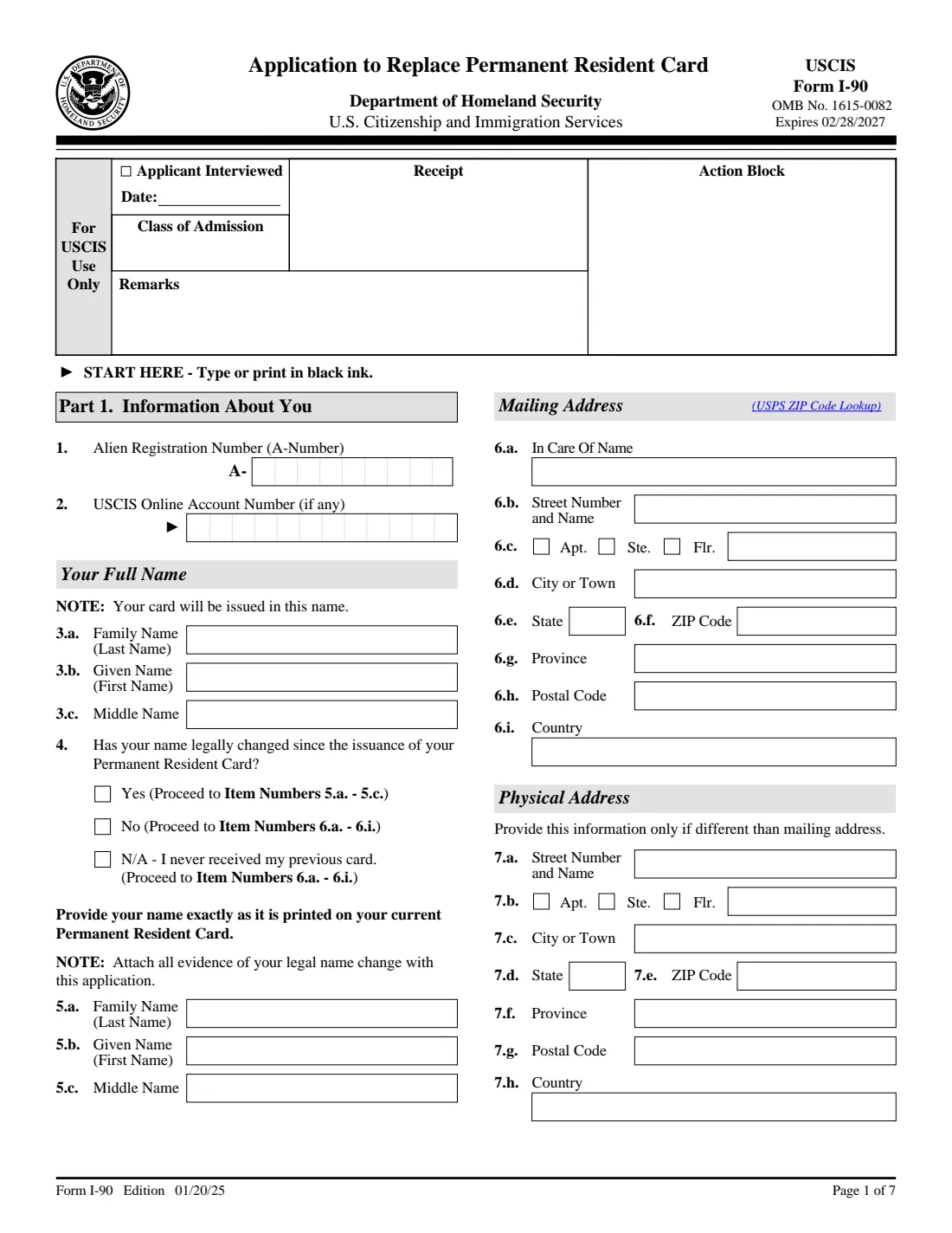
Form I-90, Application to Replace Permanent Resident Card, is how a lawful permanent resident asks U.S. Citizenship and Immigration Services (USCIS) for a new green card. People file it when their card is about to expire or has expired, when it was lost, stolen, destroyed or never arrived, when it carries wrong information, after a legal name change, at age 14 to register as required, or when moving into or out of commuter status. The current edition is dated 01/20/25 and runs to seven pages.
USCIS accepts Form I-90 online through a USCIS online account or on paper by mail. If you choose paper, you must use the current edition, keep every page, and sign in ink: USCIS does not accept a stamped or typed name in place of a signature. The filing fee and the mailing address are published on the USCIS Form I-90 page and in Form G-1055, and they can change, so check them just before you send the form.
FileIt guides you through every part of the paper form in plain English and prints your answers into the official USCIS PDF. It pre-fills your name, date of birth and email from the People records in your vault, only shows the questions that apply to your status and reason, and checks common mistakes, such as picking a reason that doesn't match your status. The finished PDF is saved to your vault. You print it, sign it by hand and mail it yourself; FileIt never files anything with USCIS.
- Who fills it
- The permanent resident (a parent or legal guardian may sign for an applicant under 14). An interpreter and a preparer complete their own parts if they helped.
- Given to
- U.S. Citizenship and Immigration Services (USCIS), online or by mail. See the Form I-90 page for the current filing address.
- When
- When your card is lost, stolen, damaged, wrong, out of date, or expires within six months; within 30 days after turning 14; or when taking up or leaving commuter status.
- Signatures
- The applicant signs Part 5 in ink. An interpreter (Part 6) and a preparer (Part 7) also sign in ink if used.
- Edition
- 01/20/25 (OMB No. 1615-0082, expires 02/28/2027)
- Agency
- U.S. Citizenship and Immigration Services (USCIS), Department of Homeland Security
Who needs to fill out Form I-90?
- Lawful permanent residents whose green card has expired or will expire within the next six months.
- Permanent residents whose card was lost, stolen or destroyed, or was mailed but never received.
- Anyone whose card is mutilated or shows wrong information, whether the mistake was made by DHS or not.
- Permanent residents who have legally changed their name or other biographic details since the card was issued.
- Children with a green card who have just turned 14 and must register and be fingerprinted within 30 days.
- Permanent residents taking up commuter status (living in Canada or Mexico and working in the U.S.), or commuters moving to the United States.
- Conditional permanent residents only for a lost, stolen, damaged, wrong or out-of-date card. If your two-year conditional card is expiring within 90 days, the form tells you not to file Form I-90.
When to use Form I-90
- Up to six months before your 10-year green card expires, or as soon as possible after it has expired (reason 2.f).
- As soon as you realize your card is lost, stolen or destroyed. If your card is about to expire and you plan to travel abroad, USCIS recommends applying for and receiving the new card before you leave.
- After a legal name change, such as marriage or divorce, once the change has been registered with the civil authority.
- Within 30 days after a child's 14th birthday, if the child's card was issued before age 14.
- Before you begin commuting from Canada or Mexico, or when a commuter moves to live in the United States.
What you need before you start
- Your current or most recent green card, or a copy, for your A-Number, class of admission code and the date you became a resident.
- Your USCIS Online Account Number, if you have one (only if you have a receipt number beginning with IOE).
- Your mailing address in the United States (USCIS only mails cards to a U.S. address) and your physical address if different.
- Your date and place of birth, your parents' first names, and your Social Security number if you have one.
- Where you applied for your immigrant visa or adjustment of status, and where it was issued or granted.
- Your height, weight in pounds, eye color and hair color.
- Evidence for your reason, such as the damaged card, a copy of a government photo ID, a registered marriage certificate or court order, or proof of employment for commuter status.
- The name and contact details of any interpreter or preparer who helped you.
What’s on Form I-90
The 2025 edition has 7 pages. FileIt asks for it in 9 parts:
- Part 1. Information about youApplicant
- Part 1. Additional information about youApplicant
- Part 2. Application typeApplicant
- Part 3. Processing informationApplicant
- Part 4. Accommodations for individuals with disabilities and/or impairmentsApplicant
- Part 5. Applicant's statement, contact information and signatureApplicant
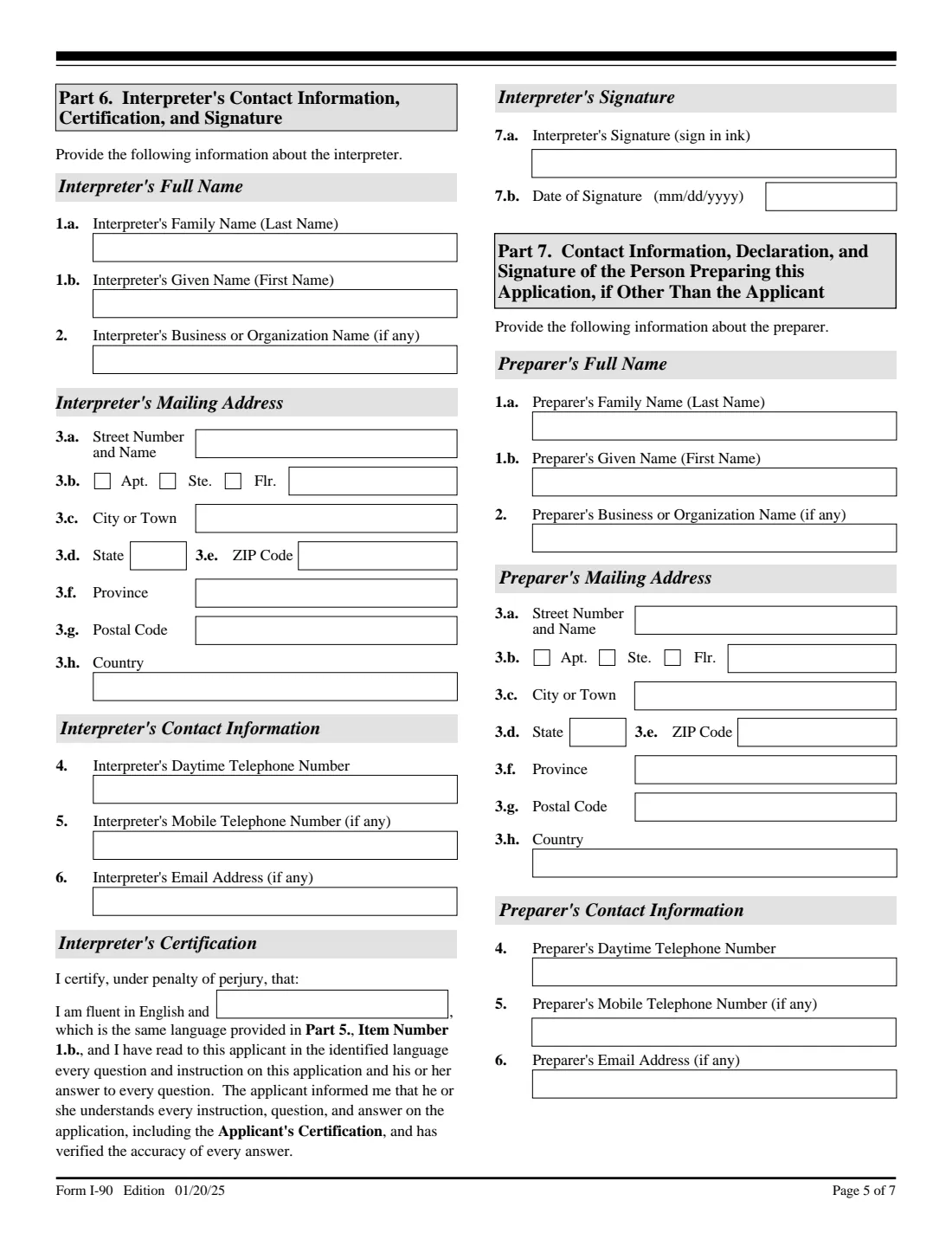
- Part 6. Interpreter's contact information, certification and signatureInterpreter
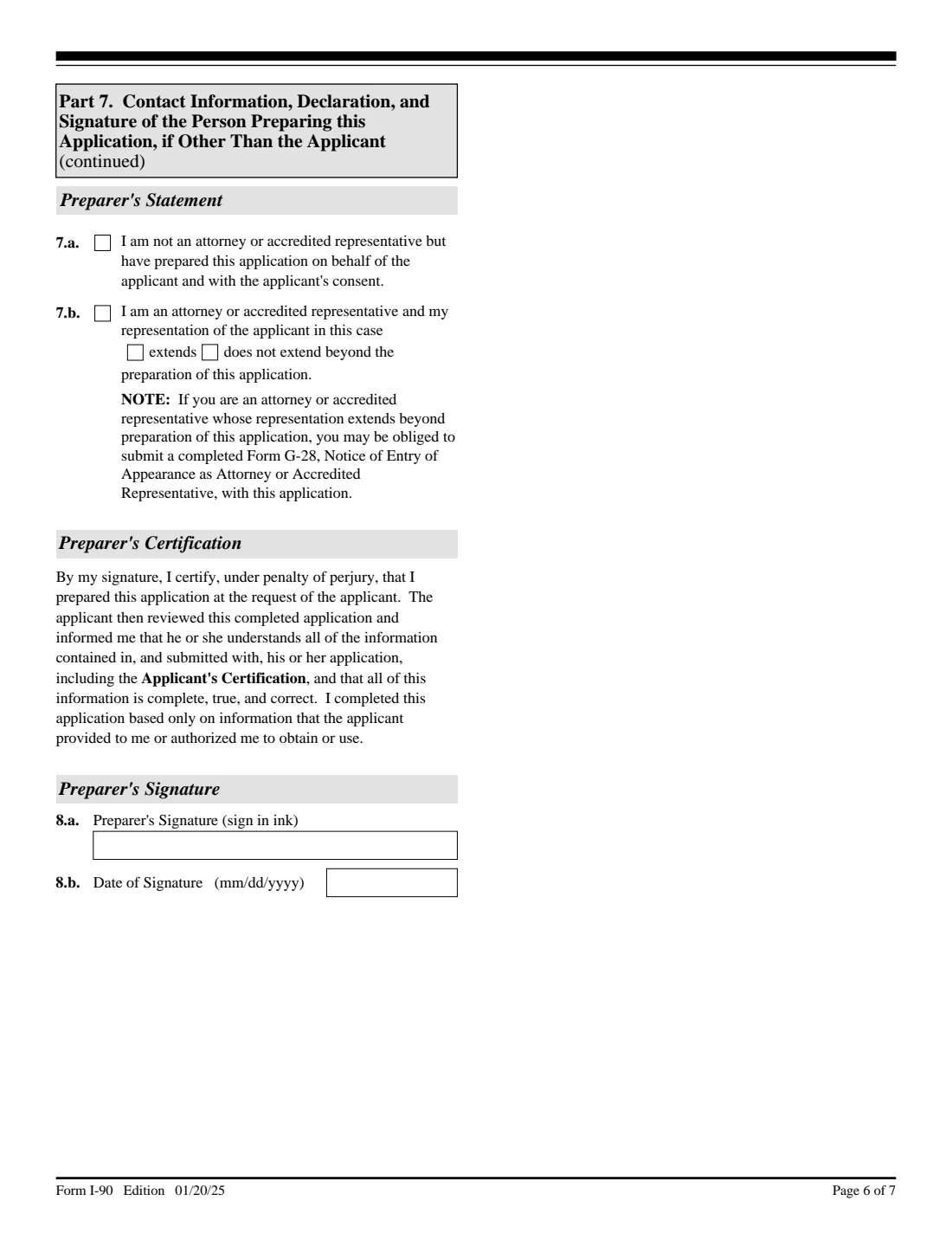
- Part 7. Person preparing this application, if other than the applicantPreparer
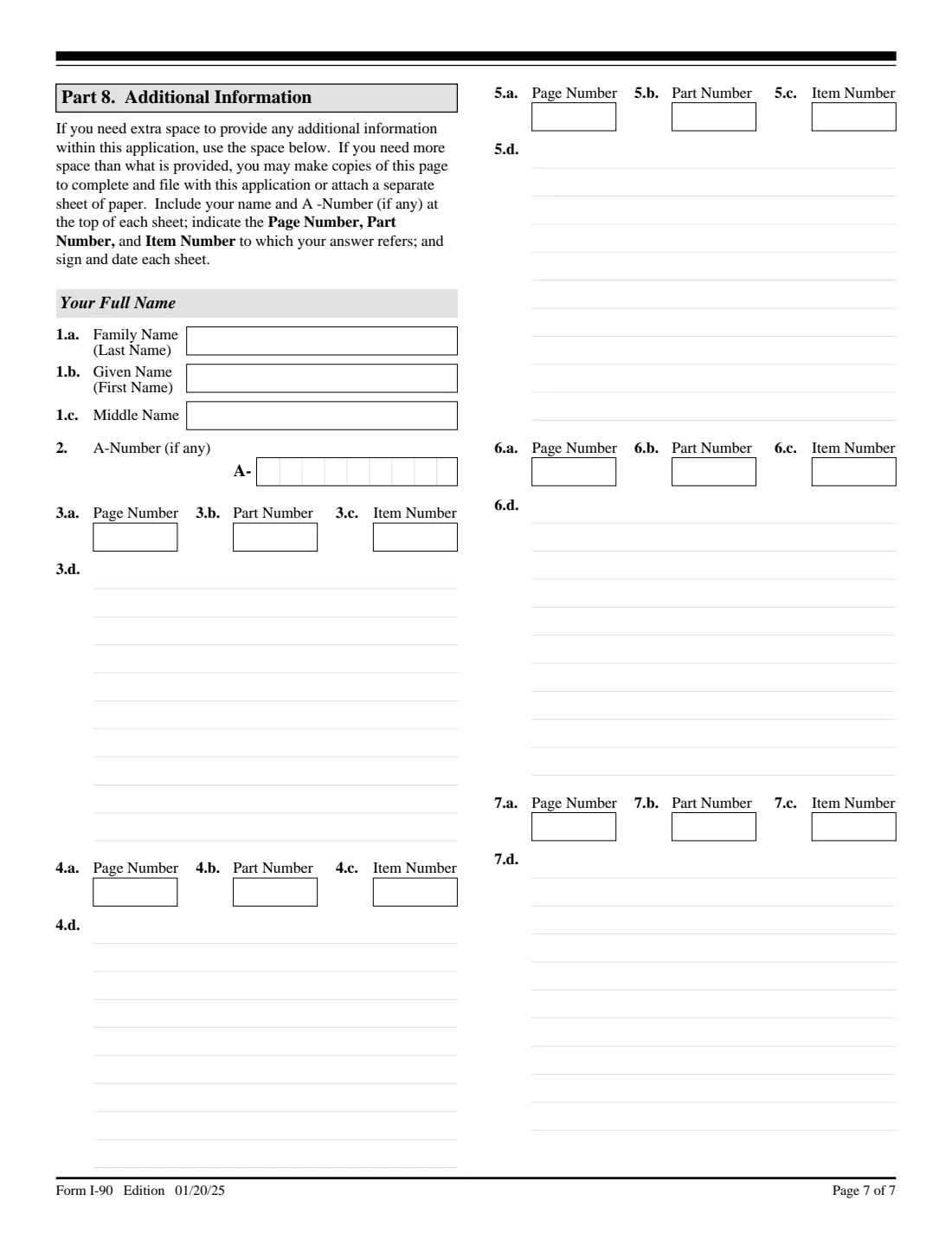
- Part 8. Additional informationApplicant
How to fill out Form I-90, step by step
1 Part 1. Information About You
Enter your A-Number (it starts with an A and appears on your card as the USCIS#), any USCIS Online Account Number, and your full name. Your new card is issued in the name you give here. If your name has legally changed since the card was issued, answer Yes to item 4 and give your name exactly as it is printed on the current card in items 5.a to 5.c.
Then give your mailing address and, if different, your physical address, followed by your sex, date and place of birth, your mother's and father's first names, your class of admission (the code on your card, such as IR1), the date you became a resident, and your Social Security number if you have one.
2 Part 2. Application Type
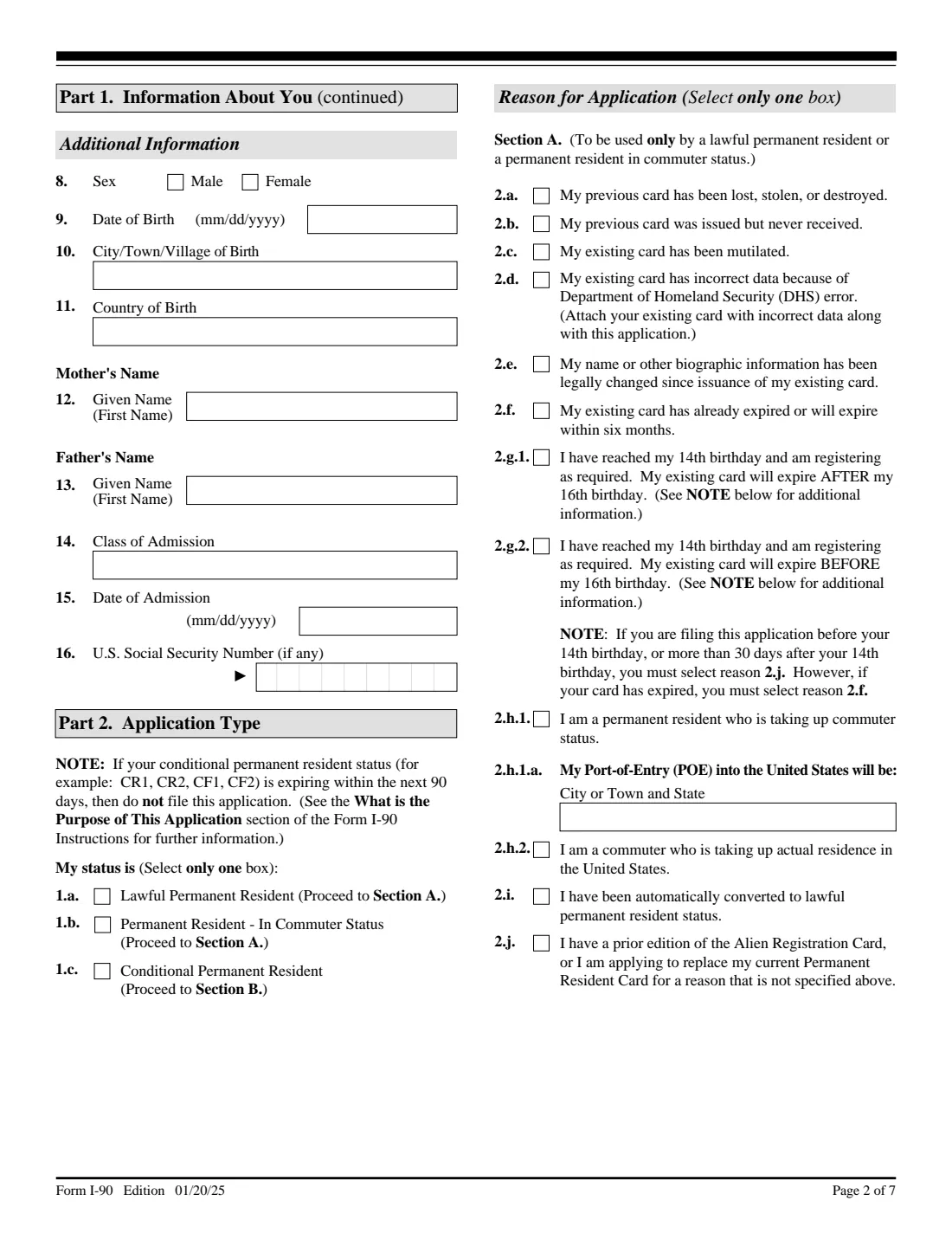
First choose your status: lawful permanent resident, permanent resident in commuter status, or conditional permanent resident. Residents and commuters then pick exactly one reason in Section A (2.a to 2.j); conditional residents pick one in Section B (3.a to 3.e).
The reasons have fine print. Choose 2.b (never received) only if the card was returned to USCIS as undeliverable; otherwise use 2.a. Reason 2.d is for errors made by DHS, and 2.e is for legal changes or errors that DHS did not cause. The age-14 reasons (2.g.1 and 2.g.2) apply only within 30 days after the 14th birthday. If you're taking up commuter status (2.h.1), name the port of entry where you'll pick up your card. FileIt shows only the section that matches your status.
3 Part 3. Processing Information
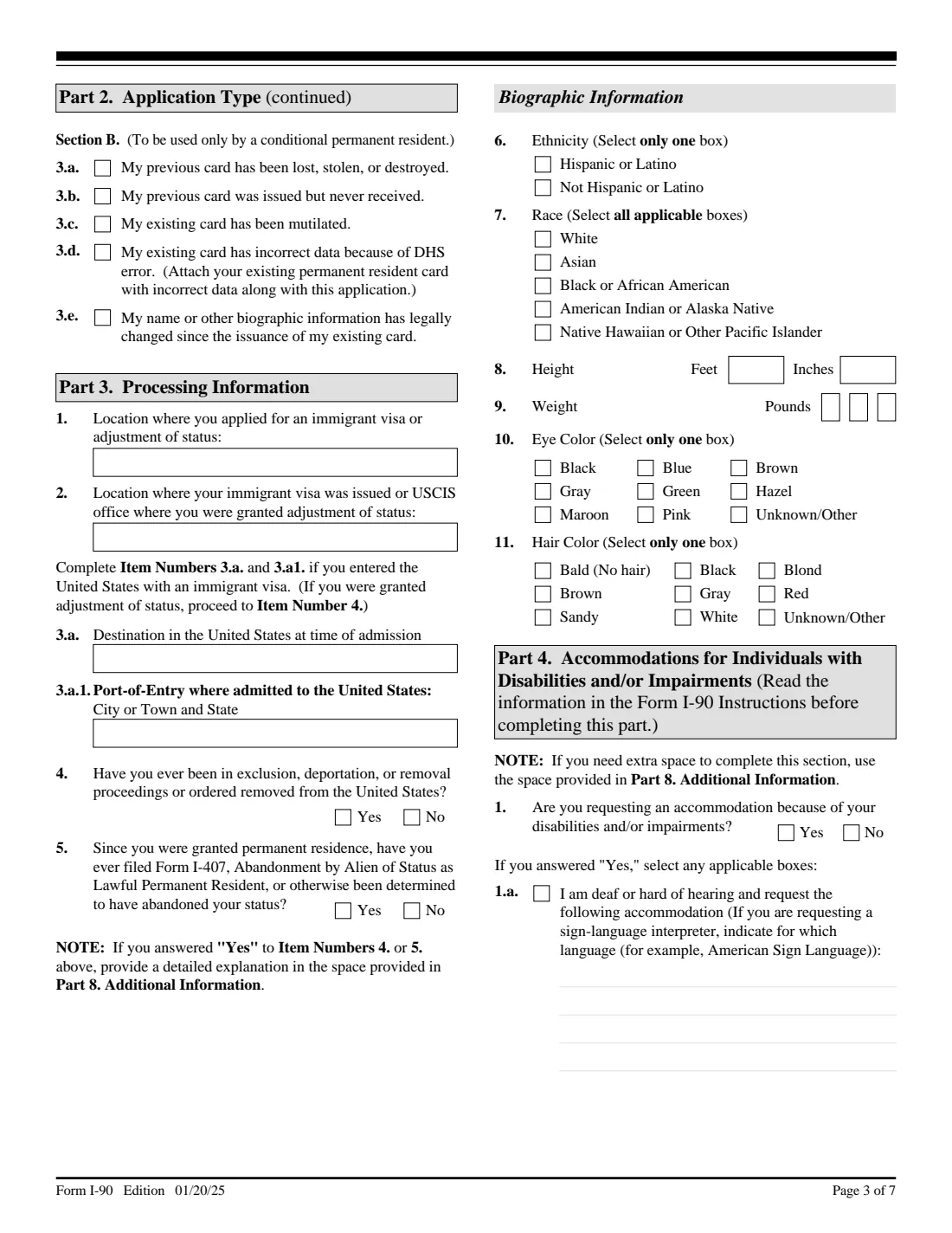
Say where you applied for your immigrant visa or adjustment of status and where it was issued or granted. If you entered the U.S. with an immigrant visa, add your destination and the port of entry where you were admitted. Answer whether you have ever been in exclusion, deportation or removal proceedings, and whether you have filed Form I-407 or been found to have abandoned your status. A Yes to either needs an explanation in Part 8.
The biographic section asks for ethnicity, race (select all that apply), height, weight in pounds, eye color and hair color. The weight has one box per digit, so FileIt asks for three digits, for example 095 for 95 pounds. The instructions say to enter 000 if you don't know your weight or it is under 30 or over 699 pounds.
4 Part 4. Accommodations for Individuals with Disabilities and/or Impairments
If you need an accommodation, for example at your biometrics appointment, answer Yes and tick the boxes that apply: deaf or hard of hearing (name the sign language if you need an interpreter), blind or low vision, or another disability or impairment. Describe what you need in the space next to each box, and continue in Part 8 if it doesn't fit.
5 Part 5. Applicant's Statement, Contact Information, Certification, and Signature
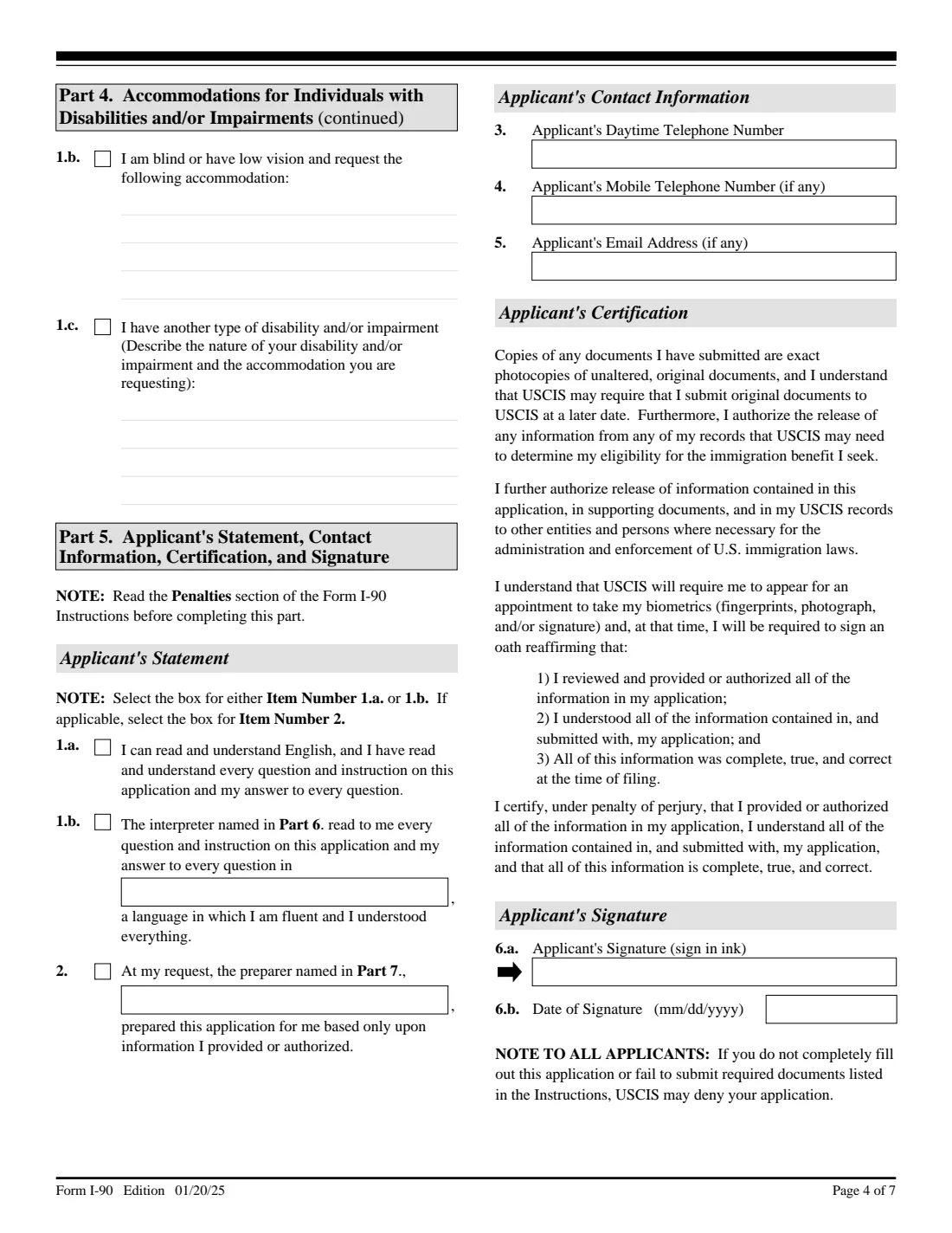
Tick 1.a if you read and understood the form in English, or 1.b if an interpreter read it to you, and name the language. Tick item 2 if a preparer filled it in for you. Give your daytime phone number, and your mobile number and email if you have them.
Read the certification before you sign. You sign item 6.a by hand in ink after printing; you can leave the date for when you sign. USCIS will also ask you to reaffirm your answers when you attend a biometrics appointment.
6 Part 6. Interpreter's Contact Information, Certification, and Signature
Only if someone interpreted the form for you. The interpreter gives their name, organization, mailing address and contact details, states the language (the same one you named in Part 5), and signs in ink.
7 Part 7. Contact Information, Declaration, and Signature of the Person Preparing this Application
Only if someone other than you prepared the form. The preparer gives their details, says whether they are an attorney or accredited representative, and, if so, whether their representation extends beyond preparing this form (in which case they may need to file Form G-28). The preparer signs in ink.
8 Part 8. Additional Information
Use this page for anything that doesn't fit elsewhere, such as an explanation of a Yes in Part 3 or extra port-of-entry details. For each answer, give the page, part and item number it belongs to. FileIt prints your name and A-Number at the top. Sign and date the page, and add more sheets if you need them.
Common mistakes to avoid
- Using an old edition or leaving out pages. USCIS asks for the current edition, with the edition date and page numbers visible on every page.
- Leaving out required basics. The USCIS page says it will reject the form if your family name, mailing address or date of birth is missing.
- Choosing reason 2.b (never received) when the card was delivered to your address and not returned to USCIS. Use 2.a instead.
- Filing under an age-14 reason more than 30 days after the birthday. Use 2.j, or 2.f if the card has expired.
- Filing Form I-90 when a conditional (two-year) card is about to expire. The form says not to file it if conditional status expires within 90 days.
- Typing your name in the signature box or using a stamp. Sign in ink by hand.
- Entering your weight in kilograms, or as two digits in the three weight boxes.
- Forgetting the evidence for your reason, such as the original card with the DHS error (2.d) or a registered name-change document (2.e).
After you fill it out
Print the PDF, check every page, and sign item 6.a of Part 5 in ink. If an interpreter or preparer helped, they sign their parts too. Put together the evidence the instructions list for your reason and the filing fee shown on the USCIS Form I-90 page, then mail the package to the address given there. FileIt does not submit the form for you. If you'd rather file online, you can use your answers as a guide in a USCIS online account.
USCIS will require you to attend a biometrics appointment (fingerprints, photo and signature), where you reaffirm your answers. Keep your receipt notice, and remember that you must tell USCIS within 10 days if you move, following the instructions on the USCIS change-of-address page.
Your completed Form I-90 stays in your FileIt vault under the person's folder, next to a scan of the old card and the evidence you sent. When the new card arrives, you can store it in the vault and set a reminder well before the new expiry date.
Fill out Form I-90 online with FileIt
- Pick the person. Choose someone from People and FileIt fills in their name, date of birth, address and other details it already knows.
- Answer plain-language questions. One part of the form at a time, with the official help text beside each question — 129 fields in all. Your answers save as you go.
- Check the live preview. Watch your answers land on the real U.S. Citizenship and Immigration Services (USCIS) form, and let FileIt do any worksheet arithmetic.
- Generate the official PDF. FileIt prints your answers into the agency’s own PDF and files it in that person’s folder in your vault.
FileIt fills the form — it never files or submits anything for you. Deliver the finished form to whoever asked for it, the way the form’s instructions say.
Start Form I-90 now — it’s freeForm I-90: frequently asked questions
Can I fill out Form I-90 online with FileIt?
Yes. FileIt walks you through each part of the paper Form I-90, shows only the questions that apply to you, and prints your answers into the official USCIS PDF. It is available on every FileIt account, including the free plan. You then print, sign and mail the form yourself.
Where do I send Form I-90?
USCIS publishes the current mailing address on its Form I-90 page (uscis.gov/i-90). You can also file online with a USCIS online account instead of mailing a paper form. FileIt never sends the form to USCIS for you.
How much does it cost to replace a green card?
The filing fee is set by USCIS and published on the Form I-90 page and in Form G-1055. Fees change from time to time, so check the USCIS page on the day you file.
Can I e-sign Form I-90?
Not for a paper filing. USCIS requires a handwritten signature in ink and will not accept a stamped or typed name. FileIt therefore doesn't place e-signature boxes on this form. Print it and sign by hand.
When should I renew my green card?
Reason 2.f covers a card that has already expired or will expire within six months, so you can file up to six months before the expiry date. If you plan to travel abroad, USCIS recommends receiving the new card before you leave.
Can I use Form I-90 if I have a two-year conditional green card?
Only to replace a conditional card that was lost, stolen, destroyed, never received, mutilated, wrong because of a DHS error, or out of date after a legal change (Section B). To remove conditions you file a different form, and the I-90 says not to file it if your conditional status expires within 90 days.
My name changed after I got married. Which reason do I pick?
Reason 2.e (or 3.e for conditional residents): your name or other biographic information has legally changed. Answer Yes to Part 1, item 4, give your name as printed on the current card, and attach the registered marriage certificate or court document.
What if my card has a mistake?
If DHS made the error, choose 2.d (or 3.d) and send the original card with the wrong data; a copy is not acceptable. If the error was not caused by DHS, choose 2.e (or 3.e) instead.
My child just turned 14. Do they need a new green card?
A permanent resident must register and be fingerprinted within 30 days after turning 14 if their card was issued before then. Use 2.g.1 or 2.g.2 depending on whether the card expires after or before the 16th birthday. After the 30 days, use 2.j, or 2.f if the card has expired.
Official sources
- Blank form (PDF), published by U.S. Citizenship and Immigration Services (USCIS): https://www.uscis.gov/sites/default/files/document/forms/i-90.pdf
- Official instructions and guidance: https://www.uscis.gov/i-90
- Edition shown on this page: 01/20/25 (OMB 1615-0082, expires 02/28/2027) (checked 2026-09-26).
FileIt is not affiliated with or endorsed by U.S. Citizenship and Immigration Services (USCIS) or any government. This page explains the form in general terms and is not legal, tax or immigration advice. Always read the official instructions, and check that you are using the edition the recipient accepts. Page last reviewed 2026-09-26.