What is Form 8822?
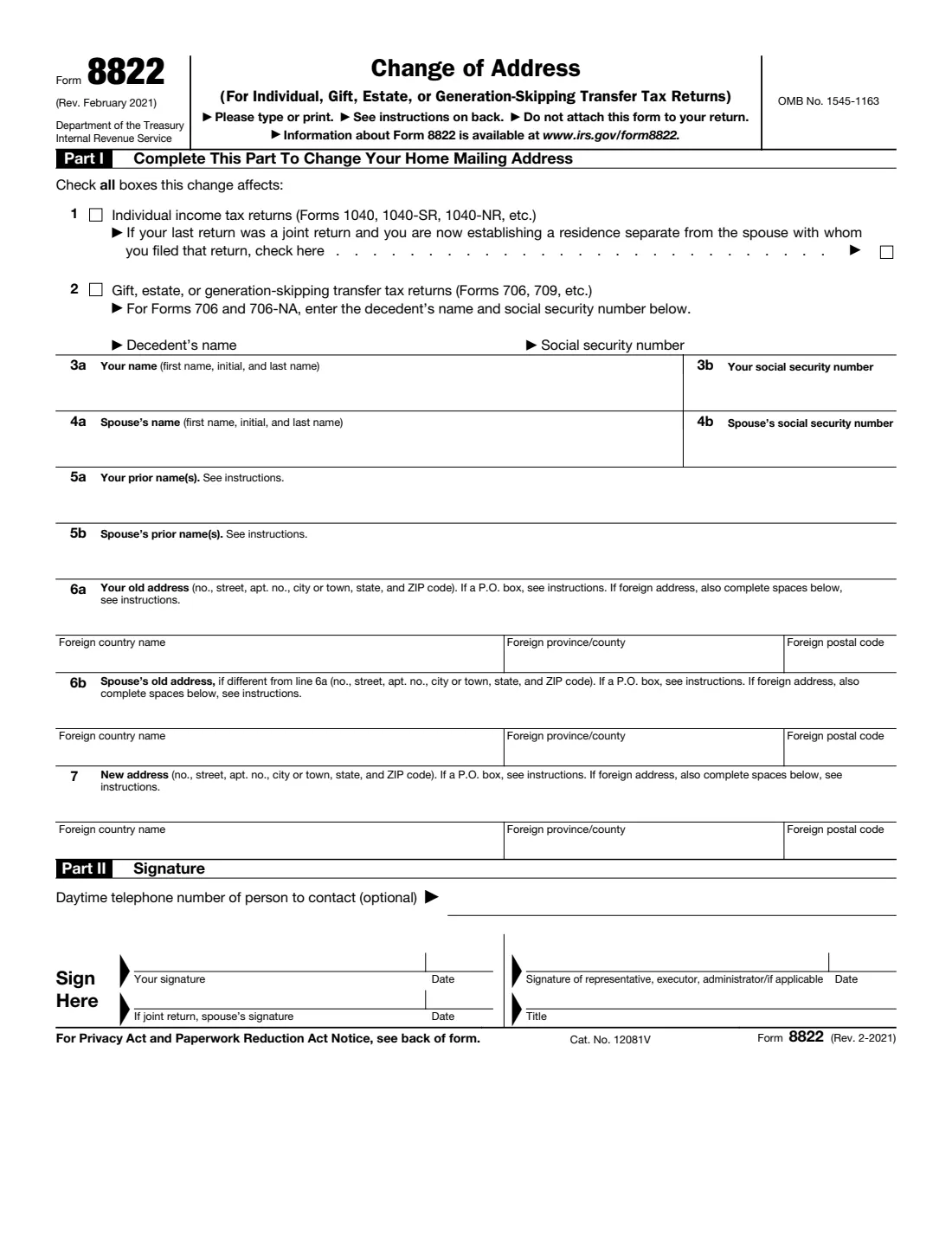
Form 8822, Change of Address, is how you notify the Internal Revenue Service that your home mailing address has changed. It covers individual income tax returns (Forms 1040, 1040-SR, 1040-NR and so on) and gift, estate or generation-skipping transfer tax returns (Forms 706, 709 and similar). The edition in use is Rev. February 2021. If you're changing a business address, the IRS uses a separate form, Form 8822-B.
Keeping your address current with the IRS matters more than it might seem. The form's own notice explains that if you don't give the IRS your current mailing address, you may not receive a notice of deficiency or a notice and demand for tax — and penalties and interest keep accruing even if the notice never reaches you. The form says it generally takes 4 to 6 weeks to process a change of address.
FileIt guides you through each line of Form 8822, pre-fills your name from the People records in your vault, builds each address line in the layout the form asks for (including foreign addresses), and prints everything into the IRS's official PDF. The finished PDF is saved in your vault folder. Because the IRS needs ink signatures on this paper form, you print it, sign it by hand and mail it yourself — FileIt never sends anything to the IRS.
- Who fills it
- The taxpayer (and spouse, if the last return was joint), an executor or donor, or an authorized representative.
- Sent to
- The IRS, by mail, at the address on page 2 that matches your old home address (or Kansas City if you checked line 2).
- When
- After you move, or whenever your home mailing address changes.
- Signatures
- Signed by hand. A joint-return spouse also signs, unless you're establishing a separate residence.
- Edition
- Rev. February 2021
- Agency
- Internal Revenue Service (IRS), Department of the Treasury
Who needs to fill out Form 8822?
- Individuals who have moved and want IRS mail, notices and refund checks sent to their new home address.
- Married couples who filed jointly and have moved together — one form covers both, with both spouses signing.
- A spouse who is setting up a separate home after filing a joint return, who checks the separate-residence box on line 1.
- Executors of an estate, or donors, who file gift, estate or generation-skipping transfer tax returns and need to update the mailing address for those returns.
- Parents of children who file their own income tax returns — each child needs a separate Form 8822.
- Authorized representatives acting under a power of attorney, who must attach a copy of it.
When to use Form 8822
- As soon as practical after a move, so the IRS has your new address before it sends any notices.
- When you start receiving mail in care of someone else, such as an accountant or attorney ("C/O" address).
- When your post office stops delivering to your street address and you switch to a P.O. box.
- When you change your name at the same time — line 5 records prior names, and the form reminds you to tell the Social Security Administration too.
- Before requesting an IRS transcript, if the address on your last return is out of date: transcripts are mailed only to your address of record.
What you need before you start
- Your full name and Social Security number (or ITIN).
- Your spouse's name and SSN, if your last return was a joint return.
- Any prior names you or your spouse used, if a name changed because of marriage, divorce or similar.
- Your old address exactly as the IRS has it — the one on your last return.
- Your spouse's old address, if it was different.
- Your complete new address, including apartment, room or suite number, and the full country name if it's abroad.
- For estate returns on Forms 706 or 706-NA: the decedent's name and Social Security number.
- If a representative is signing: a copy of the power of attorney (for example Form 2848) to attach.
What’s on Form 8822
The 2021 edition has 2 pages. FileIt asks for it in 6 parts:
- Part I: Which returns this change affectsTaxpayer
- Lines 3a and 5a: YouTaxpayer
- Line 6a: Your old addressTaxpayer
- Line 7: New addressTaxpayer
- Lines 4, 5b and 6b: Spouse (joint return)Taxpayer
- Part II: SignatureTaxpayer
How to fill out Form 8822, step by step
1 Part I, lines 1 and 2: Which returns the change affects
Check all boxes this change affects. Line 1 is for individual income tax returns (Forms 1040, 1040-SR, 1040-NR, etc.). Under it is a separate box for one situation: your last return was a joint return and you're now establishing a residence separate from the spouse you filed with. Checking it means your spouse doesn't need to sign.
Line 2 is for gift, estate or generation-skipping transfer tax returns (Forms 706, 709, etc.). For Forms 706 and 706-NA, also enter the decedent's name and Social Security number.
2 Lines 3 and 4: Your name and your spouse's
Enter your name (first name, initial and last name) and Social Security number on line 3. If your last return was a joint return, enter your spouse's name and SSN on line 4. Use the names and numbers that appear on your returns so the IRS can match its records.
3 Line 5: Prior names
If you or your spouse changed your name because of marriage, divorce or similar, list the prior name(s) on lines 5a and 5b. The instructions also ask you to tell the Social Security Administration about the new name, so its records match your tax return — this prevents delays in processing your return and issuing refunds.
4 Line 6: Old address
Line 6a is the old address: number, street, apartment number, city or town, state and ZIP code. Line 6b is only for your spouse's old address if it was different from yours. For a foreign address, also fill in the country name (not abbreviated), province or county, and postal code in the spaces below the line, following that country's practice for postal codes.
FileIt builds each address line for you from separate street, city, state and ZIP answers, and moves foreign details into the right boxes.
5 Line 7: New address
Enter your new home mailing address, including any apartment, room or suite number. Use a P.O. box only if your post office doesn't deliver mail to your street address. If your mail goes to someone else, such as an accountant or attorney, enter "C/O" followed by their name and street address or P.O. box.
6 Part II: Signature
Add a daytime phone number if you'd like the IRS to be able to reach you (it's optional). Then sign and date by hand. The taxpayer, executor, donor or an authorized representative must sign. If your last return was a joint return, your spouse must also sign unless you checked the separate-residence box on line 1.
A representative signs in the right-hand column and enters a title. The IRS will not complete an address change from an "unauthorized" third party, so a representative must attach a copy of the power of attorney — the form suggests Form 2848.
Common mistakes to avoid
- Using Form 8822 for a business address. A business changing its address or responsible party uses Form 8822-B.
- Forgetting your spouse's signature when your last return was joint and you are moving together.
- Leaving off the apartment or suite number — the form specifically asks you to include it.
- Abbreviating a foreign country name. The instructions ask you not to.
- Filing one form for the whole family. Each child who filed their own return needs a separate Form 8822.
- Attaching Form 8822 to your tax return. The form says not to — mail it separately.
- Mailing it to the wrong IRS address. The address depends on where your old home was and whether you checked line 2.
- Assuming the new address on another form updates your record. For example, a new address on Form 4868 does not change your IRS address.
After you fill it out
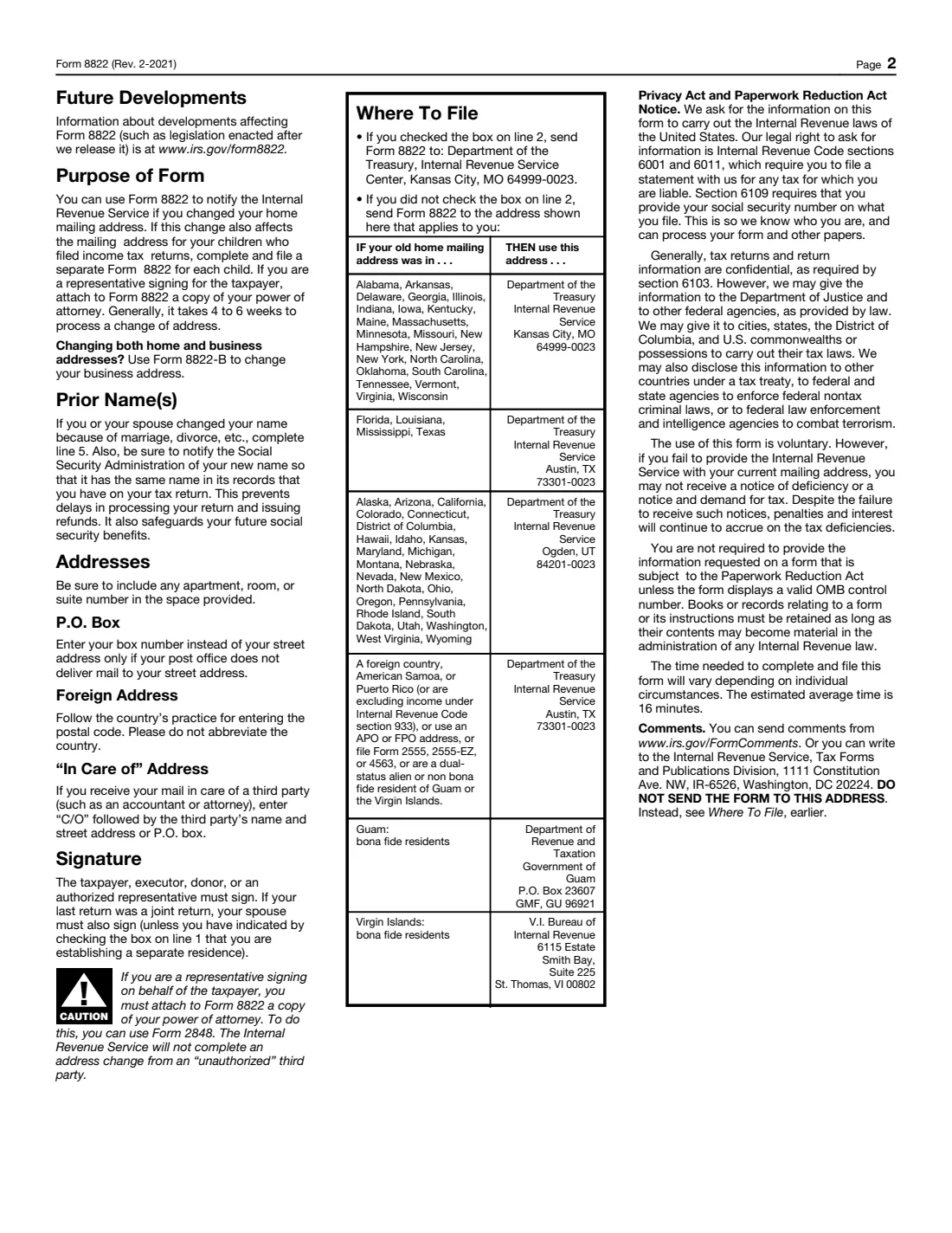
Print the PDF, sign and date it by hand (and have your spouse sign if required), then mail it. If you checked line 2, the form says to send it to the Department of the Treasury, Internal Revenue Service Center, Kansas City, MO 64999-0023. Otherwise use the address in the chart on page 2 that matches the state or place of your old home mailing address. Don't attach it to your tax return.
FileIt keeps a copy of the completed form in your vault folder. Keep a note of the date you mailed it: the form says a change of address generally takes 4 to 6 weeks to process, so watch for IRS mail at both addresses in the meantime, and consider forwarding mail from your old address.
If you also changed your name, tell the Social Security Administration. If you have a business, file Form 8822-B for the business address. And if you later move again, file a new Form 8822.
Fill out Form 8822 online with FileIt
- Pick the person. Choose someone from People and FileIt fills in their name, date of birth, address and other details it already knows.
- Answer plain-language questions. One part of the form at a time, with the official help text beside each question — 38 fields in all. Your answers save as you go.
- Check the live preview. Watch your answers land on the real Internal Revenue Service (IRS) form, and let FileIt do any worksheet arithmetic.
- Generate the official PDF. FileIt prints your answers into the agency’s own PDF and files it in that person’s folder in your vault.
FileIt fills the form — it never files or submits anything for you. Deliver the finished form to whoever asked for it, the way the form’s instructions say.
Start Form 8822 now — it’s freeForm 8822: frequently asked questions
Can I fill out Form 8822 online?
You can complete it online with FileIt: answer guided questions and your answers are printed into the official IRS PDF, saved in your vault. Filling forms is available on every FileIt account, including the free plan. The form itself is then printed, signed by hand and mailed.
Where do I mail Form 8822?
It depends on your old address. If you checked line 2 (gift, estate or GST returns), send it to the Internal Revenue Service Center in Kansas City, MO 64999-0023. Otherwise, page 2 of the form has a chart by state or place of your old home mailing address, pointing to Kansas City, Austin or Ogden, with separate entries for Guam and the U.S. Virgin Islands.
How long does an IRS change of address take?
The form says that generally it takes 4 to 6 weeks to process a change of address.
Do both spouses need to sign Form 8822?
If your last return was a joint return, your spouse must also sign — unless you checked the box on line 1 saying you're establishing a residence separate from that spouse.
What's the difference between Form 8822 and Form 8822-B?
Form 8822 changes the home mailing address for individual, gift, estate and generation-skipping transfer tax returns. Form 8822-B is for a business: a change of business mailing address, business location or responsible party.
Can I file Form 8822 for my children?
Yes, if they filed their own income tax returns — but the form says to complete and file a separate Form 8822 for each child.
Can someone else file Form 8822 for me?
An authorized representative can sign, but must attach a copy of the power of attorney, such as Form 2848. The IRS won't complete an address change from an unauthorized third party.
Should I attach Form 8822 to my tax return?
No. The form says "Do not attach this form to your return." Mail it on its own to the address from the chart on page 2.
Official sources
- Blank form (PDF), published by Internal Revenue Service (IRS): https://www.irs.gov/pub/irs-pdf/f8822.pdf
- Official instructions and guidance: https://www.irs.gov/forms-pubs/about-form-8822
- Edition shown on this page: Rev. February 2021 (checked 2026-09-26).
FileIt is not affiliated with or endorsed by Internal Revenue Service (IRS) or any government. This page explains the form in general terms and is not legal, tax or immigration advice. Always read the official instructions, and check that you are using the edition the recipient accepts. Page last reviewed 2026-09-26.