What is Form 4506-T?
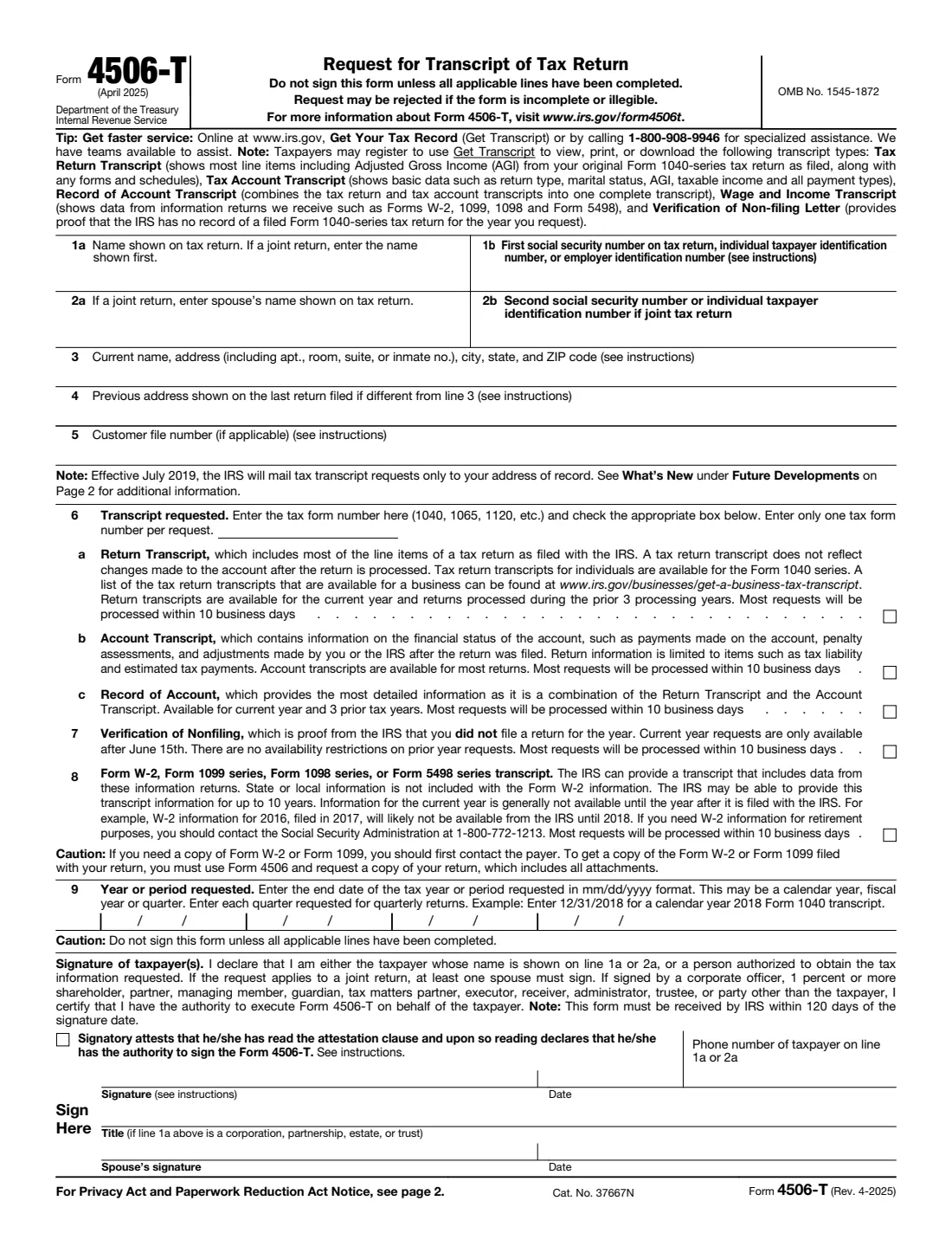
Form 4506-T, Request for Transcript of Tax Return, asks the Internal Revenue Service for a transcript: a printout of tax information the IRS holds for you. Lenders, schools, financial aid offices and others often ask for one to verify income, and you may want one yourself to check what was filed or paid. The form covers five products — a Return Transcript, an Account Transcript, a Record of Account, a Verification of Nonfiling, and a Form W-2, 1099, 1098 or 5498 series transcript. The current edition is Rev. April 2025.
A transcript is not a copy of your return. For a full copy with all attachments, the IRS uses a different form, Form 4506. Transcripts are also partly masked to protect your privacy — they show only partial personal information, such as the last four digits of an SSN, but full financial figures like wages and taxable income. Since July 2019 the IRS mails transcripts requested on this form only to the taxpayer's address of record, not to a third party.
FileIt walks you through each line in plain language, pre-fills your name from the People records in your vault, splits each requested period into the month, day and year boxes the form uses, and prints everything into the IRS's official PDF, saved in your vault. You then print, check the attestation box, sign by hand and mail or fax it yourself — FileIt never submits anything to the IRS. The form's own tip is worth knowing: individuals can often get transcripts faster online through Get Transcript at www.irs.gov.
- Who fills it
- The taxpayer on line 1a or 2a, or a person authorized to obtain the information (such as a corporate officer or executor).
- Sent to
- The IRS RAIVS team, by mail or fax, at the address for the state you lived in when the return was filed (charts on page 2).
- When
- Whenever you need a transcript. The IRS must receive it within 120 days of the signature date.
- Signatures
- Signed by hand by the taxpayer; for a joint return one spouse is enough. The attestation box must be checked.
- Edition
- Rev. April 2025
- Agency
- Internal Revenue Service (IRS), Department of the Treasury
Who needs to fill out Form 4506-T?
- People applying for a mortgage, loan or student financial aid who are asked to show past income.
- Anyone who needs proof that they did not file a return for a year (a Verification of Nonfiling).
- Taxpayers who have lost W-2 or 1099 information and want the data the IRS received from employers and payers.
- People checking their account for payments, penalties or adjustments made after a return was filed.
- Fiscal-year taxpayers, who the form says must use Form 4506-T to request a return transcript.
- Businesses, partnerships, estates and trusts requesting transcripts, signed by someone with authority.
When to use Form 4506-T
- When a lender, school or agency asks you for an IRS tax transcript and you can't or don't want to use the online Get Transcript tool.
- When you need a transcript for a business return or a fiscal-year return.
- When you need wage and income data and the payer can't give you a copy of your W-2 or 1099.
- Right after completing all lines — the form warns not to sign it until everything applicable is filled in, and the IRS must receive it within 120 days of signing.
- After updating your address with the IRS if you've moved, because transcripts are mailed only to your address of record.
What you need before you start
- The name exactly as shown on the return (for a joint return, the name shown first and the spouse's name).
- The first SSN, ITIN or EIN on the return, and the second SSN or ITIN if it was a joint return.
- Your current address, and the address on the last return you filed if it's different.
- The tax form number the transcript is for (for example 1040, 1065 or 1120).
- Which transcript you need — or, if you aren't sure, the IRS suggests the Record of Account.
- The end date of each tax year or period you're asking for (for example 12/31/2024 for calendar year 2024).
- A phone number where you can be reached.
- For an entity or representative: the authorization document or Form 2848 to attach.
What’s on Form 4506-T
The 2025 edition has 2 pages. FileIt asks for it in 5 parts:
- Lines 1–2: Taxpayer on the returnTaxpayer
- Lines 3–5: Addresses and customer file numberTaxpayer
- Lines 6–8: Transcript requestedTaxpayer
- Line 9: Year or period requestedTaxpayer
- SignatureTaxpayer
How to fill out Form 4506-T, step by step
1 Lines 1a–2b: Names and taxpayer identification numbers
Line 1a is the name shown on the tax return; for a joint return, the name shown first. Line 1b is the first Social Security number, individual taxpayer identification number, or — for a business return — the employer identification number. For a Form 1040 that includes Schedule C, the instructions say to enter your SSN.
For a joint return, enter the spouse's name on line 2a and the second SSN or ITIN on line 2b.
2 Line 3: Current name and address
Enter your current name and address, including any apartment, room or suite number, city, state and ZIP code. If you use a P.O. box, include it here. If you are incarcerated, include your inmate identification number.
3 Line 4: Previous address
Only if the address on the last return you filed is different from line 3. The instructions add that if the addresses differ and you haven't told the IRS about the move, you should file Form 8822, Change of Address (or Form 8822-B for a business). This matters because the IRS mails transcripts only to your address of record.
4 Line 5: Customer file number
Optional. You can enter up to 10 numeric characters, which will print on the transcript — useful for matching a transcript to a loan file. It must not contain an SSN: if you use an SSN, a name, or a combination, the IRS prints the generic entry 9999999999 instead.
5 Line 6: Transcript requested (6a, 6b, 6c)
Enter one tax form number and check one box. A Return Transcript (6a) shows most line items of the return as filed, but not changes made after processing; for individuals it covers the Form 1040 series, for the current year and returns processed in the prior 3 processing years. An Account Transcript (6b) shows the financial status of the account: payments, penalty assessments and adjustments. A Record of Account (6c) combines both and is the most detailed, available for the current year and 3 prior tax years.
The form states most requests are processed within 10 business days. Enter only one tax form number per request — use another Form 4506-T for a different form number.
6 Line 7: Verification of Nonfiling
Proof from the IRS that you did not file a return for the year. Current-year requests are only available after June 15th; there's no restriction on prior-year requests.
7 Line 8: Form W-2, 1099, 1098 or 5498 series transcript
Data from information returns the IRS received, available for up to 10 years. State or local information isn't included with W-2 data, and current-year information generally isn't available until the year after it is filed with the IRS. If you need W-2 information for retirement purposes, the form points you to the Social Security Administration.
8 Line 9: Year or period requested
Enter the end date of each tax year or period in mm/dd/yyyy format — calendar year, fiscal year or quarter. For quarterly returns, enter each quarter separately. There's room for four periods. FileIt takes normal dates and prints them into the month, day and year boxes.
9 Signature
Check the attestation box — the instructions warn that the form will not be processed if it is unchecked — add the taxpayer's phone number, then sign and date by hand. Sign exactly as your name appeared on the original return; if you've changed your name, also sign your current name. For a joint return only one spouse needs to sign.
If line 1a is a corporation, partnership, estate or trust, the signer enters a title. A representative can sign only if the taxpayer delegated this authority on Form 2848, line 5, with that Form 2848 attached.
Common mistakes to avoid
- Signing before every applicable line is complete. The form warns it may be rejected if incomplete or illegible.
- Leaving the attestation box unchecked — the IRS won't process the form without it.
- Asking for more than one tax form number on a single request. Use a separate Form 4506-T for each form number.
- Entering a tax year instead of the end date of the period. Use the format 12/31/2024, not "2024".
- Using an SSN or name as the customer file number, which the IRS replaces with 9999999999.
- Waiting too long to send it. The IRS must receive it within 120 days of the signature date.
- Expecting the transcript to go to your lender. Since July 2019 transcripts requested this way are mailed only to your address of record.
- Using Form 4506-T when you need a full copy of your return, which requires Form 4506.
After you fill it out
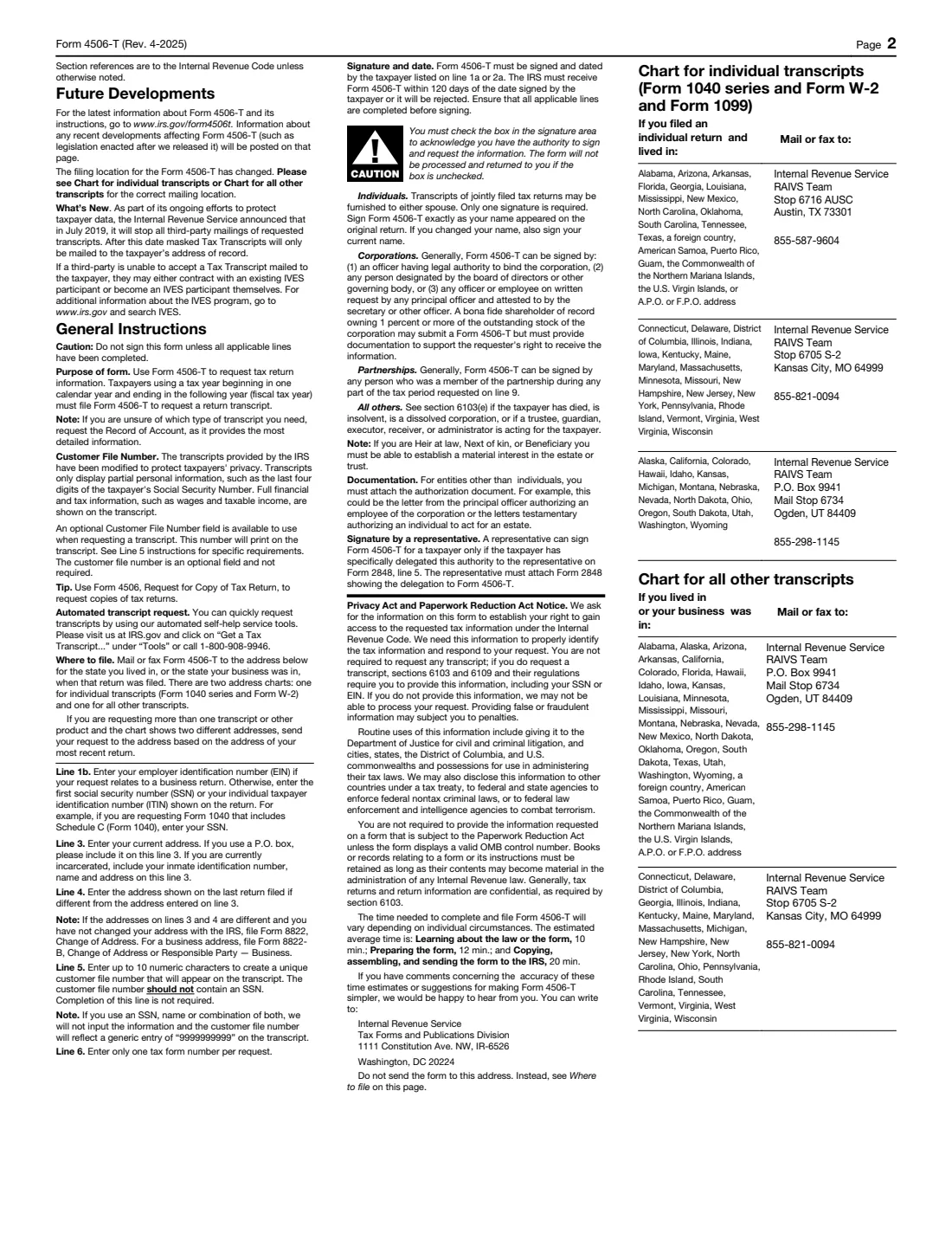
Print the PDF, check the attestation box if you haven't, sign and date it by hand, and send it by mail or fax. Page 2 has two charts: one for individual transcripts (Form 1040 series, W-2 and 1099) and one for all other transcripts. Each gives the RAIVS team's mailing address and fax number for groups of states, based on where you lived (or where your business was) when the return was filed. If you're requesting several transcripts and the chart points to different addresses, use the address based on your most recent return.
FileIt keeps a copy of the completed form in your vault folder. Note the date you signed it, because the IRS must receive it within 120 days. Most requests are processed within 10 business days, according to the form, and the transcript arrives by mail at your address of record.
When the transcript arrives, store it in your vault alongside the return it relates to. If it was for a lender or school, send them the transcript yourself or follow their instructions.
Fill out Form 4506-T online with FileIt
- Pick the person. Choose someone from People and FileIt fills in their name, date of birth, address and other details it already knows.
- Answer plain-language questions. One part of the form at a time, with the official help text beside each question — 24 fields in all. Your answers save as you go.
- Check the live preview. Watch your answers land on the real Internal Revenue Service (IRS) form, and let FileIt do any worksheet arithmetic.
- Generate the official PDF. FileIt prints your answers into the agency’s own PDF and files it in that person’s folder in your vault.
FileIt fills the form — it never files or submits anything for you. Deliver the finished form to whoever asked for it, the way the form’s instructions say.
Start Form 4506-T now — it’s freeForm 4506-T: frequently asked questions
Can I fill out Form 4506-T online?
You can complete it online with FileIt: answer guided questions and the answers are printed into the official IRS PDF, saved in your vault. Filling forms is available on every FileIt account, including the free plan. You then print it, sign it by hand and mail or fax it to the IRS.
Where do I send Form 4506-T?
Mail or fax it to the IRS RAIVS team address in the chart on page 2 for the state you lived in, or the state your business was in, when the return was filed. There's one chart for individual transcripts and another for all other transcripts, each with the fax number for that office.
How long does it take to get a transcript with Form 4506-T?
For each product the form states that most requests will be processed within 10 business days. The transcript is then mailed to your address of record.
Which transcript should I request?
If you aren't sure, the IRS says to request the Record of Account, because it combines the Return Transcript and the Account Transcript and is the most detailed. Lenders often ask specifically for a Return Transcript, so check what they need.
Can I get my transcript faster than by mail?
The form's own tip says individuals can get faster service online at www.irs.gov with Get Your Tax Record (Get Transcript), or by calling 1-800-908-9946.
Can the IRS send my transcript directly to my lender?
Not with this form. Since July 2019 the IRS mails transcripts requested on Form 4506-T only to the taxpayer's address of record. The form notes that third parties can use the IRS's IVES program instead.
What's the difference between Form 4506-T and Form 4506?
Form 4506-T requests a transcript — a summary of tax information. Form 4506 requests an actual copy of your tax return, including all attachments such as the W-2s you filed with it.
Does my spouse need to sign for a joint return?
No. The instructions say transcripts of jointly filed returns may be furnished to either spouse and only one signature is required.
What is a Verification of Nonfiling letter?
It's proof from the IRS that it has no record of a filed Form 1040-series return for the year you ask about. Request it on line 7. Current-year requests are only available after June 15th.
Official sources
- Blank form (PDF), published by Internal Revenue Service (IRS): https://www.irs.gov/pub/irs-pdf/f4506t.pdf
- Official instructions and guidance: https://www.irs.gov/forms-pubs/about-form-4506-t
- Edition shown on this page: Rev. April 2025 (checked 2026-09-26).
FileIt is not affiliated with or endorsed by Internal Revenue Service (IRS) or any government. This page explains the form in general terms and is not legal, tax or immigration advice. Always read the official instructions, and check that you are using the edition the recipient accepts. Page last reviewed 2026-09-26.