What is Form 4852?
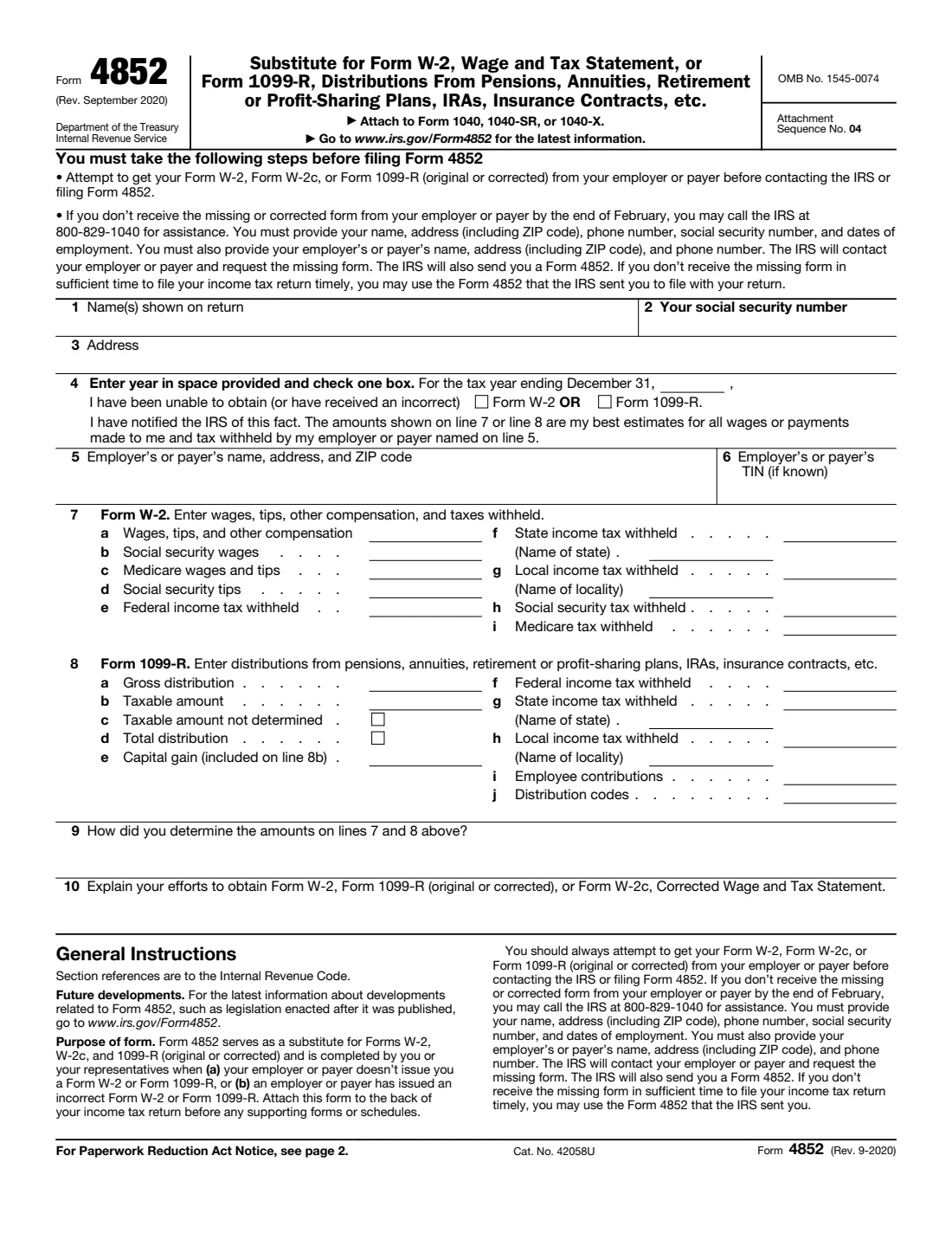
Form 4852 is a substitute for Forms W-2, W-2c and 1099-R. You (or your representative) complete it when an employer doesn't issue you a Form W-2, a payer doesn't issue a Form 1099-R for a pension, annuity, IRA or similar distribution, or the form you received is wrong. On it you give your best estimates of what you were paid and what was withheld, and explain how you worked them out and what you did to get the real form. The current edition is Rev. September 2020.
It's a last resort. The form says to first try to get the missing or corrected form from your employer or payer, and if it hasn't arrived by the end of February, to call the IRS for help; the IRS then contacts the employer or payer and sends you a Form 4852. If the real form still doesn't arrive in time to file, you attach Form 4852 to your Form 1040, 1040-SR or 1040-X.
FileIt shows only the part that applies (line 7 for a W-2, line 8 for a 1099-R), checks the amounts against the instructions, and prints everything into the IRS's official PDF, saved in your vault. You attach it to your return yourself; FileIt never files anything with the IRS.
- Who fills it
- Employees and retirement-plan or IRA recipients whose W-2 or 1099-R is missing or wrong.
- Filed with
- Your Form 1040, 1040-SR or 1040-X, attached to the back of the return before any supporting forms or schedules.
- One form per
- Employer or payer, for one tax year.
- Signatures
- None on this revision; the return it's attached to is signed.
- Edition
- Rev. September 2020
- Agency
- Internal Revenue Service (IRS), Department of the Treasury
Who needs to fill out Form 4852?
- Employees whose employer didn't send a Form W-2, for example because the business closed or stopped responding.
- Employees whose Form W-2 is wrong and whose employer won't issue a corrected Form W-2c in time.
- People who received a pension, annuity, retirement plan, IRA or insurance contract distribution but no (or an incorrect) Form 1099-R.
When to use Form 4852
- After you've asked the employer or payer for the form and, if it hadn't arrived by the end of February, contacted the IRS for help.
- When the filing deadline is near and the missing or corrected form still hasn't arrived.
- Not instead of waiting a reasonable time: the instructions list penalties for improper use, including accuracy-related and civil fraud penalties and a $5,000 penalty for a frivolous submission.
What you need before you start
- Your name, Social Security number and current address.
- The tax year and which form is missing or incorrect.
- The employer's or payer's name, address and, if you know it, its EIN (last year's W-2 or 1099-R shows it if they're the same).
- Your final pay stub for the year (for a W-2), or a distribution statement from the plan trustee (for a 1099-R).
- A note of how you estimated the amounts and every attempt you made to get the form.
What’s on Form 4852
The 2020 edition has 2 pages. FileIt asks for it in 6 parts:
- Lines 1 to 3: YouTaxpayer
- Line 4: The missing or incorrect formTaxpayer
- Lines 5 and 6: Employer or payerTaxpayer
- Line 7: Form W-2 amountsTaxpayer
- Line 8: Form 1099-R amountsTaxpayer
- Lines 9 and 10: ExplanationsTaxpayer
How to fill out Form 4852, step by step
1 Lines 1 to 3: You
Enter the name(s) shown on your return, your Social Security number and your current address.
2 Line 4: Year and form
Enter the tax year and tick Form W-2 or Form 1099-R. By completing this line you state that you've been unable to get a correct form, that you've notified the IRS, and that the amounts are your best estimates.
3 Lines 5 and 6: Employer or payer
Enter their name, address and ZIP code, and their taxpayer identification number if you know it. If you don't know the EIN but know another TIN for them, such as an SSN, you may enter that.
4 Line 7: Form W-2 amounts
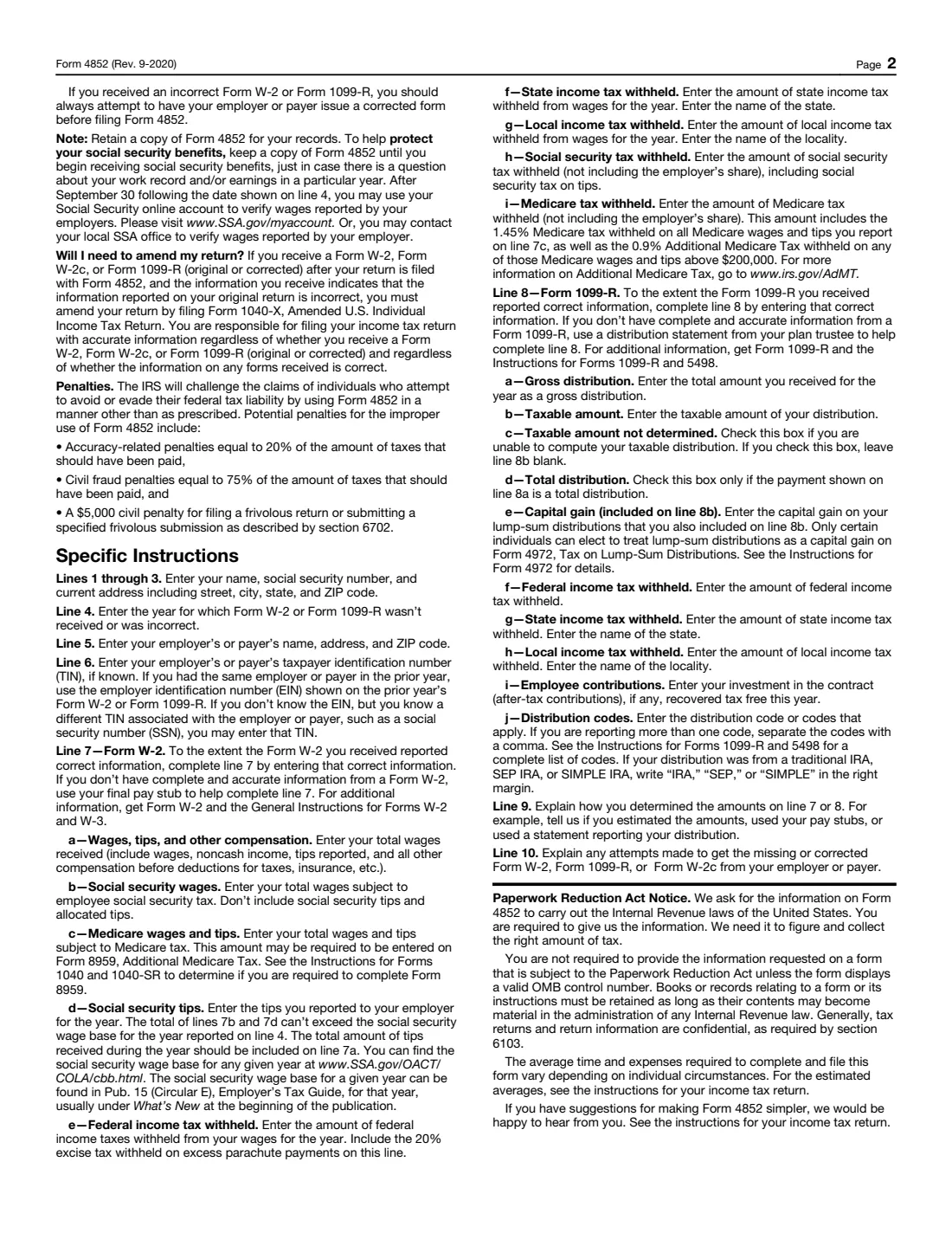
Enter wages, tips and other compensation; social security and Medicare wages; social security tips; and federal, state, local, social security and Medicare tax withheld. Use correct figures from the W-2 you received, or your final pay stub. Social security and Medicare tax withheld are your share only, not the employer's.
5 Line 8: Form 1099-R amounts
Enter the gross distribution, the taxable amount (or tick 8c if you can't work it out, leaving 8b blank), whether it was a total distribution, any capital gain included in 8b, tax withheld, employee contributions recovered tax free, and the distribution codes. For a traditional, SEP or SIMPLE IRA, the instructions ask you to note IRA, SEP or SIMPLE beside the codes.
6 Lines 9 and 10: Explanations
Explain how you determined the amounts (estimates, pay stubs, a distribution statement) and the efforts you made to get the missing or corrected form.
Common mistakes to avoid
- Filing Form 4852 before trying to get the real form from your employer or payer and, if needed, contacting the IRS.
- Filling in both line 7 and line 8 on one form. Each Form 4852 covers one W-2 or one 1099-R.
- Entering a taxable amount on line 8b after ticking 8c (taxable amount not determined).
- Including the employer's share of social security or Medicare tax on lines 7h and 7i.
- Forgetting to amend: if the real W-2, W-2c or 1099-R arrives later and differs, you must file Form 1040-X.
After you fill it out
Attach Form 4852 to the back of your Form 1040, 1040-SR or 1040-X, before any supporting forms or schedules, and file the return as usual. FileIt keeps a copy in your vault.
Keep a copy until you start receiving Social Security benefits, the form suggests, in case there's a question about your earnings record. After September 30 following the tax year, you can check the wages your employers reported in your Social Security online account.
If you later receive a Form W-2, W-2c or 1099-R showing that your return was wrong, file Form 1040-X to amend it.
Fill out Form 4852 online with FileIt
- Pick the person. Choose someone from People and FileIt fills in their name, date of birth, address and other details it already knows.
- Answer plain-language questions. One part of the form at a time, with the official help text beside each question — 40 fields in all. Your answers save as you go.
- Check the live preview. Watch your answers land on the real Internal Revenue Service (IRS) form, and let FileIt do any worksheet arithmetic.
- Generate the official PDF. FileIt prints your answers into the agency’s own PDF and files it in that person’s folder in your vault.
FileIt fills the form — it never files or submits anything for you. Deliver the finished form to whoever asked for it, the way the form’s instructions say.
Start Form 4852 now — it’s freeForm 4852: frequently asked questions
What do I do if my employer never sent my W-2?
First ask the employer. If it hasn't arrived by the end of February, the form says to contact the IRS, which will contact the employer and send you a Form 4852. If the W-2 still doesn't come in time, complete Form 4852 with your best estimates and attach it to your return.
Can I use Form 4852 for a missing 1099-R?
Yes. Tick Form 1099-R on line 4 and complete line 8 with the distribution details, using a statement from your plan trustee if you have one.
Does Form 4852 need a signature?
This revision has no signature line. It's attached to your tax return, which you sign.
What if my W-2 arrives after I file?
If it shows your return was incorrect, you must amend the return by filing Form 1040-X.
My W-2 has an error. Can I use Form 4852?
Yes, if the employer won't correct it in time. The form says to always try to have the employer issue a corrected form (Form W-2c) first; on Form 4852, use the correct figures from the W-2 you received and your best estimates for the rest.
Is there a penalty for misusing Form 4852?
Yes. The instructions list accuracy-related penalties of 20%, civil fraud penalties of 75% of the tax that should have been paid, and a $5,000 civil penalty for a frivolous return or submission.
Official sources
- Blank form (PDF), published by Internal Revenue Service (IRS): https://www.irs.gov/pub/irs-pdf/f4852.pdf
- Official instructions and guidance: https://www.irs.gov/forms-pubs/about-form-4852
- Edition shown on this page: Rev. September 2020 (checked 2026-10-01).
FileIt is not affiliated with or endorsed by Internal Revenue Service (IRS) or any government. This page explains the form in general terms and is not legal, tax or immigration advice. Always read the official instructions, and check that you are using the edition the recipient accepts. Page last reviewed 2026-10-01.