What is SSS Form E-1?
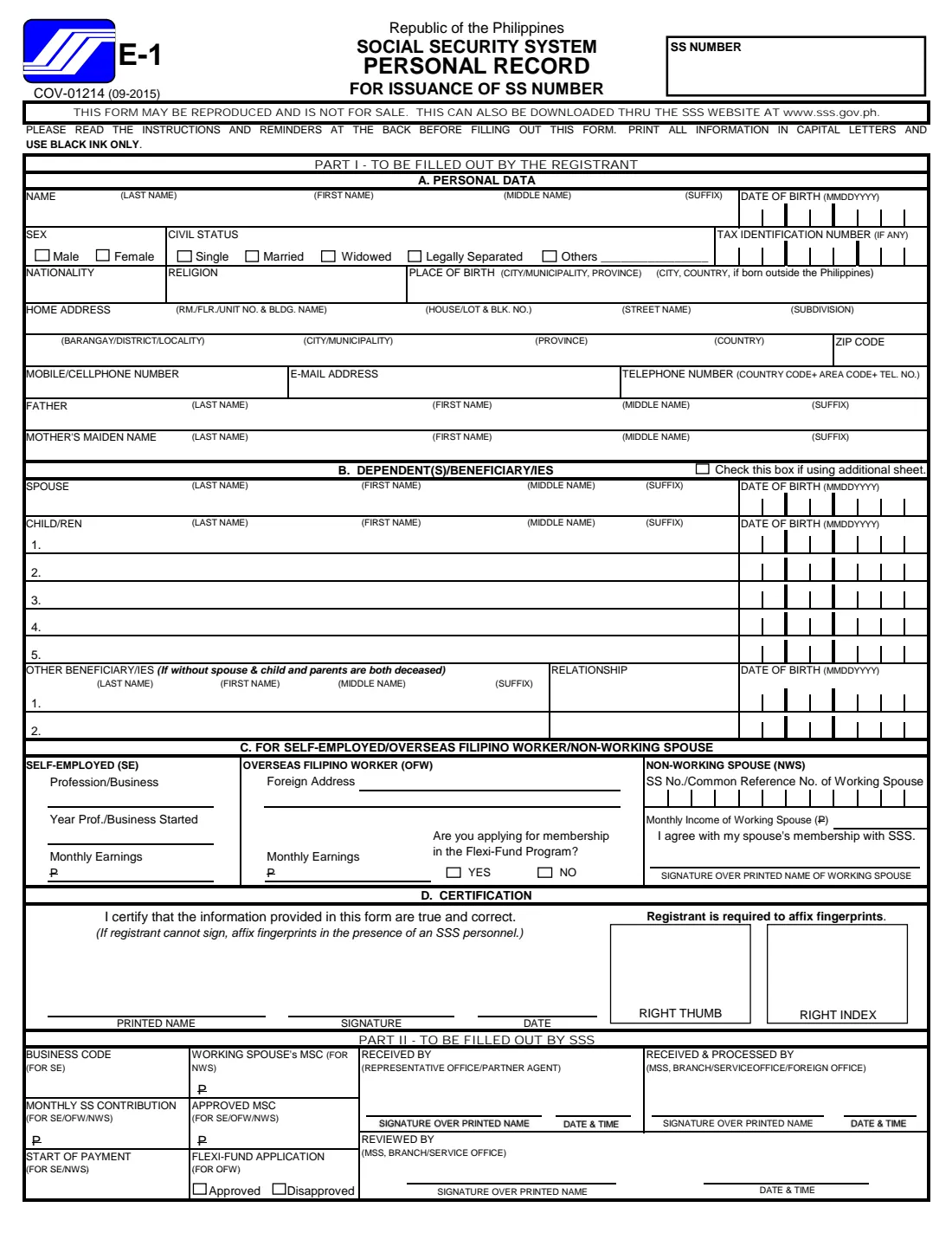
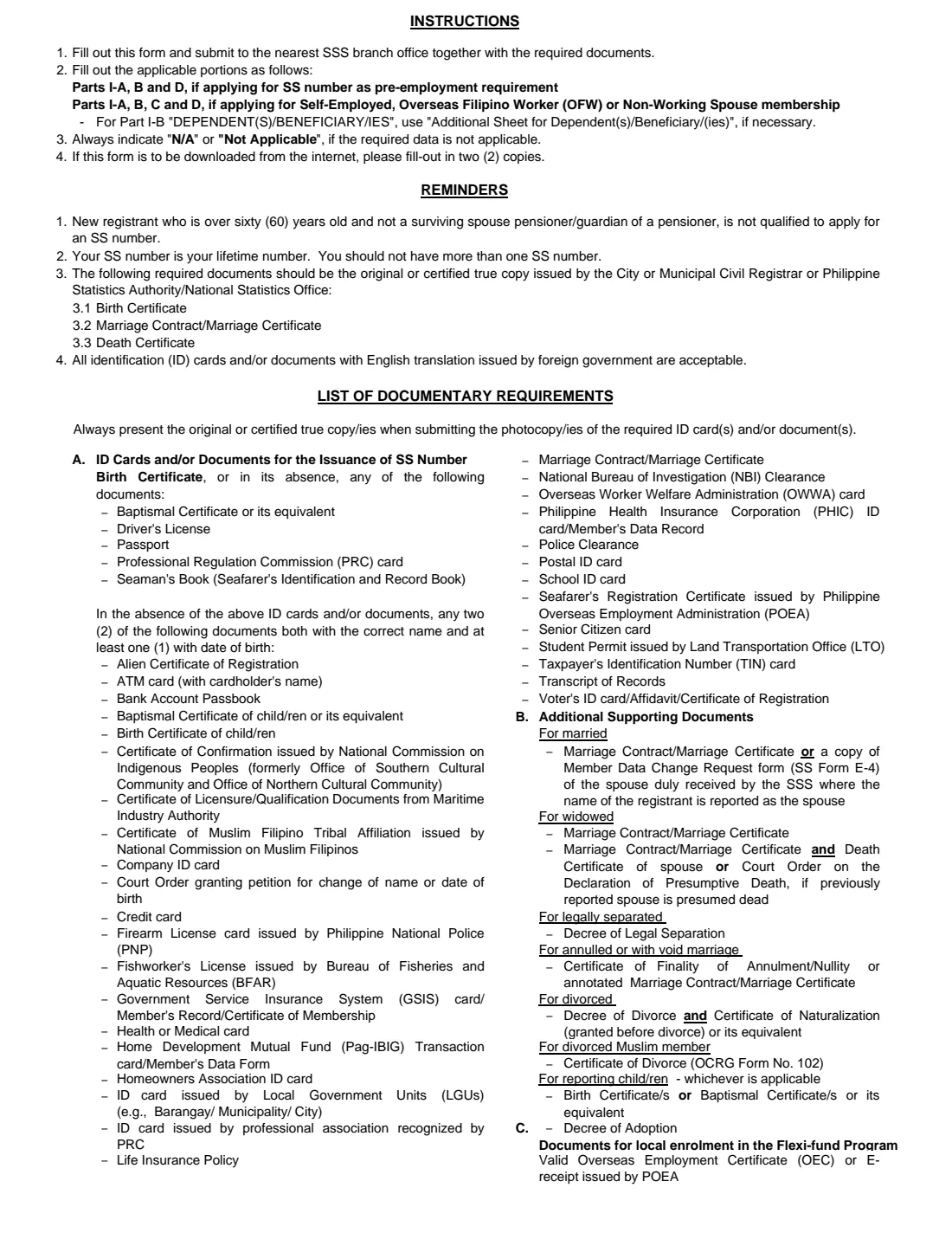
SSS Form E-1, the Personal Record, is the Social Security System form a person uses to register with the SSS and be issued a Social Security (SS) number. Employers in the Philippines ask for an SS number as a pre-employment requirement, and self-employed people, Overseas Filipino Workers (OFWs) and non-working spouses need one to start paying contributions as members. The edition in use is COV-01214 (09-2015): a one-page personal record, a page of instructions and documentary requirements, and an additional sheet for extra dependents.
The form collects your personal data, home address and contact details, your parents' names, your dependents and beneficiaries, and — for self-employed, OFW and non-working-spouse members — details of your work, earnings or your working spouse. You then certify it, sign it and affix your right thumb and right index fingerprints.
FileIt asks why you're registering and shows only the parts the form's own instructions say you need, pre-fills your name, date of birth and email from the People in your FileIt vault, and prints every answer in capital letters on the SSS's official PDF, with each date of birth in its MMDDYYYY boxes. The filled form is saved in your vault. You print it, sign it in black ink and take it to the SSS yourself — FileIt never submits it.
- Who fills it
- The registrant — the person applying for an SS number
- Given to
- The nearest SSS branch office, with the required documents
- When
- Before your first job, or when you start as self-employed, an OFW or a non-working spouse
- Signatures
- Registrant signs by hand and affixes right thumb and index fingerprints; a non-working spouse's working spouse also signs
- Edition
- COV-01214 (09-2015)
- Parts
- I-A personal data, I-B dependents, I-C SE/OFW/NWS, I-D certification
Who needs to fill out SSS Form E-1?
- First-time job seekers and new hires whose employer needs an SS number as a pre-employment requirement.
- Self-employed people — professionals, business owners, freelancers — registering for SSS coverage.
- Overseas Filipino Workers registering as members, including those who want to join the Flexi-Fund Program.
- Non-working spouses of SSS members who want their own coverage, with the working spouse's consent.
- Anyone who has never had an SS number. If you already have one, don't apply again: the form reminds you that your SS number is for life and you should not have more than one.
When to use SSS Form E-1
- Before you start your first job, so your employer can report you and remit your contributions.
- When you start working for yourself or go abroad to work and want to be covered as a self-employed member or an OFW.
- When a non-working spouse wants to become a member and the working spouse agrees to it.
- Not if you're over 60 and a new registrant: the form's reminders say you can't apply for an SS number then, unless you're a surviving-spouse pensioner or a pensioner's guardian.
What you need before you start
- Your birth certificate — the original or a certified true copy from the civil registrar or the PSA — plus a photocopy.
- If you don't have a birth certificate: one of the IDs or documents listed on page 2 (such as a passport, driver's licence or PRC card), or two of the other listed documents with your correct name, at least one showing your date of birth.
- Your marriage contract if married, and your children's birth or baptismal certificates to report them.
- Your full home address, mobile number, email address and any landline.
- Your father's full name and your mother's maiden name.
- Your TIN, if you have one.
- Self-employed: your profession or business, the year you started and your monthly earnings.
- OFW: your foreign address and monthly earnings; for the Flexi-Fund Program, a valid Overseas Employment Certificate (OEC) or e-receipt.
- Non-working spouse: your working spouse's SS number or Common Reference Number, their monthly income and their signature.
What’s on SSS Form E-1
The 2015 edition has 3 pages. FileIt asks for it in 8 parts:
- Part I-A — Personal dataRegistrant
- Home address and contact detailsRegistrant
- ParentsRegistrant
- Part I-B — Dependents and beneficiariesRegistrant
- Other beneficiariesRegistrant
- Additional sheet — more dependents or beneficiariesRegistrant
- Part I-C — Self-employed, OFW or non-working spouseRegistrant
- Part I-D — CertificationRegistrant
How to fill out SSS Form E-1, step by step
1 Part I-A — Personal data
Write your name (last, first, middle and suffix), date of birth as MMDDYYYY, sex, civil status, TIN if you have one, nationality, religion and place of birth. If you were born abroad, give the city and country.
Then your home address in the order the columns ask — room/floor/unit and building, house/lot and block, street, subdivision, barangay, city or municipality, province, country and ZIP code — followed by your mobile number, email and telephone number, your father's name and your mother's maiden name.
2 Part I-B — Dependent(s)/beneficiary(ies)
List your spouse and up to five children with their dates of birth. Only if you have no spouse and no child and both your parents have died do you name other beneficiaries, with their relationship to you.
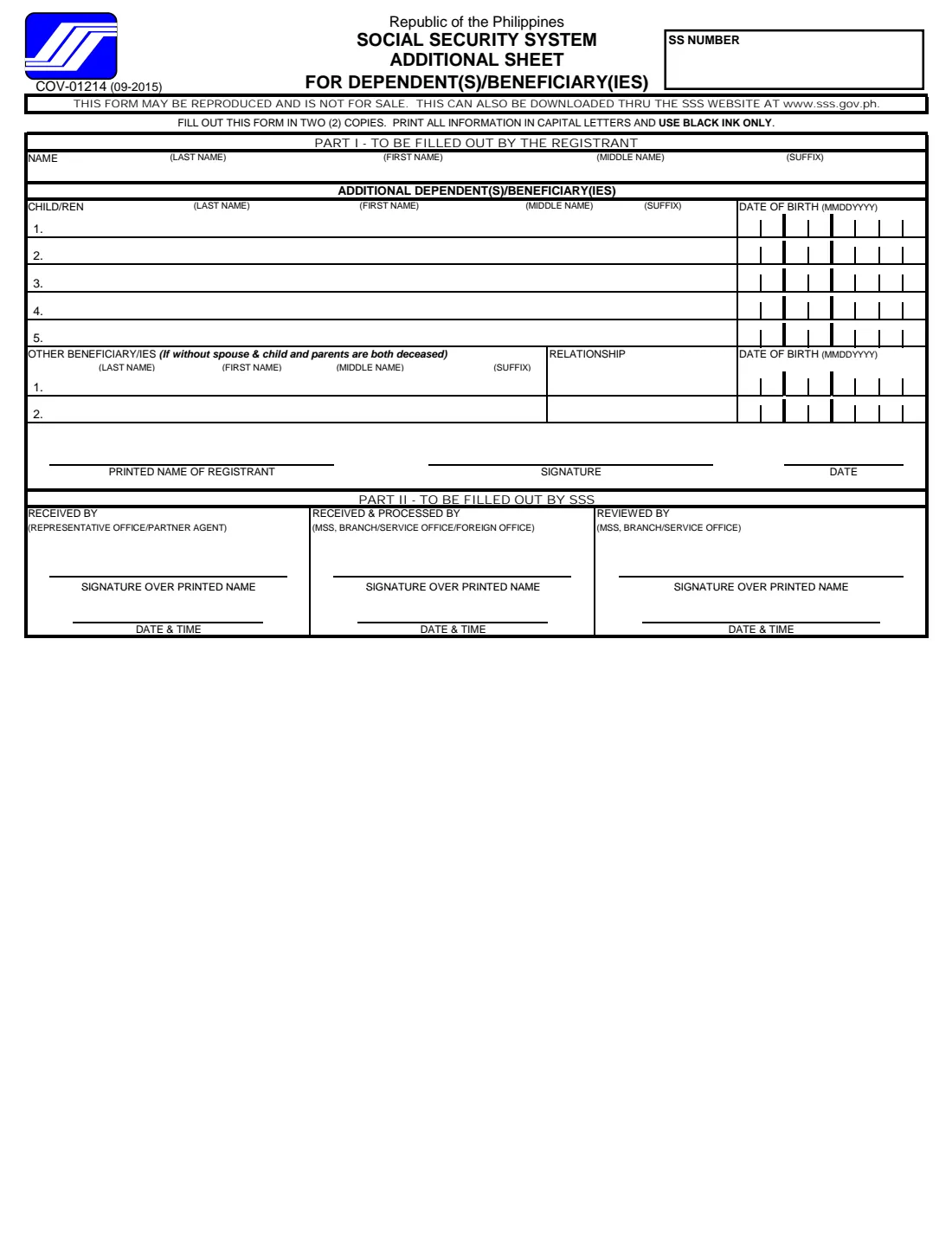
If you have more dependents than fit, tick the box at the top of Part I-B and use the Additional Sheet (page 3), which takes five more children and two more beneficiaries. FileIt ticks that box for you when you switch the additional sheet on.
3 Part I-C — Self-employed, OFW or non-working spouse
Only for these members; employees registering for a pre-employment SS number skip it. Self-employed members give their profession or business, the year it started and their monthly earnings. OFWs give their foreign address and monthly earnings and say whether they're applying for the Flexi-Fund Program.
A non-working spouse enters the working spouse's SS number or Common Reference Number and monthly income, and the working spouse signs over their printed name to agree to the membership.
4 Part I-D — Certification
You certify that the information is true and correct, then write your printed name, sign and date. The form says the registrant is required to affix fingerprints — right thumb and right index — and that anyone who can't sign affixes fingerprints in the presence of SSS personnel. FileIt prints your name and the date; the signature and fingerprints are yours to add.
5 Part II — To be filled out by SSS
The bottom of page 1 is for the SSS: business code, contribution and MSC figures, start of payment, Flexi-Fund approval and the officers who receive and process the form. Leave it blank.
6 Additional Sheet for Dependent(s)/Beneficiary(ies)
Repeats your name, then more children and other beneficiaries, and ends with your printed name, signature and date. The sheet says to fill it out in two copies, in capital letters and black ink.
Common mistakes to avoid
- Applying for a second SS number. If you ever had one — even from a summer job years ago — use it; the form warns you should not have more than one.
- Writing dates day-first. The boxes are MMDDYYYY, month first.
- Using a name that doesn't match your birth certificate, including the middle name and suffix.
- Listing other beneficiaries when you have a spouse or children — they're only for people with no spouse or child whose parents have both died.
- Filling in Part I-C as an ordinary employee, or leaving it blank as a self-employed person, OFW or non-working spouse.
- Bringing photocopies without the original or certified true copies to show.
- Signing in blue ink or pencil — the form asks for black ink only.
After you fill it out
Print the form from your FileIt vault, check it, and sign it in black ink. The instructions say that a form downloaded from the internet is filled out in two copies, so print two. Leave the fingerprint boxes empty until you're asked to affix them.
Take the form to the nearest SSS branch office together with the original or certified true copies of your documents and their photocopies. The SSS issues your SS number; FileIt does not send anything to the SSS.
Keep a copy of the filled form and, once issued, your SS number in your FileIt vault. The number is yours for life — give it to every employer, and report changes such as marriage or new dependents to the SSS rather than registering again.
Fill out SSS Form E-1 online with FileIt
- Pick the person. Choose someone from People and FileIt fills in their name, date of birth, address and other details it already knows.
- Answer plain-language questions. One part of the form at a time, with the official help text beside each question — 134 fields in all. Your answers save as you go.
- Check the live preview. Watch your answers land on the real Social Security System (SSS) form, and let FileIt do any worksheet arithmetic.
- Generate the official PDF. FileIt prints your answers into the agency’s own PDF and files it in that person’s folder in your vault.
FileIt fills the form — it never files or submits anything for you. Deliver the finished form to whoever asked for it, the way the form’s instructions say.
Start SSS Form E-1 now — it’s freeSSS Form E-1: frequently asked questions
What is SSS Form E-1?
It's the Social Security System's Personal Record form for the issuance of an SS number. It records your personal details, dependents and beneficiaries, and, for self-employed people, OFWs and non-working spouses, the details the SSS needs to set up their membership.
Can I fill out the SSS E-1 form online?
You can fill it in online with FileIt: answer the questions and FileIt prints them on the SSS's official PDF, ready to print. You still sign it in black ink, affix your fingerprints and hand it in at an SSS branch yourself — FileIt doesn't submit it.
Where do I submit Form E-1?
The form's instructions say to submit it at the nearest SSS branch office together with the required documents.
What documents do I need with the E-1?
Your birth certificate, or if you don't have one, one of the IDs listed on page 2 such as a passport or driver's licence, or two other listed documents with your correct name and at least one with your date of birth. Bring originals or certified true copies with photocopies, plus a marriage contract and children's birth certificates if you're reporting them.
Which parts of the E-1 do I fill in?
For an SS number as a pre-employment requirement: Parts I-A, B and D. For self-employed, OFW or non-working-spouse membership: Parts I-A, B, C and D.
Do I need to write N/A in empty boxes?
The instructions ask you to write N/A or Not Applicable where the required data doesn't apply. FileIt leaves unused boxes blank, so add N/A by hand if the branch asks for it.
Can I get an SS number if I'm over 60?
According to the form's reminders, a new registrant over 60 is not qualified to apply for an SS number unless they're a surviving-spouse pensioner or the guardian of a pensioner.
What's the Flexi-Fund question for?
It asks OFWs whether they're applying for membership in the SSS Flexi-Fund Program. The form lists a valid Overseas Employment Certificate (OEC) or e-receipt as the document needed for local enrolment.
Official sources
- Blank form (PDF), published by Social Security System (SSS): https://www.sss.gov.ph/wp-content/uploads/2022/03/SSSForms_Personal_Record.pdf
- Official instructions and guidance: https://www.sss.gov.ph/wp-content/uploads/2022/03/SSSForms_Personal_Record.pdf
- Edition shown on this page: COV-01214 (09-2015) (checked 2026-09-26).
FileIt is not affiliated with or endorsed by Social Security System (SSS) or any government. This page explains the form in general terms and is not legal, tax or immigration advice. Always read the official instructions, and check that you are using the edition the recipient accepts. Page last reviewed 2026-09-26.