What is Pag-IBIG Member's Data Form (MDF)?
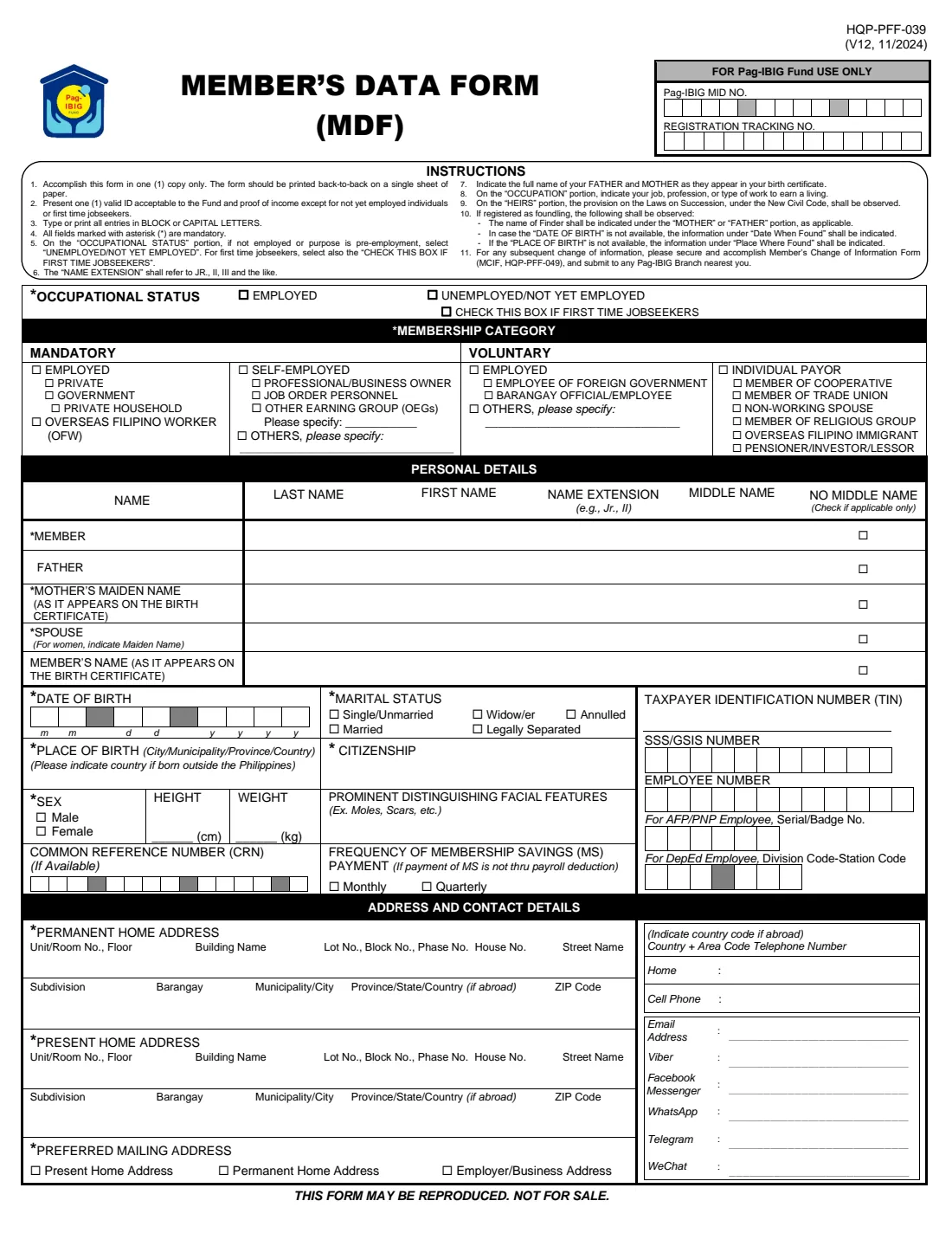
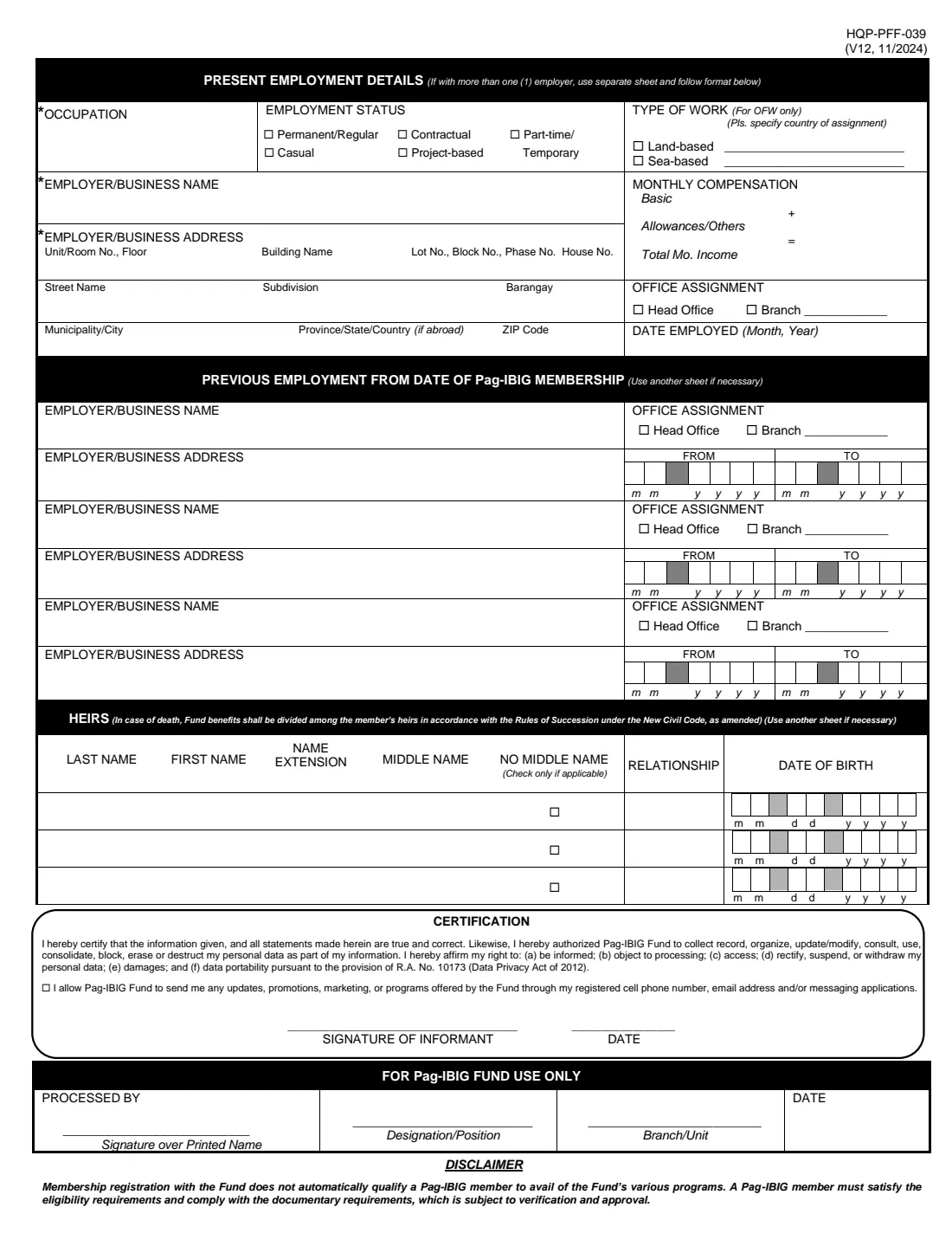
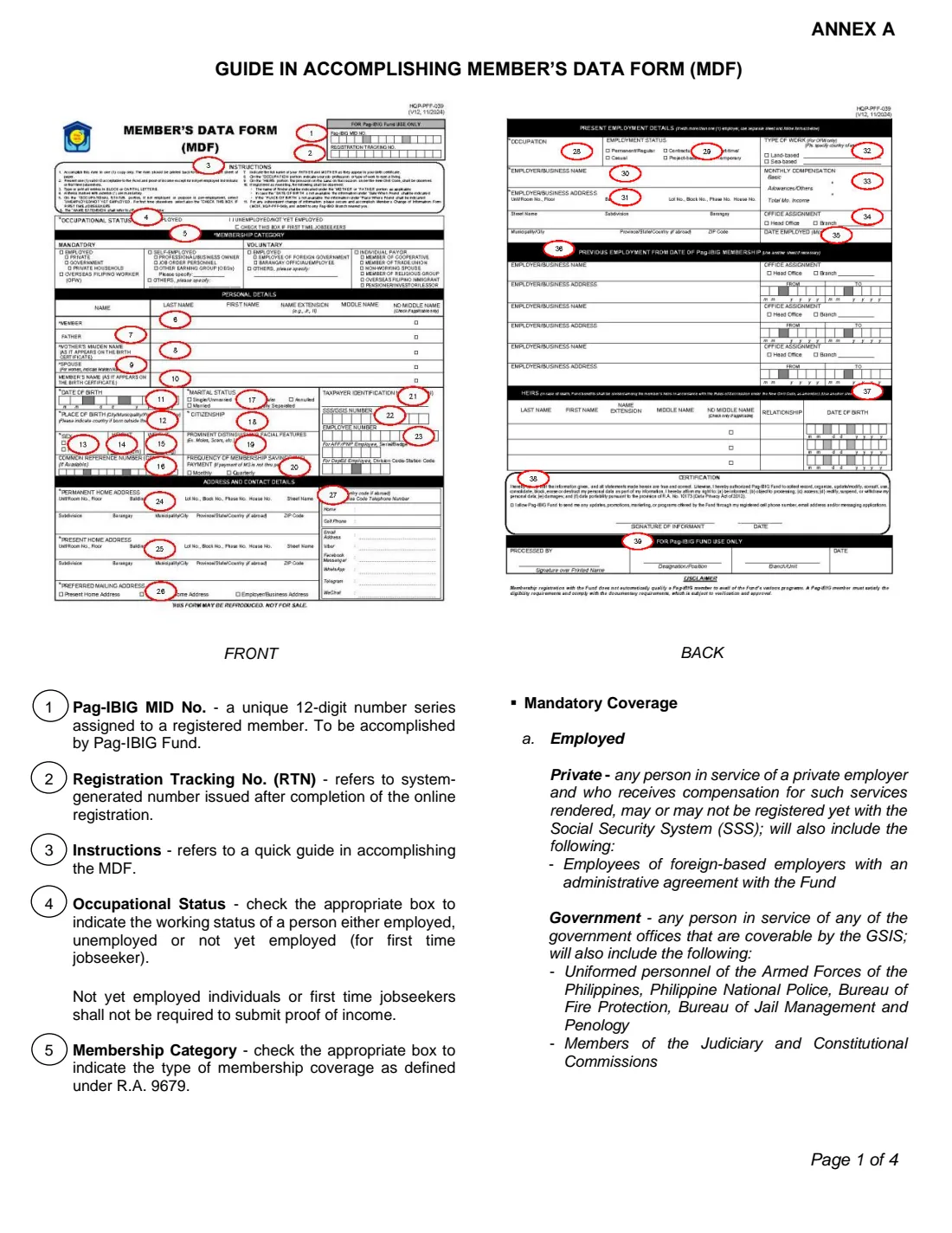
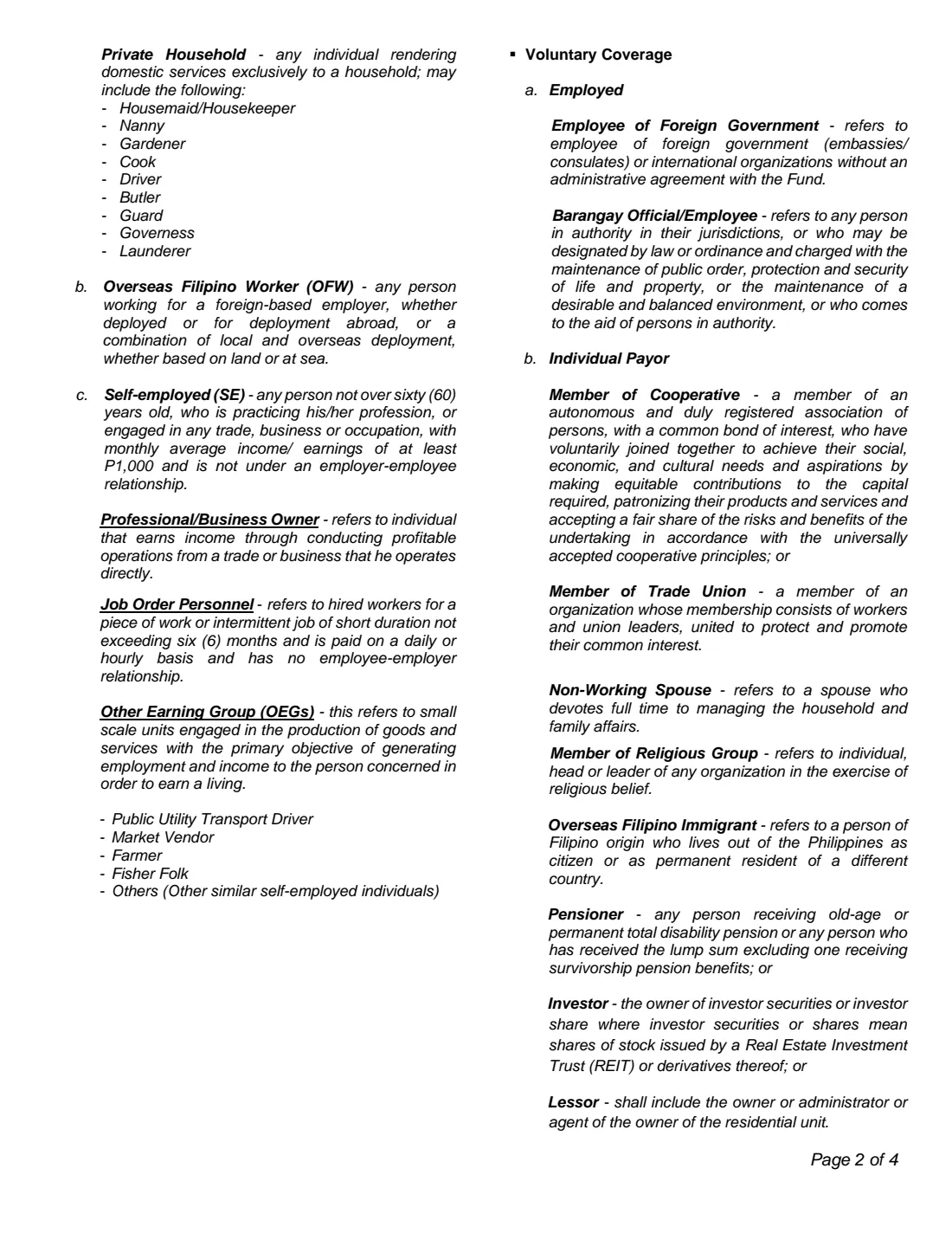
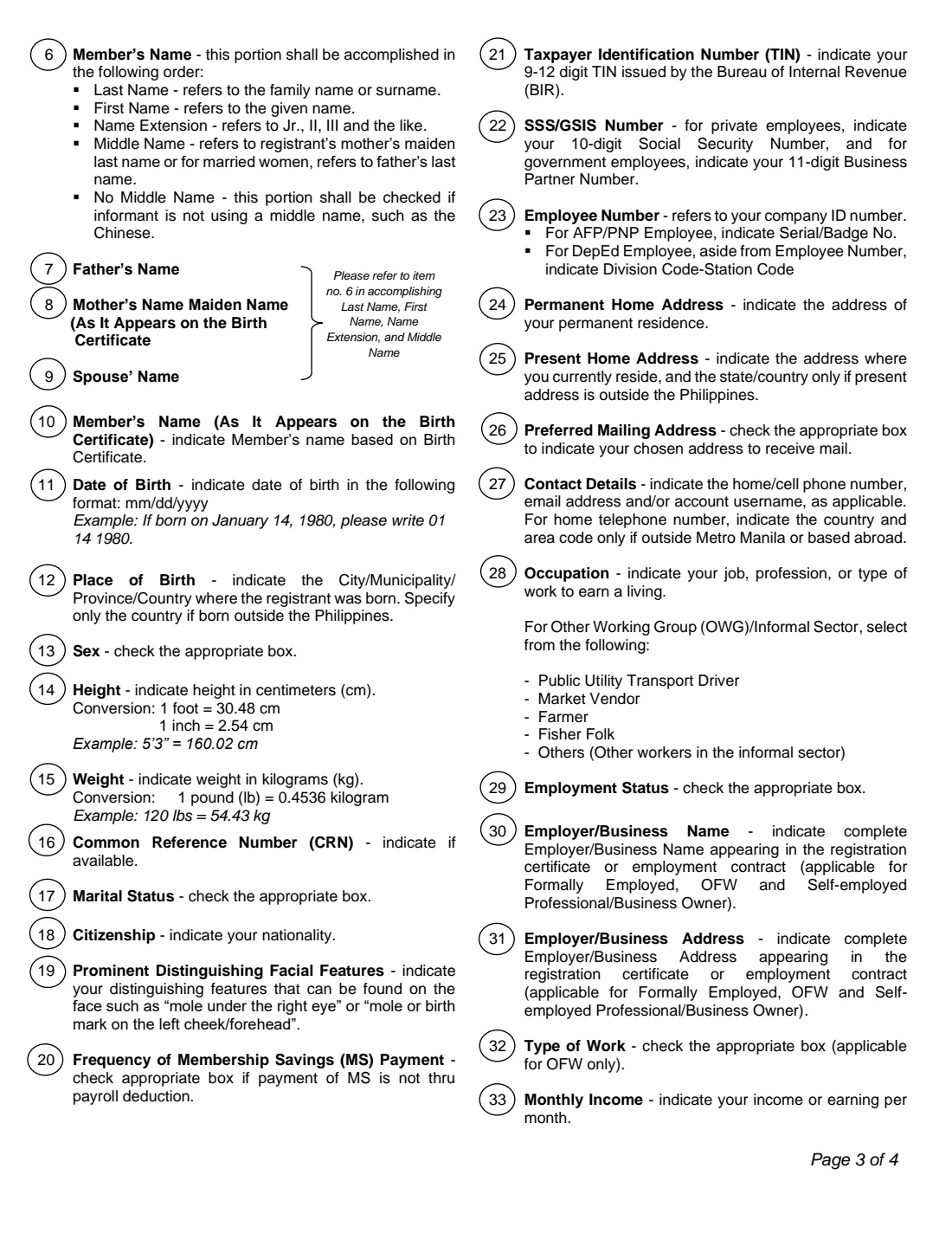
The Member's Data Form (MDF), form HQP-PFF-039, is how you register with the Home Development Mutual Fund, better known as the Pag-IBIG Fund. It records who you are, where you live, where you work and who your heirs are, so the Fund can open your membership and issue your Pag-IBIG MID number. This page covers version 12, dated November 2024: two pages of form followed by a four-page guide to filling it in.
Pag-IBIG membership is mandatory for most employees, OFWs and self-employed people in the Philippines, and open to others on a voluntary basis. The Fund also lets people register online; the paper MDF is the version handed in at a Pag-IBIG branch or collected by employers when they enrol new staff.
FileIt takes you through the MDF question by question, pre-fills your name, date of birth and email from the People in your FileIt vault, works out your total monthly income, copies your permanent address into the present-address boxes when they're the same, and prints everything in capital letters — as the form asks — on the Fund's own PDF. The finished form is saved in your vault. You print it back-to-back, sign it by hand and hand it in yourself; FileIt never submits anything to Pag-IBIG.
- Who fills it
- The person registering as a Pag-IBIG member
- Given to
- Any Pag-IBIG Fund branch, or your employer when it registers you
- When
- Once, when you first register — later changes use a separate change-of-information form
- Signatures
- The member signs and dates the Certification by hand
- Edition
- HQP-PFF-039 (V12, 11/2024)
- Copies
- One copy, printed back-to-back on a single sheet
Who needs to fill out Pag-IBIG Member's Data Form (MDF)?
- Employees of private companies and government offices joining Pag-IBIG for the first time, including domestic workers (kasambahay).
- Overseas Filipino Workers, whether land-based or sea-based.
- Self-employed professionals and business owners, job order personnel, and informal-sector workers such as drivers, vendors, farmers and fisher folk.
- Voluntary members: employees of foreign governments or international organisations without an agreement with the Fund, barangay officials and employees, non-working spouses, members of cooperatives, trade unions or religious groups, overseas Filipino immigrants, and pensioners, investors or lessors.
- People not yet employed or first-time jobseekers who need a Pag-IBIG number before starting work.
- HR staff who help new hires complete their registration.
When to use Pag-IBIG Member's Data Form (MDF)
- When you start your first job or are asked for a Pag-IBIG MID number as a pre-employment requirement.
- When you begin working abroad as an OFW, or start working for yourself.
- When you decide to join voluntarily, for example as a non-working spouse or an overseas Filipino immigrant.
- Only once: the form itself says that later changes (a new name, civil status or address) are made on the Member's Change of Information Form (MCIF, HQP-PFF-049) at any Pag-IBIG branch.
What you need before you start
- One valid ID acceptable to the Fund.
- Proof of income — not needed if you're not yet employed or a first-time jobseeker.
- Your parents' full names exactly as on your birth certificate, including your mother's maiden name.
- Your spouse's name (a wife's maiden name) if you are or were married.
- Your height in centimetres and weight in kilograms.
- Your TIN, SSS number (or GSIS Business Partner Number) and UMID Common Reference Number, if you have them.
- Your permanent and present home addresses, broken down into unit, building, lot/block, house number, street, subdivision, barangay, city, province and ZIP code.
- Your employer's registered name and address, your start date and your basic pay and allowances.
- Names, relationships and dates of birth of your heirs.
- Details of any previous employers since you first became a member, if this isn't your first registration.
What’s on Pag-IBIG Member's Data Form (MDF)
The 2024 edition has 6 pages. FileIt asks for it in 9 parts:
- Occupational status and membership categoryMember
- Personal details — namesMember
- Personal detailsMember
- Tax, social security and employee numbersMember
- Address and contact detailsMember
- Present employment detailsMember
- Previous employment from date of Pag-IBIG membershipMember
- HeirsMember
- CertificationMember
How to fill out Pag-IBIG Member's Data Form (MDF), step by step
1 Occupational status and membership category
Tick Employed, or Unemployed/Not yet employed — the latter also applies if you're registering as a pre-employment requirement, and first-time jobseekers tick the extra box beneath it.
Then choose your membership category. Mandatory coverage covers employees (private, government or private household), OFWs and the self-employed; voluntary coverage covers certain employees and individual payors. The guide on pages 3 to 6 of the PDF explains each category, and FileIt ticks the heading box (such as Employed or Individual payor) for the sub-category you pick.
2 Personal details — names
Write your name as last name, first name, name extension (Jr., II, III) and middle name. Your middle name is normally your mother's maiden surname; married women use their father's surname. Tick No middle name only if you genuinely don't use one.
Add your father's name and your mother's maiden name as they appear on your birth certificate, your spouse's name (a wife's maiden name), and — if it differs — your own name exactly as on your birth certificate. Foundlings write the finder's name under Mother or Father.
3 Date and place of birth, marital status, citizenship, sex, height and weight
The date of birth goes in the boxes as month, day and year. For place of birth give the city or municipality and province, or just the country if you were born abroad. Height is in centimetres and weight in kilograms; the guide shows the conversions. Under Prominent distinguishing facial features, note something such as a mole or scar.
4 CRN, MS payment frequency, TIN, SSS/GSIS and employee numbers
Give your UMID Common Reference Number if you have one, and tick Monthly or Quarterly only if your savings won't be deducted from payroll. Add your 9- to 12-digit TIN, your 10-digit SSS number (private employees) or 11-digit GSIS Business Partner Number (government employees), and your company employee number. AFP and PNP personnel add their serial or badge number; DepEd employees add their division and station codes.
5 Address and contact details
Fill in your permanent home address and your present home address — the present one only needs the state or country if you live outside the Philippines — and tick which one, or your employer's address, should receive your mail. Add a home telephone (with area code only if outside Metro Manila or abroad), a mobile number, email address and any messaging accounts you use.
6 Present employment details
Give your occupation, employment status (permanent/regular, casual, contractual, project-based or part-time/temporary), and your employer's or business's registered name and full address. OFWs tick land-based or sea-based and name the country of assignment. Enter your basic monthly pay and allowances — FileIt adds them up for the total monthly income — then your office assignment and the month and year you were employed. With more than one employer, attach a sheet in the same format.
7 Previous employment from date of Pag-IBIG membership
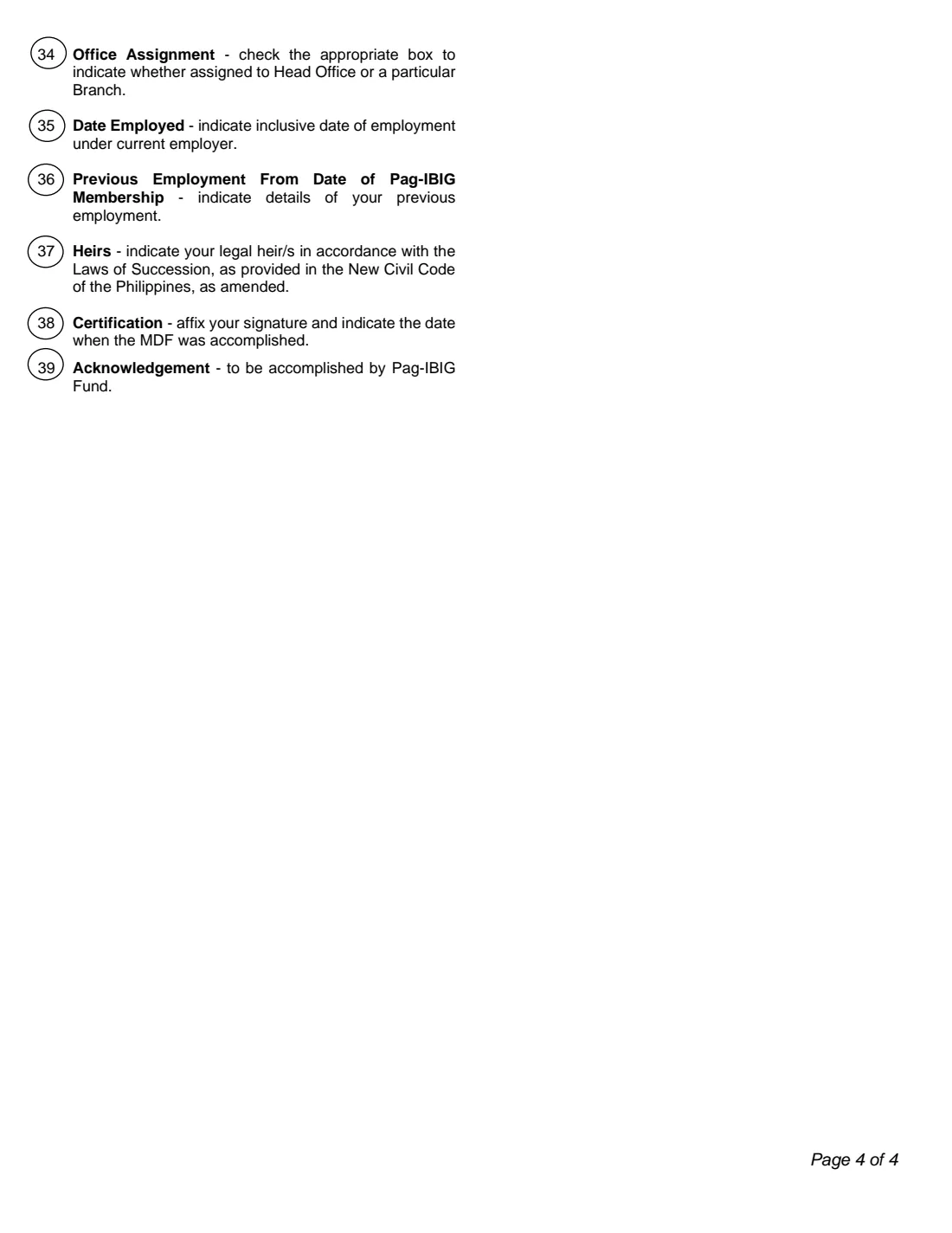
If you were already a member and have worked elsewhere since, list up to three previous employers with their addresses, office assignment and the months and years you worked there. Use another sheet for more.
8 Heirs
Name the people who would receive your Fund benefits if you died, with their relationship to you and dates of birth. The form notes that benefits are divided among your heirs under the rules of succession in the New Civil Code, as amended, so list your legal heirs.
9 Certification
By signing you certify that the information is true and correct and authorise Pag-IBIG Fund to process your personal data under the Data Privacy Act of 2012. A separate optional box lets the Fund send you updates and promotions by phone, email or messaging apps. Sign on the Signature of Informant line and date it. The block below is for Pag-IBIG Fund use only.
Common mistakes to avoid
- Writing in lower case or cursive — the form asks for block or capital letters.
- Filling in the MID number or Registration Tracking Number boxes at the top; those are for the Fund.
- Ticking No middle name while also writing a middle name, or using a married surname as your middle name.
- Entering your parents' names differently from your birth certificate.
- Giving height in feet or weight in pounds instead of centimetres and kilograms.
- Leaving out proof of income when you're employed or self-employed.
- Printing the two pages on separate sheets — the form should be printed back-to-back on one sheet.
- Using a new MDF to update your details later instead of the Member's Change of Information Form.
After you fill it out
Print the MDF from your FileIt vault back-to-back on one sheet, check your details, and sign and date the Certification by hand.
Hand it in at a Pag-IBIG Fund branch with one valid ID and, unless you're not yet employed or a first-time jobseeker, proof of income — or give it to your employer if it is registering you. The Fund assigns your Pag-IBIG MID number. FileIt does not send the form to Pag-IBIG.
Keep a copy and your MID number in your FileIt vault. The form's disclaimer notes that registering doesn't automatically qualify you for the Fund's programmes, which have their own eligibility and document requirements.
Fill out Pag-IBIG Member's Data Form (MDF) online with FileIt
- Pick the person. Choose someone from People and FileIt fills in their name, date of birth, address and other details it already knows.
- Answer plain-language questions. One part of the form at a time, with the official help text beside each question — 154 fields in all. Your answers save as you go.
- Check the live preview. Watch your answers land on the real Home Development Mutual Fund (Pag-IBIG Fund) form, and let FileIt do any worksheet arithmetic.
- Generate the official PDF. FileIt prints your answers into the agency’s own PDF and files it in that person’s folder in your vault.
FileIt fills the form — it never files or submits anything for you. Deliver the finished form to whoever asked for it, the way the form’s instructions say.
Start Pag-IBIG Member's Data Form (MDF) now — it’s freePag-IBIG Member's Data Form (MDF): frequently asked questions
What is the Pag-IBIG Member's Data Form?
It's the Pag-IBIG Fund's registration form (HQP-PFF-039) for new members. It collects your personal details, addresses, employment and heirs so the Fund can open your membership and assign a Pag-IBIG MID number.
Can I fill in the Pag-IBIG MDF online?
Yes. With FileIt you answer the questions in a guided web form and get the official V12 PDF with your answers printed in capital letters, ready to print, sign and hand in. FileIt doesn't submit it to Pag-IBIG.
Where do I submit the MDF?
At any Pag-IBIG Fund branch, with one valid ID and proof of income where required, or through your employer if it enrols its staff. Check with HR first if you're newly hired.
Do I need proof of income?
The form asks for proof of income from everyone except those not yet employed and first-time jobseekers.
Where is my Pag-IBIG MID number on the form?
You don't fill it in. The Pag-IBIG MID number — a unique 12-digit number — and the Registration Tracking Number boxes at the top are completed by the Fund.
I've changed my name or address. Should I file a new MDF?
No. The form says later changes are made on the Member's Change of Information Form (MCIF, HQP-PFF-049), submitted at any Pag-IBIG branch.
What counts as a middle name on the MDF?
The guide defines it as your mother's maiden surname, or for married women their father's surname. If you don't use a middle name, tick No middle name.
Who should I list as heirs?
Your legal heirs. The form states that benefits are divided among the member's heirs under the rules of succession in the New Civil Code, as amended; use another sheet if you have more than three.
Official sources
- Blank form (PDF), published by Home Development Mutual Fund (Pag-IBIG Fund): https://www.pagibigfund.gov.ph/document/pdf/dlforms/providentrelated/PFF039_MembersDataForm_V12.pdf
- Official instructions and guidance: https://www.pagibigfund.gov.ph/document/pdf/dlforms/providentrelated/PFF039_MembersDataForm_V12.pdf
- Edition shown on this page: HQP-PFF-039 (V12, 11/2024) (checked 2026-09-26).
FileIt is not affiliated with or endorsed by Home Development Mutual Fund (Pag-IBIG Fund) or any government. This page explains the form in general terms and is not legal, tax or immigration advice. Always read the official instructions, and check that you are using the edition the recipient accepts. Page last reviewed 2026-09-26.