What is BIR Form 1902?
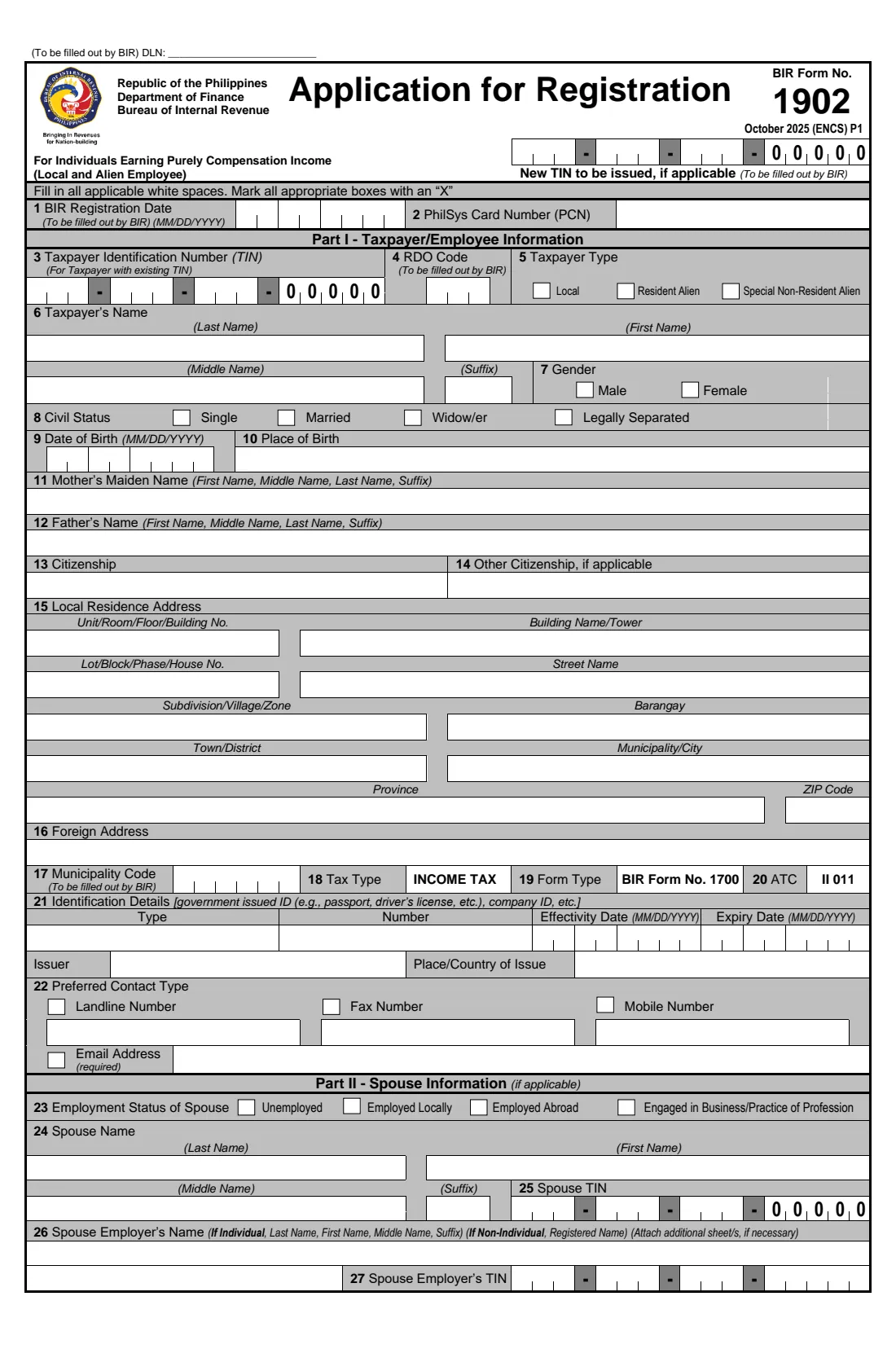
BIR Form 1902 is the Bureau of Internal Revenue's Application for Registration for individuals earning purely compensation income — in other words, employees whose only income is their salary. It is how a first-time employee in the Philippines, Filipino or foreign, is registered with the BIR and issued a Taxpayer Identification Number (TIN). The current edition is dated October 2025 (ENCS) and runs to two pages.
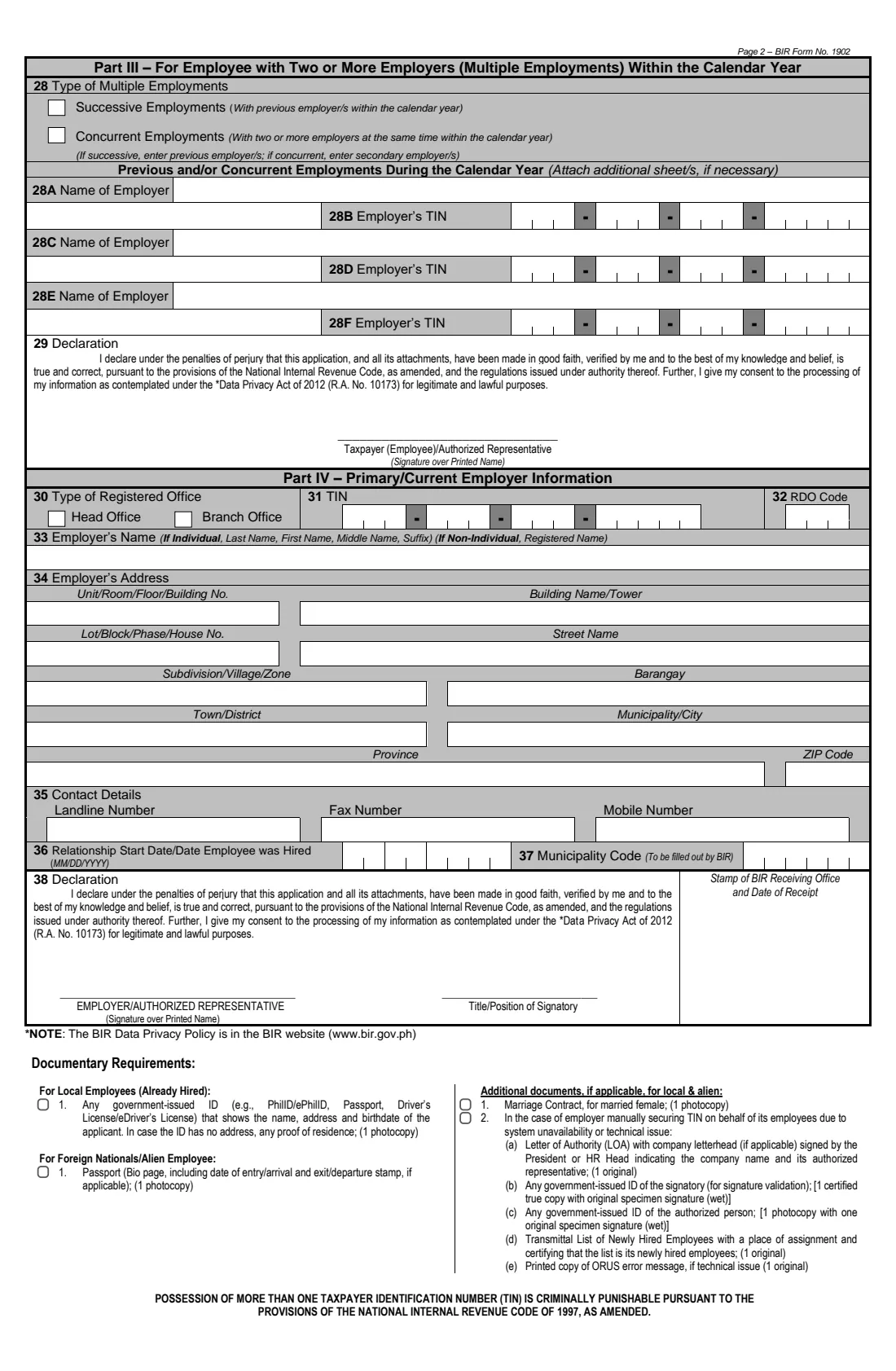
The form is shared between two people. The employee fills in Part I (personal details, address, ID and contact details), Part II (spouse information, if married) and Part III (previous or concurrent employers in the same calendar year), and signs the declaration. The employer completes Part IV with its own TIN, RDO code, address and the date the employee was hired, and signs its own declaration. Boxes such as the new TIN, the RDO code in item 4 and the municipality codes are left for the BIR.
FileIt walks you through each part in plain English, pre-fills names, date of birth and email from the People in your FileIt vault, splits your TIN and dates into the right comb boxes, and prints everything in capital letters with an X in the chosen boxes — exactly as the form asks — on the BIR's own PDF. The finished form is saved in your vault. You print it, both parties sign by hand, and you or your employer deliver it; FileIt never files anything with the BIR.
- Who fills it
- The employee (Parts I–III) and the employer (Part IV)
- Given to
- The BIR Revenue District Office (RDO), usually through the employer
- When
- When you start your first job and don't yet have a TIN
- Signatures
- Employee (item 29) and employer or authorised representative (item 38), by hand
- Edition
- October 2025 (ENCS)
- Pages
- 2
Who needs to fill out BIR Form 1902?
- Filipino citizens starting their first job who have never been issued a TIN.
- Resident aliens — foreign nationals living and working in the Philippines — who earn only compensation income.
- Special non-resident aliens employed by regional or area headquarters, regional operating headquarters (ROHQs), offshore banking units or petroleum service contractors.
- Employers and HR teams registering newly hired employees with the BIR, especially when registering manually rather than online.
- Employees who already have a TIN (for example one issued for a government transaction) and now need it tied to their employment — they enter the existing TIN in item 3 rather than getting a new one.
- Employees with more than one employer in the same calendar year, who declare those employers in Part III.
When to use BIR Form 1902
- When you are hired for your first job and have no TIN yet — your employer needs it for payroll withholding and your certificate of withholding tax.
- When a foreign national starts work in the Philippines under an employment arrangement.
- When your employer asks you to complete the employee parts so HR can register you, or when the employer can't register you online and falls back to the paper form.
- Never to get a second TIN: the form warns in bold that possessing more than one TIN is criminally punishable under the National Internal Revenue Code. If you already have one, give it to your new employer instead.
What you need before you start
- A government-issued ID that shows your name, address and date of birth — PhilID/ePhilID, passport, driver's licence or similar — plus a photocopy. If the ID has no address, bring proof of residence.
- For foreign nationals: your passport bio page, including the entry or arrival stamp, and a photocopy.
- Your PhilSys Card Number (PCN) if you have a PhilID.
- Your parents' full names, including your mother's maiden name.
- Your full Philippine address broken down by unit, building, lot/block, street, subdivision, barangay, city or municipality, province and ZIP code.
- A mobile or landline number and an email address (the email is required).
- If married: your spouse's name, TIN, employment status and employer's name and TIN — and, for married women, a photocopy of the marriage contract.
- Any previous or concurrent employer's name and TIN in the same calendar year.
- From the employer: its TIN and branch code, RDO code, registered name and address, contact numbers and your hire date.
What’s on BIR Form 1902
The 2025 edition has 2 pages. FileIt asks for it in 8 parts:
- Part I — Taxpayer/employee informationEmployee
- Local residence and foreign address (items 15–16)Employee
- Identification details (item 21)Employee
- Preferred contact type (item 22)Employee
- Part II — Spouse informationEmployee
- Part III — Two or more employers in the calendar yearEmployee
- Declaration (item 29)Employee
- Part IV — Primary/current employer informationEmployer
How to fill out BIR Form 1902, step by step
1 Item 2 and Part I — Taxpayer/employee information (items 3–14)
Enter your TIN in item 3 only if you already have one; otherwise leave it blank for the BIR to issue a new TIN. The branch code 00000 is already printed for individuals. Add your PhilSys Card Number in item 2 if you have one.
Choose your taxpayer type (Local for Filipino citizens, Resident Alien or Special Non-Resident Alien), then give your full name exactly as on your ID, your gender, civil status, date of birth (MM/DD/YYYY), place of birth, your mother's maiden name, your father's name and your citizenship. Item 14 is for dual citizens.
2 Items 15–16 — Local residence and foreign address
The address is split into separate boxes for unit or floor, building, lot/block/house number, street, subdivision, barangay, town or district, municipality or city, province and ZIP code. Fill in the ones that apply and leave the rest blank. Item 16 is for a foreign address, which foreign nationals usually complete.
3 Item 21 — Identification details
Give the type, number, effectivity and expiry dates, issuer and place or country of issue of the ID you are presenting. Use a current, unexpired ID and bring a photocopy, as listed in the documentary requirements on page 2.
4 Item 22 — Preferred contact type
Tick the way you would like the BIR to contact you — landline, fax, mobile or email — and write the numbers. The email address is marked as required, so always include one you check.
5 Part II — Spouse information (items 23–27)
Only for married applicants. Mark your spouse's employment status (unemployed, employed locally, employed abroad, or in business or practising a profession), then their name and TIN. If your spouse is employed, add the employer's name — last name first for an individual employer, or the registered name for a company — and the employer's TIN.
6 Part III — Two or more employers in the calendar year (item 28)
Complete this only if you have more than one employer in the same year. Tick Successive if you changed jobs during the year and list your previous employers; tick Concurrent if you work for two or more employers at the same time and list your secondary employers. There is room for three, each with its TIN; attach a sheet for more.
7 Item 29 — Employee declaration
By signing you declare, under the penalties of perjury, that the application is true and correct, and you consent to the processing of your information under the Data Privacy Act of 2012. FileIt prints your name above the line; sign over it by hand. An authorised representative may sign for you.
8 Part IV — Primary/current employer information (items 30–36)
The employer marks whether it is registering from its head office or a branch, enters its TIN with branch code, its RDO code and its registered name, its full address and contact numbers, and the date the employee was hired. Item 37 is for the BIR.
9 Item 38 — Employer declaration
The employer or its authorised representative signs over their printed name and gives their title or position, making the same declaration under the penalties of perjury. The box beside it is reserved for the stamp of the BIR receiving office.
Common mistakes to avoid
- Applying for a new TIN when you already have one. Check old payslips, IDs or BIR documents first — multiple TINs are criminally punishable.
- Writing your name differently from your ID. Use the same spelling, middle name and suffix as the ID you attach.
- Mixing up the date order — the form uses MM/DD/YYYY, month first.
- Choosing Local as a foreign national, or Resident Alien as a Filipino citizen.
- Leaving out the email address, which the form marks as required.
- Filling in Part II when you're not married, or leaving it blank when you are.
- Forgetting Part III when you had another employer earlier in the same year — your employers need it to get your withholding right.
- Submitting without both handwritten signatures or without the photocopied ID.
After you fill it out
Print the form from your FileIt vault, check every page, and sign item 29 by hand. Pass it to your employer so the authorised representative can complete and sign Part IV and item 38, unless the employer has already filled that part in with you.
The completed form goes to the BIR Revenue District Office with the documentary requirements listed on page 2 — typically your employer's HR team handles this, or registers you online and uses the form as a record. The RDO fills in your new TIN and registration details and stamps the receiving box. FileIt does not send the form anywhere.
Keep a copy of the signed form and your TIN in your FileIt vault. Your TIN stays with you for life: when you change jobs, give it to the new employer rather than registering again, and update your registration details with the BIR if they change.
Fill out BIR Form 1902 online with FileIt
- Pick the person. Choose someone from People and FileIt fills in their name, date of birth, address and other details it already knows.
- Answer plain-language questions. One part of the form at a time, with the official help text beside each question — 80 fields in all. Your answers save as you go.
- Check the live preview. Watch your answers land on the real Bureau of Internal Revenue (BIR), Department of Finance form, and let FileIt do any worksheet arithmetic.
- Generate the official PDF. FileIt prints your answers into the agency’s own PDF and files it in that person’s folder in your vault.
FileIt fills the form — it never files or submits anything for you. Deliver the finished form to whoever asked for it, the way the form’s instructions say.
Start BIR Form 1902 now — it’s freeBIR Form 1902: frequently asked questions
What is BIR Form 1902 used for?
It registers individuals who earn purely compensation income — employees — with the Bureau of Internal Revenue and is used to issue them a TIN. It covers both Filipino and foreign employees.
What's the difference between BIR Form 1902 and 1904?
Form 1902 is for employees earning purely compensation income. Form 1904 is a separate BIR registration form for one-time taxpayers and people registering under Executive Order 98, such as those who need a TIN for a government transaction without being employed. Use 1902 when the TIN is for employment.
Can I fill out BIR Form 1902 online?
Yes. FileIt lets you fill in the form in a guided web form and prints your answers on the BIR's official October 2025 PDF, ready to print. You and your employer then sign it by hand. FileIt does not submit the form to the BIR.
Where do I submit BIR Form 1902?
To the BIR Revenue District Office, together with the documentary requirements on page 2. In practice your employer usually handles the registration of new hires, so check with HR first.
Who signs Form 1902?
Two people: the employee (or an authorised representative) signs the declaration in item 29, and the employer or its authorised representative signs item 38 and gives their title or position. Both sign by hand over their printed names.
I already have a TIN. Do I need Form 1902?
You must not get a second TIN. Enter your existing TIN in item 3 if your employer asks you to complete the form, or simply give your TIN to your employer. Having more than one TIN is criminally punishable.
What ID do I need for BIR Form 1902?
Any government-issued ID showing your name, address and date of birth, such as a PhilID/ePhilID, passport or driver's licence, with one photocopy. If it has no address, add proof of residence. Foreign nationals bring the passport bio page with the arrival stamp.
Does a married woman need to attach anything extra?
The form lists a photocopy of the marriage contract as an additional document for married female applicants, where applicable.
Official sources
- Blank form (PDF), published by Bureau of Internal Revenue (BIR), Department of Finance: https://bir-cdn.bir.gov.ph/BIR/pdf/1902%20October%202025%20(ENCS)%20Final.pdf
- Official instructions and guidance: https://www.bir.gov.ph/bir-forms
- Edition shown on this page: October 2025 (ENCS) (checked 2026-09-26).
FileIt is not affiliated with or endorsed by Bureau of Internal Revenue (BIR), Department of Finance or any government. This page explains the form in general terms and is not legal, tax or immigration advice. Always read the official instructions, and check that you are using the edition the recipient accepts. Page last reviewed 2026-09-26.