What is PMRF PhilHealth registration?
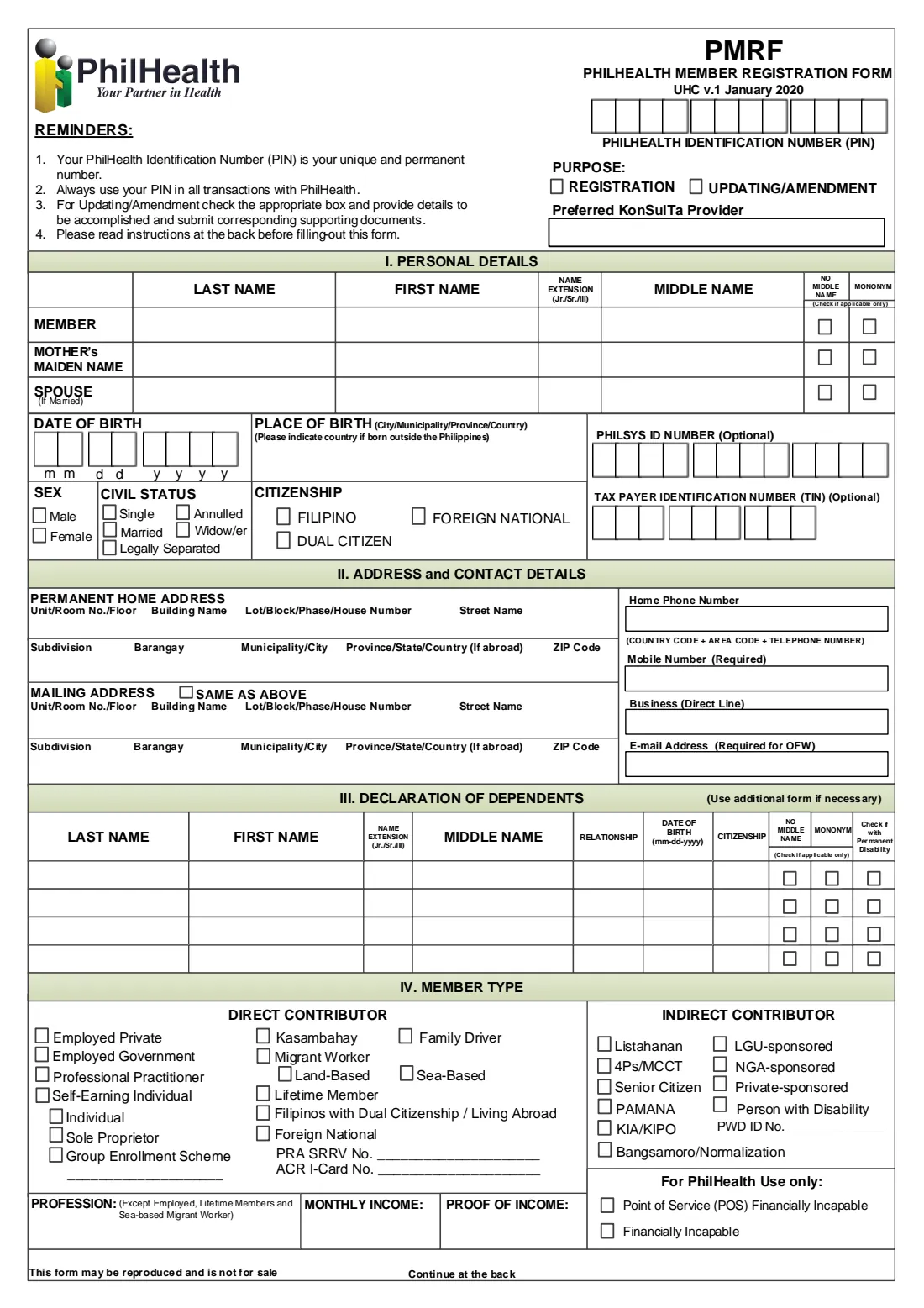
The PhilHealth Member Registration Form (PMRF) is the form the Philippine Health Insurance Corporation uses both to register new members and to update existing ones. It records who you are, where you live, how you pay into PhilHealth (your member type) and which family members are your declared dependents. Once you are registered, PhilHealth gives you a PhilHealth Identification Number (PIN), which the form reminds you is your unique and permanent number for every transaction with PhilHealth.
The current edition is marked "UHC v.1 January 2020" — the version introduced with the Universal Health Care law. It asks for your preferred Konsulta provider (the primary care clinic you want to be linked to), your PhilSys ID number if you have one, and your member type from a long list of direct and indirect contributor categories. The same form is used whether you are a new employee, a self-earning individual, an overseas Filipino worker, a senior citizen or someone sponsored by a local government unit.
FileIt walks you through each part of the PMRF in plain English, pre-fills your name, date of birth and e-mail from the People in your FileIt vault, checks the rules printed in the instructions (such as which dependents can be declared), and prints your answers in capital letters into PhilHealth's own PDF. The finished form is saved in your vault. You then print it, sign it by hand (or add your right thumbmark) and hand it in yourself — FileIt never submits anything to PhilHealth.
- Who fills it
- The member or registrant — new members, and existing members updating their record
- Given to
- PhilHealth (a regional office, Local Health Insurance Office or branch), or through your employer if you are employed
- When
- When you first register, when you add or change dependents, and whenever your personal details change
- Signatures
- The member signs by hand over their printed name, or affixes a right thumbmark if unable to write
- Edition
- UHC v.1 January 2020
- Pages
- Two: the form on page 1, updating/amendment, declaration and instructions on page 2
Who needs to fill out PMRF PhilHealth registration?
- Anyone registering with PhilHealth for the first time who needs a PhilHealth Identification Number (PIN).
- New employees whose employer asks them to complete a PMRF so they can be reported as employed members.
- Self-earning individuals, professional practitioners, kasambahay (household helpers) and family drivers who register or update their membership themselves.
- Overseas Filipino workers (land-based and sea-based migrant workers), Filipinos with dual citizenship or living abroad, and foreign nationals covered by PhilHealth.
- Members who want to declare or update dependents: a living spouse, children below 21, and parents aged 60 or over who are totally dependent on them.
- Existing members who need to correct their name, date of birth or sex, record a change in civil status, or update their address, phone numbers or e-mail.
When to use PMRF PhilHealth registration
- When you start your first job, begin working for yourself, or otherwise need PhilHealth coverage for the first time.
- When your membership category changes — for example from employed to self-earning, or when you leave to work overseas.
- When you marry, have or adopt a child, or a parent becomes dependent on you and you want to declare them.
- When your civil status changes through marriage, annulment, legal separation or the death of a spouse.
- When PhilHealth's records show a wrong name, date of birth or sex and you need them corrected with supporting documents.
- When you move or change your mobile number or e-mail address, so PhilHealth can reach you.
What you need before you start
- A valid proof of identity, which the instructions require from first-time registrants.
- Your PSA birth certificate, so you can write your name and your mother's maiden name exactly as they appear on it.
- Your PhilHealth Identification Number (PIN) if you are updating an existing record.
- Your PhilSys Number (PSN) and BIR Taxpayer Identification Number (TIN), if you have them — both are optional.
- Your complete permanent address (and mailing address if different), mobile number and e-mail address.
- Full names, dates of birth and citizenship of each dependent, plus documents proving the relationship, such as a marriage certificate or your children's birth certificates.
- For self-earning members, professional practitioners, kasambahay, family drivers and similar direct contributors: your profession, actual monthly income and a proof of income.
- For an amendment: documents supporting the correction, such as a PSA certificate or court decision.
- The name of the Konsulta provider you would like to be assigned to, near where you live or work.
What’s on PMRF PhilHealth registration
The 2020 edition has 2 pages. FileIt asks for it in 10 parts:
- Purpose and PhilHealth numberMember
- I. Personal detailsMember
- II. Address and contact detailsMember
- III. Dependent 1Member
- III. Dependent 2Member
- III. Dependent 3Member
- III. Dependent 4Member
- IV. Member typeMember
- V. Updating/amendmentMember
- Declaration and signatureMember
How to fill out PMRF PhilHealth registration, step by step
1 PIN, purpose and preferred Konsulta provider
At the top right of page 1 you enter your 12-digit PhilHealth Identification Number (PIN) — leave it blank if you are registering for the first time — and tick the purpose: Registration or Updating/Amendment.
Below that is space for your preferred Konsulta provider. Konsulta is PhilHealth's primary care package, and the instructions ask you to name a provider near your place of work or residence.
2 I. Personal details
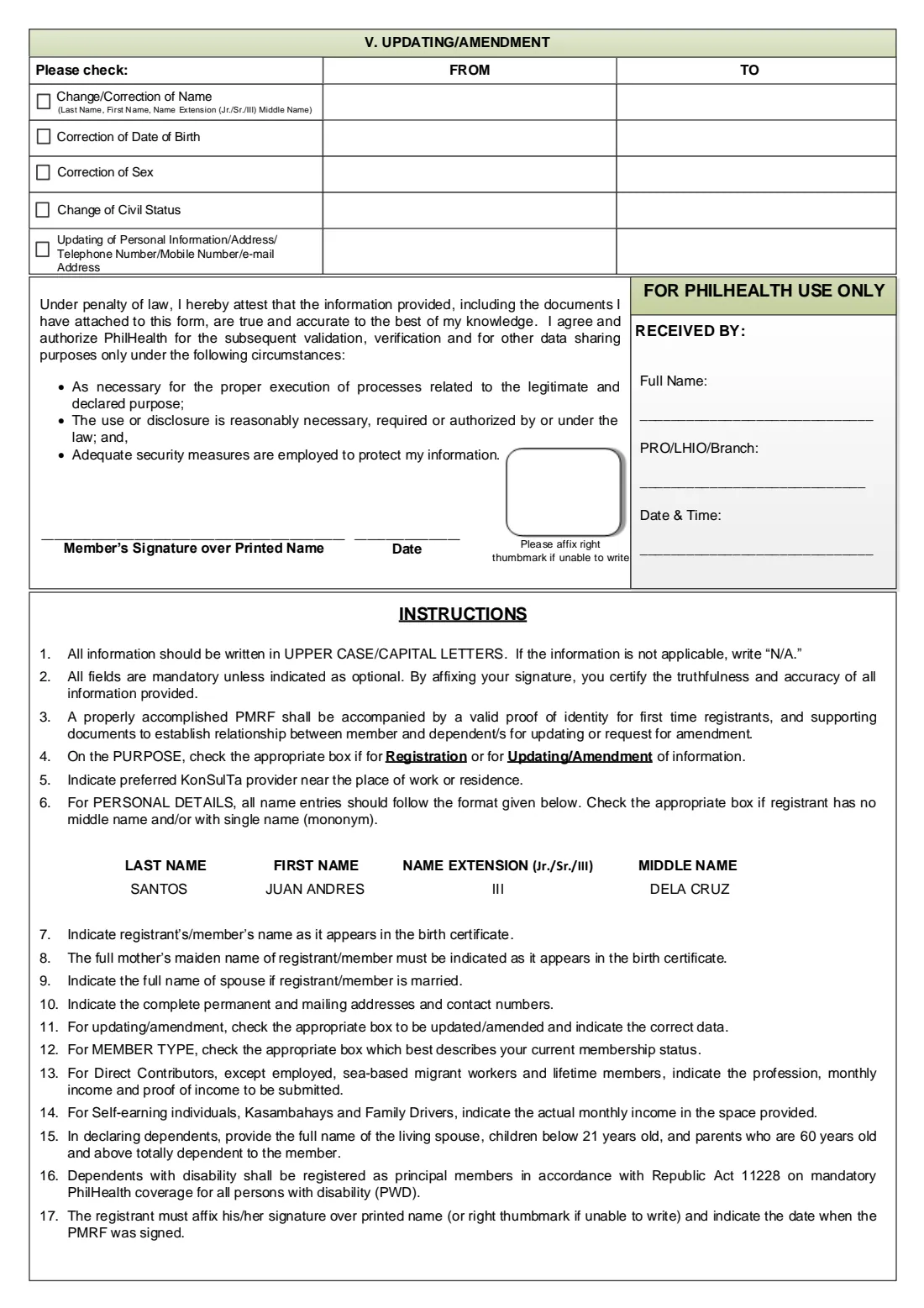
You give your own name, your mother's maiden name and, if you are married, your spouse's name, each split into last name, first name, name extension (Jr., Sr., III) and middle name. The back of the form shows the expected order with the example SANTOS / JUAN ANDRES / III / DELA CRUZ. Two small boxes on each row let you indicate that the person has no middle name or has a single name only (a mononym).
The section continues with your date of birth, place of birth (add the country if you were born abroad), sex, civil status, citizenship (Filipino, dual citizen or foreign national), and two optional numbers: your PhilSys ID number and your Taxpayer Identification Number. The PhilSys boxes take the 12-digit PhilSys Number, and the TIN area has nine boxes.
3 II. Address and contact details
Write your permanent home address in the order printed on the form, from unit and building down to barangay, municipality or city, province and ZIP code. If your mailing address is the same, tick "Same as above"; otherwise complete it in full.
On the right are your home phone, mobile number (required), business line and e-mail address. The form marks e-mail as required for OFWs, so overseas workers should always include one.
4 III. Declaration of dependents
The table has four rows for dependents. For each you give the full name, relationship, date of birth in mm-dd-yyyy format and citizenship, and tick boxes for no middle name, mononym or permanent disability. Instruction 15 limits dependents to your living spouse, children below 21 years old, and parents aged 60 or over who are totally dependent on you.
Instruction 16 adds that dependents with a disability are registered as principal members under Republic Act 11228. If you have more than four dependents, the form asks you to use an additional form.
5 IV. Member type
Tick the one box that best describes your current membership. Direct contributors include employed members in the private sector or government, professional practitioners, self-earning individuals (as an individual, sole proprietor or through a group enrollment scheme), kasambahay, family drivers, land-based and sea-based migrant workers, lifetime members, Filipinos with dual citizenship or living abroad, and foreign nationals (with their PRA SRRV or ACR I-Card number).
Indirect contributors are covered through programmes or sponsors: Listahanan, 4Ps/MCCT, senior citizens, PAMANA, KIA/KIPO, Bangsamoro/Normalization, LGU-, NGA- or private-sponsored members, and persons with disability (with a PWD ID number). Direct contributors other than employed members, sea-based migrant workers and lifetime members also fill in their profession, monthly income and proof of income at the bottom of the page.
6 V. Updating/amendment
Only needed if you ticked Updating/Amendment. Tick each item you are changing — name, date of birth, sex, civil status, or other personal information such as address, telephone, mobile or e-mail — and write the details as currently recorded under FROM and the correct details under TO.
Attach documents that support each change. PhilHealth needs evidence before it will alter a name, date of birth or sex on your record.
7 Declaration and signature
By signing you attest, under penalty of law, that the information and attached documents are true and accurate, and you authorise PhilHealth to validate, verify and share the data only for the purposes listed on the form.
Sign over your printed name and write the date you signed. If you are unable to write, affix your right thumbmark in the box provided. The "For PhilHealth use only" block beside it is completed by the office that receives your form.
Common mistakes to avoid
- Writing names differently from the birth certificate — the instructions ask for your name and your mother's maiden name exactly as they appear there.
- Putting the names in the wrong order; the form wants last name, first name, name extension, then middle name.
- Leaving the middle name blank without ticking "No middle name", or filling every name box for someone who has a single name instead of ticking "Mononym".
- Declaring dependents the form does not allow, such as children aged 21 or over or parents under 60.
- Ticking Updating/Amendment but not completing part V, or not attaching the supporting documents for the change.
- Choosing more than one member type, or forgetting the profession, income and proof of income when your member type needs them.
- Forgetting the mobile number, or the e-mail address if you are an OFW.
- Using lower-case letters — the form asks for everything in capital letters (FileIt prints your answers that way).
After you fill it out
Print the completed PMRF from your FileIt vault, check every entry, then sign it by hand over your printed name and date it. If you cannot write, affix your right thumbmark in the box beside the signature line instead. The form is signed in ink, so there is no electronic signature step.
Hand the form in to PhilHealth together with your proof of identity (for first-time registrants) and the documents that support your dependents or your amendment. Employed members usually go through their employer; others take it to a PhilHealth office — the receiving block on page 2 is completed by a PhilHealth regional office, Local Health Insurance Office or branch. FileIt does not submit the form for you.
Keep the filled PDF in your vault alongside a note of your PIN. Fill in a new PMRF whenever you need to add a dependent, change your member type or update your details — your saved answers make the next one quicker.
Fill out PMRF PhilHealth registration online with FileIt
- Pick the person. Choose someone from People and FileIt fills in their name, date of birth, address and other details it already knows.
- Answer plain-language questions. One part of the form at a time, with the official help text beside each question — 117 fields in all. Your answers save as you go.
- Check the live preview. Watch your answers land on the real Philippine Health Insurance Corporation (PhilHealth) form, and let FileIt do any worksheet arithmetic.
- Generate the official PDF. FileIt prints your answers into the agency’s own PDF and files it in that person’s folder in your vault.
FileIt fills the form — it never files or submits anything for you. Deliver the finished form to whoever asked for it, the way the form’s instructions say.
Start PMRF PhilHealth registration now — it’s freePMRF PhilHealth registration: frequently asked questions
What is the PMRF used for?
The PhilHealth Member Registration Form is used to register as a PhilHealth member and get a PhilHealth Identification Number (PIN), to declare your dependents, and to update or correct your details. You tick Registration or Updating/Amendment at the top of page 1.
Can I fill in the PMRF online?
Yes. With FileIt you answer the questions in a guided web form and FileIt prints your answers into PhilHealth's official PMRF PDF, which is saved in your vault. You then print it, sign it by hand and hand it in yourself; FileIt does not submit it to PhilHealth.
Where do I submit the PMRF?
Employed members usually submit it through their employer. Others hand it in at a PhilHealth office — the form's receiving block names regional offices (PRO), Local Health Insurance Offices (LHIO) and branches. Bring your proof of identity and any supporting documents.
Who can I declare as a dependent?
According to the form's instructions: your living spouse, children below 21 years old, and parents who are 60 years old or over and totally dependent on you. Dependents with a disability are registered as principal members under Republic Act 11228.
Do I need a PhilHealth number to fill in the PMRF?
No. If you are registering for the first time, leave the PIN boxes blank; PhilHealth issues your PIN. If you are updating your record, enter your existing PIN so PhilHealth can find you.
What is the PhilSys ID number on the PMRF?
It is your number under the Philippine Identification System (the national ID). It is optional on the PMRF. The form provides 12 boxes, which fit the 12-digit PhilSys Number rather than the longer card number.
What if I have no middle name or only one name?
Tick the "No middle name" box, or the "Mononym" box if you have a single name only. The same boxes appear for your mother, your spouse and each dependent.
Can I sign the PMRF electronically?
The form asks you to affix your signature over your printed name, or your right thumbmark if you are unable to write, and the date you signed. FileIt treats it as a form you print and sign by hand.
Is there a separate PMRF for foreign nationals?
PhilHealth publishes a separate PMRF for foreign nationals on its downloads page. This page covers the main PMRF (UHC v.1 January 2020), which also lists foreign nationals as a member type.
Official sources
- Blank form (PDF), published by Philippine Health Insurance Corporation (PhilHealth): https://www.philhealth.gov.ph/downloads/membership/pmrf_012020.pdf
- Official instructions and guidance: https://www.philhealth.gov.ph/downloads/
- Edition shown on this page: UHC v.1 January 2020 (checked 2026-09-26).
FileIt is not affiliated with or endorsed by Philippine Health Insurance Corporation (PhilHealth) or any government. This page explains the form in general terms and is not legal, tax or immigration advice. Always read the official instructions, and check that you are using the edition the recipient accepts. Page last reviewed 2026-09-26.