What is IR597 Elect someone to act on your behalf?
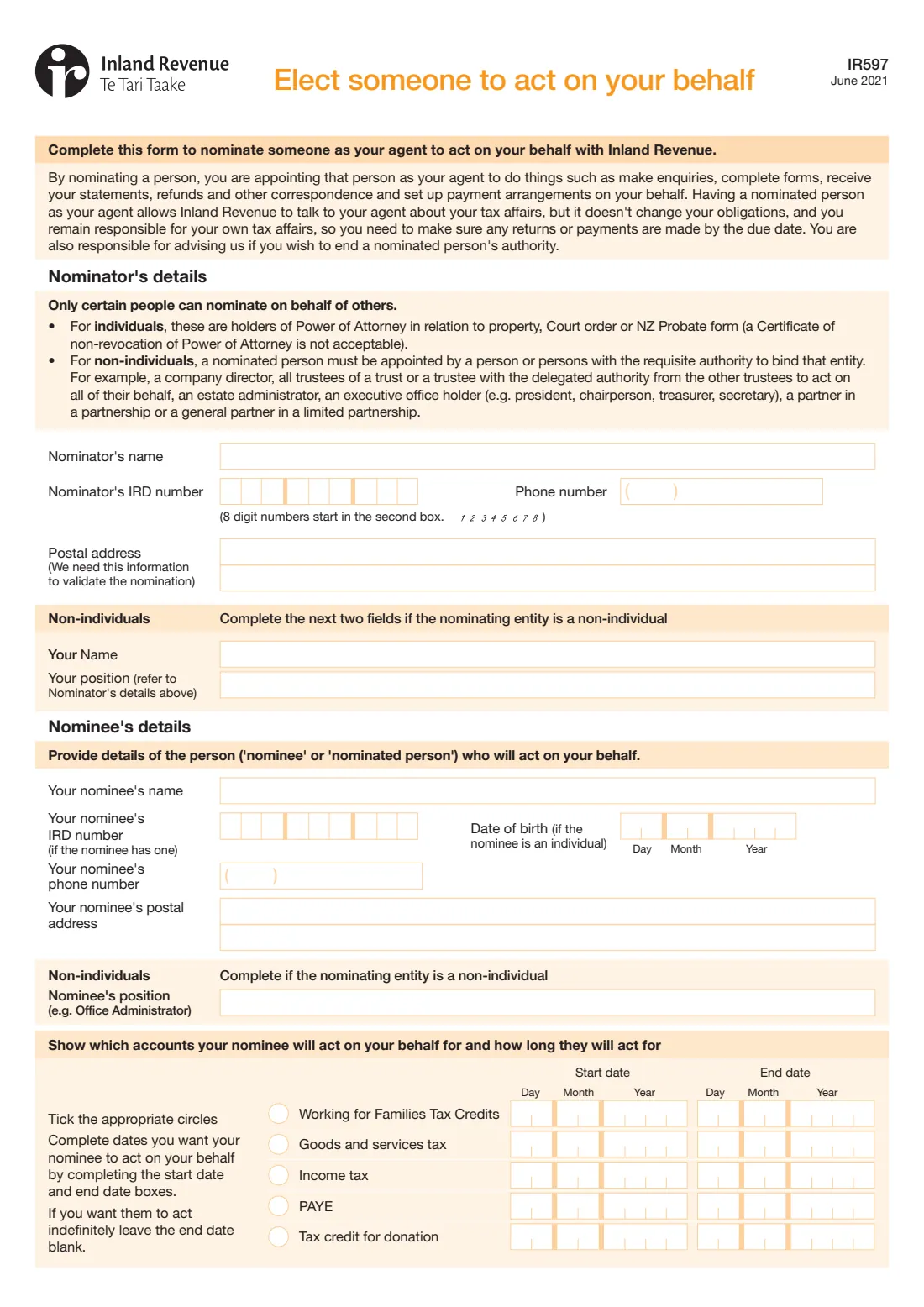
A nominated person can deal with Inland Revenue for you: make enquiries, complete forms, receive your statements, refunds and other correspondence, and set up payment arrangements. Form IR597, Elect someone to act on your behalf, is how you appoint one — useful when you're going overseas, need help from a family member, or run an organisation whose office administrator handles its tax.
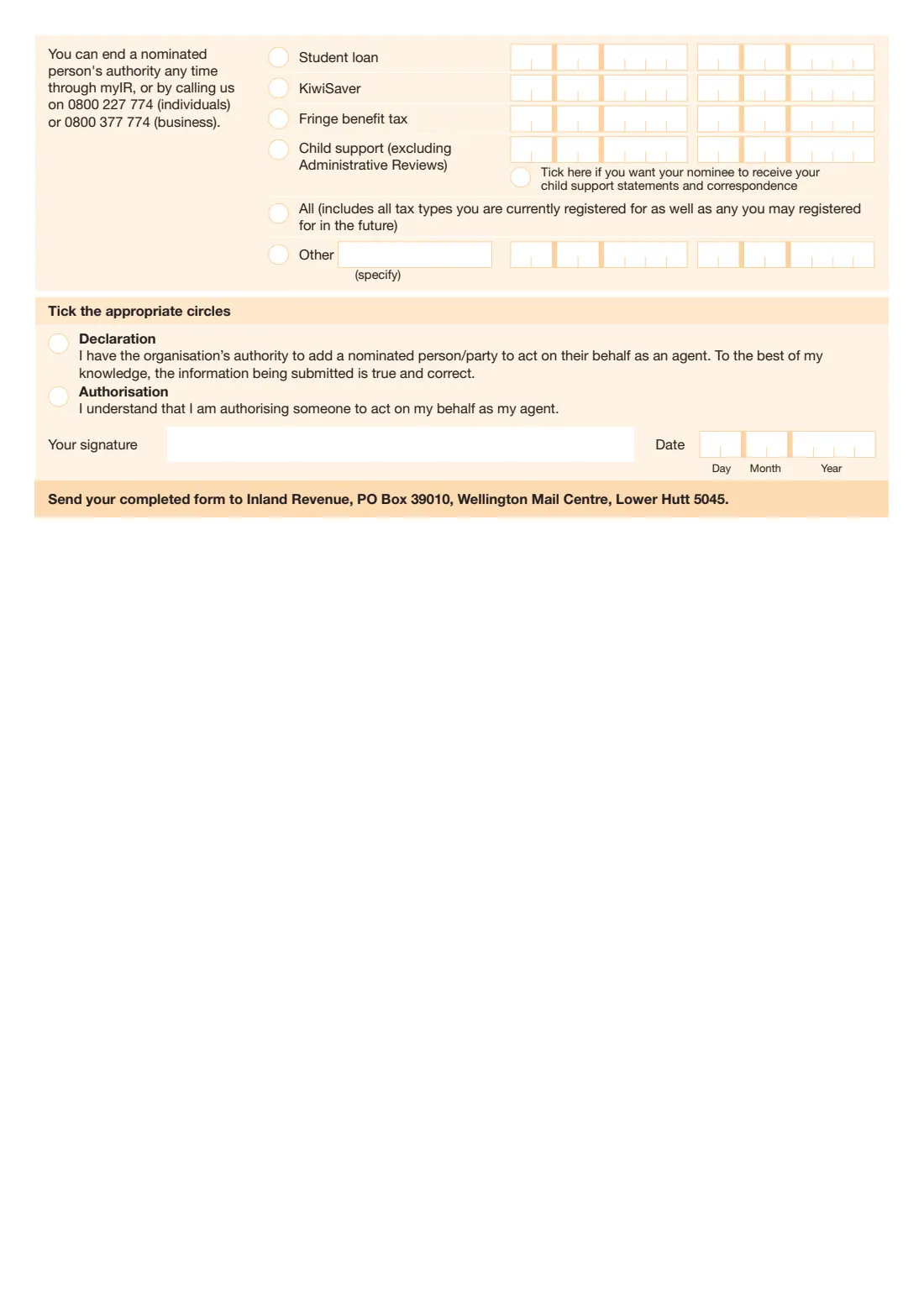
You choose which accounts they act on — Working for Families, GST, income tax, PAYE, donation tax credits, student loan, KiwiSaver, fringe benefit tax, child support, all of them, or another — with a start date and, if you want, an end date. Having a nominated person doesn't change your obligations: you stay responsible for your own tax affairs and for telling Inland Revenue if you want to end their authority. Only certain people can nominate on behalf of someone else, such as the holder of a power of attorney in relation to property.
FileIt fills in Inland Revenue's own IR597 PDF from a guided form, placing IRD numbers from the second box when they have 8 digits, ticking the circles for you, and printing names with macrons correctly. It saves the completed form to your vault. You sign and post it yourself; FileIt never submits anything.
- Who fills it
- The nominator — you, or someone authorised to nominate for a person or entity
- Sent to
- Inland Revenue, PO Box 39010, Wellington Mail Centre, Lower Hutt 5045
- Accounts
- Any of 9 listed tax types, All, or Other
- Ending it
- Any time through myIR, or by calling 0800 227 774 (individuals) or 0800 377 774 (business), as the form says
- Signatures
- The nominator signs and dates
- Edition
- IR597 June 2021
Who needs to fill out IR597 Elect someone to act on your behalf?
- Individuals who want a family member or friend to deal with Inland Revenue for them — for example while they're overseas.
- Attorneys under a power of attorney in relation to property, executors with probate, or people with a court order, nominating someone on another person's behalf.
- Companies, trusts, partnerships, estates and organisations appointing someone such as an office administrator.
When to use IR597 Elect someone to act on your behalf
- When you want someone else to be able to talk to Inland Revenue and act on your tax accounts.
- When you're leaving New Zealand for a while and want someone to handle your student loan, KiwiSaver or child support correspondence.
- When you want to limit the arrangement to particular accounts or dates.
What you need before you start
- Your name, IRD number, phone number and postal address — Inland Revenue uses them to validate the nomination.
- For an organisation: the name and position of the person signing.
- The nominee's name, IRD number (if they have one), date of birth (if an individual), phone number and postal address, and their position for an organisation.
- Which accounts the nominee will act on, with start dates and any end dates.
What’s on IR597 Elect someone to act on your behalf
The 2021 edition has 2 pages. FileIt asks for it in 5 parts, and it is signed by Nominator (you, or the person signing for the entity):
- Nominator's detailsNominator (you, or the person signing for the entity)
- Non-individualsNominator (you, or the person signing for the entity)
- Nominee's detailsNominator (you, or the person signing for the entity)
- Accounts and how long the nominee will actNominator (you, or the person signing for the entity)
- Declaration or authorisationNominator (you, or the person signing for the entity)
How to fill out IR597 Elect someone to act on your behalf, step by step
1 Nominator's details
Your name, IRD number, phone number and postal address. If the nominating entity is a non-individual, also give the name and position of the person completing the form.
2 Nominee's details
The nominated person's name, IRD number if they have one, date of birth if they're an individual, phone number, postal address and — for an organisation — their position.
3 Accounts and dates
Tick each account the nominee will act on and give a start date. Leave the end date blank for them to act indefinitely. For child support, you can also tick to have them receive your statements and correspondence. 'All' covers all the tax types you're registered for now and any in future.
4 Declaration or authorisation
Tick Declaration if you're signing for an organisation, or Authorisation if you're authorising someone to act for you, then sign and date the form.
Common mistakes to avoid
- Assuming a nominated person takes over your obligations — you remain responsible for filing and paying on time.
- Nominating on someone else's behalf without the right authority — the form lists who can (and says a Certificate of non-revocation of Power of Attorney isn't acceptable).
- Forgetting start dates for the accounts you tick.
- Ticking the wrong signing statement — Declaration is for organisations, Authorisation for individuals.
After you fill it out
Sign and date the form, by hand or with FileIt's optional e-signature.
Post it to Inland Revenue, PO Box 39010, Wellington Mail Centre, Lower Hutt 5045.
To end the arrangement later, use myIR or call Inland Revenue. FileIt keeps the completed PDF in your vault so you know exactly what you authorised.
Fill out IR597 Elect someone to act on your behalf online with FileIt
- Pick the person. Choose someone from People and FileIt fills in their name, date of birth, address and other details it already knows.
- Answer plain-language questions. One part of the form at a time, with the official help text beside each question — 51 fields in all. Your answers save as you go.
- Check the live preview. Watch your answers land on the real Inland Revenue (Te Tari Taake) form, and let FileIt do any worksheet arithmetic.
- Generate the official PDF. FileIt prints your answers into the agency’s own PDF and files it in that person’s folder in your vault. Sign it, or send it for e-signature.
FileIt fills the form — it never files or submits anything for you. Deliver the finished form to whoever asked for it, the way the form’s instructions say.
Start IR597 Elect someone to act on your behalf now — it’s freeIR597 Elect someone to act on your behalf: frequently asked questions
What can a nominated person do?
The form says they can make enquiries, complete forms, receive your statements, refunds and other correspondence, and set up payment arrangements on your behalf with Inland Revenue.
Am I still responsible for my tax?
Yes. The form says a nominated person doesn't change your obligations — you remain responsible for your own tax affairs and need to make sure returns and payments are made by the due date.
Can I limit what my nominee handles?
Yes. Tick only the accounts you want them to act on, and give start and end dates. Leave the end date blank for them to act indefinitely.
How do I cancel a nominated person?
The form says you can end a nominated person's authority any time through myIR, or by calling 0800 227 774 (individuals) or 0800 377 774 (business).
Can I fill in the IR597 online?
Yes. FileIt guides you through the questions and prints your answers into Inland Revenue's official PDF, ready to sign and post.
Official sources
- Blank form (PDF), published by Inland Revenue (Te Tari Taake): https://www.ird.govt.nz/-/media/project/ir/home/documents/forms-and-guides/ir500---ir599/ir597/ir597.pdf
- Official instructions and guidance: https://www.ird.govt.nz/managing-my-tax/nominated-persons
- Edition shown on this page: IR597 June 2021 (checked 2026-10-01).
FileIt is not affiliated with or endorsed by Inland Revenue (Te Tari Taake) or any government. This page explains the form in general terms and is not legal, tax or immigration advice. Always read the official instructions, and check that you are using the edition the recipient accepts. Page last reviewed 2026-10-01.