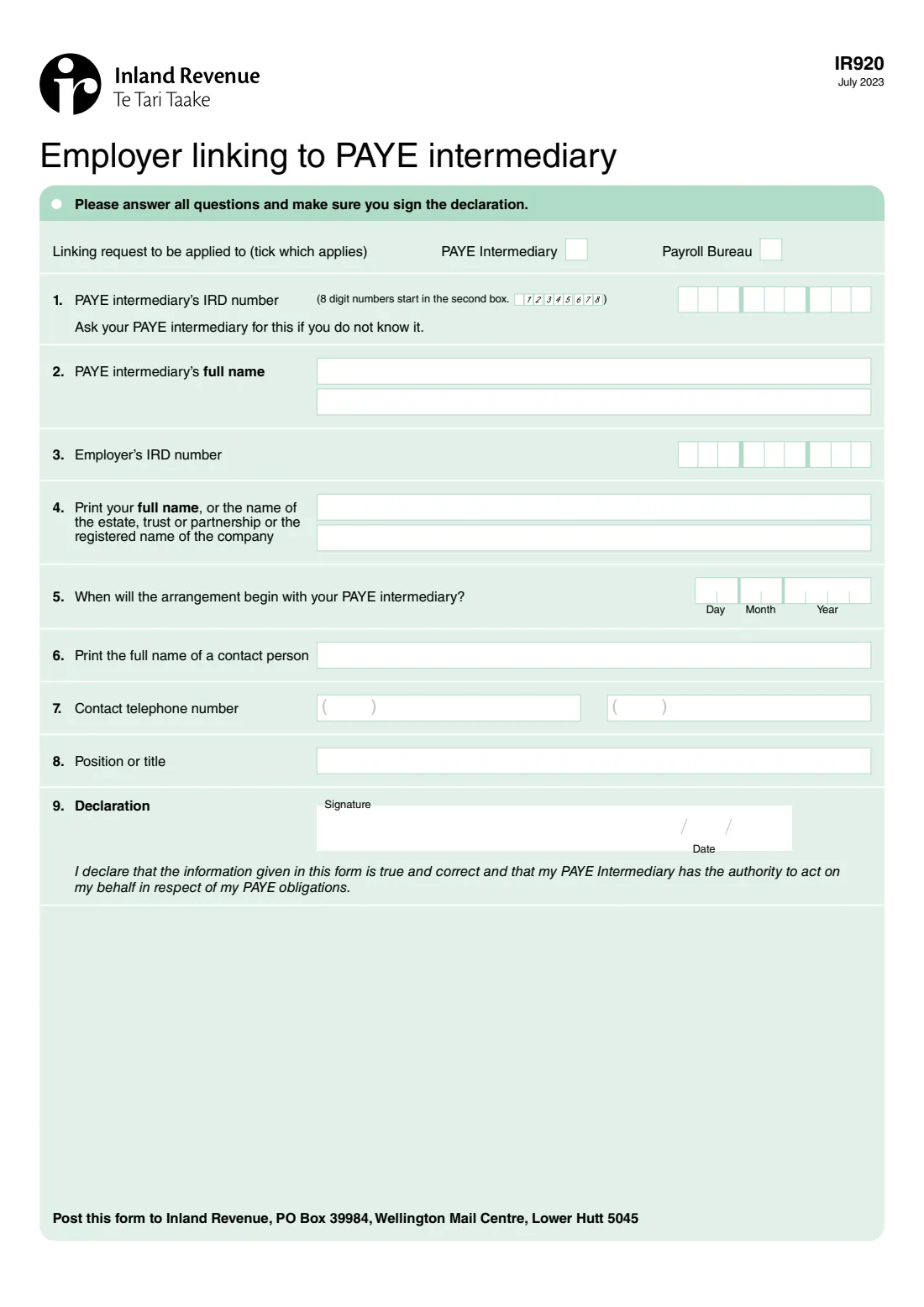
What is IR920 Employer linking to PAYE intermediary?
Many New Zealand employers use a PAYE intermediary or payroll bureau to run their payroll and handle their PAYE and payday filing. Form IR920, Employer linking to PAYE intermediary, tells Inland Revenue about that arrangement: who the intermediary is, who the employer is, when the arrangement begins, and who to contact.
The employer signs a declaration that the information is true and correct and that the PAYE intermediary has the authority to act on their behalf in respect of their PAYE obligations. The form is posted to Inland Revenue.
FileIt fills in Inland Revenue's own IR920 PDF from a guided form. It places 8-digit IRD numbers from the second box as the form asks, checks both IRD numbers' check digits, prints names with macrons correctly, and saves the completed form to your vault. You sign and post it yourself; FileIt never submits anything.
- Who fills it
- The employer (or someone signing for the business, trust or partnership)
- Links to
- A PAYE intermediary or a payroll bureau
- Sent to
- Inland Revenue, PO Box 39984, Wellington Mail Centre, Lower Hutt 5045
- Signatures
- The employer signs and dates the declaration
- Length
- One page, nine questions
- Edition
- IR920 July 2023
Who needs to fill out IR920 Employer linking to PAYE intermediary?
- Employers who are handing their payroll and PAYE obligations to a PAYE intermediary.
- Employers linking to a payroll bureau.
- Trusts, partnerships, estates and companies that employ staff and use an outside payroll provider.
When to use IR920 Employer linking to PAYE intermediary
- When you start using a PAYE intermediary or payroll bureau.
- When you move your payroll to a different intermediary and need to link to the new one.
- Your intermediary may ask you to complete it as part of setting up the arrangement.
What you need before you start
- Your PAYE intermediary's IRD number and full name — the form says to ask your intermediary if you don't know the number.
- Your IRD number as the employer.
- Your full name, or the name of the estate, trust or partnership, or the registered name of the company.
- The date the arrangement with your intermediary begins.
- A contact person's name, phone number and position or title.
What’s on IR920 Employer linking to PAYE intermediary
The 2023 edition has 1 page. FileIt asks for it in 1 parts, and it is signed by Employer:
- Employer linking to PAYE intermediary (questions 1–9)Employer
How to fill out IR920 Employer linking to PAYE intermediary, step by step
1 Linking request
Tick whether the link is to a PAYE intermediary or a payroll bureau.
2 Questions 1 to 4: who is linking
Give the intermediary's IRD number and full name, then your IRD number and your full name or the entity's name. An 8-digit IRD number starts in the second box.
3 Questions 5 to 8: the arrangement and a contact
Give the date the arrangement begins, and the name, phone number and position or title of a contact person.
4 Question 9: declaration
Sign and date the declaration that the information is true and correct and that your PAYE intermediary has the authority to act on your behalf in respect of your PAYE obligations.
Common mistakes to avoid
- Swapping the intermediary's IRD number and the employer's.
- Starting an 8-digit IRD number in the first box — the form says 8-digit numbers start in the second box.
- Leaving questions blank — the form asks you to answer all questions.
- Forgetting to sign the declaration.
After you fill it out
Sign and date the declaration, by hand or with FileIt's optional e-signature.
Post the form to Inland Revenue, PO Box 39984, Wellington Mail Centre, Lower Hutt 5045.
FileIt keeps the completed PDF in your vault with your other employer records.
Fill out IR920 Employer linking to PAYE intermediary online with FileIt
- Pick the person. Choose someone from People and FileIt fills in their name, date of birth, address and other details it already knows.
- Answer plain-language questions. One part of the form at a time, with the official help text beside each question — 13 fields in all. Your answers save as you go.
- Check the live preview. Watch your answers land on the real Inland Revenue (Te Tari Taake) form, and let FileIt do any worksheet arithmetic.
- Generate the official PDF. FileIt prints your answers into the agency’s own PDF and files it in that person’s folder in your vault. Sign it, or send it for e-signature.
FileIt fills the form — it never files or submits anything for you. Deliver the finished form to whoever asked for it, the way the form’s instructions say.
Start IR920 Employer linking to PAYE intermediary now — it’s freeIR920 Employer linking to PAYE intermediary: frequently asked questions
What is the IR920 form?
It's Inland Revenue's form for an employer to link to a PAYE intermediary or payroll bureau, so the intermediary can act on the employer's PAYE obligations.
Where do I send the IR920?
The form says to post it to Inland Revenue, PO Box 39984, Wellington Mail Centre, Lower Hutt 5045.
I don't know my intermediary's IRD number — what do I do?
The form says to ask your PAYE intermediary for it.
What does the declaration cover?
That the information is true and correct, and that your PAYE intermediary has the authority to act on your behalf in respect of your PAYE obligations.
Can I fill in the IR920 online?
Yes. FileIt guides you through the questions and prints your answers into Inland Revenue's official PDF, ready to sign and post.
Official sources
- Blank form (PDF), published by Inland Revenue (Te Tari Taake): https://www.ird.govt.nz/-/media/project/ir/home/documents/forms-and-guides/ir900---ir999/ir920/ir920-2023.pdf
- Official instructions and guidance: https://www.ird.govt.nz/employing-staff/payday-filing/paye-intermediaries
- Edition shown on this page: IR920 July 2023 (checked 2026-10-01).
FileIt is not affiliated with or endorsed by Inland Revenue (Te Tari Taake) or any government. This page explains the form in general terms and is not legal, tax or immigration advice. Always read the official instructions, and check that you are using the edition the recipient accepts. Page last reviewed 2026-10-01.