What is KS2 KiwiSaver deduction form?
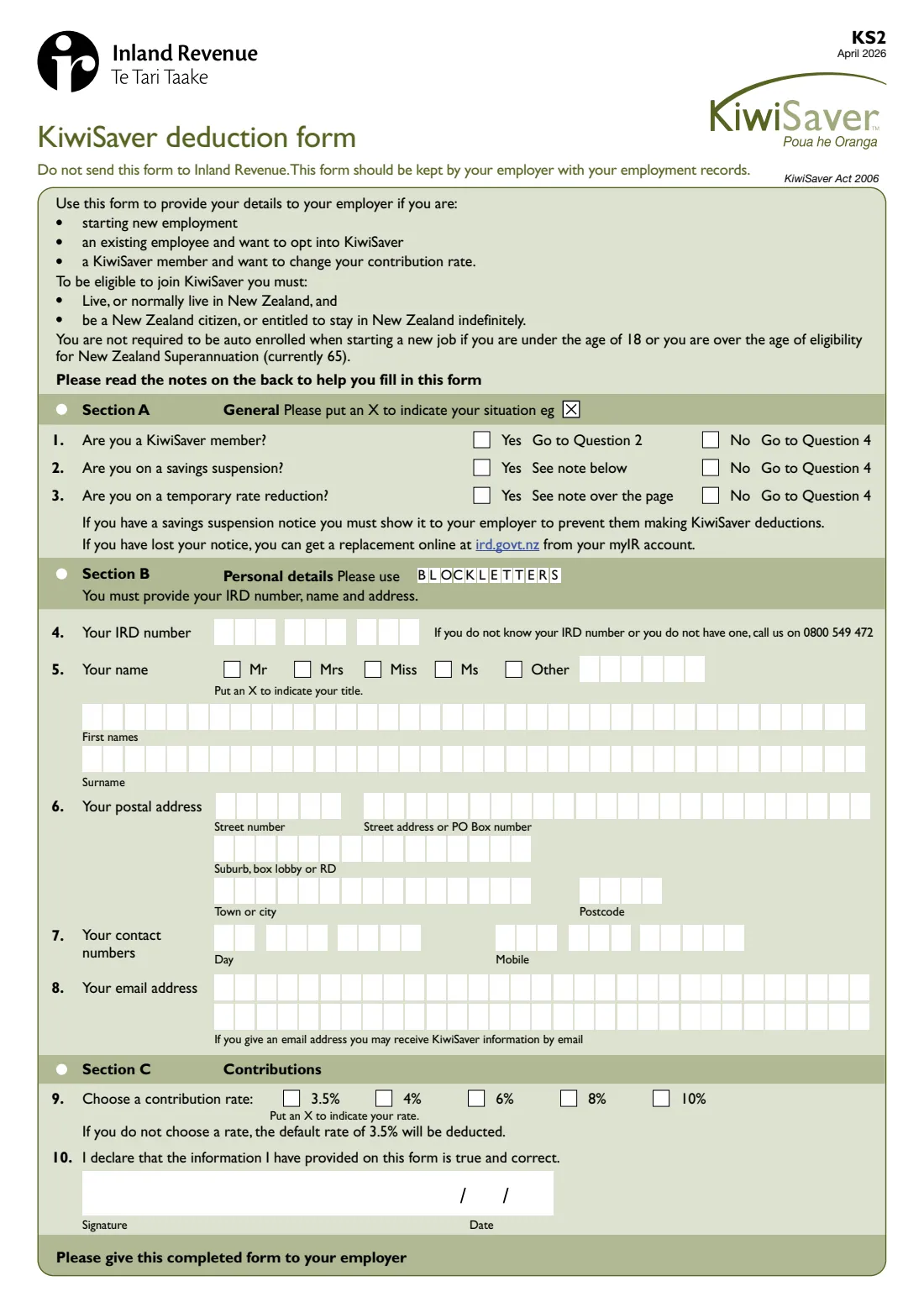
The KS2 KiwiSaver deduction form gives your employer the details they need to deduct KiwiSaver contributions from your salary or wages. It's used in three situations printed on the form: you're starting a new job, you're an existing employee who wants to opt in to KiwiSaver, or you're already a member and want to change your contribution rate. It's a single page — three yes/no questions, your personal details, and your chosen rate.
Although it's an Inland Revenue form, it isn't sent to Inland Revenue. Your employer keeps it with your employment records and uses the information for their own KiwiSaver reporting. For the April 2026 edition, the rates you can choose are 3.5%, 4%, 6%, 8% or 10%, and if you don't choose, the default rate of 3.5% is deducted.
FileIt lets you fill in the KS2 through a short guided form. Your name and address can be pre-filled from your People records, your answers are printed into Inland Revenue's own PDF — including an 8-digit IRD number placed from the second box — and the completed form is saved to your FileIt vault. You can sign by hand or with FileIt's optional e-signature, then give it to your employer yourself.
- Who fills it
- The employee
- Given to
- Your employer — not Inland Revenue
- When
- Starting a new job, opting in as an existing employee, or changing your contribution rate
- Signatures
- The employee signs and dates the declaration (question 10)
- Rates
- 3.5%, 4%, 6%, 8% or 10% — default 3.5% (April 2026 edition)
- Edition
- KS2 April 2026
Who needs to fill out KS2 KiwiSaver deduction form?
- Existing KiwiSaver members starting a new job — the form recommends giving your new employer a KS2 so deductions start.
- Employees who aren't in KiwiSaver and want to opt in through their current employer.
- KiwiSaver members who want to change their contribution rate — for example from the 3.5% default to 6% or 10%.
- New employees aged 65 or over who want to join KiwiSaver through their employer.
- Members on a savings suspension or a temporary rate reduction, who need to tell their new employer.
- It is not for under-18s joining KiwiSaver — they must join through a scheme provider directly.
When to use KS2 KiwiSaver deduction form
- When you start a new job, so your employer has your IRD number, contact details and chosen rate from your first pay.
- When you decide to opt in to KiwiSaver as an existing employee.
- Whenever you want to change your contribution rate — complete Sections B and C and give the form to your employer.
- When you have a savings suspension notice or a temporary rate reduction letter to show a new employer.
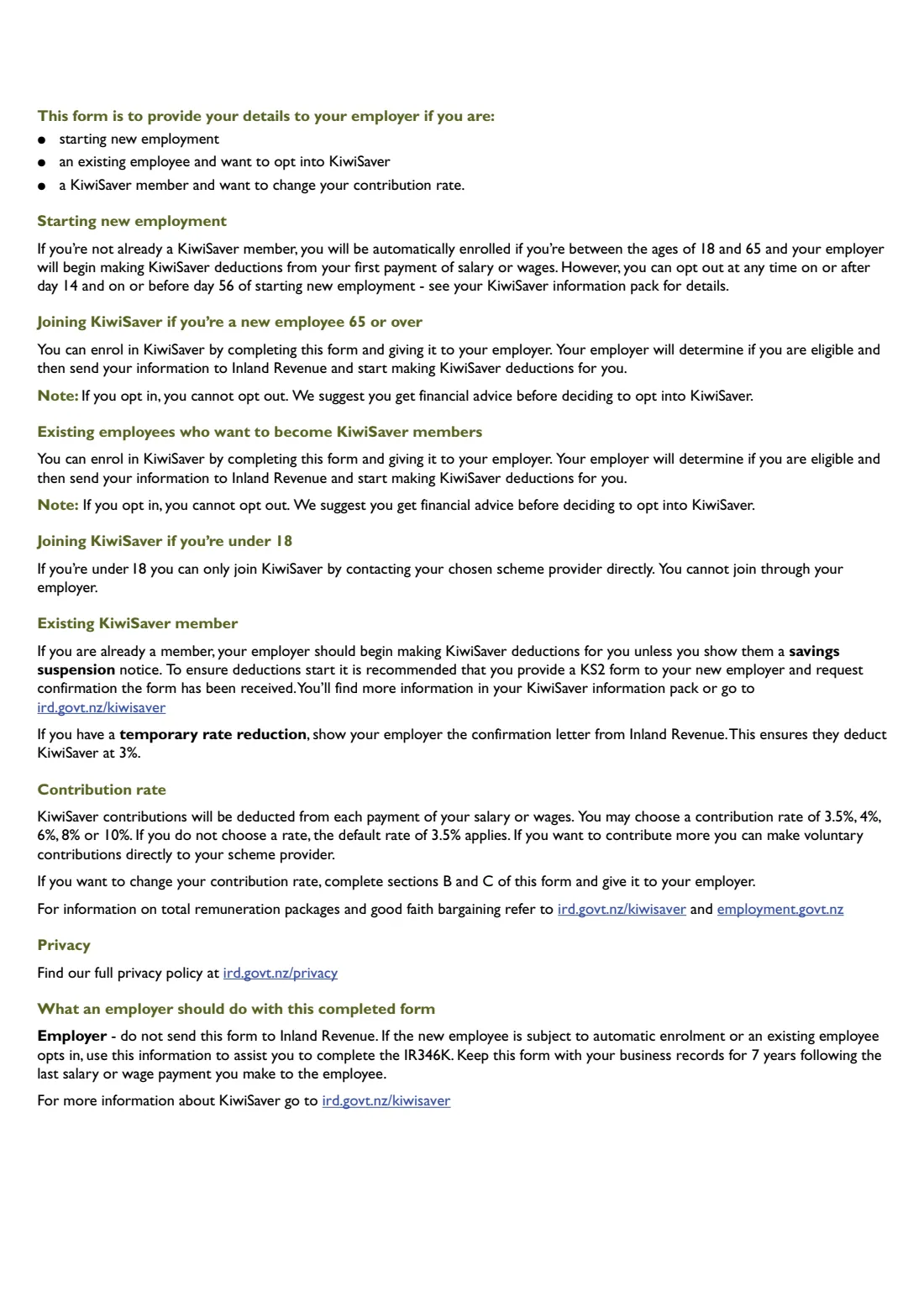
- If you're not a member and you're between 18 and 65, you'll usually be enrolled automatically when you start a new job; the form explains you can opt out on or after day 14 and on or before day 56.
What you need before you start
- Your IRD number (8 or 9 digits). If you don't know it or don't have one, the form gives an Inland Revenue number to call.
- Your title, all your first names and your surname.
- Your postal address — street number and street, or PO Box, plus suburb, box lobby or RD, town or city and postcode.
- A daytime phone number and mobile number.
- An email address, if you'd like to receive KiwiSaver information by email (optional).
- Whether you're already a KiwiSaver member.
- Your savings suspension notice or temporary rate reduction letter from Inland Revenue, if you have one.
- The contribution rate you want: 3.5%, 4%, 6%, 8% or 10%.
What’s on KS2 KiwiSaver deduction form
The 2026 edition has 2 pages. FileIt asks for it in 3 parts, and it is signed by Employee:
- Section A: GeneralEmployee
- Section B: Personal detailsEmployee
- Section C: ContributionsEmployee
How to fill out KS2 KiwiSaver deduction form, step by step
1 Section A: General
Question 1 asks whether you're a KiwiSaver member. If No, skip to question 4. If Yes, question 2 asks whether you're on a savings suspension: if you have a savings suspension notice, you must show it to your employer to stop KiwiSaver deductions. A lost notice can be replaced through your myIR account.
Question 3 asks whether you're on a temporary rate reduction. If so, show your employer the confirmation letter from Inland Revenue so they deduct KiwiSaver at 3%.
2 Section B: Personal details
The form says you must provide your IRD number, name and address. Enter your IRD number at question 4 — an 8-digit number starts in the second box, which FileIt handles for you. At question 5, choose a title and give all your first names and your surname in block letters.
Question 6 is your postal address: street number (including any unit number, such as 2/14), street or PO Box, suburb, box lobby or RD, town or city and postcode. Question 7 asks for daytime and mobile numbers, and question 8 for an optional email address.
3 Section C: Contributions
At question 9, choose a contribution rate: 3.5%, 4%, 6%, 8% or 10% of each payment of salary or wages. If you don't choose one, the default rate of 3.5% is deducted. If you'd like to save more than 10%, the form says you can make voluntary contributions directly to your scheme provider.
Question 10 is the declaration that the information on the form is true and correct. Sign and date it, then give the form to your employer.
Common mistakes to avoid
- Sending the KS2 to Inland Revenue. The form says clearly: do not send it to Inland Revenue — give it to your employer.
- Forgetting your IRD number. Section B must include your IRD number, name and address.
- Not ticking a rate and being surprised by the default 3.5% deduction — choose the rate you actually want.
- Assuming a new employer knows you're on a savings suspension. You must show them the notice, or they'll make deductions.
- Opting in without thinking it through. The form warns that if you opt in, you cannot opt out, and suggests getting financial advice first.
- Trying to join through an employer when you're under 18 — you must go to a KiwiSaver provider directly.
- Not checking your payslip afterwards. The form recommends asking your new employer to confirm they've received your KS2.
After you fill it out
Sign and date the declaration at question 10, by hand or with FileIt's optional e-signature, and give the form to your employer. Don't send it to Inland Revenue. The form suggests asking your employer to confirm they've received it.
Your employer keeps the KS2 with their business records for 7 years after the last salary or wage payment they make to you. If you're being automatically enrolled or you've opted in, they use your details for their own KiwiSaver paperwork with Inland Revenue.
FileIt saves the completed PDF in your vault, so you have a record of the rate you chose and when. To change your rate later, fill in a new KS2 (Sections B and C) and give it to your employer.
Fill out KS2 KiwiSaver deduction form online with FileIt
- Pick the person. Choose someone from People and FileIt fills in their name, date of birth, address and other details it already knows.
- Answer plain-language questions. One part of the form at a time, with the official help text beside each question — 20 fields in all. Your answers save as you go.
- Check the live preview. Watch your answers land on the real Inland Revenue (Te Tari Taake) form, and let FileIt do any worksheet arithmetic.
- Generate the official PDF. FileIt prints your answers into the agency’s own PDF and files it in that person’s folder in your vault. Sign it, or send it for e-signature.
FileIt fills the form — it never files or submits anything for you. Deliver the finished form to whoever asked for it, the way the form’s instructions say.
Start KS2 KiwiSaver deduction form now — it’s freeKS2 KiwiSaver deduction form: frequently asked questions
What is the KS2 form?
The KS2 is Inland Revenue's KiwiSaver deduction form. You give it to your employer to provide your details for KiwiSaver deductions when you start a new job, opt in to KiwiSaver, or change your contribution rate.
Where do I send the KS2 KiwiSaver form?
Give it to your employer. The form says not to send it to Inland Revenue — your employer keeps it with your employment records.
Can I fill in the KS2 online?
Yes. FileIt guides you through the questions and prints your answers into Inland Revenue's official KS2 PDF, which you can sign by hand or with FileIt's optional e-signature. It's available on every FileIt account, including the free plan.
How do I change my KiwiSaver contribution rate?
Complete Sections B and C of the KS2 with your new rate and give it to your employer. For the April 2026 edition the options are 3.5%, 4%, 6%, 8% or 10%.
What is the default KiwiSaver contribution rate?
The April 2026 KS2 says that if you don't choose a rate, the default rate of 3.5% is deducted.
Can I opt out of KiwiSaver after opting in?
No. The form says that if you opt in, you cannot opt out, and suggests getting financial advice first. Opting out applies to automatic enrolment when starting a new job, between day 14 and day 56.
Do I need a KS2 if I'm already a KiwiSaver member?
It's recommended. The form says your new employer should start deductions anyway, but suggests giving them a KS2 and asking them to confirm they've received it.
Can I join KiwiSaver through my employer if I'm under 18?
No. The form says under-18s can only join by contacting their chosen scheme provider directly.
Official sources
- Blank form (PDF), published by Inland Revenue (Te Tari Taake): https://www.ird.govt.nz/-/media/project/ir/home/documents/forms-and-guides/ir1---ir99/ks2/ks2.pdf
- Official instructions and guidance: https://www.ird.govt.nz/kiwisaver/kiwisaver-employers/starting-employees-in-kiwisaver/employees-who-choose-to-opt-into-kiwisaver/opt-an-employee-into-kiwisaver
- Edition shown on this page: KS2 April 2026 (checked 2026-09-25).
FileIt is not affiliated with or endorsed by Inland Revenue (Te Tari Taake) or any government. This page explains the form in general terms and is not legal, tax or immigration advice. Always read the official instructions, and check that you are using the edition the recipient accepts. Page last reviewed 2026-09-25.