What is IR330 Tax code declaration?
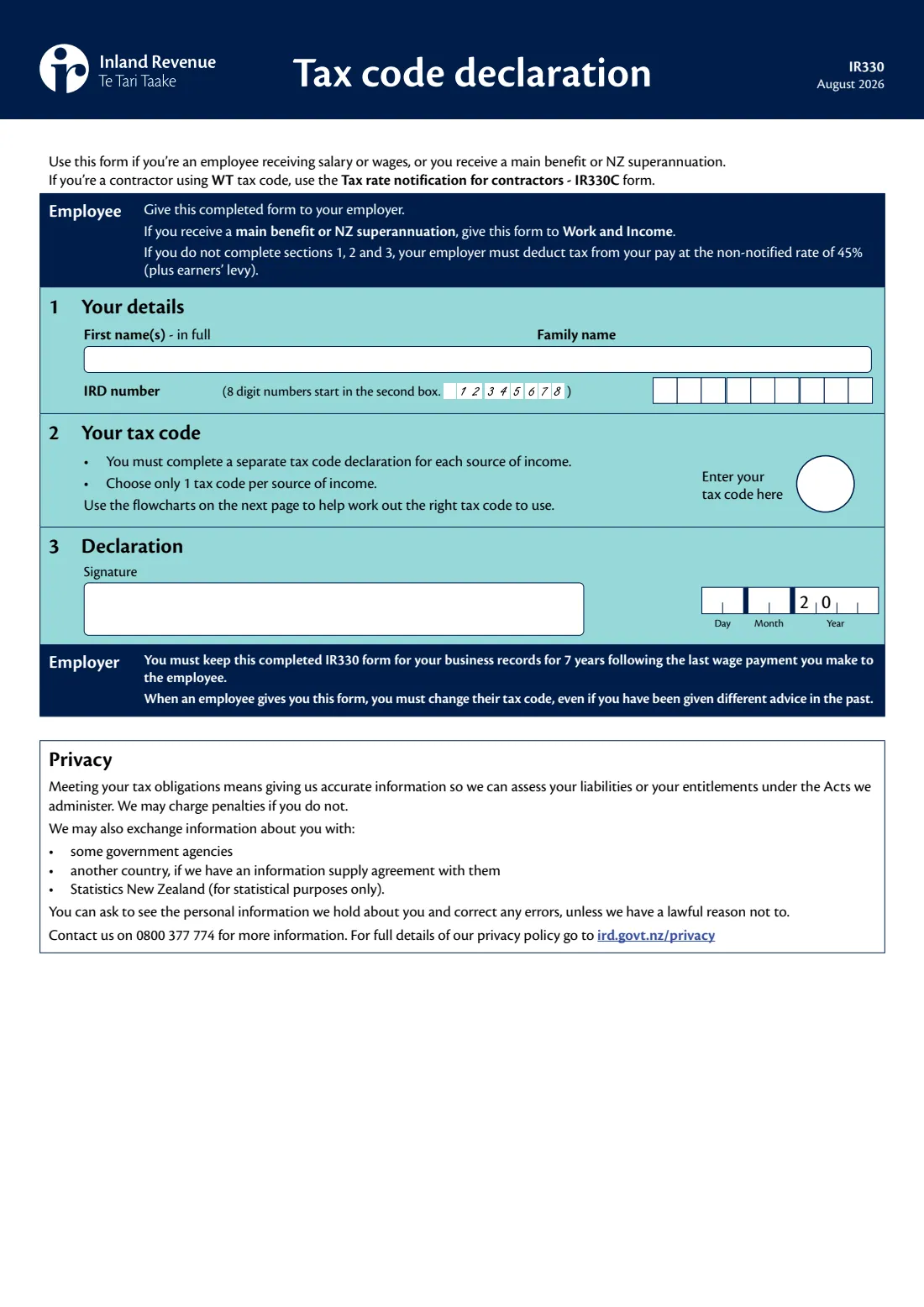
The IR330 Tax code declaration tells your employer which tax code to use when deducting PAYE from your salary or wages. If you receive a main benefit or NZ Super, it goes to Work and Income instead. It's a one-page form — your name, your IRD number, your tax code and your signature — but choosing the right code is where people get stuck, which is why pages 2 and 3 of the form are flowcharts.
The code matters. The form says that if you don't complete sections 1, 2 and 3, your employer must deduct tax at the non-notified rate of 45% (plus earners' levy). Pick a code that doesn't fit your situation and too much or too little tax comes out of each pay, or student loan repayments aren't deducted when they should be.
FileIt helps you fill in the August 2026 edition of the IR330 by asking the flowchart questions one at a time and working out the tax code your answers lead to. Your name can be pre-filled from your People records, the answers are printed into Inland Revenue's own PDF, and the finished form is saved to your FileIt vault. You can sign it by hand or with FileIt's optional e-signature, and you hand it to your employer yourself — it isn't sent to Inland Revenue.
- Who fills it
- The employee, or a person receiving a main benefit or NZ Super
- Given to
- Your employer — or Work and Income for a main benefit or NZ Super. Not Inland Revenue.
- When
- When you start a job, add a second job, or your circumstances change
- Signatures
- The employee signs and dates section 3
- One form per
- Source of income — a separate IR330 for each job or benefit
- Edition
- IR330 August 2026
Who needs to fill out IR330 Tax code declaration?
- Anyone starting a new job in New Zealand and being paid salary or wages.
- People taking on a second or third job, who need a secondary tax code (SB, S, SH, ST or SA) for the extra income.
- People receiving a main benefit or NZ Super from Work and Income, who give the form to Work and Income.
- Anyone who takes out a New Zealand student loan or pays one off, since the SL part of the code changes.
- Casual agricultural workers, shearers and shed-hands (CAE), election day workers (EDW) and recognised seasonal workers (NSW).
- People with a tailored tax code certificate from Inland Revenue, who enter STC.
When to use IR330 Tax code declaration
- On or before your first pay with a new employer, so the right tax code is used from the start.
- When you take out or pay off a student loan.
- When you start or stop being eligible for the ME or ME SL tax code — for example if you or your partner start receiving Working for Families.
- When your income from a second job goes up or down enough to change the secondary code you should use.
- Your employer must change your tax code when you give them a new IR330, even if they've had different advice in the past.
What you need before you start
- Your full first name(s) and family name.
- Your IRD number (8 or 9 digits) — it's on letters from Inland Revenue and in myIR. If you don't have one, apply with an IR595 first.
- Whether this income is your main or highest source of salary or wages, a main benefit, or secondary income.
- Whether you're a New Zealand tax resident.
- An estimate of your annual net income, or for secondary income your total annual PAYE income from all sources (1 April to 31 March).
- Whether you or your partner receive Working for Families, or you receive NZ Super, a veteran's pension or an overseas equivalent.
- Whether you have a New Zealand student loan.
- Your tailored tax code certificate, if you have one.
What’s on IR330 Tax code declaration
The 2026 edition has 4 pages. FileIt asks for it in 3 parts, and it is signed by Employee:
- 1 Your detailsEmployee
- 2 Your tax codeEmployee
- 3 DeclarationEmployee
How to fill out IR330 Tax code declaration, step by step
1 1 Your details
Enter all your first names in full, your family name and your IRD number. The form notes that 8-digit IRD numbers start in the second box — FileIt lines the digits up correctly for you.
If you don't yet have an IRD number, apply for one (for example with the IR595 if you're in New Zealand) before completing your IR330.
2 2 Your tax code — main or highest source of income
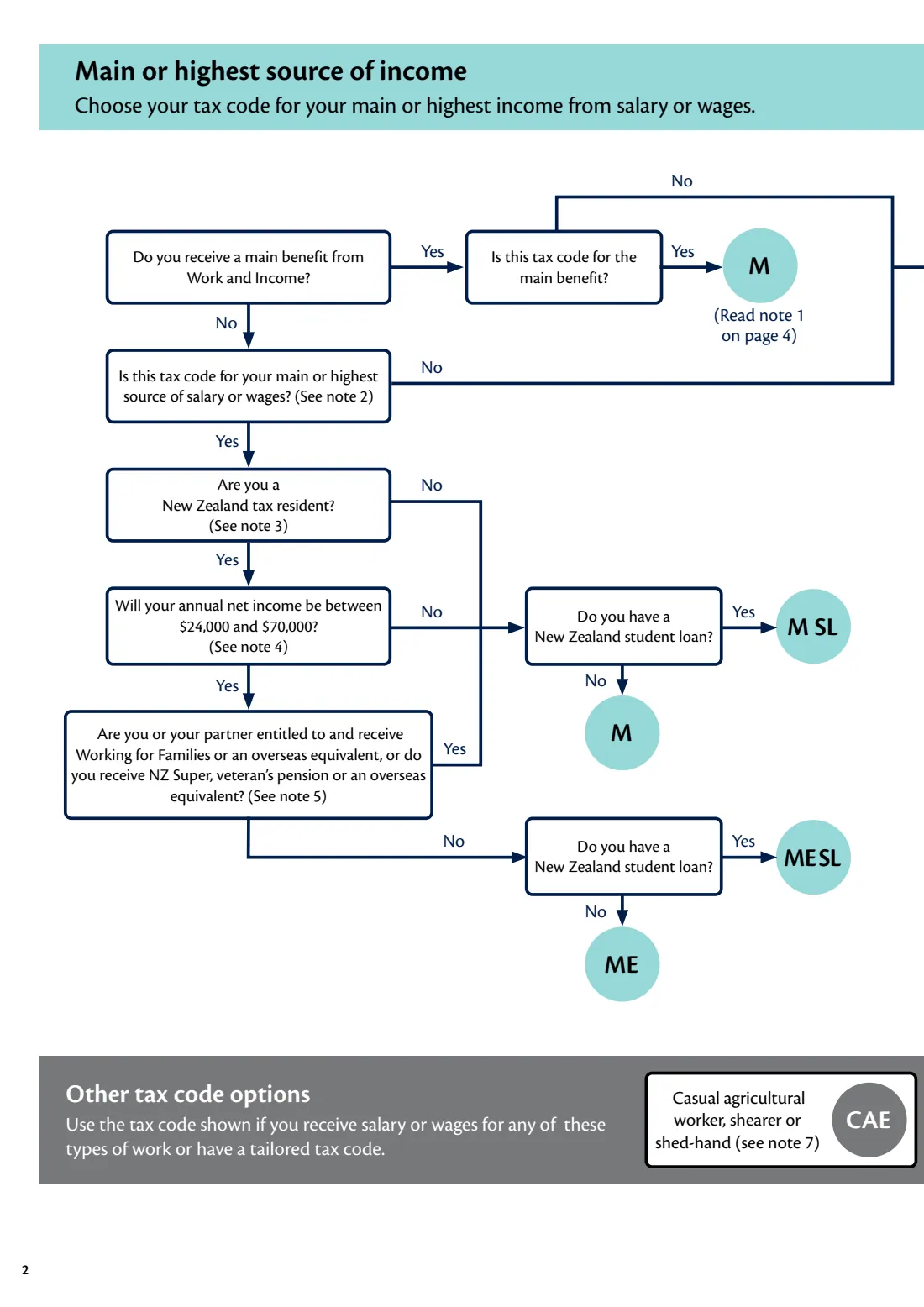
Complete a separate IR330 for each source of income, and choose only one tax code per source. For your main or highest-paying job, the page 2 flowchart asks: are you a New Zealand tax resident? Will your annual net income be between $24,000 and $70,000? And do you or your partner receive Working for Families (or an overseas equivalent), or do you receive NZ Super, a veteran's pension or an overseas equivalent?
For the August 2026 edition, a resident earning between $24,000 and $70,000 who doesn't receive any of those payments uses ME; everyone else on their main job uses M. Add SL (M SL or ME SL) if you have a New Zealand student loan.
3 2 Your tax code — main benefit from Work and Income
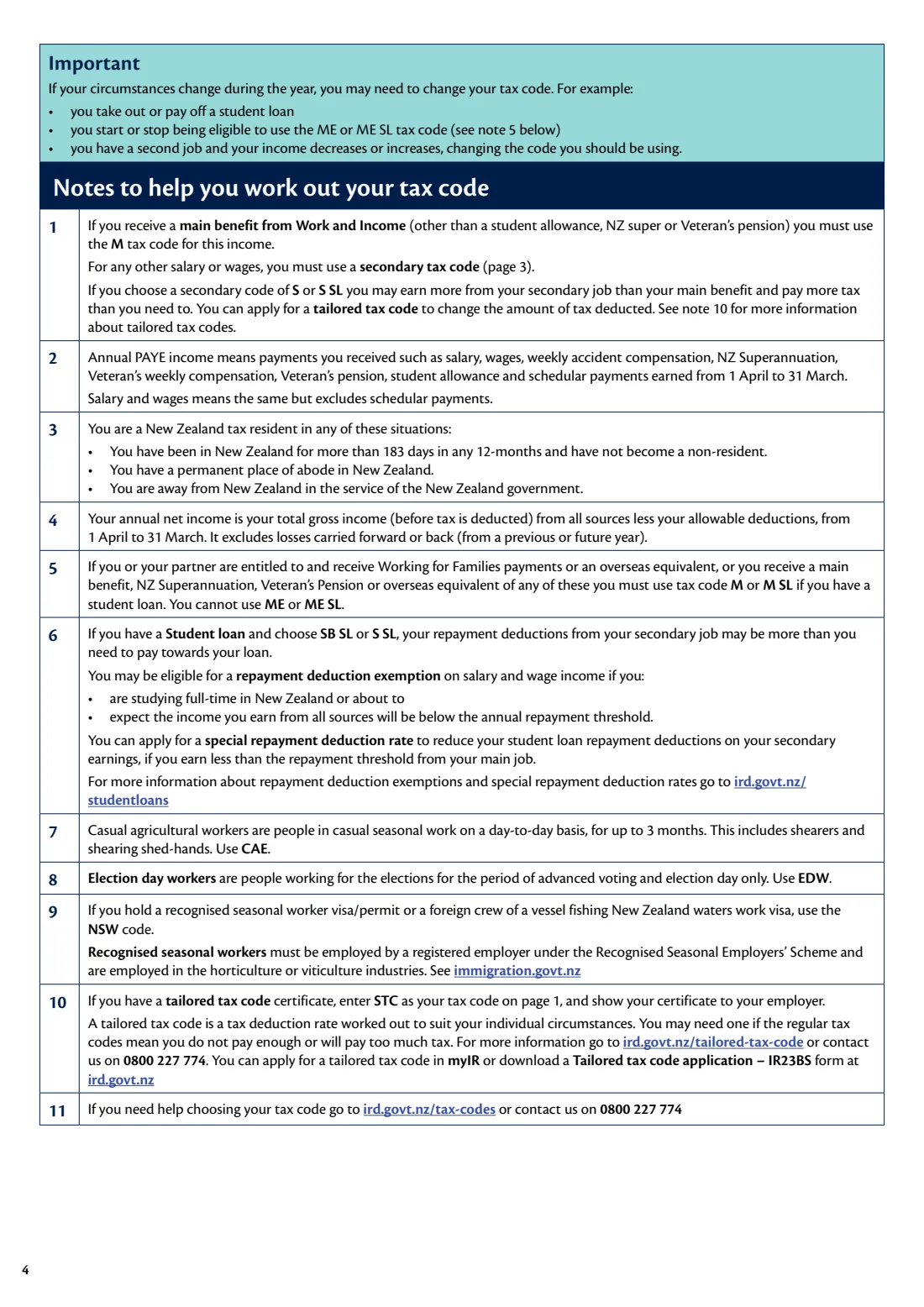
If this declaration is for a main benefit from Work and Income, note 1 on the form says to use the M code for that benefit. Any salary or wages you earn alongside it must use a secondary code.
The form warns that if you choose S or S SL for your job you may earn more from it than your benefit and pay more tax than needed — a tailored tax code can fix that.
4 2 Your tax code — secondary income
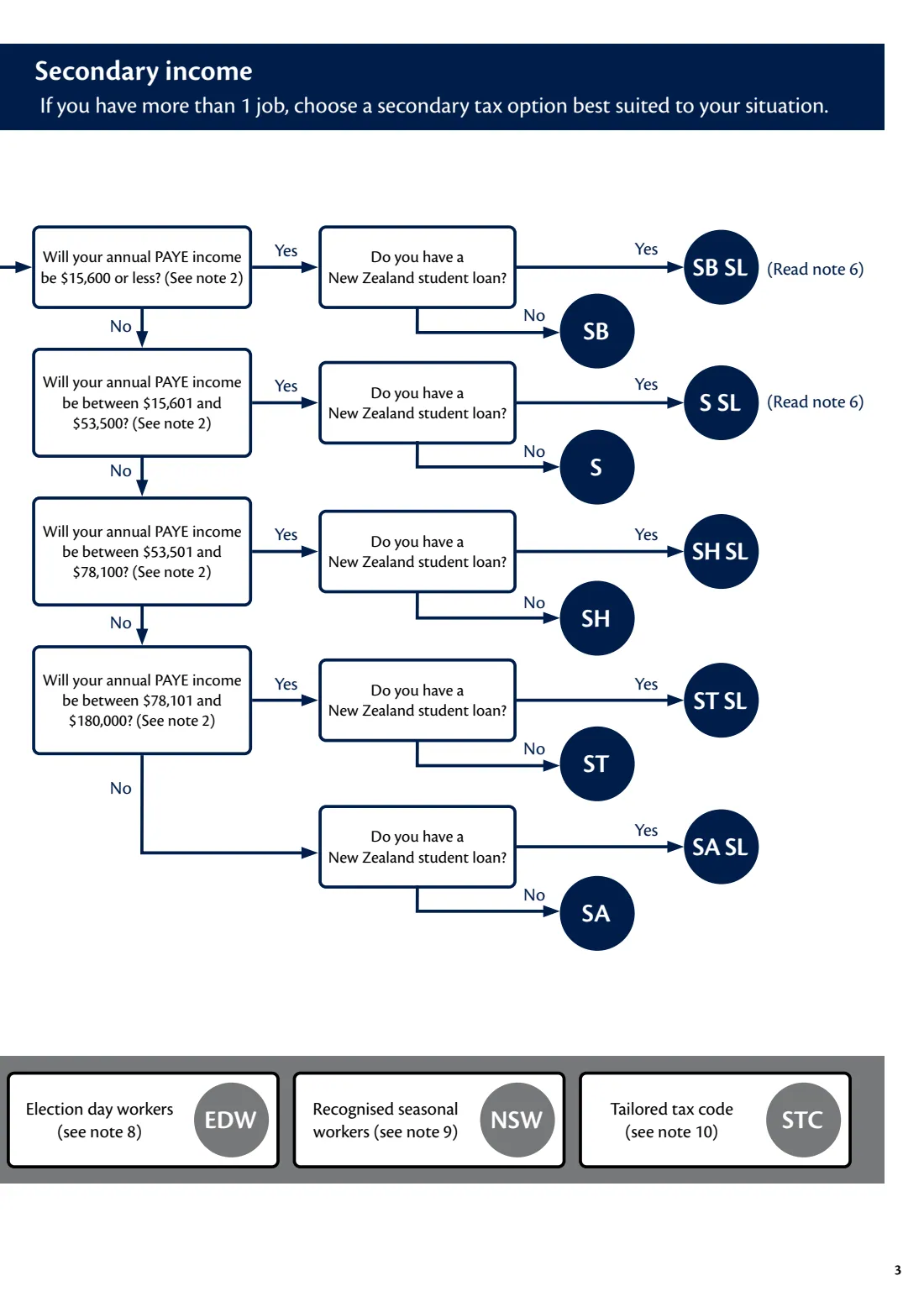
For a second job, the page 3 flowchart uses your total annual PAYE income from all sources. For the August 2026 edition the bands are: $15,600 or less (SB), $15,601 to $53,500 (S), $53,501 to $78,100 (SH), $78,101 to $180,000 (ST), and over $180,000 (SA). Add SL if you have a student loan.
Annual PAYE income includes salary, wages, weekly ACC, NZ Super, veteran's payments, student allowance and schedular payments. If you choose SB SL or S SL, note 6 explains that your loan deductions may be more than you need to pay, and points to repayment deduction exemptions and special deduction rates.
5 2 Your tax code — other tax code options
Some kinds of work have their own code: CAE for casual agricultural workers, shearers and shed-hands (casual seasonal work for up to 3 months), EDW for election day workers, and NSW for recognised seasonal workers or foreign crew of a vessel fishing New Zealand waters.
If Inland Revenue has given you a tailored tax code certificate, enter STC and show the certificate to your employer.
6 3 Declaration
Sign and date the form. The year is printed as '20' followed by the last two digits.
The employer section on the form explains that your employer must keep the completed IR330 for 7 years after the last wage payment they make to you.
Common mistakes to avoid
- Leaving the form blank or incomplete — your employer must then deduct at the non-notified rate of 45% plus earners' levy.
- Using M or ME on a second job. Additional jobs need a secondary code (SB, S, SH, ST or SA).
- Choosing ME when you or your partner receive Working for Families, or you receive NZ Super or a veteran's pension — the form says you must use M or M SL.
- Working out the secondary band from one job only, instead of your total annual PAYE income from all sources.
- Forgetting to add SL when you have a New Zealand student loan, or leaving SL on after you've paid the loan off.
- Using one IR330 for two jobs. Each source of income needs its own form.
- Sending the IR330 to Inland Revenue rather than giving it to your employer or Work and Income.
After you fill it out
Sign and date section 3 — by hand or with FileIt's optional e-signature — and give the form to your employer. If the form is for a main benefit or NZ Super, give it to Work and Income. Don't send it to Inland Revenue.
Your employer must start using the new code once they have your form, and keeps it for 7 years after your last pay. Check your next payslip to make sure the code matches what you declared.
FileIt keeps the finished PDF in your vault, so you can see which code you gave each employer. Fill in a new IR330 whenever your situation changes — a new student loan, a paid-off loan, a change in family payments, or a second job whose income moves into a different band.
Fill out IR330 Tax code declaration online with FileIt
- Pick the person. Choose someone from People and FileIt fills in their name, date of birth, address and other details it already knows.
- Answer plain-language questions. One part of the form at a time, with the official help text beside each question — 11 fields in all. Your answers save as you go.
- Check the live preview. Watch your answers land on the real Inland Revenue (Te Tari Taake) form, and let FileIt do any worksheet arithmetic.
- Generate the official PDF. FileIt prints your answers into the agency’s own PDF and files it in that person’s folder in your vault. Sign it, or send it for e-signature.
FileIt fills the form — it never files or submits anything for you. Deliver the finished form to whoever asked for it, the way the form’s instructions say.
Start IR330 Tax code declaration now — it’s freeIR330 Tax code declaration: frequently asked questions
What is the IR330 form?
The IR330 is Inland Revenue's Tax code declaration. You use it to tell your employer (or Work and Income) which tax code to use for PAYE on one source of income. You need a separate IR330 for each job or benefit.
Where do I send my IR330?
Give it to your employer. If you receive a main benefit or NZ Super, give it to Work and Income. It isn't sent to Inland Revenue.
Can I fill in the IR330 online?
Yes. FileIt asks the same questions as the form's flowcharts, works out the tax code your answers lead to, and prints everything into Inland Revenue's official IR330 PDF. You can sign it by hand or with FileIt's optional e-signature. It's available on every FileIt account, including the free plan.
What is the difference between M and ME tax codes?
Both are for your main or highest source of salary or wages. ME is for New Zealand tax residents whose annual net income will be between $24,000 and $70,000 (August 2026 edition) and who don't receive Working for Families, NZ Super, a veteran's pension or an overseas equivalent. Everyone else uses M.
What tax code do I use for a second job?
A secondary code based on your total annual PAYE income: SB, S, SH, ST or SA, with SL added if you have a student loan. The bands for the August 2026 edition are shown on page 3 of the form.
What happens if I don't give my employer an IR330?
The form says your employer must deduct tax at the non-notified rate of 45%, plus earners' levy, until you complete sections 1, 2 and 3.
When should I change my tax code?
When your circumstances change — for example you take out or pay off a student loan, start or stop being eligible for ME, or your second job's income changes. Give your employer a new IR330.
What does SL mean in my tax code?
SL means you have a New Zealand student loan, so your employer also deducts student loan repayments from your pay.
What is the STC tax code?
STC stands for a tailored tax code, worked out by Inland Revenue for your individual circumstances. You can only use it if you have a tailored tax code certificate, which you show to your employer.
Official sources
- Blank form (PDF), published by Inland Revenue (Te Tari Taake): https://www.ird.govt.nz/-/media/project/ir/home/documents/forms-and-guides/ir300---ir399/ir330/ir330.pdf
- Official instructions and guidance: https://www.ird.govt.nz/income-tax/income-tax-for-individuals/tax-codes-and-tax-rates-for-individuals/complete-my-tax-code-declaration
- Edition shown on this page: IR330 August 2026 (checked 2026-09-25).
FileIt is not affiliated with or endorsed by Inland Revenue (Te Tari Taake) or any government. This page explains the form in general terms and is not legal, tax or immigration advice. Always read the official instructions, and check that you are using the edition the recipient accepts. Page last reviewed 2026-09-25.