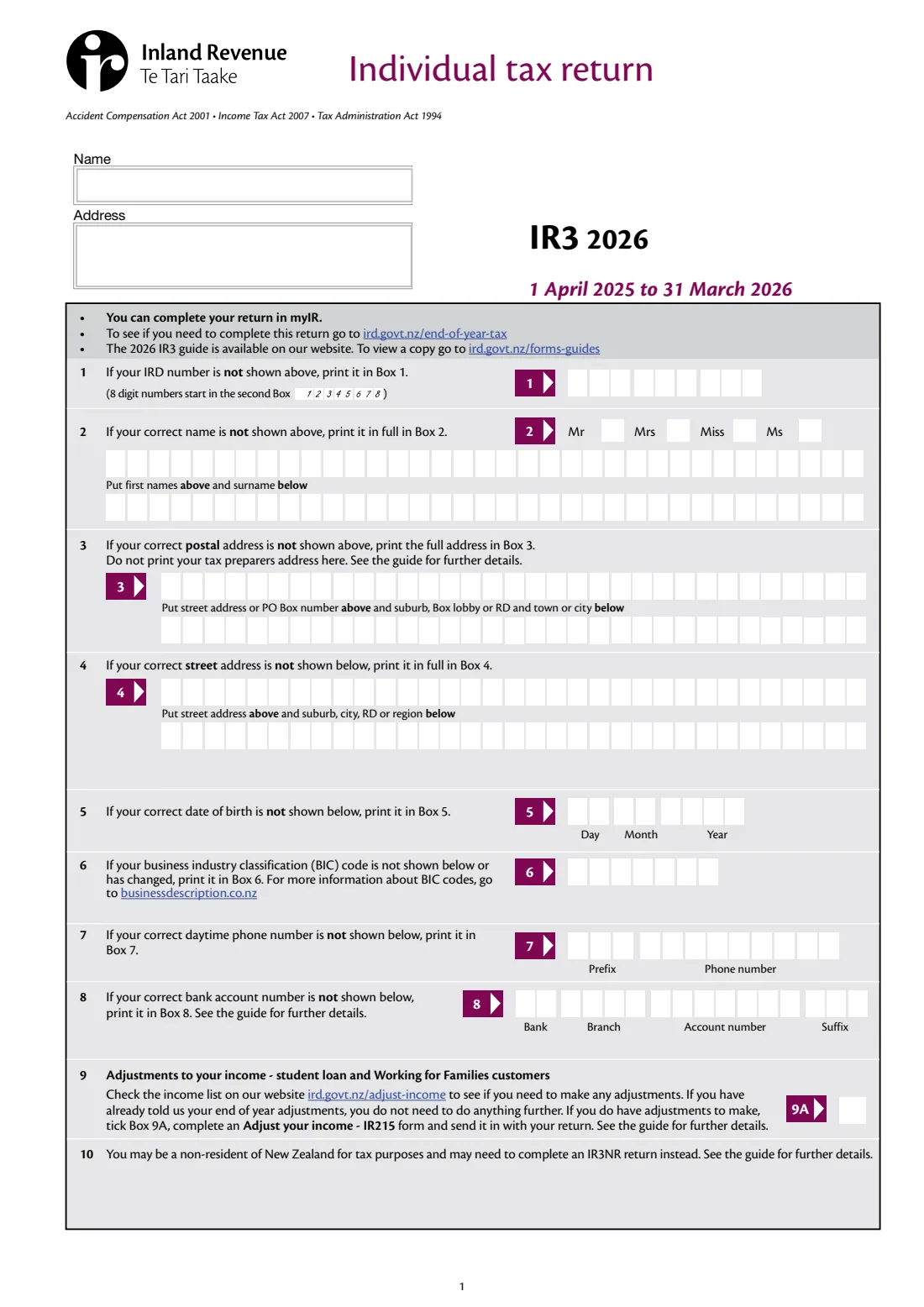
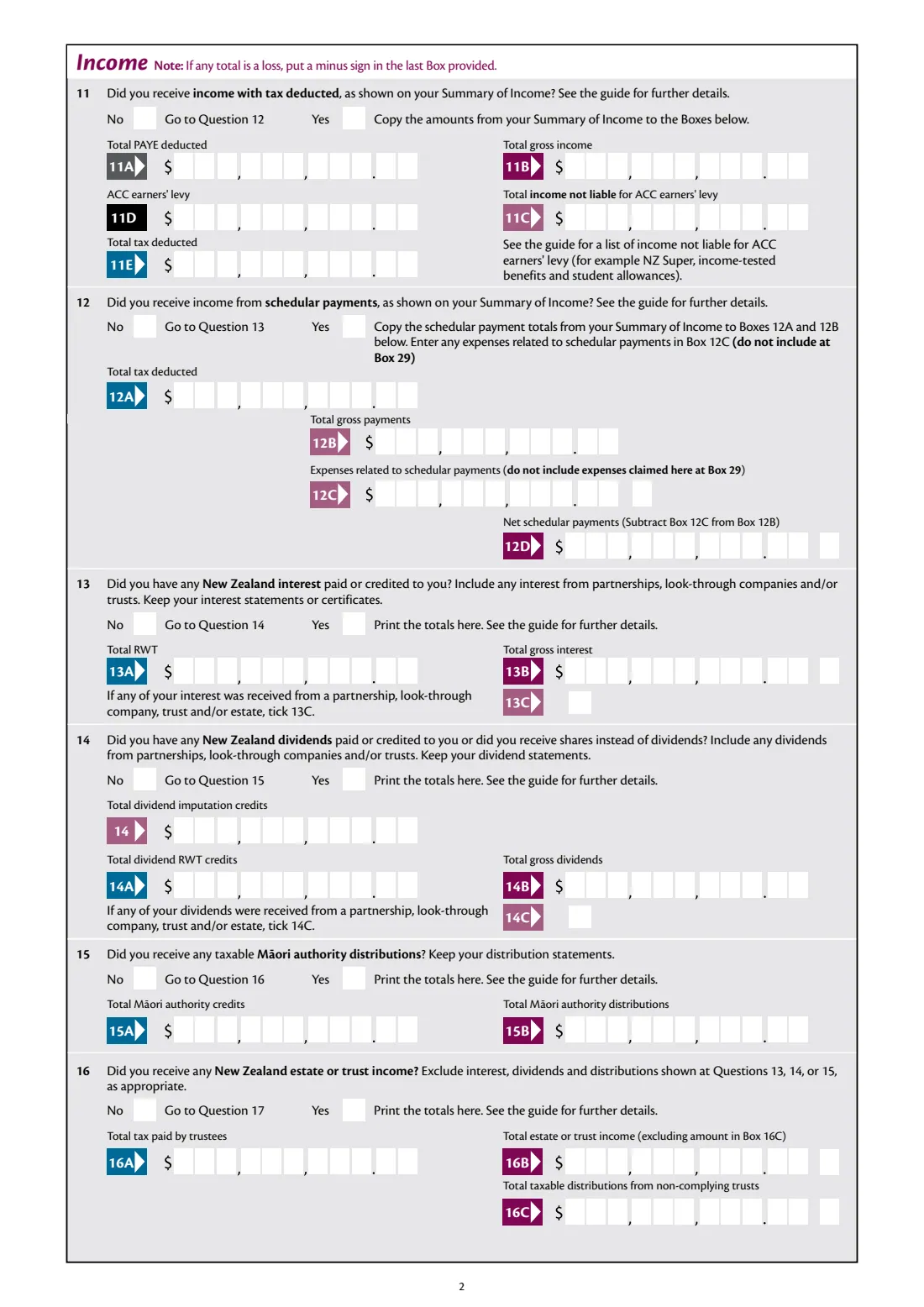
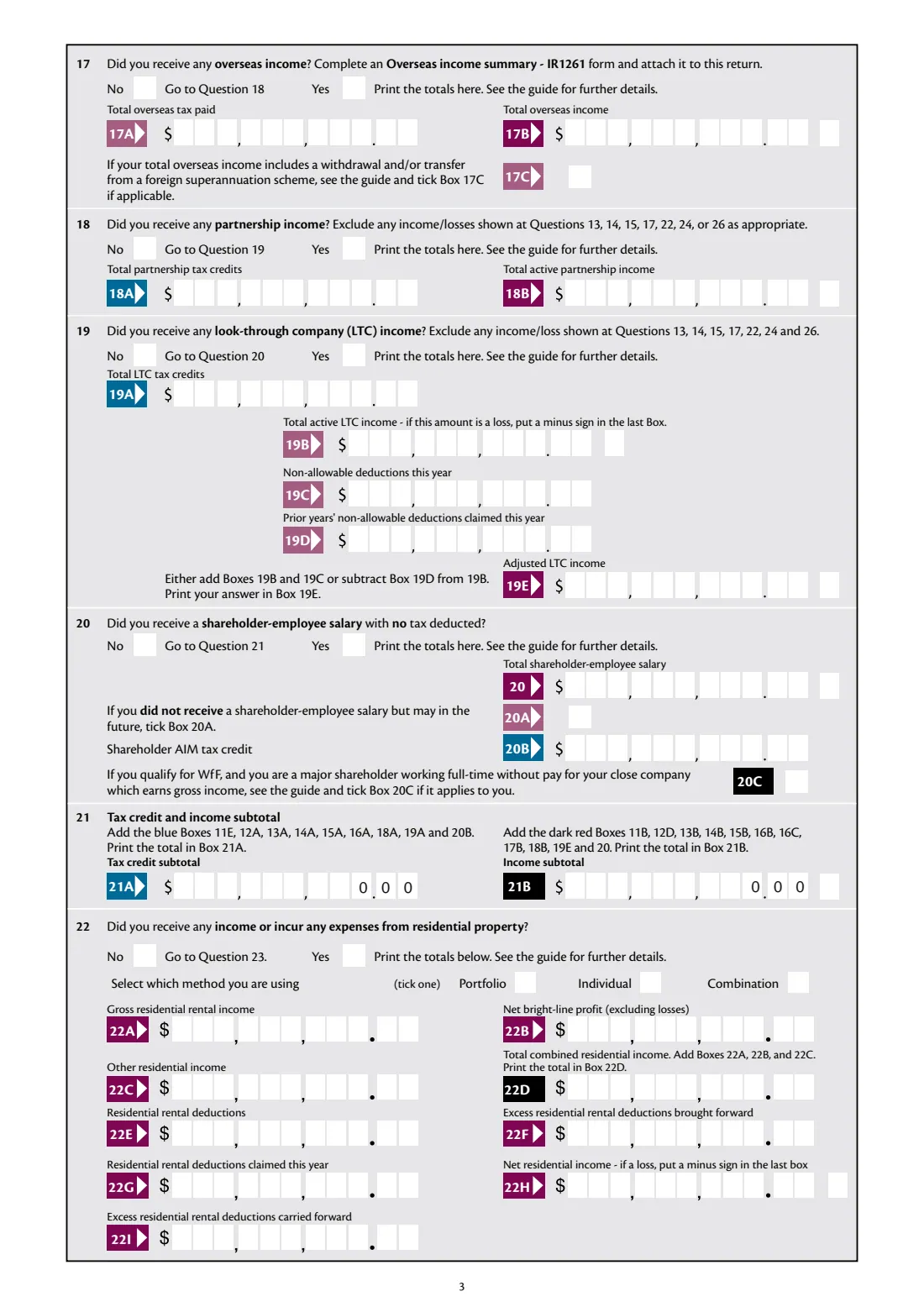
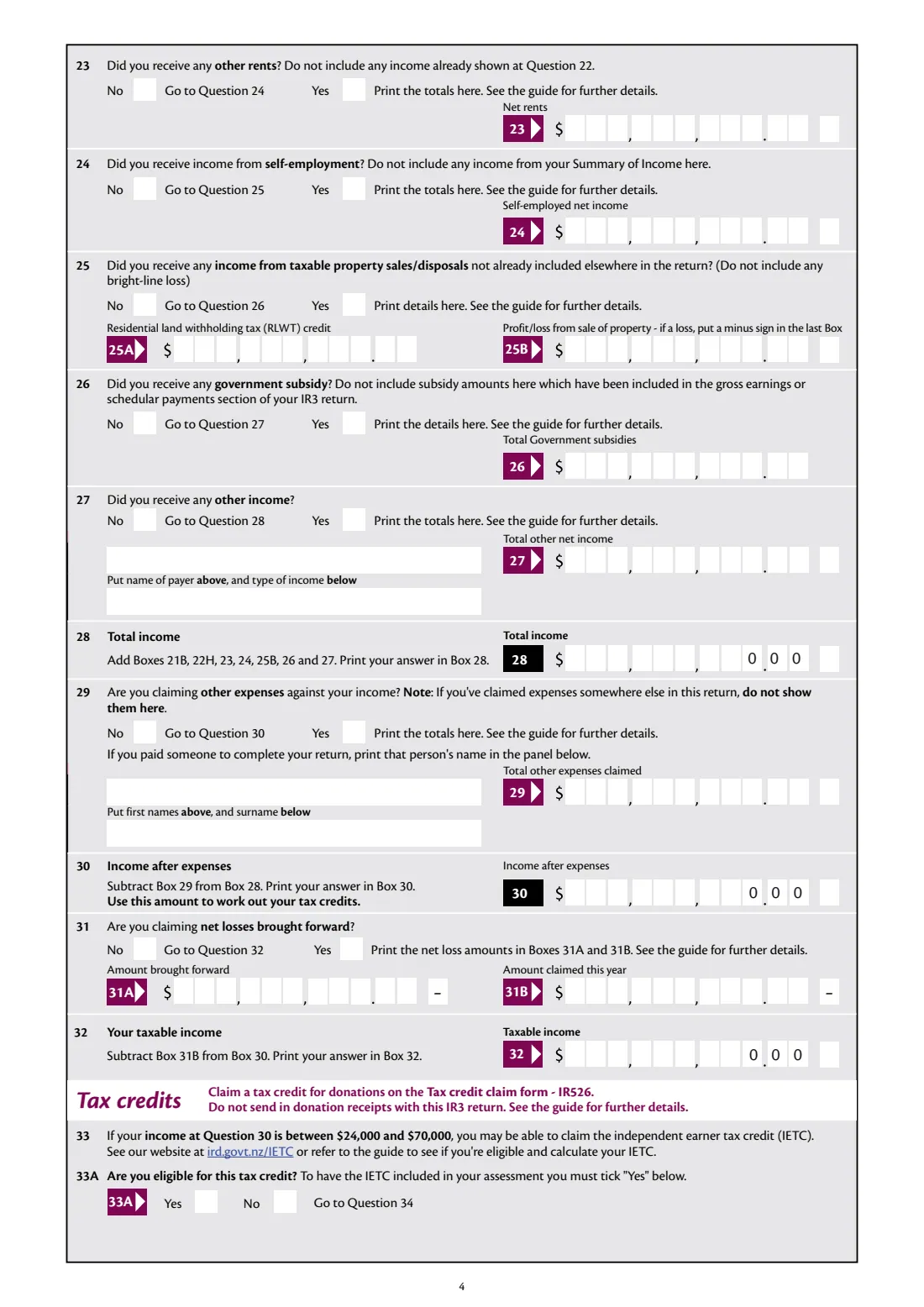
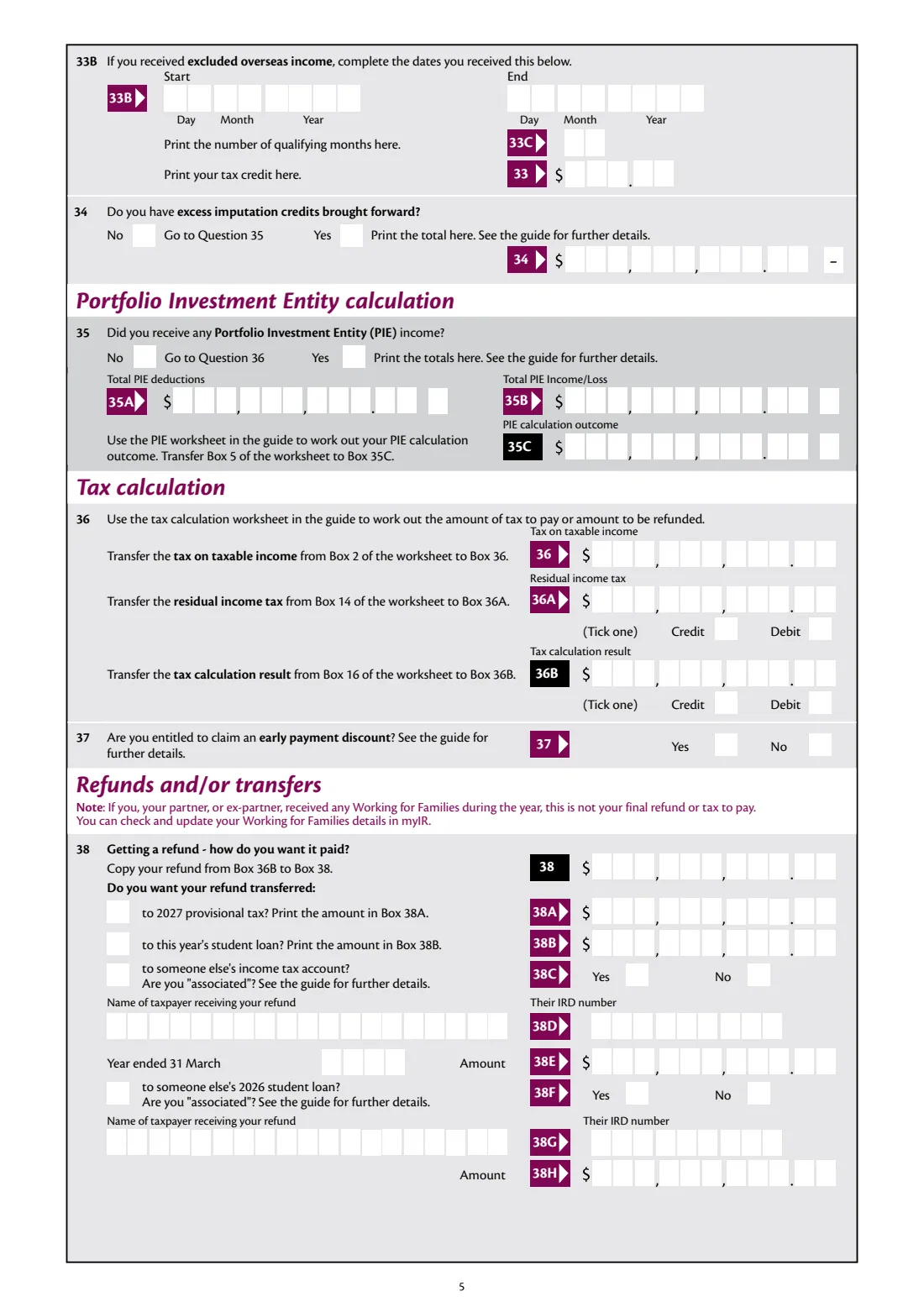
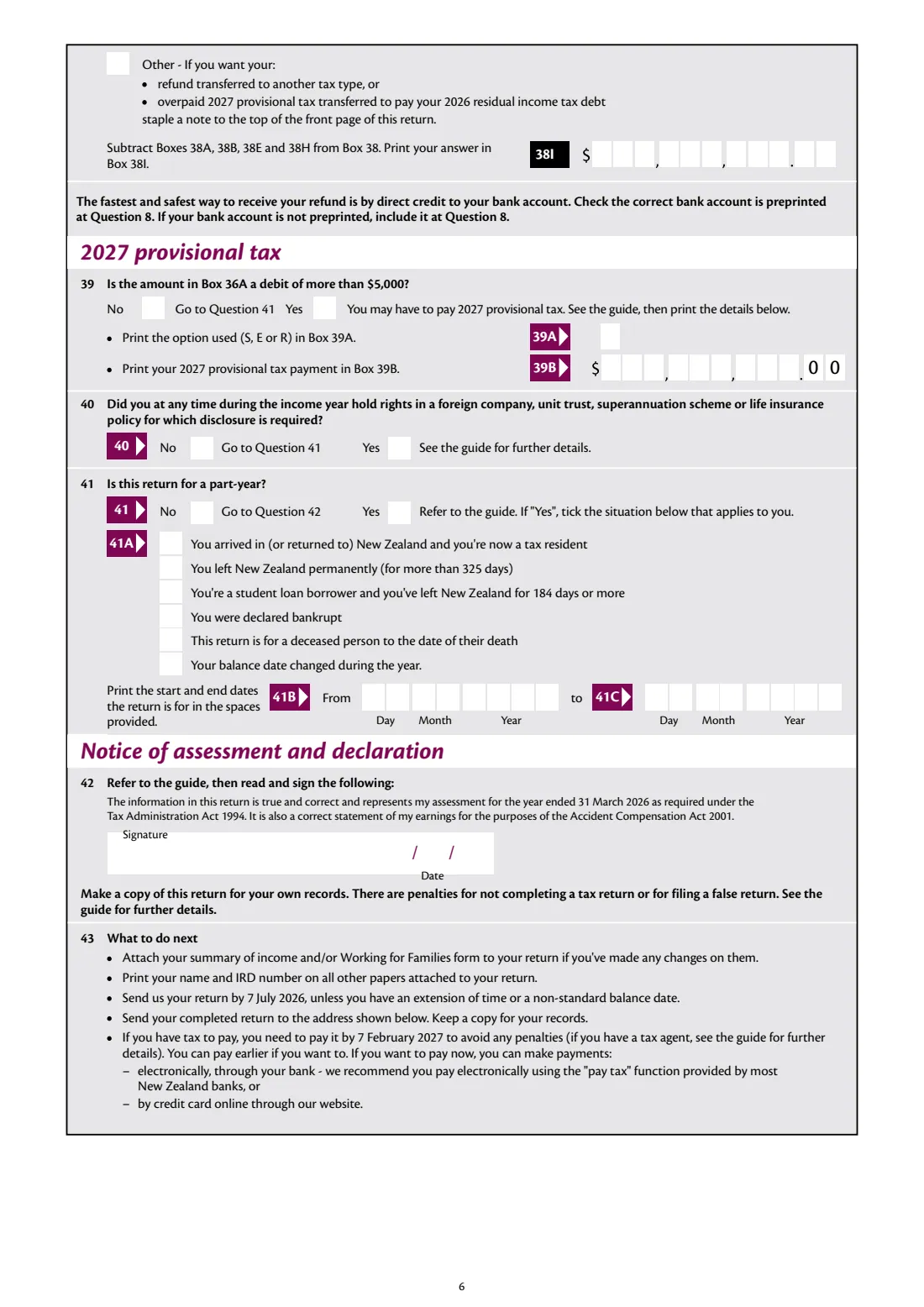
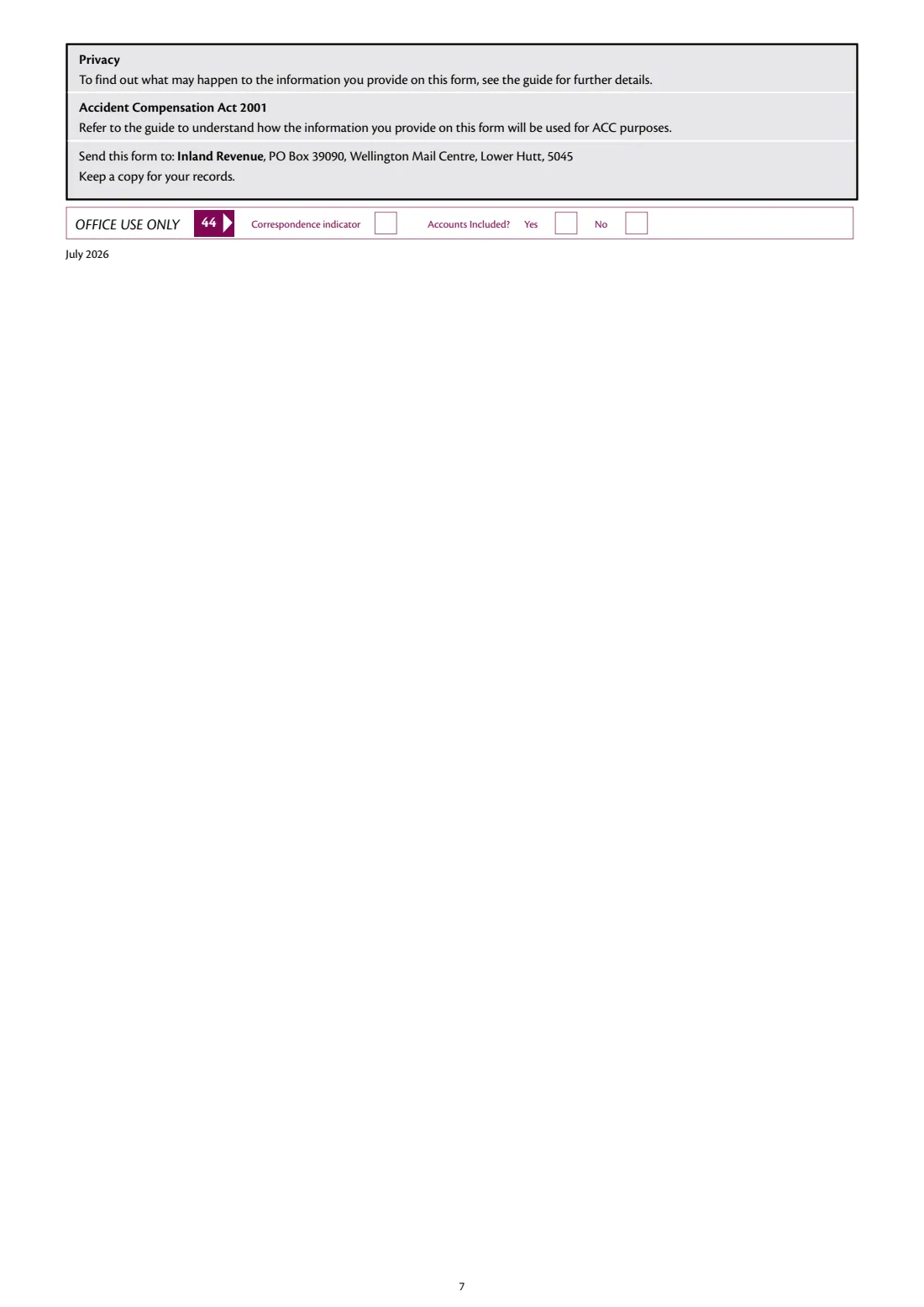
What is IR3 Individual tax return 2026?
Most New Zealanders never file a tax return: their employer, bank and KiwiSaver provider tell Inland Revenue what they earned, and IR works out the result automatically. You need to file an IR3 if you received more than $200 (before tax) of income that Inland Revenue hasn't been told about, even for part of the year. Common examples are rental income, self-employed or contracting income, overseas income, and income from partnerships, look-through companies, estates and trusts.
The 2026 IR3 covers the income year 1 April 2025 to 31 March 2026. It's due by 7 July 2026, unless you have a tax agent or an extension of time, and any tax to pay is due by 7 February 2027. Most people file in myIR. The paper return is posted to Inland Revenue, PO Box 39090, Wellington Mail Centre, Lower Hutt 5045. Non-residents file an IR3NR instead.
FileIt fills in Inland Revenue's own 2026 IR3 for you, one digit per box. It adds up the boxes the form tells you to add (12D, 19E, the 21A and 21B subtotals, 22D, 22H, 22I, total income at 28, income after expenses at 30, taxable income at 32 and the refund at 38I) and prints minus signs for losses in the right box. It also lays out 8-digit IRD numbers from the second box. You still use the tax calculation worksheet in the 2026 IR3 guide for your tax, residual income tax and refund or tax to pay, and copy those figures in.
- Income year
- 1 April 2025 to 31 March 2026
- Who files
- Individuals with more than $200 of income Inland Revenue hasn't been told about
- Due
- 7 July 2026, unless you have a tax agent or an extension of time
- Tax to pay due
- 7 February 2027
- Posted to
- Inland Revenue, PO Box 39090, Wellington Mail Centre, Lower Hutt 5045
- Online instead
- Complete it in myIR
- Edition
- IR3 2026 (July 2026)
Who needs to fill out IR3 Individual tax return 2026?
- Landlords with residential or other rental income.
- Sole traders, contractors and other self-employed people (including a business that stopped during the year).
- People with overseas income, such as foreign pensions, interest or wages.
- Partners in a partnership, and shareholders in a look-through company.
- Beneficiaries with estate or trust income, and shareholder-employees paid without tax deducted.
- Anyone who sold property that's taxable (for example under the bright-line test) and hasn't included it elsewhere.
- Not non-residents, who file an IR3NR.
When to use IR3 Individual tax return 2026
- After 31 March 2026, once you have your Summary of Income from myIR and your records for income IR doesn't know about.
- Inland Revenue suggests waiting until June if you have salary, benefit, interest or investment income reported by payers, so their information is complete.
- By 7 July 2026, unless you have a tax agent or an extension of time.
- A new version is published for every income year, so use the 2026 IR3 for 1 April 2025 to 31 March 2026 only.
What you need before you start
- Your IRD number and your Summary of Income (in myIR).
- The 2026 IR3 guide, for its tax calculation, PIE and other worksheets.
- Interest, dividend, Māori authority and trust distribution statements.
- Your rental and residential property figures: rent received, deductions, and any excess deductions brought forward from last year.
- Self-employed accounts, or net income from your business records.
- An Overseas income summary (IR1261) if you had overseas income.
- Partnership or look-through company figures from their returns.
- Your bank account number for a refund by direct credit.
What’s on IR3 Individual tax return 2026
The 2026 edition has 7 pages. FileIt asks for it in 21 parts, and it is signed by Taxpayer:
- Your details (boxes 1–9)Taxpayer
- 11 Income with tax deductedTaxpayer
- 12 Schedular paymentsTaxpayer
- 13 New Zealand interestTaxpayer
- 14 New Zealand dividendsTaxpayer
- 15 Māori authority distributionsTaxpayer
- 16 Estate or trust incomeTaxpayer
- 17 Overseas incomeTaxpayer
- 18 Partnership incomeTaxpayer
- 19 Look-through company incomeTaxpayer
- 20 Shareholder-employee salaryTaxpayer
- 21 Tax credit and income subtotalTaxpayer
- 22 Residential propertyTaxpayer
- 23–27 Other rents, self-employment, property sales, subsidies and other incomeTaxpayer
- 28–32 Total income, expenses and taxable incomeTaxpayer
- 33–34 Tax creditsTaxpayer
- 35 Portfolio Investment Entity (PIE) calculationTaxpayer
- 36–37 Tax calculationTaxpayer
- 38 Refunds and transfersTaxpayer
- 39–41 Provisional tax, foreign investments and part-year returnsTaxpayer
- 42 DeclarationTaxpayer
How to fill out IR3 Individual tax return 2026, step by step
1 Your details (1–9)
Give your IRD number, name, postal address, street address if it's different, date of birth, business industry classification (BIC) code if you're in business, a daytime phone number and a bank account for refunds. Tick 9A if you need to adjust your income for student loan or Working for Families, and send an IR215 with the return.
2 Income with tax deducted and schedular payments (11–12)
Copy the totals from your Summary of Income: PAYE, gross income, ACC earners' levy, income not liable for the levy and tax deducted. For schedular payments, add any related expenses at 12C. FileIt works out the net at 12D.
3 Investment and other income (13–20)
Answer Yes or No to each type of income: New Zealand interest, dividends, Māori authority distributions, estate or trust income, overseas income, partnership income, look-through company income and shareholder-employee salary. Give the totals from your statements. If a total is a loss, the minus sign goes in the last box.
4 Subtotals (21)
21A adds the tax credits in the blue boxes and 21B adds the income in the dark red boxes. FileIt calculates both.
5 Residential property (22)
Tick whether you use the portfolio, individual or combination method. Give rental income, net bright-line profit and other residential income, then your deductions and any excess deductions brought forward. Enter the deductions you're claiming this year at 22G (the ring-fencing rules generally limit them to your residential income). FileIt works out 22D, the net residential income at 22H and the excess to carry forward at 22I.
6 Other income, expenses and taxable income (23–32)
Add other rents, self-employed net income, taxable property sales, government subsidies and other income. Box 28 (total income) is calculated. Claim other expenses at 29, such as the fee for having your return prepared, and name the preparer. Box 30 is then calculated. Claim any net losses brought forward at 31, and Box 32 gives your taxable income.
7 Tax credits, PIE and tax calculation (33–37)
Say whether you're eligible for the independent earner tax credit (income at Box 30 between $24,000 and $70,000; see the guide). Add any excess imputation credits brought forward and PIE income. Then use the tax calculation worksheet in the IR3 guide and copy its results to 36, 36A and 36B, ticking credit or debit.
8 Refunds and provisional tax (38–41)
If 36B is a refund, you can transfer some of it to your 2027 provisional tax, your student loan, or someone else's income tax account or student loan. FileIt works out what's left at 38I. If 36A is a debit of more than $5,000, you may have to pay 2027 provisional tax, so give the option and amount. Then answer the foreign investment disclosure and part-year questions.
9 Declaration (42)
Sign and date the declaration that the return is true and correct and represents your assessment for the year ended 31 March 2026.
Common mistakes to avoid
- Filing an IR3 when you're a non-resident. Non-residents use the IR3NR.
- Leaving out amounts from your Summary of Income, or copying the wrong box.
- Claiming the same expense twice. Expenses claimed elsewhere, such as schedular expenses at 12C, don't go at 29.
- Claiming residential rental deductions beyond what the ring-fencing rules allow.
- Sending donation receipts with the return. Claim donation tax credits on the IR526 instead.
- Forgetting the minus sign for a loss.
- Posting the return after 7 July 2026 without an extension of time.
- Not signing the declaration.
After you fill it out
Sign and date the return, attach your summary of income or Working for Families form if you've made changes to them, and print your name and IRD number on any other pages you attach.
Post it by 7 July 2026 to Inland Revenue, PO Box 39090, Wellington Mail Centre, Lower Hutt 5045, and keep a copy for your records.
If you have tax to pay, pay it by 7 February 2027 to avoid penalties. The form suggests paying electronically through your bank's 'pay tax' function, or by credit card on IR's website.
Keep the return and your supporting records together in your FileIt vault. Next year's IR3 is a new form.
Fill out IR3 Individual tax return 2026 online with FileIt
- Pick the person. Choose someone from People and FileIt fills in their name, date of birth, address and other details it already knows.
- Answer plain-language questions. One part of the form at a time, with the official help text beside each question — 160 fields in all. Your answers save as you go.
- Check the live preview. Watch your answers land on the real Inland Revenue (Te Tari Taake) form, and let FileIt do any worksheet arithmetic.
- Generate the official PDF. FileIt prints your answers into the agency’s own PDF and files it in that person’s folder in your vault. Sign it, or send it for e-signature.
FileIt fills the form — it never files or submits anything for you. Deliver the finished form to whoever asked for it, the way the form’s instructions say.
Start IR3 Individual tax return 2026 now — it’s freeIR3 Individual tax return 2026: frequently asked questions
Do I need to file an IR3?
Inland Revenue says to file an IR3 if you received more than $200 (before tax) of income it hasn't been told about, such as rental or self-employed income, even if only for part of the year. Non-residents file an IR3NR instead.
When is the 2026 IR3 due?
The form says to send your return by 7 July 2026, unless you have an extension of time or a non-standard balance date. Tax to pay is due by 7 February 2027. If you have a tax agent, you get more time.
Where do I send a paper IR3?
The 2026 IR3 says to send it to Inland Revenue, PO Box 39090, Wellington Mail Centre, Lower Hutt 5045.
Does FileIt calculate my tax?
FileIt adds up the boxes the form itself tells you to total, including the subtotals, total income, income after expenses, taxable income and refund after transfers. The tax on taxable income, residual income tax and the final result come from the tax calculation worksheet in the 2026 IR3 guide, which you copy into boxes 36 to 36B.
Can I fill in the IR3 online?
You can file in myIR. With FileIt you fill in Inland Revenue's official paper IR3 online, get the PDF with every figure in its box, then sign and post it.
What's the difference between the IR3 and the IR3NR?
The IR3 is for New Zealand tax residents. The IR3NR is the return for non-residents.
Official sources
- Blank form (PDF), published by Inland Revenue (Te Tari Taake): https://www.ird.govt.nz/-/media/project/ir/home/documents/forms-and-guides/ir1---ir99/ir3/ir3-2026.pdf
- Official instructions and guidance: https://www.ird.govt.nz/income-tax/income-tax-for-individuals/what-happens-at-the-end-of-the-tax-year/individual-income-tax-return---ir3
- Edition shown on this page: IR3 2026 (July 2026) — income year 1 April 2025 to 31 March 2026 (checked 2026-09-28).
FileIt is not affiliated with or endorsed by Inland Revenue (Te Tari Taake) or any government. This page explains the form in general terms and is not legal, tax or immigration advice. Always read the official instructions, and check that you are using the edition the recipient accepts. Page last reviewed 2026-09-28.