What is IR315 (Business cessation)?
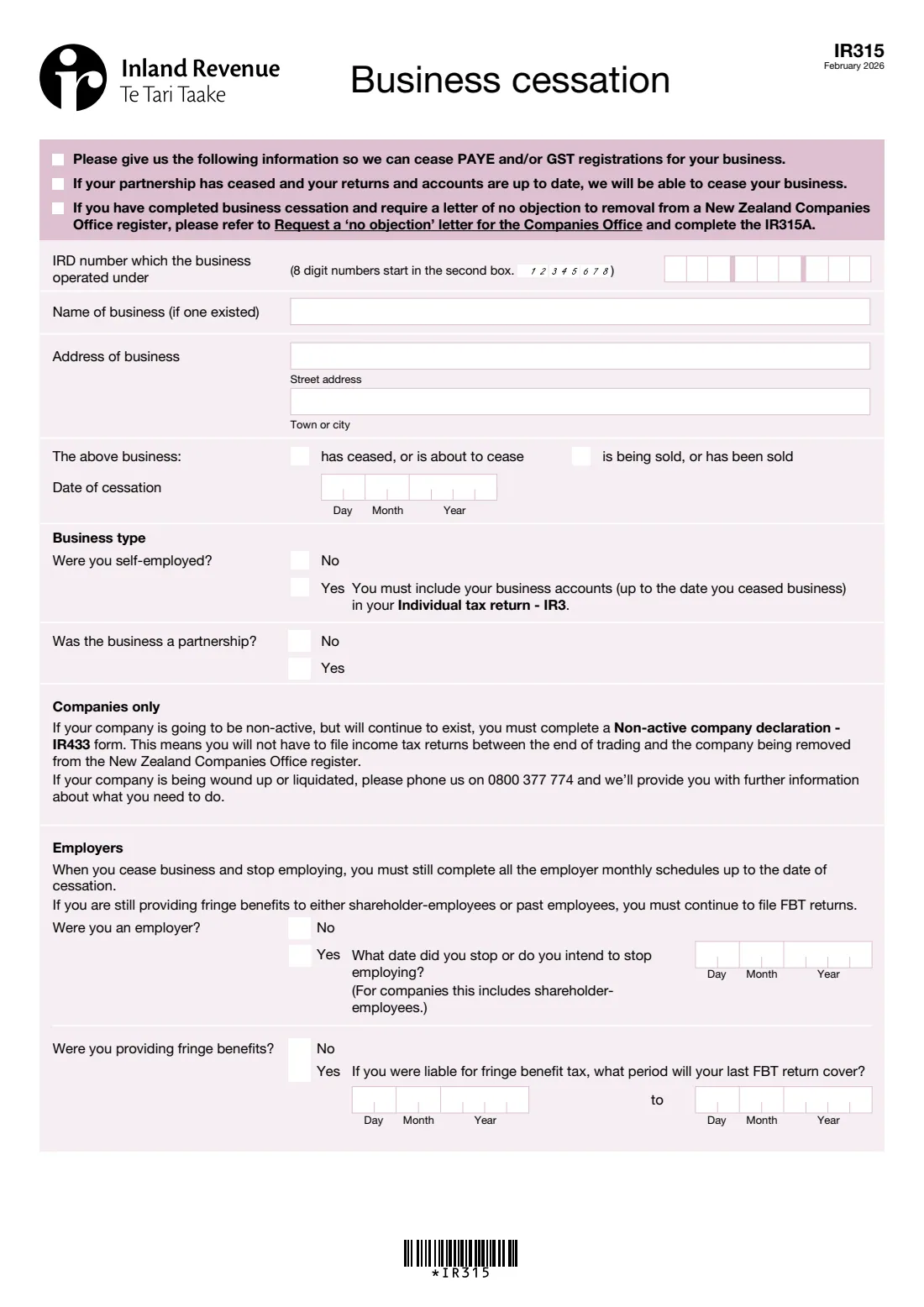
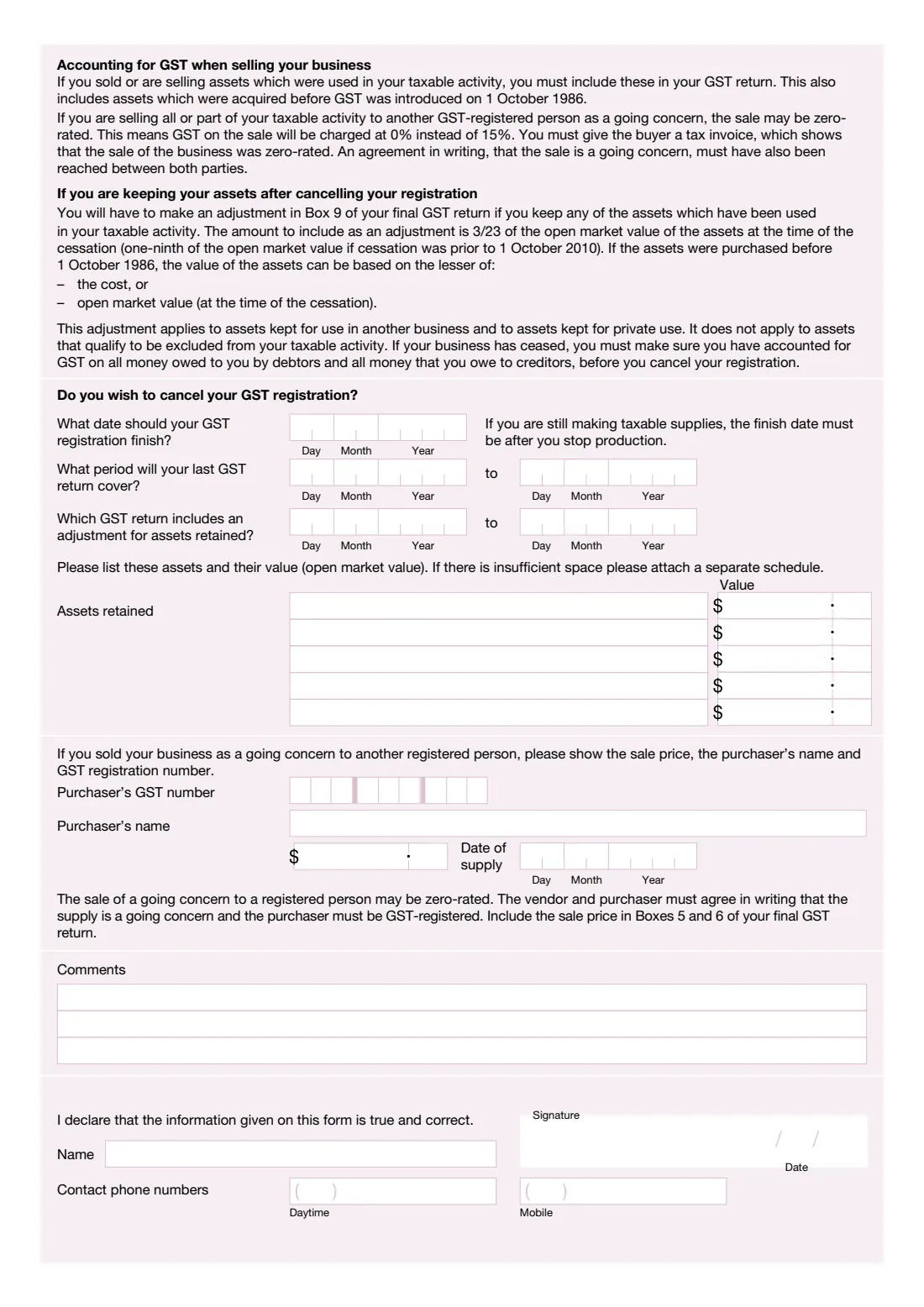
When a New Zealand business stops trading or is sold, Inland Revenue needs to know so it can close the registrations that keep generating filing obligations, mainly the employer (PAYE) registration and GST. The IR315 Business cessation form collects everything IR needs: the date the business ceased, whether you employed staff and when you stopped, the period your last fringe benefit tax (FBT) and GST returns will cover, any assets you're keeping and their open market value, and the purchaser's details if you sold the business as a going concern.
You don't have to use the paper form. Inland Revenue lets you cancel a GST registration in myIR (GST account, 'More...', then 'Cancel account registration'), by sending a message in myIR, or by calling 0800 377 776. IR says to expect confirmation within 5 working days. The IR315 is the written way to give IR the full picture in one place, and it's handy when a business has several registrations to close.
FileIt fills in the February 2026 edition of the IR315 for you. It lays your IRD number out in the boxes the right way (8-digit numbers start in the second box), writes every date one digit per cell, splits amounts into dollars and cents, and checks that the periods run forwards. The finished PDF is saved to your FileIt vault, ready to sign.
- Who fills it
- A sole trader, partnership or company owner (or authorised person) whose business has stopped or been sold
- What it ceases
- PAYE (employer) and/or GST registrations
- Also online
- GST can be cancelled in myIR or by phoning 0800 377 776
- Final returns
- A final GST return, plus employer monthly schedules up to the cessation date
- Signatures
- Signed and dated by the owner or an authorised person
- Edition
- IR315 February 2026
Who needs to fill out IR315 (Business cessation)?
- Sole traders who have stopped self-employment. The form reminds you to include your business accounts, up to the date you ceased, in your Individual tax return (IR3).
- Partnerships that have ceased. IR can cease the business once its returns and accounts are up to date.
- Employers who have stopped employing, including companies with shareholder-employees.
- Businesses that have been sold, including as a going concern to another GST-registered person.
- GST-registered businesses that want to cancel their GST registration.
When to use IR315 (Business cessation)
- When your business has ceased, or is about to cease, trading.
- When your business is being sold or has been sold.
- Not for a company that will stop trading but stay registered with the Companies Office. It files a Non-active company declaration (IR433) instead.
- Not for a company being wound up or liquidated. The form asks you to phone Inland Revenue on 0800 377 774 for what to do.
- If you've already completed business cessation and need a letter of no objection to removing a company from the Companies Office register, use the IR315A.
What you need before you start
- The IRD number the business operated under (its GST number too).
- The business name, if it had one, and its street address.
- The date the business ceased or was sold.
- If you employed people: the date you stopped (or will stop) employing.
- If you provided fringe benefits: the period your last FBT return will cover.
- To cancel GST: the date the registration should finish, the period of your last GST return, and the GST return that includes the adjustment for assets you're keeping.
- A list of assets you're keeping, with their open market value at cessation.
- If you sold the business as a going concern: the purchaser's name and GST number, the sale price and the date of supply.
What’s on IR315 (Business cessation)
The 2026 edition has 2 pages. FileIt asks for it in 7 parts, and it is signed by Business owner or authorised person:
- The businessBusiness owner or authorised person
- Business typeBusiness owner or authorised person
- Employers and fringe benefitsBusiness owner or authorised person
- Cancelling your GST registrationBusiness owner or authorised person
- Sale as a going concernBusiness owner or authorised person
- CommentsBusiness owner or authorised person
- Declaration and contact numbersBusiness owner or authorised person
How to fill out IR315 (Business cessation), step by step
1 The business
Enter the IRD number the business operated under, its name (if it had one) and its address. Tick whether the business has ceased or is about to cease, is being or has been sold, or both, and give the date of cessation.
2 Business type
Say whether you were self-employed and whether the business was a partnership. If you were self-employed, you must include your business accounts, up to the date you ceased, in your IR3.
3 Employers and fringe benefits
If you were an employer, give the date you stopped or intend to stop employing. For companies this includes shareholder-employees. You must still file all the employer monthly schedules up to the date of cessation. If you provided fringe benefits and were liable for FBT, give the period your last FBT return will cover. If you're still providing fringe benefits to shareholder-employees or past employees, you keep filing FBT returns.
4 Cancelling your GST registration
Give the date your GST registration should finish. If you're still making taxable supplies, it must be after you stop production. Then give the period your last GST return will cover, and the GST return that includes an adjustment for assets you're keeping.
List the assets you're keeping, for another business or for private use, with their open market value. In your final GST return, Box 9 includes an adjustment of 3/23 of that value (one-ninth if the business ceased before 1 October 2010). If the list doesn't fit, attach a separate schedule.
5 Sale as a going concern
If you sold the business as a going concern to another GST-registered person, give the purchaser's GST number and name, the sale price and the date of supply. Such a sale may be zero-rated (GST at 0% instead of 15%) if you both agree in writing that it's a going concern and the purchaser is GST-registered. Include the sale price in Boxes 5 and 6 of your final GST return.
6 Comments and declaration
Add any comments on the three lines provided. Then print your name, sign and date the declaration that the information is true and correct, and give daytime and mobile phone numbers.
Common mistakes to avoid
- Forgetting the final GST return. Cancelling your GST registration doesn't remove the need to file it.
- Leaving out assets you're keeping. Assets used in your taxable activity and kept for private use or another business need the Box 9 adjustment.
- Cancelling GST before accounting for GST on money owed to you by debtors and money you owe to creditors.
- Zero-rating a going-concern sale without a written agreement or to a buyer who isn't GST-registered.
- Using the IR315 for a company that will stay on the Companies Office register but stop trading. That's the IR433.
- Writing an 8-digit IRD number from the first box. It starts in the second box.
After you fill it out
Print the form, sign and date the declaration, and send it to Inland Revenue. Alternatively, you can cancel the GST registration in myIR or by phoning 0800 377 776.
File your final GST return, including any Box 9 adjustment for assets you keep, and any outstanding employer monthly schedules and FBT returns.
If you were self-employed, include the business's accounts up to the cessation date in your IR3 for the year.
Keep a copy of the form and your final returns in your FileIt vault with the business's records.
Fill out IR315 (Business cessation) online with FileIt
- Pick the person. Choose someone from People and FileIt fills in their name, date of birth, address and other details it already knows.
- Answer plain-language questions. One part of the form at a time, with the official help text beside each question — 42 fields in all. Your answers save as you go.
- Check the live preview. Watch your answers land on the real Inland Revenue (Te Tari Taake) form, and let FileIt do any worksheet arithmetic.
- Generate the official PDF. FileIt prints your answers into the agency’s own PDF and files it in that person’s folder in your vault. Sign it, or send it for e-signature.
FileIt fills the form — it never files or submits anything for you. Deliver the finished form to whoever asked for it, the way the form’s instructions say.
Start IR315 (Business cessation) now — it’s freeIR315 (Business cessation): frequently asked questions
How do I cancel my GST registration in New Zealand?
In myIR, go to your GST account, choose 'More...' and then 'Cancel account registration'. You can also send a message in myIR, call 0800 377 776, or use the IR315 Business cessation form. You'll need to file a final GST return.
How long does it take for IR to cancel my GST?
Inland Revenue says to expect confirmation within 5 working days, and it may contact you if it needs more information.
What is the GST adjustment for assets I keep?
According to the IR315, you include 3/23 of the open market value of assets you keep, at the time of cessation, in Box 9 of your final GST return (one-ninth if the business ceased before 1 October 2010). For assets bought before 1 October 1986 you can use the lesser of cost and open market value.
Can I fill in the IR315 online?
You can fill it in online with FileIt, which prints your answers into Inland Revenue's official IR315 PDF. You then sign it and send it to Inland Revenue.
My company is being liquidated. Do I use the IR315?
The form asks companies being wound up or liquidated to phone Inland Revenue on 0800 377 774 for what to do. Companies that will stay registered but stop trading use the Non-active company declaration (IR433).
Official sources
- Blank form (PDF), published by Inland Revenue (Te Tari Taake): https://www.ird.govt.nz/-/media/project/ir/home/documents/forms-and-guides/ir300---ir399/ir315/ir315.pdf
- Official instructions and guidance: https://www.ird.govt.nz/gst/cancelling-your-gst-registration
- Edition shown on this page: IR315 February 2026 (checked 2026-09-28).
FileIt is not affiliated with or endorsed by Inland Revenue (Te Tari Taake) or any government. This page explains the form in general terms and is not legal, tax or immigration advice. Always read the official instructions, and check that you are using the edition the recipient accepts. Page last reviewed 2026-09-28.