What is IR526 Donation tax credit claim?
If you give money to a school, a church or a registered charity in New Zealand, you can usually claim a tax credit of a third of the amount. The IR526 Tax credit claim form is the paper way to do it: you total up your receipts in three groups, work out the credit, sign the form and post it to Inland Revenue with your receipts attached. You can also upload receipts in myIR during the year instead.
The form is short, but the details matter. Each receipt must meet Inland Revenue's requirements, only donations of $5 or more count, some payments (school tuition fees, payroll giving, childcare) can't be claimed at all, and the total you claim can't be more than your taxable income. If your donations were more than your income, the form lets you split the receipts with your spouse or partner.
FileIt helps you fill in the April 2026 edition of the IR526. You enter your receipt totals and FileIt adds up Box 6 and divides it by three for Box 7, stopping at two decimal places as the form's notes describe. It checks IRD numbers, lines the figures up in the form's dollar and cent boxes, and prints everything into Inland Revenue's own PDF, which is saved to your FileIt vault. You print it, sign it by hand, staple your receipts to it and post it yourself — FileIt doesn't send it to Inland Revenue.
- Who fills it
- An individual who made donations and earned taxable income in the tax year
- Sent to
- Inland Revenue, PO Box 39090, Wellington Mail Centre, Lower Hutt 5045 — with your receipts
- Credit
- A third of your eligible receipts (Box 6 divided by 3), up to a third of your taxable income
- Signatures
- You sign and date the declaration by hand
- Time limit
- Receipts can be claimed within 4 tax years of the donation
- Edition
- IR526 April 2026
Who needs to fill out IR526 Donation tax credit claim?
- Anyone who donated $5 or more to an approved donee organisation, school or state-run kindergarten and has the receipts.
- Parents who paid school donations that go to the school's general fund.
- People who give to a church or other donee religious organisation.
- Couples whose donations were more than one partner's taxable income and who want to split the receipts.
- People who prefer to claim on paper rather than uploading receipts to myIR.
- Someone claiming on behalf of a person who has died, or a person going overseas permanently or for a long time — the form says these claims can be processed before the tax year ends.
When to use IR526 Donation tax credit claim
- After the end of the tax year (31 March) that the donations were made in — Inland Revenue can't process a claim before then, apart from the exceptions printed on the form.
- Any time within 4 tax years of the donation date. The credit still applies to the tax year the donation was made.
- Once a year, gathering all your receipts for that tax year onto one form.
- If you file an IR3 income tax return, Inland Revenue needs your return to check your taxable income before it can process the claim.
What you need before you start
- Your IRD number and the tax year you're claiming for (the year ending 31 March).
- All your donation receipts for that year, sorted into schools and kindergartens, religious organisations and other donee organisations.
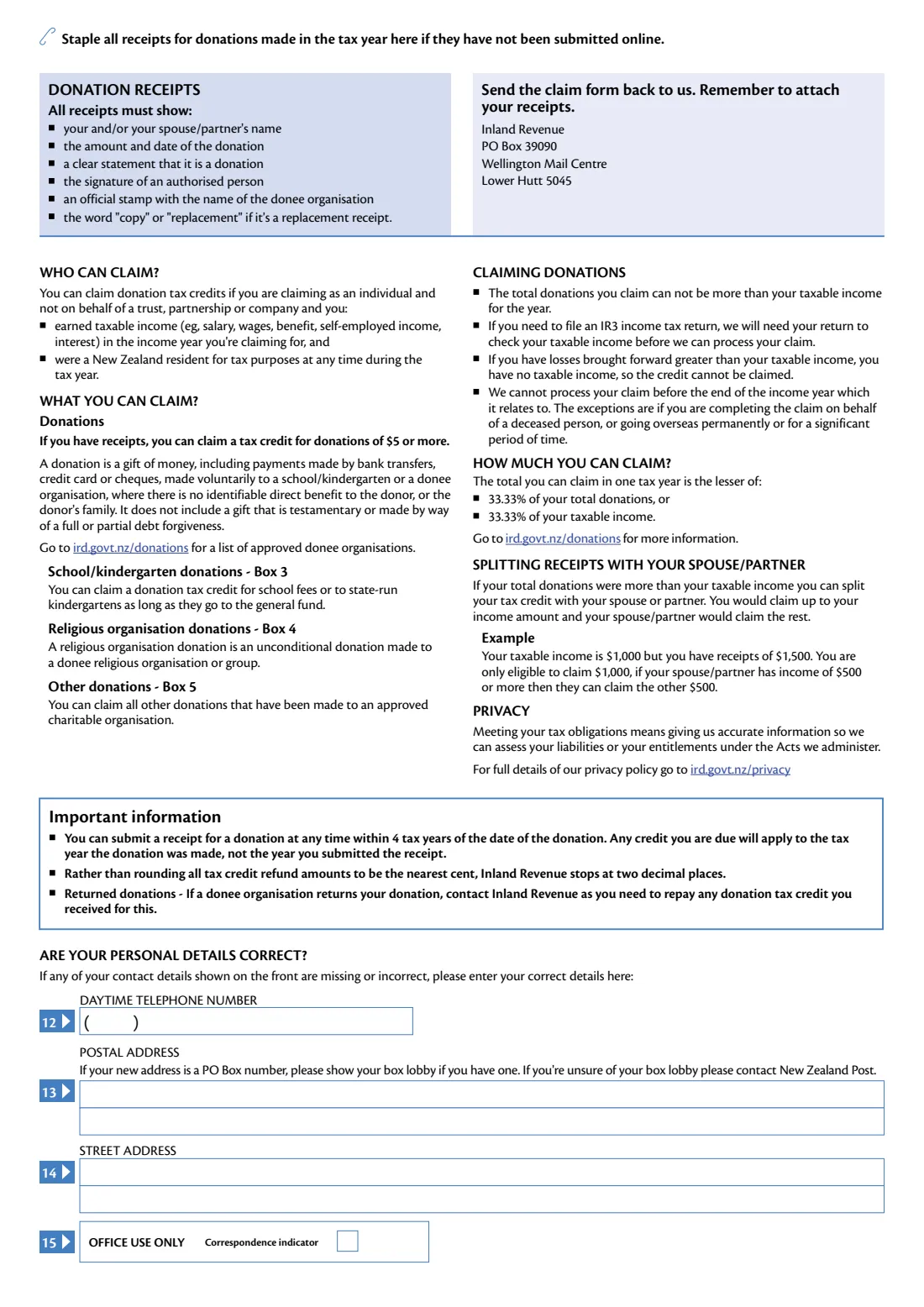
- Receipts that show your (and/or your spouse or partner's) name, the amount and date, a clear statement that it's a donation, an authorised person's signature, and the organisation's official stamp.
- Your spouse or partner's name and IRD number, if you're splitting receipts.
- Your bank account number, if Inland Revenue doesn't already have it or has the wrong one.
- The IRD number, year and amount, if you want to transfer the tax credit to your own or someone else's tax account.
- Your current daytime phone number and addresses, if the ones Inland Revenue holds are wrong.
What’s on IR526 Donation tax credit claim
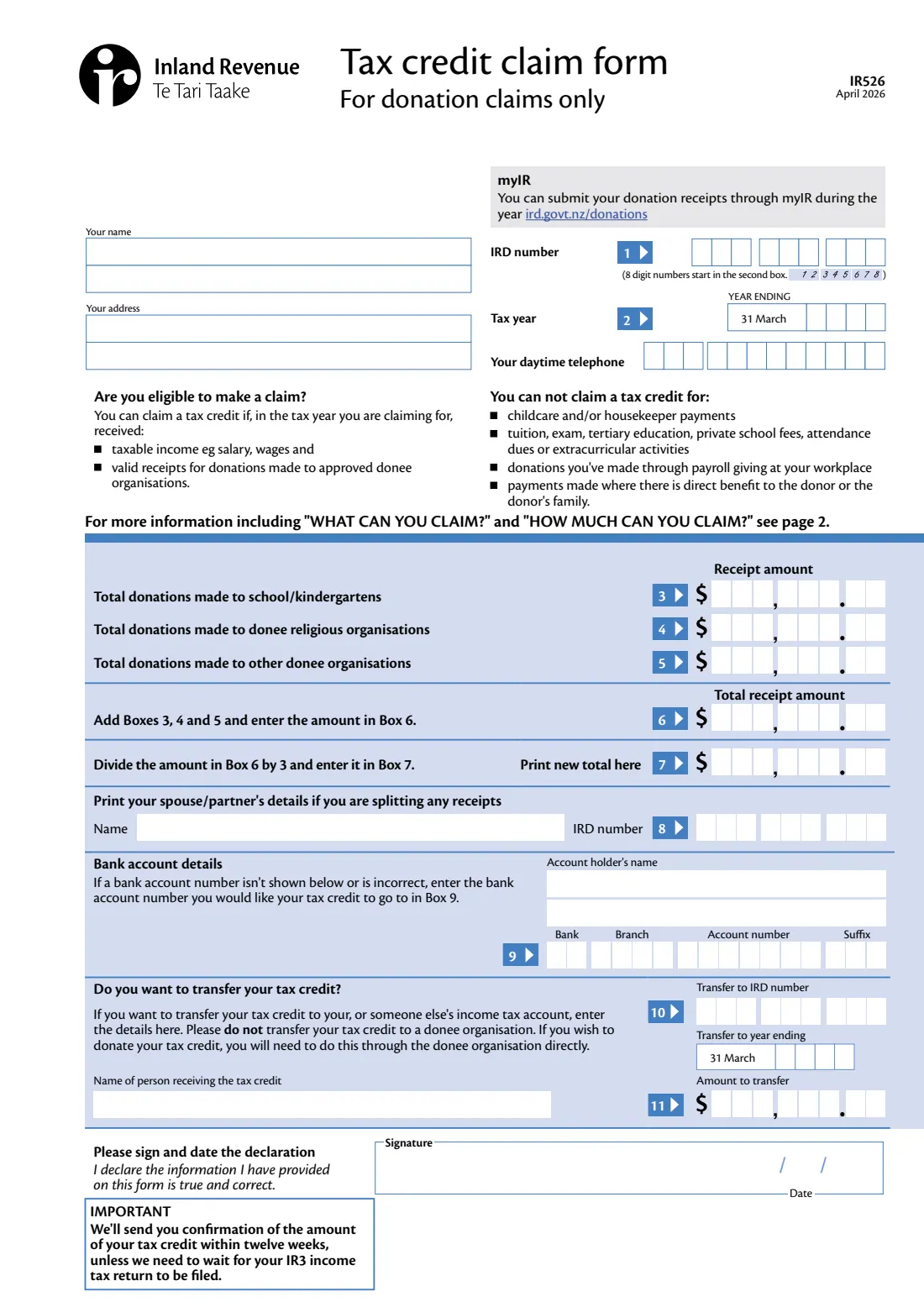
The 2026 edition has 2 pages. FileIt asks for it in 7 parts:
- 1–2 Your detailsClaimant
- 3–7 Donation receiptsClaimant
- 8 Splitting receipts with your spouse or partnerClaimant
- 9 Bank account detailsClaimant
- 10–11 Transfer your tax creditClaimant
- 12–14 Changes to your contact detailsClaimant
- DeclarationClaimant
How to fill out IR526 Donation tax credit claim, step by step
1 Your name, address, IRD number, tax year and phone (boxes 1–2)
Enter your name and address, your IRD number in box 1 (8-digit numbers start in the second box — FileIt lines them up for you) and the tax year in box 2, written as the year ending 31 March. For example, donations made between 1 April 2025 and 31 March 2026 are claimed for the year ending 31 March 2026. Add a daytime phone number.
2 Receipt amounts (boxes 3–5)
Add up your receipts in three groups: box 3 for donations to schools and kindergartens (school fees or donations to state-run kindergartens count as long as they go to the general fund), box 4 for unconditional donations to donee religious organisations or groups, and box 5 for all other donations to approved charitable organisations.
The boxes have spaces for cents, so enter amounts in dollars and cents, like 250.00. Leave out anything you can't claim: childcare or housekeeper payments, tuition, exam, tertiary or private school fees, attendance dues, extracurricular activities, payroll giving at work, and payments where you or your family get a direct benefit.
3 Total receipt amount and credit (boxes 6–7)
Box 6 is boxes 3, 4 and 5 added together. Box 7 is box 6 divided by 3 — the tax credit you're claiming. FileIt works both out for you. The form's notes say Inland Revenue stops at two decimal places rather than rounding, so FileIt does the same.
The credit you receive is limited to a third of your taxable income for the year, so the total donations you claim can't be more than that income.
4 Splitting receipts with your spouse or partner (box 8)
If your total donations were more than your taxable income, you can split the tax credit with your spouse or partner: you claim up to your income and they claim the rest. The form's own example: if your taxable income is $1,000 and your receipts come to $1,500, you can claim $1,000 and your spouse or partner, if they earned $500 or more, can claim the other $500. Give their name and IRD number in box 8.
5 Bank account details (box 9)
If Inland Revenue doesn't have a bank account for you, or has the wrong one, enter the account holder's name and the account number you'd like the credit paid into: bank, branch, account number and suffix.
6 Transferring your tax credit (boxes 10–11)
Instead of a refund, you can transfer the credit to your own or someone else's income tax account. Enter the IRD number, the year ending to transfer to, the name of the person receiving it and the amount. The form asks you not to transfer the credit to a donee organisation — to donate your credit, arrange it with the organisation directly.
7 Declaration
Sign and date the declaration that the information you've given is true and correct. The form must be signed by hand before you post it.
8 Are your personal details correct? (boxes 12–14, page 2)
Only if the contact details Inland Revenue holds for you are missing or wrong: give your daytime phone number, postal address and street address. If your new address is a PO Box, include your box lobby if you have one.
Common mistakes to avoid
- Including amounts that can't be claimed, such as school tuition or exam fees, extracurricular activities, childcare, or donations made through payroll giving at work.
- Sending receipts that are missing the organisation's stamp, an authorised signature or a clear statement that the payment is a donation.
- Posting the form before the tax year has ended — Inland Revenue can't process it until after 31 March, apart from the exceptions on the form.
- Forgetting to staple the receipts to the form if you haven't already submitted them online.
- Getting the tax year wrong. It's the year ending 31 March in which the donations were made, not the year you're claiming.
- Claiming more in donations than your taxable income instead of splitting the excess with your spouse or partner.
- Transferring the tax credit to a charity. The form asks you not to — donate your credit through the organisation itself.
- Missing the time limit: receipts can be claimed within 4 tax years of the donation date.
After you fill it out
Print the completed form, sign and date the declaration by hand, and staple all your donation receipts for the tax year to page 2 (unless you've already submitted them online). Post it to Inland Revenue, PO Box 39090, Wellington Mail Centre, Lower Hutt 5045 — the address printed on the form. Keep copies of your receipts, since the originals go with the form.
The form says Inland Revenue will send you confirmation of the amount of your tax credit within twelve weeks, unless it needs to wait for your IR3 income tax return to be filed. If a donee organisation later returns a donation, contact Inland Revenue, as you'll need to repay any credit you received for it.
FileIt keeps the filled PDF in your vault, so next year you can see what you claimed and how you grouped your receipts. For future years, you may find it easier to upload receipts in myIR as you go.
Fill out IR526 Donation tax credit claim online with FileIt
- Pick the person. Choose someone from People and FileIt fills in their name, date of birth, address and other details it already knows.
- Answer plain-language questions. One part of the form at a time, with the official help text beside each question — 27 fields in all. Your answers save as you go.
- Check the live preview. Watch your answers land on the real Inland Revenue (Te Tari Taake) form, and let FileIt do any worksheet arithmetic.
- Generate the official PDF. FileIt prints your answers into the agency’s own PDF and files it in that person’s folder in your vault.
FileIt fills the form — it never files or submits anything for you. Deliver the finished form to whoever asked for it, the way the form’s instructions say.
Start IR526 Donation tax credit claim now — it’s freeIR526 Donation tax credit claim: frequently asked questions
What is the IR526 form?
The IR526 is Inland Revenue's Tax credit claim form for donation claims. You list the total of your donation receipts for a tax year and claim a tax credit of a third of that total.
Where do I send my IR526?
Post it, with your receipts stapled to page 2, to Inland Revenue, PO Box 39090, Wellington Mail Centre, Lower Hutt 5045. You can also submit receipts through myIR instead of using the paper form.
Can I fill in the IR526 online?
Yes. FileIt asks for your details and receipt totals, adds up boxes 6 and 7, and prints everything into Inland Revenue's official IR526 PDF, which is saved to your vault. You then print, sign and post it with your receipts. Filling forms is available on every FileIt account, including the free plan.
How much can I get back for donations?
The credit is a third of your eligible donations (33.33%), but the total you can claim in a tax year is limited to the lesser of 33.33% of your donations or 33.33% of your taxable income.
What is the minimum donation I can claim?
The form says you can claim a tax credit for donations of $5 or more, as long as you have a valid receipt.
Can I claim school donations?
Yes, donations to a school or state-run kindergarten can be claimed in box 3 as long as they go to the general fund. Tuition, exam, private school or tertiary fees, attendance dues and extracurricular activities can't be claimed.
How far back can I claim donations?
You can submit a receipt at any time within 4 tax years of the date of the donation. The credit applies to the tax year the donation was made, not the year you submit the receipt.
When will I hear back?
The form says Inland Revenue will send confirmation of the amount of your tax credit within twelve weeks, unless it needs to wait for your IR3 income tax return to be filed.
Can a company or trust use the IR526?
No. The form says you can claim donation tax credits if you're claiming as an individual, not on behalf of a trust, partnership or company.
Official sources
- Blank form (PDF), published by Inland Revenue (Te Tari Taake): https://www.ird.govt.nz/-/media/project/ir/home/documents/forms-and-guides/ir500---ir599/ir526/ir526.pdf
- Official instructions and guidance: https://www.ird.govt.nz/income-tax/income-tax-for-individuals/individual-tax-credits/donation-tax-credits
- Edition shown on this page: IR526 April 2026 (checked 2026-09-26).
FileIt is not affiliated with or endorsed by Inland Revenue (Te Tari Taake) or any government. This page explains the form in general terms and is not legal, tax or immigration advice. Always read the official instructions, and check that you are using the edition the recipient accepts. Page last reviewed 2026-09-26.