What is IR23BS Tailored tax code application?
The standard tax codes on the IR330 and the standard contractor rates on the IR330C suit most people, but not everyone. If you have two jobs and your second one is taxed at a secondary code that's too high for your total income, or you're a contractor with business expenses that the flat schedular rate doesn't allow for, you can end up paying far more tax during the year than you actually owe. The IR23BS Tailored tax code or special rate of tax application asks Inland Revenue to work out a code or rate that fits your estimated income.
The form covers two situations. If you're paid salary, wages or NZ Super, it applies for a tailored tax code. If you're a contractor receiving schedular payments under the WT tax code, it applies for a special rate of tax — including a 0% rate for contractors paid through a labour hire business who have a good filing and payment record. Either way, you estimate all your income for one tax year (1 April to 31 March), and Inland Revenue bases the code or rate on those estimates.
FileIt helps you fill in the April 2021 edition of the IR23BS, the current paper version. It asks each question in turn, skips the income questions when you're applying for the 0% labour-hire rate (as the form tells you to), checks IRD numbers and dates, and prints your answers into Inland Revenue's own PDF. Your name can be pre-filled from your People records and the finished form is saved to your FileIt vault. You then print it, sign it by hand and post it yourself — FileIt doesn't send it to Inland Revenue. You can also apply in myIR instead of on paper.
- Who fills it
- Employees, NZ Super or Veteran's Pension recipients, and contractors on the WT tax code
- Sent to
- Inland Revenue, PO Box 39010, Wellington Mail Centre, Lower Hutt 5045 (or apply in myIR)
- Covers
- One tax year, 1 April to 31 March — apply again each year you want one
- Signatures
- You sign and date the declaration on page 2 by hand
- Applies to
- One employer, or NZ Super / Veteran's Pension — another employer needs another application
- Edition
- IR23BS April 2021
Who needs to fill out IR23BS Tailored tax code application?
- People with more than one job whose secondary tax code (SB, S, SH, ST or SA) would take too much tax given their total income.
- People receiving NZ Super or a Veteran's Pension alongside other income, who want the tax on their pension tailored.
- Contractors on the WT tax code whose standard or chosen schedular rate doesn't reflect their business expenses.
- Contractors paid by a labour hire business (such as a recruitment agency) who want a 0% special rate and have filed returns and paid on time for at least the last 12 months.
- People with losses to carry forward, or income from partnerships, self-employment, estates or overseas, that changes the tax they'll owe.
- Anyone who expects a large refund or tax bill at the end of the year because their tax code doesn't fit their circumstances.
When to use IR23BS Tailored tax code application
- Before or early in the tax year the code or rate is for, so it applies to as many pays as possible.
- When you start a second job or a contract and realise the standard secondary code or schedular rate will overtax you.
- Every tax year you want to keep a tailored code — it doesn't roll over automatically.
- When your income changes significantly during the year and your current tailored code no longer fits.
- Not for student loans or most residential rental losses: the form says tailored codes no longer change student loan deductions, and most residential property losses are ring-fenced.
What you need before you start
- Your IRD number, and the tax year you're applying for (shown by the year ending 31 March).
- Your postal address and a contact phone number.
- Your NZ Super or Veteran's Pension number from Work and Income, if you receive one.
- A short explanation of why you're applying, including any losses to carry forward.
- For each employer: their name, their IRD number if you know it, your estimated gross salary or wages for the year, the tax code you use there, and start and stop dates if you won't work there all year.
- Estimates of any NZ Super, overseas pensions or benefits, schedular payments and expenses, interest (and the tax rate deducted from it), dividends, provisional tax, other income or losses, and lump sums.
- For the 0% labour-hire rate: the name of the labour hire business that pays you.
- Documents showing how you worked out any losses, if this is your first application and you haven't filed returns that include them.
What’s on IR23BS Tailored tax code application
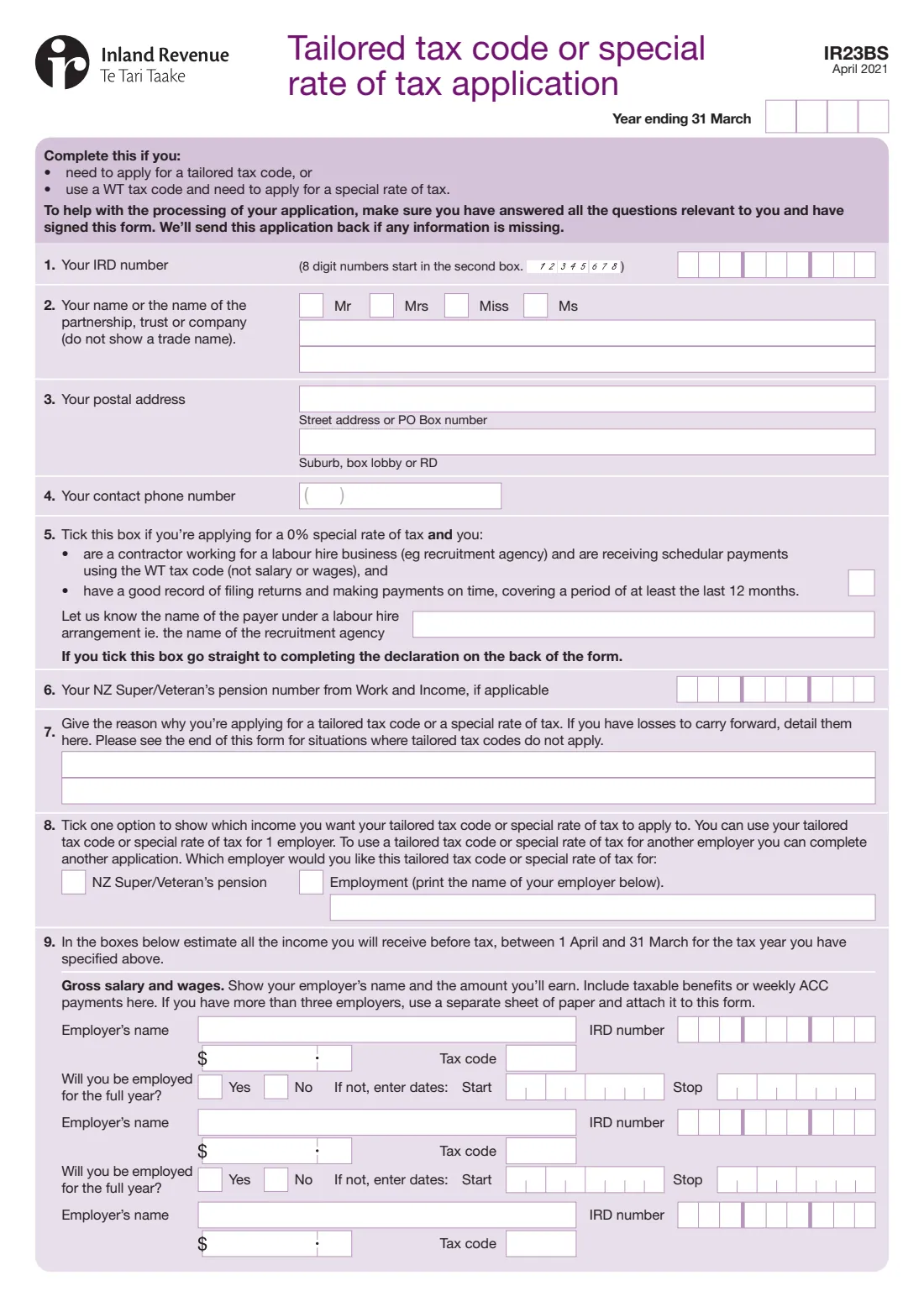
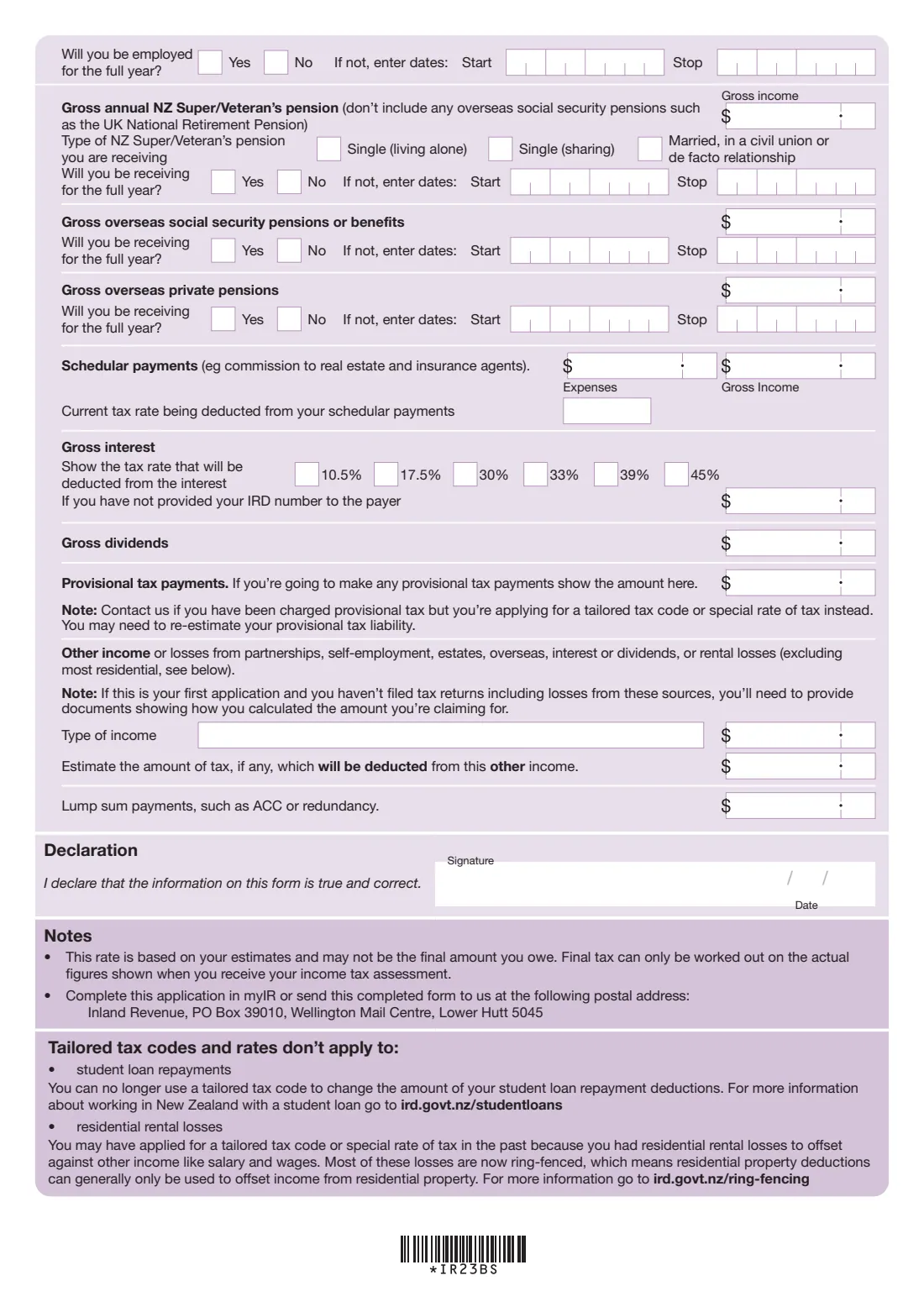
The 2021 edition has 2 pages. FileIt asks for it in 16 parts:
- Your applicationApplicant
- 1–4 Your detailsApplicant
- 5 0% special rate — labour hire payerApplicant
- 6–8 Reason and which incomeApplicant
- 9 Salary and wages — employer 1Applicant
- 9 Salary and wages — employer 2Applicant
- 9 Salary and wages — employer 3Applicant
- 9 NZ Super / Veteran's PensionApplicant
- 9 Overseas social security pensions or benefitsApplicant
- 9 Overseas private pensionsApplicant
- 9 Schedular paymentsApplicant
- 9 Gross interestApplicant
- 9 Dividends and provisional taxApplicant
- 9 Other income or lossesApplicant
- 9 Lump sum paymentsApplicant
- DeclarationApplicant
How to fill out IR23BS Tailored tax code application, step by step
1 Year ending 31 March
At the top of page 1, enter the tax year the tailored code or special rate is for, as the year it ends. For example, 2027 means 1 April 2026 to 31 March 2027. Inland Revenue's guidance stresses making sure you apply for the right year, because every estimate on the form relates to it.
2 1–4 Your IRD number, name, postal address and phone
Give your IRD number (8-digit numbers start in the second box — FileIt lines the digits up for you), your title, and your name or the name of the partnership, trust or company. Don't use a trade name.
Then add your postal address — street address or PO Box on the first line, and suburb, box lobby or RD on the second — and a contact phone number with its area code.
3 5 The 0% special rate for labour-hire contractors
Tick this box only if you're a contractor working for a labour hire business (for example a recruitment agency), you're paid schedular payments under the WT tax code rather than salary or wages, and you have a good record of filing returns and making payments on time covering at least the last 12 months. Name the labour hire business that pays you.
If you tick this box, the form tells you to go straight to the declaration on the back. FileIt hides questions 6 to 9 when you choose this option.
4 6 NZ Super or Veteran's Pension number
If you receive NZ Super or a Veteran's Pension, give the number Work and Income uses for you. Leave it blank if it doesn't apply.
5 7 Reason for applying
Explain briefly why you need a tailored tax code or special rate — for example, that your second job's secondary code will take more tax than you'll owe over the year, or that business expenses reduce your taxable income. If you have losses to carry forward, give the details here.
The form has two lines for this. If you need more room, attach a separate sheet.
6 8 Which income it applies to
Tick whether the tailored code or special rate should apply to your NZ Super / Veteran's Pension or to employment, and if employment, print the employer's name. A tailored code or special rate applies to one employer. To use one for another employer as well, complete another application.
7 9 Your estimated income for the year
Estimate all the income you'll receive before tax between 1 April and 31 March of the tax year you chose. For salary and wages, list each employer (up to three on the form; attach a sheet for more), the amount you'll earn including taxable benefits or weekly ACC payments, the tax code you use there, and start and stop dates if you won't be employed for the full year.
The rest of question 9 covers gross NZ Super or Veteran's Pension (and its type — single living alone, single sharing, or married, civil union or de facto), overseas social security pensions or benefits, overseas private pensions, schedular payments with their expenses and current tax rate, gross interest and the rate deducted from it, dividends, provisional tax payments, other income or losses, the tax deducted from that other income, and lump sums such as ACC or redundancy payments. FileIt lets you switch on only the parts that apply to you.
8 Declaration
Sign and date the declaration on page 2 to confirm the information is true and correct. The form must be signed — Inland Revenue says it will send the application back if information is missing.
The notes explain that the rate is based on your estimates and may not be the final amount you owe; your final tax is worked out on your actual figures.
Common mistakes to avoid
- Applying for the wrong tax year. The year on the form is the year ending 31 March, and all your estimates must match it.
- Leaving out income from other sources. Question 9 asks for all your income for the year, not just the job you want the code for.
- Expecting a tailored code to change student loan repayment deductions — the form says it no longer can.
- Claiming residential rental losses against salary or wages. Most of these are now ring-fenced and can generally only be used against residential property income.
- Ticking the 0% box when you're paid salary or wages, or without at least 12 months of on-time filing and payments.
- Forgetting to sign. Unsigned or incomplete applications are sent back.
- Asking for one code to cover two employers. Each employer needs its own application.
- Assuming the code carries on. You need to apply again for each tax year.
After you fill it out
Print the completed form, sign and date the declaration by hand, and post it to the address printed on the form: Inland Revenue, PO Box 39010, Wellington Mail Centre, Lower Hutt 5045. Attach any separate sheets (more employers, a longer reason) and any documents showing how you worked out losses. If you'd rather apply online, the same application is available in myIR.
Inland Revenue's guidance says it sends a letter and certificate once your application is approved, usually within 10 working days (applications made in February and March can take longer), and you'll also see the certificate in myIR if you use it. Show the certificate to your employer or payer so they can use the new code or rate. If the code is for NZ Super or a Veteran's Pension, Inland Revenue lets Work and Income know.
Keep the filled PDF in your FileIt vault so you have your estimates to hand if Inland Revenue asks questions, and so you can compare them next year. Apply again every tax year you want a tailored code, and reapply sooner if your income changes a lot during the year.
Fill out IR23BS Tailored tax code application online with FileIt
- Pick the person. Choose someone from People and FileIt fills in their name, date of birth, address and other details it already knows.
- Answer plain-language questions. One part of the form at a time, with the official help text beside each question — 60 fields in all. Your answers save as you go.
- Check the live preview. Watch your answers land on the real Inland Revenue (Te Tari Taake) form, and let FileIt do any worksheet arithmetic.
- Generate the official PDF. FileIt prints your answers into the agency’s own PDF and files it in that person’s folder in your vault.
FileIt fills the form — it never files or submits anything for you. Deliver the finished form to whoever asked for it, the way the form’s instructions say.
Start IR23BS Tailored tax code application now — it’s freeIR23BS Tailored tax code application: frequently asked questions
What is the IR23BS form?
The IR23BS is Inland Revenue's Tailored tax code or special rate of tax application. You use it to ask for a tax code (for salary, wages or NZ Super) or a schedular tax rate (for contractors on the WT code) that's worked out from your estimated income for one tax year, instead of the standard codes and rates.
Where do I send the IR23BS?
Post it to Inland Revenue, PO Box 39010, Wellington Mail Centre, Lower Hutt 5045 — the address printed on the form. You can also make the same application in myIR instead of posting a paper form.
Can I fill in the IR23BS online?
Yes. FileIt guides you through each question, checks IRD numbers and dates, and prints your answers into Inland Revenue's official IR23BS PDF, which is saved to your vault. You then print, sign and post it yourself. Filling forms is available on every FileIt account, including the free plan.
Do I need to apply every year?
Yes. A tailored tax code applies for one tax year (1 April to 31 March), and you need to apply again for each year you want one.
What is the 0% special rate of tax?
It's a special rate for contractors working for a labour hire business, such as a recruitment agency, who receive schedular payments under the WT tax code and have a good record of filing returns and paying on time for at least the last 12 months. You tick question 5, name the labour hire business and go straight to the declaration.
Can a tailored tax code reduce my student loan deductions?
No. The form says you can no longer use a tailored tax code to change the amount of your student loan repayment deductions.
Can I use a tailored tax code for rental losses?
Generally not for residential rental losses. The form explains that most of these losses are now ring-fenced, so residential property deductions can generally only be offset against residential property income.
Can one tailored tax code cover two jobs?
No. A tailored tax code or special rate applies to one employer (or to NZ Super / Veteran's Pension). To use one for another employer, complete another application.
What happens after I apply?
Inland Revenue sends a letter and certificate with your tailored code or rate, which you show to your employer or payer. The rate is based on your estimates, and your final tax is worked out from your actual income.
Official sources
- Blank form (PDF), published by Inland Revenue (Te Tari Taake): https://www.ird.govt.nz/-/media/project/ir/home/documents/forms-and-guides/ir1---ir99/ir23bs/ir23bs.pdf
- Official instructions and guidance: https://www.ird.govt.nz/income-tax/income-tax-for-individuals/tax-codes-and-tax-rates-for-individuals/apply-for-a-tailored-tax-code
- Edition shown on this page: IR23BS April 2021 (checked 2026-09-26).
FileIt is not affiliated with or endorsed by Inland Revenue (Te Tari Taake) or any government. This page explains the form in general terms and is not legal, tax or immigration advice. Always read the official instructions, and check that you are using the edition the recipient accepts. Page last reviewed 2026-09-26.