
What is IR330C Tax rate notification for contractors?
If you're a contractor in New Zealand rather than an employee — a labour-only builder, a cleaner, a company director, a freelance writer, a shearer or someone paid through a labour hire agency — the person paying you may have to deduct tax from your payments as schedular payments. The IR330C Tax rate notification for contractors tells them which rate to use. Your tax code is always WT; what changes is the rate.
Getting the rate right matters. The form says that if you don't complete sections 1 and 3, your payer must deduct tax at the no-notification rate of 45%, or 20% for non-resident contractor companies. Choose a rate that's too low and you may face a bill at the end of the year; too high and you'll wait for a refund. The form's flowchart and activity table show the standard rate for each type of work, and let you choose your own rate within limits.
FileIt helps you fill in the January 2024 edition of the IR330C. It asks the flowchart questions, lets you pick your activity from the page 3 table with its standard rate, works out the rate to one decimal place, and prints everything into Inland Revenue's own PDF. Your name can be pre-filled from your People records, and the finished form is saved to your FileIt vault. You can sign by hand or with FileIt's optional e-signature, and you give the form to your payer yourself — it isn't sent to Inland Revenue.
- Who fills it
- Contractors receiving schedular payments (not salary or wages)
- Given to
- The person or business paying you — not Inland Revenue
- Tax code
- Always WT
- Signatures
- The contractor (or someone signing for a company, partnership or trust) signs and dates section 3
- One form per
- Source of contracting income
- Edition
- IR330C January 2024
Who needs to fill out IR330C Tax rate notification for contractors?
- Independent, labour-only and self-employed contractors paid for one of the activities listed on page 3, such as building labour, cleaning, forestry, modelling or freelance writing.
- Company directors receiving directors' fees, examiners, honoraria recipients and public office holders.
- Contractors paid by a labour hire business under a labour hire arrangement (activity 19).
- Non-resident contractors, and non-resident entertainers or professional sportspeople visiting New Zealand.
- People who aren't normally required to have tax deducted but choose to, with their payer's written agreement (voluntary schedular payments, activity 25).
- Contractors who have a tailored tax rate certificate from Inland Revenue.
When to use IR330C Tax rate notification for contractors
- When you start a new contract where you'll receive schedular payments — before the first payment, so the 45% no-notification rate isn't used.
- When you take on another source of contracting income: each one needs its own IR330C.
- When you want to change your rate — for example to choose a higher or lower rate within the limits.
- When you receive a new tailored tax rate certificate, or your old one ends.
- Your payer must be told if your tax rate changes, so give them a new form.
What you need before you start
- Your full name (or your company, partnership or trust's name).
- Your IRD number — in myIR or on letters or statements from Inland Revenue. If you don't have one, apply for it first.
- The type of work you're being paid for, to find your activity number in the page 3 table.
- Whether you're a non-resident for tax purposes or hold a temporary entry class visa.
- Your tailored tax rate certificate, if you have one.
- An idea of the rate you want if you're choosing your own — Inland Revenue's estimation tool for contractors can help.
- The name and designation of the person signing, if you're signing for a company or other entity.
What’s on IR330C Tax rate notification for contractors
The 2024 edition has 4 pages. FileIt asks for it in 3 parts, and it is signed by Contractor:
- 1 Your detailsContractor
- 2 Your tax rateContractor
- 3 DeclarationContractor
How to fill out IR330C Tax rate notification for contractors, step by step
1 1 Your details
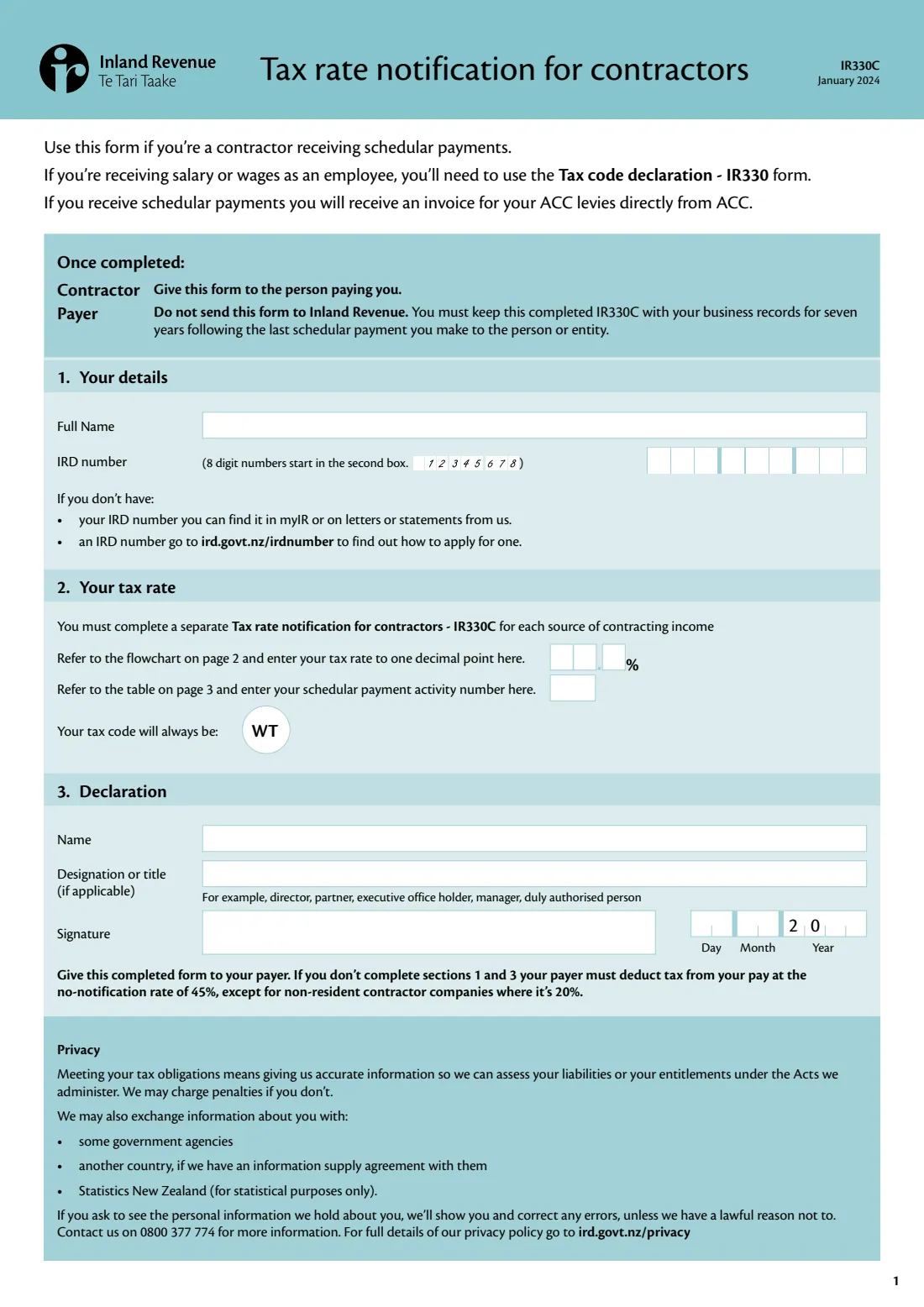
Enter your full name and your IRD number. The form notes that 8-digit IRD numbers start in the second box — FileIt places the digits correctly. If you're completing it for a company, partnership or trust, use its full name.
2 2 Your tax rate — the page 2 flowchart
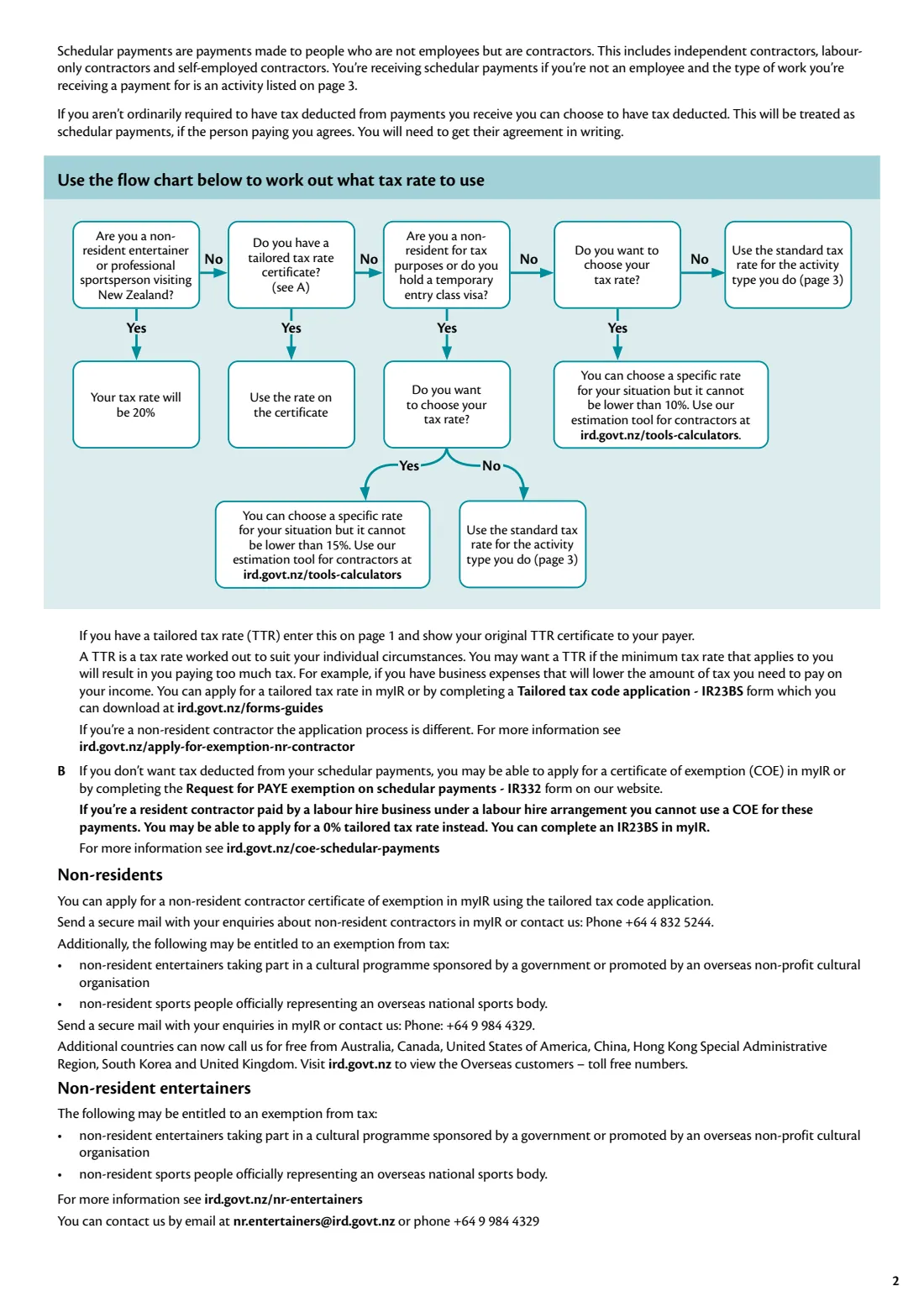
The flowchart starts by asking whether you're a non-resident entertainer or professional sportsperson visiting New Zealand; if so, your rate is 20%. If not, it asks whether you have a tailored tax rate (TTR) certificate — if you do, use the rate on it and show the original certificate to your payer.
Otherwise, the form asks whether you're a non-resident for tax purposes or hold a temporary entry class visa, and whether you want to choose your own rate. If you don't, use the standard rate for your activity from page 3. If you do, you can choose a rate that suits you, but it can't be lower than 10% — or 15% if you're a non-resident or on a temporary entry class visa. Enter the rate to one decimal place; the decimal point is printed before the last box.
3 2 Your tax rate — the page 3 activity table
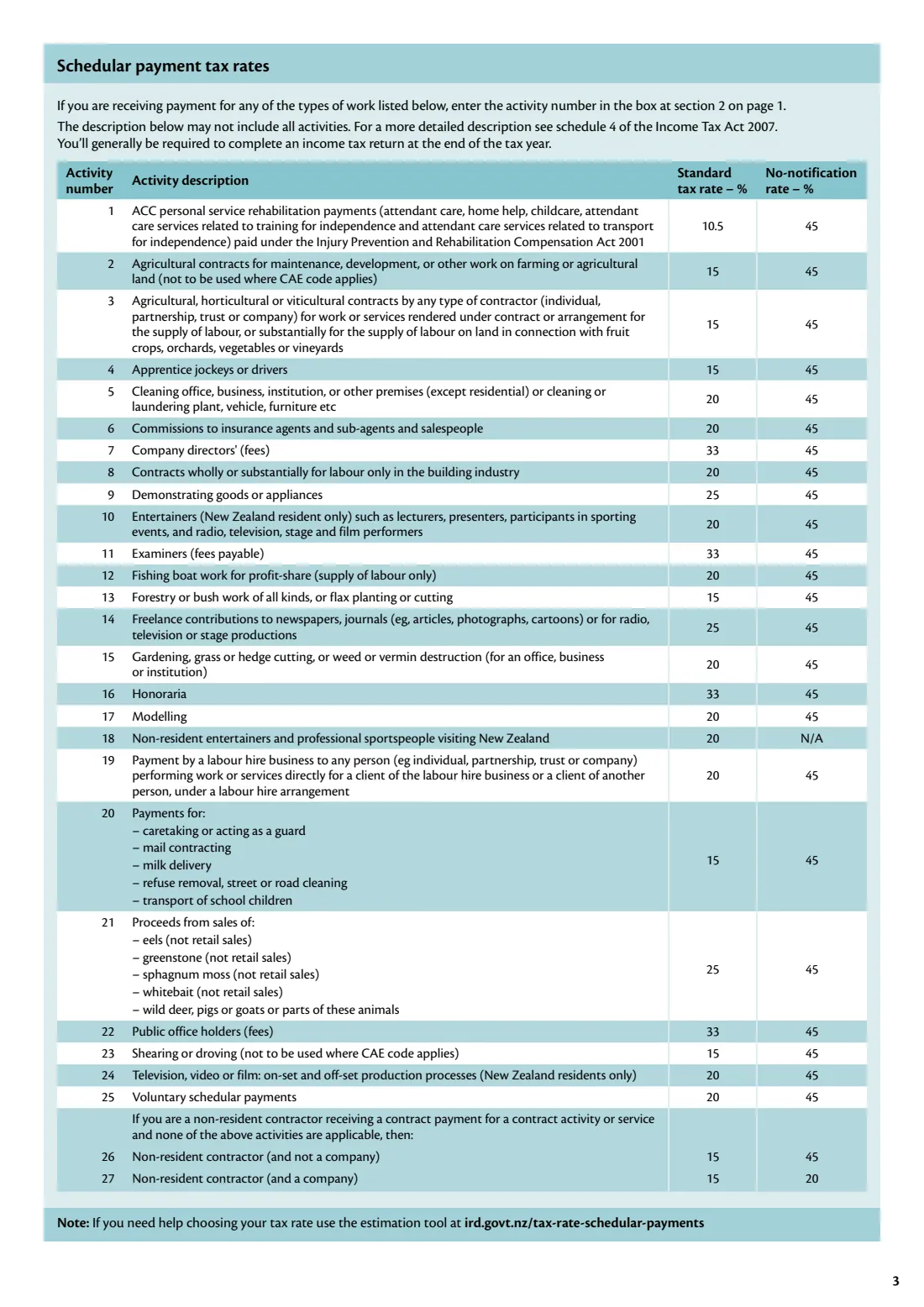
Enter the schedular payment activity number for the type of work you do. The January 2024 table lists 27 activities with their standard rates — for example 10.5% for ACC personal service rehabilitation payments, 15% for agricultural contracts, forestry and shearing, 20% for cleaning, building labour-only contracts and labour hire, 25% for demonstrating goods and freelance contributions, and 33% for company directors' fees, examiners, honoraria and public office holders.
The table notes its descriptions may not include every activity; schedule 4 of the Income Tax Act 2007 has the full detail. Activities 26 and 27 cover non-resident contractors when nothing else in the list applies.
4 Your tax code will always be WT
The WT code is printed on the form — there's nothing to choose. It tells your payer the payments are schedular payments with tax withheld at the rate you've given.
5 3 Declaration
Give the name of the person signing and, if you're signing on behalf of an entity, your designation or title — for example director, partner, executive office holder, manager or duly authorised person. Sign and date the form. The year is printed as '20' followed by the last two digits.
Common mistakes to avoid
- Using the IR330C for salary or wages. Employees use the IR330 Tax code declaration instead.
- Leaving sections 1 or 3 incomplete, so your payer must deduct at the 45% no-notification rate (20% for non-resident contractor companies).
- Choosing your own rate below the minimum: 10%, or 15% for non-residents and temporary entry class visa holders.
- Using one form for two payers. Each source of contracting income needs its own IR330C.
- Picking the wrong activity number — check the page 3 table, and note which activities are for New Zealand residents only.
- Entering a tailored tax rate without showing your payer the original TTR certificate.
- Sending the form to Inland Revenue. It goes to your payer, who keeps it.
After you fill it out
Sign and date the form — by hand or with FileIt's optional e-signature — and give it to the person paying you. Don't send it to Inland Revenue. The form tells the payer to keep the completed IR330C with their business records for seven years after the last schedular payment made to you.
Your payer deducts tax at your rate using the WT code. You'll generally need to file an income tax return at the end of the tax year, when your actual tax is worked out. As a contractor receiving schedular payments, you'll also get an invoice for your ACC levies directly from ACC.
FileIt keeps the finished PDF in your vault, so you can see the rate you gave each payer. If your tax rate changes — a new tailored tax rate, or you decide on a different rate — fill in a new IR330C and give it to your payer.
Fill out IR330C Tax rate notification for contractors online with FileIt
- Pick the person. Choose someone from People and FileIt fills in their name, date of birth, address and other details it already knows.
- Answer plain-language questions. One part of the form at a time, with the official help text beside each question — 14 fields in all. Your answers save as you go.
- Check the live preview. Watch your answers land on the real Inland Revenue (Te Tari Taake) form, and let FileIt do any worksheet arithmetic.
- Generate the official PDF. FileIt prints your answers into the agency’s own PDF and files it in that person’s folder in your vault. Sign it, or send it for e-signature.
FileIt fills the form — it never files or submits anything for you. Deliver the finished form to whoever asked for it, the way the form’s instructions say.
Start IR330C Tax rate notification for contractors now — it’s freeIR330C Tax rate notification for contractors: frequently asked questions
What is the IR330C form?
The IR330C is Inland Revenue's Tax rate notification for contractors. Contractors receiving schedular payments use it to tell their payer which tax rate to deduct. The tax code is always WT.
Where do I send my IR330C?
Give it to the person or business paying you. The form says not to send it to Inland Revenue — the payer keeps it with their business records for seven years after the last payment to you.
Can I fill in the IR330C online?
Yes. FileIt asks the flowchart questions, lets you pick your activity, works out your rate and prints everything into Inland Revenue's official IR330C PDF. You can sign it by hand or with FileIt's optional e-signature. Filling forms is available on every FileIt account, including the free plan.
What is the difference between the IR330 and the IR330C?
The IR330 is for employees receiving salary or wages, who choose a tax code such as M or ME. The IR330C is for contractors receiving schedular payments, who use the WT code and give a tax rate instead.
What is the lowest tax rate I can choose as a contractor?
If you choose your own rate, it can't be lower than 10%, or 15% if you're a non-resident for tax purposes or hold a temporary entry class visa. A lower rate needs a tailored tax rate certificate from Inland Revenue.
What happens if I don't give my payer an IR330C?
The form says that if you don't complete sections 1 and 3, your payer must deduct tax at the no-notification rate of 45%, except for non-resident contractor companies, where it's 20%.
What tax rate does a labour hire contractor use?
Activity 19, payments by a labour hire business under a labour hire arrangement, has a standard rate of 20% in the January 2024 table. You can choose a different rate within the limits, or apply for a tailored rate — including a 0% rate for eligible contractors — with the IR23BS.
Do I need a separate IR330C for each payer?
Yes. The form says you must complete a separate IR330C for each source of contracting income.
How do I get a tailored tax rate?
Apply in myIR or with a Tailored tax code application (IR23BS). If Inland Revenue gives you a tailored tax rate, enter it on the IR330C and show your original certificate to your payer.
Official sources
- Blank form (PDF), published by Inland Revenue (Te Tari Taake): https://www.ird.govt.nz/-/media/project/ir/home/documents/forms-and-guides/ir300---ir399/ir330c/ir330c-2024.pdf
- Official instructions and guidance: https://www.ird.govt.nz/tax-rate-schedular-payments
- Edition shown on this page: IR330C January 2024 (checked 2026-09-26).
FileIt is not affiliated with or endorsed by Inland Revenue (Te Tari Taake) or any government. This page explains the form in general terms and is not legal, tax or immigration advice. Always read the official instructions, and check that you are using the edition the recipient accepts. Page last reviewed 2026-09-26.