What is IR742 IRD number application — offshore individual?
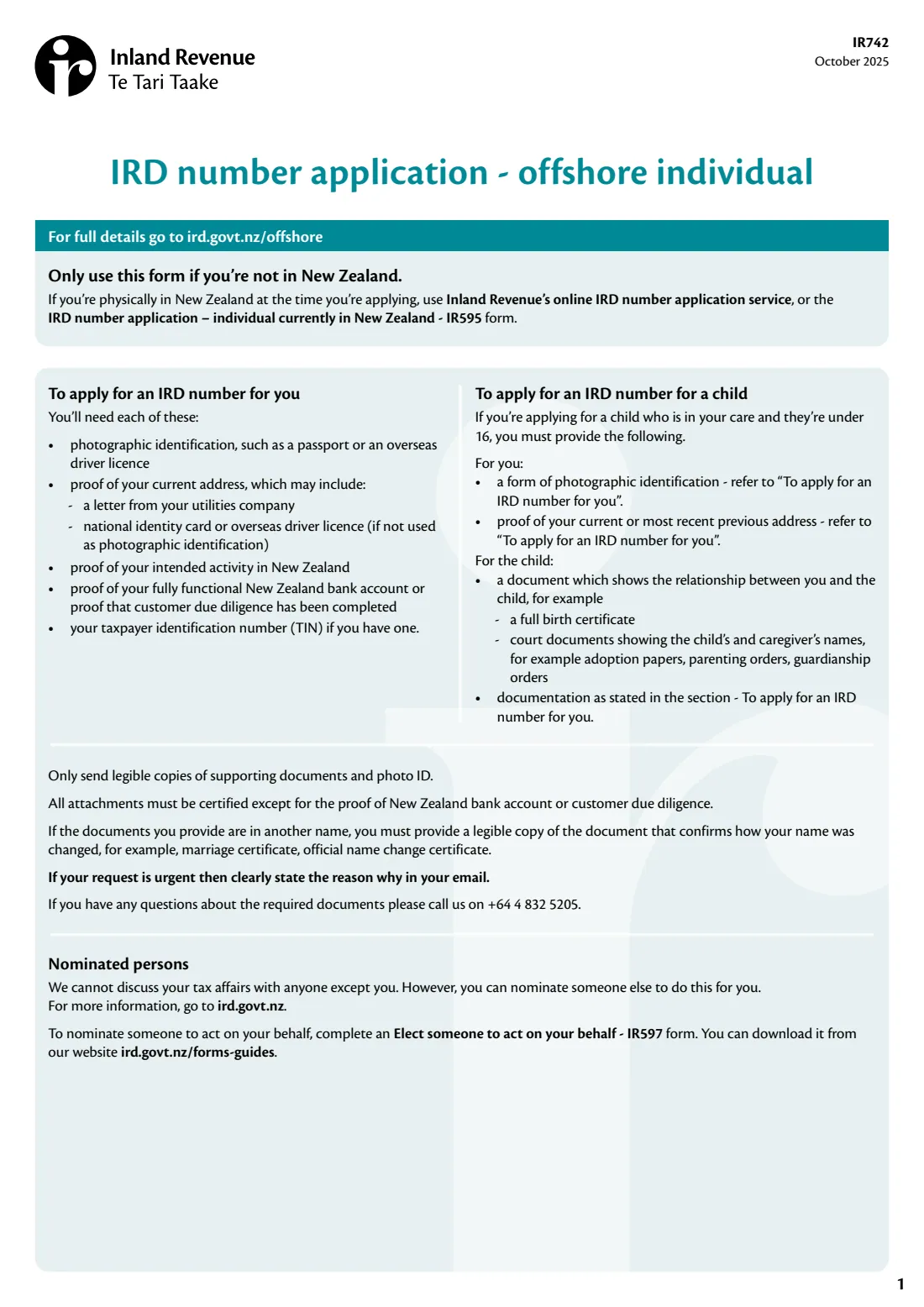
An IRD number is New Zealand's tax number. If you're overseas and need one — because you're buying or selling New Zealand property, earning rent in New Zealand, coming to work, are a director, partner or trustee, have a student loan, or are a New Zealand citizen or resident living abroad — form IR742, IRD number application – offshore individual, is how you apply. The form says to use it only if you're not in New Zealand; if you are, you use Inland Revenue's online service or the IR595 instead.
You give your name as shown on your identity documents, your address, your reasons for applying (with evidence for each), your most recent overseas taxpayer identification number (TIN) or why you don't have one, and either a fully functional New Zealand bank account or confirmation that a New Zealand reporting entity has completed customer due diligence. Parents and caregivers can apply for a child under 16 in their care, with a document showing the relationship.
FileIt fills in Inland Revenue's own IR742 PDF from a guided form, printing your answers one letter per box (macrons and accents included), splitting the address rows under their printed labels, and checking IRD numbers. It saves the completed form to your vault. You sign it and email it with your documents yourself; FileIt never submits anything.
- Who fills it
- An individual outside New Zealand, or a parent or caregiver for a child under 16
- Sent to
- [email protected] by email — the form says not to post it
- Processing
- The form says Inland Revenue aims to process applications within 8-10 working days of receiving them
- Signatures
- The applicant; the form says an electronic signature is acceptable when completing it online
- Questions
- +64 4 832 5205, the number the form gives for questions about documents
- Edition
- IR742 October 2025
Who needs to fill out IR742 IRD number application — offshore individual?
- People overseas buying, selling or renting out New Zealand property.
- People coming to New Zealand to work, including non-resident contractors and seasonal workers.
- Overseas directors or shareholders of New Zealand companies, partners in partnerships and trustees of trusts.
- New Zealand citizens and residence or permanent residence visa holders living overseas.
- Parents and caregivers applying for a child under 16 in their care.
When to use IR742 IRD number application — offshore individual
- When you need an IRD number and you're not physically in New Zealand at the time you apply.
- Not if you're in New Zealand — the form says to use the online IRD number application or the IR595 instead.
- Before a New Zealand property settlement, a first pay day, or other activity that needs an IRD number.
What you need before you start
- Photographic identification, such as a passport or an overseas driver licence.
- Proof of your current address, such as a utilities letter, national identity card or overseas driver licence (if not your photo ID).
- Proof of your intended activity in New Zealand, matching each reason you tick.
- Proof of a fully functional New Zealand bank account (a statement with at least 1 deposit and 1 withdrawal for differing amounts), or confirmation that a New Zealand reporting entity has completed customer due diligence.
- Your taxpayer identification number (TIN) from another country, if you have one.
- For a child: your own photo ID and proof of address, and a document showing the relationship, such as a full birth certificate.
- The form says all attachments must be certified, except the proof of bank account or customer due diligence.
What’s on IR742 IRD number application — offshore individual
The 2025 edition has 4 pages. FileIt asks for it in 12 parts, and it is signed by Applicant (or parent or caregiver of a child under 16):
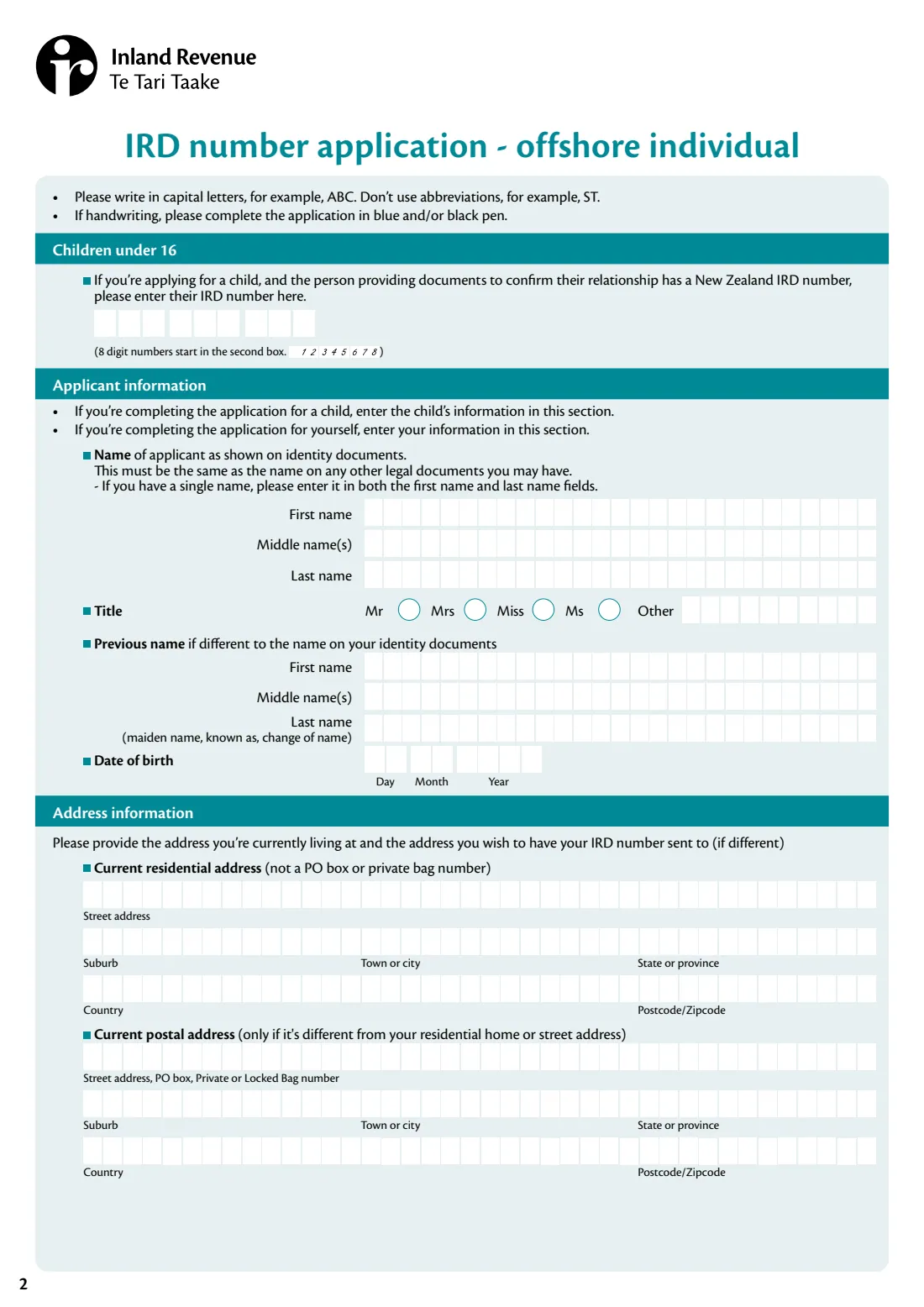
- Children under 16Applicant (or parent or caregiver of a child under 16)
- Applicant informationApplicant (or parent or caregiver of a child under 16)
- Address informationApplicant (or parent or caregiver of a child under 16)
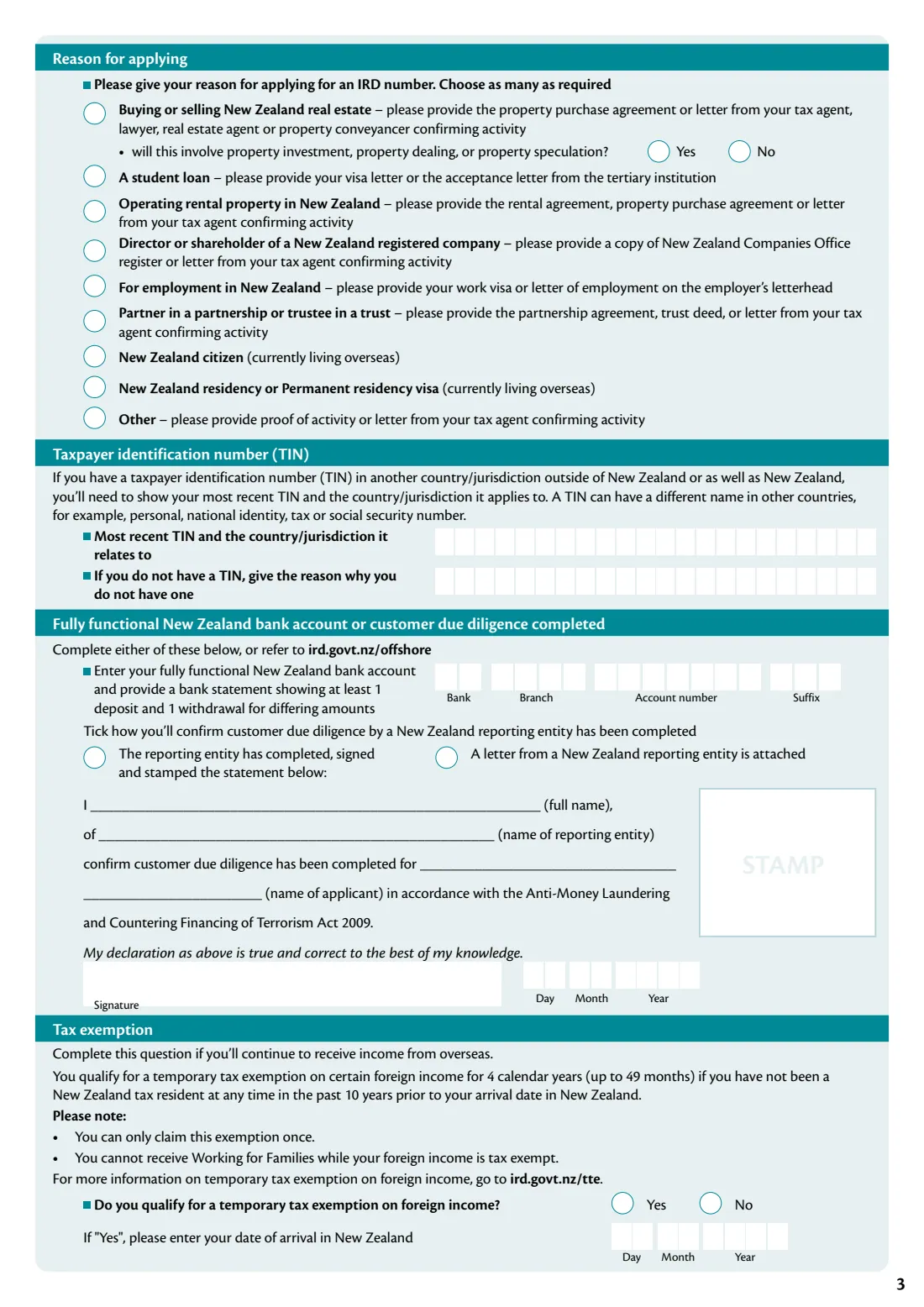
- Reason for applyingApplicant (or parent or caregiver of a child under 16)
- Taxpayer identification number (TIN)Applicant (or parent or caregiver of a child under 16)
- Fully functional New Zealand bank account or customer due diligenceApplicant (or parent or caregiver of a child under 16)
- Statement by the New Zealand reporting entityApplicant (or parent or caregiver of a child under 16)
- Tax exemptionApplicant (or parent or caregiver of a child under 16)
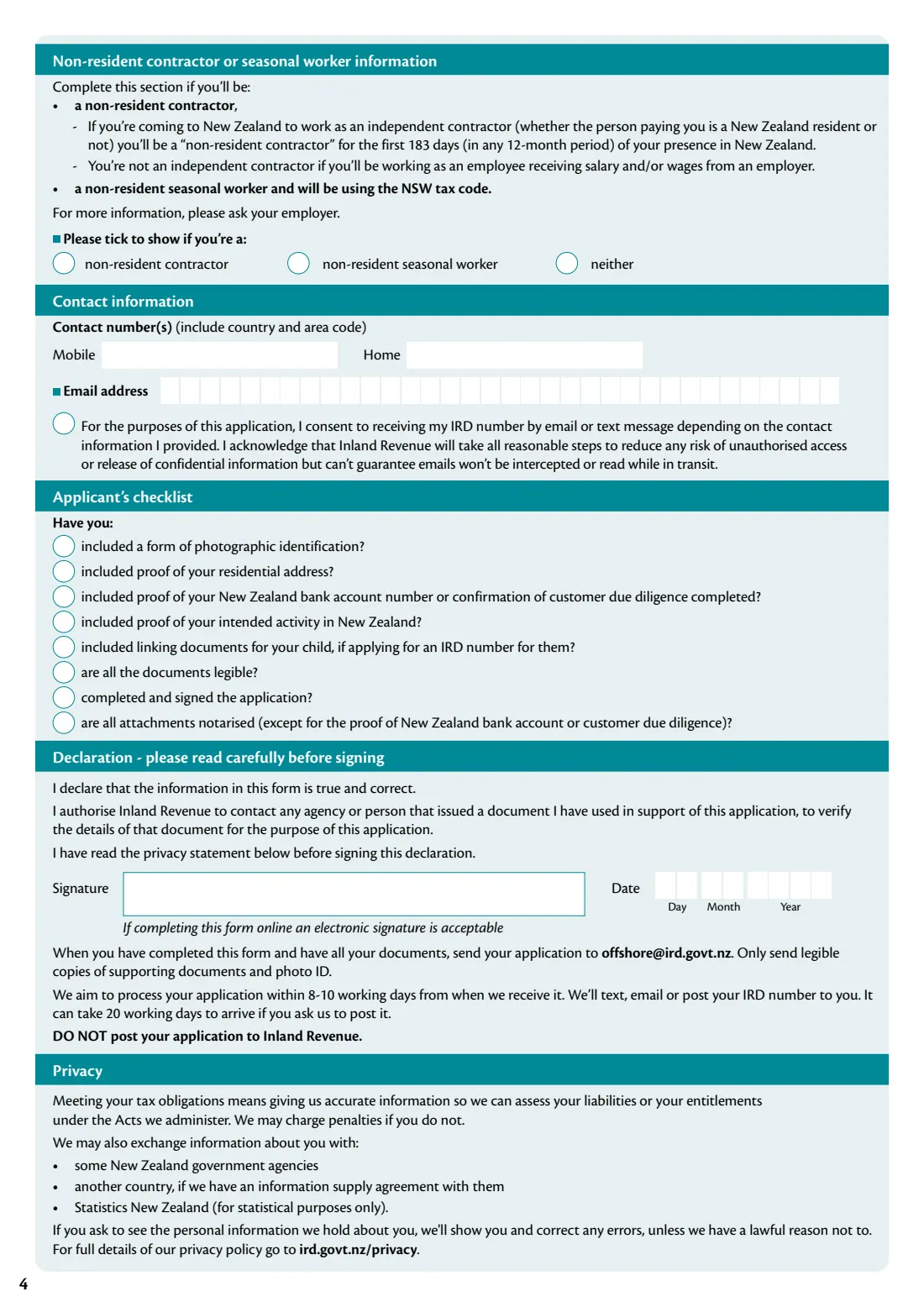
- Non-resident contractor or seasonal worker informationApplicant (or parent or caregiver of a child under 16)
- Contact informationApplicant (or parent or caregiver of a child under 16)
- Applicant's checklistApplicant (or parent or caregiver of a child under 16)
- DeclarationApplicant (or parent or caregiver of a child under 16)
How to fill out IR742 IRD number application — offshore individual, step by step
1 Children under 16 and applicant information
If you're applying for a child, give the IRD number of the person providing the relationship documents, if they have one, and enter the child's details. Otherwise enter your own: name as on your identity documents, title, any previous name, and date of birth.
2 Address information
Your current residential address (not a PO box or private bag) and, if different, the postal address to send your IRD number to.
3 Reason for applying and TIN
Tick every reason that applies — each lists the evidence to provide — and say whether a property purchase involves investment, dealing or speculation. Then give your most recent overseas TIN and its country, or why you don't have one.
4 Bank account or customer due diligence
Give a fully functional New Zealand bank account, or confirm customer due diligence: either a New Zealand reporting entity completes, signs and stamps the statement on the form, or you attach a letter from one.
5 Tax exemption, worker type and contact details
Say whether you qualify for the temporary tax exemption on foreign income (and your arrival date), whether you'll be a non-resident contractor or seasonal worker, and give your phone numbers and email, with consent to receive your IRD number by email or text.
6 Checklist and declaration
Work through the applicant's checklist, then sign and date the declaration.
Common mistakes to avoid
- Using the IR742 while you're in New Zealand — it's only for applicants who are offshore.
- Sending uncertified copies — the form says all attachments must be certified except the bank account or customer due diligence proof.
- Ticking a reason without the evidence it asks for.
- Giving a bank account without a statement showing at least one deposit and one withdrawal for differing amounts.
- Posting the application — the form says to email it, not post it.
- Using abbreviations such as ST in the address — the form asks you not to.
After you fill it out
Sign and date the declaration — by hand, or with FileIt's optional e-signature, since the form says an electronic signature is acceptable when completing it online.
Email the form with legible copies of your documents and photo ID to [email protected]. If your request is urgent, the form says to clearly state why in your email.
Inland Revenue texts, emails or posts your IRD number to you. FileIt keeps the completed PDF in your vault.
Fill out IR742 IRD number application — offshore individual online with FileIt
- Pick the person. Choose someone from People and FileIt fills in their name, date of birth, address and other details it already knows.
- Answer plain-language questions. One part of the form at a time, with the official help text beside each question — 61 fields in all. Your answers save as you go.
- Check the live preview. Watch your answers land on the real Inland Revenue (Te Tari Taake) form, and let FileIt do any worksheet arithmetic.
- Generate the official PDF. FileIt prints your answers into the agency’s own PDF and files it in that person’s folder in your vault. Sign it, or send it for e-signature.
FileIt fills the form — it never files or submits anything for you. Deliver the finished form to whoever asked for it, the way the form’s instructions say.
Start IR742 IRD number application — offshore individual now — it’s freeIR742 IRD number application — offshore individual: frequently asked questions
Can I apply for a New Zealand IRD number from overseas?
Yes. The IR742 is Inland Revenue's IRD number application for individuals who are not in New Zealand at the time they apply.
How do I send the IR742?
By email to [email protected] with legible copies of your supporting documents and photo ID. The form says not to post it to Inland Revenue.
How long does it take?
The October 2025 edition says Inland Revenue aims to process applications within 8-10 working days from when it receives them, and that it can take 20 working days for the number to arrive if you ask for it to be posted.
What if I don't have a New Zealand bank account?
You can instead show that a New Zealand reporting entity has completed customer due diligence — either its signed and stamped statement on the form, or a letter from it.
Can I apply for my child?
Yes, for a child under 16 in your care. You provide your own photo ID and proof of address, a document showing your relationship to the child, and the child's documents.
Can I fill in the IR742 online?
Yes. FileIt guides you through the questions and prints your answers into Inland Revenue's official PDF, ready to sign and email.
Official sources
- Blank form (PDF), published by Inland Revenue (Te Tari Taake): https://www.ird.govt.nz/-/media/project/ir/home/documents/forms-and-guides/ir700---ir799/ir742/ir742-6-october-2025.pdf
- Official instructions and guidance: https://www.ird.govt.nz/offshore
- Edition shown on this page: IR742 October 2025 (checked 2026-10-01).
FileIt is not affiliated with or endorsed by Inland Revenue (Te Tari Taake) or any government. This page explains the form in general terms and is not legal, tax or immigration advice. Always read the official instructions, and check that you are using the edition the recipient accepts. Page last reviewed 2026-10-01.