What is IR3R Rental income?
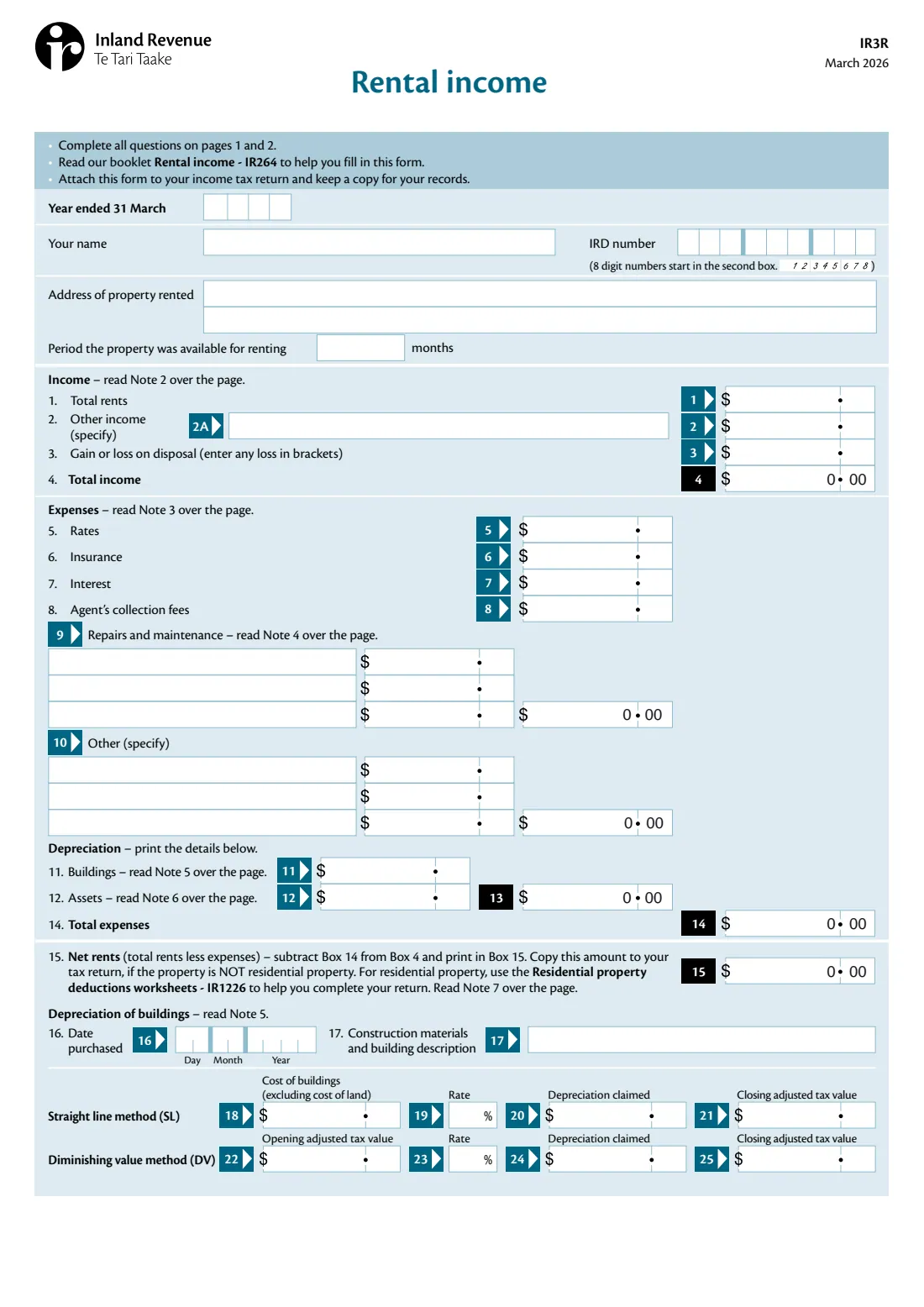
If you rent out a property in New Zealand, the IR3R, Rental income, is where you set out the property's income and expenses for the year: total rents and other income, any gain or loss on disposal, rates, insurance, interest, agent's collection fees, repairs and maintenance, other expenses and depreciation on buildings and assets. The result, net rents, carries into your income tax return. You fill in a separate IR3R for each property.
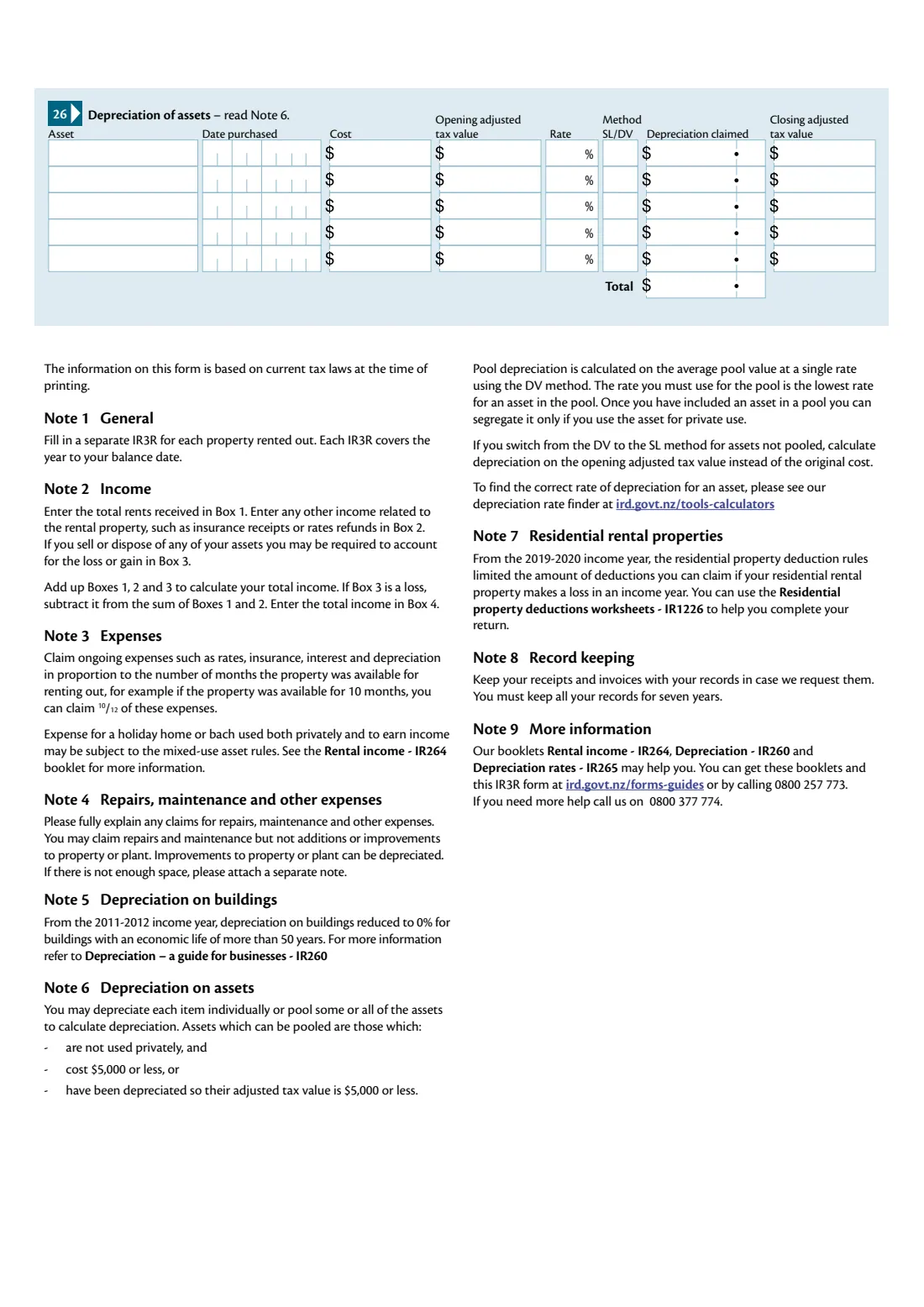
Ongoing expenses like rates, insurance, interest and depreciation are claimed in proportion to the months the property was available for renting. Repairs and maintenance can be claimed, but not additions or improvements, which are depreciated instead. For residential property, the residential property deduction rules limit deductions when the property makes a loss — the form points you to the Residential property deductions worksheets (IR1226) — and a holiday home or bach used both privately and for income may fall under the mixed-use asset rules.
FileIt fills in Inland Revenue's own IR3R PDF from a guided form. It adds up total income, the repairs and other-expense totals, total depreciation, total expenses and net rents exactly as the form describes, prints dollars and cents either side of each box's printed point, and shows a loss in brackets. It saves the completed form to your vault. You attach it to your return yourself; FileIt never submits anything.
- Who fills it
- Individuals with rental income from a property
- One form per
- Property rented out
- Attach to
- Your income tax return (IR3)
- Guides
- Rental income (IR264), Depreciation (IR260), Depreciation rates (IR265)
- Records
- The form says to keep all records for seven years
- Edition
- IR3R March 2026
Who needs to fill out IR3R Rental income?
- Landlords who own a rental property in their own name and file an IR3.
- People renting out a holiday home or bach for part of the year.
- Owners of more than one rental — one IR3R for each property.
When to use IR3R Rental income
- When you prepare your income tax return for a year in which you had rental income.
- Each IR3R covers the year to your balance date — for most people the year ended 31 March.
- For a property sold or disposed of during the year, include any gain or loss on disposal of assets at Box 3.
What you need before you start
- Your IRD number and the address of the property.
- The number of months the property was available for renting.
- Total rents received and any other income related to the property, such as insurance receipts or rates refunds.
- Rates, insurance, interest and agent's fees for the year.
- Details and amounts of repairs, maintenance and other expenses.
- Depreciation details for the building (if any) and each asset or pool of assets: purchase date, cost or opening adjusted tax value, rate, method, depreciation claimed and closing value.
What’s on IR3R Rental income
The 2026 edition has 2 pages. FileIt asks for it in 8 parts:
- Your details and the propertyTaxpayer
- Income (questions 1–4)Taxpayer
- Expenses (questions 5–8)Taxpayer
- 9. Repairs and maintenanceTaxpayer
- 10. Other expensesTaxpayer
- Depreciation and net rents (questions 11–15)Taxpayer
- Depreciation of buildings (questions 16–25)Taxpayer
- 26. Depreciation of assetsTaxpayer
How to fill out IR3R Rental income, step by step
1 Your details and the property
The year ended 31 March, your name, IRD number, the property's address, and the months it was available for renting.
2 Income (Boxes 1 to 4)
Total rents, other income related to the property, and any gain or loss on disposal. Box 4 is the total — a loss in Box 3 is subtracted.
3 Expenses (Boxes 5 to 10)
Rates, insurance, interest and agent's collection fees, then up to three lines each for repairs and maintenance and for other expenses, with their totals.
4 Depreciation and net rents (Boxes 11 to 15)
Building and asset depreciation, total depreciation (Box 13), total expenses (Box 14) and net rents (Box 15 = Box 4 less Box 14). Copy Box 15 to your return if the property is not residential; for residential property, use the IR1226 worksheets.
5 Depreciation details (Boxes 16 to 26)
For a building: date purchased, description, and either the straight line (cost, rate, depreciation, closing value) or diminishing value (opening value, rate, depreciation, closing value) figures. For assets: each asset or pool with its date, cost, opening value, rate, method, depreciation and closing value, and the total.
Common mistakes to avoid
- Claiming improvements as repairs — improvements are depreciated, not expensed.
- Claiming a full year of rates, insurance and interest when the property was only available for part of the year.
- Depreciating a building with an economic life of more than 50 years — the rate has been 0% since the 2011-2012 income year.
- Combining several properties on one form — use a separate IR3R for each.
- Copying Box 15 straight to the return for a residential property without applying the residential property deduction rules.
After you fill it out
Attach the IR3R to your income tax return (IR3) and keep a copy for your records.
Keep your receipts and invoices — the form says you must keep all records for seven years.
FileIt keeps the completed PDF in your vault, so next year's figures (like closing adjusted tax values) are easy to find.
Fill out IR3R Rental income online with FileIt
- Pick the person. Choose someone from People and FileIt fills in their name, date of birth, address and other details it already knows.
- Answer plain-language questions. One part of the form at a time, with the official help text beside each question — 90 fields in all. Your answers save as you go.
- Check the live preview. Watch your answers land on the real Inland Revenue (Te Tari Taake) form, and let FileIt do any worksheet arithmetic.
- Generate the official PDF. FileIt prints your answers into the agency’s own PDF and files it in that person’s folder in your vault.
FileIt fills the form — it never files or submits anything for you. Deliver the finished form to whoever asked for it, the way the form’s instructions say.
Start IR3R Rental income now — it’s freeIR3R Rental income: frequently asked questions
What is the IR3R?
It's Inland Revenue's rental income schedule — the income and expenses for one rented-out property, attached to your individual income tax return.
Do I need one IR3R per property?
Yes. The form says to fill in a separate IR3R for each property rented out.
What if the property was only rented for part of the year?
Claim ongoing expenses such as rates, insurance, interest and depreciation in proportion to the months it was available — for example 10/12 of them for 10 months.
Can I claim depreciation on the building?
The form notes that from the 2011-2012 income year, depreciation on buildings with an economic life of more than 50 years is 0%. Assets such as chattels can still be depreciated.
Where does net rents go?
Copy Box 15 to your tax return if the property is not residential property. For residential property, use the Residential property deductions worksheets (IR1226) to help complete your return.
Can I fill in the IR3R online?
Yes. FileIt guides you through the boxes, does the form's additions and subtractions, and prints your answers into Inland Revenue's official PDF.
Official sources
- Blank form (PDF), published by Inland Revenue (Te Tari Taake): https://www.ird.govt.nz/-/media/project/ir/home/documents/forms-and-guides/ir1---ir99/ir3r/ir3r-2026.pdf
- Official instructions and guidance: https://www.ird.govt.nz/property/renting-out-residential-property
- Edition shown on this page: IR3R March 2026 (checked 2026-10-01).
FileIt is not affiliated with or endorsed by Inland Revenue (Te Tari Taake) or any government. This page explains the form in general terms and is not legal, tax or immigration advice. Always read the official instructions, and check that you are using the edition the recipient accepts. Page last reviewed 2026-10-01.