What is Borang KWSP 3?
Borang KWSP 3 (Daftar), the Member Registration Application (Permohonan Pendaftaran Ahli), is the form used to become a member of the Employees Provident Fund (EPF, or Kumpulan Wang Simpanan Pekerja in Malay). Your EPF membership is what your retirement savings and your employer's contributions are credited to, so registering correctly — with details that match your identification document exactly — is the first step. The current edition is V20250730.
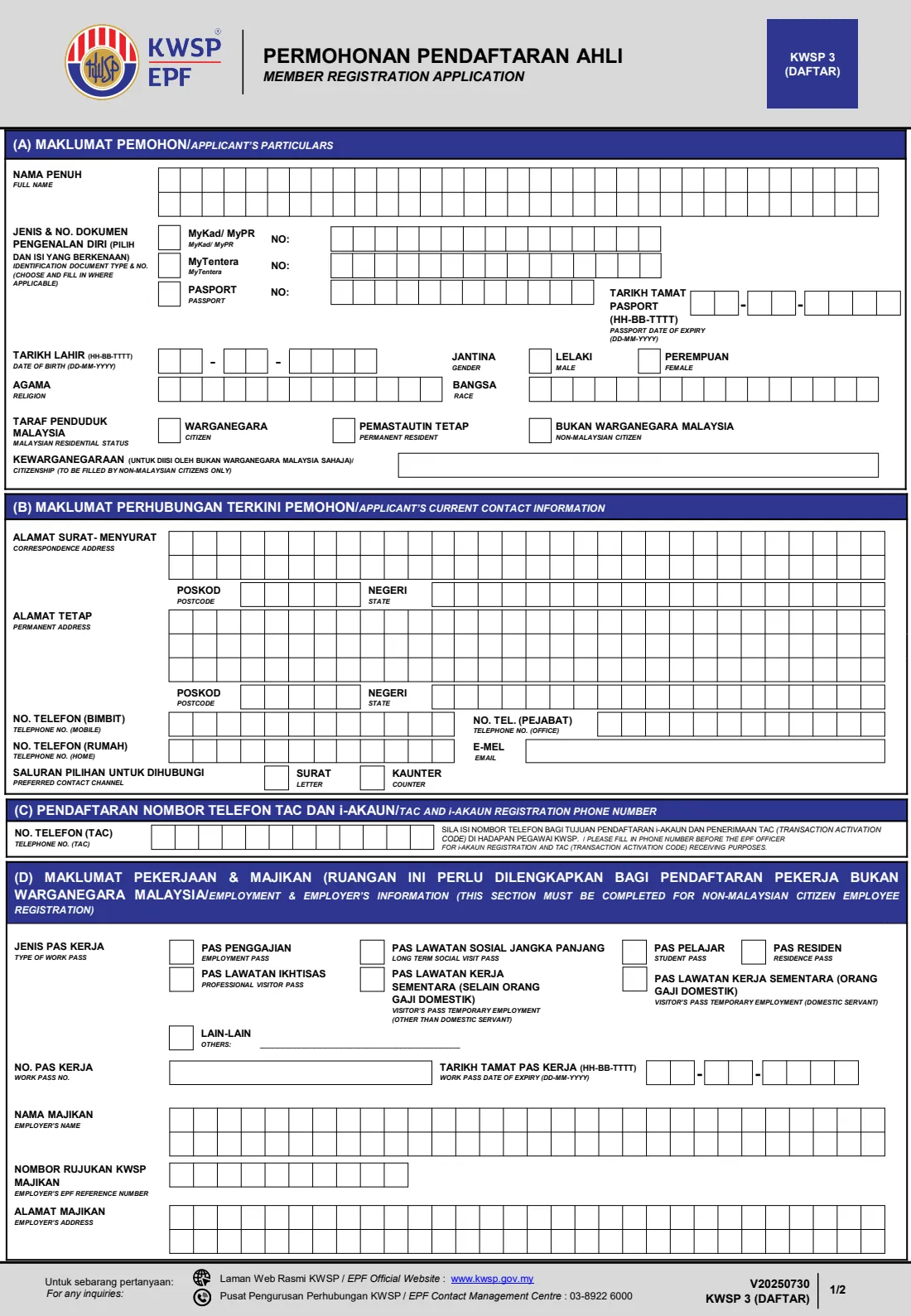
The form is bilingual (Malay and English) and has five parts: (A) your particulars, (B) your contact information, (C) the phone number for i-Akaun registration and TAC, (D) employment and employer details, which non-Malaysian citizens must complete, and (E) your declaration with thumbprints. There is no signature box — instead you put your left and right thumbprints on the printed form. A filling guide on the last page explains which supporting documents each type of applicant must attach.
FileIt helps you fill in the KWSP 3 online. It pre-fills your name, date of birth and address from the People records in your vault, splits long names and addresses across the form's rows of boxes in BLOCK LETTERS, checks that your MyKad number matches your date of birth and gender, and warns if your passport or work pass has expired. It then prints your answers into EPF's own official PDF and saves it in your vault folder. FileIt never submits anything to EPF — you print the form, add your thumbprints and hand it in yourself.
- Who fills it
- The person registering as an EPF member. Non-Malaysian citizens also complete Part (D), and their employer verifies their documents.
- Handed in at
- An EPF (KWSP) counter, with copies of your supporting documents.
- When
- When you need to register as a new EPF member, typically on starting work.
- Signatures
- No signature — left and right thumbprints in black ink in Part (E).
- Edition
- V20250730 — KWSP 3 (DAFTAR).
- Cost
- Free to fill in on any FileIt account.
Who needs to fill out Borang KWSP 3?
- Malaysian citizens who are starting work and don't yet have an EPF member number.
- Malaysian permanent residents (holders of MyPR) registering as EPF members.
- Members of the armed forces registering with their MyTentera card.
- Non-Malaysian citizen employees, such as Employment Pass, Residence Pass or Visit Pass (Temporary Employment) holders, who must also complete Part (D).
- Foreign domestic workers, who register with a copy of Form KWSP 16 as well as their passport and work pass.
- Employers or HR staff helping a new foreign employee prepare a complete application.
When to use Borang KWSP 3
- When you take up your first job and have not registered with EPF before.
- When a non-Malaysian citizen starts work in Malaysia and needs to be registered as an EPF member.
- Before you visit an EPF counter, so you can hand in a complete, neatly printed form rather than filling it in on the spot.
- Make sure your passport and work pass are still valid on the date you apply — EPF asks for copies of valid documents.
What you need before you start
- Your identification document: MyKad, MyPR, MyTentera, or passport for non-Malaysian citizens.
- Your full name, date of birth, gender, religion and race exactly as they appear on that document.
- Your correspondence address and your permanent address, each with postcode and state.
- Your mobile phone number, and optionally office and home numbers and an email address.
- For non-Malaysian citizens: your work pass type, work pass number and expiry date, and passport expiry date.
- For non-Malaysian citizens: your employer's name, address and EPF reference number (Nombor rujukan KWSP majikan).
- Photocopies of your supporting documents on A4 paper, with the front and back of your identification document on the same page.
- For domestic workers: Form KWSP 16 (Notice of Election to EPF and Employer for domestic servants).
- A black ink pad for your thumbprints and, if writing anything by hand, a black or blue pen.
What’s on Borang KWSP 3
The 2025 edition has 3 pages. FileIt asks for it in 5 parts:
- (A) Applicant's particulars (Maklumat pemohon)Member
- (B) Current contact information (Maklumat perhubungan terkini)Member
- (C) TAC and i-Akaun registration phone numberMember
- (D) Employment and employer (Maklumat pekerjaan & majikan)Member
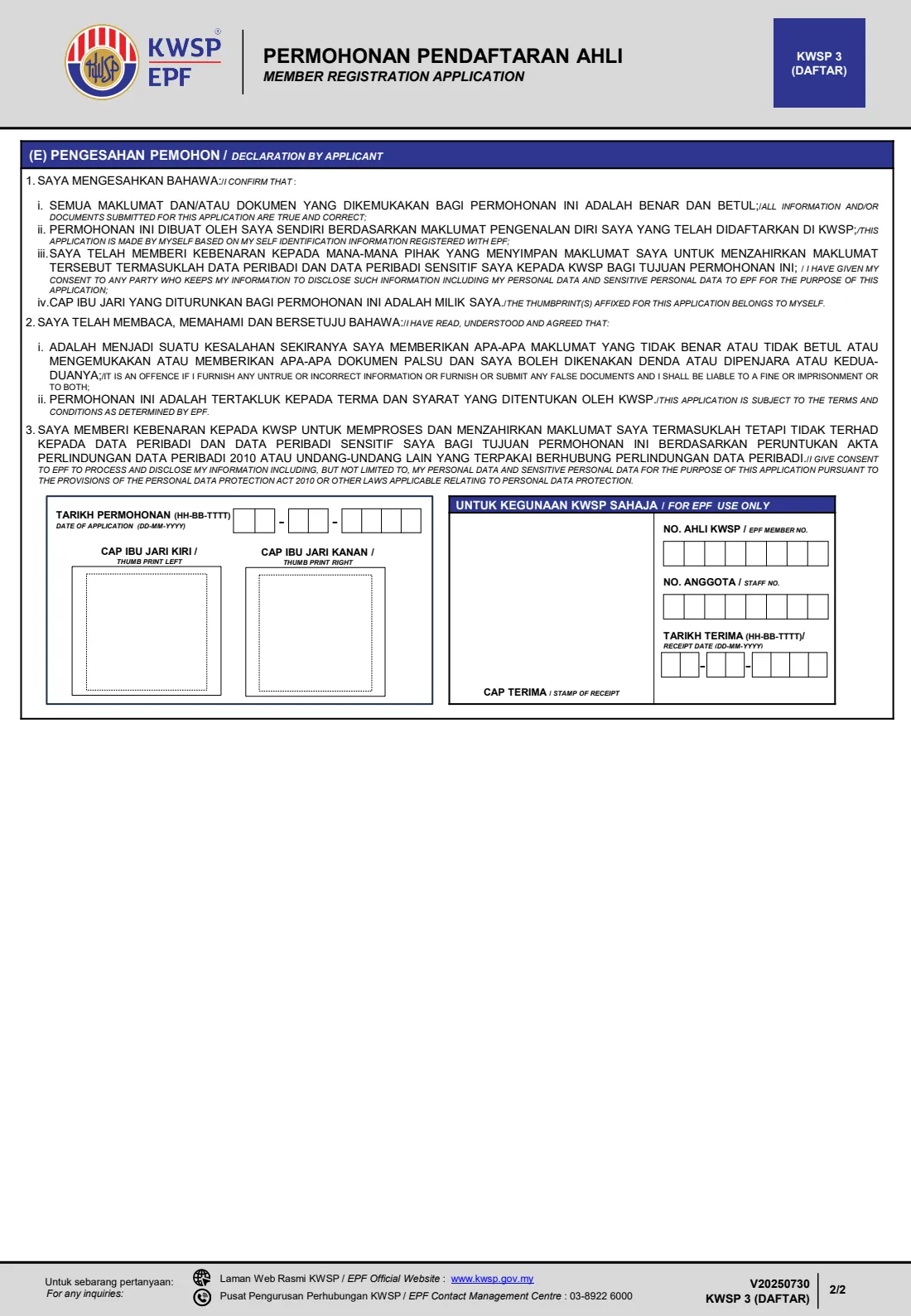
- (E) Declaration by applicant (Pengesahan pemohon)Member
How to fill out Borang KWSP 3, step by step
1 (A) Applicant's particulars (Maklumat pemohon)
Enter your full name (Nama penuh) exactly as on your identification document. The name has two rows of 33 boxes, one letter per box in BLOCK LETTERS; FileIt splits it between words for you and warns if it is too long, in which case shorten it the way it is shortened on your document.
Choose your identification document type and give the number: MyKad or MyPR, MyTentera, or passport (Pasport) with its expiry date. Malaysian citizens use MyKad or MyTentera, permanent residents use MyPR, and non-Malaysian citizens use their passport. Then fill in your date of birth, gender (Jantina), religion (Agama) and race (Bangsa, written in Malay as on your document, for example MELAYU, CINA or INDIA).
2 (A) Malaysian residential status and citizenship
Tick your Malaysian residential status (Taraf penduduk Malaysia): citizen (Warganegara), permanent resident (Pemastautin tetap) or non-Malaysian citizen (Bukan warganegara Malaysia). The citizenship (Kewarganegaraan) box is only for non-Malaysian citizens — write the country of your passport, for example INDONESIA.
Your residential status must match your document type. FileIt checks this, and for a MyKad it also checks that the first six digits match your date of birth and that the last digit fits your gender, which catches common typing mistakes.
3 (B) Applicant's current contact information (Maklumat perhubungan terkini)
Give your correspondence address (Alamat surat-menyurat) with postcode (Poskod) and state (Negeri), and then your permanent address (Alamat tetap) — fill it in again even if it is the same. The address rows have 30 boxes each and there is no separate town box, so include your town or city in the address lines. If your permanent address is outside Malaysia, the state is Outside Malaysia (Luar negara) and the country goes in the address lines.
Add your mobile number, and optionally your office and home numbers and email. Finally, choose how EPF should contact you: by letter (Surat) or at the EPF counter (Kaunter).
4 (C) TAC and i-Akaun registration phone number
This part is only filled in if you hand in the application yourself at an EPF counter. Enter the phone number that should receive the TAC (Transaction Activation Code) used to register your i-Akaun, EPF's online member account — usually your own mobile number. The form asks you to fill it in before you see the EPF officer.
5 (D) Employment and employer's information (Maklumat pekerjaan & majikan)
This part must be completed for non-Malaysian citizen employees and is left blank by citizens and permanent residents. Tick one type of work pass (Jenis pas kerja): Employment Pass, Long Term Social Visit Pass, Student Pass, Residence Pass, Professional Visitor Pass, Visitor's Pass Temporary Employment (other than domestic servant), Visitor's Pass Temporary Employment (domestic servant), or Others.
Then give the work pass number and expiry date, your employer's name, the employer's EPF reference number and the employer's address. Employer name and address each have two rows of 30 boxes, so abbreviate if needed (for example SDN BHD or JLN for JALAN).
6 (E) Declaration by applicant (Pengesahan pemohon)
Fill in the date of application. By applying, you confirm that the information and documents are true and correct, that the application is your own, that you consent to anyone holding your information disclosing it to EPF for this application, and that the thumbprints are yours. You also agree EPF may process your personal data under the Personal Data Protection Act 2010. The form warns that giving untrue information or false documents is an offence that can lead to a fine, imprisonment or both.
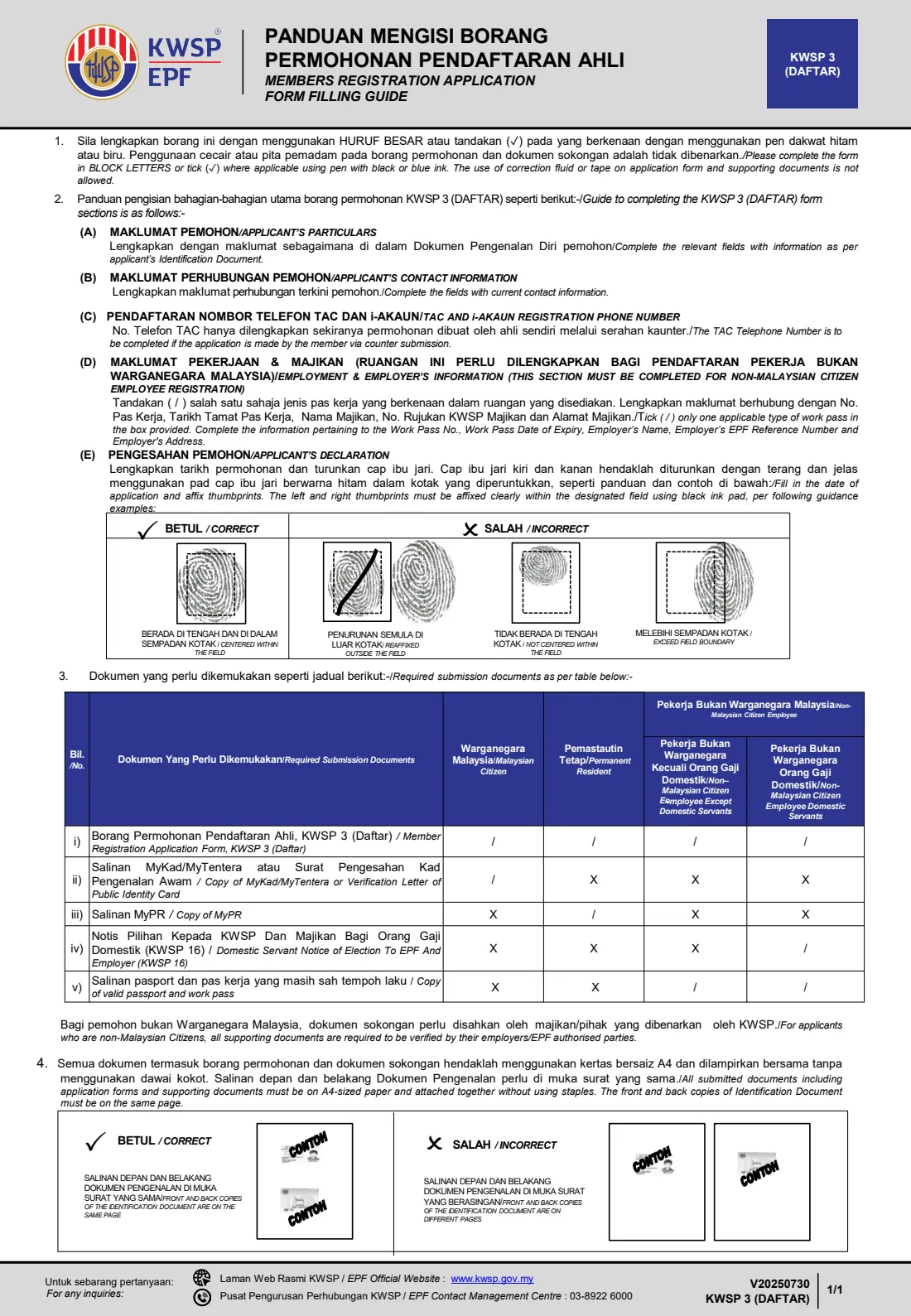
Instead of signing, put your LEFT and RIGHT thumbprints in the two boxes using a black ink pad. The filling guide shows that prints must be clear, centred and inside the box — prints that cross the border, are off-centre or re-affixed outside the box are marked incorrect. The EPF-use-only area (member number, staff number, receipt date and stamp) is left blank for the officer.
7 Supporting documents (Dokumen yang perlu dikemukakan)
The filling guide's table lists what to attach. Every applicant hands in the KWSP 3 form. Malaysian citizens add a copy of their MyKad or MyTentera (or a Verification Letter of Public Identity Card); permanent residents add a copy of their MyPR. Non-Malaysian citizen employees add a copy of their valid passport and work pass, and domestic servants also add Form KWSP 16.
For non-Malaysian citizens, all supporting documents must be verified by their employer or a party authorised by EPF. Use A4 paper, don't staple the pages, and put the front and back of your identification document on the same page.
Common mistakes to avoid
- Writing your name differently from your identification document, for example leaving out 'bin' or 'binti' or using a nickname. Copy it exactly.
- Using correction fluid or tape on the form or the photocopies — the guide says this is not allowed. Print a fresh copy instead.
- Smudged thumbprints, or prints that cross the edge of the box. Press straight down with black ink, centred inside each box.
- Photocopying the front and back of your identification document on separate pages. They must be on the same page.
- Stapling the pages together. Clip or attach them without staples on A4 paper.
- Non-Malaysian citizens leaving Part (D) blank, or bringing documents that haven't been verified by the employer.
- Applying with an expired passport or work pass. EPF asks for copies of valid documents.
- Choosing the wrong document type for your status — citizens use MyKad or MyTentera, permanent residents MyPR, and non-citizens their passport.
After you fill it out
Print the finished KWSP 3 from FileIt on A4 paper, fill in anything still to be done by hand (such as the date, if you left it for the day), and add your left and right thumbprints in black ink. Prepare your supporting documents as the filling guide describes, and for non-Malaysian citizens have them verified by your employer or an EPF-authorised party.
Take the form and documents to an EPF counter. If you apply in person, have the phone number in Part (C) ready so your i-Akaun can be registered and the TAC received in front of the EPF officer. The officer fills in the EPF-use-only section, including your EPF member number, and stamps the receipt.
Keep a copy. FileIt saves the filled form in your vault folder, and it is worth scanning and adding the stamped, thumbprinted copy once you have it. Once registered, keep your contact details up to date with EPF, and consider making a nomination on Borang KWSP 4 so your savings go to the people you choose.
Fill out Borang KWSP 3 online with FileIt
- Pick the person. Choose someone from People and FileIt fills in their name, date of birth, address and other details it already knows.
- Answer plain-language questions. One part of the form at a time, with the official help text beside each question — 41 fields in all. Your answers save as you go.
- Check the live preview. Watch your answers land on the real Employees Provident Fund (KWSP / EPF) form, and let FileIt do any worksheet arithmetic.
- Generate the official PDF. FileIt prints your answers into the agency’s own PDF and files it in that person’s folder in your vault.
FileIt fills the form — it never files or submits anything for you. Deliver the finished form to whoever asked for it, the way the form’s instructions say.
Start Borang KWSP 3 now — it’s freeBorang KWSP 3: frequently asked questions
What is Borang KWSP 3?
Borang KWSP 3 (Daftar) is the EPF Member Registration Application. It registers a person as a member of the Employees Provident Fund, Malaysia's retirement savings scheme for employees. It is used by Malaysian citizens, permanent residents and non-Malaysian citizen employees.
Where do I submit the KWSP 3 form?
You hand it in at an EPF (KWSP) counter together with copies of your supporting documents. FileIt does not submit it for you. Check EPF's registration page, linked on this page, for the latest guidance on where and how to register.
Can I fill in the KWSP 3 form online?
Yes, with FileIt you can fill it in online in a guided form and print it on EPF's own official PDF, with names and addresses laid out in the form's boxes. You still need to print it, add your thumbprints and hand it in at an EPF counter yourself. The form is free to fill in on every FileIt account.
Does the KWSP 3 need a signature?
No. Part (E) uses your left and right thumbprints instead of a signature. Use a black ink pad and keep each print clear and centred inside its box.
What documents do foreign workers need for EPF registration?
According to the form's guide, non-Malaysian citizen employees attach copies of their valid passport and work pass, and foreign domestic servants also attach Form KWSP 16. All supporting documents must be verified by the employer or a party authorised by EPF. They also complete Part (D) with the work pass and employer details.
What is the TAC phone number in Part (C) for?
It is the number that receives the TAC (Transaction Activation Code) used to register your i-Akaun, EPF's online account. You only fill it in if you are handing the form in yourself at a counter, and you do it before you see the EPF officer.
What is the difference between KWSP 3 and KWSP 4?
KWSP 3 registers you as an EPF member. KWSP 4 is the nomination form, where an existing member names who receives or administers their EPF savings after death. Most people register first and then make a nomination.
Can I use correction tape if I make a mistake?
No. The form's guide says correction fluid or tape is not allowed on the application form or the supporting documents. With FileIt you simply correct your answers and print a clean copy.
Official sources
- Blank form (PDF), published by Employees Provident Fund (KWSP / EPF): https://www.kwsp.gov.my/documents/d/guest/kwsp-3-daftar-_permohonan-pendaftaran-ahli_v20240228-1
- Official instructions and guidance: https://www.kwsp.gov.my/en/member/overview/registration
- Edition shown on this page: V20250730 — KWSP 3 (DAFTAR) (checked 2026-09-25).
FileIt is not affiliated with or endorsed by Employees Provident Fund (KWSP / EPF) or any government. This page explains the form in general terms and is not legal, tax or immigration advice. Always read the official instructions, and check that you are using the edition the recipient accepts. Page last reviewed 2026-09-25.