What is Borang KWSP 4?
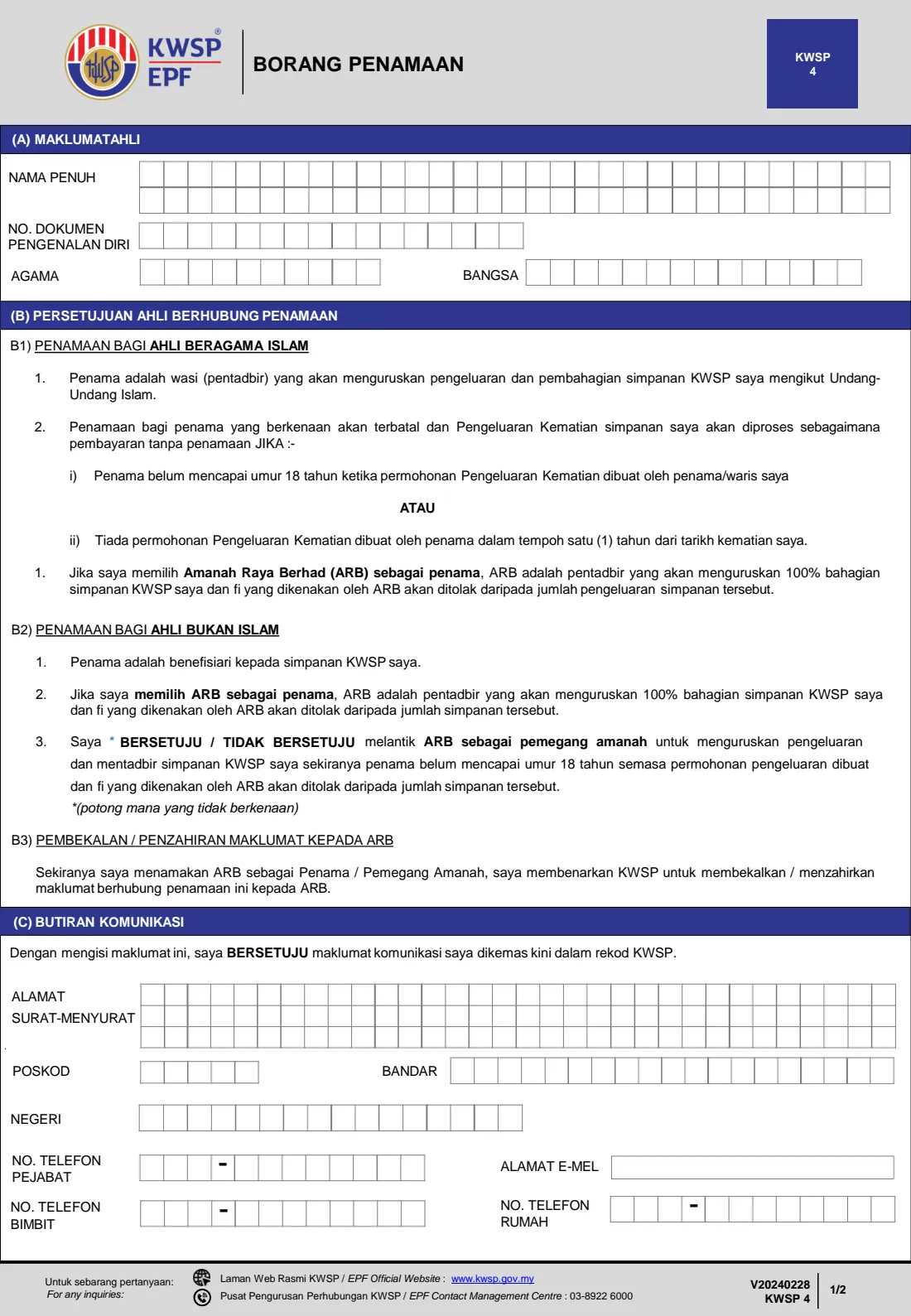
Borang KWSP 4, the EPF Nomination Form (Borang Penamaan), lets a member of the Employees Provident Fund (EPF / KWSP) name one or more nominees (penama) for their EPF savings. It is one of the simplest ways to make sure your retirement savings reach the right people if you die, and it takes only two pages. The current edition is V20240228, and the form is printed in Malay.
What a nomination means depends on your religion, and the form spells this out. For a Muslim member, the nominee is a wasi — an administrator who withdraws the savings and distributes them according to Islamic law. For a non-Muslim member, the nominee is the beneficiary who receives the savings. Either way, you can name up to 10 people or institutions on one form with a percentage share for each, or name Amanah Raya Berhad (ARB) to administer all of your savings. A new nomination replaces all earlier ones.
FileIt helps you fill in the KWSP 4 online in English, with the Malay terms shown alongside. It pre-fills your details and your family members' names and dates of birth from the People records in your vault, lays names out in the form's boxes, checks that your nominees' shares add up to 100% and that MyKad numbers match dates of birth, and prints everything into EPF's own official PDF. The finished form is saved in your vault folder. FileIt never submits anything to EPF — you add your thumbprint and hand it in at an EPF office yourself.
- Who fills it
- The EPF member making the nomination.
- Handed in at
- An EPF office, in person, with your identification document.
- When
- Any time you are an EPF member — and again whenever your family or wishes change.
- Signatures
- No signature — your left or right thumbprint in Part (F).
- Nominees
- Up to 10 per form, with shares adding up to 100%, or Amanah Raya Berhad for 100%.
- Cost
- Free to fill in on any FileIt account.
Who needs to fill out Borang KWSP 4?
- Any EPF member who hasn't made a nomination yet and wants their savings to go to specific people.
- Members who have married, divorced, had children, or lost a nominee since their last nomination.
- Muslim members who want to appoint a trusted person as wasi to handle their EPF savings under Islamic law.
- Non-Muslim members who want to name beneficiaries and decide whether Amanah Raya Berhad should act as trustee for a nominee under 18.
- Members who would rather have Amanah Raya Berhad administer all of their EPF savings.
- Families organising their affairs who want each member's nomination recorded and kept safe.
When to use Borang KWSP 4
- As soon as you are registered with EPF (see Borang KWSP 3) — there is no need to wait until later in life.
- After marriage, divorce, the birth or adoption of a child, or the death of a nominee.
- When you want to change the share each nominee receives. Remember a new nomination cancels all earlier ones, so list everyone again.
- When you want to name more than 10 nominees — use a second KWSP 4 and hand both in together.
- When a nominee's identification details change, for example a child moving from a MyKid to a MyKad.
What you need before you start
- Your full name, identification document number (MyKad, MyPR, MyTentera or passport), religion and race, as on your identification document.
- Each nominee's full name exactly as on their identification document, or an institution's registered name.
- Each nominee's identification document number — MyKad, MyKid, birth certificate or passport — or an institution's registration number.
- Each nominee's date of birth (not needed for an institution).
- Each nominee's relationship to you, written in Malay, such as ISTERI (wife), SUAMI (husband), ANAK (child), IBU (mother) or BAPA (father).
- The percentage share for each nominee, adding up to 100%.
- Optionally, your up-to-date correspondence address, phone numbers and email for Part (C).
- Your own identification document to bring to the EPF office when you hand the form in.
What’s on Borang KWSP 4
The 2024 edition has 2 pages. FileIt asks for it in 4 parts:
- (A) Member's particulars (Maklumat ahli)Member
- (B) Your consent on the nomination (Persetujuan ahli berhubung penamaan)Member
- (C) Contact details (Butiran komunikasi)Member
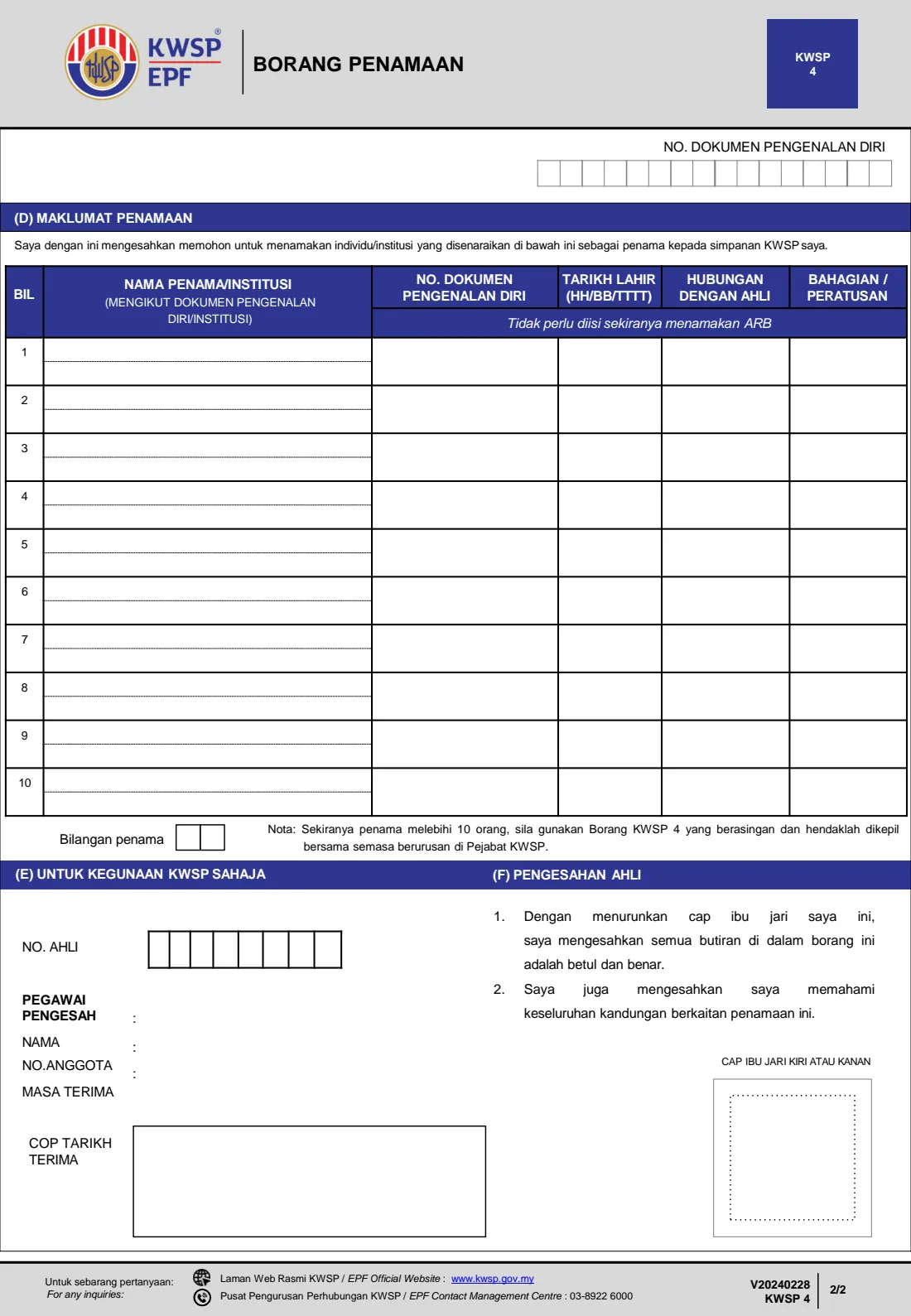
- (D) Nominees (Maklumat penamaan)Member
How to fill out Borang KWSP 4, step by step
1 (A) Member's particulars (Maklumat ahli)
Enter your full name (Nama penuh) as on your identification document, your identification document number (No. dokumen pengenalan diri), religion (Agama) and race (Bangsa). The name has two rows of 31 boxes, one letter per box in BLOCK LETTERS; FileIt splits it between words for you. Your document number is also printed on page 2 so both pages can be matched.
Your religion matters here, because it decides which nomination rules in Part (B) apply to you.
2 (B1) Nomination for Muslim members (Penamaan bagi ahli beragama Islam)
If you are Muslim, your nominee is a wasi (administrator) who will manage the withdrawal and distribution of your EPF savings according to Islamic law — they don't simply keep the money. The form states that the nomination lapses, and your death withdrawal is processed as if there were no nomination, if the nominee is under 18 when the death withdrawal is applied for, or if the nominee makes no death withdrawal application within one year of your death.
If you choose Amanah Raya Berhad (ARB) as nominee, ARB administers 100% of your savings and its fees are deducted from the amount withdrawn. There is nothing to fill in for B1 itself; you are confirming you understand these terms.
3 (B2) Nomination for non-Muslim members (Penamaan bagi ahli bukan Islam)
If you are not Muslim, your nominee is the beneficiary of your EPF savings. If you choose ARB as nominee, ARB administers 100% of your savings and deducts its fees.
Item 3 asks you to decide whether you AGREE (BERSETUJU) or DO NOT AGREE (TIDAK BERSETUJU) to appoint ARB as trustee to manage the withdrawal and administer your savings if a nominee is under 18 when the withdrawal is made, with ARB's fees deducted. On paper you strike out the word that doesn't apply; FileIt does this for you based on your choice.
4 (B3) Supplying information to ARB (Pembekalan / penzahiran maklumat kepada ARB)
If you name ARB as nominee or trustee, you allow EPF to supply and disclose information about this nomination to ARB. This is a consent statement rather than a box to fill in.
5 (C) Contact details (Butiran komunikasi)
This part is optional. If you fill it in, you agree that EPF updates your contact details in its records. There are three rows of 32 boxes for your correspondence address (Alamat surat-menyurat), then postcode (Poskod), town (Bandar) and state (Negeri), plus mobile, office and home phone numbers and email. Phone numbers for the office and home are split into area code and number.
6 (D) Nomination details (Maklumat penamaan)
On page 2 you confirm you are applying to name the listed people or institutions as nominees for your EPF savings. For each of up to 10 nominees, give their full name (or institution name) as in their identification document, their identification document number, date of birth, relationship to you (Hubungan dengan ahli) and share (Bahagian / peratusan). The shares must add up to 100%, and the form asks for the number of nominees (Bilangan penama) at the bottom.
If you are naming ARB, the nominee columns don't need to be filled in. For more than 10 nominees, the form's note says to use a separate KWSP 4 and attach it when you visit the EPF office. FileIt pre-fills nominees from your family in the vault and totals the shares for you.
7 (E) For EPF use only (Untuk kegunaan KWSP sahaja)
Leave this box blank. The EPF officer records your member number, their own name and staff number as the verifying officer, and the date and time the form was received.
8 (F) Member's confirmation (Pengesahan ahli)
There is no signature. Instead, you put your left or right thumbprint (Cap ibu jari kiri atau kanan) in the box. By doing so you confirm that all details on the form are correct and true, and that you understand everything about this nomination. Keep the print clear and inside the box. If you spot a mistake before you hand it in, correct it in FileIt and print a fresh copy rather than writing over the form.
Common mistakes to avoid
- Shares that don't add up to exactly 100%. Check the total before printing — FileIt flags it for you.
- Assuming an old nomination stays in place alongside a new one. A new nomination cancels all earlier ones, so include everyone you want.
- Muslim members naming a young child as their only nominee. Under B1, the nomination lapses if the nominee is under 18 when the death withdrawal is applied for.
- Writing nominees' names from memory instead of copying them exactly from their MyKad, MyKid, birth certificate or passport.
- Leaving the ARB trustee choice in B2 undecided when you have nominees under 18.
- Nominating yourself by mistake, or giving a date of birth that doesn't match the nominee's MyKad number.
- Filling in or signing Part (E), which is for EPF use only.
- Posting the form or sending someone else — the form is handed in personally at an EPF office with your identification document.
After you fill it out
Print the finished KWSP 4 from FileIt and check every nominee's name, document number and share once more. Take the form and your identification document to an EPF office and hand it in personally; the thumbprint in Part (F) confirms the nomination is yours. If you have more than 10 nominees, bring both forms and hand them in together.
The EPF officer completes Part (E) with the time and date received. Once processed, the new nomination replaces any nomination you made before. Ask at the counter if you want confirmation of what is now on record.
Keep a copy in your FileIt vault, and tell your nominees — especially a wasi — where it is. Review your nomination whenever your family changes, and make a new one if it no longer reflects your wishes.
Fill out Borang KWSP 4 online with FileIt
- Pick the person. Choose someone from People and FileIt fills in their name, date of birth, address and other details it already knows.
- Answer plain-language questions. One part of the form at a time, with the official help text beside each question — 72 fields in all. Your answers save as you go.
- Check the live preview. Watch your answers land on the real Employees Provident Fund (KWSP / EPF) form, and let FileIt do any worksheet arithmetic.
- Generate the official PDF. FileIt prints your answers into the agency’s own PDF and files it in that person’s folder in your vault.
FileIt fills the form — it never files or submits anything for you. Deliver the finished form to whoever asked for it, the way the form’s instructions say.
Start Borang KWSP 4 now — it’s freeBorang KWSP 4: frequently asked questions
What is Borang KWSP 4?
Borang KWSP 4 is the EPF Nomination Form (Borang Penamaan). An EPF member uses it to name who will receive or administer their EPF savings after their death. You can name up to 10 people or institutions on one form, or Amanah Raya Berhad.
Where do I submit the EPF nomination form?
You hand it in personally at an EPF office together with your identification document. FileIt does not submit it for you; it prepares the official form so it's ready when you go.
Can I fill in the KWSP 4 nomination form online?
Yes. FileIt lets you fill it in online in plain English, pre-fills your family members from your vault, checks that shares add up to 100%, and prints everything into EPF's official PDF. You then add your thumbprint and hand it in at an EPF office. It's free on every FileIt account.
What is a wasi in an EPF nomination?
For Muslim members, the nominee is a wasi — an administrator who withdraws the EPF savings and distributes them according to Islamic law. The wasi is not automatically entitled to keep the savings. The form explains when the nomination lapses.
Can I nominate a child under 18?
Yes, but the rules differ by religion. For Muslim members, the nomination lapses if the nominee is under 18 when the death withdrawal is applied for. For non-Muslim members, you choose in B2 whether Amanah Raya Berhad may act as trustee for a nominee who is under 18 when the withdrawal is made.
What happens to my old nomination if I submit a new one?
A new nomination cancels all earlier ones. List every nominee you want on the new form, not just the changes.
What if I want more than 10 nominees?
The form's note says to use a separate KWSP 4 form for the extra nominees and attach it when you deal with the EPF office. Make sure the shares across both forms add up correctly.
Should I register with EPF before making a nomination?
Yes — nomination is for existing members. If you are not yet registered, use Borang KWSP 3, the EPF Member Registration Application, first.
Official sources
- Blank form (PDF), published by Employees Provident Fund (KWSP / EPF): https://www.kwsp.gov.my/documents/20119/44767/Form_KWSP_4_Nomination.pdf/aaeeeb42-8fe0-0a00-4cb0-6fc26484d402
- Official instructions and guidance: https://www.kwsp.gov.my/en/member/account-centre/nomination
- Edition shown on this page: V20240228 — KWSP 4 (Borang Penamaan) (checked 2026-09-25).
FileIt is not affiliated with or endorsed by Employees Provident Fund (KWSP / EPF) or any government. This page explains the form in general terms and is not legal, tax or immigration advice. Always read the official instructions, and check that you are using the edition the recipient accepts. Page last reviewed 2026-09-25.