What is Form TP3 (PCB)?
Form TP3 (Borang PCB/TP3) is the Inland Revenue Board of Malaysia (LHDN / HASiL) form for passing on tax information from previous employment in the current year. When you change jobs part-way through a year, your new employer's payroll starts from zero and doesn't know what you have already earned, how much EPF and zakat were deducted, how much PCB (Potongan Cukai Bulanan, the monthly tax deduction) was taken, or which reliefs your previous employer applied. TP3 fills in that gap. The current edition is 1/2026, for the 2026 year of assessment.
Getting this right matters because Malaysian PCB is calculated on a year-to-date basis. If your new employer doesn't have your earlier figures, your monthly deductions can come out too low — leaving you with tax to pay when you file — or too high. The form itself says the employer must ask the employee to submit it if the employee has worked for other employers during the current year. Most of the figures you need are on the EA form or final payslip from each previous employer.
FileIt lets you fill in the TP3 online. It pre-fills your name and identity card number from the People records in your vault, adds up the sub-items of each relief line, and checks each Section D total against the annual limits printed on the 1/2026 edition. It then prints your answers into LHDN's official English PDF and saves the finished form in your vault folder, with optional e-signature. FileIt never submits anything to LHDN — you hand the TP3 to your new employer yourself.
- Who fills it
- The employee who has worked for one or more other employers earlier in the same year.
- Given to
- Your new employer. The employer keeps it for 7 years and gives it to HASiL only if asked.
- When
- When you start with a new employer part-way through the year.
- Signatures
- The employee signs the Section E declaration.
- Edition
- PCB Form/TP3 (1/2026), for the 2026 year of assessment.
- Cost
- Free to fill in on any FileIt account.
Who needs to fill out Form TP3 (PCB)?
- Employees who change jobs in Malaysia part-way through a year and had PCB deducted by an earlier employer.
- People who have worked for two or more employers earlier in the same year — each one is listed.
- Employees whose previous employer applied tax reliefs or rebates from TP1 claims, which the new employer needs to know about.
- Anyone returning to work after a gap in the same year who earned taxable pay earlier that year.
- Employers onboarding a new hire who worked elsewhere earlier in the year, since the form says the employer must request it.
When to use Form TP3 (PCB)
- When you join a new employer and have already worked for another employer in the same calendar year.
- Before your new employer runs your first payroll, so your first PCB is worked out with your earlier figures.
- Once you have your EA form or final payslip from each previous employer, which carries the year-to-date totals.
- Each year you change jobs mid-year, using the edition of the form for that year of assessment.
What you need before you start
- The name and tax identification number (TIN) of each previous employer this year, found on your EA form or payslip.
- Your name, identity card or passport number and your own income tax number (TIN), shown in MyTax.
- Your total gross remuneration from previous employment this year, including allowances, perquisites, gifts and taxable benefits.
- The tax-exempt allowances and benefits you received, such as travel or petrol allowance for official duties and child-care allowance.
- Your total EPF (or other approved fund) contributions deducted from your pay.
- Total zakat deducted from your salary by previous employers.
- Total PCB deducted by previous employers, not counting any CP38 instalments.
- The totals of any reliefs your previous employers already applied from your TP1 claims, line by line.
What’s on Form TP3 (PCB)
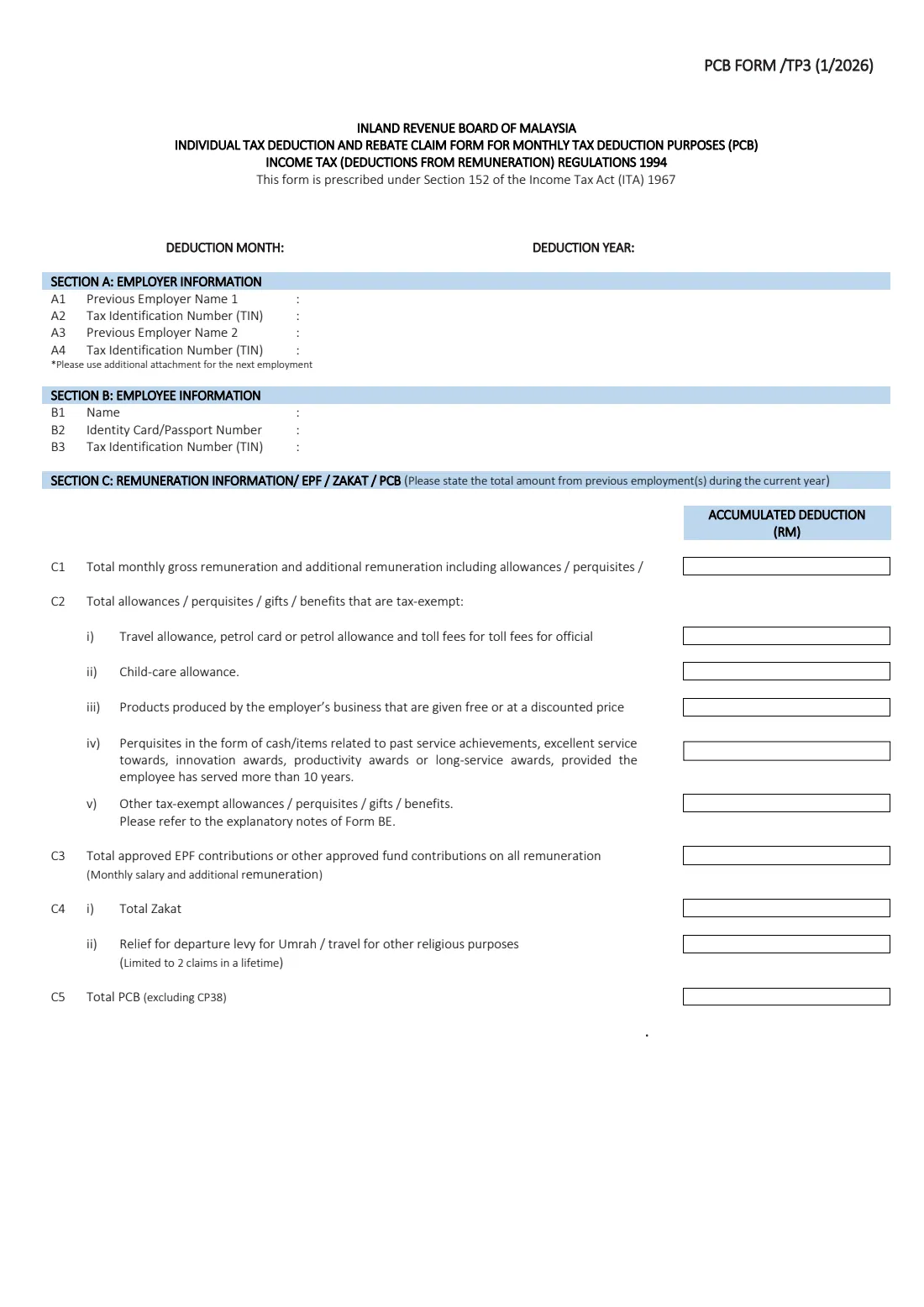
The 2026 edition has 3 pages. FileIt asks for it in 8 parts, and it is signed by Employee:
- Deduction month and yearEmployee
- Section A: Previous employer informationEmployee
- Section B: Employee informationEmployee
- Section C: Remuneration, EPF, zakat and PCB from previous employmentEmployee
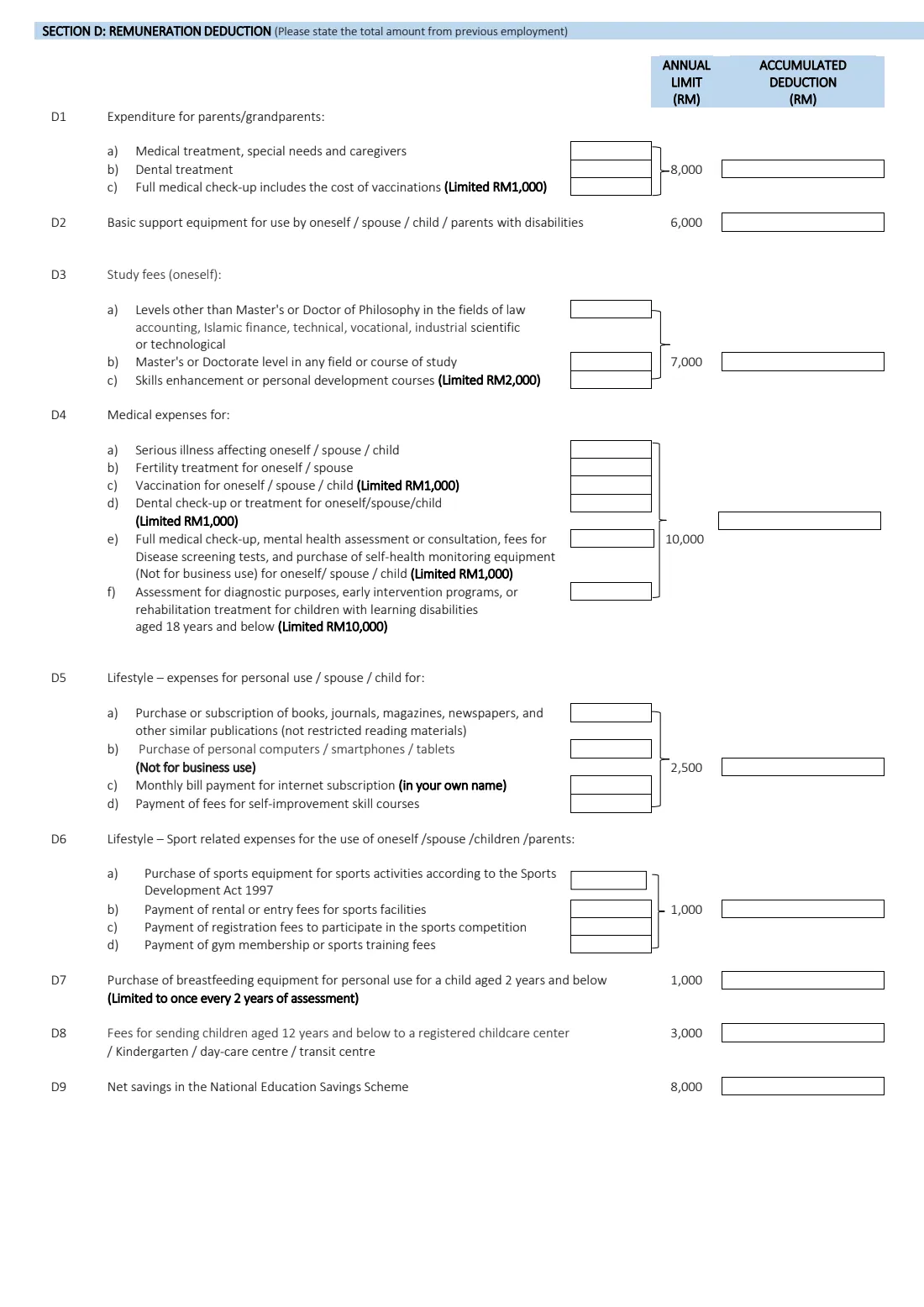
- Section D: Deductions claimed with previous employer(s) — parents, disability equipment, study fees, medicalEmployee
- Section D: Deductions — lifestyle, sports, childcare, SSPN, alimonyEmployee
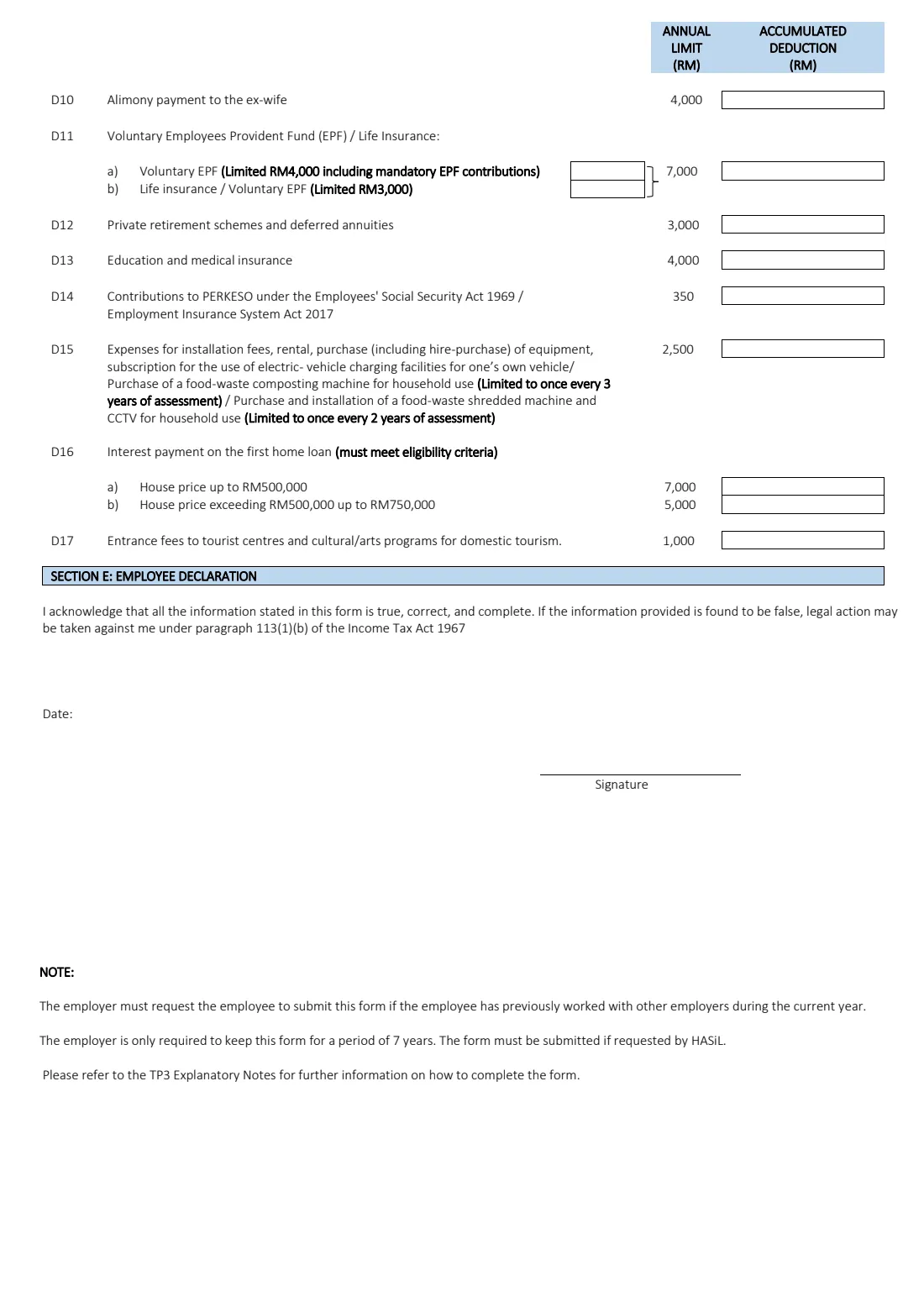
- Section D: Deductions — EPF / insurance, PRS, PERKESO, EV charging, home loan interest, domestic tourismEmployee
- Section E: Employee declarationEmployee
How to fill out Form TP3 (PCB), step by step
1 Deduction month and deduction year
Enter the month and year your new employer starts your monthly tax deduction. With the 1/2026 edition, the year will normally be 2026.
2 Section A: Employer information (previous employers)
List each employer you worked for earlier this year: previous employer name 1 and its tax identification number (A1 and A2), and previous employer name 2 and its TIN (A3 and A4). The TIN is on your EA form or payslip. The form has room for two previous employers; if you had more, use an additional attachment for the next employment, as the form instructs.
3 Section B: Employee information
Give your name as in your identity card or passport (B1), your identity card or passport number (B2) and your own tax identification number (B3), which you can find in MyTax.
4 Section C: Remuneration information, EPF, zakat and PCB
Here you give totals from all previous employment during the current year. C1 is total monthly gross remuneration and additional remuneration, including allowances, perquisites, gifts and taxable benefits. C2 lists tax-exempt items separately: (i) travel allowance, petrol card or petrol allowance and toll fees for official duties, (ii) child-care allowance, (iii) your employer's own products given free or at a discount, (iv) cash or items for past service achievement, excellent service, innovation, productivity or long service where you have served more than 10 years, and (v) other tax-exempt allowances, perquisites, gifts and benefits (the form refers you to the explanatory notes of Form BE).
C3 is your total EPF or other approved fund contributions on all remuneration. C4(i) is total zakat and C4(ii) the departure levy relief for Umrah or other religious travel (limited to 2 claims in a lifetime). C5 is the total PCB deducted, excluding CP38. Your EA form and last payslip are the best sources for these figures.
5 Section D: Remuneration deduction — parents, disability equipment, study fees and medical (D1–D4)
Section D is not about new claims. It records the accumulated reliefs your previous employer or employers already applied this year, usually because you gave them a TP1. The lines mirror TP1: D1 parents' or grandparents' medical, dental and check-up costs (annual limit RM8,000 for the 2026 edition), D2 basic support equipment for a disabled family member (RM6,000), D3 your own study fees (RM7,000, with skills courses capped at RM2,000) and D4 medical expenses for yourself, your spouse or child (RM10,000).
There is only one column — Accumulated deduction — because you are reporting totals to date, not this month's claim. FileIt adds the sub-items for you.
6 Section D: Lifestyle, sports, breastfeeding equipment, childcare, SSPN and alimony (D5–D10)
Report what previous employers already allowed for lifestyle purchases such as books, devices, internet and self-improvement courses (D5, RM2,500), sports equipment and fees (D6, RM1,000), breastfeeding equipment (D7, RM1,000), registered childcare or kindergarten fees for children aged 12 and below (D8, RM3,000), net SSPN savings (D9, RM8,000) and alimony to a former wife (D10, RM4,000). Leave lines blank if nothing was claimed.
7 Section D: EPF and insurance, PRS, PERKESO, EV charging, home loan interest and domestic tourism (D11–D17)
D11 covers voluntary EPF and life insurance (combined RM7,000: voluntary EPF capped at RM4,000 including mandatory contributions, and life insurance or voluntary EPF at RM3,000). D12 is private retirement schemes and deferred annuities (RM3,000), D13 education and medical insurance (RM4,000), D14 PERKESO contributions (RM350) and D15 EV charging and certain household equipment (RM2,500). D16 is first-home loan interest — (a) up to RM7,000 for a house priced up to RM500,000 or (b) up to RM5,000 for one over RM500,000 up to RM750,000, not both — and D17 domestic tourism entrance fees (RM1,000). These limits are as printed on the 1/2026 edition.
8 Section E: Employee declaration
Date and sign the declaration that the information is true, correct and complete. The form warns that legal action may be taken under paragraph 113(1)(b) of the Income Tax Act 1967 if it is found to be false. You can sign with FileIt's optional e-signature or print and sign by hand.
Common mistakes to avoid
- Only listing your most recent previous employer. Include every employer you worked for earlier in the current year, using an attachment if there are more than two.
- Including CP38 instalments in the total PCB at C5. The form asks for total PCB excluding CP38.
- Lumping tax-exempt allowances into C1 without also listing them in C2, or listing taxable items as exempt.
- Putting new claims in Section D. Section D is for reliefs previous employers already applied — make new claims with your new employer on a TP1.
- Guessing figures instead of taking them from your EA form or final payslip.
- Reporting only one employer's EPF or zakat when you had two — Section C is the total from all previous employment.
- Delaying the form until after your first payroll at the new job, which means your first PCB is worked out without your earlier figures.
After you fill it out
Sign and date Section E and give the TP3 to your new employer, usually HR or payroll, ideally before your first payday. You don't send it to LHDN. The form notes that the employer only needs to keep it for 7 years and must submit it if requested by HASiL.
Keep your own copy together with the EA forms and payslips it is based on. FileIt saves the finished PDF in your vault folder, which is useful when you file your annual income tax return and need to account for income from every employer in the year.
If you have new reliefs or rebates to claim with your new employer, fill in a Form TP1 as well. If you change jobs again later in the year, complete a fresh TP3 covering all earlier employment.
Fill out Form TP3 (PCB) online with FileIt
- Pick the person. Choose someone from People and FileIt fills in their name, date of birth, address and other details it already knows.
- Answer plain-language questions. One part of the form at a time, with the official help text beside each question — 60 fields in all. Your answers save as you go.
- Check the live preview. Watch your answers land on the real Inland Revenue Board of Malaysia (LHDN / IRBM) form, and let FileIt do any worksheet arithmetic.
- Generate the official PDF. FileIt prints your answers into the agency’s own PDF and files it in that person’s folder in your vault. Sign it, or send it for e-signature.
FileIt fills the form — it never files or submits anything for you. Deliver the finished form to whoever asked for it, the way the form’s instructions say.
Start Form TP3 (PCB) now — it’s freeForm TP3 (PCB): frequently asked questions
What is Form TP3 (Borang PCB/TP3)?
TP3 is the LHDN form for tax deduction information from previous employment in the current year. A new employee uses it to tell their new employer what earlier employers this year paid them and deducted for EPF, zakat and PCB, and which reliefs were claimed. It helps the new employer calculate PCB correctly.
Who needs to fill in TP3?
Any employee who has worked for another employer earlier in the same year. The form says the employer must request it from the employee in that situation. If this is your first job of the year, you don't need it.
Where do I send the TP3 form?
Give it to your new employer — not to LHDN. Your employer keeps it for 7 years and submits it only if HASiL asks. FileIt prepares the form but never submits it anywhere.
Can I fill in the TP3 form online?
Yes. FileIt gives you a guided online form, totals the relief lines, checks them against the limits printed on the 1/2026 edition, and prints your answers into LHDN's official PDF. You can e-sign or print it, and a copy is saved in your vault. It is free on every FileIt account.
Where do I find the figures for TP3?
Mostly on the EA form or final payslip from each previous employer, which show your gross pay, EPF, zakat and PCB for the year. For Section D, use the totals of the reliefs you claimed on TP1 forms with those employers.
What does 'excluding CP38' mean?
CP38 is a separate instruction from LHDN for an employer to deduct extra instalments, usually for tax owed from earlier years. Those amounts are not part of the regular PCB total you report at C5.
What is the difference between TP3 and TP1?
TP3 reports what already happened with previous employers this year. TP1 is for claiming new reliefs and rebates with your current employer. A new employee might submit both: TP3 for the history and TP1 for new claims.
What if I had more than two previous employers this year?
The form has room for two in Section A. It says to use an additional attachment for the next employment, and the Section C and D totals should cover all of them.
Official sources
- Blank form (PDF), published by Inland Revenue Board of Malaysia (LHDN / IRBM): https://www.hasil.gov.my/wp-content/uploads/bi-tp3-form-2026.pdf
- Official instructions and guidance: https://www.hasil.gov.my/wp-content/uploads/bi-explanatory-notes-for-form-tp3-2026.pdf
- Edition shown on this page: 1/2026 (checked 2026-09-25).
FileIt is not affiliated with or endorsed by Inland Revenue Board of Malaysia (LHDN / IRBM) or any government. This page explains the form in general terms and is not legal, tax or immigration advice. Always read the official instructions, and check that you are using the edition the recipient accepts. Page last reviewed 2026-09-25.