What is Form TP1 (PCB)?
Form TP1 (Borang PCB/TP1), the Individual Tax Deduction and Rebate Claim Form for Monthly Tax Deduction Purposes, is issued by the Inland Revenue Board of Malaysia (LHDN, also known as HASiL or IRBM). It is prescribed under section 152 of the Income Tax Act 1967 and the Income Tax (Deductions from Remuneration) Regulations 1994. You use it to tell your employer about tax reliefs (Section C) and rebates (Section D) you want taken into account in your Potongan Cukai Bulanan (PCB), the monthly tax deduction from your salary. The current edition is 1/2026, for the 2026 year of assessment.
Without a TP1, your employer only knows about the reliefs it can see from payroll. Claiming things like your parents' medical bills, your own study fees, lifestyle purchases, childcare fees, SSPN savings or zakat through TP1 means less tax is deducted each month during the year, rather than getting the difference back after you file your annual return. Each claim has an annual limit printed on the form, and you report both this month's amount and the total claimed so far this year.
FileIt lets you fill in the TP1 online. It pre-fills your name and identity card number from the People records in your vault and your employer's details from your entities, adds up the sub-items of each relief line, and checks every line against the annual limit and per-item caps printed on the 1/2026 edition. It then prints your answers into LHDN's official English PDF and saves the finished form in your vault folder, with optional e-signature. FileIt never submits anything to LHDN — you hand the TP1 to your employer yourself.
- Who fills it
- The employee (Sections A to E); the employer approves it in Section F.
- Given to
- Your employer (usually HR or payroll), not LHDN.
- When
- For any month in which you want new reliefs or rebates reflected in your PCB.
- Signatures
- The employee signs the Section E declaration; the employer's officer records approval in Section F.
- Edition
- PCB Form/TP1 (1/2026), for the 2026 year of assessment.
- Cost
- Free to fill in on any FileIt account.
Who needs to fill out Form TP1 (PCB)?
- Employees in Malaysia who have PCB deducted from their salary and want their allowable reliefs reflected each month.
- People paying medical, dental or care costs for parents or grandparents.
- Employees studying for a recognised qualification, a Master's or doctorate, or taking skills-enhancement courses.
- Parents paying registered childcare or kindergarten fees, saving in SSPN, or buying breastfeeding equipment.
- Anyone paying zakat directly (not through salary deduction) who wants the rebate reflected in their PCB.
- Employees paying first-home loan interest who meet the eligibility criteria for that relief.
When to use Form TP1 (PCB)
- In the month you incur a claimable expense and want it taken into account from that month's PCB.
- Whenever your accumulated claims change — each TP1 shows the current month and the year-to-date total for each line.
- At the start of a new year of assessment, using the edition of the form for that year, since reliefs and limits can change.
- Alongside Form TP3 if you joined your employer part-way through the year, so both earlier deductions and new claims are known.
What you need before you start
- Your employer's name and its tax identification number (TIN) — ask HR if you don't have it.
- Your name, identity card or passport number and your own income tax number (TIN), shown in MyTax.
- Receipts and supporting documents for every expense you claim. They are not attached to the form, but keep them for 7 years.
- A running total of what you have already claimed for each relief line earlier this year.
- For parents' medical claims: evidence the treatment was in Malaysia and certified by a registered medical or dental practitioner.
- For disability equipment: confirmation the person is registered with the Social Welfare Department (JKM).
- For SSPN: your deposits and withdrawals for the year, to work out net savings.
- For zakat: receipts for zakat you paid yourself, outside salary deductions.
What’s on Form TP1 (PCB)
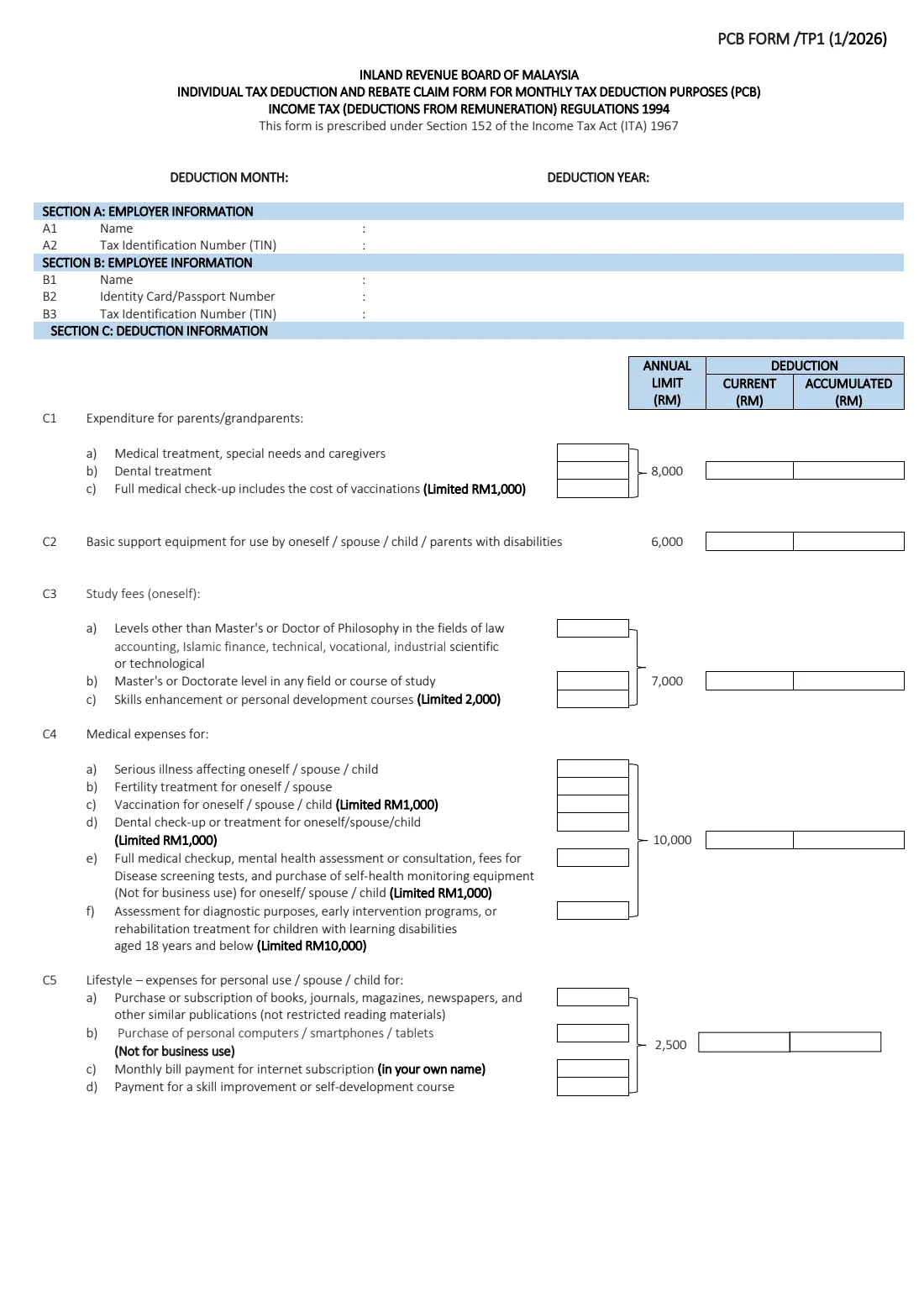
The 2026 edition has 2 pages. FileIt asks for it in 9 parts, and it is signed by Employee:
- Deduction month and yearEmployee
- Section A: Employer informationEmployee
- Section B: Employee informationEmployee
- Section C: Deductions — parents, disability equipment, study fees, medicalEmployee
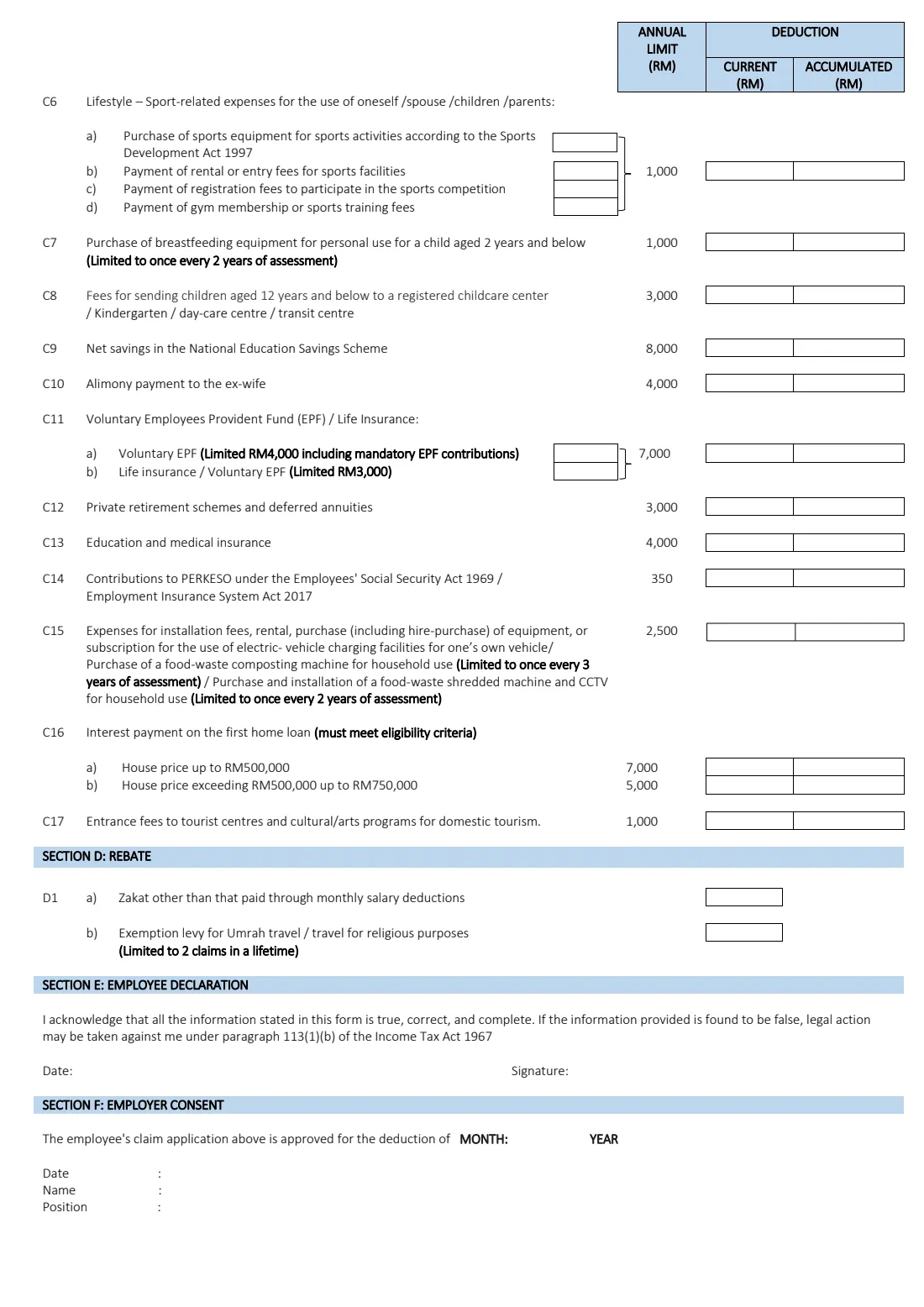
- Section C: Deductions — lifestyle, sports, childcare, SSPN, alimonyEmployee
- Section C: Deductions — EPF / insurance, PRS, PERKESO, EV charging, home loan interest, domestic tourismEmployee
- Section D: RebatesEmployee
- Section E: Employee declarationEmployee
- Section F: Employer consentEmployer
How to fill out Form TP1 (PCB), step by step
1 Deduction month and deduction year
At the top, enter the month and year from which your employer should apply these claims to your PCB. The 1/2026 edition is for the 2026 year of assessment, so the deduction year will normally be 2026.
2 Section A: Employer information
Enter the name of the employer you are giving the form to (A1) and its tax identification number (A2), which is a company TIN such as C followed by digits. This section is mandatory. FileIt can pre-fill it from the employer entity in your vault.
3 Section B: Employee information
Give your name as in your identity card or passport (B1), your identity card or passport number (B2), and your own tax identification number (B3), for example IG followed by digits, which you can find in MyTax. The TIN is required, so look it up before you start.
4 Section C: Deductions for parents, disability equipment, study fees and medical expenses (C1–C4)
C1 covers medical treatment, special needs and caregivers, dental treatment and full medical check-ups (capped at RM1,000) for parents or grandparents, with an annual limit of RM8,000 for the 2026 edition. C2 covers basic support equipment for a disabled self, spouse, child or parent, up to RM6,000. C3 is your own study fees, up to RM7,000, with skills-enhancement courses capped at RM2,000. C4 covers medical expenses for yourself, your spouse or child — serious illness, fertility treatment, vaccination, dental care, check-ups and screening, and assessment or rehabilitation for children with learning disabilities — up to RM10,000 in total.
For each line, enter this month's claim in the Current column and the total for the year so far in the Accumulated column. Where a line has sub-items (a), (b), (c), FileIt adds them up for you.
5 Section C: Lifestyle, sports, breastfeeding equipment, childcare, SSPN and alimony (C5–C10)
C5 is lifestyle spending for yourself, your spouse or child — books and publications, a personal computer, smartphone or tablet, internet bills in your own name, and self-development courses — up to RM2,500. C6 is sports equipment, facility fees, competition fees and gym or training fees, up to RM1,000. C7 is breastfeeding equipment for a child aged 2 and below (RM1,000, once every 2 years of assessment). C8 is fees at a registered childcare centre or kindergarten for children aged 12 and below (RM3,000). C9 is net savings in the National Education Savings Scheme (SSPN) — deposits minus withdrawals — up to RM8,000. C10 is alimony to a former wife, up to RM4,000.
6 Section C: EPF and insurance, PRS, PERKESO, EV charging, home loan interest and domestic tourism (C11–C17)
C11 has a combined limit of RM7,000: voluntary EPF capped at RM4,000 including mandatory EPF contributions, and life insurance or voluntary EPF capped at RM3,000. C12 is private retirement schemes and deferred annuities (RM3,000), C13 education and medical insurance (RM4,000), and C14 PERKESO contributions (RM350). C15 covers EV charging facilities for your own vehicle and certain household food-waste machines and CCTV, up to RM2,500.
C16 is interest on your first home loan if you meet the eligibility criteria: up to RM7,000 for a house priced up to RM500,000, or RM5,000 for one over RM500,000 up to RM750,000 — claim one, not both. C17 is entrance fees to tourist attractions and cultural or arts programmes for domestic tourism, up to RM1,000. All limits here are as printed on the 1/2026 edition.
7 Section D: Rebate
D1(a) is zakat you paid other than through monthly salary deductions — zakat already deducted from your salary is handled by payroll. D1(b) is the departure levy for Umrah or travel for other religious purposes, limited to 2 claims in a lifetime. Rebates reduce tax directly rather than reducing taxable income.
8 Section E: Employee declaration
Date and sign the declaration. You acknowledge that everything on the form is true, correct and complete, and that legal action may be taken under paragraph 113(1)(b) of the Income Tax Act 1967 if it is found to be false. You can sign with FileIt's optional e-signature or print and sign by hand.
9 Section F: Employer consent
Your employer completes this part to approve the claim for deduction from a given month and year, with the date and the name and position of the officer approving it. Leave it for HR unless you are filling it in as the employer.
Common mistakes to avoid
- Putting the year-to-date total in the Current column, or this month's amount in Accumulated. Current is this month; Accumulated is the running total including this month.
- Going over an annual limit or a per-item cap, such as the RM1,000 cap on full medical check-ups. FileIt checks each line against the limits printed on the 1/2026 edition.
- Claiming both C16(a) and C16(b) for home loan interest. The form allows one or the other.
- Claiming zakat under D1(a) that was already deducted from your salary.
- Leaving out your own TIN or your employer's TIN — both are required.
- Throwing away receipts because they aren't attached. Keep them for 7 years in case LHDN asks.
- Using an old edition of TP1 for 2026 claims. Relief lines and limits are set for each year of assessment.
After you fill it out
Sign and date Section E, then give the TP1 to your employer, usually HR or payroll. Your employer reviews the claim and, if approved, records the month and year from which it is applied in Section F. You don't send the TP1 to LHDN.
Save a copy — FileIt keeps the finished PDF in your vault folder — and file your receipts with it so you can back up each claim. When you complete your annual income tax return, the reliefs you claim there should be consistent with what you claimed through PCB.
Submit a new TP1 whenever you have further claims during the year, updating the accumulated totals each time. If you change jobs part-way through the year, give your new employer Form TP3 with the reliefs already claimed so your PCB continues correctly.
Fill out Form TP1 (PCB) online with FileIt
- Pick the person. Choose someone from People and FileIt fills in their name, date of birth, address and other details it already knows.
- Answer plain-language questions. One part of the form at a time, with the official help text beside each question — 73 fields in all. Your answers save as you go.
- Check the live preview. Watch your answers land on the real Inland Revenue Board of Malaysia (LHDN / IRBM) form, and let FileIt do any worksheet arithmetic.
- Generate the official PDF. FileIt prints your answers into the agency’s own PDF and files it in that person’s folder in your vault. Sign it, or send it for e-signature.
FileIt fills the form — it never files or submits anything for you. Deliver the finished form to whoever asked for it, the way the form’s instructions say.
Start Form TP1 (PCB) now — it’s freeForm TP1 (PCB): frequently asked questions
What is Form TP1 (Borang PCB/TP1)?
TP1 is the Inland Revenue Board of Malaysia's Individual Tax Deduction and Rebate Claim Form for Monthly Tax Deduction Purposes. Employees use it to claim tax reliefs and rebates through their employer so that less PCB is deducted from their monthly salary. The 1/2026 edition covers the 2026 year of assessment.
Do I submit TP1 to LHDN?
No. You give the TP1 to your employer, who approves it in Section F and applies it when calculating your PCB. FileIt prepares the form but never submits it anywhere.
Can I fill in the TP1 form online?
Yes. FileIt gives you a guided online form, totals each relief line, checks the annual limits printed on the 1/2026 edition, and prints your answers into LHDN's official PDF. You can e-sign or print it, and the finished copy is saved in your vault. It's free on every FileIt account.
What is the difference between Current and Accumulated on TP1?
Current is the amount you are claiming for the deduction month. Accumulated is the total you have claimed for that relief line so far this year, including this month. The accumulated total can't be more than the line's annual limit.
Do I need to attach receipts to the TP1?
No, receipts are not attached to the form. You should keep them for 7 years in case they are needed to support your claims.
Is TP1 compulsory?
TP1 is optional — it is how you choose to have reliefs and rebates reflected in your monthly deductions. If you don't submit one, you can still claim eligible reliefs when you file your annual income tax return.
What is the difference between TP1 and TP3?
TP1 claims reliefs and rebates with your current employer. TP3 is for new employees who worked for another employer earlier in the same year: it tells the new employer what was paid, deducted and claimed before, so PCB continues correctly.
Can I claim zakat on the TP1?
Yes, in Section D1(a), but only zakat paid other than through monthly salary deductions. Zakat deducted from your salary is already handled by your employer's payroll.
Is there a Malay version of TP1?
Yes. LHDN publishes the form in both English and Malay (Borang PCB/TP1), and both are official. FileIt fills the English edition.
Official sources
- Blank form (PDF), published by Inland Revenue Board of Malaysia (LHDN / IRBM): https://www.hasil.gov.my/wp-content/uploads/bi-tp1-form-2026.pdf
- Official instructions and guidance: https://www.hasil.gov.my/wp-content/uploads/bi-explanatory-notes-for-from-tp1-2026-1.pdf
- Edition shown on this page: 1/2026 (checked 2026-09-25).
FileIt is not affiliated with or endorsed by Inland Revenue Board of Malaysia (LHDN / IRBM) or any government. This page explains the form in general terms and is not legal, tax or immigration advice. Always read the official instructions, and check that you are using the edition the recipient accepts. Page last reviewed 2026-09-25.