What is Form 93 (PAN application)?
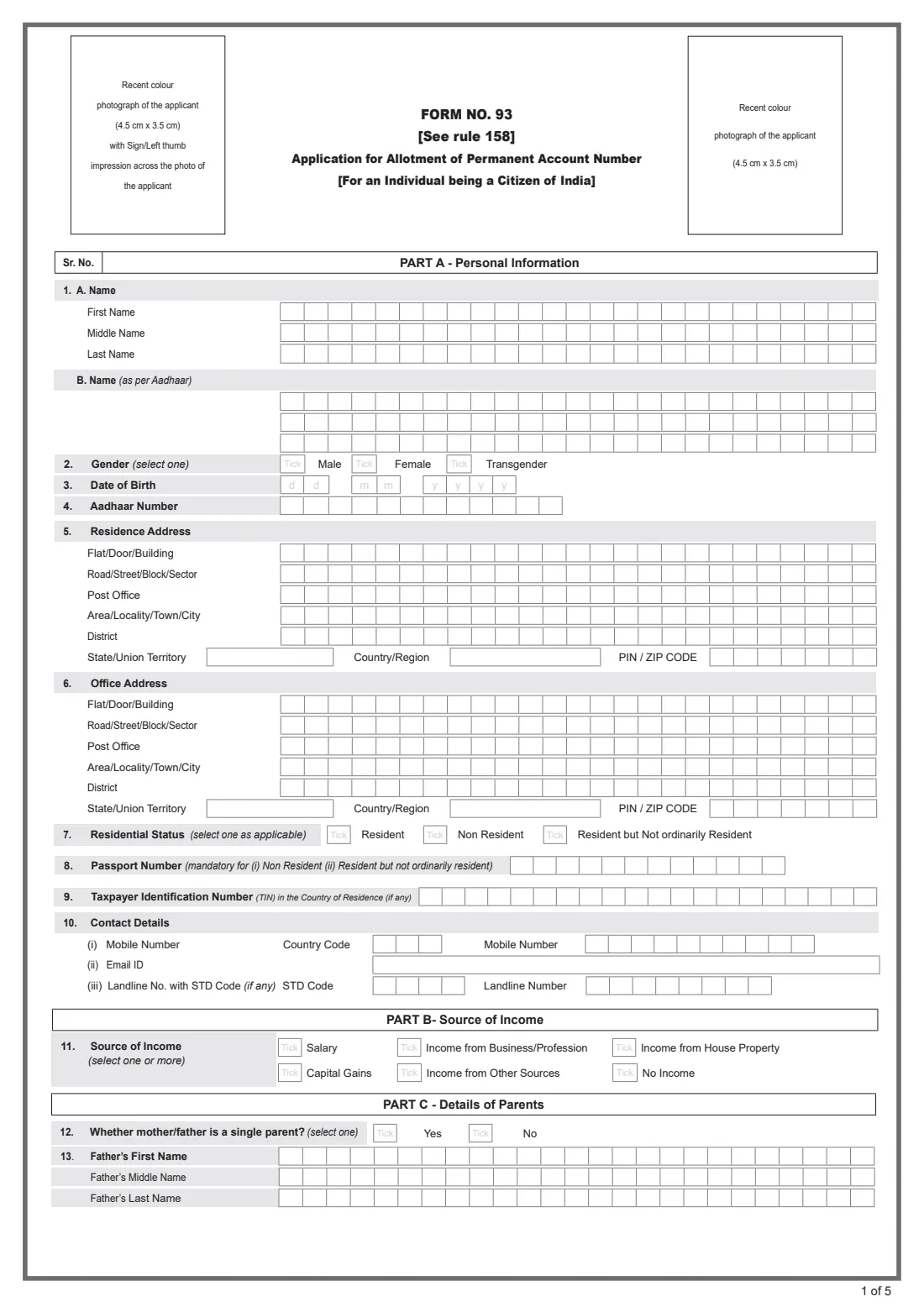
Form No. 93 is the application for allotment of a Permanent Account Number (PAN) for an individual who is a citizen of India. It is issued under rule 158 of the Income-tax Rules, 2026 and replaces the long-familiar Form 49A. The PAN is the ten-character identifier the Income Tax Department uses to link your tax records, and applications are handled on behalf of the department by Protean eGov Technologies (formerly NSDL e-Gov) and UTIITSL.
The form looks simple but is strict about detail: one character per box in block capitals, your name exactly as on Aadhaar, both parents' names, your Assessing Officer (AO) code, and photographs signed in a particular way. Mistakes in the name or the photographs are among the most common reasons a PAN card is delayed or printed wrongly.
FileIt guides you through Form 93 part by part, explains each box in plain English and prints your answers into the correct boxes of the official PDF — including splitting your Aadhaar name between words across the three rows. Your name, date of birth, parents and address can be pre-filled from the People records in your FileIt vault, and the finished PDF is saved in your vault folder. FileIt does not submit anything: you print the form, stick on the photographs, sign by hand and hand it in or post it yourself.
- Who fills it
- An individual citizen of India, resident or living abroad, who does not already have a PAN (or a Representative Assessee on their behalf)
- Given to
- A PAN service centre run by Protean or UTIITSL, or posted to Protean or UTIITSL for the Income Tax Department
- When
- Once in a lifetime — when you first need a PAN
- Signatures
- Handwritten signature or left thumb impression across the left photo and in the box on page 2; thumb impressions must be attested
- Edition
- Form No. 93 [See rule 158], Income-tax Rules, 2026
Who needs to fill out Form 93 (PAN application)?
- Indian citizens living in India who have never been allotted a PAN.
- Non-resident Indians (NRIs) and those who are resident but not ordinarily resident, who give a passport number and a Representative Assessee with an Indian address.
- Minors who need a PAN, applied for through a parent or guardian acting as Representative Assessee.
- Salaried people, business owners, landlords, investors and people with no income alike — the form has a tick box for each source, including "No income".
- Married women applying for the first time give their father's name, not their husband's, in Part C.
- Foreign citizens do not use this form; it is only for individuals who are citizens of India.
When to use Form 93 (PAN application)
- When you first need a PAN, for example before you start earning, invest, or need to quote a PAN in a financial transaction.
- Only if you do not already hold a PAN — the declaration states that the applicant does not possess one, and you are liable for legal consequences if that is untrue.
- When a minor in the family needs a PAN of their own, with a parent or guardian signing as Representative Assessee.
- When you are living abroad and need a PAN for Indian income, property or investments.
What you need before you start
- Your Aadhaar card or letter (Aadhaar is mandatory for everyone who holds one, except exempt categories).
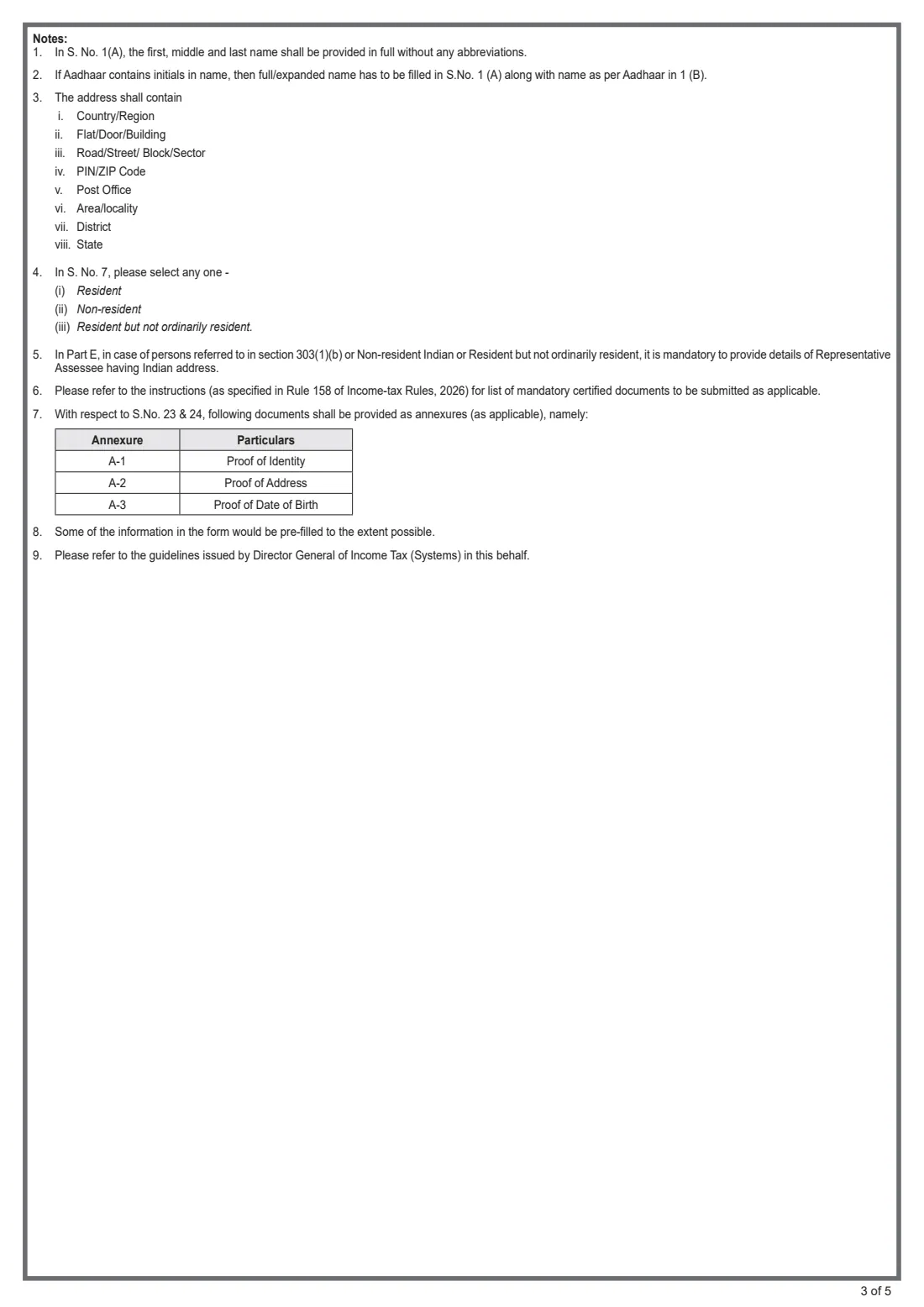
- Proof of identity (Annexure A-1), proof of address (A-2) and proof of date of birth (A-3), as listed in the official instructions.
- Two recent colour photographs, 4.5 cm x 3.5 cm, with a white background.
- Your full name without abbreviations or titles, and your name exactly as printed on Aadhaar.
- Both parents' full names, and which parent's name you want printed on the card.
- Your residence address with PIN code, and your office address if you want the card sent there.
- Your mobile number with country code and your email address (both mandatory).
- Your Assessing Officer (AO) code — area code, AO type, range code and AO number.
- For NRIs: your passport number and any foreign tax identification number.
- For a Representative Assessee: their name, PAN or Aadhaar, Indian address, mobile, email and proofs of identity and address.
What’s on Form 93 (PAN application)
The 2026 edition has 5 pages. FileIt asks for it in 11 parts:
- Part A — 1. NameApplicant
- Part A — 2–4, 7–9. Gender, date of birth, Aadhaar, residential statusApplicant
- Part A — 5. Residence addressApplicant
- Part A — 6. Office addressApplicant
- Part A — 10. Contact detailsApplicant
- Part B — 11. Source of incomeApplicant
- Part C — Details of parentsApplicant
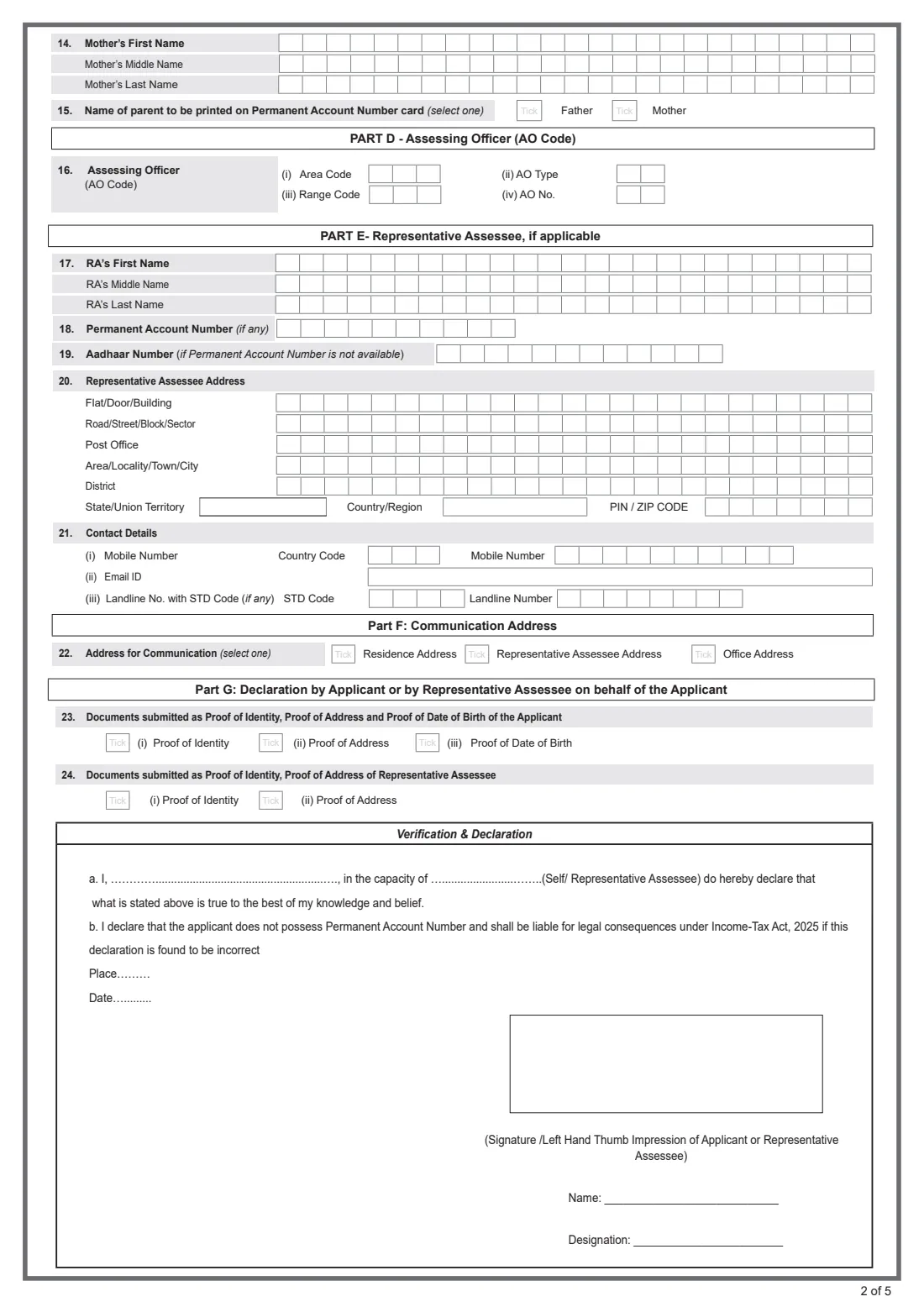
- Part D — 16. Assessing Officer (AO code)Applicant
- Part E — Representative Assessee (if applicable)Representative assessee
- Part F — 22. Address for communicationApplicant
- Part G — Documents and declarationApplicant
How to fill out Form 93 (PAN application), step by step
1 Part A — 1. Name
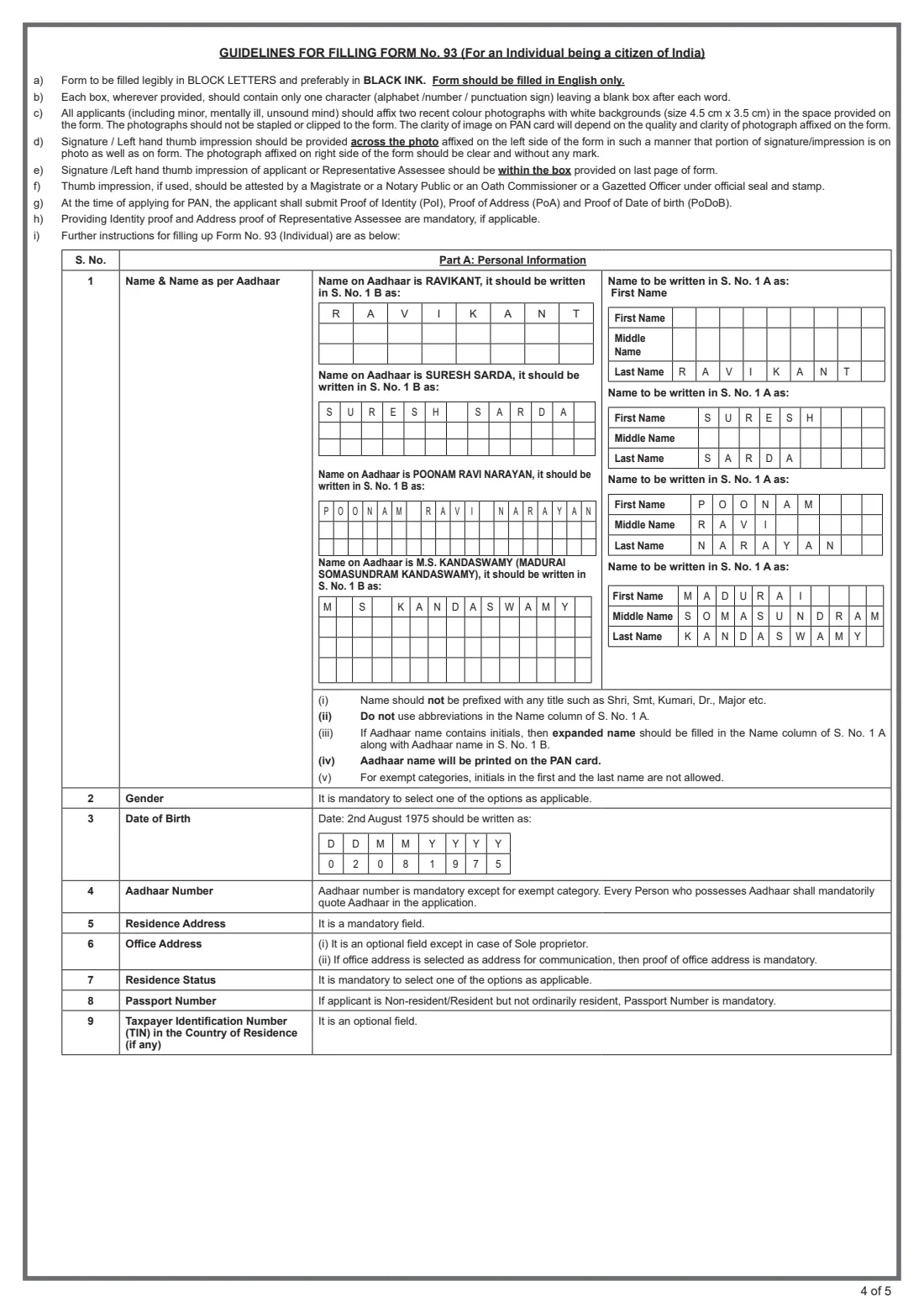
In 1A give your first, middle and last name in full, with no titles such as Shri, Smt, Kumari, Dr. or Major and no abbreviations. If you have only one name, it goes in the last-name row (the form's example is RAVIKANT).
In 1B write your name exactly as it appears on Aadhaar, with initials but without dots — M.S. KANDASWAMY becomes M S KANDASWAMY — and then give the expanded name (MADURAI SOMASUNDRAM KANDASWAMY) in 1A. The Aadhaar name is the one printed on your PAN card, so double-check it.
2 Part A — 2 to 4, 7 to 9. Gender, date of birth, Aadhaar and residential status
Tick your gender (male, female or transgender) and write your date of birth as dd mm yyyy, one digit per box. Enter your 12-digit Aadhaar number; it is mandatory for anyone who has one, except exempt categories.
Choose your residential status: resident, non-resident, or resident but not ordinarily resident. For the last two, your passport number is mandatory, and you can add the taxpayer identification number from your country of residence if you have one.
3 Part A — 5. Residence address
Your residence address is mandatory: flat or building, road or street, post office, area or town, district, state or union territory, country and PIN or ZIP code, each line limited to the boxes printed. The proof of address you attach should match what you write here.
4 Part A — 6. Office address
Optional for most people, but required for a sole proprietor. Put the office or business name on the first line. If you choose your office as the address for communication in Part F, you must also attach proof of the office address.
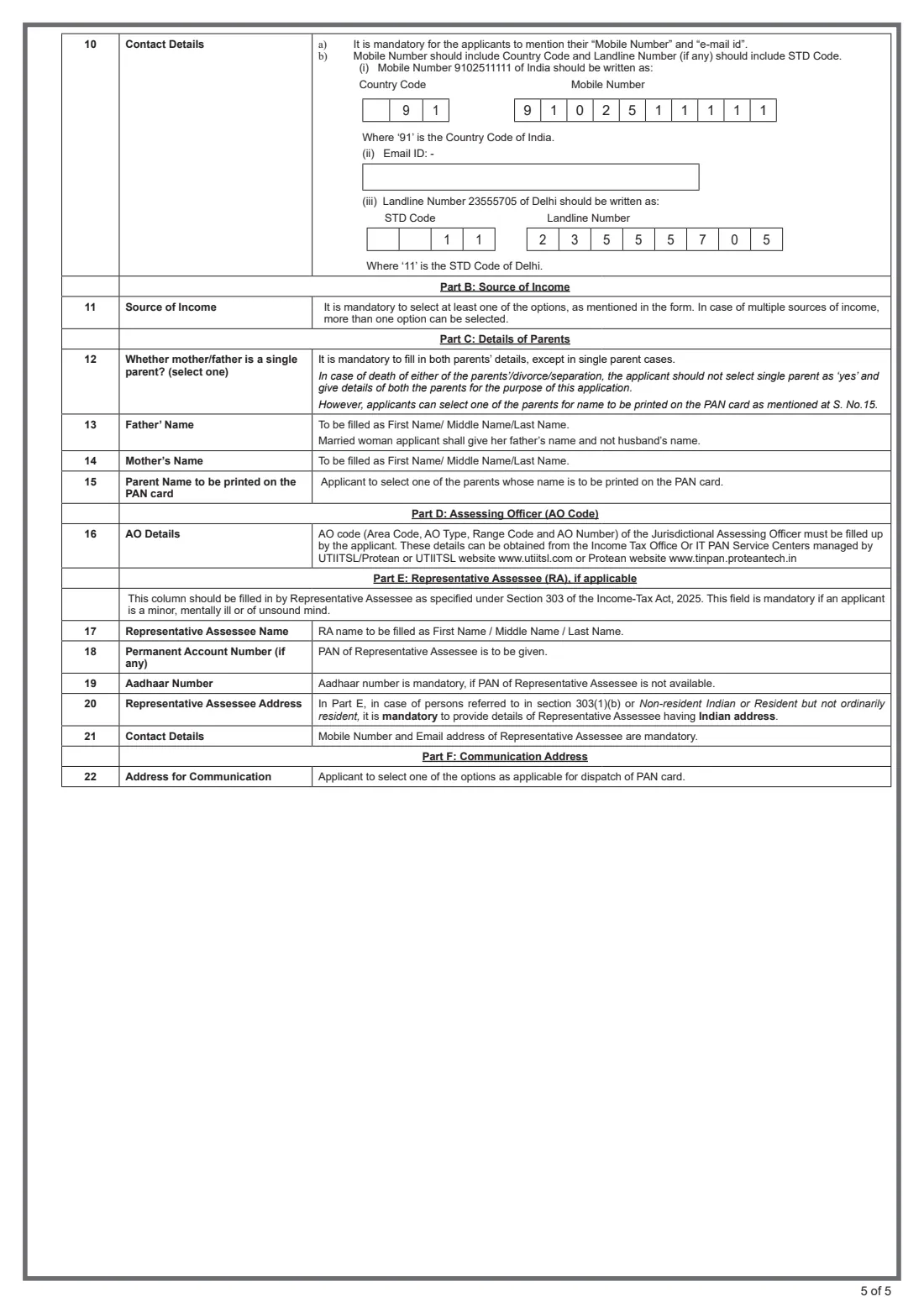
5 Part A — 10. Contact details
Your mobile number and email ID are mandatory. Write the mobile number with the country code — 91 for India — in the separate boxes, and a landline, if you have one, with its STD code without the leading zero (Delhi is 11).
6 Part B — 11. Source of income
Tick at least one: salary, business or profession, house property, capital gains, or other sources. Tick all that apply if you have several. "No income" is ticked on its own, for example for a student or a minor.
7 Part C — Details of parents
Question 12 asks whether your mother or father is a single parent. Answer yes only when there really is just one parent; if a parent has died or your parents are divorced or separated, still answer no and give both names.
Fill in your father's and mother's first, middle and last names — a married woman gives her father's name, not her husband's — then choose whose name should be printed on the PAN card.
8 Part D — 16. Assessing Officer (AO code)
Enter the four parts of your jurisdictional Assessing Officer's code: area code, AO type, range code and AO number. The code depends on where you live (and there are international taxation codes for non-residents). The form says you can get it from an Income Tax office, a PAN service centre, or the Protean or UTIITSL websites.
9 Part E — Representative Assessee (if applicable)
This part is mandatory when the applicant is a minor, mentally ill or of unsound mind, and — under note 5 of the form — for a non-resident or resident but not ordinarily resident, who must name a Representative Assessee with an Indian address. Give the RA's full name, their PAN (or Aadhaar if they have no PAN), their address, and their mobile number and email, which are mandatory. Tick that the RA's proof of identity and address are attached.
10 Part F — 22. Address for communication
Choose where the PAN card should be dispatched: your residence address, your office address, or the Representative Assessee's address. Pick one you have actually filled in.
11 Part G — Documents, verification and declaration
Tick the proofs you are attaching: identity (A-1), address (A-2) and date of birth (A-3), plus the RA's proofs if applicable. In the declaration, the person signing — you (Self) or the Representative Assessee — states their name and capacity, and confirms the details are true and that the applicant does not already have a PAN. Add the place and date.
Stick two photographs in the boxes on page 1 without stapling or clipping them. Sign or give your left thumb impression across the left photo so part of it falls on the form, leave the right photo unmarked, and sign again in the box on page 2. A thumb impression must be attested by a Magistrate, Notary Public, Oath Commissioner or Gazetted Officer under official seal and stamp.
Common mistakes to avoid
- Adding a title (Mr, Shri, Dr.) or abbreviating names in 1A — both are not allowed.
- Writing a name in 1B that differs from Aadhaar, or leaving the dots in initials. The Aadhaar name is printed on the card.
- Ticking "single parent" because a parent has died or the parents are divorced; the guidelines say to give both parents instead.
- A married woman entering her husband's name as father's name.
- Leaving the AO code blank or using one for the wrong area.
- Signing across the right-hand photo, stapling the photos, or leaving no part of the signature on the form itself.
- Applying again when you already hold a PAN — the declaration makes this a legal matter.
- For an NRI, forgetting the passport number or the Representative Assessee with an Indian address.
After you fill it out
Print the completed PDF, preferably with no scaling so the boxes line up. Stick the two photographs in place, sign across the left one and in the signature box on page 2 in black ink (or give an attested left thumb impression), and attach copies of your proofs of identity, address and date of birth as annexures A-1 to A-3.
You then submit it yourself: hand it in at a PAN service centre run by Protean or UTIITSL, or post it to Protean or UTIITSL as described in their instructions, along with the processing fee they specify. FileIt does not send the form or pay the fee for you, and the PAN is allotted by the Income Tax Department, not by FileIt.
Keep the filled PDF in your FileIt vault together with your Aadhaar and other identity documents. When your PAN card arrives, store it in the same folder so the number is easy to find when a bank, employer or tax return asks for it. A PAN is permanent, so you should not need this form again.
Fill out Form 93 (PAN application) online with FileIt
- Pick the person. Choose someone from People and FileIt fills in their name, date of birth, address and other details it already knows.
- Answer plain-language questions. One part of the form at a time, with the official help text beside each question — 81 fields in all. Your answers save as you go.
- Check the live preview. Watch your answers land on the real Income Tax Department (CBDT); applications handled by Protean eGov Technologies and UTIITSL form, and let FileIt do any worksheet arithmetic.
- Generate the official PDF. FileIt prints your answers into the agency’s own PDF and files it in that person’s folder in your vault.
FileIt fills the form — it never files or submits anything for you. Deliver the finished form to whoever asked for it, the way the form’s instructions say.
Start Form 93 (PAN application) now — it’s freeForm 93 (PAN application): frequently asked questions
What is Form 93 and does it replace Form 49A?
Form No. 93 is the PAN application for an individual citizen of India under rule 158 of the Income-tax Rules, 2026. It takes the place of Form 49A, which was the PAN application form for Indian citizens under the earlier rules.
Can I fill out the PAN application Form 93 online?
Yes, you can fill it online with FileIt and download the official PDF with your answers placed in the right boxes. You then print it, add photographs and your signature, and submit it yourself — FileIt does not file it with Protean, UTIITSL or the Income Tax Department.
Where do I submit Form 93?
At a PAN service centre managed by Protean or UTIITSL, or by post to Protean or UTIITSL following their instructions. Include your photographs, the proofs of identity, address and date of birth, and the fee they specify.
Whose name is printed on the PAN card?
Your name as per Aadhaar, from box 1B, and the parent's name you choose in question 15. That is why 1B must match Aadhaar exactly.
What if my Aadhaar name has initials?
Write the name with initials, without dots, in 1B (for example M S KANDASWAMY), and write the full expanded name in 1A. Abbreviations are not allowed in 1A.
How do I find my AO code?
The guidelines say AO codes are available from Income Tax offices, PAN service centres, and the Protean and UTIITSL websites. The code depends on where you live, and non-residents use the international taxation codes.
Can an NRI apply for PAN using Form 93?
Yes, if they are an Indian citizen. They tick non-resident (or resident but not ordinarily resident), give a passport number, and must provide a Representative Assessee with an Indian address in Part E.
How does a minor apply for a PAN?
A parent or guardian fills in Part E as Representative Assessee, attaches their own proofs of identity and address, and signs the declaration in that capacity. The minor's photographs are still required.
Can I use a thumb impression instead of a signature?
Yes, a left thumb impression is allowed, but it must be attested by a Magistrate, Notary Public, Oath Commissioner or Gazetted Officer under official seal and stamp.
Official sources
- Blank form (PDF), published by Income Tax Department (CBDT); applications handled by Protean eGov Technologies and UTIITSL: https://tinpan.proteantech.in/downloads/pan/download/Form%2093.pdf
- Official instructions and guidance: https://tinpan.proteantech.in/services/pan/instructions-form_93-form_94.html
- Edition shown on this page: FORM NO. 93 [See rule 158] (checked 2026-09-25).
FileIt is not affiliated with or endorsed by Income Tax Department (CBDT); applications handled by Protean eGov Technologies and UTIITSL or any government. This page explains the form in general terms and is not legal, tax or immigration advice. Always read the official instructions, and check that you are using the edition the recipient accepts. Page last reviewed 2026-09-25.