What is Form 124 (replaces 12BB)?
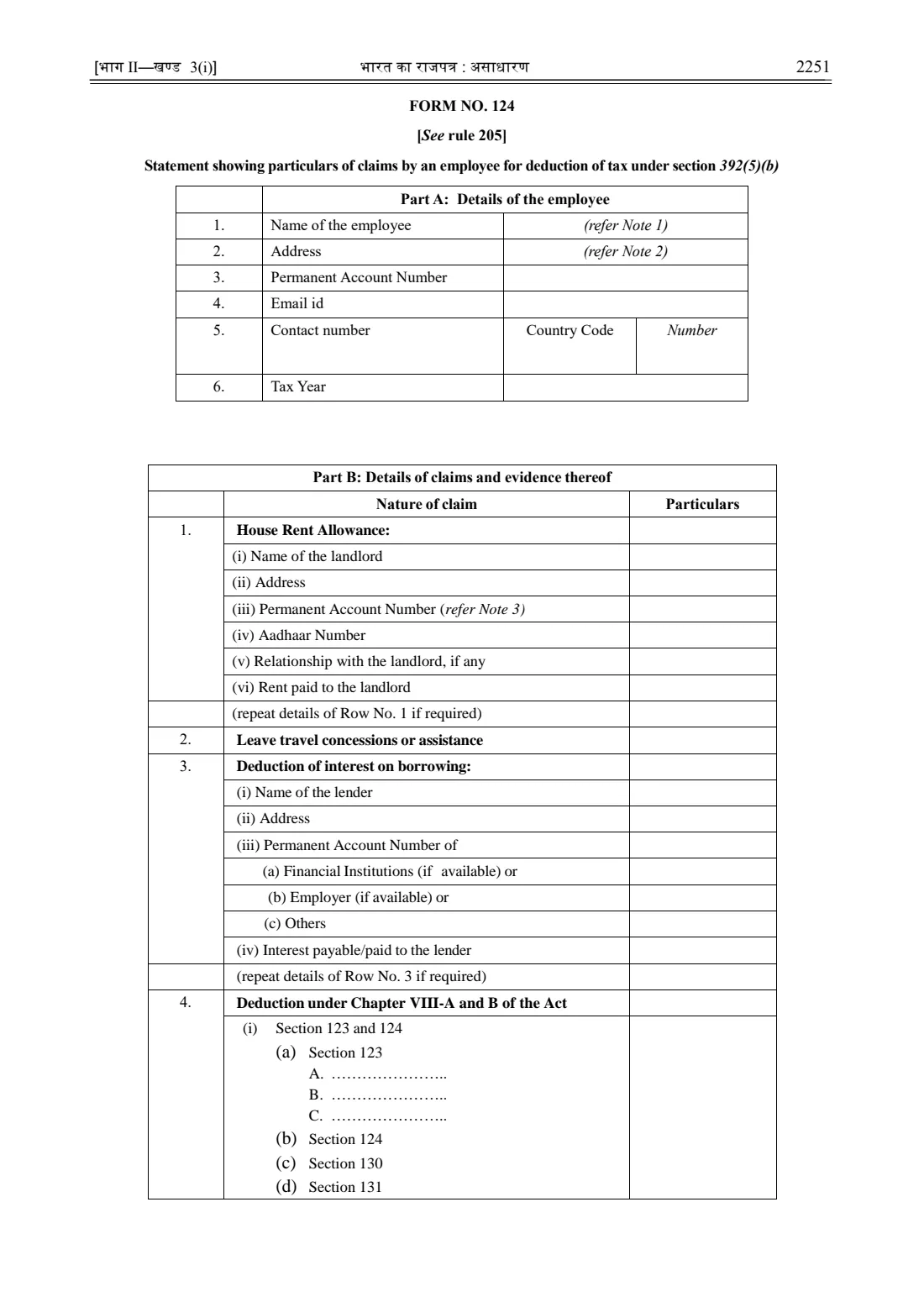
Form No. 124 is the statement showing particulars of claims by an employee for deduction of tax under section 392(5)(b) of the Income-tax Act, 2025. It is prescribed by rule 205 of the Income-tax Rules, 2026 and replaces the familiar Form 12BB from 1 April 2026. You use it to tell your employer about the house rent allowance, leave travel concession, interest on borrowing and Chapter VIII-A and B deductions you want taken into account, with the evidence attached.
It matters because your employer deducts tax at source (TDS) from your salary every month. According to the Income Tax Department's FAQ, if you don't give your employer Form No. 124, tax is deducted without the benefit of these deductions and exemptions, and you are left to claim the difference back through your return. The form isn't filed with the department: it goes to your employer only, on paper or electronically.
FileIt walks you through Form No. 124 part by part, explains each row in plain English and prints your answers into the official form as published in the Gazette of India. Your name and email can be pre-filled from the People records in your FileIt vault, the Section 123 total and the annexure codes are worked out for you, and the finished PDF is saved in your vault folder. You can sign it by hand or, where your employer accepts it, send it for e-signature. FileIt does not submit anything: you give the form to your employer yourself.
- Who fills it
- A salaried employee who wants their employer to allow deductions, exemptions or allowances when deducting tax from salary
- Given to
- Your current employer (not the Income Tax Department)
- When
- Once each tax year, as early as possible, and again if your claims change or you join a new employer
- Signatures
- The employee signs the declaration; the form may be given to the employer on paper or electronically
- Edition
- Form No. 124 [See rule 205], Income-tax Rules, 2026 (formerly Form 12BB)
- Attachments
- Annexures A-1 to A-4: rent agreement, leave travel documents, loan agreement, deduction evidence
Who needs to fill out Form 124 (replaces 12BB)?
- Salaried employees in India who pay rent and receive house rent allowance (HRA) from their employer.
- Employees claiming leave travel concession or assistance (LTC or LTA) for a trip taken during the year.
- Anyone repaying a loan, such as a housing loan, whose interest they want considered when their tax is worked out.
- Employees with investments or payments that qualify for deductions under Chapter VIII-A and B of the Income-tax Act, 2025, such as the items listed under section 123.
- People who used to hand in Form 12BB each year: from the 2026-27 tax year the form has a new number and uses the new section numbers.
- New joiners and people who change jobs during the year, who also need to tell the new employer about income and tax from the previous job (the department's FAQ points to Form No. 122 for that).
When to use Form 124 (replaces 12BB)
- At the start of each tax year (which runs from 1 April to 31 March), or as soon as your employer asks for investment declarations and proofs.
- When you join a new employer part-way through the year and want your claims counted from the start.
- When your circumstances change, for example you start renting, change landlord, take a home loan or make a new qualifying investment.
- Before your employer's cut-off for proofs, so the final months' TDS reflects what you have actually paid.
- You don't need it for the standard deduction: the FAQ says that is allowed in every case without Form No. 124.
What you need before you start
- Your PAN (Permanent Account Number), full name, address, email and mobile number.
- The tax year you are claiming for, written like 2026-27.
- For HRA: your landlord's name and address, the total rent paid, and the landlord's PAN if the rent for the year is more than one lakh rupees (₹1,00,000), plus a copy of the rent agreement (Annexure A-1).
- Your landlord's Aadhaar number only if your employer asks for it (the FAQ says it isn't mandatory otherwise).
- For leave travel: the amount you are claiming and the tickets or other supporting documents (Annexure A-2).
- For loan interest: the lender's name, address and PAN (for a bank or your employer if available), the interest payable or paid, and the loan agreement (Annexure A-3).
- For Chapter VIII-A and B deductions: what each investment or payment is, the amount, the section number, and receipts or certificates (Annexure A-4).
What’s on Form 124 (replaces 12BB)
The 2026 edition has 2 pages. FileIt asks for it in 6 parts, and it is signed by Employee:
- Part A — Details of the employeeEmployee
- Part B, row 1 — House Rent AllowanceEmployee
- Part B, row 2 — Leave travel concessions or assistanceEmployee
- Part B, row 3 — Deduction of interest on borrowingEmployee
- Part B, row 4 — Deductions under Chapter VIII-A and BEmployee
- Row 5 (annexures) and declarationEmployee
How to fill out Form 124 (replaces 12BB), step by step
1 Part A: Details of the employee
Part A asks for your name, address, PAN, email, contact number (country code and number) and the tax year. Note 1 says your first, middle and last name must be given in full without abbreviations, and Note 2 lists the parts your address should contain: country, flat or door number, road or street, PIN code, post office, area, district and state.
FileIt collects the address part by part and prints it neatly in the space beside the label, because the answer cells for the name and address already carry the printed words "refer Note 1" and "refer Note 2". Enter the tax year like 2026-27.
2 Part B, row 1: House Rent Allowance
Fill this in only if you receive HRA and pay rent. It asks for the landlord's name, address, PAN, Aadhaar number, your relationship with the landlord (if any) and the rent you paid.
Note 3 makes the landlord's PAN compulsory when the aggregate rent for the tax year is more than one lakh rupees. If you rent from a relative, say so in the relationship row rather than leaving it out. The form lets you repeat the row for another landlord: FileIt prints "Attached" in the repeat row when you give extra landlords on a separate sheet.
3 Part B, row 2: Leave travel concessions or assistance
Enter the amount of leave travel concession or assistance you are claiming for the year. The supporting documents, such as travel tickets, go with the form as Annexure A-2.
Your employer applies its own policy and the rules of the Act to decide how much of the claim is exempt, so keep every ticket and invoice for the journey.
4 Part B, row 3: Deduction of interest on borrowing
This row is for interest on a loan, most often a housing loan. Give the lender's name and address and the interest payable or paid. The lender's PAN goes on one of three lines: (a) a financial institution, (b) your employer, or (c) others. The form asks for the PAN of a financial institution or employer "if available"; for a private lender you should give it.
FileIt asks which kind of lender it is and prints the PAN on the right line. Attach the loan agreement as Annexure A-3, and a sheet with any further loans.
5 Part B, row 4: Deduction under Chapter VIII-A and B of the Act
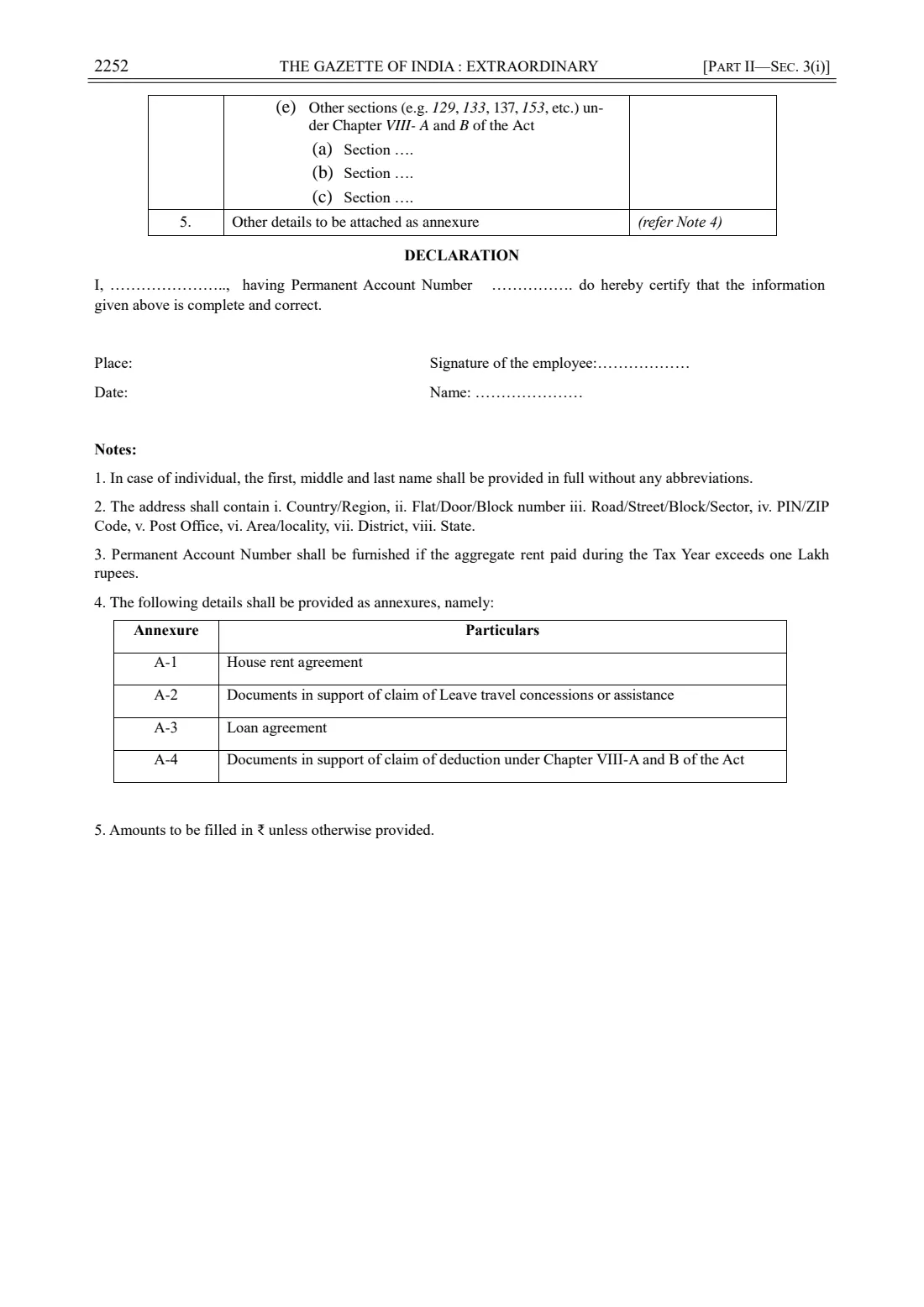
Here you list deductions under the new section numbers: under (i), section 123 with up to three items (A, B and C) and then sections 124, 130 and 131; under (e), up to three other sections of Chapter VIII-A and B, such as the examples the form gives (129, 133, 137 and 153).
For each section 123 item, write what it is (for example a provident fund contribution or an insurance premium) and the amount; FileIt adds up the section 123 total. For the other sections, write the section number and the amount. Attach the evidence as Annexure A-4. Whether a deduction is actually allowed depends on the Act and the tax regime that applies to you; the form only records your claim.
6 Row 5: Other details to be attached as annexure
Note 4 lists the annexures: A-1 house rent agreement, A-2 documents for leave travel, A-3 loan agreement and A-4 documents for Chapter VIII-A and B deductions. Tick the ones you are attaching and FileIt prints their codes in row 5.
FileIt checks that each claim you make has its annexure ticked, and that you haven't ticked an annexure for a claim you didn't make.
7 Declaration
The declaration reads "I, [name], having Permanent Account Number [PAN] do hereby certify that the information given above is complete and correct." FileIt fills in your name and PAN, the place and your name under the signature.
Sign above "Signature of the employee" and write the date. You can print and sign by hand, or use FileIt's optional e-signature step if your employer accepts electronically signed forms.
Common mistakes to avoid
- Leaving out the landlord's PAN when the year's rent is more than ₹1,00,000: Note 3 makes it compulsory, and many employers won't allow the HRA claim without it.
- Forgetting the evidence. Each claim needs its annexure (rent agreement, travel documents, loan agreement, investment proofs).
- Using the old Form 12BB or the old Income-tax Act, 1961 section numbers for 2026-27 claims: Form No. 124 uses the Income-tax Act, 2025 numbering.
- Abbreviating your name. Note 1 asks for the first, middle and last name in full.
- Writing the financial year the old way. The form now uses the tax year, written like 2026-27.
- Claiming an item your tax regime doesn't allow. The form records your claim, but your employer applies the rules that apply to you.
- Giving the form once and forgetting it. It is given once each tax year, and again if you change jobs or your claims change.
After you fill it out
Check the printed form, then sign the declaration by hand or send it for e-signature from FileIt if your employer accepts that. Add the date, and gather the annexures you ticked in row 5.
Give the signed form and annexures to your employer, usually the payroll or HR team, in whatever way they ask (by hand, by email or through an HR portal). The FAQ says Form No. 124 may be given electronically or physically and is not uploaded to the Income-tax portal. FileIt does not send it anywhere for you.
The finished PDF is kept in your FileIt vault, so you can check what you declared when you prepare your own return and reuse the details next year. Give your employer an updated form if your rent, loan or investments change during the year.
Fill out Form 124 (replaces 12BB) online with FileIt
- Pick the person. Choose someone from People and FileIt fills in their name, date of birth, address and other details it already knows.
- Answer plain-language questions. One part of the form at a time, with the official help text beside each question — 80 fields in all. Your answers save as you go.
- Check the live preview. Watch your answers land on the real Income Tax Department, Central Board of Direct Taxes (CBDT) form, and let FileIt do any worksheet arithmetic.
- Generate the official PDF. FileIt prints your answers into the agency’s own PDF and files it in that person’s folder in your vault. Sign it, or send it for e-signature.
FileIt fills the form — it never files or submits anything for you. Deliver the finished form to whoever asked for it, the way the form’s instructions say.
Start Form 124 (replaces 12BB) now — it’s freeForm 124 (replaces 12BB): frequently asked questions
What is Form 124 and does it replace Form 12BB?
Yes. Form No. 124 under the Income-tax Rules, 2026 replaces Form 12BB. It is the statement an employee gives the employer listing claims such as HRA, leave travel, interest on borrowing and Chapter VIII-A and B deductions, so that tax deducted from salary takes them into account.
Is Form 124 mandatory?
Only if you want your employer to consider your claims. According to the department's FAQ, if you don't give it, your employer deducts TDS without allowing those deductions and exemptions.
Where do I submit Form 124?
To your employer, not the Income Tax Department. It can be given on paper or electronically, and it doesn't need to be uploaded to the Income-tax portal.
When is the landlord's PAN required?
Note 3 on the form says the landlord's PAN must be given if the aggregate rent paid during the tax year is more than one lakh rupees. The department's FAQ adds that the landlord's Aadhaar is not mandatory unless your employer asks for it.
What documents do I attach to Form 124?
Note 4 lists four annexures: A-1 house rent agreement, A-2 documents supporting leave travel, A-3 loan agreement and A-4 documents supporting Chapter VIII-A and B deductions. Attach only those that relate to your claims.
Do I need Form 124 for the standard deduction?
No. The department's FAQ says the standard deduction is allowed in every case and doesn't need a declaration in Form No. 124.
Can I fill out Form 124 online with FileIt?
Yes. FileIt guides you through each part, can pre-fill your details from the People records in your vault, adds up the section 123 items and prints everything into the official form. You download the PDF, sign it by hand or send it for e-signature, and give it to your employer yourself.
I changed jobs during the year. What do I give my new employer?
Give the new employer Form No. 124 with your claims. The FAQ says you should also give details of the income and tax from your previous employer, using Form No. 122, so the new employer can work out the tax correctly.
Can I list more than one landlord or loan?
The form has a "repeat details" row after the house rent and loan sections. Give the extra landlords or lenders on an attached sheet; FileIt prints "Attached" in that row when you tell it you have done so.
Official sources
- Blank form (PDF), published by Income Tax Department, Central Board of Direct Taxes (CBDT): https://www.incometaxindia.gov.in/documents/d/guest/en-notified-it-rules-2026-20-03-2026-pdf
- Official instructions and guidance: https://www.incometaxindia.gov.in/documents/d/guest/form-124-faqs
- Edition shown on this page: FORM NO. 124 [See rule 205], Income-tax Rules, 2026 (checked 2026-09-26).
FileIt is not affiliated with or endorsed by Income Tax Department, Central Board of Direct Taxes (CBDT) or any government. This page explains the form in general terms and is not legal, tax or immigration advice. Always read the official instructions, and check that you are using the edition the recipient accepts. Page last reviewed 2026-09-26.