
What is Form 121 (replaces 15G / 15H)?
Form No. 121 is the declaration under section 393(6) of the Income-tax Act, 2025 for receipt of certain incomes without deduction of tax. It is prescribed by rule 211 of the Income-tax Rules, 2026 and, from 1 April 2026, replaces both Form 15G (used by people under 60, HUFs and trusts) and Form 15H (used by senior citizens). One form now covers both, with a question on whether you are 60 or over.
It matters if your income is low enough that you won't owe any tax, but a bank or company would still deduct tax at source (TDS) from your interest or dividends. By giving the payer Form No. 121 before the income is paid, you stop that deduction instead of waiting for a refund. Submitting it doesn't make the income tax-free: it only stops the deduction, and a false declaration can lead to prosecution.
FileIt guides you through Part A of Form No. 121 in plain English and prints your answers into the Income Tax Department's official PDF. Your name, date of birth and email can be pre-filled from the People records in your FileIt vault. FileIt adds up item 12, fills your name, PAN and tax year into the declaration, and checks your answers against the form's own rules, such as the age-60 question. The finished PDF is saved in your vault. FileIt doesn't submit anything: you sign the form and give it to each payer yourself.
- Who fills it
- A resident individual, or another person that is not a company or a firm (such as an HUF or a trust), whose tax on estimated total income for the year will be nil
- Given to
- Each payer of the income, such as your bank, post office, company or provident fund trustees (not the Income Tax Department)
- When
- Each tax year, before the income is paid or credited, ideally at the start of the year
- Signatures
- The declarant signs Part A by hand; the payer's authorised person signs Part B
- Edition
- Form No. 121 [See rule 211], Income-tax Rules, 2026 (replaces Forms 15G and 15H)
- Part B
- Completed by the payer, which allots a Unique Identification Number (UIN) and reports the declaration
Who needs to fill out Form 121 (replaces 15G / 15H)?
- Senior citizens (60 or over at any time during the tax year) living in India whose tax on their estimated total income will be nil, who previously used Form 15H.
- Resident individuals under 60 with a nil tax liability whose covered income doesn't exceed the maximum amount not chargeable to tax, who previously used Form 15G.
- Hindu undivided families (HUFs), trusts and other persons that are not companies or firms, where the same conditions are met.
- Anyone with fixed or recurring deposits, post office deposits, dividends, mutual fund units, insurance commission or other income listed in the form's Note 5 that would otherwise have tax deducted.
- Employees withdrawing a recognised provident fund balance where tax would otherwise be deducted (the one kind of income for which a non-resident can also use the form).
When to use Form 121 (replaces 15G / 15H)
- At the start of each tax year (which runs from 1 April to 31 March), before the first interest or dividend is credited.
- When you open a new fixed deposit or other investment during the year with a payer you haven't given a declaration to yet.
- Separately for each payer: the department's FAQ says the declaration must be given to every payer of the relevant income.
- Again every year: a declaration is valid only for the tax year it names.
- Not when you expect to owe tax for the year: the payer should accept it only where the tax on your estimated total income will be nil (Note 9).
What you need before you start
- Your PAN (Permanent Account Number). A valid PAN is mandatory.
- Your full name, address, email and phone number, and your date of birth (proof of age if you are 60 or over).
- Your residential status for the tax year: resident, non-resident, or resident but not ordinarily resident.
- The kind of income (for example interest on deposits) and your estimate of it from this payer for the year.
- How many other Form No. 121 you've already given this tax year, and the total income they covered.
- An estimate of your total income for the whole tax year from every source, after deductions and rebate.
- The tax year, acknowledgment number and returned income of your income-tax returns for the previous two tax years, if you filed any.
What’s on Form 121 (replaces 15G / 15H)
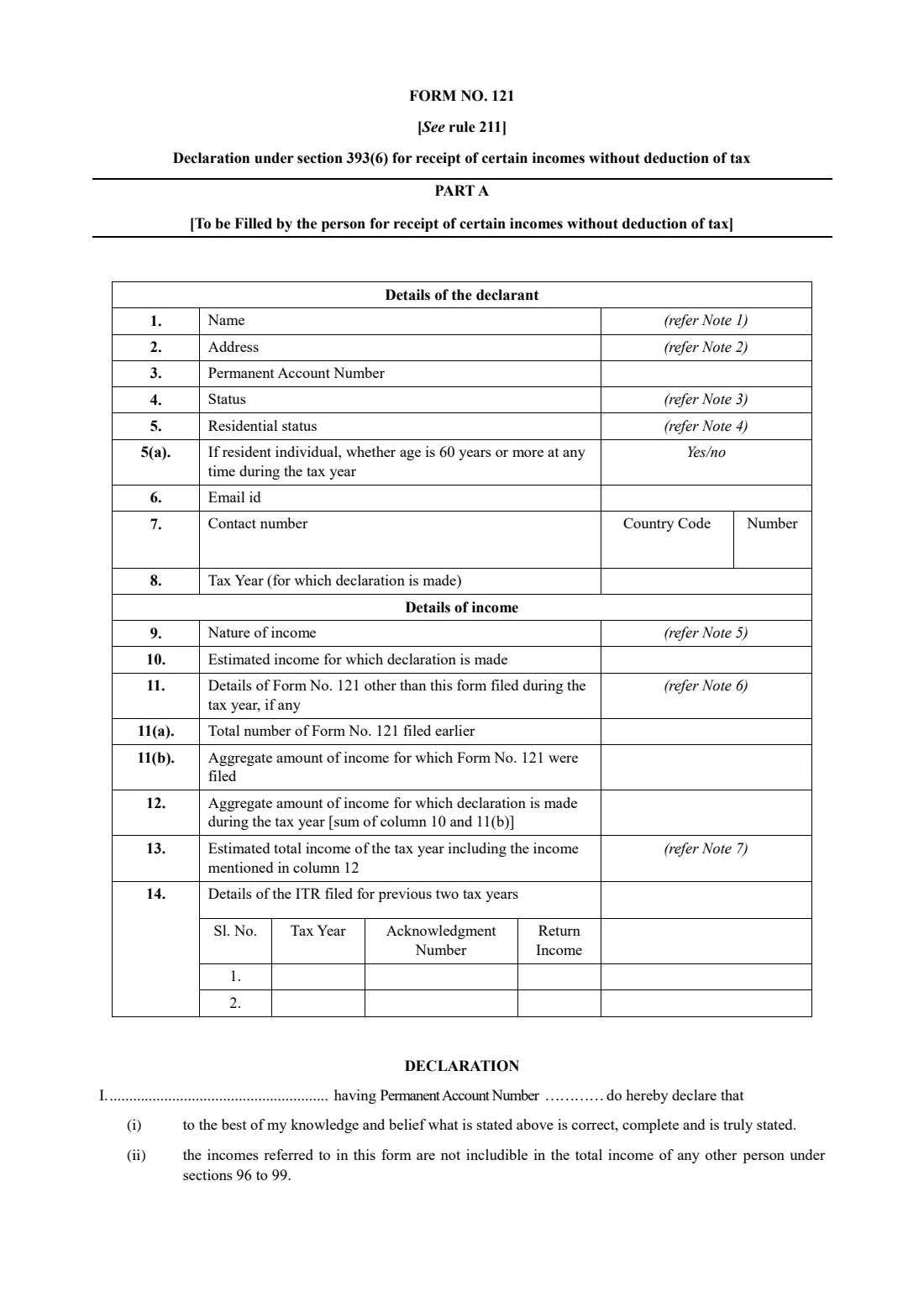
The 2026 edition has 4 pages. FileIt asks for it in 4 parts:
- Part A — Details of the declarant (items 1–8)Declarant
- Part A — Details of income (items 9–14)Declarant
- Part A — DeclarationDeclarant
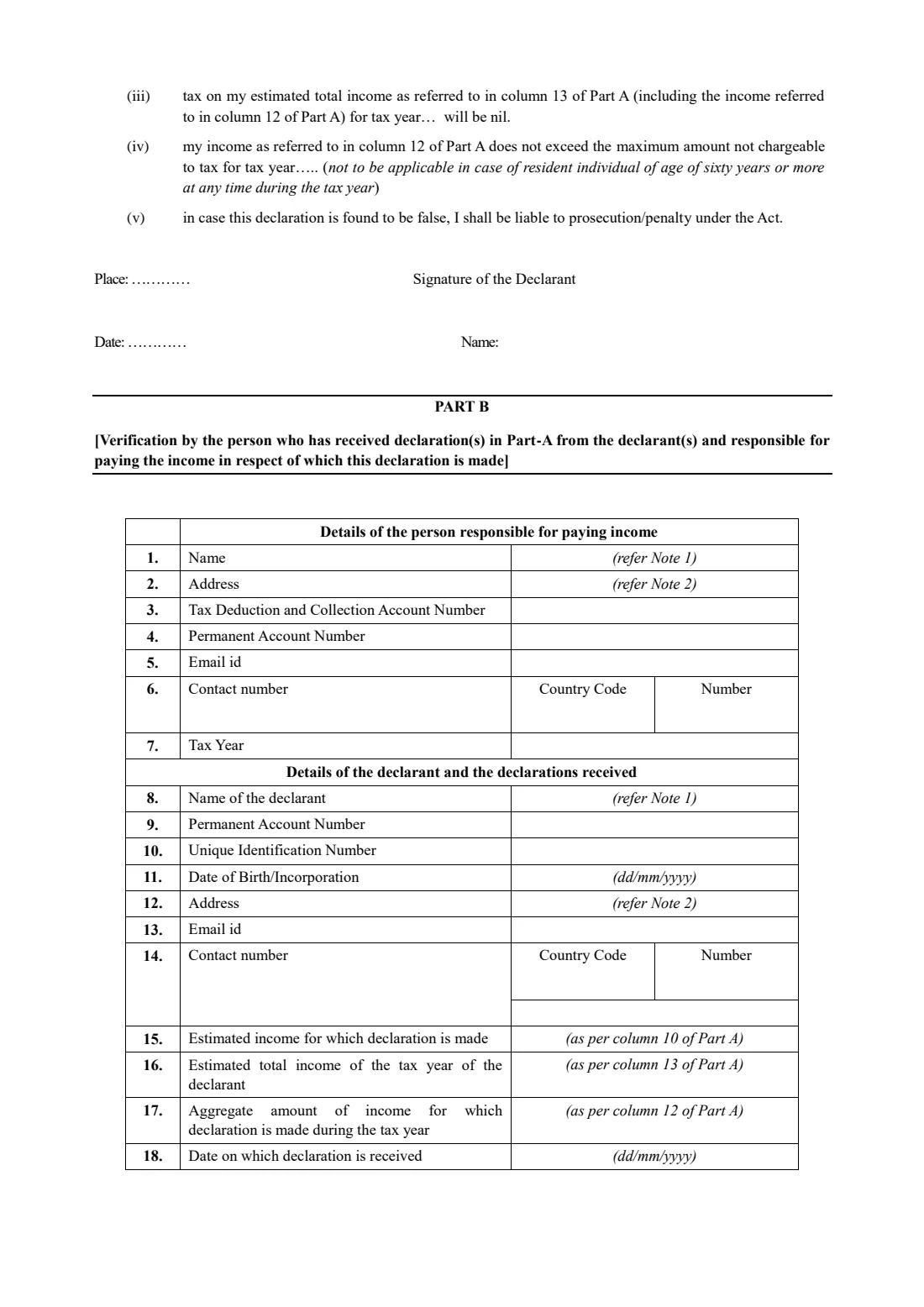
- Part B — Person responsible for paying the income (optional)Payer (bank / company)
How to fill out Form 121 (replaces 15G / 15H), step by step
1 Part A, items 1 to 8: Details of the declarant
Give your full name without abbreviations (Note 1), your address (Note 2 lists the parts it should contain), PAN, status, residential status, email, contact number and the tax year the declaration is for.
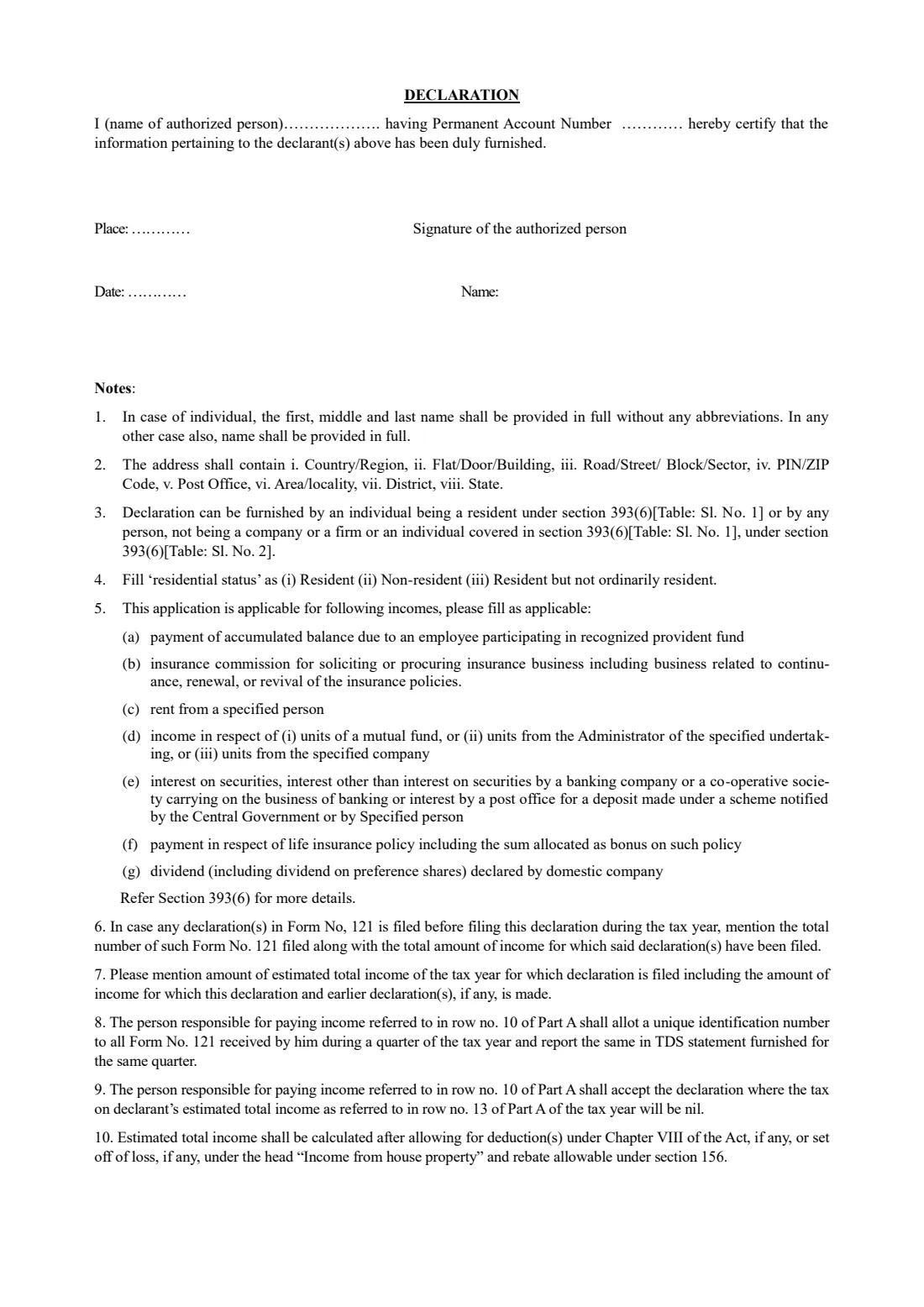
Status is "Individual" for most people, or HUF, trust and so on (Note 3: companies and firms can't use the form). For residential status, choose resident, non-resident or resident but not ordinarily resident (Note 4). Item 5(a) asks a resident individual whether they are 60 or more at any time during the tax year; FileIt checks your answer against your date of birth. Write the tax year like 2026-27.
2 Part A, items 9 and 10: Nature and estimated amount of income
Item 9 is the kind of income from this payer, chosen from Note 5: (a) a recognised provident fund balance, (b) insurance commission, (c) rent from a specified person, (d) income from units, (e) interest, including bank, co-operative bank and post office deposits, (f) payments under a life insurance policy, or (g) dividends from a domestic company.
Item 10 is the income you expect from this payer in the tax year. For a bank, that's the interest on your deposits there.
3 Part A, items 11 and 12: Earlier declarations and the aggregate
If you've already given Form No. 121 to other payers (or the same payer) this tax year, item 11(a) is how many and 11(b) is the total income they covered (Note 6). Leave them blank if this is your first.
Item 12 is the sum of item 10 and item 11(b), and FileIt works it out for you. For anyone other than a resident individual aged 60 or over, this aggregate must not exceed the maximum amount not chargeable to tax (Note 11).
4 Part A, item 13: Estimated total income of the tax year
Your estimate of all your income for the year, including item 12. Note 10 says it is worked out after deductions under Chapter VIII, any set-off of loss under income from house property, and the rebate under section 156.
The key condition is that the tax on this amount will be nil. FileIt checks that item 13 isn't less than item 12, but it can't tell you whether your tax will be nil. That depends on your whole income.
5 Part A, item 14: Returns filed for the previous two tax years
If you filed income-tax returns for the last two tax years, give each year, its acknowledgment number and the returned income. If you didn't file, leave the rows blank.
6 Part A: Declaration
You declare that the details are correct, that the income isn't includible in anyone else's income under sections 96 to 99, that the tax on your estimated total income will be nil, and (unless you're a resident individual aged 60 or more) that your aggregate income in item 12 doesn't exceed the maximum amount not chargeable to tax. It ends with a warning that a false declaration can lead to prosecution or a penalty.
FileIt fills in your name, PAN and the tax year in the declaration, the place, the date and your name. Sign by hand above "Signature of the Declarant".
7 Part B: Verification by the payer
Part B is for the person responsible for paying the income, such as the bank. It repeats the payer's details (name, address, TAN, PAN, contact) and your key figures, and adds a Unique Identification Number (UIN) and the date the declaration was received. The payer's authorised person signs it.
You normally leave Part B to the payer. FileIt lets you pre-fill it if your payer asks you to, copying your details from Part A. The department's FAQ describes the UIN as 26 characters: a serial number starting with D, the tax year and the payer's TAN.
Common mistakes to avoid
- Giving the form when you will owe tax for the year. The declaration is only for people whose tax on estimated total income will be nil, and a false one can lead to prosecution.
- Giving it to only one payer. Each bank, company or fund that pays you needs its own declaration.
- Handing it in late. If the income is credited before the payer has your form, tax may already have been deducted.
- Forgetting earlier declarations. Items 11(a) and 11(b) must count the forms already given this tax year, and item 13 must include all your income.
- Using the old Form 15G or 15H for the 2026-27 tax year and later. Form No. 121 replaces both.
- Answering item 5(a) wrongly. Only a resident individual who is 60 or more at any time during the tax year answers Yes.
- Leaving out your PAN or entering it wrongly. It is mandatory, and the declaration is linked to it.
After you fill it out
Check the printed form, then sign Part A by hand above "Signature of the Declarant". FileIt has already printed the place, date and your name.
Give the signed form to the payer, such as your bank branch, before the income is paid or credited, ideally at the start of the tax year. The department's FAQ also describes giving it electronically on a portal provided by the payer. The payer completes Part B, allots a UIN and reports the declaration to the Income Tax Department. FileIt does not send it for you.
Keep the PDF in your FileIt vault, together with the payer's acknowledgment if you get one. Give a fresh declaration each tax year, and update your estimate if your income changes so that tax would become payable.
Fill out Form 121 (replaces 15G / 15H) online with FileIt
- Pick the person. Choose someone from People and FileIt fills in their name, date of birth, address and other details it already knows.
- Answer plain-language questions. One part of the form at a time, with the official help text beside each question — 68 fields in all. Your answers save as you go.
- Check the live preview. Watch your answers land on the real Income Tax Department, Central Board of Direct Taxes (CBDT) form, and let FileIt do any worksheet arithmetic.
- Generate the official PDF. FileIt prints your answers into the agency’s own PDF and files it in that person’s folder in your vault.
FileIt fills the form — it never files or submits anything for you. Deliver the finished form to whoever asked for it, the way the form’s instructions say.
Start Form 121 (replaces 15G / 15H) now — it’s freeForm 121 (replaces 15G / 15H): frequently asked questions
What is Form 121 and does it replace Forms 15G and 15H?
Yes. Form No. 121 under the Income-tax Rules, 2026 merges Forms 15G and 15H into a single declaration. It lets an eligible person ask a payer not to deduct tax at source from certain incomes because the tax on their estimated total income for the year will be nil.
Who can submit Form 121?
A resident individual, or another person that is not a company or a firm (such as an HUF or a trust), where the tax on the estimated total income for the tax year will be nil. People under 60 must also have covered income within the maximum amount not chargeable to tax. Resident individuals aged 60 or more only need the nil-tax condition.
Where do I submit Form 121?
To each payer of the income, such as your bank, post office or the company paying dividends, not to the Income Tax Department. The payer allots a Unique Identification Number and reports the declaration itself.
When should I submit Form 121?
Before the income is paid or credited, ideally at the start of the tax year. The declaration is valid for the tax year it names, so give a new one every year.
Does Form 121 make my interest tax-free?
No. It only stops tax being deducted at source. The income is still part of your total income, and you must report it in your return if you file one.
What does item 5(a) mean?
It asks a resident individual whether they are 60 or more at any time during the tax year. Answering Yes means condition (iv) of the declaration (the maximum amount not chargeable to tax) doesn't apply to you. This is what Form 15H used to cover.
Can I fill out Form 121 online with FileIt?
Yes. FileIt guides you through Part A, can pre-fill your details from your vault, adds up item 12, checks the age question against your date of birth and prints everything into the official PDF. You then sign it by hand and give it to the payer. Some payers also offer their own online facility for the declaration.
What is the UIN in Part B?
The Unique Identification Number the payer gives each declaration it receives. According to the department's FAQ it has 26 characters: a running serial number beginning with D, the tax year as six digits and the payer's TAN.
Official sources
- Blank form (PDF), published by Income Tax Department, Central Board of Direct Taxes (CBDT): https://www.incometaxindia.gov.in/documents/d/guest/form-no-121-1
- Official instructions and guidance: https://www.incometaxindia.gov.in/documents/d/guest/form-121-faqs
- Edition shown on this page: FORM NO. 121 [See rule 211], Income-tax Rules, 2026 (checked 2026-09-26).
FileIt is not affiliated with or endorsed by Income Tax Department, Central Board of Direct Taxes (CBDT) or any government. This page explains the form in general terms and is not legal, tax or immigration advice. Always read the official instructions, and check that you are using the edition the recipient accepts. Page last reviewed 2026-09-26.