What is the workshop sign-up form template?
Running a workshop with multiple sessions or a waiting list usually means juggling spreadsheets and a stream of "can I still get in" emails. This template gives participants one place to choose a session, say what they hope to get out of it, and flag anything that would help them take part fully — so you arrive at the day with a clear list, not a pile of separate replies to reconcile.
Asking about experience level and goals up front means a facilitator can tailor the content before the session starts, rather than discovering mid-workshop that half the room already knows the basics. And because accessibility needs are asked directly and specifically — step-free access, a hearing loop, captions, large-print materials — organisers can actually plan for them instead of scrambling on the day.
Every sign-up becomes a PDF saved automatically in your FileIt vault, so a facilitator or coordinator has the full picture — who's coming, to which session, and what they need — well before the first person walks in.
- Best for
- Trainers, community organisations, libraries and businesses running workshops or classes
- Filled in by
- The participant, or someone signing up on their behalf
- Time to complete
- About 3 minutes
- Includes
- Session choice, waiting list preference, accessibility checklist, photo consent
Who uses a workshop sign-up form?
- A community centre offers the same workshop across morning, afternoon and evening sessions to reach more people
- A trainer running a hands-on class finds out in advance who will bring their own laptop and who needs one to borrow
- An organisation running a hybrid event lets participants choose between an in-person session or an online live stream
- A facilitator tailors workshop content in advance based on participants' stated experience level and goals
- A venue collects dietary requirements for in-person sessions where refreshments are served
- An accessibility-conscious organiser plans interpreters, captions or a quiet space based on sign-up responses
Questions on this workshop sign-up form
16 questions over 3 pages · includes conditional questions, multiple pages, consent checkbox.
1 About you
- Your name*
- Email*
- Mobile
- Organisation
- Role or job title
2 Your session
- Which session would you like?* Session A — morning (09:30–12:30) · Session B — afternoon (13:30–16:30) · Session C — evening (18:00–21:00) · Online (live stream)
- If that session is full, what would you prefer? Put me on the waiting list · Any other session is fine · Let me know about the next date
- Your experience with the topic* Completely new to it · I know the basics · I use it regularly · Advanced — looking for new ideas
- What would you like to get out of the workshop?
- Will you bring your own laptop or equipment? asked only when it applies
- Dietary requirements asked only when it applies
3 Accessibility & consent
- Do you have any accessibility needs?*
- What would help? asked only when it applies Step-free access · Hearing loop · Sign language interpreter · Live captions · Large-print or digital materials in advance · A quiet space to take breaks · Specific seating
- Anything else we should know? asked only when it applies
- Photography
- Your details*
The workshop sign-up form, page by page
1 About you
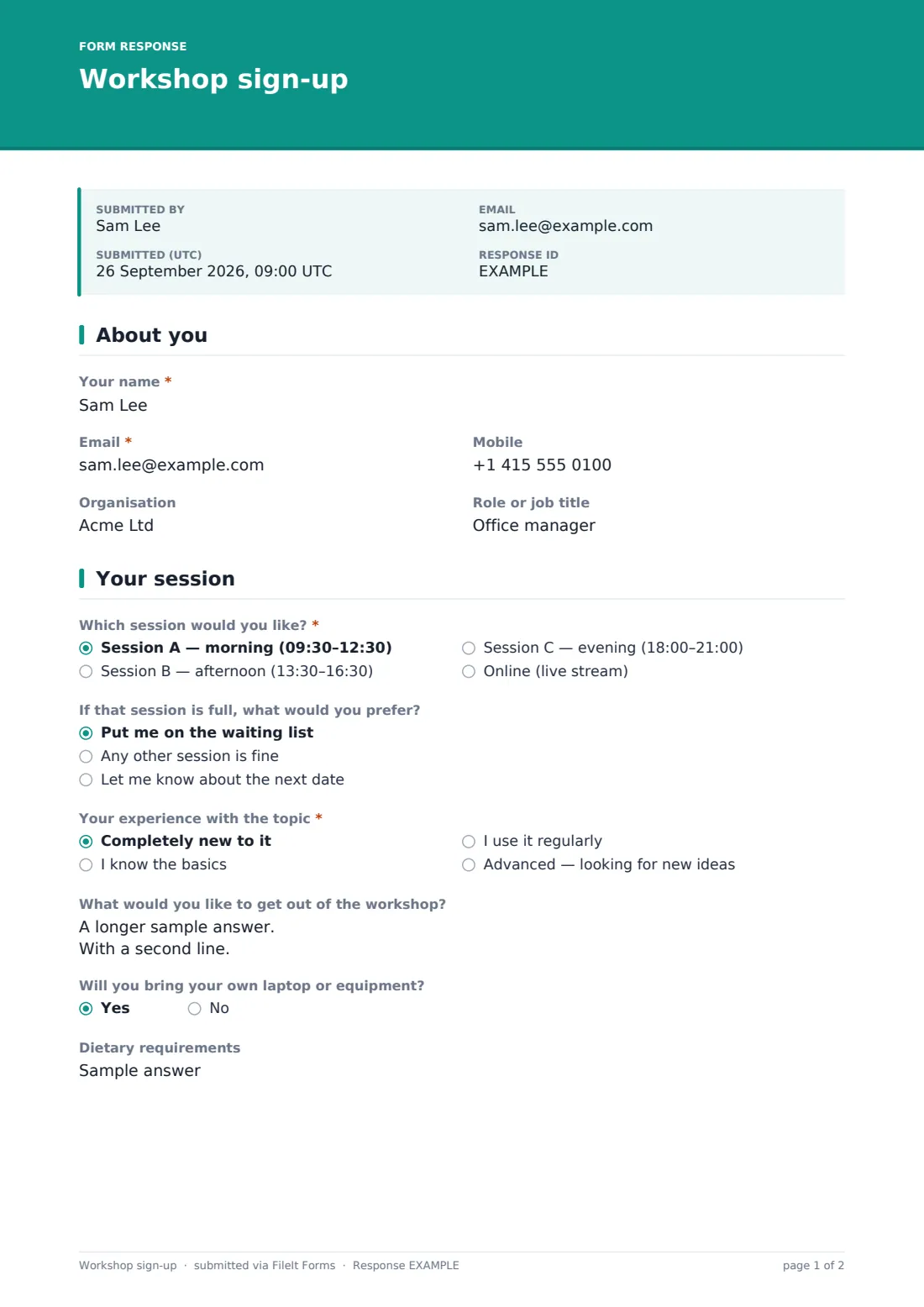
Participants give their name, email (used to send joining instructions), optional mobile number, and — if attending through work — their organisation and job title. This keeps the form quick for individuals while still capturing useful context for corporate or professional sign-ups.
2 Your session
A radio question lists the available sessions — a morning, afternoon and evening slot with specific times, plus an online live-stream option — and a backup preference (join a waiting list, accept any other session, or just hear about the next date) covers what to do if the chosen session is full. An experience-level question, from completely new to advanced, and an optional goals field help the facilitator understand the room before it fills up.
For in-person sessions specifically, two further questions appear: whether the participant will bring their own laptop or equipment, and any dietary requirements if refreshments are served — both are skipped automatically for the online option, since neither applies.
3 Accessibility & consent
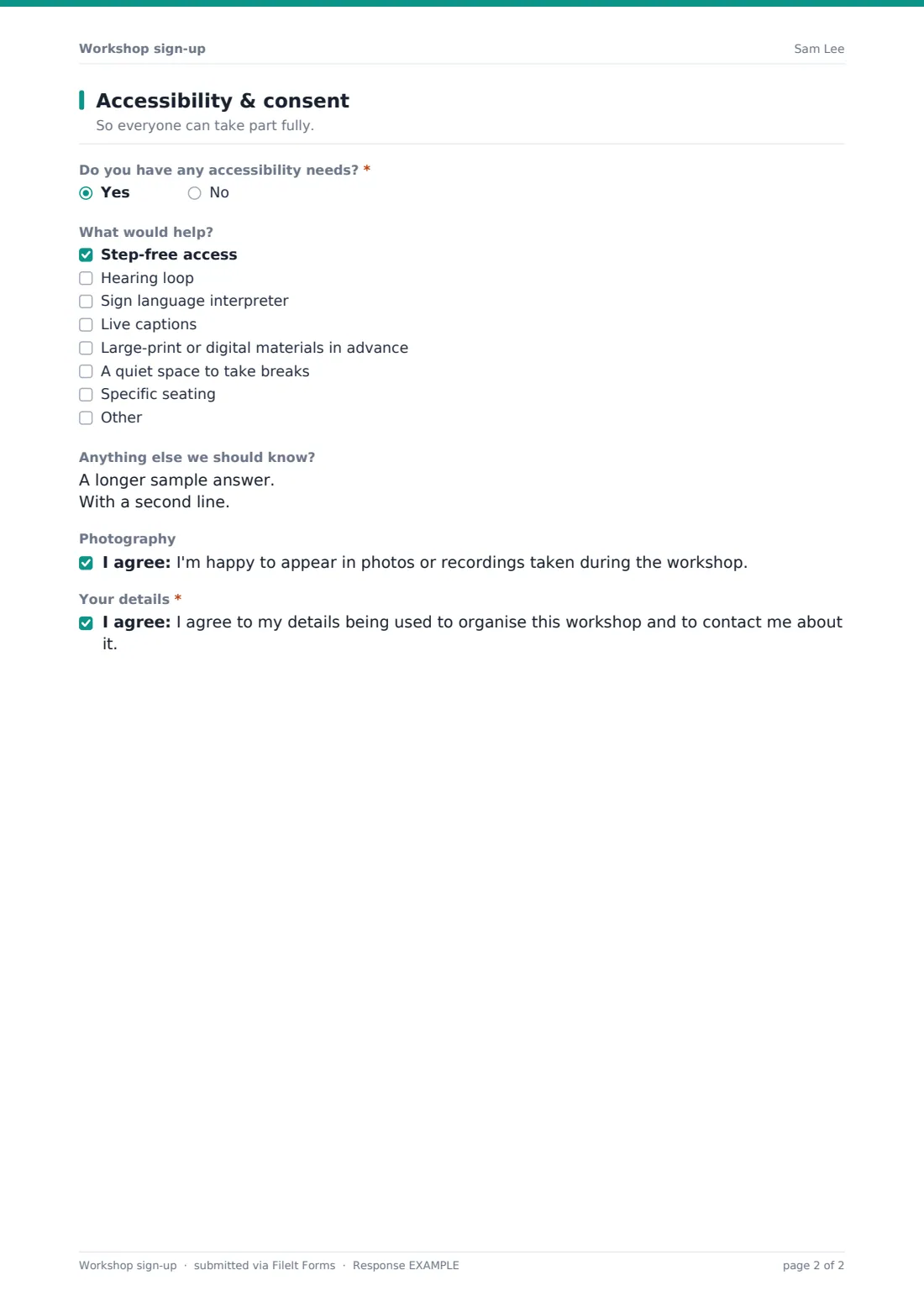
A yes/no question asks directly whether the participant has any accessibility needs, revealing a checklist — step-free access, a hearing loop, a sign language interpreter, live captions, large-print or digital materials in advance, a quiet space for breaks, or specific seating, plus an "Other" option — and an open field for anything else the organiser should know. An optional consent checkbox covers being happy to appear in photos or recordings taken during the workshop, kept clearly separate from a required consent statement agreeing to have contact details used to organise the session.
Make the template yours
- Adjust the session times and formats to match your actual schedule, adding or removing options as needed
- Add a fee or ticket-price field if your workshop isn't free, alongside a note about how payment is arranged separately
- Set a maximum number of responses per session if you're tracking capacity manually rather than through a booking system
- Add a pre-workshop materials or pre-reading field if participants need to prepare something in advance
- File responses into a folder per session date, so headcounts and access needs are easy to review before each one
- Turn on extra notification emails so a co-facilitator also sees new sign-ups and access requests as they arrive
- Adjust the confirmation message to include a calendar link or venue directions for in-person sessions
Tips for a better workshop sign-up form
- Act on accessibility requests as soon as they come in, rather than waiting until the week of the workshop
- Use the experience-level answers to genuinely adjust your content, not just as background information
- Keep photography consent separate from the general participation consent, exactly as the template does, since people should be able to say yes to one and no to the other
- Confirm sessions and waiting-list status promptly — people on a waiting list appreciate knowing where they stand
- Ask about equipment needs early enough that you can arrange loan laptops or materials before the day
- Review sign-up patterns across sessions to plan future workshop times around when people actually want to attend
Every response becomes a PDF in your vault
As soon as someone signs up, FileIt saves their answers as a PDF in your vault, in the folder you've set up for the workshop, and you're notified by email right away. If you've turned on the optional copy, the participant also receives their own PDF of what they submitted.
The organiser then reviews sign-ups in the Responses table — checking session numbers, access requests and equipment needs — before sending joining instructions, which the confirmation message tells participants to expect by email. For workshops with several sessions, exporting the list to CSV makes it easy to see numbers per session at a glance.
- Start from this template. It opens in the FileIt Forms designer — change any question, add pages, set the rules for when questions appear.
- Share it. Turn on a public link, or send it to people by email, each with their own link. They don’t need a FileIt account.
- Get the answers as PDFs. Each response is saved as a PDF in the vault folder you choose, with uploaded files attached — and listed in a Responses table you can export to CSV.
Workshop sign-up form: frequently asked questions
Is this workshop sign-up form template free?
Yes. It's included in FileIt's Forms app on every plan, including the free plan, and every question can be edited to fit your workshop.
Do participants need a FileIt account to sign up?
No. Share a public link or a personal emailed invitation, and participants sign up without creating an account.
How do we see who's signed up?
Every sign-up is saved automatically as a PDF in your FileIt vault, and you can browse, filter or export the full list to CSV, including by chosen session.
Can we offer multiple sessions and let people choose?
Yes, the template includes a session choice question with several time slots and an online option, plus a backup preference if their first choice is full.
Can we limit how many people sign up per session?
Yes, the Forms app lets you set a maximum number of responses, useful if each session has a fixed capacity.
Can participants tell us about accessibility needs?
Yes, there's a dedicated accessibility question with a checklist of common needs like step-free access, captions or a hearing loop, plus a free-text field for anything else.
Can we ask for photo consent separately from general consent to be contacted?
Yes, the template keeps photography consent optional and separate from the required consent to use contact details for organising the workshop.
Can this form work for both in-person and online workshops?
Yes, choosing the online session option automatically skips questions that only make sense in person, like bringing equipment or dietary needs.