What is the small group sign-up form template?
Small groups are where many congregations do most of their real connecting — Bible studies, prayer groups, men's and women's groups, young adults, parents. Placing people well means knowing more than a name: what kind of group they're after, which evenings they're free, whether they'd rather meet at church, in a home or online, and whether they need childcare to come at all.
This small group sign-up template gathers those preferences on three short pages. A spouse or partner's name only appears when someone is joining as a couple, childcare details only when childcare is needed, and a neighbourhood question is skipped for people who want to meet online. The last page quietly finds your future hosts and leaders.
Each sign-up lands in your FileIt vault as a PDF and in a Responses table you can filter by day, group type or location — which makes the matching session with your small group leaders much quicker.
- Best for
- Churches and faith communities running Bible studies, home groups or life groups
- Filled in by
- Members, regular attenders and newcomers
- Time to complete
- About 3 minutes
- Includes
- Group type, days, times, location, childcare, hosting and leading interest
Who uses a small group sign-up form?
- A church's autumn small group launch, with sign-ups taken after the Sunday service
- A newcomers' welcome, pointing new visitors to an exploring-faith group
- A women's or men's ministry forming new groups by day and area
- A parish recruiting home hosts and new group leaders alongside members
- A campus ministry placing students in weekly Bible studies
Questions on this small group sign-up form
22 questions over 3 pages · includes conditional questions, multiple pages, consent checkbox.
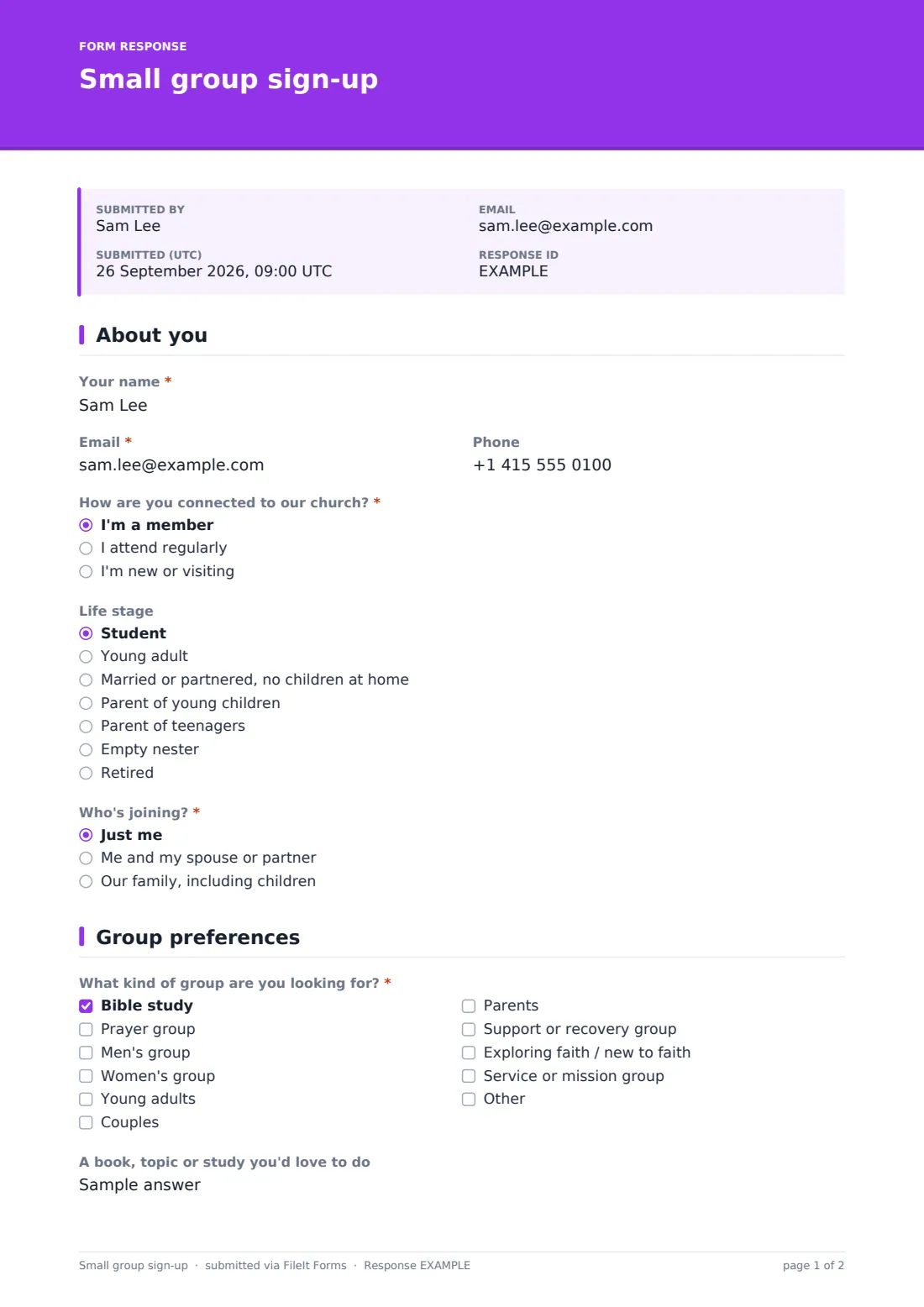
1 About you
- Your name*
- Email*
- Phone
- How are you connected to our church?* I'm a member · I attend regularly · I'm new or visiting
- Life stage Student · Young adult · Married or partnered, no children at home · Parent of young children · Parent of teenagers · Empty nester · Retired
- Who's joining?* Just me · Me and my spouse or partner · Our family, including children
- Spouse or partner's name* asked only when it applies
2 Group preferences
- What kind of group are you looking for?* Bible study · Prayer group · Men's group · Women's group · Young adults · Couples · Parents · Support or recovery group · Exploring faith / new to faith · Service or mission group
- A book, topic or study you'd love to do
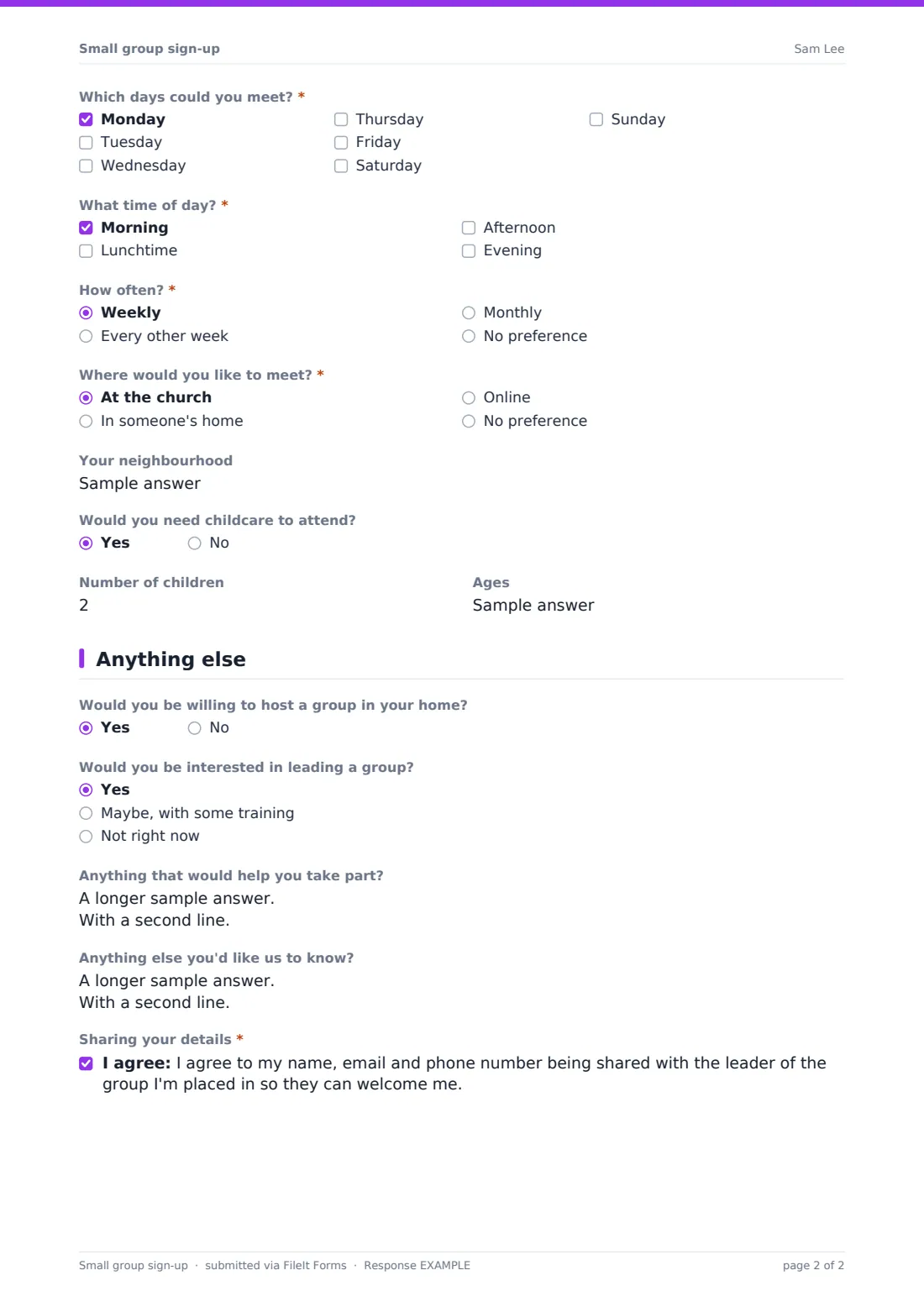
- Which days could you meet?* Monday · Tuesday · Wednesday · Thursday · Friday · Saturday · Sunday
- What time of day?* Morning · Lunchtime · Afternoon · Evening
- How often?* Weekly · Every other week · Monthly · No preference
- Where would you like to meet?* At the church · In someone's home · Online · No preference
- Your neighbourhood asked only when it applies
- Would you need childcare to attend?
- Number of children asked only when it applies
- Ages asked only when it applies
3 Anything else
- Would you be willing to host a group in your home?
- Would you be interested in leading a group? Yes · Maybe, with some training · Not right now
- Anything that would help you take part?
- Anything else you'd like us to know?
- Sharing your details*
The small group sign-up form, page by page
1 About you
Name and email are required, phone is optional. People say whether they're a member, a regular attender or new, choose a life stage if they wish, and say who's joining — just them, them and a spouse or partner (which asks for the partner's name), or the whole family.
2 Group preferences
The kind of group is a checkbox list — Bible study, prayer, men's, women's, young adults, couples, parents, support or recovery, exploring faith, service or mission, plus Other — with room for a favourite book or topic. Days and time of day are both required, followed by how often and where: at church, in a home, online or no preference. Anyone not choosing online can give their neighbourhood. If childcare is needed, the number of children and their ages appear.
3 Anything else
Two optional questions find potential hosts and leaders (with a 'maybe, with some training' option). People can mention access needs or anything else, and agree to their contact details being passed to their group leader.
Make the template yours
- Replace the group types with the actual groups on offer this term
- Swap 'Your neighbourhood' for a dropdown of the areas where you have groups
- Remove the childcare questions if your groups don't offer it
- Change 'church' wording to parish, congregation or fellowship to fit your community
- Set a close date for a term's sign-ups and reopen it next term
Tips for a better small group sign-up form
- Promote the form from the front on a Sunday and put the link in your weekly notices
- Contact people within a week — enthusiasm fades quickly
- Filter the responses by day and location first; group type comes second for most people
- Follow up personally with anyone who ticks 'maybe' for leading
- Pay attention to access notes when choosing a home to meet in
Every response becomes a PDF in your vault
Each sign-up is saved as a PDF in the vault folder you choose, and you're emailed for every new one. The person who signed up can get a copy of their answers.
Use the Responses table to filter by day, time, group type or location and build your group lists, then export to CSV to share with small group leaders.
- Start from this template. It opens in the FileIt Forms designer — change any question, add pages, set the rules for when questions appear.
- Share it. Turn on a public link, or send it to people by email, each with their own link. They don’t need a FileIt account.
- Get the answers as PDFs. Each response is saved as a PDF in the vault folder you choose, with uploaded files attached — and listed in a Responses table you can export to CSV.
Small group sign-up form: frequently asked questions
Is this small group sign-up template free?
Yes. It's one of the ready-made templates in the Forms app on every FileIt account, including the free plan. Use it as it is or change any question in the designer.
Do people need a FileIt account to fill it in?
No. Anyone with the public link, or a personal invitation you send by email, can fill it in without signing up.
Can couples sign up together?
Yes. Choosing 'Me and my spouse or partner' asks for their name, so one form covers both.
Does it work for online groups?
Yes. 'Online' is a location option, and the neighbourhood question is skipped for anyone who picks it.
Can I use it to recruit leaders and hosts?
Yes. The last page asks whether the person would host a group at home and whether they'd consider leading one.
Will group leaders see people's details?
Only if you share them. The form asks people to agree to their name, email and phone being passed to their group leader.