What is the open house sign-in form template?
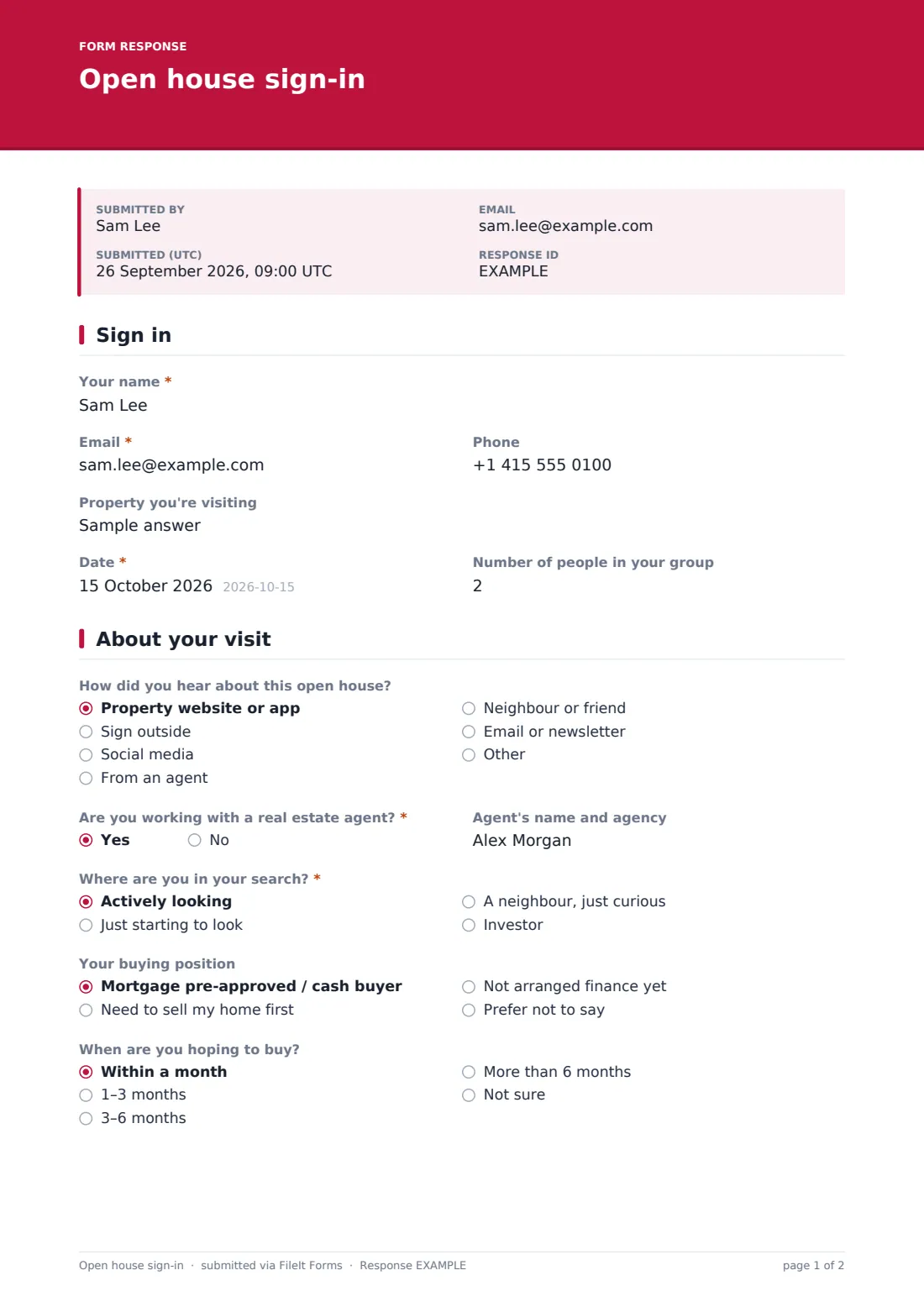
A paper sign-in sheet at an open house gives you illegible names and half the phone numbers. This template replaces it with a short form visitors can fill in on a tablet at the door, or on their own phone from a QR code: name, email, phone, the date and how many people are in their group.
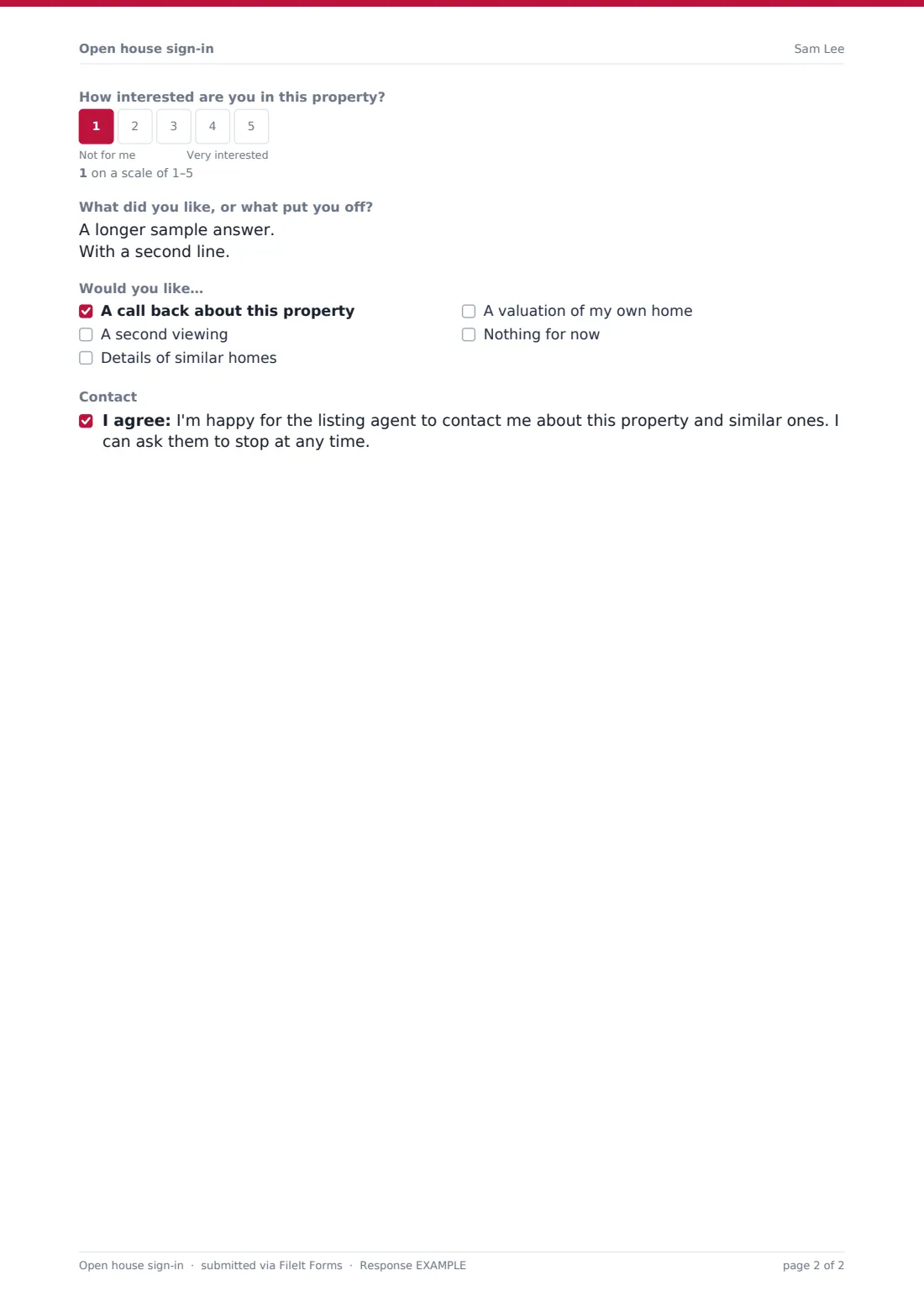
A second page gathers what helps the agent follow up well — how they heard about the open house, whether they already have an agent (and who), where they are in their search, their buying position and timeline, a 1–5 interest rating and what they liked or didn't. Visitors can ask for a call back, a second viewing, similar homes or a valuation of their own home, and agree to be contacted.
Each sign-in is saved to your FileIt vault as its own PDF, so after the open house you have a tidy list of visitors to follow up, and a record of who attended.
- Best for
- Listing agents and private sellers running open houses
- Filled in by
- Each visitor or group, at the door or on their phone
- Time to complete
- About 1–2 minutes
- Includes
- Contact details, agent status, buying position, interest scale, follow-up requests
Who uses a open house sign-in form?
- A listing agent collecting visitor details at a weekend open house
- A new-build sales office logging walk-in visitors
- An agent who wants to separate serious buyers from curious neighbours
- A seller holding their own open house who needs a record of who came through
- A brokerage comparing interest across open houses for the same listing
- An agent gathering feedback to share with the seller after the event
Questions on this open house sign-in form
16 questions over 2 pages · includes conditional questions, multiple pages, consent checkbox, ratings.
1 Sign in
- Your name*
- Email*
- Phone
- Property you're visiting
- Date*
- Number of people in your group
2 About your visit
- How did you hear about this open house? Property website or app · Sign outside · Social media · From an agent · Neighbour or friend · Email or newsletter · Other
- Are you working with a real estate agent?*
- Agent's name and agency asked only when it applies
- Where are you in your search?* Actively looking · Just starting to look · A neighbour, just curious · Investor
- Your buying position Mortgage pre-approved / cash buyer · Need to sell my home first · Not arranged finance yet · Prefer not to say
- When are you hoping to buy? Within a month · 1–3 months · 3–6 months · More than 6 months · Not sure
- How interested are you in this property?
- What did you like, or what put you off?
- Would you like… A call back about this property · A second viewing · Details of similar homes · A valuation of my own home · Nothing for now
- Contact
The open house sign-in form, page by page
1 Sign in
Your name, email, phone, the Property you're visiting, the Date and the Number of people in your group — kept short so visitors don't queue at the door.
2 About your visit
How did you hear about this open house?, Are you working with a real estate agent? (a yes asks for the agent's name and agency), Where are you in your search?, Your buying position, When are you hoping to buy?, a 1–5 interest scale, what they liked or what put them off, the follow-ups they'd like, and an optional consent to be contacted.
Make the template yours
- Type the property address into the cover text so visitors don't have to
- Show the form as a QR code at the door so visitors can use their own phones
- Make phone required if you follow up mainly by calling
- Remove the buying position question if it feels too personal for your market
- Create a copy of the form per listing so each property's sign-ins are filed separately
- Send the visitor's copy only if you want them to have a record of the visit
Tips for a better open house sign-in form
- Greet visitors first and ask them to sign in second — it feels less like a checkpoint
- Respect the agent answer; if someone is represented, contact their agent, not them
- Follow up within a day or two while the visit is still fresh
- Share anonymised feedback and interest scores with the seller after the open house
- Only contact visitors who agreed to it, and stop when asked
Every response becomes a PDF in your vault
Each sign-in becomes a PDF in the FileIt folder you've chosen — contact details, search stage, interest, feedback and requested follow-ups — and you're notified by email.
After the open house, agents usually work through the sign-ins to arrange call backs and second viewings. FileIt doesn't send follow-up messages for you, so use the PDFs as your call list.
- Start from this template. It opens in the FileIt Forms designer — change any question, add pages, set the rules for when questions appear.
- Share it. Turn on a public link, or send it to people by email, each with their own link. They don’t need a FileIt account.
- Get the answers as PDFs. Each response is saved as a PDF in the vault folder you choose, with uploaded files attached — and listed in a Responses table you can export to CSV.
Open house sign-in form: frequently asked questions
Is this open house sign-in form free?
Yes. It's a starter template in FileIt's Forms app on every plan, and every question can be edited.
Can visitors sign in on their own phones?
Yes. Share the form's public link — for example as a QR code by the door — and visitors fill it in on their own devices.
Can several people use one tablet?
Yes, visitors can sign in one after another on the same tablet. Public forms accept only a limited number of submissions per hour from one connection, though, so at a busy open house it's better to put the QR code by the door and let visitors use their own phones.
Do visitors have to agree to be contacted?
No. The contact consent is optional, so visitors can sign in without agreeing to marketing.
Can I see all the sign-ins for one open house?
Each sign-in is saved as a PDF in the folder you choose. Using a separate copy of the form per listing keeps them apart.