
What is the dNS change request form template?
A DNS change request form captures what whoever manages your domains needs to add, change or delete a record: the domain, record type, host, the value as it is now and the value it should become. This template also asks why the change is needed, what else depends on the domain, when it should happen and how to roll it back.
DNS changes are short but unforgiving. A long TXT value pasted into chat picks up a line break, an MX record goes in with the wrong priority, or a website moves and email stops arriving. Asking for the "Current value" and the "New value" side by side — and letting people upload the supplier's own instructions — removes most of the guesswork.
The form runs on FileIt's Forms app. Anyone can fill it in from a link, with no FileIt account needed, and each request is saved as a PDF in your vault. Over time that becomes a simple history of what changed on each domain, and who asked.
- Best for
- IT teams, web agencies and office managers who look after company domains
- Filled in by
- Staff, marketers or suppliers who need a record added or changed
- Time to complete
- About 3 minutes
- Includes
- Record-type logic for TXT and MX, current/new value fields, upload for supplier instructions
Who uses a dNS change request form?
- Adding an SPF, DKIM or DMARC record for a new email marketing tool
- Verifying domain ownership for a SaaS application
- Pointing www at a new website host
- Moving email to a new provider and changing MX records
- Removing old records for a service you no longer use
- A web agency collecting DNS changes from several client domains
Questions on this dNS change request form
23 questions over 3 pages · includes file upload, conditional questions, multiple pages.
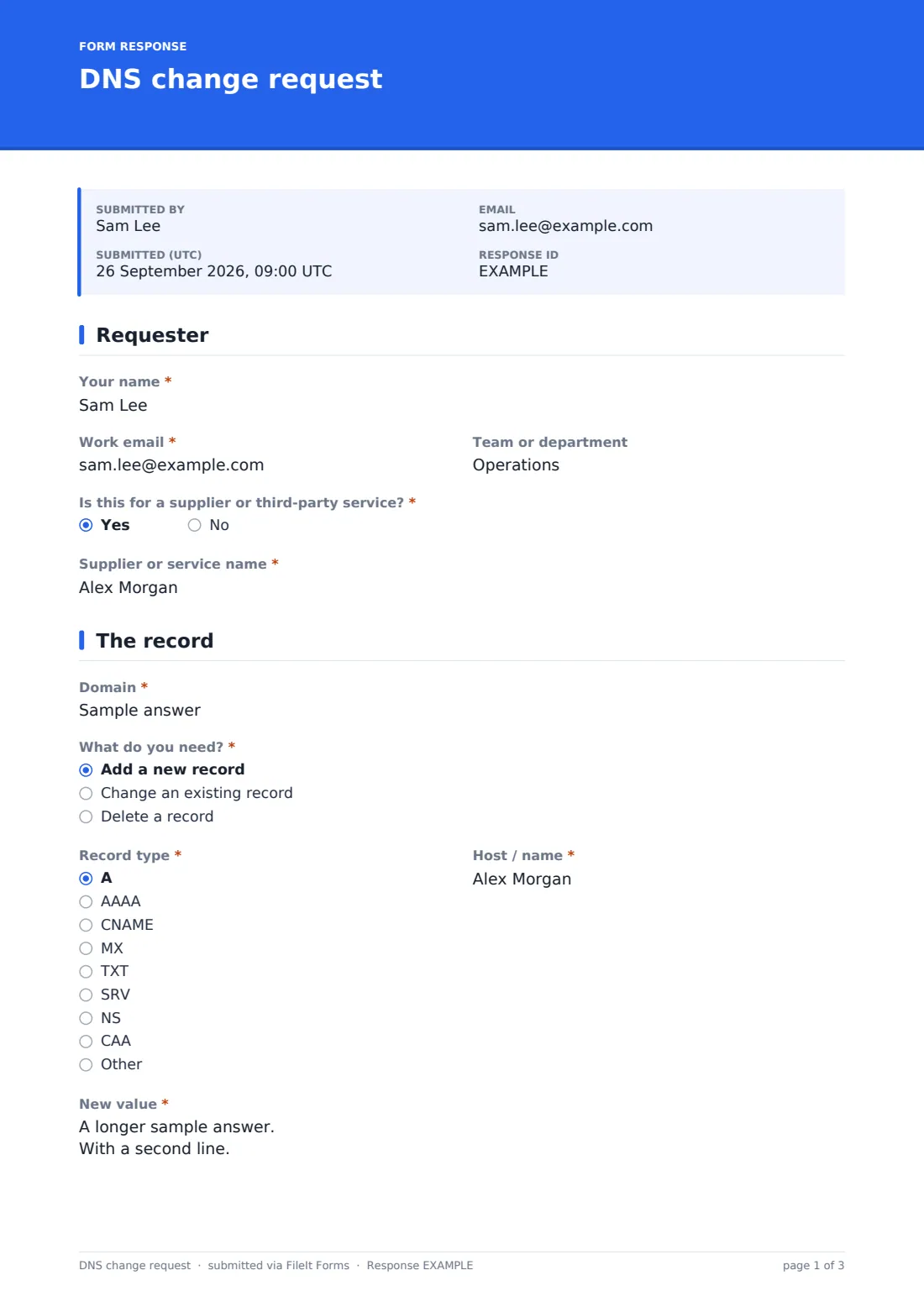
1 Requester
- Your name*
- Work email*
- Team or department
- Is this for a supplier or third-party service?*
- Supplier or service name* asked only when it applies
2 The record
- Domain*
- What do you need?* Add a new record · Change an existing record · Delete a record
- Record type* A · AAAA · CNAME · MX · TXT · SRV · NS · CAA · Other
- Which record type?* asked only when it applies
- Host / name*
- What is the TXT record for?* asked only when it applies SPF (email sending) · DKIM (email signing) · DMARC (email policy) · Domain verification for a service
- Current value* asked only when it applies
- New value* asked only when it applies
- Priority asked only when it applies
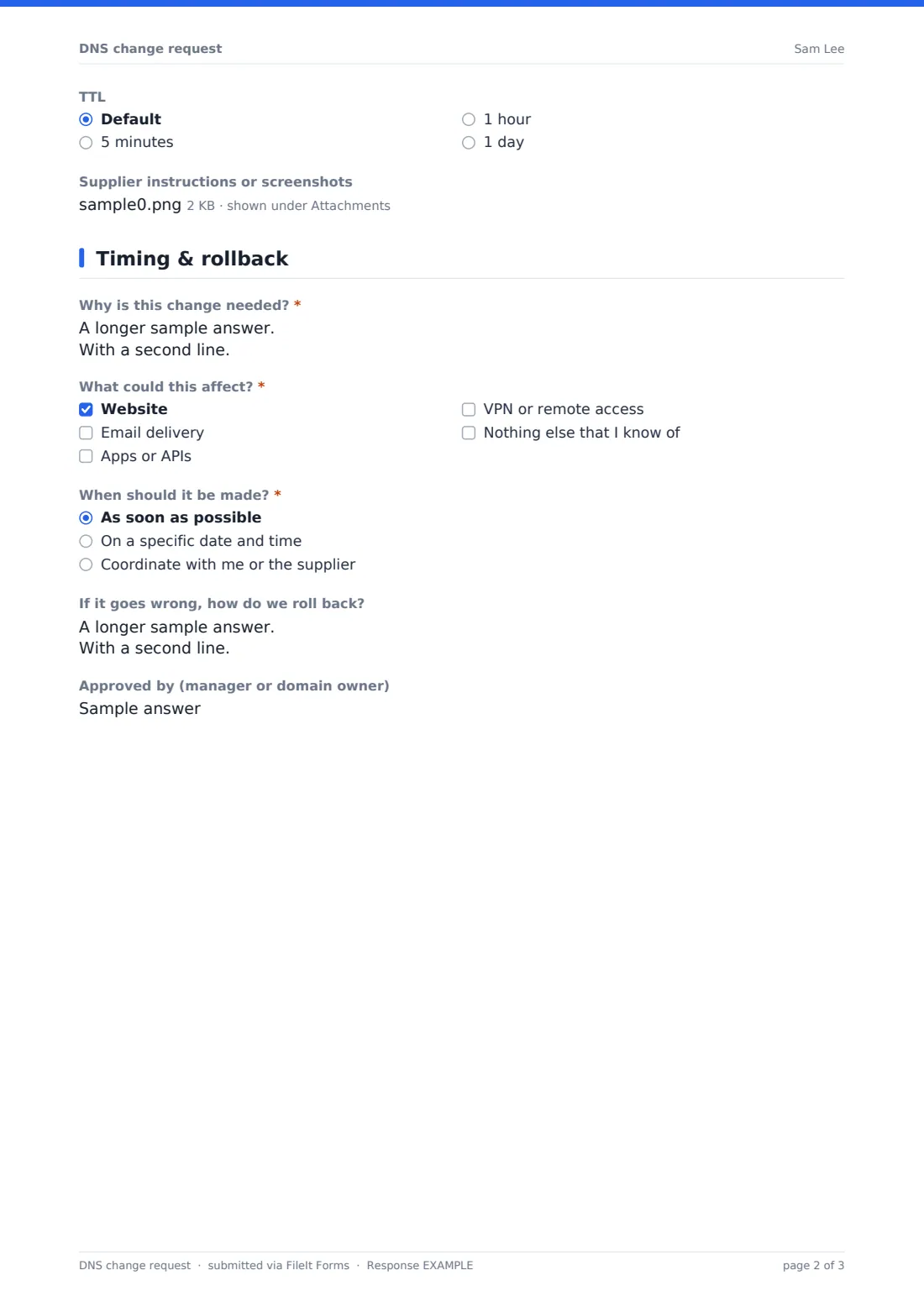
- TTL Default · 5 minutes · 1 hour · 1 day
- Supplier instructions or screenshots
3 Timing & rollback
- Why is this change needed?*
- What could this affect?* Website · Email delivery · Apps or APIs · VPN or remote access · Nothing else that I know of
- When should it be made?* As soon as possible · On a specific date and time · Coordinate with me or the supplier
- Date* asked only when it applies
- Time asked only when it applies
- If it goes wrong, how do we roll back?
- Approved by (manager or domain owner)
The dNS change request form, page by page
1 Requester
Name, work email and team identify who's asking. "Is this for a supplier or third-party service?" opens a field for the supplier or service name, which helps when you later wonder why a record exists.
2 The record
The requester gives the domain and chooses whether to add, change or delete a record, then picks the record type — A, AAAA, CNAME, MX, TXT, SRV, NS, CAA or other — and the "Host / name", with @ for the domain itself. Picking TXT asks what it's for: SPF, DKIM, DMARC or domain verification. "Current value" appears for changes and deletions; "New value" for additions and changes, with a reminder to copy it exactly. MX records ask for a priority, and an optional TTL defaults to your normal setting. Up to three files of supplier instructions or screenshots can be attached.
3 Timing & rollback
The requester explains why the change is needed and ticks what it could affect: website, email delivery, apps or APIs, VPN or remote access. They choose as soon as possible, a specific date and time, or to coordinate with them or the supplier. A rollback box and an optional approver name finish the request.
Make the template yours
- Turn the domain question into a dropdown listing the domains you actually own
- Make the approver field required for changes to your main domain
- Add your registrar or DNS provider to the cover text so suppliers know who to expect
- Send copies of every request to your web agency with the notification settings
- File requests into a vault folder per domain
- Remove record types you never use to keep the form short
Tips for a better dNS change request form
- Ask for the supplier's instructions as a file — copying long values by hand is where most errors happen
- Record the current value before changing anything; it's your rollback plan
- Lower the TTL ahead of a planned migration so the switch takes effect faster
- Check "What could this affect?" before touching MX or SPF records
- Delete records for services you've stopped using
- Confirm with the requester once the change is visible
Every response becomes a PDF in your vault
Each submission becomes a PDF in your vault, with any attached instructions kept alongside it, and you're notified by email. The requester receives a copy of exactly what they asked for.
From the Responses table you can search by domain or record, export to CSV, and open any request's PDF — useful when an email deliverability problem leads back to a DNS change made months ago.
- Start from this template. It opens in the FileIt Forms designer — change any question, add pages, set the rules for when questions appear.
- Share it. Turn on a public link, or send it to people by email, each with their own link. They don’t need a FileIt account.
- Get the answers as PDFs. Each response is saved as a PDF in the vault folder you choose, with uploaded files attached — and listed in a Responses table you can export to CSV.
DNS change request form: frequently asked questions
Is the DNS change request template free?
Yes. It's included in FileIt's Forms app on every plan, including free.
Does FileIt update my DNS records?
No. The form records the request. Whoever manages your DNS makes the change at your registrar or DNS host.
Can suppliers fill it in?
Yes. Share the public link or send it by email — they don't need a FileIt account.
Why does the form ask for the current value?
It shows exactly what's being replaced and gives you a ready-made rollback if the new value causes a problem.
Which record types are covered?
A, AAAA, CNAME, MX, TXT, SRV, NS and CAA, plus an "Other" choice with a box to name the type.
Can I limit it to my own domains?
Yes. Change the domain question to a dropdown in the designer and list your domains as options.