What is the product demo request form template?
A "Book a demo" button that only asks for an email address creates work: a reply to ask about the company and use case, another to find a time, and often a demo that misses what the prospect actually cared about.
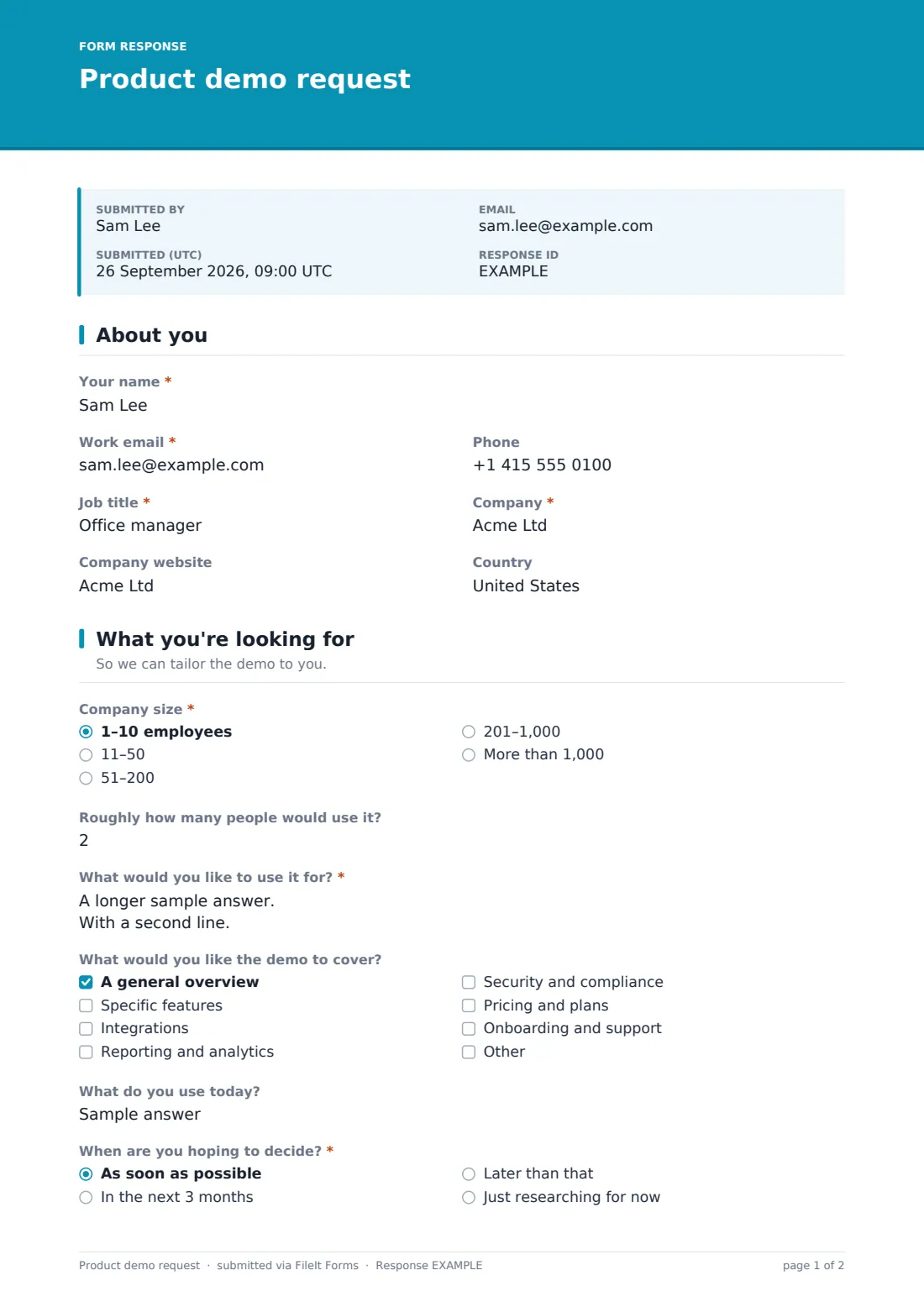
This product demo request template collects what a good demo needs up front. Prospects tell you about themselves and their company, how many people would use the product, what they want to use it for and which topics the demo should cover, what they use today, and when they hope to decide. They then choose a live video call, an in-person visit or a recorded walkthrough, and — for live demos — give two preferred dates and times, their time zone and who else will join.
Each request is saved as a PDF in your FileIt vault, and the Responses table gives your team a queue of requests to schedule.
- Best for
- Software companies and B2B businesses offering product demos
- Filled in by
- Prospective customers, usually from your website
- Time to complete
- About 3-4 minutes
- Includes
- Scheduling questions that adapt to the demo format, and topics to cover
Who uses a product demo request form?
- A software company adding a demo request page to its website
- An equipment supplier offering on-site demonstrations to trade customers
- A startup whose founders run every demo and need to prepare for each one
- A sales team offering recorded walkthroughs to prospects in other time zones
- A reseller booking demos of a partner's product
- An event team collecting demo requests from booth visitors
Questions on this product demo request form
26 questions over 3 pages · includes conditional questions, multiple pages, consent checkbox.
1 About you
- Your name*
- Work email*
- Phone
- Job title*
- Company*
- Company website
- Country
2 What you're looking for
- Company size* 1–10 employees · 11–50 · 51–200 · 201–1,000 · More than 1,000
- Roughly how many people would use it?
- What would you like to use it for?*
- What would you like the demo to cover? A general overview · Specific features · Integrations · Reporting and analytics · Security and compliance · Pricing and plans · Onboarding and support
- Which features? asked only when it applies
- What do you use today?
- When are you hoping to decide?* As soon as possible · In the next 3 months · Later than that · Just researching for now
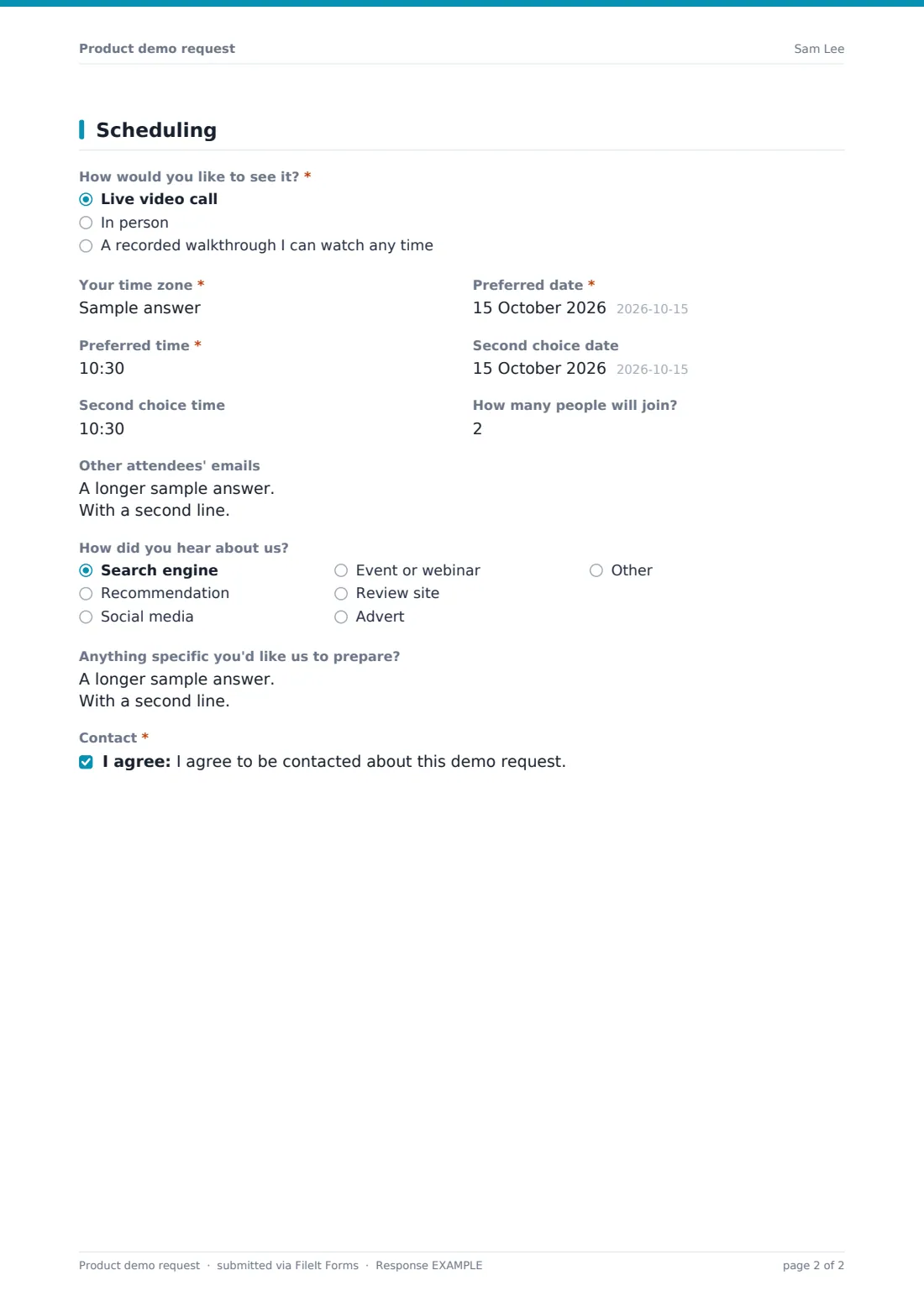
3 Scheduling
- How would you like to see it?* Live video call · In person · A recorded walkthrough I can watch any time
- Your time zone* asked only when it applies
- Preferred date* asked only when it applies
- Preferred time* asked only when it applies
- Second choice date asked only when it applies
- Second choice time asked only when it applies
- Where should we meet? asked only when it applies
- How many people will join? asked only when it applies
- Other attendees' emails asked only when it applies
- How did you hear about us? Search engine · Recommendation · Social media · Event or webinar · Review site · Advert · Other
- Anything specific you'd like us to prepare?
- Contact*
The product demo request form, page by page
1 About you
The prospect gives their name, work email, phone, job title, company, company website and country.
2 What you're looking for
A required company size question and an optional estimate of how many people would use the product come first. The prospect describes what they'd like to use it for, and ticks what the demo should cover: a general overview, specific features (which asks which ones), integrations, reporting and analytics, security and compliance, pricing and plans, or onboarding and support.
They note what they use today and when they're hoping to decide, from as soon as possible to just researching.
3 Scheduling
The prospect chooses a live video call, an in-person demo or a recorded walkthrough. For a live or in-person demo, they give their time zone, a preferred date and time and an optional second choice, how many people will join and the other attendees' emails; in-person demos also ask where to meet. A recorded walkthrough skips the scheduling questions entirely.
The page ends with how they heard about you, anything they'd like you to prepare, and their agreement to be contacted about the request.
Make the template yours
- Replace the demo topics with your product's main modules or features
- Remove the in-person option if you only run demos online
- Edit the confirmation message to say how quickly you'll reply with an invitation
- Add a question qualifying the prospect, such as their industry or budget
- Send new requests to a shared sales inbox using the notification emails setting
- Remove the recorded walkthrough option if you don't have one ready to send
Tips for a better product demo request form
- Reply within a working day — demo requests cool quickly
- Read the use case before the call and open the demo with it
- Confirm the time in the prospect's time zone in your invitation
- Invite the other attendees they listed so nobody is forwarded a stale link
- Track which topics people ask for most — it tells you what to lead with
- Follow up after the demo with whatever they asked you to prepare
Every response becomes a PDF in your vault
Each demo request is saved as a PDF in your vault. With owner notifications on, your sales team is emailed as soon as it arrives, and the prospect receives a copy of what they submitted.
The Responses table shows every request with the chosen format and preferred times, and you can export it to a CSV. FileIt doesn't book calendar slots automatically — your team sends the invitation for one of the preferred times.
- Start from this template. It opens in the FileIt Forms designer — change any question, add pages, set the rules for when questions appear.
- Share it. Turn on a public link, or send it to people by email, each with their own link. They don’t need a FileIt account.
- Get the answers as PDFs. Each response is saved as a PDF in the vault folder you choose, with uploaded files attached — and listed in a Responses table you can export to CSV.
Product demo request form: frequently asked questions
Is this demo request form free?
Yes. It's a starter template in the FileIt Forms app, and every question can be edited.
Does the form book the demo in our calendar?
No. It collects preferred dates and times; your team confirms one and sends the invitation from your own calendar.
Can we embed it on our website?
You can link to the form from a button or page on your website; prospects fill it in on FileIt's form page.
What happens if someone chooses a recorded walkthrough?
The scheduling questions are hidden, and you'll know to send them your recording instead of booking a call.
Can we ask different questions for different products?
Yes. Duplicate the form for each product and adjust the topics and use-case wording.
Do prospects need an account?
No. Anyone with the link can request a demo.