What is the appliance repair request form template?
The most expensive appliance repair is the second visit. When the technician arrives knowing the brand, model number, error code and symptoms, they can bring the right parts. This form gets that information from the customer when they book.
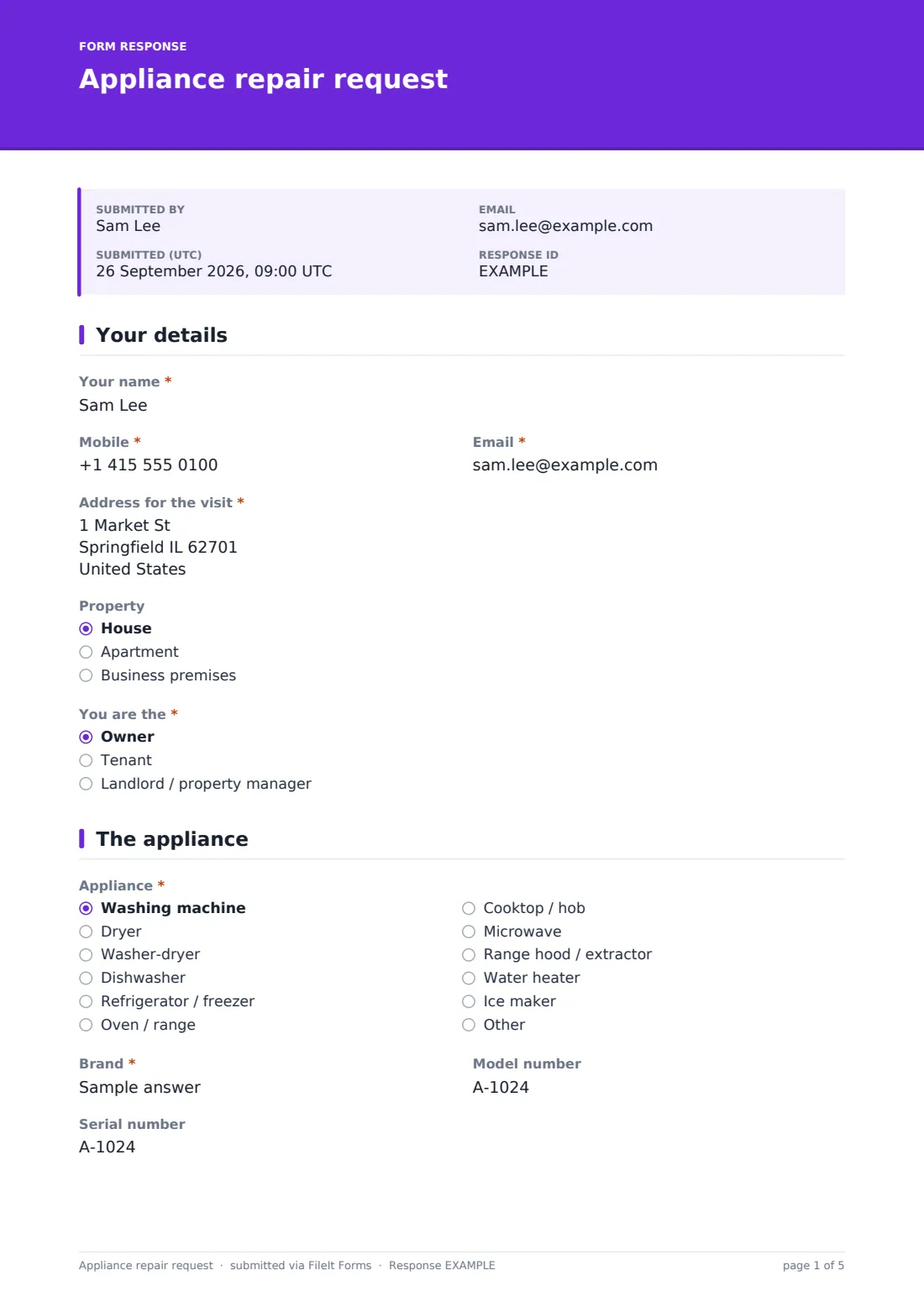
Customers give their contact details and address, identify the appliance and its warranty status, and describe the fault with a checklist and in their own words. The error code field appears only when an error is showing, proof of purchase is asked for under a manufacturer warranty, and a safety note appears if there's a gas smell, sparking or water near electrics.
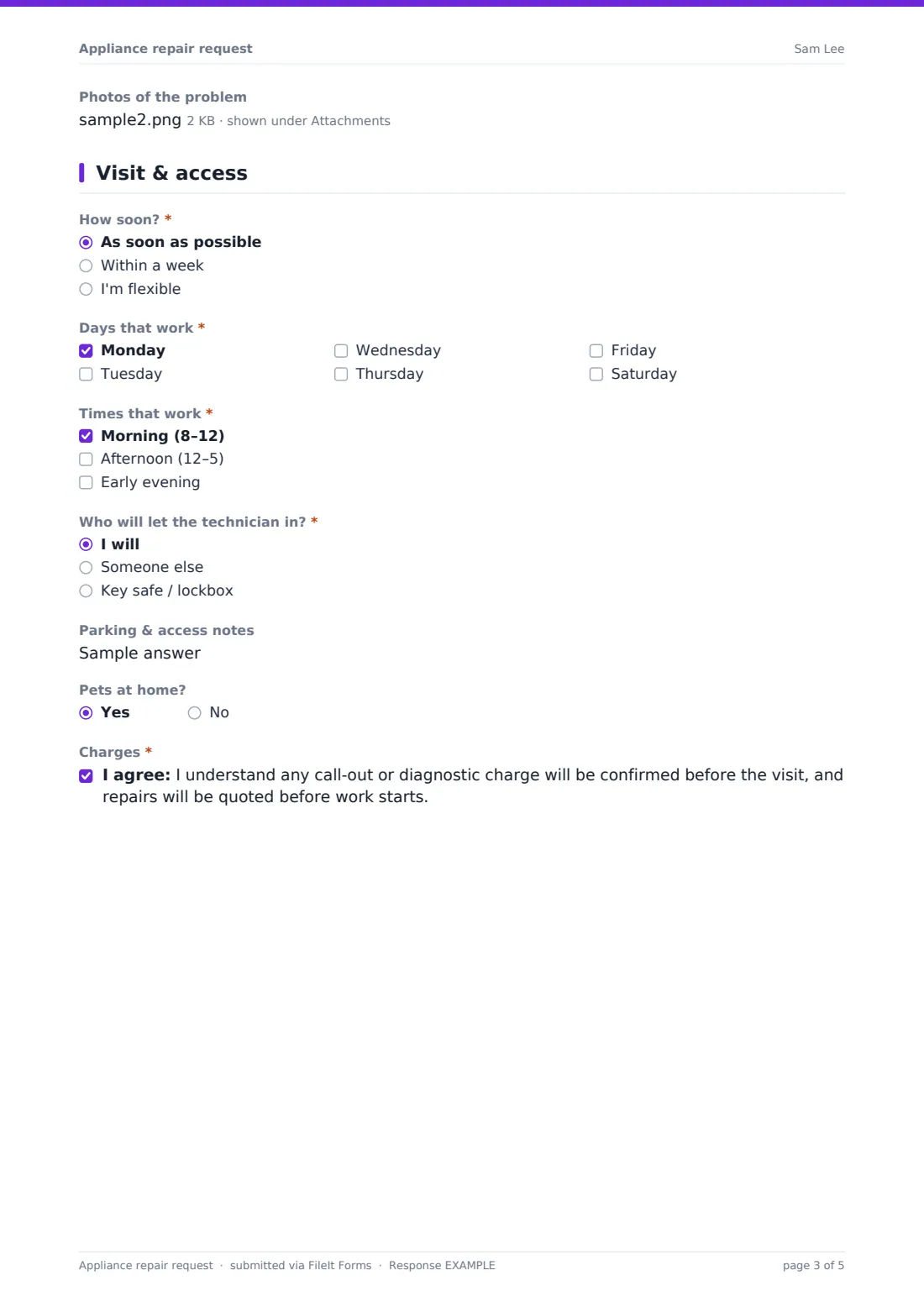
The last page collects availability and access, including who will let the technician in, and a confirmation that charges will be agreed before any work. Each request is filed as a PDF in your FileIt vault with photos attached.
- Best for
- Appliance repair businesses, handymen and property maintenance teams
- Filled in by
- Customers booking a repair
- Time to complete
- About 4–5 minutes
- Includes
- Error code, warranty, fault photos, safety note, access and availability
Who uses a appliance repair request form?
- A homeowner books a repair for a washing machine that won't drain
- A tenant reports a broken fridge to the landlord's repair company
- A restaurant books a service for a leaking dishwasher
- A customer with an extended warranty plan requests a visit
- A repair business collects model numbers to order parts before the visit
- A property manager books repairs on behalf of tenants
Questions on this appliance repair request form
34 questions over 4 pages · includes file upload, conditional questions, multiple pages, consent checkbox.
1 Your details
- Your name*
- Mobile*
- Email*
- Address for the visit*
- Property House · Apartment · Business premises
- You are the* Owner · Tenant · Landlord / property manager
2 The appliance
- Appliance* Washing machine · Dryer · Washer-dryer · Dishwasher · Refrigerator / freezer · Oven / range · Cooktop / hob · Microwave · Range hood / extractor · Water heater · Ice maker · Other
- Brand*
- Model number
- Serial number
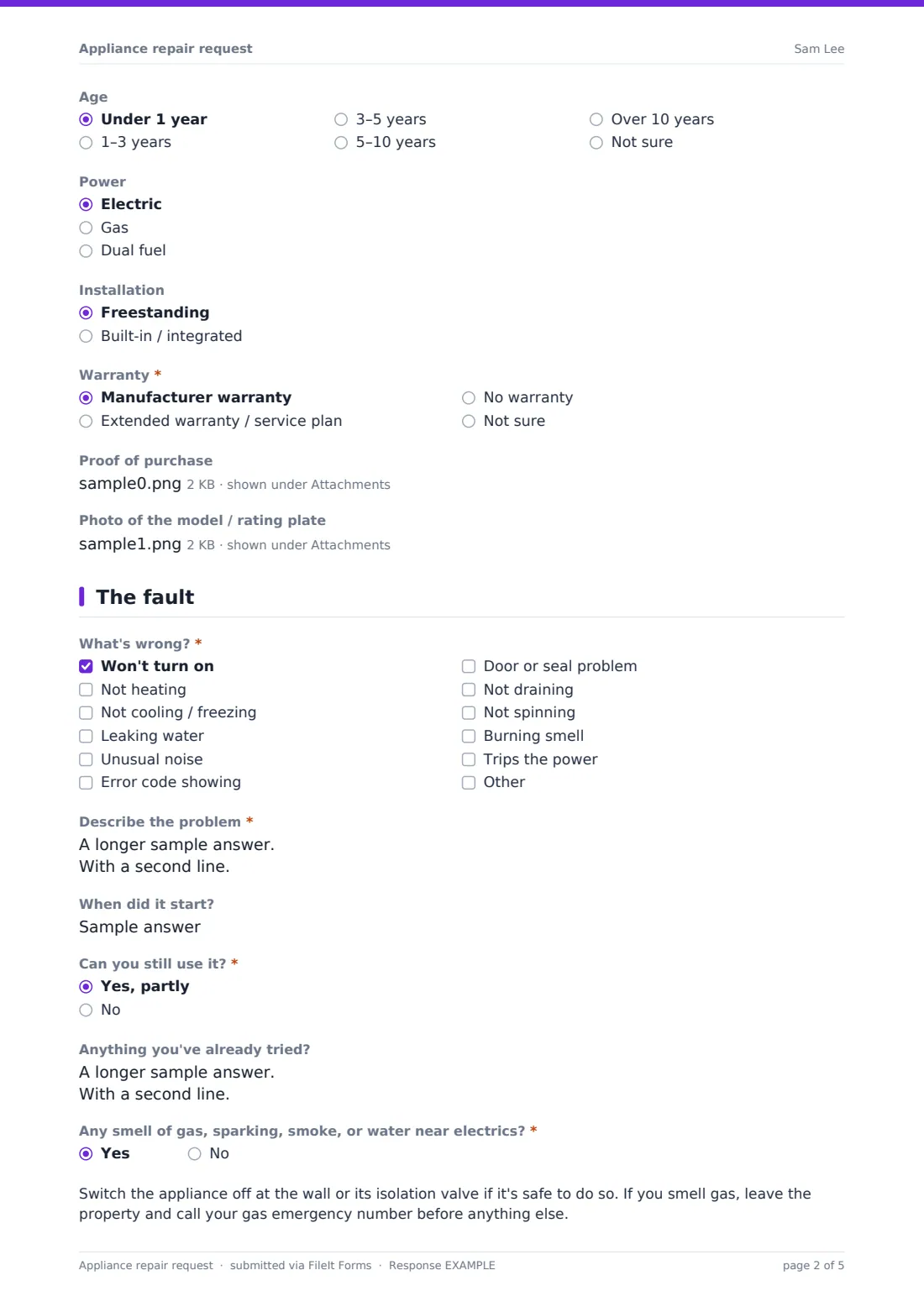
- Age Under 1 year · 1–3 years · 3–5 years · 5–10 years · Over 10 years · Not sure
- Power Electric · Gas · Dual fuel
- Installation Freestanding · Built-in / integrated
- Warranty* Manufacturer warranty · Extended warranty / service plan · No warranty · Not sure
- Plan provider & reference asked only when it applies
- Proof of purchase asked only when it applies
- Photo of the model / rating plate
3 The fault
- What's wrong?* Won't turn on · Not heating · Not cooling / freezing · Leaking water · Unusual noise · Error code showing · Door or seal problem · Not draining · Not spinning · Burning smell · Trips the power
- Error code* asked only when it applies
- Describe the problem*
- When did it start?
- Can you still use it?* Yes, partly · No
- Anything you've already tried?
- Any smell of gas, sparking, smoke, or water near electrics?*
- Photos of the problem
4 Visit & access
- How soon?* As soon as possible · Within a week · I'm flexible
- Days that work* Monday · Tuesday · Wednesday · Thursday · Friday · Saturday
- Times that work* Morning (8–12) · Afternoon (12–5) · Early evening
- Who will let the technician in?* I will · Someone else · Key safe / lockbox
- Their name and phone* asked only when it applies
- Key safe location asked only when it applies
- Parking & access notes
- Pets at home?
- Charges*
The appliance repair request form, page by page
1 Your details
The customer's name, mobile, email and address for the visit are required, with the property type and whether they're the owner, a tenant or a landlord. Tenants see a note suggesting they check with the landlord first.
2 The appliance
The appliance type and brand are required. Model and serial numbers (with a hint on where to find them), age, power type and installation type follow. Warranty status is required; an extended warranty asks for the plan provider and reference, and a manufacturer warranty asks for proof of purchase. A photo of the rating plate can be added.
3 The fault
A required checklist records what's wrong — won't turn on, not heating, not cooling, leaking, noise, error code, door or seal, not draining, not spinning, burning smell, or tripping the power. Ticking error code requires the code. A description of the problem and whether it can still be used are required.
A required safety question asks about gas smells, sparking, smoke or water near electrics; answering yes shows a note to switch off safely and, for gas, to leave and call the gas emergency number first. Photos can be attached.
4 Visit & access
The customer chooses urgency and the days and times that work, and who will let the technician in: themselves, someone else (name and phone required), or a key safe (location only — the code is taken by phone). Parking notes and pets are optional, and the customer confirms that charges will be agreed before the visit and repairs quoted before work starts.
Make the template yours
- Replace the appliance list with the appliances you repair
- Turn the brand field into a dropdown of the brands you're authorized to repair
- Edit the charges statement to show your call-out fee
- Add your service area to the form's cover text
- File requests by appliance type or by postcode
- Send requests straight to your scheduling inbox
Tips for a better appliance repair request form
- Ask for the model number every time — it's usually the difference between one visit and two
- Ask for a photo of the rating plate if the customer can't find the model
- Call customers who answer yes to the safety question straight away
- Never collect key safe codes in writing
- Confirm the call-out charge before booking the visit
- Check warranty status before quoting
Every response becomes a PDF in your vault
Each request is filed as a PDF in your FileIt vault with photos and proof of purchase attached, and your team can be notified by email to schedule the visit.
Most repair businesses call or text to confirm a slot, order parts using the model number, and keep the job's invoice in the same folder as the request.
- Start from this template. It opens in the FileIt Forms designer — change any question, add pages, set the rules for when questions appear.
- Share it. Turn on a public link, or send it to people by email, each with their own link. They don’t need a FileIt account.
- Get the answers as PDFs. Each response is saved as a PDF in the vault folder you choose, with uploaded files attached — and listed in a Responses table you can export to CSV.
Appliance repair request form: frequently asked questions
Is this appliance repair request form template free?
Yes. It's included with the Forms app on every FileIt account, including the free plan, and you can edit any question to fit the way you work.
Can customers attach photos?
Yes — of the rating plate, the fault, and proof of purchase for warranty repairs.
What if there's a gas smell?
The form shows a note telling the customer to leave the property and call their gas emergency number before anything else.
Do you collect key safe codes?
No. The form asks for the key safe's location and explains the code will be taken by phone.
Can tenants book a repair?
Yes. Tenants see a note suggesting they check with their landlord, who may have their own repair arrangement.
Can I show my call-out fee?
Yes. Edit the charges statement or the cover text to show your fees.