What is Form VA-4?
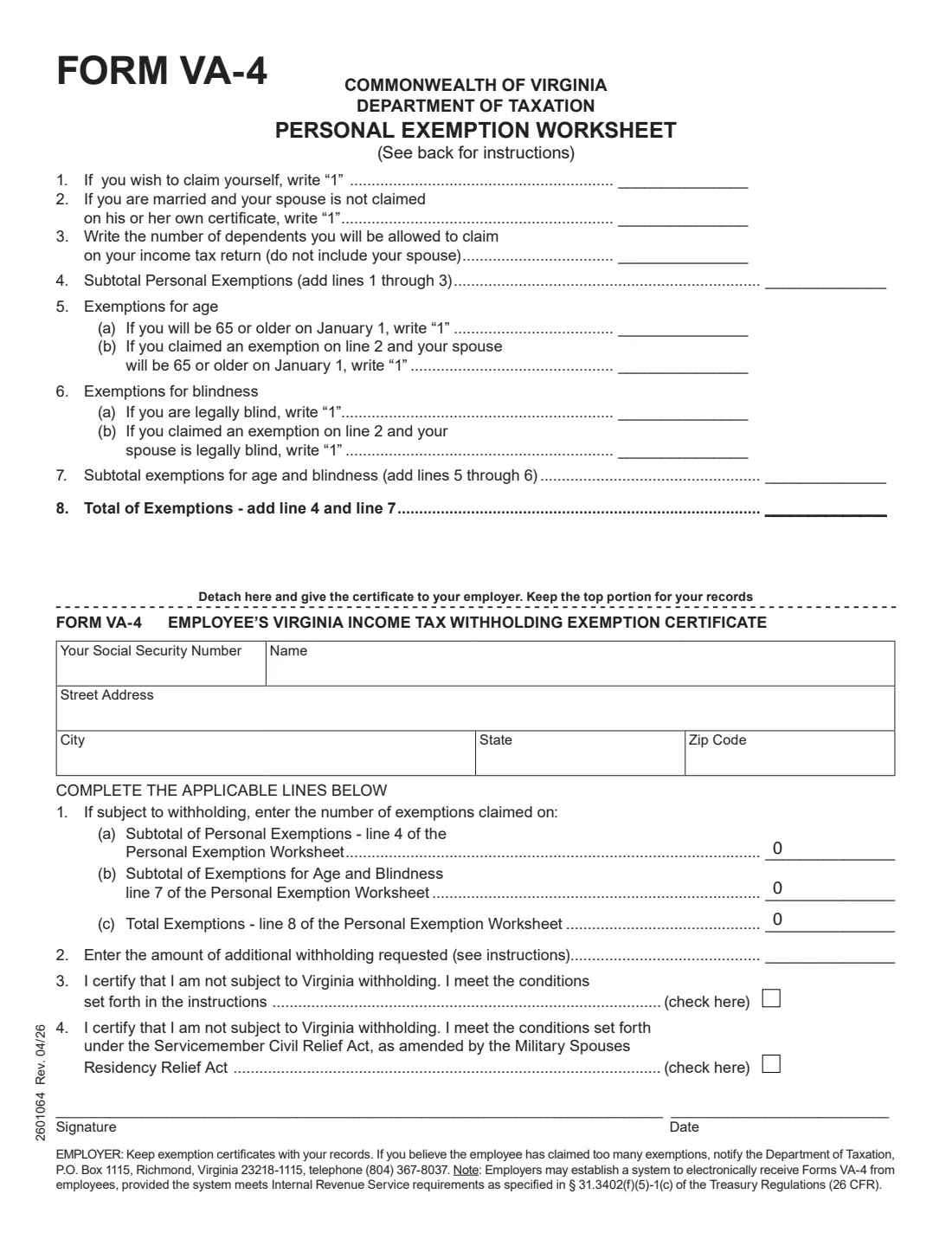
Form VA-4 is Virginia's employee withholding certificate, published by the Virginia Department of Taxation. You use it to tell your employer whether you are subject to Virginia income tax withholding and how many exemptions you can claim. The current edition is Rev. 04/26. The instructions say you must file it with your employer when your employment begins — if you don't, your employer must withhold as if you had no exemptions.
The VA-4 is built around a Personal Exemption Worksheet at the top of the page: one exemption each for yourself and your spouse, one per dependent, and extra ones for being 65 or older or legally blind. The totals go onto the certificate at the bottom, which you detach and give to your employer. The certificate also lets you request additional withholding or certify that you are not subject to Virginia withholding at all — for example because you live in Kentucky or D.C. and commute, or you're a qualifying military spouse.
FileIt lets you fill out the VA-4 online in a guided form. It pre-fills your name and address from the People records in your vault, adds up the worksheet, copies the totals to line 1, and prints your answers into Virginia Tax's official PDF. The finished form is saved in your vault and can be sent for e-signature. FileIt never submits anything to Virginia Tax or your employer — you give the certificate to your employer yourself.
- Who fills it
- The employee: the Personal Exemption Worksheet, then the certificate.
- Given to
- Your employer (the certificate part). You keep the worksheet at the top.
- When
- When your employment begins, and each calendar year you claim you are not subject to withholding under line 3.
- Signatures
- The employee signs and dates the certificate.
- Edition
- Form VA-4 (Rev. 04/26).
- Cost
- Free to fill out on any FileIt account.
Who needs to fill out Form VA-4?
- New employees who will have Virginia income tax withheld from their wages.
- Current employees whose exemptions have changed after marriage, a new dependent, turning 65 or a change in eyesight.
- Employees who want additional Virginia tax withheld from each paycheck.
- People who had no Virginia income tax liability last year and expect none this year, or whose Virginia adjusted gross income will be under the filing threshold printed on the form.
- Residents of Kentucky or the District of Columbia who commute daily to work in Virginia.
- Domiciliaries of Maryland, Pennsylvania or West Virginia whose only Virginia income is wages taxed by their home state.
- Spouses of service members stationed in Virginia who qualify under the Servicemember Civil Relief Act, as amended by the Military Spouses Residency Relief Act.
When to use Form VA-4
- When you start a job with a Virginia employer — the instructions say you must file the VA-4 when your employment begins.
- After a change in the exemptions you can claim, such as marriage, divorce, a new dependent, or you or your spouse turning 65.
- At the start of each calendar year if you claim you are not subject to Virginia withholding on line 3 — the form must be filed for each year you claim it.
- When you move to or from a neighboring state and your Virginia withholding status changes.
- When you want to start or stop additional withholding.
What you need before you start
- Your Social Security number, name and street address.
- Whether your spouse is claimed on his or her own certificate, if you're married.
- The number of dependents you will be allowed to claim on your Virginia income tax return (not counting your spouse).
- Whether you, or a spouse you claim, will be 65 or older on January 1, or is legally blind.
- Any additional amount you want withheld, and whether your employer has agreed to it.
- For a line 4 military spouse claim: a copy of your spousal military identification card to attach.
- Any written permission from the Department of Taxation, if you need to claim more exemptions than on your return.
What’s on Form VA-4
The 2026 edition has 2 pages. FileIt asks for it in 4 parts, and it is signed by Employee:
- Your detailsEmployee
- Personal Exemption WorksheetEmployee
- Certificate lines 1–4Employee
- SignatureEmployee
How to fill out Form VA-4, step by step
1 Personal Exemption Worksheet: lines 1–4
Write "1" on line 1 to claim yourself, and "1" on line 2 if you're married and your spouse isn't claimed on his or her own certificate. On line 3 enter the number of dependents you'll be allowed to claim on your income tax return; the instructions remind you a spouse is not a dependent. Line 4 is the subtotal of personal exemptions.
In FileIt you tick the boxes and enter the dependents, and line 4 is added up for you.
2 Personal Exemption Worksheet: lines 5–8
Line 5(a) is one exemption if you will be 65 or older on January 1, and 5(b) one more if you claimed your spouse on line 2 and your spouse will be 65 or older. Line 6(a) is for being legally blind, and 6(b) for a spouse you claimed who is legally blind. Line 7 is the subtotal for age and blindness, and line 8 is the total of exemptions (line 4 plus line 7).
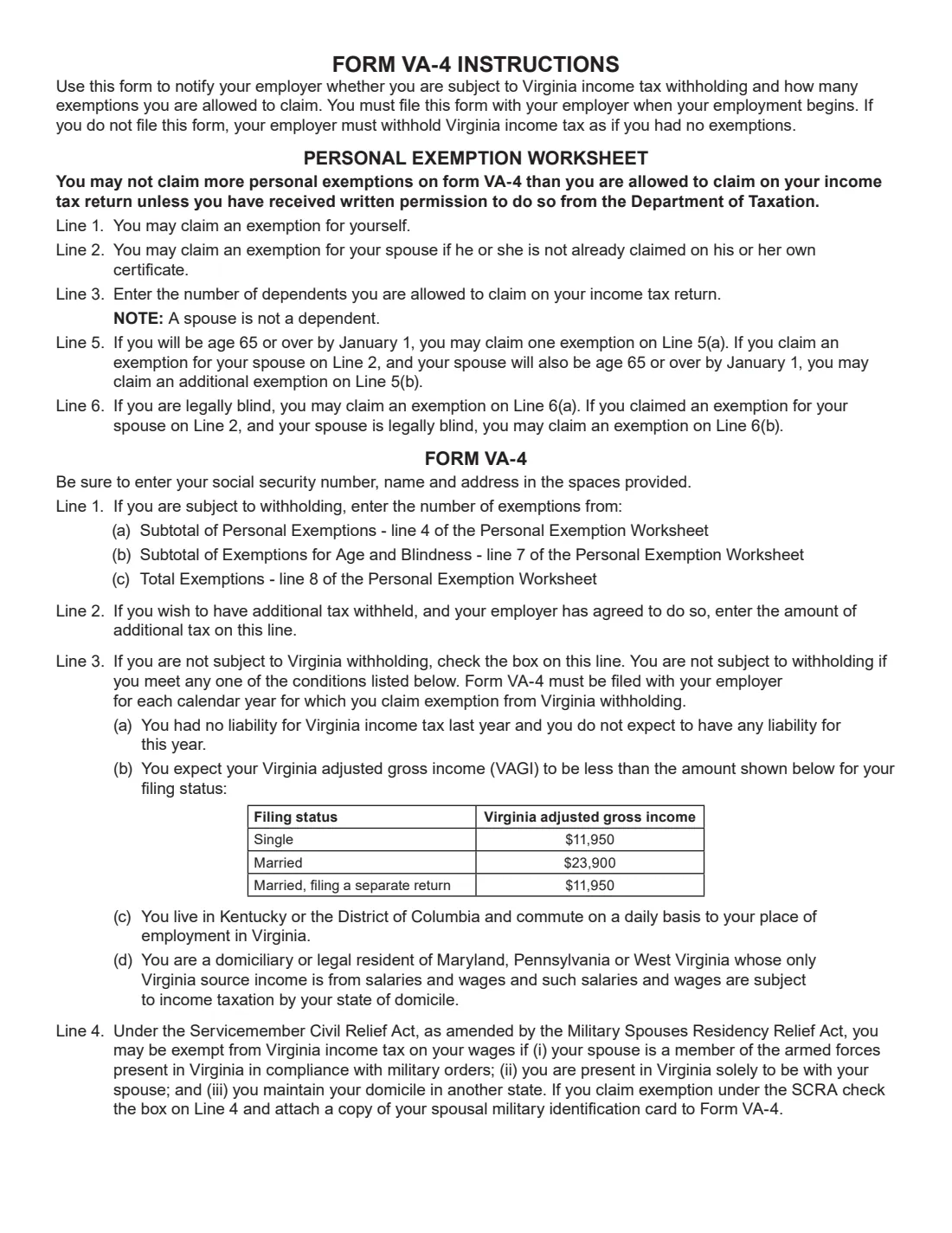
You can't claim more personal exemptions on the VA-4 than on your tax return unless the Department of Taxation has given you written permission.
3 Certificate: your details
Below the dashed line is the certificate you give your employer. Enter your Social Security number, name, street address, city, state and ZIP code. FileIt fills these from the person's record in your vault.
4 Certificate line 1: Exemptions claimed
If you are subject to withholding, copy the worksheet totals: 1(a) the subtotal of personal exemptions (worksheet line 4), 1(b) the subtotal for age and blindness (line 7), and 1(c) total exemptions (line 8). FileIt copies them across automatically and leaves line 1 empty if you check line 3 or 4.
5 Certificate line 2: Additional withholding
If you want extra tax withheld and your employer has agreed to do so, enter the amount per pay period.
6 Certificate line 3: Not subject to Virginia withholding
Check this box only if you meet one of the conditions in the instructions: (a) no Virginia income tax liability last year and none expected this year; (b) Virginia adjusted gross income expected to be below $11,950 (single, or married filing separately) or $23,900 (married), as printed on the Rev. 04/26 form; (c) you live in Kentucky or the District of Columbia and commute daily to work in Virginia; or (d) you are a domiciliary or legal resident of Maryland, Pennsylvania or West Virginia whose only Virginia income is wages taxed by your home state. You must file a VA-4 for each calendar year you claim this.
7 Certificate line 4: Military spouse (SCRA)
Check this box if your spouse is a member of the armed forces present in Virginia under military orders, you are in Virginia solely to be with your spouse, and you maintain your domicile in another state. The instructions say to attach a copy of your spousal military identification card to the VA-4.
8 Signature and date
Sign and date the certificate. FileIt prints the date, and you can sign by hand or with FileIt's e-signature. Then detach the certificate from the worksheet: the certificate goes to your employer and the worksheet stays with you.
Common mistakes to avoid
- Claiming more exemptions than you'll be allowed on your Virginia return without written permission from the Department of Taxation.
- Counting your spouse as a dependent on line 3 — a spouse goes on line 2, never line 3.
- Claiming the spouse age or blindness exemption (5(b) or 6(b)) without having claimed your spouse on line 2.
- Filling in exemptions on line 1 and also checking line 3 or 4 — line 1 is only for employees subject to withholding.
- Forgetting to attach a copy of your spousal military ID card when you check line 4.
- Not filing a new VA-4 each calendar year when you claim you are not subject to withholding under line 3.
- Giving your employer the worksheet instead of the certificate, or not handing in a VA-4 at all.
After you fill it out
Sign and date the certificate, detach it, and give it to your employer. Keep the Personal Exemption Worksheet at the top for your records. The form notes that employers may set up a system to receive VA-4s electronically if it meets IRS requirements, so ask your employer how they prefer to receive it.
FileIt saves the finished PDF in the person's folder in your vault, so you have both the worksheet and the certificate for reference.
Your employer keeps the certificate and can notify the Department of Taxation if it believes too many exemptions were claimed. Review your VA-4 whenever your family situation changes, and file a new one every year you claim line 3.
Fill out Form VA-4 online with FileIt
- Pick the person. Choose someone from People and FileIt fills in their name, date of birth, address and other details it already knows.
- Answer plain-language questions. One part of the form at a time, with the official help text beside each question — 25 fields in all. Your answers save as you go.
- Check the live preview. Watch your answers land on the real Virginia Department of Taxation (Virginia Tax) form, and let FileIt do any worksheet arithmetic.
- Generate the official PDF. FileIt prints your answers into the agency’s own PDF and files it in that person’s folder in your vault. Sign it, or send it for e-signature.
FileIt fills the form — it never files or submits anything for you. Deliver the finished form to whoever asked for it, the way the form’s instructions say.
Start Form VA-4 now — it’s freeForm VA-4: frequently asked questions
What is Form VA-4?
Form VA-4 is the Employee's Virginia Income Tax Withholding Exemption Certificate. It tells your employer whether you are subject to Virginia withholding and how many exemptions to allow, and lets you request extra withholding.
Can I fill out the VA-4 online?
Yes. FileIt lets you fill out the VA-4 online free. It adds up the Personal Exemption Worksheet, copies the totals to the certificate, and prints everything into Virginia Tax's official PDF for you to download, print or send for e-signature.
Where do I send Form VA-4?
Give the certificate to your employer — you don't send it to the Department of Taxation. Keep the worksheet at the top for yourself. FileIt never submits the form for you.
What happens if I don't give my employer a VA-4?
The instructions say your employer must withhold Virginia income tax as if you had no exemptions.
How many exemptions can I claim on the VA-4?
One for yourself, one for your spouse if not claimed on their own certificate, one per dependent you can claim on your return, and extra ones for being 65 or older on January 1 or legally blind (and for a spouse you claim). You can't claim more than on your return without written permission.
I live in Maryland and work in Virginia. Do I need to fill out a VA-4?
If you are a domiciliary or legal resident of Maryland, Pennsylvania or West Virginia and your only Virginia income is wages taxed by your home state, you can check line 3 to certify you're not subject to Virginia withholding. You must file a new VA-4 for each calendar year you claim this.
What do military spouses need to do on the VA-4?
If you qualify under the Servicemember Civil Relief Act as amended by the Military Spouses Residency Relief Act, check line 4 and attach a copy of your spousal military identification card to the form.
Can I sign the VA-4 electronically?
FileIt can send the completed VA-4 for e-signature. The form notes that employers may set up electronic systems to receive VA-4s that meet IRS requirements; if your employer wants a paper original, print it and sign by hand.
Official sources
- Blank form (PDF), published by Virginia Department of Taxation (Virginia Tax): https://www.tax.virginia.gov/sites/default/files/taxforms/withholding/any/va-4-any.pdf
- Official instructions and guidance: https://www.tax.virginia.gov/withholding-tax
- Edition shown on this page: Form VA-4 (2601064 Rev. 04/26) (checked 2026-09-26).
FileIt is not affiliated with or endorsed by Virginia Department of Taxation (Virginia Tax) or any government. This page explains the form in general terms and is not legal, tax or immigration advice. Always read the official instructions, and check that you are using the edition the recipient accepts. Page last reviewed 2026-09-26.