What is Form SSA-1696?
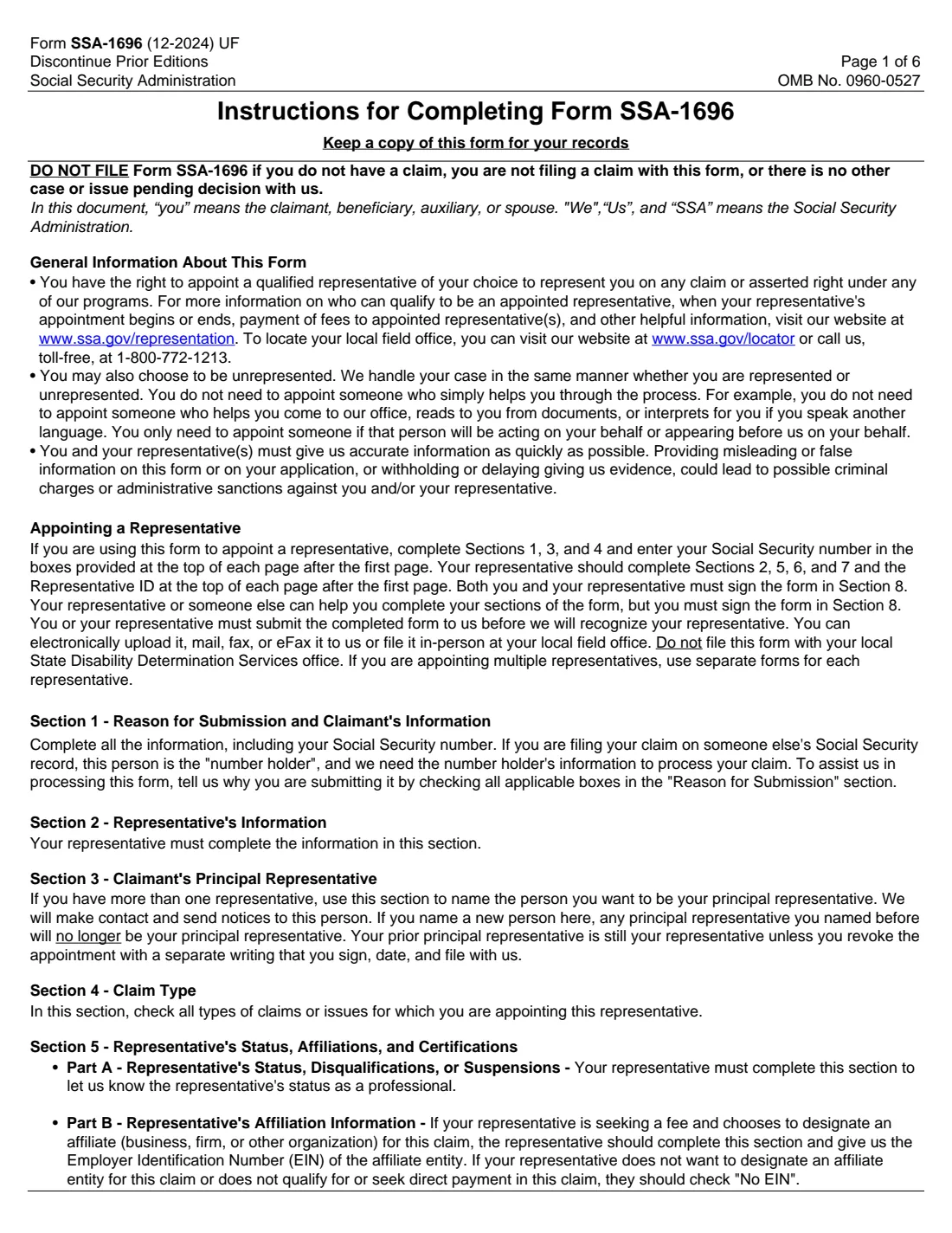
Form SSA-1696, Claimant's Appointment of a Representative, is how you tell the Social Security Administration (SSA) that someone will act for you on a claim or asserted right under Title II (retirement, survivors and disability insurance), Title XVI (SSI), Title XVIII (Medicare) or Title VIII (Special Veterans Benefits). It is the Social Security counterpart of an IRS power of attorney. Your representative can be an attorney or a non-attorney, but must be qualified, registered with SSA (with a Rep ID) and follow SSA's rules of conduct.
You complete Sections 1, 3 and 4 (your details, your principal representative if you have several, and the claim types) and put your Social Security number at the top of each page. The representative completes Sections 2, 5, 6 and 7: their Rep ID, professional status, any affiliated firm and fee assignment, certifications and the fee arrangement. Both of you sign Section 8. The same form updates an existing appointment. SSA's page notes that a representative cannot charge or collect a fee unless SSA authorizes it first.
FileIt splits the form into a claimant part and a representative part, prints both onto SSA's own PDF (edition 12-2024), repeats the SSN and Rep ID in every page header, and marks the two signature lines for eSignature. FileIt doesn't file it with SSA.
- Who fills it
- The claimant (Sections 1, 3, 4) and the representative (Sections 2, 5, 6, 7).
- Given to
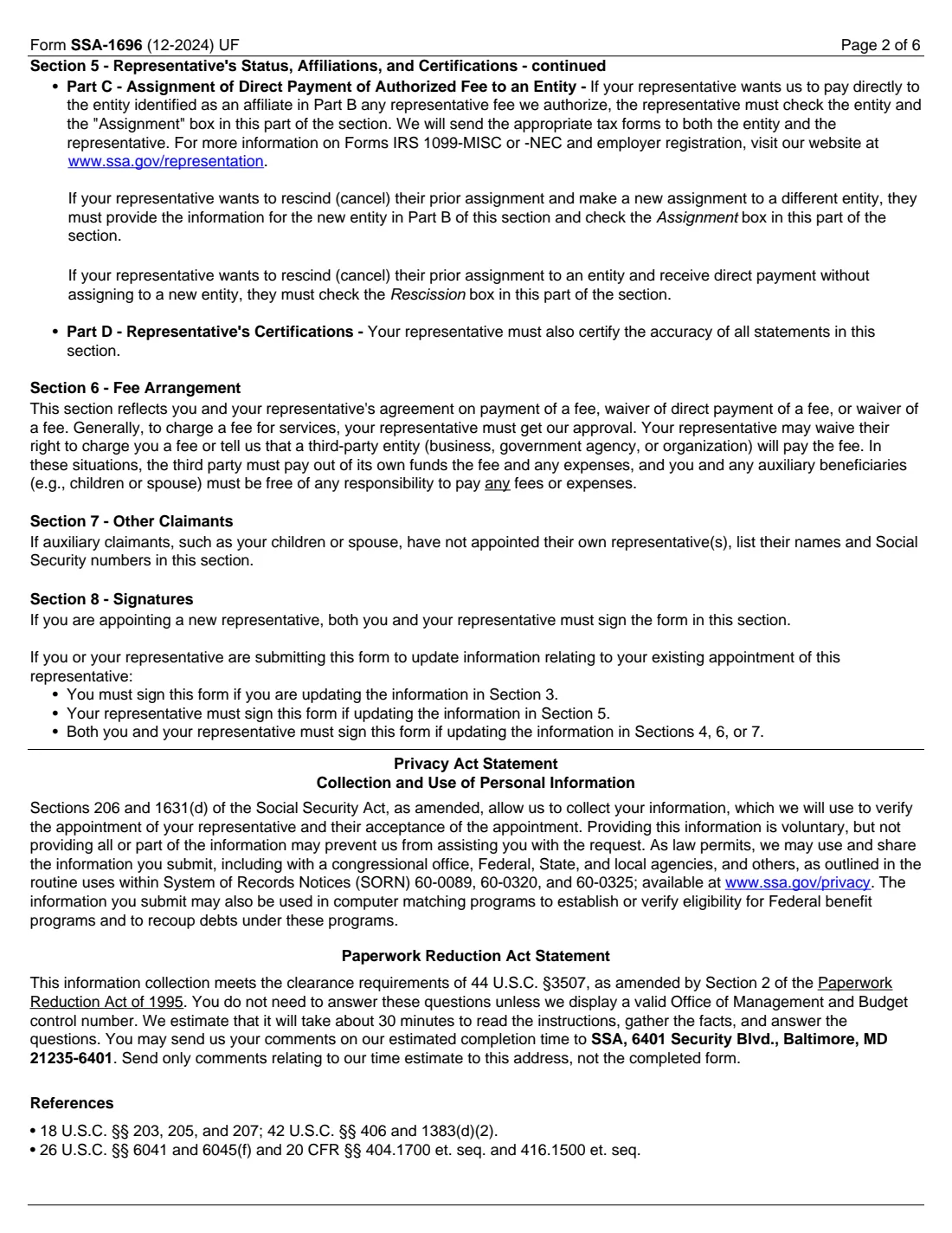
- Your local Social Security office: upload, mail, fax, eFax or in person. Not the State Disability Determination Services.
- When
- When you want someone to act for you on a pending claim, appeal or other issue with SSA, or to update an appointment.
- Signatures
- Both claimant and representative sign Section 8 for a new appointment. Some updates need only one of them.
- Edition
- Form SSA-1696 (12-2024), OMB No. 0960-0527
- One per representative
- Use a separate form for each representative you appoint.
Who needs to fill out Form SSA-1696?
- People applying for or appealing Social Security disability (SSDI) or SSI who want a disability attorney or advocate to handle the case.
- Claimants with a retirement, survivors, Medicare or Special Veterans Benefits issue who want someone to deal with SSA for them.
- Beneficiaries facing a continuing disability review or a post-entitlement issue such as an overpayment, suspension or representative payee question.
- Representatives updating their status, affiliated firm, fee assignment or fee arrangement on an existing appointment.
- Claimants who have several representatives and want to name a principal one to receive SSA's notices.
When to use Form SSA-1696
- Only when you have a claim, are filing one, or have another case or issue pending with SSA. The form says not to file it otherwise.
- Before the representative contacts SSA or appears for you, because SSA recognizes them only once it has the form.
- When something changes, such as the claim types, the fee arrangement or the representative's affiliation. Tick "Update" and the parts that changed.
What you need before you start
- Your name and Social Security number.
- If your claim is on someone else's record (a spouse or parent), that number holder's name and Social Security number.
- The representative's name and Rep ID, which every representative gets by registering with SSA.
- The claim types or issues the appointment covers.
- The representative's status (attorney, or non-attorney eligible or not eligible for direct payment) and any past disbarment, suspension or disqualification.
- For an affiliated firm: its name and EIN, already identified on the representative's Form SSA-1699.
- The agreed fee arrangement, and the names and Social Security numbers of any auxiliary claimants (such as your children) who have not appointed their own representative.
What’s on Form SSA-1696
The 2024 edition has 6 pages. FileIt asks for it in 11 parts, and it is signed by Representative and Claimant:
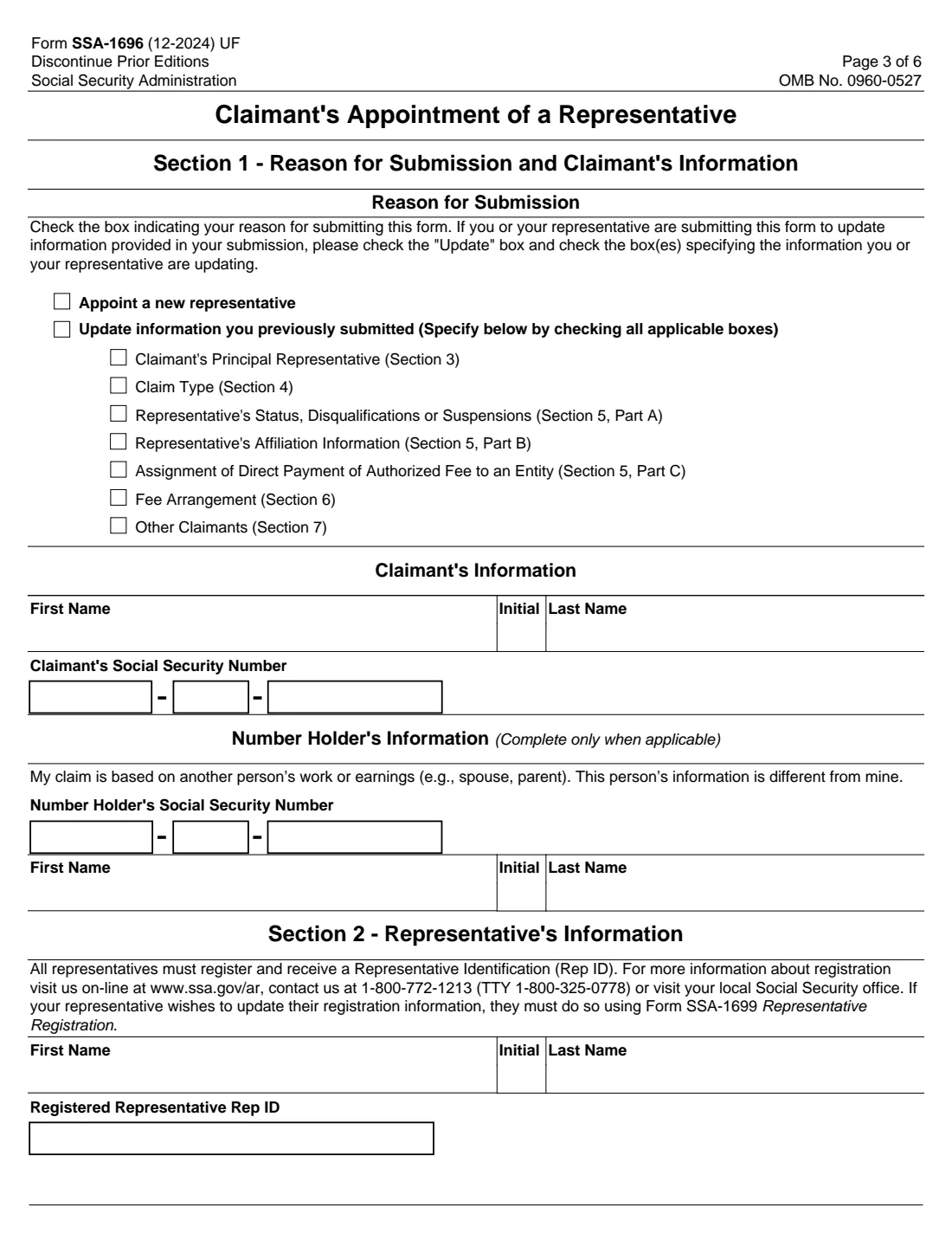
- Section 1: Reason for submissionClaimant
- Section 1: Claimant's informationClaimant
- Number holder's informationClaimant
- Section 2: Representative's informationRepresentative
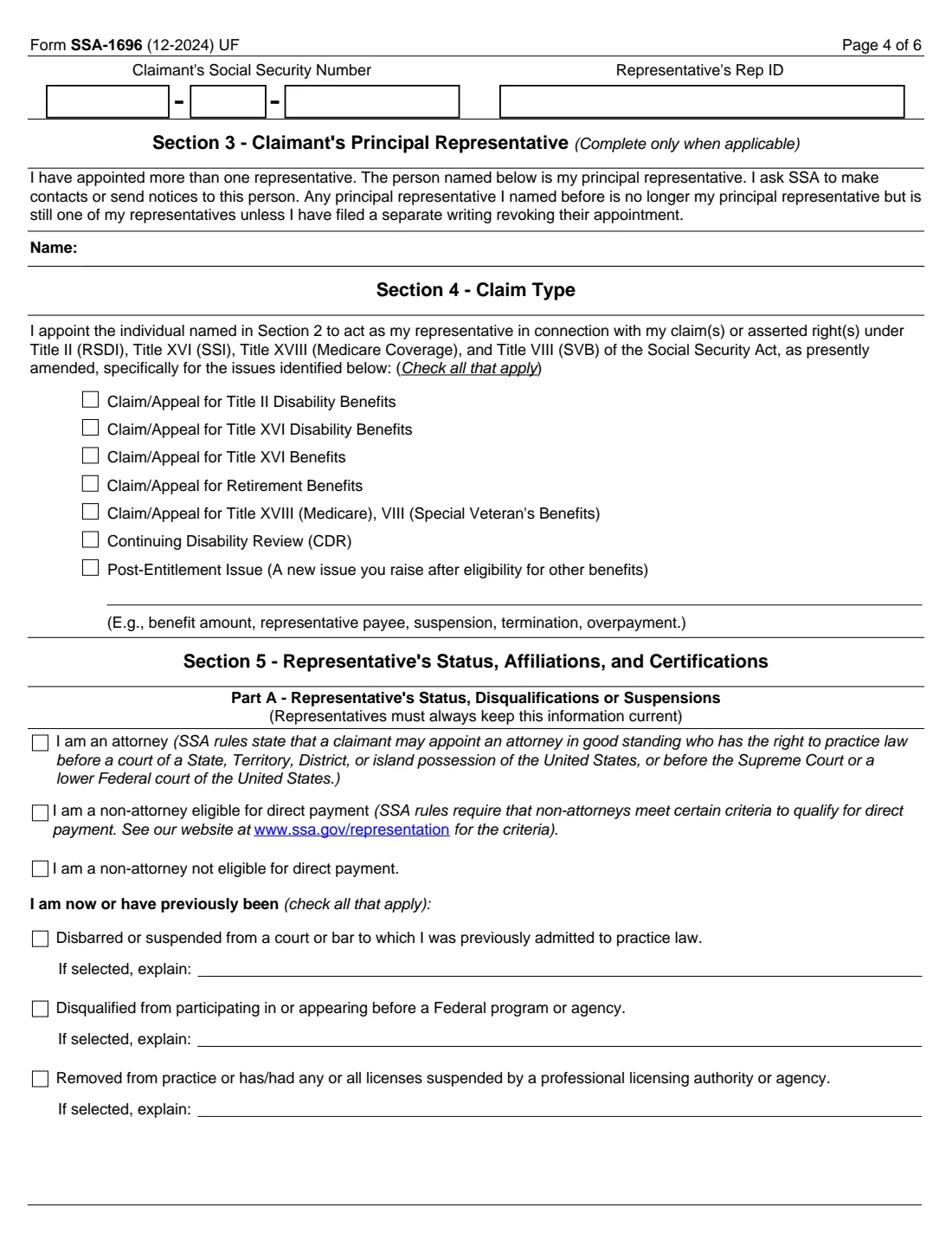
- Section 3: Principal representativeClaimant
- Section 4: Claim typeClaimant
- Section 5, Part A: Representative's statusRepresentative
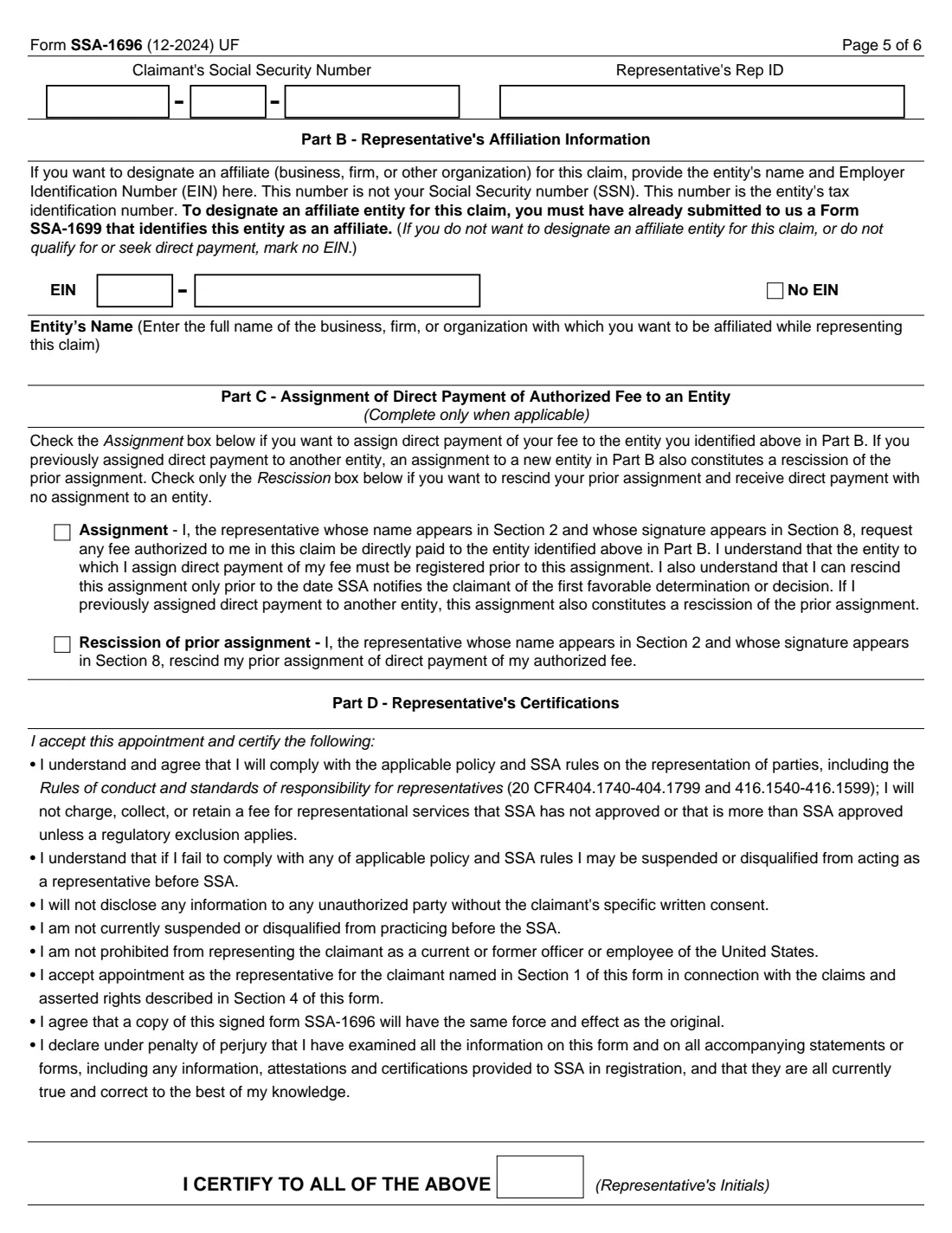
- Section 5, Parts B and C: Affiliation and assignmentRepresentative
- Section 5, Part D: Representative's certificationsRepresentative
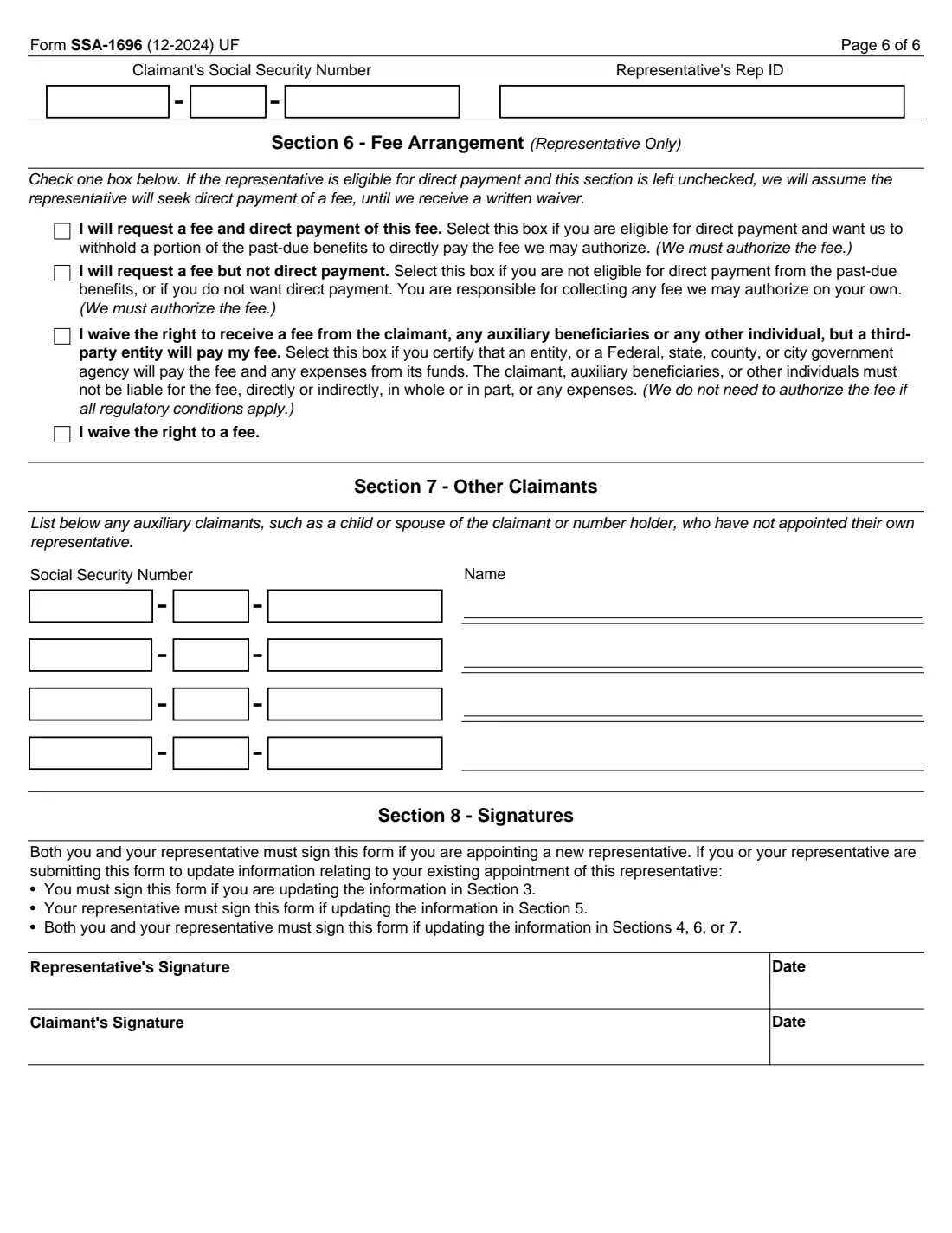
- Section 6: Fee arrangementRepresentative
- Section 7: Other claimantsClaimant
How to fill out Form SSA-1696, step by step
1 Section 1: Reason and claimant
Tick "Appoint a new representative", or "Update" plus each part you are updating. Enter your name and Social Security number, and, only if your claim is based on another person's work, the number holder's details.
2 Section 2: Representative
The representative enters their name and registered Rep ID. Registration details are changed with Form SSA-1699, not here.
3 Section 3: Principal representative
Only if you have appointed more than one representative. SSA contacts and sends notices to this person. Naming a new principal representative doesn't end the old one's appointment. That needs a separate signed writing filed with SSA.
4 Section 4: Claim type
Tick every claim or issue: Title II disability, Title XVI disability, Title XVI benefits, retirement, Medicare or Special Veterans Benefits, a continuing disability review, or a post-entitlement issue you describe (for example benefit amount, representative payee, suspension, termination or overpayment).
5 Section 5: Status, affiliation and certifications
Part A: the representative says whether they are an attorney or a non-attorney eligible or not eligible for direct payment, and discloses any disbarment, suspension, disqualification or license removal with an explanation. Part B: an affiliated entity's name and EIN, or No EIN. Part C: assign direct fee payment to that entity, or rescind a prior assignment. Part D: the representative initials the certifications.
6 Section 6: Fee arrangement
The representative checks one: request a fee with direct payment, request a fee without direct payment, waive a fee from the claimant because a third-party entity will pay it, or waive the fee. If an eligible representative leaves this blank, SSA assumes they will seek direct payment of a fee until it gets a written waiver.
7 Sections 7 and 8: Other claimants and signatures
List auxiliary claimants, such as your children or spouse, who haven't appointed their own representative. Then both of you sign and date Section 8 for a new appointment.
Common mistakes to avoid
- Filing the form when there is no claim or pending issue with SSA.
- Sending it to the State Disability Determination Services office instead of SSA.
- Putting two representatives on one form. Each needs a separate SSA-1696.
- Leaving out the claimant's SSN or the Rep ID at the top of pages 4 to 6.
- Designating an affiliated firm that the representative hasn't identified on Form SSA-1699, or assigning the fee without naming the entity in Part B.
- A representative not eligible for direct payment ticking the direct-payment fee option.
- Missing signatures: for a new appointment both the claimant and the representative must sign.
After you fill it out
Sign Section 8 (both of you, for a new appointment) and send the form to your local Social Security office by upload, mail, fax or eFax, or take it in person. Keep a copy, as the instructions ask. SSA's page also describes an online version (e1696) that your representative can start.
SSA recognizes the representative once it has the form. From then on the representative can act for you on the claims you ticked, and your principal representative gets SSA's notices.
If the arrangement changes, submit a new SSA-1696 marked "Update". To end an appointment, give SSA a separate signed writing. FileIt keeps the signed PDF in your vault.
Fill out Form SSA-1696 online with FileIt
- Pick the person. Choose someone from People and FileIt fills in their name, date of birth, address and other details it already knows.
- Answer plain-language questions. One part of the form at a time, with the official help text beside each question — 50 fields in all. Your answers save as you go.
- Check the live preview. Watch your answers land on the real Social Security Administration (SSA) form, and let FileIt do any worksheet arithmetic.
- Generate the official PDF. FileIt prints your answers into the agency’s own PDF and files it in that person’s folder in your vault. Sign it, or send it for e-signature.
FileIt fills the form — it never files or submits anything for you. Deliver the finished form to whoever asked for it, the way the form’s instructions say.
Start Form SSA-1696 now — it’s freeForm SSA-1696: frequently asked questions
Does my representative have to be a lawyer?
No. You can appoint an attorney or a non-attorney, as long as they are qualified, registered with SSA and follow its rules of conduct. Non-attorneys must meet SSA's criteria to be paid directly by SSA.
Can a representative charge me any fee they like?
No. SSA's page says a representative cannot charge or collect a fee unless SSA authorizes it first, and the representative certifies in Part D not to charge more than SSA approves unless a regulatory exclusion applies.
Where do I send Form SSA-1696?
To your local Social Security office. The instructions say you can upload it, mail, fax or eFax it, or file it in person, but not with your State Disability Determination Services office.
Do I need a separate form for each representative?
Yes. If you appoint several representatives, use a separate form for each, and name one as your principal representative in Section 3.
Do I need this form for someone who just helps me?
No. The instructions say you don't need to appoint someone who only helps you come to the office, reads documents to you or interprets. Appoint someone only if they will act or appear for you.
How do I change or end an appointment?
To change details, file a new SSA-1696 with "Update" ticked and the parts that changed. To revoke an appointment, file a separate signed and dated writing with SSA.
Official sources
- Blank form (PDF), published by Social Security Administration (SSA): https://www.ssa.gov/forms/ssa-1696.pdf
- Official instructions and guidance: https://www.ssa.gov/forms/ssa-1696.html
- Edition shown on this page: Form SSA-1696 (12-2024) UF, OMB No. 0960-0527 (checked 2026-09-28).
FileIt is not affiliated with or endorsed by Social Security Administration (SSA) or any government. This page explains the form in general terms and is not legal, tax or immigration advice. Always read the official instructions, and check that you are using the edition the recipient accepts. Page last reviewed 2026-09-28.