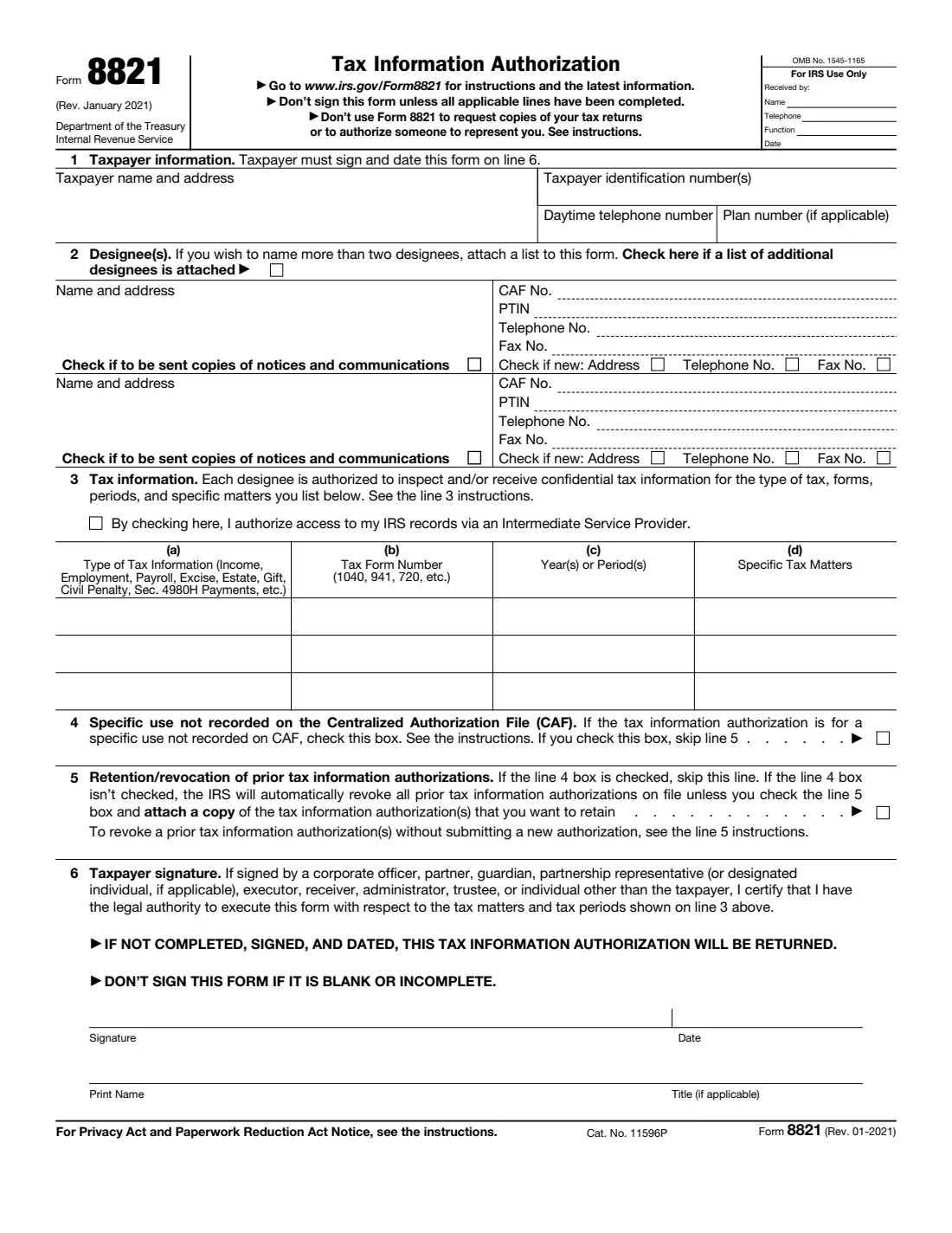
What is Form 8821?
Form 8821, Tax Information Authorization, lets you name one or more designees (an accountant, a family member, a lender, a business or anyone else) who may inspect and/or receive your confidential tax information from the Internal Revenue Service (IRS). You decide exactly which information: the type of tax, the tax forms, the years or periods and, if you like, specific tax matters.
Form 8821 is narrower than a power of attorney. A designee can see and receive the information, but can't represent you, argue your case, or sign agreements for you; for that you need Form 2848. The form also says not to use it to request copies of your tax returns. The current edition is Rev. January 2021, and it is a single page: taxpayer, designees, the information covered, two checkboxes about the CAF and earlier authorizations, and your signature.
FileIt guides you through Form 8821 in plain English and prints your answers into the IRS's own official PDF. It pre-fills your name from the People records in your vault, keeps each designee's details together, checks the rules the form states (such as skipping line 5 when line 4 is checked), saves the finished PDF to your vault and can optionally send it for e-signature. You then submit it to the IRS yourself: FileIt never files anything with the IRS.
- Who fills it
- The taxpayer, or someone with legal authority to sign for them (for example an officer, partner, executor or trustee).
- Given to
- The IRS, through its online submission tool or by fax or mail as the instructions describe. Your designee often submits it for you.
- When
- Before a designee asks the IRS for your tax information, such as transcripts, balances or notices.
- Signatures
- Only the taxpayer signs and dates line 6. Designees don't sign.
- Edition
- Rev. January 2021 (Form 8821 Rev. 01-2021)
- Agency
- Internal Revenue Service (IRS), Department of the Treasury
Who needs to fill out Form 8821?
- Individuals who want their accountant or bookkeeper to be able to pull their IRS account information and transcripts.
- Borrowers whose lender or mortgage company asks for authorization to verify tax information.
- Adult children or other relatives helping an older parent keep track of IRS notices and balances.
- Businesses that want an outside payroll provider or adviser to see payroll or employment tax information.
- Estates and trusts, where the executor or trustee signs to let an adviser see the tax records.
- Anyone who wants copies of IRS notices sent to a trusted person, without giving them power to act.
When to use Form 8821
- When someone needs to see or receive your IRS information but doesn't need to represent you.
- When a lender, adviser or relative asks for access to specific years of tax information.
- When you want a designee to receive copies of IRS notices and communications.
- When you replace an earlier authorization. A new Form 8821 revokes prior tax information authorizations on file unless you check line 5 (or check line 4).
- If the person needs to act for you before the IRS, use Form 2848 instead.
What you need before you start
- Your name, address and daytime telephone number.
- Your taxpayer identification number(s): SSN, ITIN and/or EIN, and a plan number if it concerns an employee plan.
- Each designee's name and address, telephone and fax numbers, and their CAF number and PTIN if they have them.
- The type of tax information (Income, Employment, Payroll, Excise, Estate, Gift, Civil Penalty and so on) and the tax form numbers.
- The specific years or periods, and any specific tax matters you want to limit it to.
- A copy of any earlier tax information authorization you want to keep in effect.
- For a business, estate or trust: the name and title of the person with authority to sign.
What’s on Form 8821
The 2021 edition has 1 page. FileIt asks for it in 7 parts, and it is signed by Taxpayer:
- Line 1: Taxpayer informationTaxpayer
- Line 2: Designee 1Taxpayer
- Line 2: Designee 2Taxpayer
- Line 2: Additional designeesTaxpayer
- Line 3: Tax informationTaxpayer
- Lines 4-5: Specific use and prior authorizationsTaxpayer
- Line 6: Taxpayer signatureTaxpayer
How to fill out Form 8821, step by step
1 Line 1: Taxpayer information
Enter your name and address, taxpayer identification number(s), daytime telephone number and, for an employee plan, the plan number. The form covers one taxpayer, and that taxpayer signs it on line 6.
2 Line 2: Designee(s)
Name each designee with their address, CAF number, PTIN, telephone and fax numbers. The form has room for two; if you name more, attach a list and check the box at the top of line 2. Tick "Check if new" when a designee's address, telephone or fax differs from what the IRS has on file.
Check "Check if to be sent copies of notices and communications" only if you want that designee to receive copies of IRS notices.
3 Line 3: Tax information
List what each designee may inspect and/or receive: (a) the type of tax information, (b) the tax form number, (c) the years or periods, and (d) any specific tax matters. Use specific years or periods rather than a general reference such as "all years"; future periods are limited to those ending no later than three years after the IRS receives the form.
Above the table there is a checkbox to authorize access to your IRS records via an Intermediate Service Provider, which some professionals use to retrieve records.
4 Line 4: Specific use not recorded on the CAF
Check this box only if the authorization is for a specific use that isn't recorded on the IRS's Centralized Authorization File, as the instructions describe. If you check it, skip line 5.
5 Line 5: Retention/revocation of prior tax information authorizations
Unless line 4 is checked, the IRS automatically revokes all earlier tax information authorizations on file when it records this one. To keep an earlier authorization, check line 5 and attach a copy of it. The instructions explain how to revoke an authorization without filing a new one.
6 Line 6: Taxpayer signature
Sign, date and print your name, and add a title if you sign for a business, estate, trust or someone else. By signing on their behalf you certify you have the legal authority to do so for the tax matters and periods on line 3. The form warns: don't sign it if it is blank or incomplete, and an unsigned or undated form is returned.
Common mistakes to avoid
- Using Form 8821 when you want someone to represent you. A designee can only see and receive information; use Form 2848 for representation.
- Using it to request copies of your tax returns. The form says not to.
- Signing a blank or incomplete form. Fill in every applicable line first, as the form warns.
- Writing "all years" instead of listing the specific years or periods.
- Forgetting that a new 8821 revokes earlier ones. Check line 5 and attach copies of any you want to keep.
- Checking both line 4 and line 5. If line 4 is checked, skip line 5.
- Faxing or mailing a form signed electronically. The IRS accepts e-signatures only when the form is submitted through its online tool.
After you fill it out
Sign and date line 6, by hand on the printed PDF or with FileIt's optional e-signature. The IRS accepts an electronic signature on Form 8821 only when the form is submitted through its online tool (Submit Forms 2848 and 8821 Online); a form sent by fax or mail needs a handwritten signature.
Then send it as the Form 8821 instructions describe: through the online tool, or by fax or mail to the IRS office listed in the instructions. Your designee may submit it for you. FileIt doesn't send it. The completed PDF stays in your vault folder, so you have a record of who can see which tax information.
Review it when things change. File a new form to add designees or years, remembering line 5 if you want to keep an earlier authorization, and follow the line 5 instructions to revoke one you no longer want.
Fill out Form 8821 online with FileIt
- Pick the person. Choose someone from People and FileIt fills in their name, date of birth, address and other details it already knows.
- Answer plain-language questions. One part of the form at a time, with the official help text beside each question — 45 fields in all. Your answers save as you go.
- Check the live preview. Watch your answers land on the real Internal Revenue Service (IRS) form, and let FileIt do any worksheet arithmetic.
- Generate the official PDF. FileIt prints your answers into the agency’s own PDF and files it in that person’s folder in your vault. Sign it, or send it for e-signature.
FileIt fills the form — it never files or submits anything for you. Deliver the finished form to whoever asked for it, the way the form’s instructions say.
Start Form 8821 now — it’s freeForm 8821: frequently asked questions
Can I fill out Form 8821 online?
Yes. FileIt asks each question in plain English and prints your answers into the official IRS Form 8821 PDF. Filling forms is available on every FileIt account, including the free plan. You can sign by hand or with FileIt's optional e-signature, and then submit it to the IRS yourself.
Where do I send Form 8821?
The instructions list the options: the IRS online submission tool, fax, or mail to the IRS office given in the instructions. Your designee often handles this. FileIt never sends it to the IRS for you.
What's the difference between Form 8821 and Form 2848?
Form 8821 lets a designee inspect and receive your tax information only. Form 2848 appoints a representative who can also act for you before the IRS, for example answering notices and signing agreements.
Does my designee have to sign Form 8821?
No. Only the taxpayer, or someone with legal authority to sign for the taxpayer, signs and dates line 6.
Can I sign Form 8821 electronically?
Yes, if the form is submitted through the IRS online tool (Submit Forms 2848 and 8821 Online). A faxed or mailed form must be signed by hand.
Can I use Form 8821 to get copies of my tax returns?
No. The form itself says not to use it to request copies of your tax returns; the instructions point you to the right way to do that.
How many designees can I name?
The form has space for two. If you name more, attach a list with the same details for each and check the box on line 2.
Will a new Form 8821 cancel my previous one?
Yes, unless you check line 5 and attach a copy of the earlier authorization you want to keep, or check line 4 for a specific use not recorded on the CAF.
Official sources
- Blank form (PDF), published by Internal Revenue Service (IRS): https://www.irs.gov/pub/irs-pdf/f8821.pdf
- Official instructions and guidance: https://www.irs.gov/forms-pubs/about-form-8821
- Edition shown on this page: Rev. January 2021 (Rev. 01-2021) (checked 2026-09-26).
FileIt is not affiliated with or endorsed by Internal Revenue Service (IRS) or any government. This page explains the form in general terms and is not legal, tax or immigration advice. Always read the official instructions, and check that you are using the edition the recipient accepts. Page last reviewed 2026-09-26.