What is Form 2848?
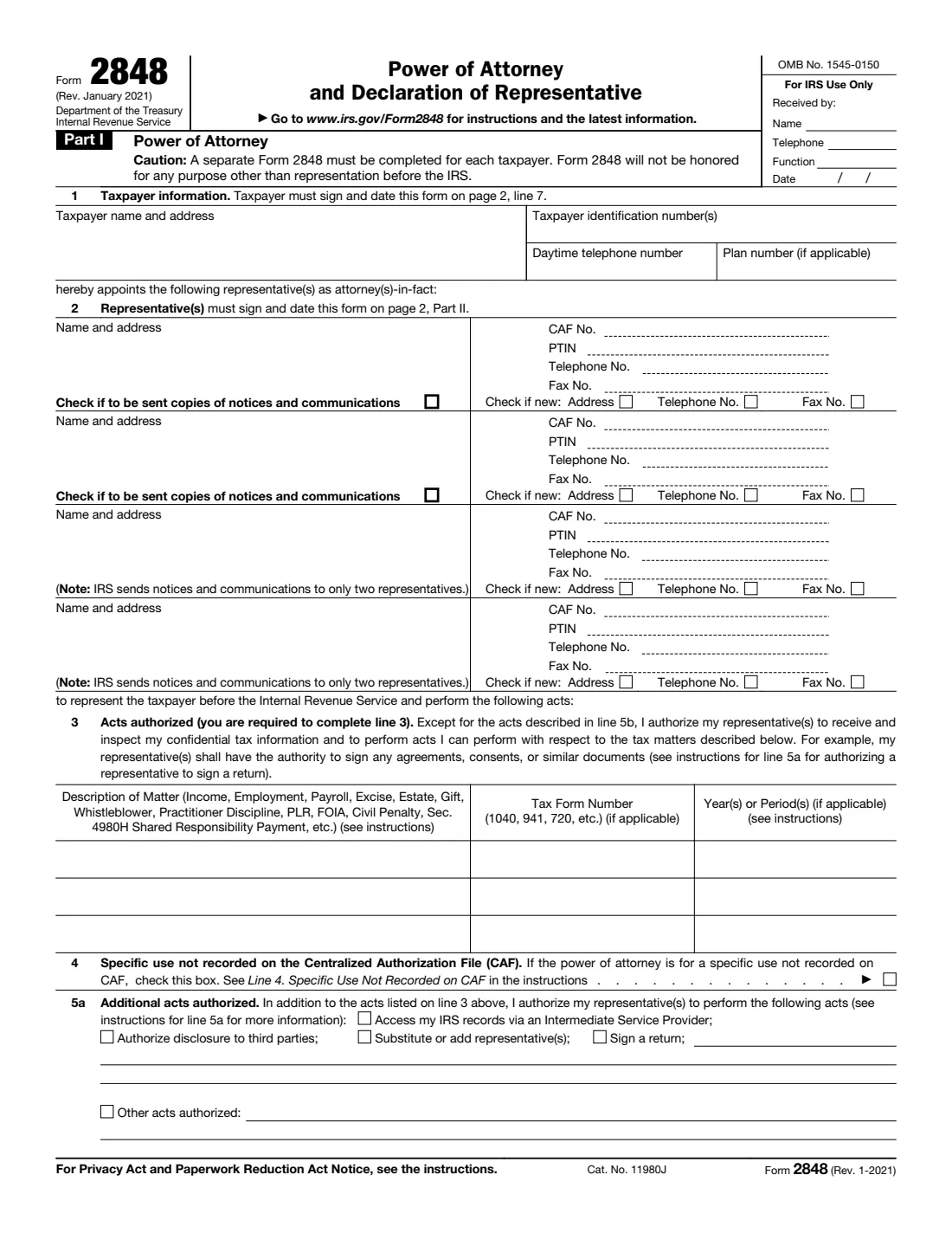
Form 2848, Power of Attorney and Declaration of Representative, is how you authorize someone to represent you before the Internal Revenue Service (IRS). The people you appoint, your representatives, can receive and inspect your confidential tax information and act for you on the tax matters and years you list: talk to the IRS, respond to notices, and sign agreements, consents and similar documents. The form has two parts: in Part I you name the representatives and the matters and sign; in Part II each representative declares who they are and signs.
A representative must be eligible to practice before the IRS, such as an attorney, certified public accountant (CPA), enrolled agent, or, in limited cases, a family member, officer, full-time employee or unenrolled return preparer. If you only want someone to see your tax information without representing you, Form 8821 is the right form instead. The current edition is Rev. January 2021, and the form says in its caution that it won't be honored for any purpose other than representation before the IRS.
FileIt guides you and your representatives through every line and prints the answers into the IRS's own official PDF. It pre-fills the taxpayer's name from the People records in your vault, keeps each representative's Part I details and Part II declaration together, checks what each designation needs, saves the finished PDF to your vault and can optionally send it for e-signature. You then submit the form to the IRS yourself: FileIt never files anything with the IRS.
- Who fills it
- The taxpayer (Part I) and each representative (line 2 and the Part II declaration).
- Given to
- The IRS, through its online submission tool or by fax or mail as the instructions describe. Representatives often submit it for the taxpayer.
- When
- Before a representative contacts the IRS for you, for example about an audit, a notice, a payment plan or a penalty.
- Signatures
- The taxpayer signs and dates line 7; each representative signs and dates Part II, in the order listed on line 2.
- Edition
- Rev. January 2021 (Form 2848 Rev. 1-2021)
- Agency
- Internal Revenue Service (IRS), Department of the Treasury
Who needs to fill out Form 2848?
- Individuals who want a tax professional to handle an IRS audit, notice, collection matter or appeal for them.
- Businesses, partnerships, estates and trusts appointing an attorney, CPA or enrolled agent to deal with the IRS about payroll, excise, income or other taxes.
- Taxpayers who want a family member (spouse, parent, child, sibling and others listed on the form) to represent them.
- Organizations letting a bona fide officer or full-time employee represent them before the IRS.
- Anyone giving a representative authority to perform extra acts, such as substituting another representative or, in limited cases, signing a return.
- Each spouse separately, when a joint return is involved: the form says each spouse must file their own power of attorney, even if appointing the same representative.
When to use Form 2848
- When you receive an IRS notice, audit letter or collection notice and want a professional to deal with it for you.
- When a representative needs to talk to the IRS about your account, request information, or negotiate a payment plan or penalty relief.
- When you change representatives, or add one. A new Form 2848 automatically revokes earlier powers of attorney for the same matters and periods unless you check line 6.
- When a representative's address, phone or fax changes (they tick "Check if new"), or when you want to extend the authorization to more years or tax matters.
- Before your representative contacts the IRS. The IRS generally won't discuss your account with someone who isn't authorized.
What you need before you start
- The taxpayer's name, address and daytime telephone number.
- The taxpayer's identification number(s): SSN, ITIN and/or EIN, and a plan number for an employee plan.
- Each representative's name, address, phone and fax, and their CAF number and PTIN if they have them.
- Each representative's designation (a to r) and their licensing jurisdiction and bar, license or enrollment number where it applies.
- The tax matters to cover: the type of tax, the form number and the specific years or periods.
- A decision on any additional acts to allow (line 5a) and anything you want to exclude (line 5b).
- A copy of any earlier power of attorney you want to keep in effect (line 6).
- For a business, estate or trust: the name and title of the person with authority to sign.
What’s on Form 2848
The 2021 edition has 2 pages. FileIt asks for it in 12 parts, and it is signed by Taxpayer and Representative 1 and Representative 2 and Representative 3 and Representative 4:
- Line 1: Taxpayer informationTaxpayer
- Line 2 and Part II: Representative 1Representative 1
- Line 2 and Part II: Representative 2Representative 2
- Line 2 and Part II: Representative 3Representative 3
- Line 2 and Part II: Representative 4Representative 4
- Line 3: Acts authorizedTaxpayer
- Line 4: Specific use not recorded on the CAFTaxpayer
- Line 5a: Additional acts authorizedTaxpayer
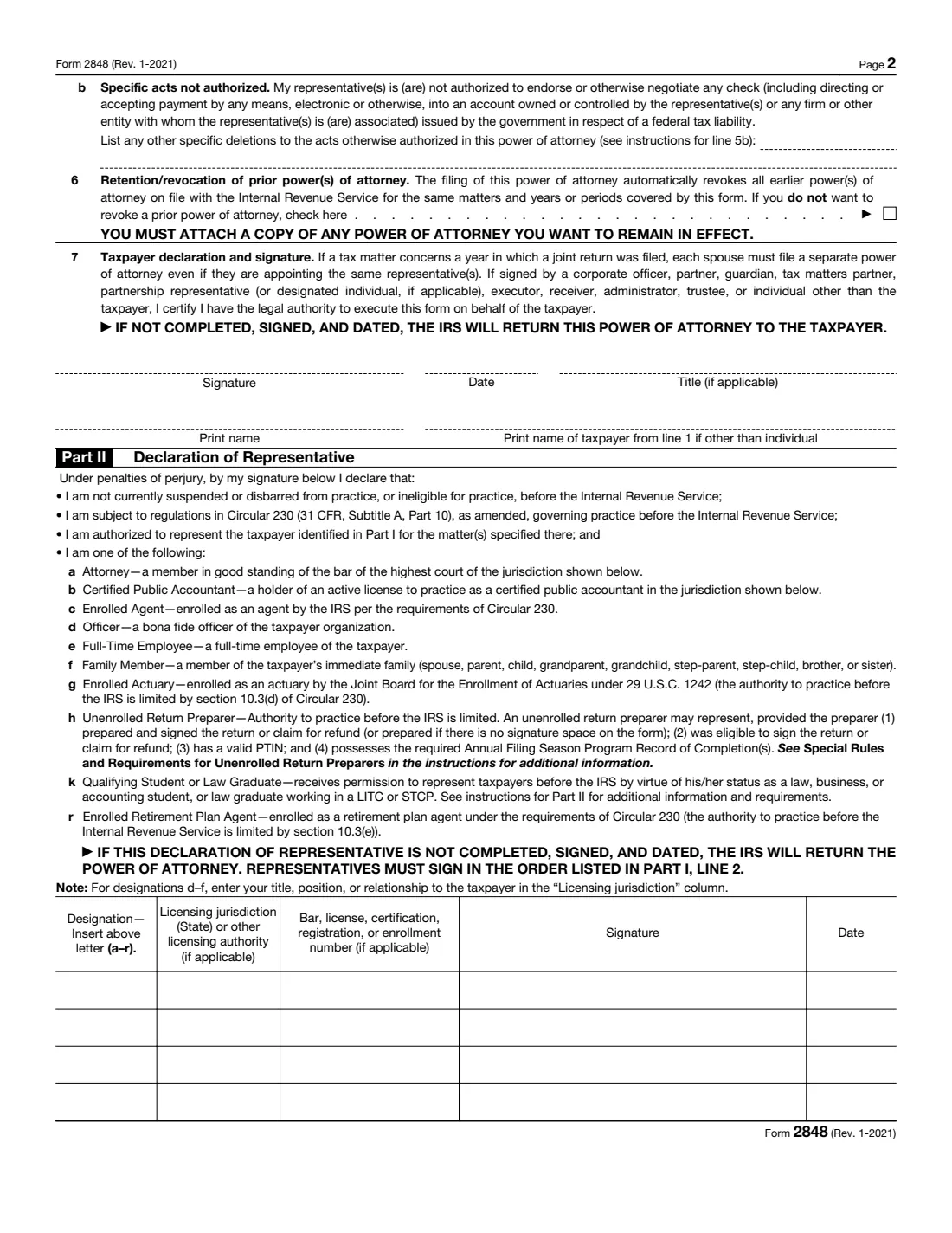
- Line 5b: Specific acts not authorizedTaxpayer
- Line 6: Retention/revocation of prior power(s) of attorneyTaxpayer
- Line 7: Taxpayer declaration and signatureTaxpayer
- Part II: Declaration of RepresentativeRepresentative 1
How to fill out Form 2848, step by step
1 Line 1: Taxpayer information
Enter the taxpayer's name and address, taxpayer identification number(s), daytime telephone number, and a plan number if the matter concerns an employee plan. A separate Form 2848 is needed for each taxpayer, so spouses each complete their own.
2 Line 2: Representative(s)
Name up to four representatives on the form, with their address, CAF number, PTIN, telephone and fax numbers. If a representative doesn't have a Centralized Authorization File (CAF) number yet, the IRS assigns one. Tick "Check if new" when the address, phone or fax differs from what the IRS has on file.
You can ask for copies of notices and communications to be sent to your representatives. As the form notes, the IRS sends them to only two representatives.
3 Line 3: Acts authorized
This line is required. Describe each tax matter (Income, Employment, Payroll, Excise, Estate, Gift, Civil Penalty and so on), the tax form number where there is one, and the years or periods. List specific years or periods, for example "2021 through 2024". General references such as "all years" aren't accepted, and future periods are limited to those ending no later than three years after the IRS receives the form.
For these matters your representatives can receive and inspect your confidential tax information and do the things you could do, such as signing agreements and consents, except for the acts excluded on line 5b.
4 Line 4: Specific use not recorded on the CAF
Check this box only if the power of attorney is for a specific use that isn't recorded on the IRS's Centralized Authorization File, as the line 4 instructions describe. Most people leave it blank.
5 Line 5a: Additional acts authorized
Tick any extra acts you want to allow: accessing your IRS records via an Intermediate Service Provider, authorizing disclosure to third parties, substituting or adding representatives, or signing a return. A representative may sign a return for you only in the limited circumstances the instructions describe. You can also describe other acts.
6 Line 5b: Specific acts not authorized
Representatives can never endorse or cash a government refund check, or have a refund paid into an account they or their firm control. List anything else you don't want them to do here.
7 Line 6: Retention/revocation of prior power(s) of attorney
Filing a new Form 2848 automatically revokes earlier powers of attorney on file for the same matters and years or periods. If you want an earlier one to stay in effect, check the box and attach a copy of it.
8 Line 7: Taxpayer declaration and signature
The taxpayer signs, dates and prints their name. Someone signing for a business, estate or trust (an officer, partner, executor, trustee and so on) adds their title and the taxpayer's name, and certifies that they have legal authority to sign. The form warns that the IRS returns it if this line isn't completed, signed and dated.
9 Part II: Declaration of Representative
Each representative declares under penalties of perjury that they aren't suspended or disbarred from practice before the IRS, are subject to Circular 230, and are authorized to represent you. They enter their designation letter (a Attorney, b CPA, c Enrolled Agent, d Officer, e Full-Time Employee, f Family Member, g Enrolled Actuary, h Unenrolled Return Preparer, k Qualifying Student or Law Graduate, r Enrolled Retirement Plan Agent), their licensing jurisdiction and license or enrollment number, and sign and date.
For designations d to f, the "Licensing jurisdiction" column holds the title, position or relationship to the taxpayer instead. Representatives sign in the order they are listed on line 2.
Common mistakes to avoid
- Using a general reference like "all years" or "all taxes" on line 3 instead of listing the tax matters and periods.
- Listing future years too far ahead. Future periods may end no later than three years after the IRS receives the form.
- Having spouses share one form for a joint return. Each spouse files their own Form 2848.
- Forgetting that a new form revokes earlier ones. Check line 6 and attach a copy of any power of attorney you want to keep.
- Leaving Part II incomplete or unsigned. The IRS returns the power of attorney if the declaration isn't completed, signed and dated.
- Entering a license number but no jurisdiction for an attorney or CPA, or no title or relationship for designations d to f.
- Faxing or mailing a form signed electronically. E-signatures are accepted only when the form goes through the IRS online submission tool.
- Using Form 2848 when you only want someone to see your tax information. Form 8821 is the form for that.
After you fill it out
The taxpayer signs line 7 and each representative signs Part II. You can sign by hand on the printed PDF, or use FileIt's optional e-signature. The IRS accepts electronic signatures on Form 2848 only when the form is submitted through its online tool (Submit Forms 2848 and 8821 Online); if you fax or mail it, sign it by hand.
Then send it the way the Form 2848 instructions describe: through the online tool, or by fax or mail to the IRS office in the instructions' Where To File chart. Your representative often does this for you. FileIt doesn't submit it. FileIt keeps the completed PDF in your vault folder, so you and your representative have a copy of exactly what was authorized.
Update it when things change: file a new form to add or replace a representative or to cover new years or matters (remember line 6 if you want to keep an earlier one), and see the instructions to revoke a power of attorney or for a representative to withdraw.
Fill out Form 2848 online with FileIt
- Pick the person. Choose someone from People and FileIt fills in their name, date of birth, address and other details it already knows.
- Answer plain-language questions. One part of the form at a time, with the official help text beside each question — 83 fields in all. Your answers save as you go.
- Check the live preview. Watch your answers land on the real Internal Revenue Service (IRS) form, and let FileIt do any worksheet arithmetic.
- Generate the official PDF. FileIt prints your answers into the agency’s own PDF and files it in that person’s folder in your vault. Sign it, or send it for e-signature.
FileIt fills the form — it never files or submits anything for you. Deliver the finished form to whoever asked for it, the way the form’s instructions say.
Start Form 2848 now — it’s freeForm 2848: frequently asked questions
Can I fill out Form 2848 online?
Yes. FileIt walks you and your representatives through each line in plain English and prints the answers into the official IRS Form 2848 PDF. Filling forms is available on every FileIt account, including the free plan. You can sign by hand or with FileIt's optional e-signature, and then submit it to the IRS yourself.
Where do I send Form 2848?
The instructions give three ways: the IRS online submission tool, fax, or mail to the office in the Where To File chart. Your representative often submits it for you. FileIt doesn't send it to the IRS.
Does the IRS accept an electronic signature on Form 2848?
Yes, but only when the form is submitted through the IRS online tool (Submit Forms 2848 and 8821 Online). A form sent by fax or mail needs handwritten signatures.
What is the difference between Form 2848 and Form 8821?
Form 2848 lets an eligible representative act for you before the IRS: talk to the IRS on your behalf, answer notices and sign agreements. Form 8821 only lets a designee inspect or receive your confidential tax information; it doesn't let them represent you.
Who can be my representative?
Someone eligible to practice before the IRS: an attorney, CPA, enrolled agent, enrolled actuary or enrolled retirement plan agent, or in limited situations an officer, full-time employee, family member, unenrolled return preparer or qualifying student or law graduate. Part II lists each designation.
How many years can a power of attorney cover?
Any tax years or periods that have already ended, listed specifically, plus future periods ending no later than three years after the IRS receives the form.
Does a new Form 2848 cancel my old one?
Filing it automatically revokes earlier powers of attorney for the same matters and years or periods. To keep one in effect, check line 6 and attach a copy.
Can my spouse and I use one Form 2848?
No. Even for a joint return, each spouse must file a separate power of attorney, even when appointing the same representative.
Can my representative sign my tax return?
Only if you authorize it on line 5a and only in the limited circumstances the instructions describe. Otherwise you sign your own return.
Official sources
- Blank form (PDF), published by Internal Revenue Service (IRS): https://www.irs.gov/pub/irs-pdf/f2848.pdf
- Official instructions and guidance: https://www.irs.gov/forms-pubs/about-form-2848
- Edition shown on this page: Rev. January 2021 (Rev. 1-2021) (checked 2026-09-26).
FileIt is not affiliated with or endorsed by Internal Revenue Service (IRS) or any government. This page explains the form in general terms and is not legal, tax or immigration advice. Always read the official instructions, and check that you are using the edition the recipient accepts. Page last reviewed 2026-09-26.