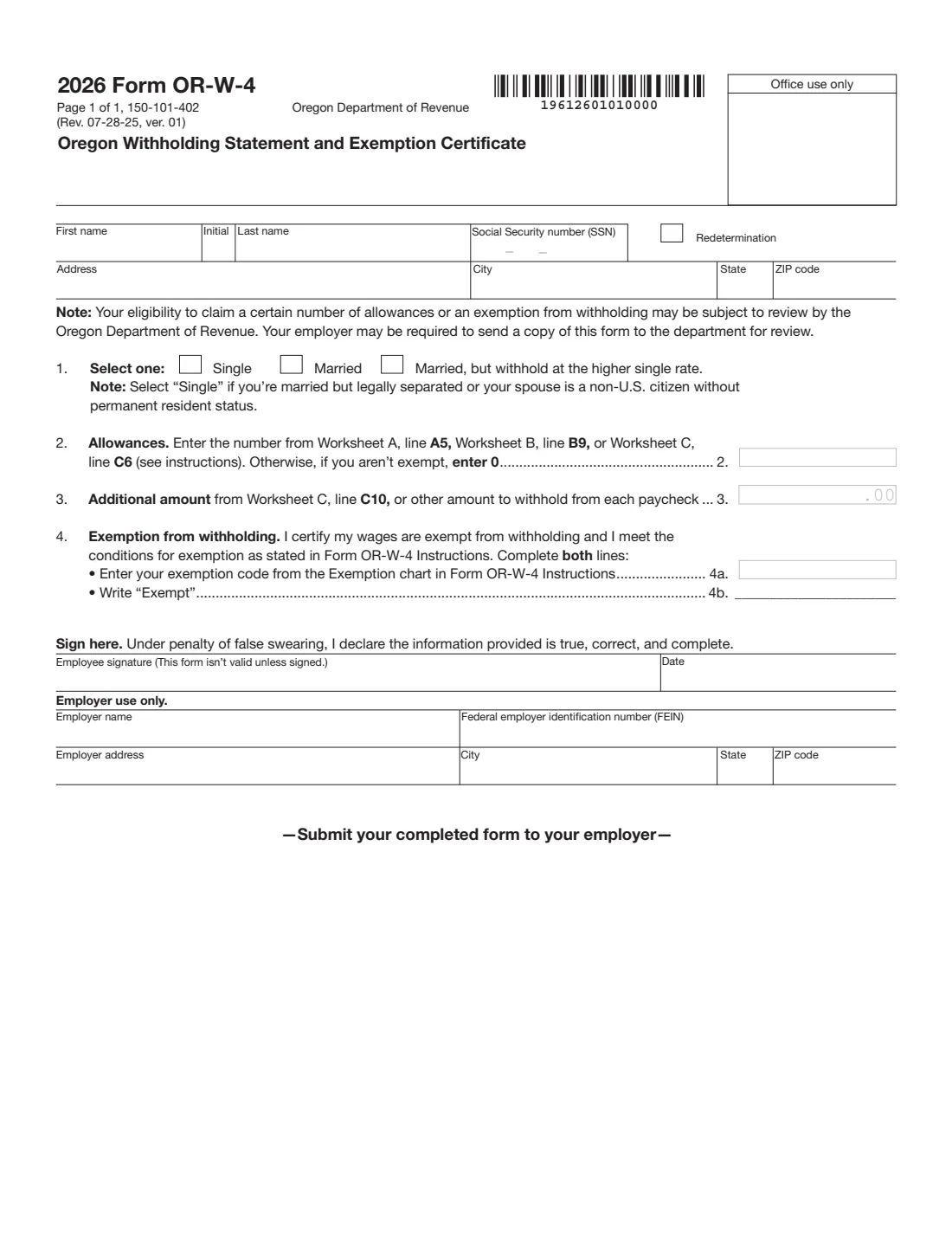
What is Form OR-W-4?
Form OR-W-4, the Oregon Withholding Statement and Exemption Certificate, is how you tell your employer — or the payer of a pension or annuity — how much Oregon income tax to withhold. Oregon has its own form because a federal Form W-4 filed after 2017 no longer carries the withholding allowances Oregon uses. The 2026 edition is a single page from the Oregon Department of Revenue (form 150-101-402).
The form asks for your marital status for withholding, a number of allowances, any additional amount per paycheck, or an exemption code. The worksheets that produce those numbers (Worksheets A, B and C) are in the separate 2026 Form OR-W-4 Instructions, and the Department also offers an online withholding calculator that the instructions recommend for more complicated situations.
FileIt lets you fill out the OR-W-4 online in a guided form. It pre-fills your name from the People records in your vault, lists the exemption codes from the instructions' Exemption chart so you can pick one, writes "Exempt" on line 4b for you, splits your SSN and date into the right boxes, and prints everything into the Department of Revenue's own official PDF. The finished form is saved in your vault and can be sent for e-signature. FileIt never submits anything to the Department of Revenue or your employer — you give the form to your employer yourself.
- Who fills it
- The employee (or pension recipient). The employer or payer completes the 'Employer use only' part.
- Given to
- Your employer or other payer — the form says to submit it to your employer.
- When
- When you start a job or pension, after a personal or financial change, and every year if you claim an exemption for wages.
- Signatures
- The employee signs and dates it under penalty of false swearing. It isn't valid unless signed.
- Edition
- 2026 Form OR-W-4, 150-101-402 (Rev. 07-28-25).
- Cost
- Free to fill out on any FileIt account.
Who needs to fill out Form OR-W-4?
- Anyone starting a job with an employer who must withhold Oregon tax from their pay.
- People receiving a pension or annuity where the payer must withhold Oregon tax from each payment.
- Employees who've had a change that affects their taxes, such as a change in income, filing status or number of dependents.
- People who weren't happy with the Oregon tax they owed, or the refund they got, on a recent return.
- Anyone who gave their employer a federal Form W-4 after 2017 without specifying Oregon allowances.
- Workers whose wages are exempt from Oregon tax — for example air carrier, Amtrak, waterway and certain dam workers, qualifying military, or people with no Oregon tax liability — who want to claim exemption.
When to use Form OR-W-4
- When you start a new job in Oregon, alongside the federal Form W-4 and Form I-9.
- When you start receiving a pension or annuity and want Oregon tax withheld (or want to change it).
- After a life or income change: marriage, divorce, a new dependent, a second job or a big change in pay.
- Every year if you claim exemption for wages — the form's instructions say an exemption for wages ends on February 15 of the following year and a new OR-W-4 must be given to your employer each year.
- If the Department of Revenue has sent your employer a determination letter and you want to change your withholding (the Redetermination box).
What you need before you start
- Your name, Social Security number and mailing address. The instructions say you must enter an SSN — an ITIN can't be used.
- The filing status you plan to use on your 2026 Oregon return, to pick Single, Married, or Married but withhold at the higher single rate.
- Your allowances from Worksheet A, B or C in the 2026 Form OR-W-4 Instructions, or a result from the Department's online withholding calculator.
- Any additional amount you want withheld each paycheck (for example Worksheet C, line C10).
- If you're exempt, the one exemption code from the Exemption chart that fits your situation.
- If the Department sent your employer a determination letter, a copy of that situation and your worksheets or calculator results.
- For the employer: the business name, federal employer identification number (FEIN) and address.
What’s on Form OR-W-4
The 2026 edition has 1 page. FileIt asks for it in 5 parts, and it is signed by Employee:
- Your name, SSN and addressEmployee
- Lines 1–3: Marital status, allowances and additional amountEmployee
- Line 4: Exemption from withholdingEmployee
- Sign hereEmployee
- Employer use onlyEmployer
How to fill out Form OR-W-4, step by step
1 Name, SSN and address
Type or clearly print your first name, initial, last name, Social Security number and mailing address. An SSN is required; you can't use an individual taxpayer identification number (ITIN) on this form.
FileIt fills the three SSN boxes and the address fields from your answers.
2 Redetermination
Leave this box empty unless two things are both true: the Department of Revenue issued a determination letter to your employer (telling it how much to withhold from your wages), and you want to change your withholding. Your employer must follow the letter by law.
To decrease withholding in that situation you must show a personal or financial change, and the instructions ask you to mail a copy of the form and your worksheets (or the online calculator's Results page) to the Department before giving the form to your employer. The Department then tells your employer whether it may adjust your withholding.
3 1. Select one (marital status)
Mark Single if you plan to file your 2026 return as single, married filing separately or head of household — and also if you're married but legally separated, or your spouse is a non-US citizen without permanent resident status. Mark Married if you'll file jointly or as a qualifying surviving spouse. If you want more tax withheld, mark Married, but withhold at the higher single rate.
4 2. Allowances
Enter the number of allowances from Worksheet A (line A5), Worksheet B (line B9) or Worksheet C (line C6) in the instructions, whichever applies. If you don't use a worksheet and aren't exempt, the form says to enter 0.
If you (and your spouse, if filing jointly) have more than one job at a time, the instructions say to use the worksheets just once for all jobs and follow their directions for each job. The online calculator is recommended if you have several jobs, higher wages, other income, deductions or credits, or are changing withholding mid-year.
5 3. Additional amount
Enter any extra amount you want withheld from each paycheck, in whole dollars — the form prints .00 after the box. This can be the figure from Worksheet C, line C10, or any other amount you choose.
6 4. Exemption from withholding
Claim exemption only if your wages are exempt from Oregon tax, or you qualify because you had no Oregon tax liability last year and expect none this year. Enter one code from the Exemption chart in the instructions on line 4a — just one, even if more than one applies — and write "Exempt" on line 4b. The codes run from A (air carrier employee) to M (a nonresident whose wages won't be subject to Oregon tax); L is no tax liability.
FileIt shows the chart as a list and fills line 4b for you. If you're exempt, leave allowances and the additional amount empty.
7 Sign here
Sign and date the form. You declare, under penalty of false swearing, that the information is true, correct and complete, and the form isn't valid unless signed. FileIt splits the date into the month, day and year boxes.
8 Employer use only
This part is for the employer or payer: business name, FEIN, and address with city, state and ZIP code. The instructions tell employees not to complete it. The employer keeps the completed form with its records.
Common mistakes to avoid
- Relying on your federal W-4 for Oregon. A federal W-4 filed after 2017 doesn't set Oregon allowances, so Oregon needs its own form.
- Using an ITIN instead of an SSN — the instructions say you must enter an SSN.
- Entering more than one exemption code on line 4a, or filling in line 4a without writing "Exempt" on line 4b. The form says to complete both lines.
- Claiming exempt and also entering allowances or an additional amount.
- Forgetting that an exemption for wages ends on February 15 of the following year.
- Running the worksheets separately for each job instead of once for all jobs, which can lead to under-withholding.
- Ticking Redetermination when the Department hasn't sent your employer a determination letter.
- Filling in the Employer use only section as the employee.
After you fill it out
Sign and date the form and give it to your employer or payer — the form's own footer says to submit your completed form to your employer. Keep your worksheets with your tax records. Your employer may be required to send a copy to the Oregon Department of Revenue for review, and your eligibility for allowances or an exemption may be reviewed.
FileIt saves the finished, flattened PDF in your vault folder, so you have a record of the status, allowances or exemption code you claimed.
Check a few paychecks and update the form when your situation changes. If you claim an exemption for wages, put a reminder in for early each year, since it ends on February 15 of the following year.
Fill out Form OR-W-4 online with FileIt
- Pick the person. Choose someone from People and FileIt fills in their name, date of birth, address and other details it already knows.
- Answer plain-language questions. One part of the form at a time, with the official help text beside each question — 21 fields in all. Your answers save as you go.
- Check the live preview. Watch your answers land on the real Oregon Department of Revenue (DOR) form, and let FileIt do any worksheet arithmetic.
- Generate the official PDF. FileIt prints your answers into the agency’s own PDF and files it in that person’s folder in your vault. Sign it, or send it for e-signature.
FileIt fills the form — it never files or submits anything for you. Deliver the finished form to whoever asked for it, the way the form’s instructions say.
Start Form OR-W-4 now — it’s freeForm OR-W-4: frequently asked questions
What is Form OR-W-4?
It is Oregon's Withholding Statement and Exemption Certificate from the Oregon Department of Revenue. It tells your employer or pension payer how much Oregon income tax to withhold, using your marital status, allowances, any additional amount, or an exemption code.
Where are the OR-W-4 worksheets?
They're in the separate 2026 Form OR-W-4 Instructions, not on the one-page form. Worksheet A covers personal allowances, and Worksheets B and C cover more detailed situations. The Department's online withholding calculator is an alternative the instructions recommend for more complex cases.
What are the OR-W-4 exemption codes?
The instructions' Exemption chart lists codes A to M, for example A for air carrier employees, D for casual laborers, E for domestic service workers, G for certain military pay, L for no tax liability and M for nonresidents whose wages won't be subject to Oregon tax. Enter only one code, even if several apply.
How long does an Oregon withholding exemption last?
For wages, the instructions say an exemption ends on February 15 of the following year, and you must give your employer a new OR-W-4 each year to keep it.
What does the Redetermination box mean?
Mark it only if the Department of Revenue sent your employer a determination letter about your withholding and you want to change it. To lower withholding you must show a personal or financial change and send the form and worksheets to the Department first, as the instructions describe.
Where do I send Form OR-W-4?
Give it to your employer or payer, not to the Department of Revenue (unless you're in the redetermination situation). Your employer may be required to send the Department a copy for review.
Can I fill out the OR-W-4 online?
Yes. FileIt walks you through the form, lists the exemption codes, and prints your answers into the official Oregon PDF. The finished form is saved in your vault and can be sent for e-signature; you give it to your employer yourself — FileIt doesn't submit it.
Can I use the OR-W-4 for pension withholding?
Yes. The instructions say the form is also used to set Oregon withholding from pensions, annuities and other periodic payments, and in that context "employer" includes other payers.
Official sources
- Blank form (PDF), published by Oregon Department of Revenue (DOR): https://www.oregon.gov/dor/forms/FormsPubs/form-or-w-4_101-402_2026.pdf
- Official instructions and guidance: https://www.oregon.gov/dor/forms/FormsPubs/form-or-w-4-instr_101-402-1_2026.pdf
- Edition shown on this page: 2026 Form OR-W-4, 150-101-402 (Rev. 07-28-25, ver. 01) (checked 2026-09-26).
FileIt is not affiliated with or endorsed by Oregon Department of Revenue (DOR) or any government. This page explains the form in general terms and is not legal, tax or immigration advice. Always read the official instructions, and check that you are using the edition the recipient accepts. Page last reviewed 2026-09-26.