What is Form HW-4?
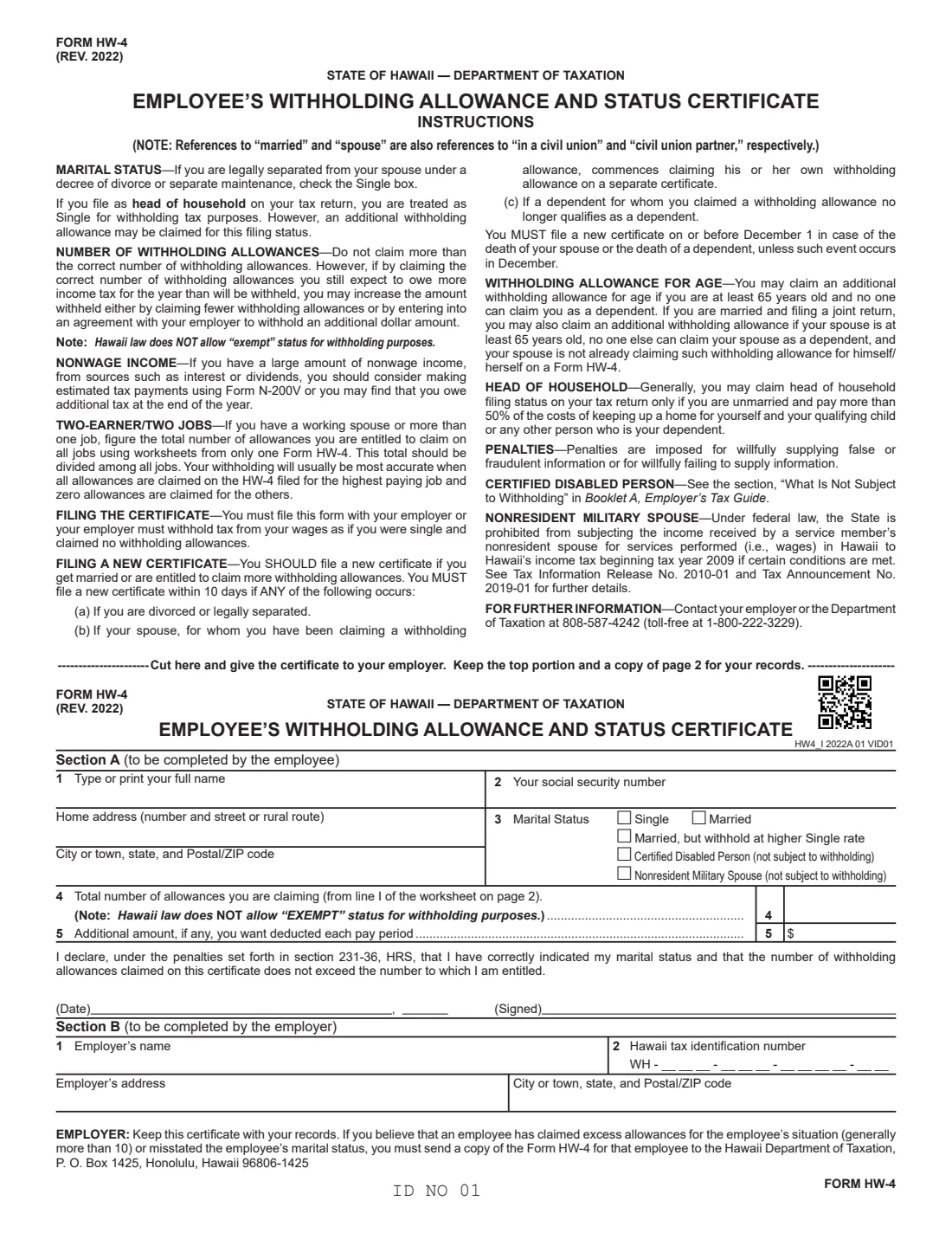
Form HW-4, the Employee's Withholding Allowance and Status Certificate, is how you tell your employer how much Hawaii income tax to withhold. The current revision is Rev. 2022 from the Hawaii Department of Taxation. Page 1 holds the instructions and the certificate, which you cut off and give to your employer; page 2 holds the worksheets you keep.
You choose a marital status (or certified disabled person or nonresident military spouse, both not subject to withholding), claim a number of withholding allowances, and can ask for an additional amount each pay period. Hawaii law does not allow 'exempt' status for withholding. If you don't file an HW-4, your employer must withhold as if you were single with no allowances.
FileIt lets you fill out the HW-4 online in a guided form. It pre-fills your name from the People records in your vault, adds up the allowance worksheet and the Deductions and Adjustments Worksheet, carries the total to line 4, and prints everything into the Department of Taxation's own PDF. The finished form is saved in your vault and can be sent for e-signature. FileIt never submits anything to your employer or the Department.
- Who fills it
- The employee fills Section A; the employer fills Section B.
- Given to
- Your employer, who keeps it with its records.
- When
- When you start a job in Hawaii, and within 10 days of certain changes such as a divorce or legal separation.
- Signatures
- The employee signs and dates it, under the penalties in section 231-36, HRS.
- Edition
- Form HW-4 (Rev. 2022).
- Cost
- Free to fill out on any FileIt account.
Who needs to fill out Form HW-4?
- Employees whose employer withholds Hawaii income tax from their wages.
- Married employees and people in a civil union — the form's 'married' and 'spouse' also mean 'in a civil union' and 'civil union partner'.
- Employees who are 65 or older, or whose spouse is, who can claim an extra allowance for age.
- People who itemize deductions or claim adjustments to income, who can claim more allowances.
- Certified disabled persons and nonresident spouses of service members, whose wages may not be subject to withholding.
When to use Form HW-4
- When you start a new job in Hawaii, alongside the federal Form W-4 and Form I-9.
- When you marry or become entitled to more allowances — the form says you SHOULD file a new certificate.
- Within 10 days if you divorce or legally separate, if a spouse you claimed starts claiming his or her own allowance, or if a dependent you claimed no longer qualifies.
- On or before December 1 after the death of a spouse or dependent, unless it happens in December.
What you need before you start
- Your full name, Social Security number and home address.
- Your marital status, and whether you or your spouse is 65 or older.
- The number of dependents you'll claim on your tax return.
- Whether you'll file as head of household, and whether you expect at least $250 of total tax credits.
- If you itemize: estimates of this year's itemized deductions, adjustments to income and nonwage income.
- For nonresidents and part-year residents using the deductions worksheet: the ratio of your Hawaii adjusted gross income to your total adjusted gross income.
- For the employer: its name, address and Hawaii tax identification number (WH).
What’s on Form HW-4
The 2022 edition has 2 pages. FileIt asks for it in 6 parts, and it is signed by Employee:
- Section A: Your name, SSN, address and marital statusEmployee
- Lines 4 and 5: Allowances and additional amountEmployee
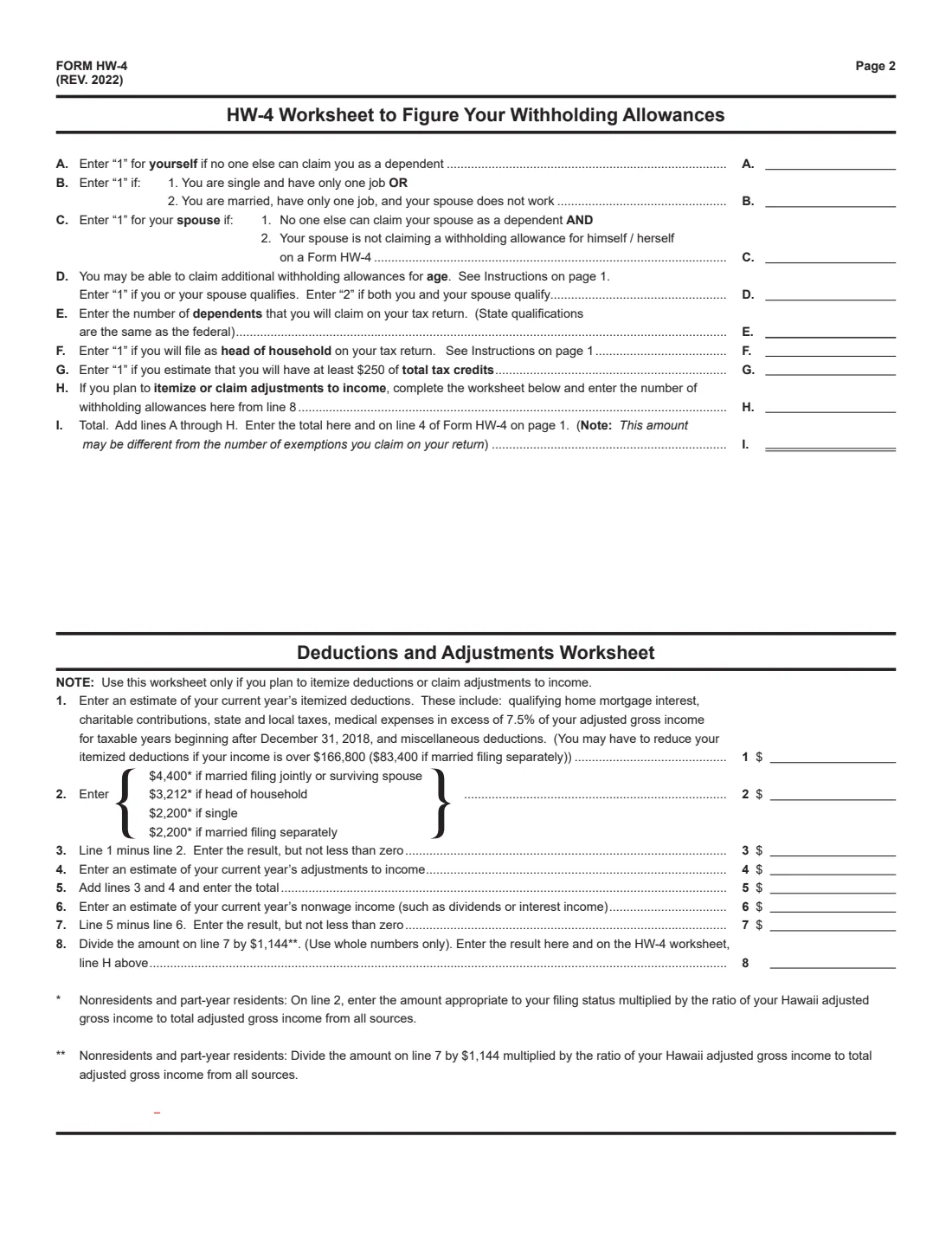
- Worksheet to figure your withholding allowances (page 2)Employee
- Deductions and Adjustments Worksheet (page 2)Employee
- Sign hereEmployee
- Section B: EmployerEmployer
How to fill out Form HW-4, step by step
1 Section A: Your details and marital status
Enter your full name, Social Security number and home address. Choose Single, Married, or Married but withhold at higher Single rate — or Certified Disabled Person or Nonresident Military Spouse if your wages aren't subject to withholding. If you're legally separated under a decree of divorce or separate maintenance, choose Single. Head of household filers are treated as Single for withholding.
2 Worksheet lines A to I
Enter 1 for yourself if no one else can claim you as a dependent (A); 1 if you're single with one job, or married with one job and your spouse doesn't work (B); 1 for your spouse if no one else can claim your spouse and your spouse isn't claiming an allowance on his or her own HW-4 (C); 1 or 2 for age (D); your number of dependents (E); 1 for head of household (F); 1 if you expect at least $250 of total tax credits (G); and line 8 of the Deductions and Adjustments Worksheet (H). Line I is the total, which goes on line 4. FileIt adds it up for you.
3 Deductions and Adjustments Worksheet
Only if you plan to itemize deductions or claim adjustments to income. Start with your estimated itemized deductions and subtract $4,400 (married filing jointly or surviving spouse), $3,212 (head of household) or $2,200 (single or married filing separately). Add adjustments to income, subtract nonwage income, and divide by $1,144, using whole numbers only. Nonresidents and part-year residents scale line 2 and the $1,144 by their Hawaii share of adjusted gross income.
4 Lines 4 and 5
Line 4 is your total allowances from line I. With a working spouse or more than one job, figure the total for all jobs on one HW-4's worksheets and divide it among the jobs — the form says withholding is usually most accurate with all allowances on the highest-paying job and zero on the others. Line 5 is any additional amount you want deducted each pay period.
5 Date and sign
Date and sign the certificate. You declare that your marital status is correct and the allowances don't exceed those you're entitled to. FileIt prints the month and day before the comma on the date line and the year after it.
6 Section B: Employer
The employer enters its name, Hawaii tax identification number (WH-___-___-____-__), address, and city, state and ZIP code, and keeps the certificate. If it believes an employee has claimed excess allowances (generally more than 10) or misstated marital status, it must send a copy to the Department of Taxation.
Common mistakes to avoid
- Writing 'Exempt' — Hawaii law does not allow exempt status for withholding.
- Claiming the full allowances on every job instead of dividing one total among your jobs.
- Claiming the spouse allowance (line C) when your spouse claims his or her own allowance on an HW-4.
- Not filing a new certificate within 10 days after a divorce, legal separation, or a dependent no longer qualifying.
- Handing in page 2 — the worksheets are for your records; the certificate part of page 1 goes to your employer.
After you fill it out
Sign and date the certificate, cut it off below the instructions and give it to your employer. Keep the top portion and a copy of page 2 for your records, as the form says.
FileIt saves the finished PDF in your vault folder, so you have a record of the allowances you claimed.
If you have large nonwage income such as interest or dividends, the form suggests estimated tax payments using Form N-200V.
Fill out Form HW-4 online with FileIt
- Pick the person. Choose someone from People and FileIt fills in their name, date of birth, address and other details it already knows.
- Answer plain-language questions. One part of the form at a time, with the official help text beside each question — 35 fields in all. Your answers save as you go.
- Check the live preview. Watch your answers land on the real Hawaii Department of Taxation form, and let FileIt do any worksheet arithmetic.
- Generate the official PDF. FileIt prints your answers into the agency’s own PDF and files it in that person’s folder in your vault. Sign it, or send it for e-signature.
FileIt fills the form — it never files or submits anything for you. Deliver the finished form to whoever asked for it, the way the form’s instructions say.
Start Form HW-4 now — it’s freeForm HW-4: frequently asked questions
What is Form HW-4?
It is Hawaii's Employee's Withholding Allowance and Status Certificate from the Hawaii Department of Taxation. It tells your employer how much Hawaii income tax to withhold, based on your marital status, allowances and any additional amount.
Can I claim exempt on the Hawaii HW-4?
No. The form says Hawaii law does NOT allow 'exempt' status for withholding. Certified disabled persons and qualifying nonresident military spouses instead check their own boxes, which say they're not subject to withholding.
Is Rev. 2022 the current HW-4?
Yes. When FileIt checked on 28 September 2026, the Hawaii Department of Taxation still published Form HW-4 (Rev. 2022).
What happens if I don't file an HW-4?
The form says your employer must withhold tax from your wages as if you were single and claimed no withholding allowances.
Does the HW-4 apply to civil unions?
Yes. The form notes that references to 'married' and 'spouse' also mean 'in a civil union' and 'civil union partner'.
Can I fill out the HW-4 online?
Yes. FileIt walks you through the form, adds up both worksheets, and prints your answers into the official Hawaii PDF. The finished form is saved in your vault and can be sent for e-signature; you give it to your employer yourself.
Official sources
- Blank form (PDF), published by Hawaii Department of Taxation: https://files.hawaii.gov/tax/forms/2022/hw4_i.pdf
- Official instructions and guidance: https://files.hawaii.gov/tax/forms/2022/hw4_i.pdf
- Edition shown on this page: Form HW-4 (Rev. 2022) (checked 2026-09-28).
FileIt is not affiliated with or endorsed by Hawaii Department of Taxation or any government. This page explains the form in general terms and is not legal, tax or immigration advice. Always read the official instructions, and check that you are using the edition the recipient accepts. Page last reviewed 2026-09-28.