What is Form CMS-40B?
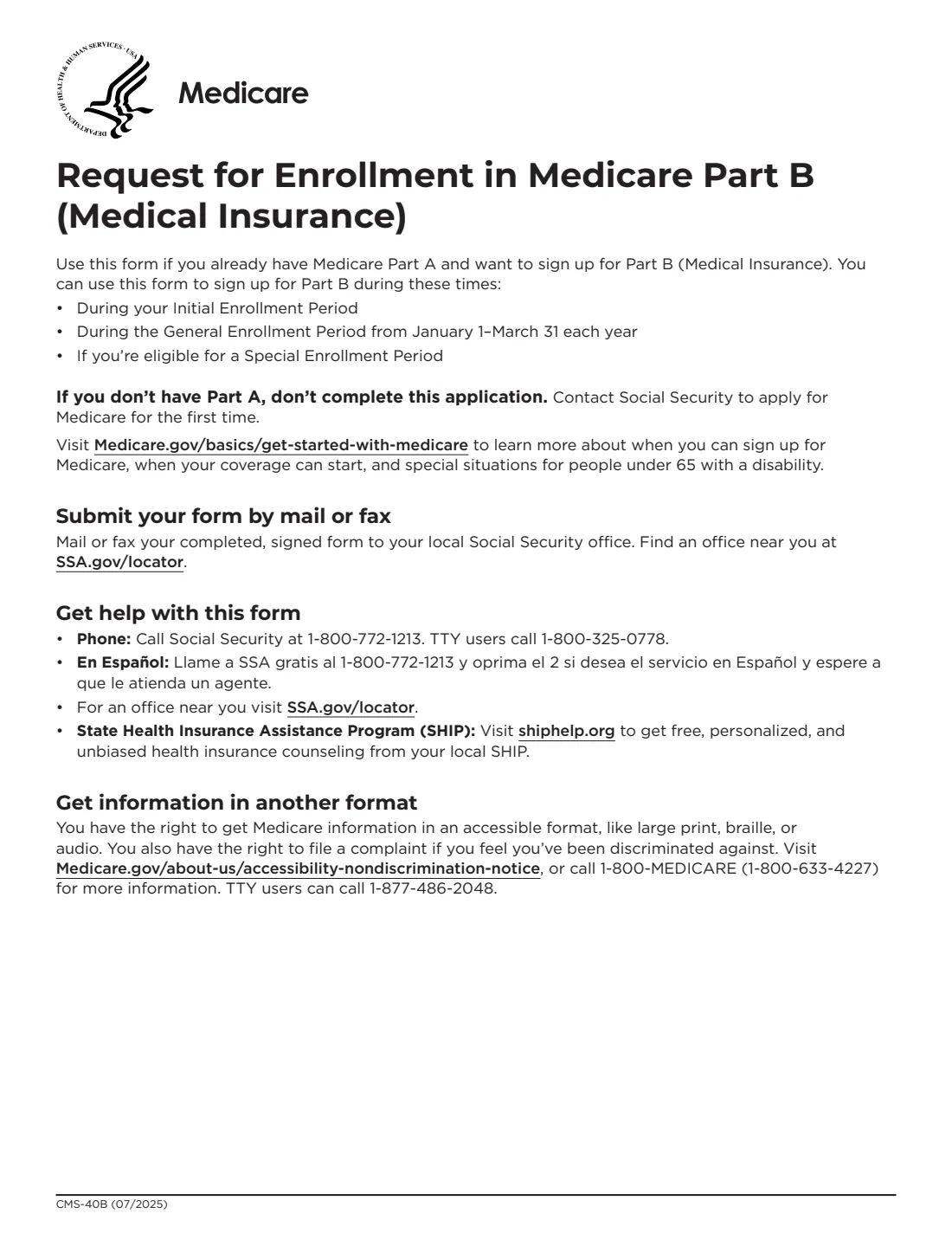
Form CMS-40B, Application for Enrollment in Medicare Part B (Medical Insurance), is the Centers for Medicare & Medicaid Services (CMS) form you use to sign up for Part B if you already have Medicare Part A. The form says you can use it during your Initial Enrollment Period, during the General Enrollment Period from January 1 to March 31 each year, or if you're eligible for a Special Enrollment Period. If you don't have Part A, the form says not to complete it; contact Social Security to apply for Medicare for the first time.
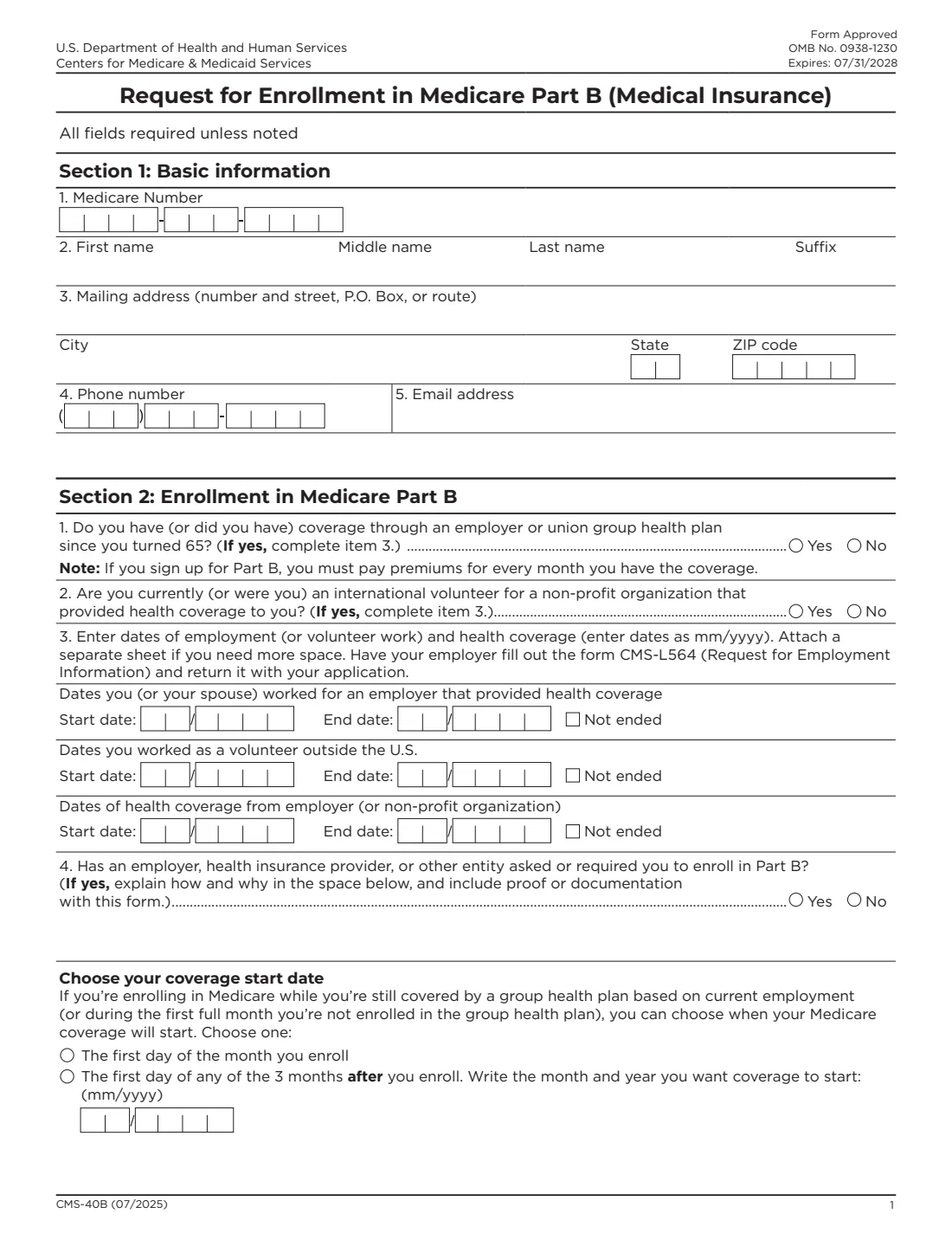
Section 1 asks for your Medicare Number, name, mailing address, phone and email. Section 2 asks whether you have had coverage through an employer or union group health plan since you turned 65, or as an international volunteer, with the dates of that work and coverage, and whether anyone asked or required you to enroll in Part B. If you're still covered by a group health plan based on current employment, you can choose when Part B starts. Section 3 is your signature.
If you're using a Special Enrollment Period because of job-based coverage, have your employer fill out Form CMS-L564 (Request for Employment Information) and send it with your application. You mail or fax your completed, signed form to your local Social Security office.
FileIt walks you through every item and prints your answers onto CMS's official PDF (07/2025), splitting your Medicare Number, phone and month/year dates into the form's boxes, and keeps the signed PDF in your vault. FileIt never submits anything to Social Security.
- Who fills it
- A person who already has Medicare Part A and wants Part B.
- Given to
- Mailed or faxed to your local Social Security office.
- When
- Initial Enrollment Period, General Enrollment Period (January 1–March 31), or a Special Enrollment Period.
- Signatures
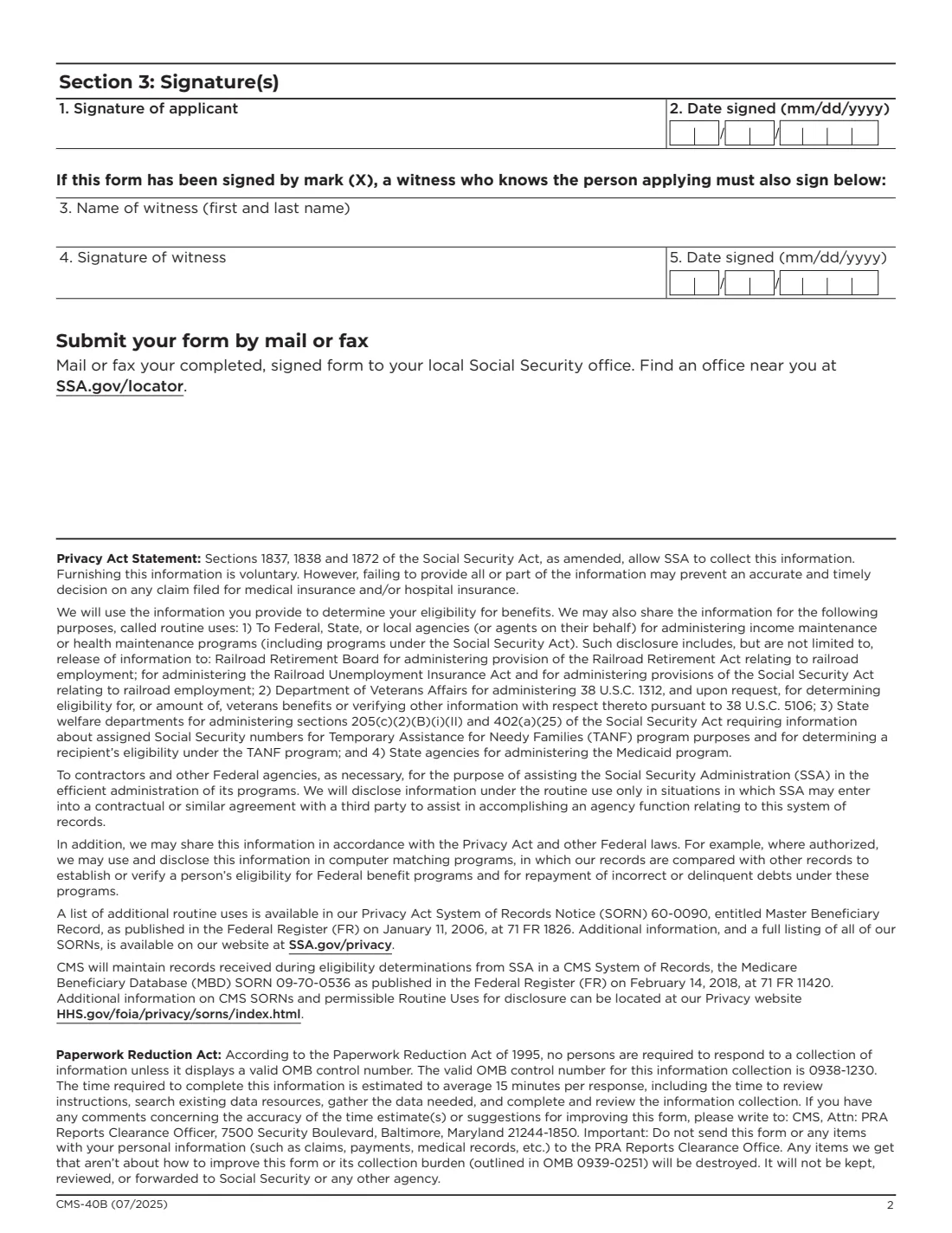
- You sign and date Section 3. If you sign by mark (X), a witness who knows you also signs.
- Pairs with
- Form CMS-L564 from your employer, for a Special Enrollment Period.
- Edition
- CMS-40B (07/2025)
Who needs to fill out Form CMS-40B?
- People who have Medicare Part A and delayed Part B, for example because they had coverage through their own or their spouse's job.
- People who didn't sign up for Part B when first eligible and are using the General Enrollment Period.
- People turning 65 who have Part A and want to add Part B during their Initial Enrollment Period.
- People who were international volunteers for a non-profit that provided their health coverage.
- People an employer or insurer has asked or required to enroll in Part B.
When to use Form CMS-40B
- During your Initial Enrollment Period. Medicare.gov says you're generally first eligible starting 3 months before you turn 65 and ending 3 months after the month you turn 65.
- During the General Enrollment Period, January 1 to March 31 each year.
- Within the 8-month Special Enrollment Period after you or your spouse stop working or lose job-based coverage, with Form CMS-L564 from the employer.
- The month before you or your spouse plan to retire, if you want Part B to start when job-based coverage ends (Medicare.gov's advice).
What you need before you start
- Your Medicare Number (the 11 characters on your Medicare card).
- Your full name, mailing address, phone number and email address.
- Whether you've had employer or union group health plan coverage since you turned 65, or coverage as an international volunteer.
- The month and year the employment (or volunteer work) and the health coverage started and ended.
- Form CMS-L564 completed by your employer, if you're using a Special Enrollment Period.
- If an employer, insurer or other entity asked or required you to enroll: an explanation and proof or documentation.
- If you're still covered through current employment: the month you want Part B to start.
What’s on Form CMS-40B
The 2025 edition has 3 pages. FileIt asks for it in 6 parts, and it is signed by Applicant (the person signing up for part b):
- Section 1: Basic informationApplicant (the person signing up for part b)
- Section 2: Enrollment in Medicare Part BApplicant (the person signing up for part b)
- Item 3: Dates of employment and health coverageApplicant (the person signing up for part b)
- Item 4: Asked to enrollApplicant (the person signing up for part b)
- Your coverage start dateApplicant (the person signing up for part b)
- Section 3: Witness (signing by mark)Applicant (the person signing up for part b)
How to fill out Form CMS-40B, step by step
1 Section 1: Basic information
Enter your Medicare Number, your first, middle and last name and any suffix, your mailing address (number and street, P.O. Box or route, city, state and ZIP code), phone number and email address. The form says all fields are required unless noted.
2 Section 2, items 1 and 2: Other coverage
Item 1 asks whether you have (or had) coverage through an employer or union group health plan since you turned 65. Item 2 asks whether you are (or were) an international volunteer for a non-profit organization that provided your health coverage. If you answer Yes to either, complete item 3. The form notes that if you sign up for Part B, you must pay premiums for every month you have the coverage.
3 Item 3: Dates of employment and coverage
Enter the start and end dates (month and year) you or your spouse worked for an employer that provided health coverage, the dates you worked as a volunteer outside the U.S., and the dates of the health coverage itself. Tick Not ended if it's still going on. Attach a separate sheet if you need more space, and have your employer fill out CMS-L564.
4 Item 4: Asked to enroll
Say whether an employer, health insurance provider or other entity asked or required you to enroll in Part B. If yes, explain how and why in the space provided, and include proof or documentation with the form.
5 Choose your coverage start date
If you're enrolling while still covered by a group health plan based on current employment (or during the first full month you're not enrolled in it), choose whether Part B starts the first day of the month you enroll, or the first day of one of the 3 months after you enroll, and write that month and year.
6 Section 3: Signature
Sign and date the form. If you sign by mark (X), a witness who knows you must also give their name, sign and date it.
Common mistakes to avoid
- Using CMS-40B when you don't have Part A yet. The form says to contact Social Security to apply for Medicare for the first time instead.
- Leaving out item 3 after answering Yes to item 1 or 2.
- Sending a Special Enrollment Period application without the employer's CMS-L564.
- Answering Yes to item 4 without including the explanation and proof.
- Typing the Medicare Number incorrectly. Copy all 11 characters from your Medicare card.
- Forgetting that a witness must sign if you sign by mark.
After you fill it out
Sign and date the form, then mail or fax it to your local Social Security office (SSA.gov/locator). If you're using a Special Enrollment Period, send the employer's CMS-L564 with it.
Keep a copy. Part B has a monthly premium; Medicare.gov says that if you don't sign up when first eligible and don't qualify for a Special Enrollment Period, you may pay a late enrollment penalty for as long as you have Part B.
FileIt saves the completed application in your vault, where you can also keep your CMS-L564 and, once it arrives, your updated Medicare card.
Fill out Form CMS-40B online with FileIt
- Pick the person. Choose someone from People and FileIt fills in their name, date of birth, address and other details it already knows.
- Answer plain-language questions. One part of the form at a time, with the official help text beside each question — 27 fields in all. Your answers save as you go.
- Check the live preview. Watch your answers land on the real Centers for Medicare & Medicaid Services (CMS) form, and let FileIt do any worksheet arithmetic.
- Generate the official PDF. FileIt prints your answers into the agency’s own PDF and files it in that person’s folder in your vault. Sign it, or send it for e-signature.
FileIt fills the form — it never files or submits anything for you. Deliver the finished form to whoever asked for it, the way the form’s instructions say.
Start Form CMS-40B now — it’s freeForm CMS-40B: frequently asked questions
Who should use Form CMS-40B?
People who already have Medicare Part A and want to sign up for Part B. If you don't have Part A, the form says not to complete it and to contact Social Security to apply for Medicare.
When can I use CMS-40B?
During your Initial Enrollment Period, during the General Enrollment Period from January 1 to March 31 each year, or if you're eligible for a Special Enrollment Period.
Where do I send CMS-40B?
Mail or fax your completed, signed form to your local Social Security office. You can find one at SSA.gov/locator.
Do I need CMS-L564 too?
If you're signing up in a Special Enrollment Period because of coverage through your or your spouse's job, yes: item 3 asks you to have your employer fill out CMS-L564 and return it with your application.
Is there a penalty for signing up for Part B late?
Medicare.gov says you'll pay an extra 10% for each full 12-month period you could have had Part B but didn't, for as long as you have Part B, unless you qualify for a Special Enrollment Period or enroll in a Medicare Savings Program.
Can I choose when my Part B coverage starts?
If you're enrolling while still covered by a group health plan based on current employment, or during the first full month you're not enrolled in it, the form lets you choose the first day of the month you enroll or of any of the 3 months after.
Can I fill out CMS-40B online?
With FileIt you answer the questions online and get CMS's official PDF with your answers printed in, ready to sign and mail or fax. FileIt doesn't submit it.
Official sources
- Blank form (PDF), published by Centers for Medicare & Medicaid Services (CMS): https://www.cms.gov/medicare/cms-forms/cms-forms/downloads/cms40b-e.pdf
- Official instructions and guidance: https://www.medicare.gov/basics/forms-publications-mailings/forms/enrollment
- Edition shown on this page: CMS-40B (07/2025), OMB No. 0938-1230, expires 07/31/2028 (checked 2026-09-28).
FileIt is not affiliated with or endorsed by Centers for Medicare & Medicaid Services (CMS) or any government. This page explains the form in general terms and is not legal, tax or immigration advice. Always read the official instructions, and check that you are using the edition the recipient accepts. Page last reviewed 2026-09-28.