What is Form 5305-SEP?
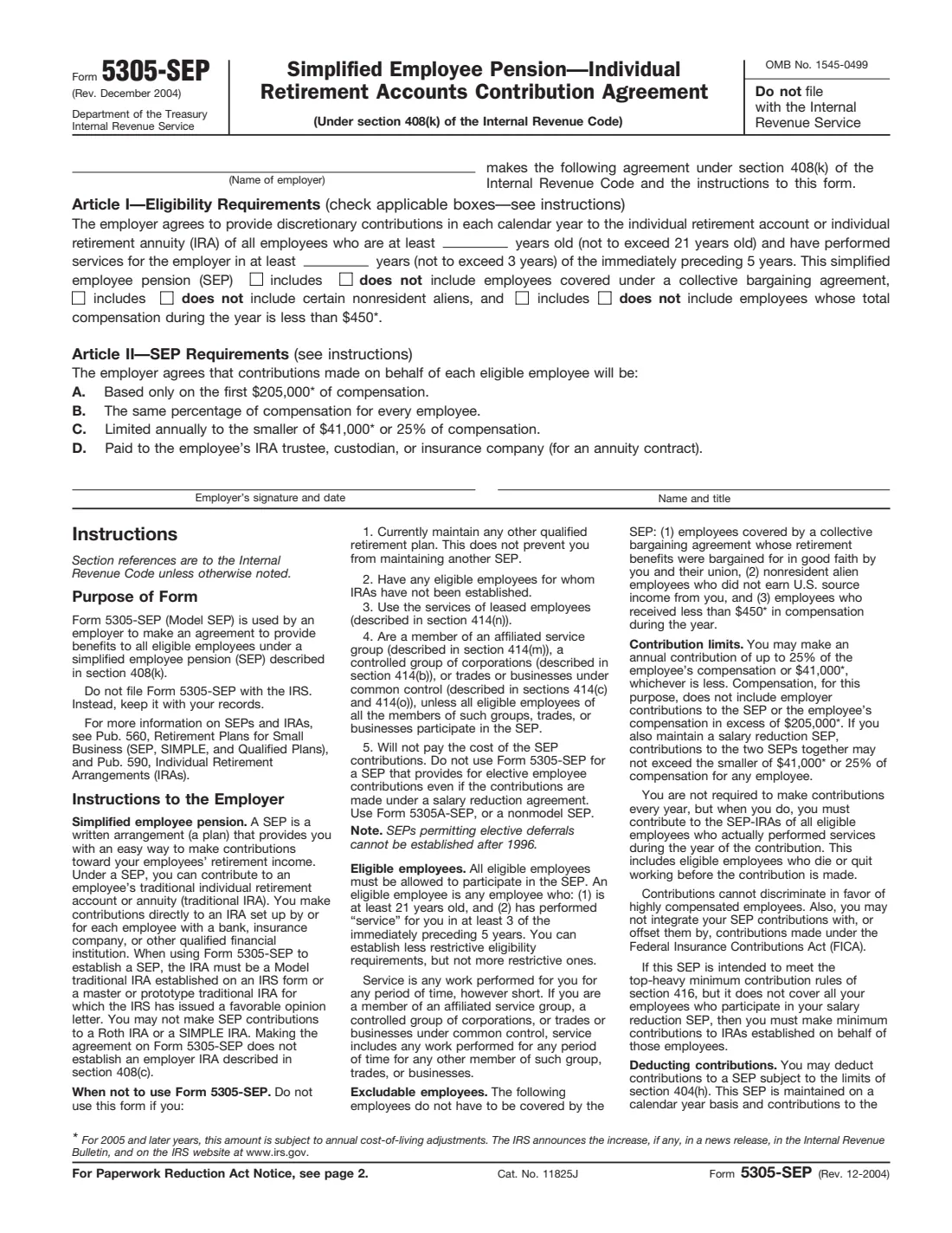
Form 5305-SEP is the Internal Revenue Service's model Simplified Employee Pension (SEP) agreement. A SEP is a written arrangement that lets an employer, including a self-employed person, make retirement contributions straight into a traditional IRA set up by or for each eligible employee, called a SEP-IRA. Signing Form 5305-SEP is one way to put that arrangement in writing.
The form is short. In Article I you set who is eligible: a minimum age (not above 21), a number of years of service in the last 5 (not above 3), and whether union employees, certain nonresident aliens and employees paid below a minimum amount are included. Article II is fixed wording: every eligible employee gets the same percentage of pay, up to the annual limits, paid to their own IRA. The form says "Do not file with the Internal Revenue Service". The employer keeps it and gives each eligible employee a copy.
FileIt walks you through each blank and prints your answers into the IRS's own PDF. It pre-fills the employer's name from your records and saves the finished form in your vault. You can also send it for e-signature from there.
- Who fills it
- The employer adopting the SEP, including a sole proprietor or partnership
- Filed with
- Nobody. The employer keeps it and gives each eligible employee a copy.
- Signatures
- The employer signs and dates it, with the signer's name and title
- Edition
- Rev. December 2004, still the current revision
- Pages
- 1 page to complete, plus instructions for employer and employees
- Agency
- Internal Revenue Service (IRS), Department of the Treasury
Who needs to fill out Form 5305-SEP?
- Small businesses that want a simple retirement plan where only the employer contributes.
- Self-employed people and sole proprietors setting up a SEP-IRA for themselves, and for any employees.
- Employers that don't maintain any other qualified retirement plan. Another SEP is allowed.
- Not for employers who use leased employees, or who belong to a controlled or affiliated group unless every member's eligible employees take part.
When to use Form 5305-SEP
- When you set up a SEP and want to use the IRS model agreement rather than a prototype plan document from a bank or broker.
- Before you make your first SEP contribution. Each eligible employee needs a traditional IRA (a Model IRA or an IRS-approved prototype) to receive it.
- When you change your eligibility choices, by signing a new agreement and giving employees a copy.
What you need before you start
- The employer's legal name.
- Your eligibility rules: the minimum age (21 or lower) and the years of service required (3 or fewer of the immediately preceding 5 years).
- Your choice for union employees, certain nonresident aliens, and employees paid below the minimum-compensation amount: include or exclude.
- The name and title of the person signing for the employer.
- A list of eligible employees, each with a traditional IRA set up to receive contributions.
What’s on Form 5305-SEP
The 2004 edition has 2 pages. FileIt asks for it in 3 parts, and it is signed by Employer:
- EmployerEmployer
- Article I: Who is eligibleEmployer
- Article II and signatureEmployer
How to fill out Form 5305-SEP, step by step
1 Name of employer
Enter the business adopting the SEP. A self-employed person enters their own name or their business name.
2 Article I: Age and service
Fill in the minimum age and the number of years of service. The law's maximums are age 21 and service in 3 of the immediately preceding 5 years. You can be more generous, with a lower age or fewer years, but not stricter. The instructions define service as any work for you for any period of time, however short.
3 Article I: The three include / exclude choices
Tick "includes" or "does not include" for each group: employees covered by a collective bargaining agreement (you may exclude them if retirement benefits were bargained for in good faith), nonresident aliens who received no U.S.-source income from you, and employees whose pay for the year is below the minimum-compensation amount. The form prints $450, the 2004 figure. Its footnote says the amount is adjusted for cost of living each year, so check the current figure on IRS.gov.
4 Article II: SEP requirements
You don't fill anything in here. You agree that contributions are based only on pay up to the annual compensation limit, are the same percentage of pay for every eligible employee, are capped each year at the smaller of the dollar limit or 25% of pay, and are paid to each employee's IRA trustee, custodian or insurance company. The printed dollar amounts are the 2004 ones and are adjusted every year.
5 Signature, name and title
The employer signs and dates the form on the "Employer's signature and date" line and prints the signer's name and title beside it.
Common mistakes to avoid
- Setting the age above 21 or requiring more than 3 years of service. The form doesn't allow stricter rules.
- Sending the form to the IRS. It is kept with your records.
- Using the model form while also maintaining another qualified retirement plan, such as a 401(k).
- Leaving out an eligible employee, or contributing different percentages of pay to different employees.
- Forgetting to give each eligible employee a copy of the completed form and the information the instructions list.
- Relying on the dollar amounts printed on the 2004 form. They change every year.
After you fill it out
Sign and date the form, by hand or with FileIt's optional e-signature, and keep it with your business records. Don't send it to the IRS.
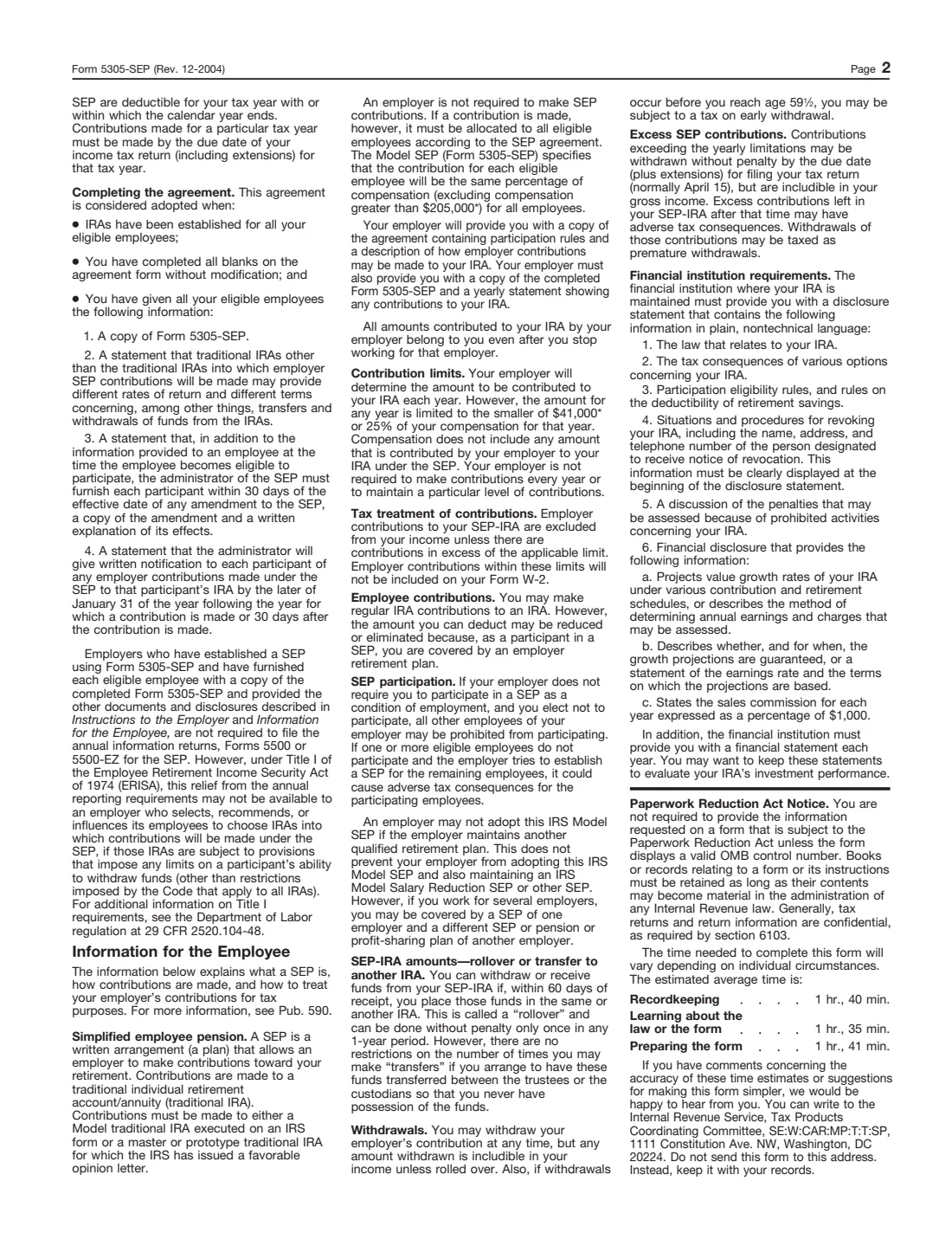
The page 2 instructions say the agreement is adopted when IRAs have been set up for all eligible employees, every blank is completed without modification, and each eligible employee has received a copy of the form plus the statements the instructions list.
Make contributions to each eligible employee's SEP-IRA. The instructions say contributions for a tax year must be made by the due date of your income tax return, including extensions. Employers who follow the model form and give employees the required information generally don't file Form 5500 for the SEP.
Fill out Form 5305-SEP online with FileIt
- Pick the person. Choose someone from People and FileIt fills in their name, date of birth, address and other details it already knows.
- Answer plain-language questions. One part of the form at a time, with the official help text beside each question — 7 fields in all. Your answers save as you go.
- Check the live preview. Watch your answers land on the real Internal Revenue Service (IRS) form, and let FileIt do any worksheet arithmetic.
- Generate the official PDF. FileIt prints your answers into the agency’s own PDF and files it in that person’s folder in your vault. Sign it, or send it for e-signature.
FileIt fills the form — it never files or submits anything for you. Deliver the finished form to whoever asked for it, the way the form’s instructions say.
Start Form 5305-SEP now — it’s freeForm 5305-SEP: frequently asked questions
Do I file Form 5305-SEP with the IRS?
No. The form says "Do not file with the Internal Revenue Service". You keep it with your records and give a copy to each eligible employee.
Can a self-employed person with no employees use Form 5305-SEP?
Yes. A sole proprietor can adopt a SEP for themselves using the model form, and must cover any employees who later become eligible.
Do I have to contribute every year?
No. The instructions say you are not required to contribute every year. In any year you do contribute, every eligible employee gets the same percentage of pay.
Can employees make their own salary-deferral contributions to this SEP?
No. Form 5305-SEP is for employer contributions only. The instructions note that SEPs permitting elective deferrals (SARSEPs) can't be established after 1996.
Is the December 2004 revision still valid?
Yes. Rev. December 2004 is the revision the IRS publishes today. Only the dollar limits printed on it have changed since, through annual cost-of-living adjustments.
Can I have a SEP and a 401(k)?
Not with this model form. It can't be used if you currently maintain any other qualified retirement plan. Another SEP is allowed.
Official sources
- Blank form (PDF), published by Internal Revenue Service (IRS): https://www.irs.gov/pub/irs-pdf/f5305sep.pdf
- Official instructions and guidance: https://www.irs.gov/forms-pubs/about-form-5305-sep
- Edition shown on this page: Rev. December 2004 (checked 2026-09-28).
FileIt is not affiliated with or endorsed by Internal Revenue Service (IRS) or any government. This page explains the form in general terms and is not legal, tax or immigration advice. Always read the official instructions, and check that you are using the edition the recipient accepts. Page last reviewed 2026-09-28.