What is SSS Form E-4?
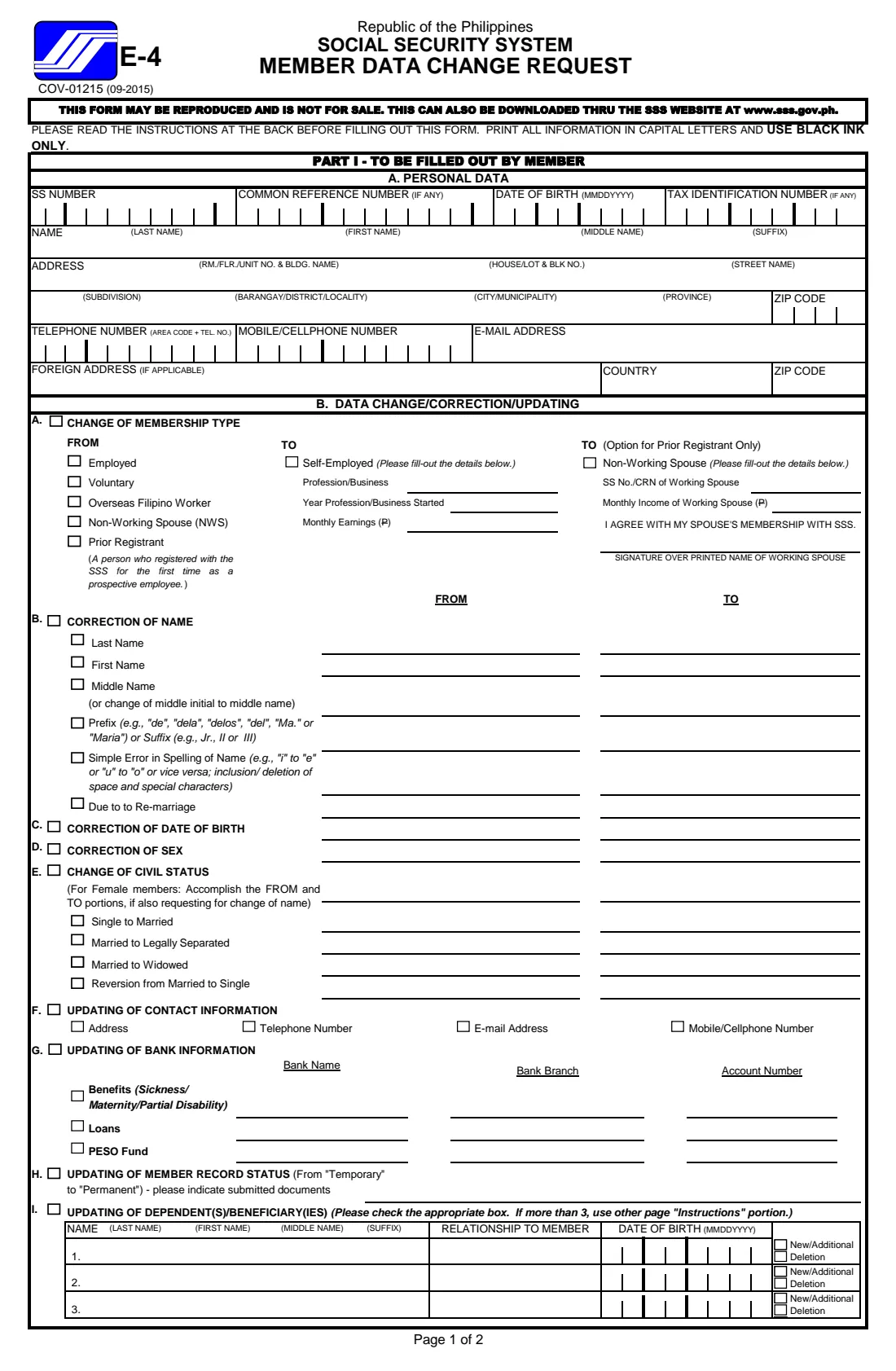
SS Form E-4, the Member Data Change Request, is how a member of the Philippine Social Security System (SSS) asks for their record to be changed, corrected or updated. One form covers nine kinds of change, lettered A to I: membership type, name, date of birth, sex, civil status, contact information, bank information, record status, and dependents or beneficiaries.
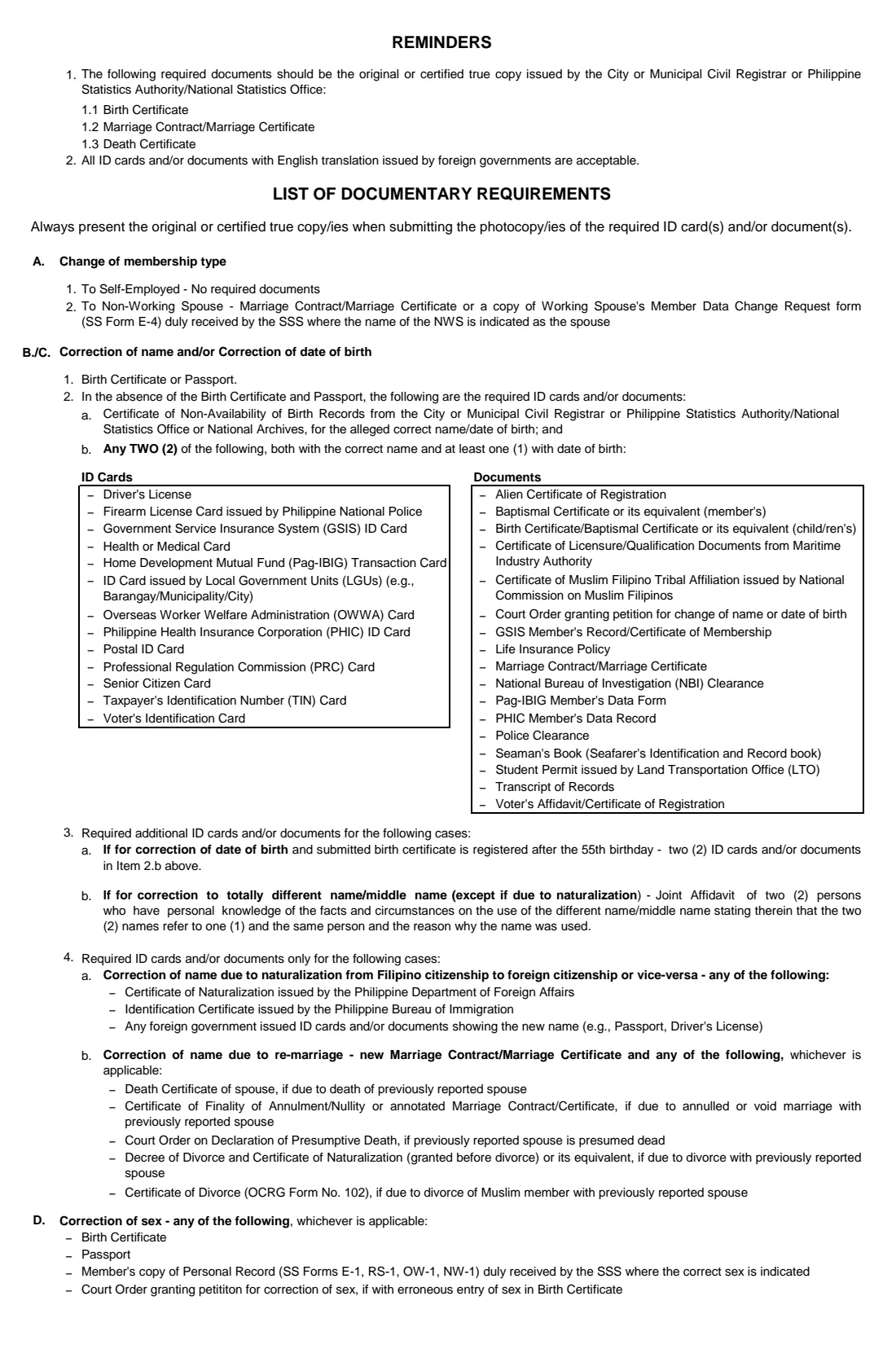
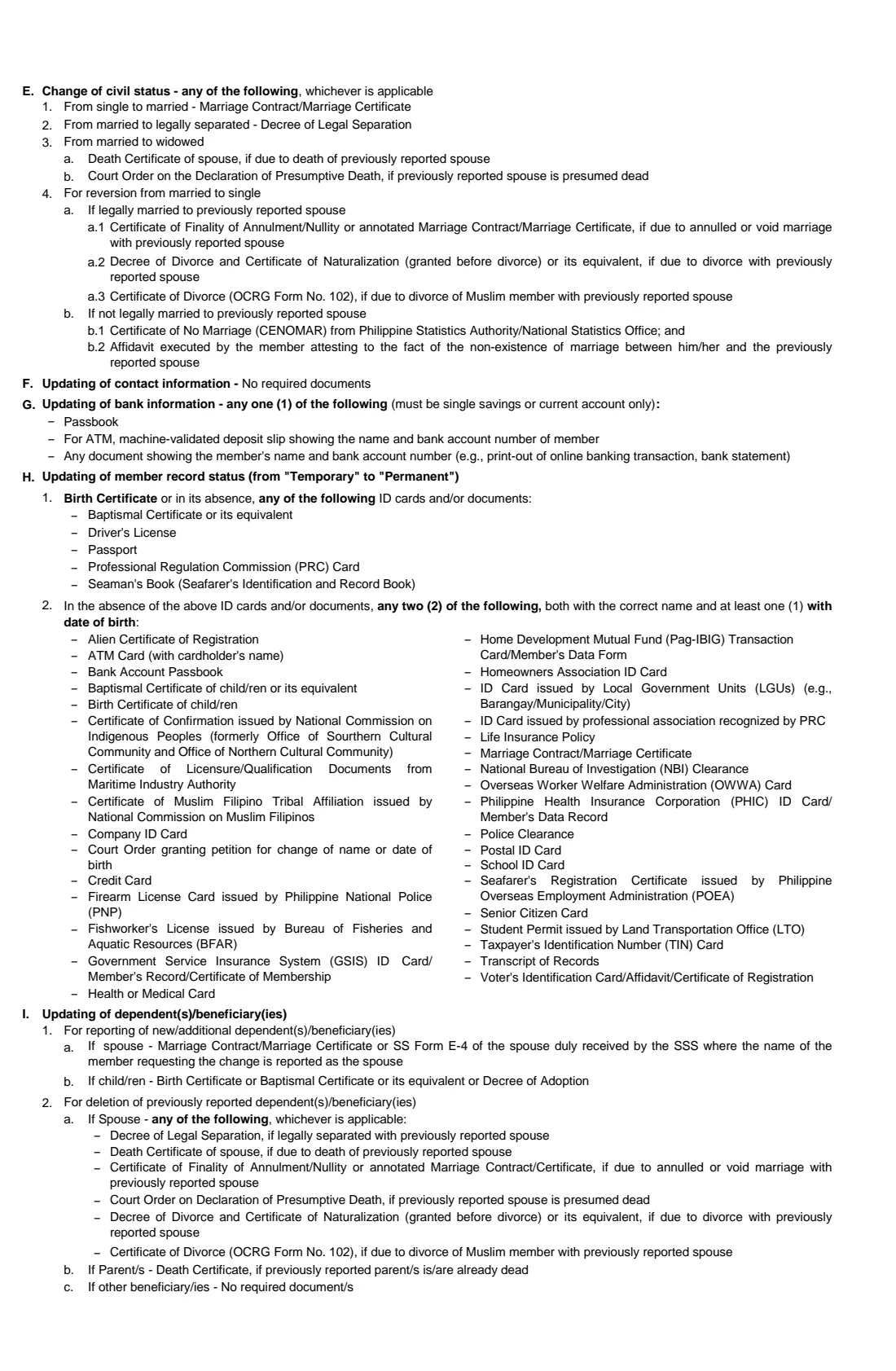
You fill in Part I-A with your SS number and details, then only the parts that apply. Each change has its own supporting documents, listed on the form itself — for example a marriage certificate for a change from single to married, or a birth certificate to make a temporary record permanent.
FileIt walks you through each part and prints your answers into the SSS's own PDF, edition COV-01215 (09-2015): in capital letters, numbers in their boxes, the right part letters ticked. The finished PDF is filed in your vault. You print it, sign it in black ink and hand it in at an SSS branch yourself — FileIt never sends anything to the SSS.
- Who fills it
- The SSS member — or, per the form's instructions, the member's employer, company representative or household employer on their behalf
- Given to
- The nearest SSS branch office, with the required documents
- Copies
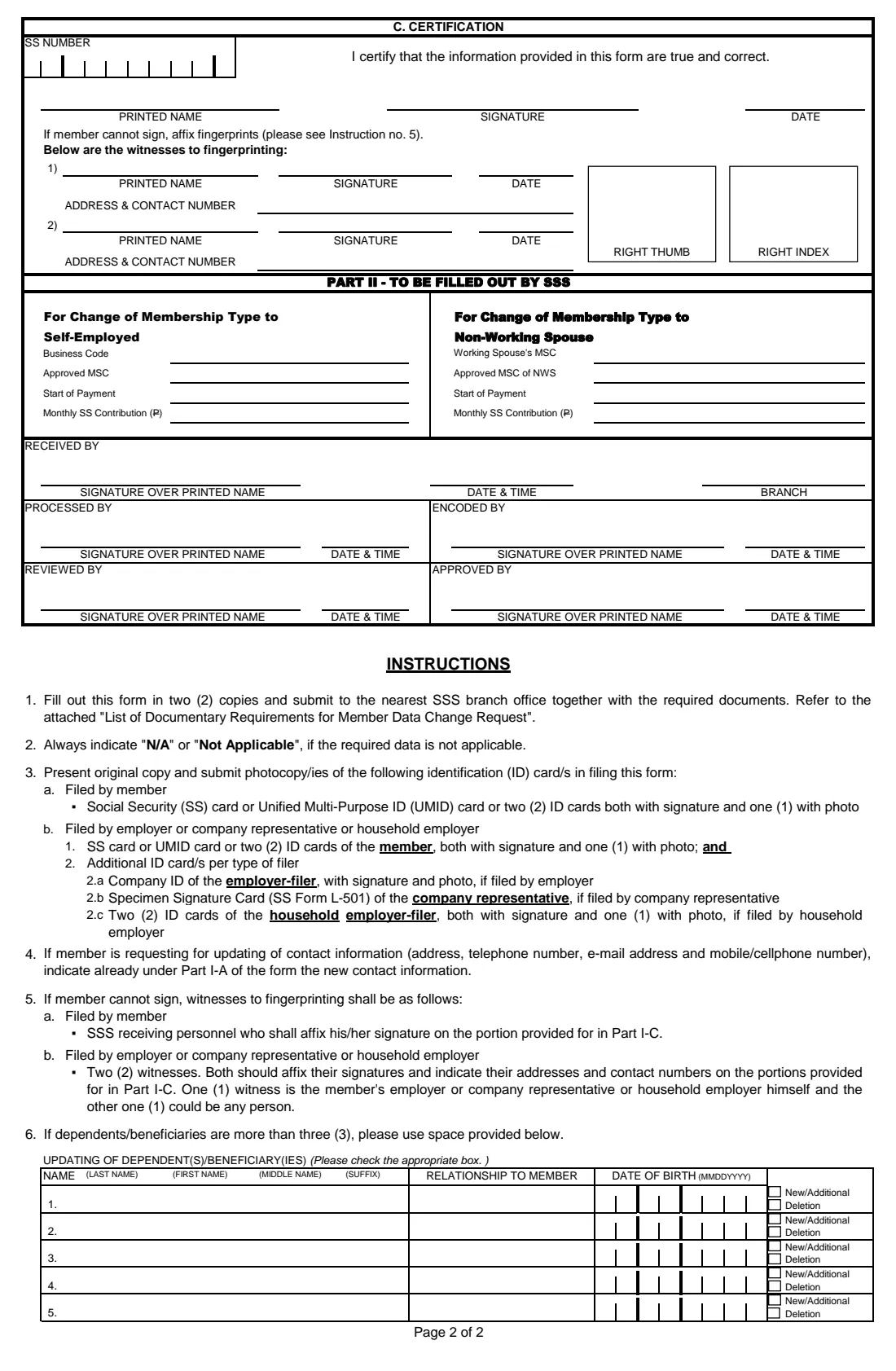
- Two, per the form's Instruction 1
- Signatures
- The member signs by hand in black ink, or affixes fingerprints before witnesses; a working spouse signs for a change to Non-Working Spouse
- Edition
- COV-01215 (09-2015), 2 form pages plus the list of documentary requirements
- Parts
- I-A personal data; B. A–I changes; C. certification; Part II for the SSS
Who needs to fill out SSS Form E-4?
- Members who married, separated, were widowed or reverted to single and need their civil status (and, for female members, their name) updated.
- Members whose SSS record has a misspelled name, a wrong date of birth or the wrong sex.
- Members adding a spouse or child as a dependent, adding or removing a beneficiary.
- Members changing membership type to Self-Employed, or a Prior Registrant changing to Non-Working Spouse.
- Members enrolling or changing the bank account for benefit, loan or PESO Fund payments.
- Members whose record is still "Temporary" and who now have the documents to make it "Permanent".
When to use SSS Form E-4
- After a life event the SSS should know about: marriage, a child's birth or adoption, the death of a spouse or parent, an annulment or divorce.
- When you notice an error in your SSS record — before it delays a benefit or loan claim.
- When you start working for yourself and change from employed to self-employed membership.
- When you move, or get a new phone number or e-mail address.
What you need before you start
- Your SS number, and your CRN and TIN if you have them.
- Your SS card or UMID card — or two ID cards, both with a signature and one with a photo (Instruction 3).
- The documents for each change, as originals or certified true copies with photocopies: the form's own list names them part by part.
- For new dependents: their full names and dates of birth, and your marriage certificate or their birth certificates.
- For bank updates: the bank name, branch and account number, with a passbook, validated deposit slip or bank statement in your name.
- For a change to Non-Working Spouse: your working spouse's SS number or CRN, their monthly income, and their signature on the form.
What’s on SSS Form E-4
The 2015 edition has 4 pages. FileIt asks for it in 12 parts:
- Part I-A — Personal dataMember
- Address and contact detailsMember
- A. Change of membership typeMember
- B. Correction of nameMember
- C. Correction of date of birthMember
- D. Correction of sexMember
- E. Change of civil statusMember
- F. Updating of contact informationMember
- G. Updating of bank informationMember
- H. Updating of member record status (Temporary to Permanent)Member
- I. Updating of dependent(s) / beneficiary(ies)Member
- C. CertificationMember
How to fill out SSS Form E-4, step by step
1 Part I-A — Personal data
Your SS number, CRN and TIN (if any), date of birth as month, day and year, your name split into last, first and middle name and suffix, and your address, phone numbers and e-mail. If you are updating your contact information, the form says to write the new details here.
2 A. Change of membership type
Tick what you are now (Employed, Voluntary, OFW, Non-Working Spouse or Prior Registrant) and what you are changing to. To Self-Employed: give your profession or business, the year it started and your monthly earnings. To Non-Working Spouse — marked on the form as the option for a Prior Registrant only — give your working spouse's SS number or CRN and monthly income; your spouse signs to agree.
3 B. Correction of name
Tick each part being corrected — last, first or middle name, prefix or suffix, a simple spelling error, or a change due to re-marriage — and write the name as recorded (FROM) and as it should be (TO).
4 C and D. Date of birth and sex
Give the recorded and correct date of birth, or the recorded and correct sex. A birth certificate or passport is the main supporting document; the form lists alternatives.
5 E. Change of civil status
Tick single to married, married to legally separated, married to widowed, or reversion from married to single. Female members also changing their name fill in the FROM and TO names here.
6 F, G and H. Contact, bank and record status
Tick the contact details you are updating. For bank information, tick benefits, loans or PESO Fund and give the bank, branch and account number — a single savings or current account. For record status, name the documents you are submitting to change your record from Temporary to Permanent.
7 I. Dependents and beneficiaries
For each person, give the name, relationship, date of birth, and tick New/Additional or Deletion. Three fit on page 1; FileIt prints up to five more in the space provided on page 2.
8 Certification
FileIt repeats your SS number and prints your name and the date. You sign by hand. If you can't sign, you affix your fingerprints, with witnesses as Instruction 5 describes.
Common mistakes to avoid
- Forgetting to bring the supporting documents for each change you tick — the form's list is part by part.
- Bringing photocopies only: the form asks for the original or a certified true copy, with the photocopy.
- Giving the new name or civil status in Part I-A instead of the record as it stands — the changes go in parts A to I.
- Choosing Non-Working Spouse when you are not a Prior Registrant.
- Giving a joint account or someone else's account for benefits — the form asks for a single savings or current account.
- Printing only one copy: the instructions say to fill out the form in two copies.
After you fill it out
Print two copies from your FileIt vault and sign both in black ink. A working spouse signs for a change to Non-Working Spouse.
Take them to the nearest SSS branch office with your ID and the original or certified true copies of the documents for each change, plus photocopies. The SSS processes the change; FileIt does not send anything to the SSS.
Keep the filled form and copies of the documents in your vault, so you can show what you asked to change if a later benefit or loan claim is questioned.
Fill out SSS Form E-4 online with FileIt
- Pick the person. Choose someone from People and FileIt fills in their name, date of birth, address and other details it already knows.
- Answer plain-language questions. One part of the form at a time, with the official help text beside each question — 142 fields in all. Your answers save as you go.
- Check the live preview. Watch your answers land on the real Social Security System (SSS) form, and let FileIt do any worksheet arithmetic.
- Generate the official PDF. FileIt prints your answers into the agency’s own PDF and files it in that person’s folder in your vault.
FileIt fills the form — it never files or submits anything for you. Deliver the finished form to whoever asked for it, the way the form’s instructions say.
Start SSS Form E-4 now — it’s freeSSS Form E-4: frequently asked questions
What is SSS Form E-4 used for?
It is the Member Data Change Request: the form an SSS member uses to change membership type or to correct or update name, date of birth, sex, civil status, contact information, bank information, record status, and dependents or beneficiaries.
What do I need to change my name after marriage?
Tick E (single to married) and, as a female member also changing her name, fill in the FROM and TO names. The form lists the marriage contract or marriage certificate as the document.
How many dependents can I list?
Three on page 1. The instructions say to use the space on page 2 if there are more — FileIt prints up to five more there.
Can someone else file it for me?
The form's instructions provide for filing by the member's employer, company representative or household employer, with the IDs listed in Instruction 3.
Can I sign it electronically?
No. The paper form is signed in black ink (or fingerprinted before witnesses) and handed in at an SSS branch. FileIt prepares the filled PDF for you to print and sign.
Does FileIt submit the form to the SSS?
No. FileIt fills in the official PDF and files it in your vault. You hand it in at an SSS branch yourself.
Official sources
- Blank form (PDF), published by Social Security System (SSS): https://www.sss.gov.ph/wp-content/uploads/2022/03/SSSForms_Change_Request.pdf
- Official instructions and guidance: https://www.sss.gov.ph/wp-content/uploads/2022/03/SSSForms_Change_Request.pdf
- Edition shown on this page: COV-01215 (09-2015) (checked 2026-10-01).
FileIt is not affiliated with or endorsed by Social Security System (SSS) or any government. This page explains the form in general terms and is not legal, tax or immigration advice. Always read the official instructions, and check that you are using the edition the recipient accepts. Page last reviewed 2026-10-01.