What is BIR Form 1905?
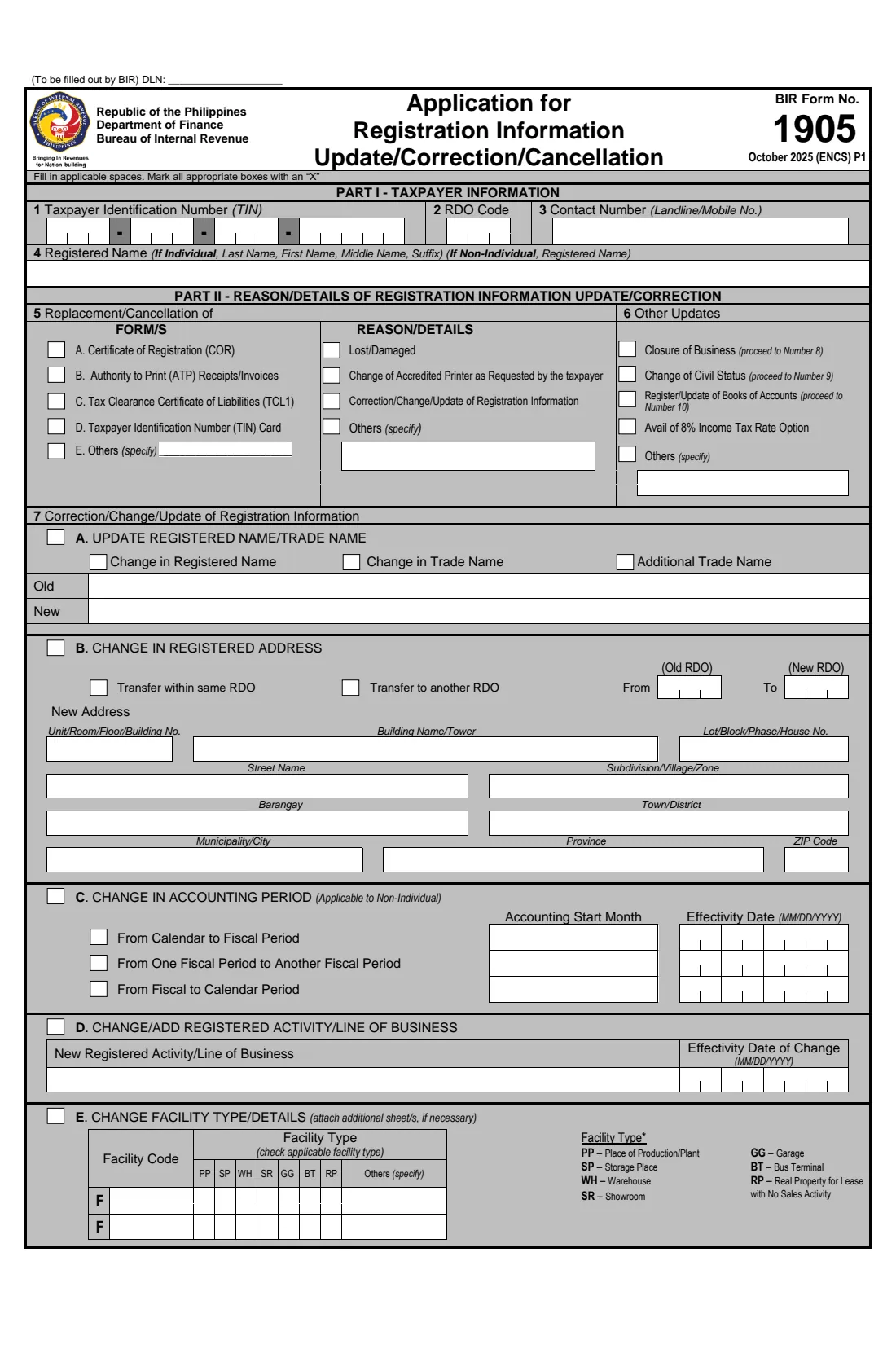
BIR Form 1905 is the Bureau of Internal Revenue's Application for Registration Information Update/Correction/Cancellation. Anyone who already has a Taxpayer Identification Number (TIN) uses it when their registration details change: a move to a new address or a transfer to another Revenue District Office (RDO), a change of civil status or name, new contact details, a replacement for a lost or damaged TIN card or Certificate of Registration (COR), or cancelling a TIN after the taxpayer's death or because a person ended up with more than one TIN. The current edition is dated October 2025 (ENCS): three pages of form plus a page of documentary requirements.
The form serves businesses and individuals alike, so most of it — Authority to Print, accounting periods, lines of business, facilities, incentives, tax types, officers and books of accounts — doesn't apply to an employee or a one-time taxpayer. FileIt covers the parts individuals not engaged in business use and leaves the business sections blank.
FileIt asks only about the changes you switch on, splits your TIN and dates into the right boxes, prints everything in capital letters with an X in the chosen boxes, and ticks the matching item box for each change. The finished PDF is saved in your vault. You print it, sign it by hand and take it to the RDO yourself; FileIt never files anything with the BIR.
- Who fills it
- A registered taxpayer (or their authorised representative, tax agent or, after a death, an heir or the estate's representative)
- Given to
- The BIR Revenue District Office (RDO)
- When
- Whenever your registered details change, or to replace a TIN card or COR, or to cancel a TIN
- Signatures
- Taxpayer, authorised representative or tax agent (item 12), by hand over the printed name
- Edition
- October 2025 (ENCS)
- Pages
- 4 (3 pages of form, 1 page of documentary requirements)
Who needs to fill out BIR Form 1905?
- Employees and other individuals who moved home, especially to an address covered by a different RDO.
- Taxpayers who married, or whose marriage ended, and need their civil status, name and spouse details updated.
- Anyone who lost or damaged their TIN card or Certificate of Registration and needs a replacement.
- Individuals correcting a wrong detail in their BIR registration, such as a misspelt name or an incorrect date of birth.
- Taxpayers changing their phone number, email address or authorised representative on file.
- Heirs and estate representatives cancelling the TIN of a person who has died, and people who were issued more than one TIN.
When to use BIR Form 1905
- After a move: tick 'Transfer within same RDO' or 'Transfer to another RDO' and give your new address and the old and new RDO codes.
- After a change of civil status: item 9 records the change, your old and new names and your spouse's details.
- When you need a replacement TIN card or COR, or want one that shows corrected details.
- When a taxpayer has died, or a person discovers they have more than one TIN — the form's item 8A cancels a TIN. Never keep using a second TIN: having more than one is criminally punishable.
- Not for a first TIN: if you have never been registered, use BIR Form 1902 (employees) or 1904 (one-time taxpayers and E.O. 98).
What you need before you start
- Your TIN and the RDO code where you are registered now, as on your Certificate of Registration or TIN records.
- Your full name as registered, and your new details: address broken down by unit, building, lot, street, subdivision, barangay, town, city, province and ZIP code; or new phone and email.
- The new RDO code if your new address is under a different RDO.
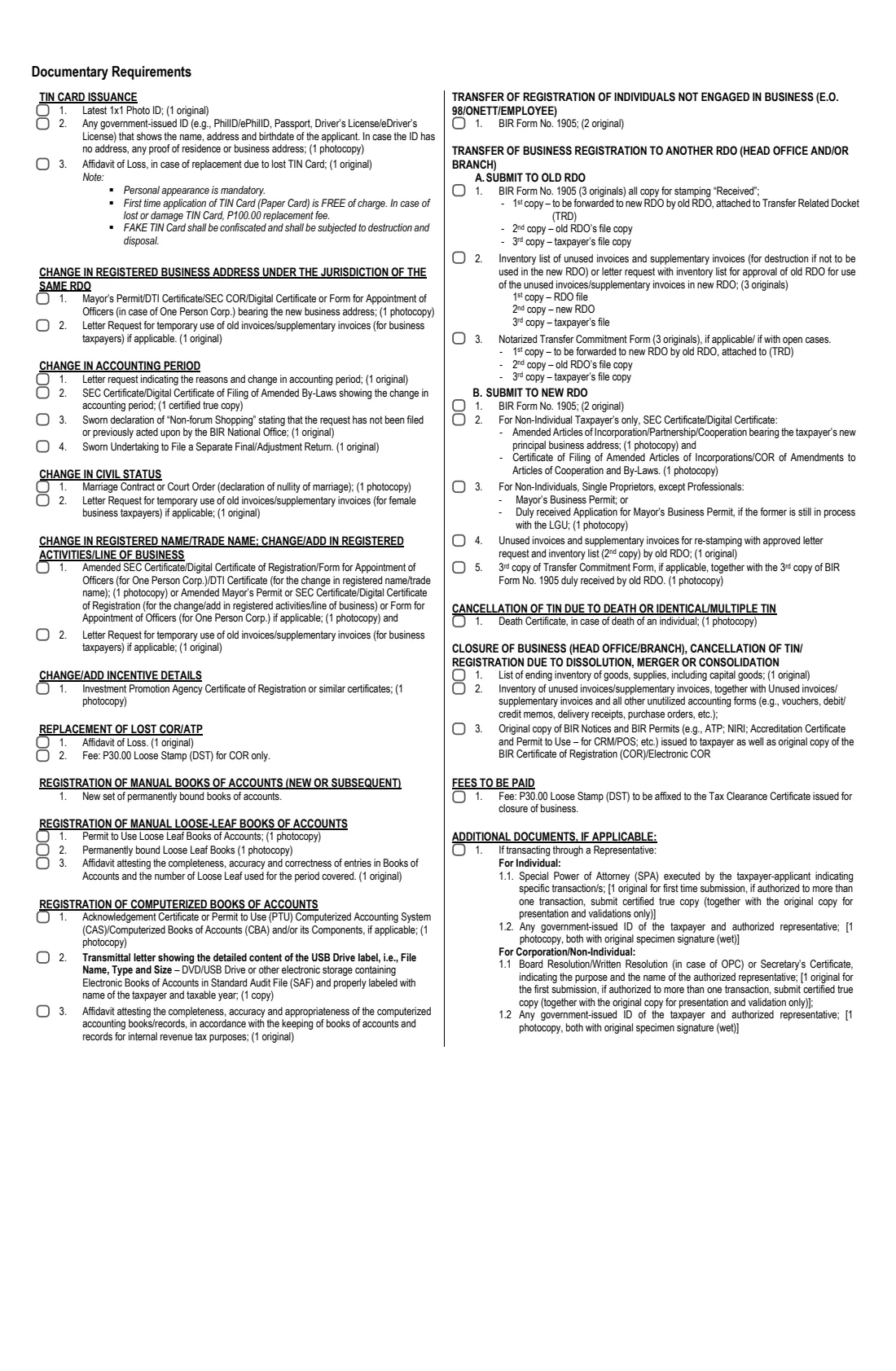
- For a change of civil status: a photocopy of the marriage contract or the court order (declaration of nullity of marriage), and your spouse's name, TIN, employment status and employer.
- For a TIN card: a 1x1 photo and a government-issued ID, plus an affidavit of loss if the card was lost — the form says personal appearance is mandatory.
- For a lost COR: an affidavit of loss.
- For a cancellation because of death: a photocopy of the death certificate.
- If someone transacts for you: a Special Power of Attorney and government-issued IDs of you both, as listed on page 4 of the form.
What’s on BIR Form 1905
The 2025 edition has 4 pages. FileIt asks for it in 10 parts:
- Part I — Taxpayer information (items 1–4)Taxpayer
- 5 Replacement of a lost or damaged COR or TIN cardTaxpayer
- 7A Correction or update of your registered nameTaxpayer
- 7B Change in registered address / transfer of RDOTaxpayer
- 7H Change or update of contact detailsTaxpayer
- 7I Change or update of contact person / authorised representativeTaxpayer
- 9 Change of civil statusTaxpayer
- 8A Cancellation of TINTaxpayer
- 6 / 11 Other update or correctionTaxpayer
- Effectivity and declaration (items 11–12)Taxpayer
How to fill out BIR Form 1905, step by step
1 Part I — Taxpayer information (items 1–4)
Give your TIN, the code of the RDO you are registered with now, a contact number, and your registered name as last name, first name, middle name and suffix. An individual's branch code is 00000; FileIt prints it when you enter only the 9 digits.
2 Item 5 — Replacement of a COR or TIN card
Tick the document to replace — the Certificate of Registration (A), the TIN card (D) or another form (E, specify) — and the reason: lost or damaged, a correction or update of registration information, or another reason. Items B and C (Authority to Print and the Tax Clearance Certificate) and 'change of accredited printer' are for businesses.
3 Item 6 — Other updates
Mark 'Change of Civil Status' when you also complete item 9, or 'Others' with a short description when you describe another change in item 11. FileIt marks these for you. Closure of business, books of accounts and the 8% option are business items.
4 Item 7A — Registered name
For a correction of the registered name, tick 'Change in Registered Name' and give the old and new names. A name change because of marriage goes in item 9 instead; trade names are for businesses.
5 Item 7B — Change in registered address
Tick whether the move is within the same RDO or to another RDO, give the old and new RDO codes for a transfer, and write the new address in the boxes provided.
6 Items 7H and 7I — Contact details and representative
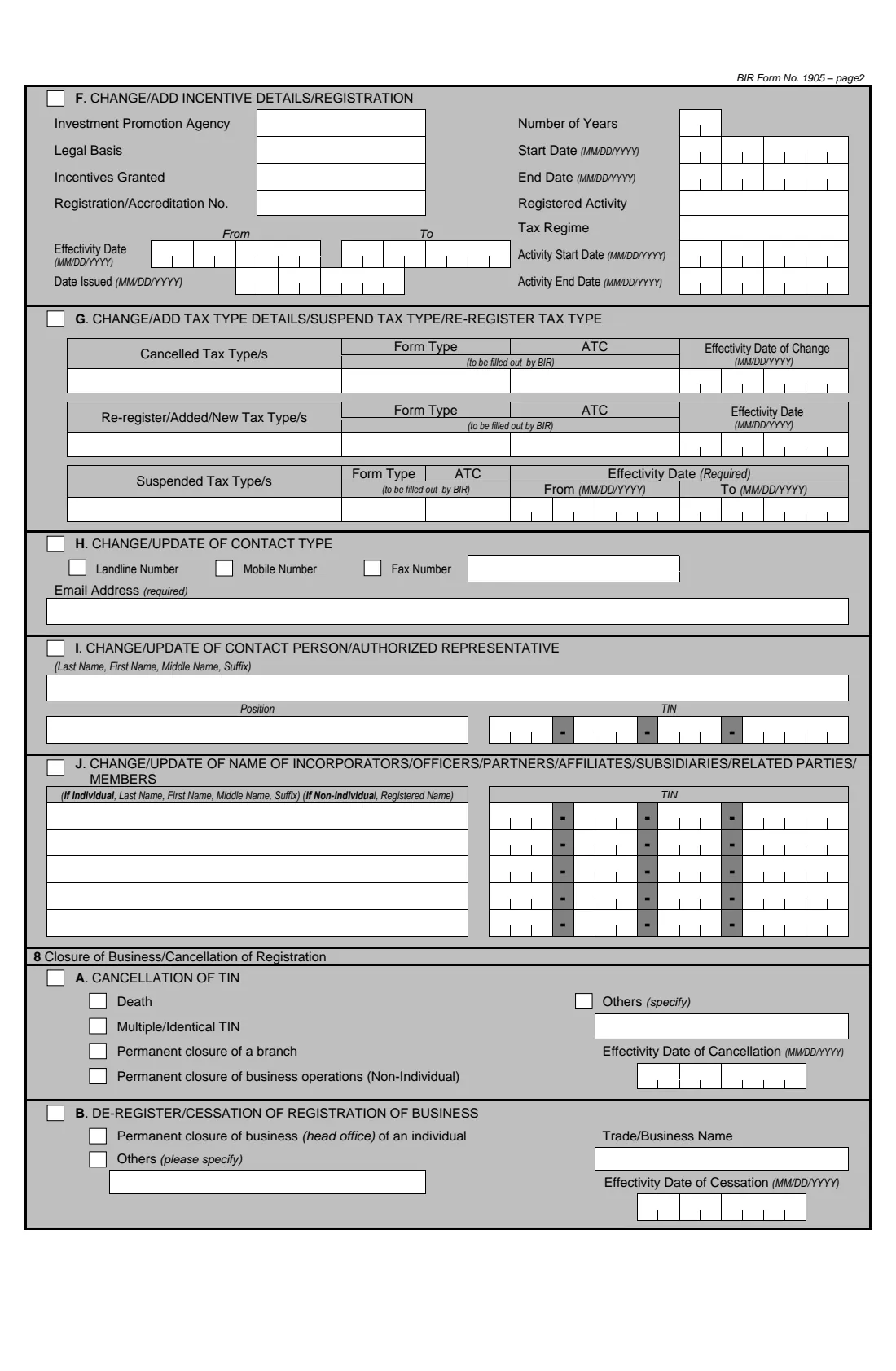
7H records a new landline, mobile or fax number and your email address, which the form marks as required. 7I records a contact person or authorised representative with their position and TIN. Items 7C to 7G and 7J are for businesses.
7 Item 8A — Cancellation of TIN
Tick the reason — death, multiple or identical TIN, or another reason — and give the effectivity date of the cancellation, which for a death is the date of death. Closure of a branch or of business operations, and item 8B, are for businesses.
8 Item 9 — Change of civil status
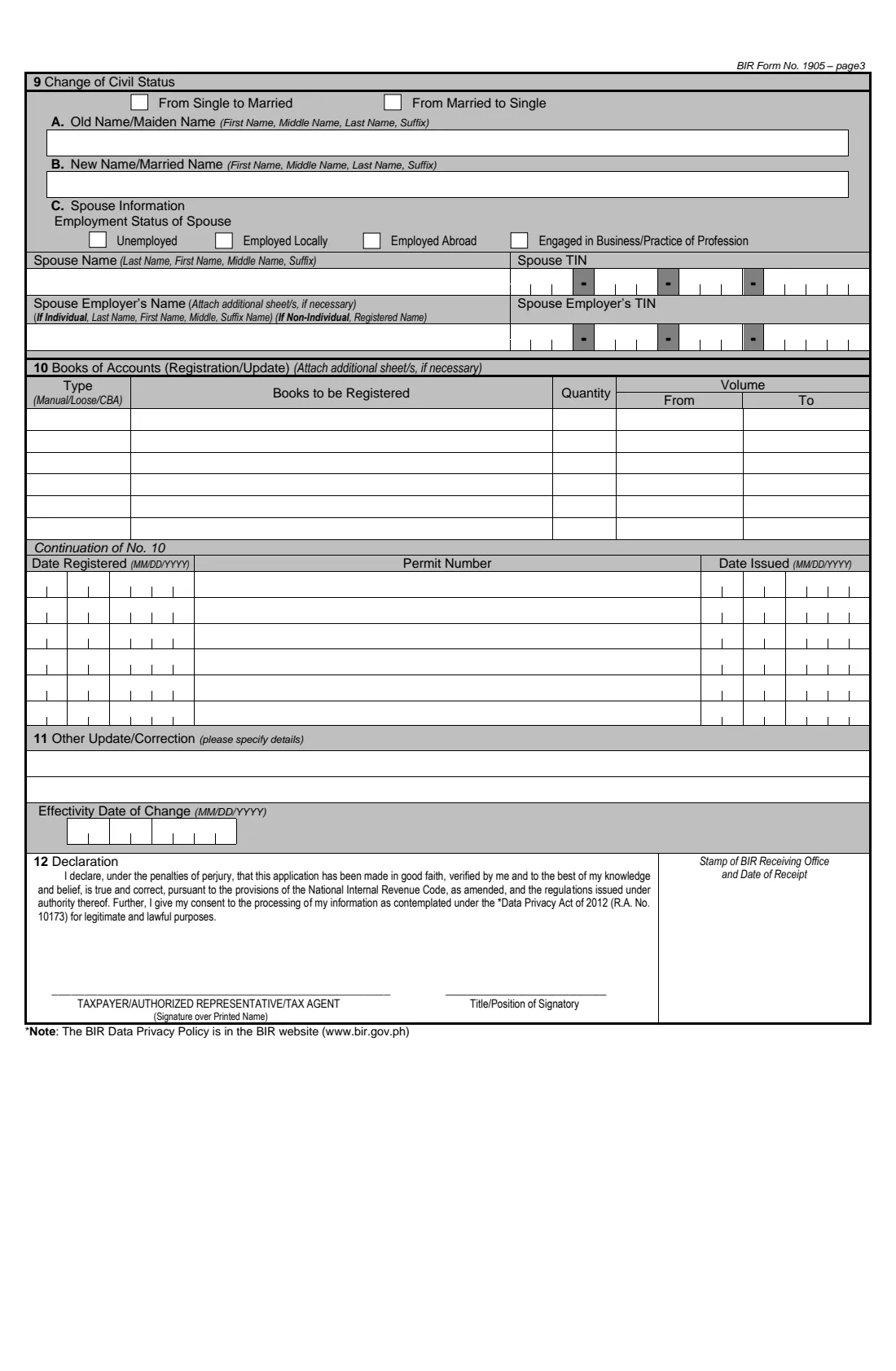
Tick 'From Single to Married' or 'From Married to Single'. Give your old or maiden name and your new or married name — note that these lines take the first name first — and, for a marriage, your spouse's employment status, name and TIN, and their employer's name and TIN.
9 Items 11 and 12 — Details, effectivity date and declaration
Item 11 takes the details of any other update or correction, and the date the change took effect. In item 12 you declare under the penalties of perjury that the application is true and correct, and consent to the processing of your information under the Data Privacy Act of 2012. FileIt prints the signer's name and title; sign by hand over the name.
Common mistakes to avoid
- Using Form 1905 to apply for a first TIN — that's Form 1902 or 1904.
- Applying for a new TIN instead of updating the one you have. Possessing more than one TIN is criminally punishable.
- Writing the old RDO code wrong, or forgetting the new RDO code when transferring to another RDO.
- Putting the married name in item 7A instead of item 9 (Change of Civil Status).
- Writing names in the wrong order: items 4, 7A and the spouse's name are last name first, while item 9A and 9B are first name first.
- Leaving out the email address, which the form marks as required in item 7H.
- Going without the supporting documents listed on page 4, such as the marriage contract or the affidavit of loss.
After you fill it out
Print the form from your FileIt vault and sign item 12 by hand over the printed name. Page 4 lists BIR Form 1905 in 2 originals for a transfer of registration of an individual not engaged in business, so print enough copies.
Bring the signed form and the documents listed on page 4 to the BIR Revenue District Office. For a TIN card, the form says personal appearance is mandatory. FileIt does not send the form anywhere.
Keep the signed copy and any updated COR or TIN card in your FileIt vault, and tell your employer about a new RDO, civil status or name so your payroll records match.
Fill out BIR Form 1905 online with FileIt
- Pick the person. Choose someone from People and FileIt fills in their name, date of birth, address and other details it already knows.
- Answer plain-language questions. One part of the form at a time, with the official help text beside each question — 64 fields in all. Your answers save as you go.
- Check the live preview. Watch your answers land on the real Bureau of Internal Revenue (BIR), Department of Finance form, and let FileIt do any worksheet arithmetic.
- Generate the official PDF. FileIt prints your answers into the agency’s own PDF and files it in that person’s folder in your vault.
FileIt fills the form — it never files or submits anything for you. Deliver the finished form to whoever asked for it, the way the form’s instructions say.
Start BIR Form 1905 now — it’s freeBIR Form 1905: frequently asked questions
What is BIR Form 1905 used for?
It updates, corrects or cancels a taxpayer's registration with the Bureau of Internal Revenue — for example a change of address or RDO, civil status, name or contact details, a replacement TIN card or Certificate of Registration, or the cancellation of a TIN after a death or for duplicate TINs.
Do I use Form 1905 to transfer my RDO?
Yes. Tick item 7B, choose 'Transfer to another RDO', give the old and new RDO codes and your new address. For individuals not engaged in business, page 4 of the form lists BIR Form 1905 in 2 originals as the requirement.
How do I replace a lost TIN card?
Tick item 5D (TIN card) with the reason 'Lost/Damaged'. Page 4 lists a 1x1 photo, a government-issued ID and an affidavit of loss, says personal appearance is mandatory, and states a P100.00 replacement fee for a lost or damaged card — as printed on the October 2025 edition.
I got married. Which part do I fill in?
Item 9, Change of Civil Status: tick 'From Single to Married', give your maiden and married names and your spouse's details, and bring a photocopy of the marriage contract. FileIt also ticks 'Change of Civil Status' in item 6.
Can FileIt fill the business parts of Form 1905?
No. FileIt covers the parts individuals not engaged in business use. Authority to Print, accounting period, line of business, facilities, incentives, tax types, officers, books of accounts and closure of business are left blank.
Can I sign Form 1905 electronically?
The form is signed by hand over the printed name in item 12 and filed at the RDO, so FileIt prints your name and you sign the paper copy.
Who signs for a taxpayer who has died?
Item 12 can be signed by an authorised representative. For a deceased taxpayer this is usually an heir or the estate's representative, who gives their name and title or position; page 4 lists a photocopy of the death certificate.
Does FileIt submit Form 1905 to the BIR?
No. FileIt fills the BIR's official PDF and saves it in your vault. You print, sign and file it at the RDO.
Official sources
- Blank form (PDF), published by Bureau of Internal Revenue (BIR), Department of Finance: https://bir-cdn.bir.gov.ph/BIR/pdf/1905%20October%202025%20ENCS%20Final.pdf
- Official instructions and guidance: https://www.bir.gov.ph/bir-forms
- Edition shown on this page: October 2025 (ENCS) (checked 2026-10-01).
FileIt is not affiliated with or endorsed by Bureau of Internal Revenue (BIR), Department of Finance or any government. This page explains the form in general terms and is not legal, tax or immigration advice. Always read the official instructions, and check that you are using the edition the recipient accepts. Page last reviewed 2026-10-01.