What is BIR Form 1904?
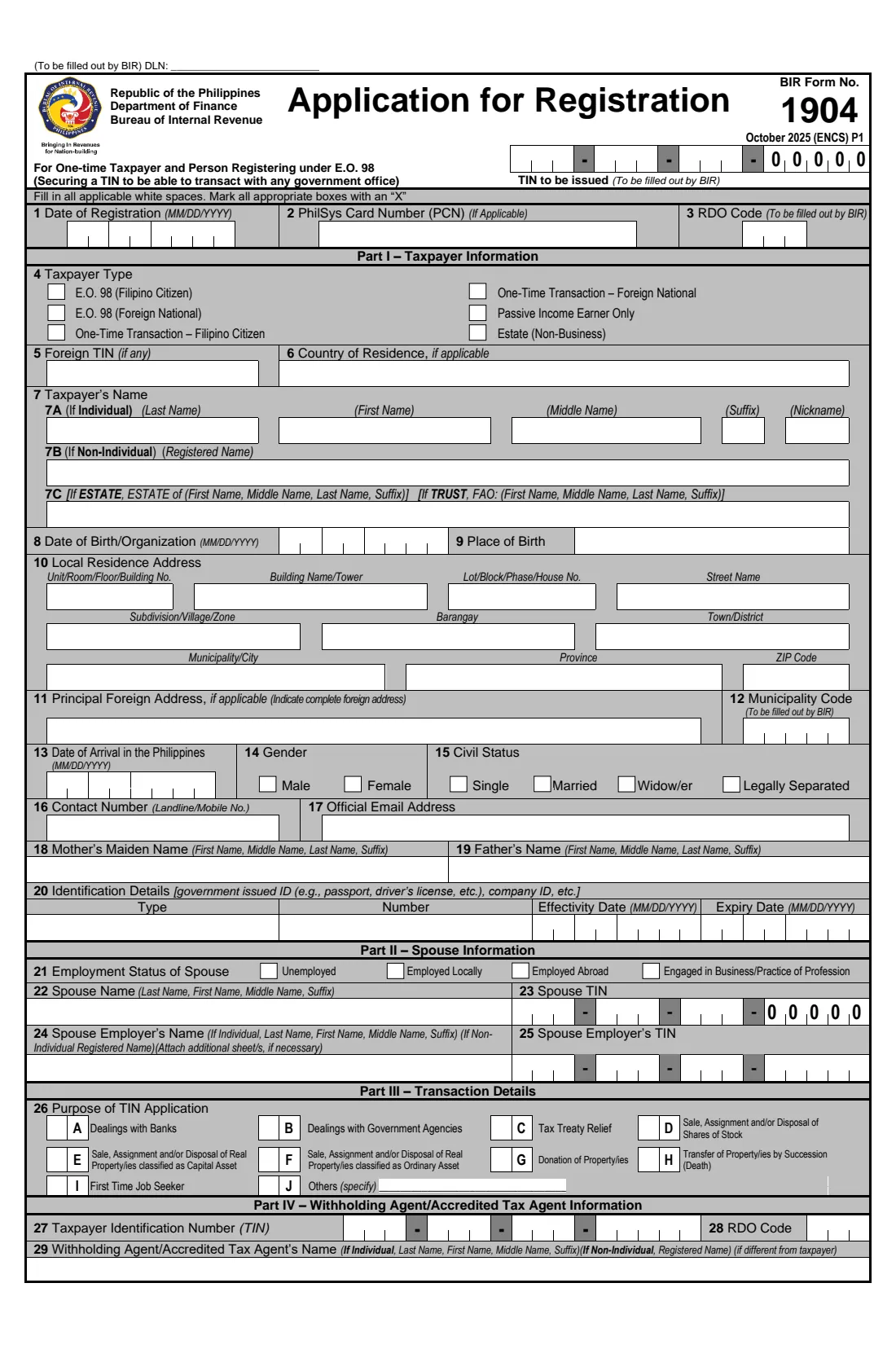
BIR Form 1904 is the Bureau of Internal Revenue's Application for Registration for one-time taxpayers and persons registering under Executive Order 98 — subtitled 'Securing a TIN to be able to transact with any government office'. It is the route to a TIN for Filipinos and foreign nationals who are not employees and have no business: people who need a TIN to deal with banks or government agencies, who have a single taxable transaction such as selling, donating or inheriting property, who earn only passive income, and estates. The current edition is dated October 2025 (ENCS) and runs to two pages, the second ending with the documentary requirements.
The form asks for the taxpayer type, name, date and place of birth, address, contact details and ID, the spouse's details for a married applicant, the purpose of the TIN, and — where one is involved — the withholding agent or accredited tax agent. Boxes such as the TIN to be issued, the date of registration, the RDO code and the municipality code are filled in by the BIR.
FileIt walks you through it in plain English, pre-fills your name, date of birth and email from the People in your vault, splits dates and TINs into the right boxes, prints 'ESTATE OF' and the decedent's name for an estate, and prints everything in capital letters with an X in the chosen boxes on the BIR's own PDF. You print it, sign it by hand and file it at the Revenue District Office; FileIt never files anything with the BIR.
- Who fills it
- The applicant, or an authorised representative — for an estate, usually an heir, executor or administrator
- Given to
- The BIR Revenue District Office (RDO)
- When
- Before a transaction that needs a TIN, if you have never been issued one
- Signatures
- Taxpayer or authorised representative (item 33), by hand over the printed name
- Edition
- October 2025 (ENCS)
- Pages
- 2
Who needs to fill out BIR Form 1904?
- Filipino citizens without a job or business who need a TIN to deal with a bank or a government office (E.O. 98).
- Foreign nationals who need a Philippine TIN for such dealings or for a tax treaty claim.
- Sellers, donors and buyers in a one-time transaction such as the sale of real property or shares of stock, or a donation (ONETT).
- Heirs and administrators registering the estate of a person who has died, for example to transfer property by succession.
- People whose only income is passive income, such as interest or dividends.
- First time job seekers who need a TIN, with the barangay certification listed on page 2.
When to use BIR Form 1904
- When a bank, government agency or other office asks for your TIN and you have never had one.
- Before paying the taxes on a one-time sale, donation or transfer of property.
- When settling an estate: register the estate with the Estate taxpayer type and purpose H (transfer of property by succession).
- Not if you are being employed — employees use BIR Form 1902 — and never if you already have a TIN: possessing more than one TIN is criminally punishable. Use Form 1905 to update an existing registration.
What you need before you start
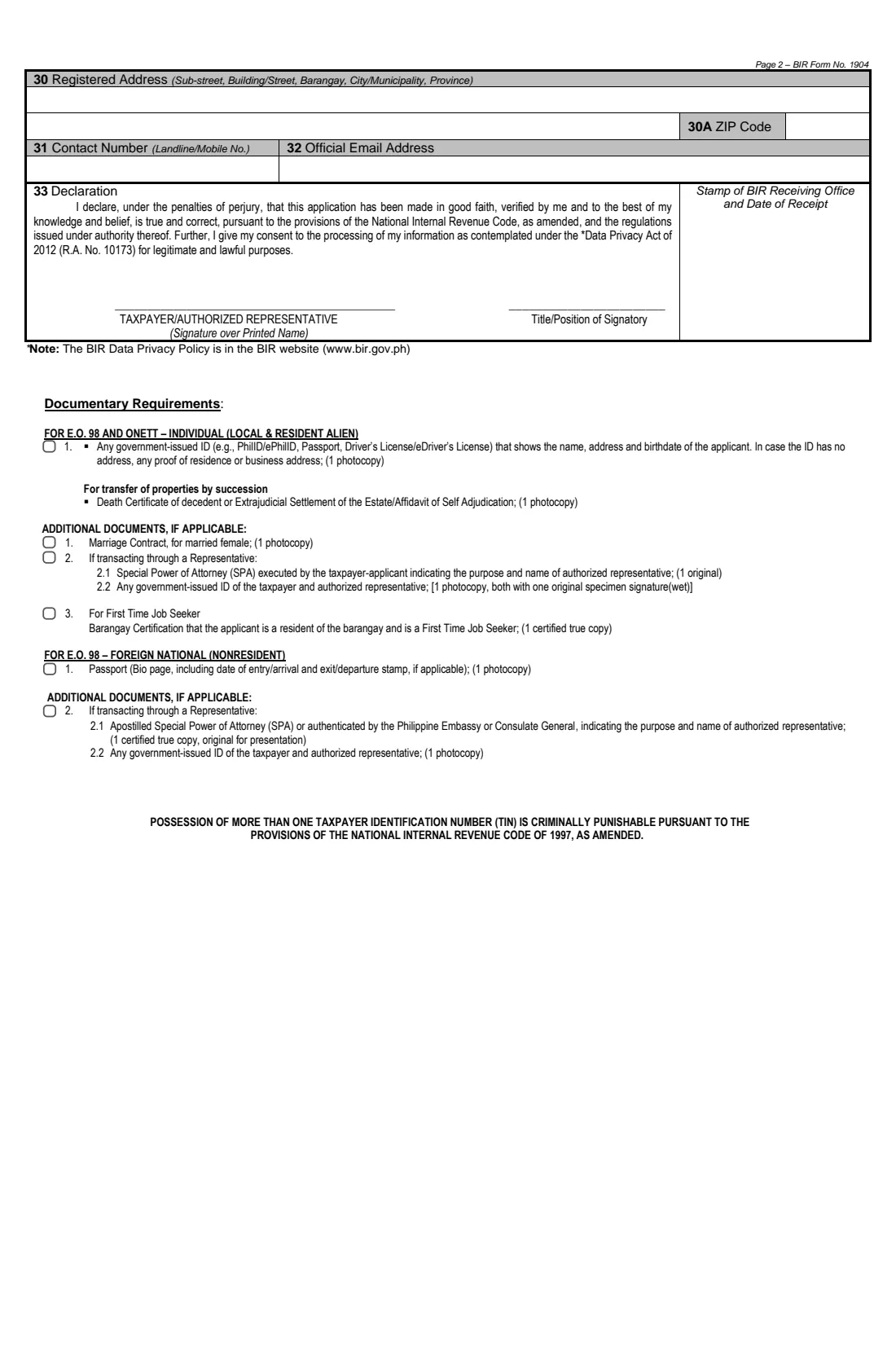
- A government-issued ID showing your name, address and date of birth — PhilID/ePhilID, passport or driver's licence — and a photocopy; if it has no address, proof of residence.
- For a foreign national: the passport bio page, including the date of entry or arrival stamp, and a photocopy.
- Your PhilSys Card Number (PCN), if you have a PhilID.
- Your parents' names, including your mother's maiden name, and your address broken down by unit, building, lot, street, subdivision, barangay, town, city, province and ZIP code.
- An email address and a contact number.
- If married: your spouse's name, TIN and employment, and a photocopy of the marriage contract for a married female applicant.
- For an estate: the death certificate of the decedent, or the extrajudicial settlement of the estate or affidavit of self-adjudication (photocopy).
- If someone transacts for you: a Special Power of Attorney and government-issued IDs of you both, as listed on page 2.
- Where applicable, the withholding agent's or accredited tax agent's TIN, RDO code, name, address and contact details.
What’s on BIR Form 1904
The 2025 edition has 2 pages. FileIt asks for it in 8 parts:
- Part I — Taxpayer type (item 4)Taxpayer
- Taxpayer's name and personal details (items 7–9, 13–15)Taxpayer
- Local residence and foreign address (items 10–11)Taxpayer
- Contact details and ID (items 16–17, 20)Taxpayer
- Part II — Spouse information (items 21–25)Taxpayer
- Part III — Purpose of TIN application (item 26)Taxpayer
- Part IV — Withholding agent / accredited tax agent (items 27–32)Taxpayer
- Declaration (item 33)Taxpayer
How to fill out BIR Form 1904, step by step
1 Items 2 and 4–6 — PCN, taxpayer type and foreign details
Give your PhilSys Card Number if you have one. Tick one taxpayer type: E.O. 98 (Filipino citizen or foreign national), one-time transaction (Filipino citizen or foreign national), passive income earner only, or estate (non-business). A foreign national or resident abroad adds a foreign TIN and country of residence. Items 1 and 3 are for the BIR.
2 Items 7–9 — Name, date and place of birth
An individual gives last name, first name, middle name, suffix and nickname in 7A, then the date of birth (MM/DD/YYYY) and place of birth. For an estate, item 7C reads 'ESTATE OF' followed by the decedent's first, middle and last names; FileIt prints it that way. Item 7B and trusts aren't covered by FileIt.
3 Items 10–11 — Addresses
Your local residence address split into its boxes, and a complete foreign address if applicable. Item 12, the municipality code, is filled in by the BIR.
4 Items 13–20 — Arrival, gender, civil status, contacts, parents and ID
A foreign national gives the date of arrival in the Philippines. Then gender, civil status, contact number, official email address, mother's maiden name and father's name, and the type, number, effectivity and expiry dates of your ID.
5 Part II — Spouse information (items 21–25)
For a married applicant: the spouse's employment status, name and TIN (the branch code 00000 is pre-printed), and, if employed, the employer's name and TIN.
6 Part III — Purpose of TIN application (item 26)
Tick every purpose that applies: dealings with banks (A) or government agencies (B), tax treaty relief (C), sale of shares (D), sale of real property as a capital asset (E) or as an ordinary asset (F), donation (G), transfer by succession (H), first time job seeker (I), or others (J, specify).
7 Part IV — Withholding agent / accredited tax agent (items 27–32)
If a withholding agent or accredited tax agent other than you is involved, give their TIN with branch code, RDO code, name, registered address with ZIP code, contact number and email address. Items 30 to 32 continue at the top of page 2.
8 Item 33 — Declaration
The taxpayer or authorised representative declares, under the penalties of perjury, that the application is true and correct and consents to the processing of personal information under the Data Privacy Act of 2012, then signs by hand over the printed name and gives a title or position.
Common mistakes to avoid
- Using Form 1904 when you are starting a job — employees register with Form 1902.
- Applying when you already have a TIN, for example from an earlier job or transaction. Possessing more than one TIN is criminally punishable; update the existing one with Form 1905 instead.
- Ticking a taxpayer type that doesn't match your citizenship, or using an individual type for an estate.
- Writing names in the wrong order: 7A is split into separate boxes, while the parents' and the estate's names are first name first and the spouse's name is last name first.
- Mixing up the date order — the form uses MM/DD/YYYY, month first.
- Leaving item 26 blank — the BIR needs the purpose of the TIN.
- Coming without the documents on page 2, such as the ID photocopy, the death certificate for an estate, or the SPA for a representative.
After you fill it out
Print both pages from your FileIt vault and sign item 33 by hand over the printed name.
File the signed form at the BIR Revenue District Office with the documentary requirements on page 2. The RDO fills in the TIN to be issued, the registration date and its codes. FileIt does not send the form anywhere.
Keep the signed copy and your new TIN in your FileIt vault. The TIN stays with you for life — when you later take a job or start a business, give the same TIN and update your registration with Form 1905 rather than registering again.
Fill out BIR Form 1904 online with FileIt
- Pick the person. Choose someone from People and FileIt fills in their name, date of birth, address and other details it already knows.
- Answer plain-language questions. One part of the form at a time, with the official help text beside each question — 64 fields in all. Your answers save as you go.
- Check the live preview. Watch your answers land on the real Bureau of Internal Revenue (BIR), Department of Finance form, and let FileIt do any worksheet arithmetic.
- Generate the official PDF. FileIt prints your answers into the agency’s own PDF and files it in that person’s folder in your vault.
FileIt fills the form — it never files or submits anything for you. Deliver the finished form to whoever asked for it, the way the form’s instructions say.
Start BIR Form 1904 now — it’s freeBIR Form 1904: frequently asked questions
What is BIR Form 1904 used for?
It registers one-time taxpayers and persons registering under Executive Order 98 — people who need a TIN without being employed or in business, such as for dealings with banks or government offices, a sale, donation or inheritance of property, passive income, or an estate.
What's the difference between BIR Form 1902 and 1904?
Form 1902 is for employees earning purely compensation income. Form 1904 is for people who need a TIN but aren't employed or in business. If you are being hired, use 1902.
Can a first time job seeker use Form 1904?
Item 26 has a purpose 'First Time Job Seeker' (I), and page 2 lists a barangay certification that the applicant is a resident of the barangay and a first time job seeker (1 certified true copy).
How do I register an estate with Form 1904?
Tick 'Estate (Non-Business)' in item 4, give the decedent's name in item 7C (FileIt prints 'ESTATE OF' before it) and tick purpose H for a transfer of property by succession. Page 2 lists the death certificate or the extrajudicial settlement or affidavit of self-adjudication. The heir or administrator signs as authorised representative.
Can a foreign national get a TIN with Form 1904?
Yes — the form has E.O. 98 and one-time transaction types for foreign nationals. Page 2 lists the passport bio page with the arrival stamp, and for a representative an apostilled SPA or one authenticated by the Philippine Embassy or Consulate General.
Can I sign Form 1904 electronically?
The form is signed by hand over the printed name in item 33 and filed at the RDO, so FileIt prints the name and you sign the paper copy.
Does FileIt submit Form 1904 to the BIR?
No. FileIt fills the BIR's official PDF and saves it in your vault. You print, sign and file it at the Revenue District Office.
Official sources
- Blank form (PDF), published by Bureau of Internal Revenue (BIR), Department of Finance: https://bir-cdn.bir.gov.ph/BIR/pdf/1904%20October%202025%20ENCS%20Final.pdf
- Official instructions and guidance: https://www.bir.gov.ph/bir-forms
- Edition shown on this page: October 2025 (ENCS) (checked 2026-10-01).
FileIt is not affiliated with or endorsed by Bureau of Internal Revenue (BIR), Department of Finance or any government. This page explains the form in general terms and is not legal, tax or immigration advice. Always read the official instructions, and check that you are using the edition the recipient accepts. Page last reviewed 2026-10-01.